Splunk Cloud Self-Service: Announcing The New Admin Config Service API For Private Applications

Private apps are collections of knowledge objects and visualizations that enable organizations to gain more value from their Splunk deployment. Apps are often used to build custom dashboards, reports, custom search commands, and for management of Splunk configurations. Using private apps to deploy configuration changes is a best practice. With ACS, our customers have a fully automated route for testing and promoting configurations across Splunk Cloud Platform environments. You can now construct CI/CD pipelines that integrate tools like Splunk AppInspect for private app vetting and ACS for private app installation into an automated end-to-end flow.
A simplified version of this flow may resemble the following:
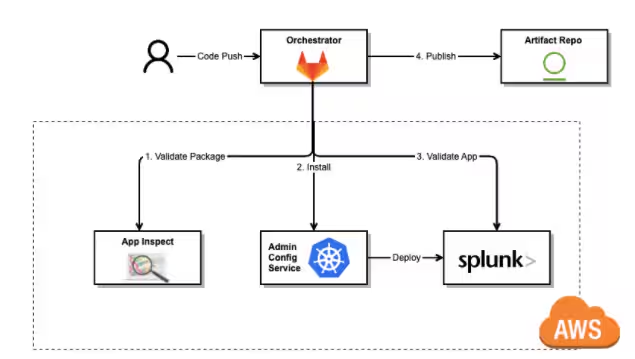
Figure 1.0 -- Simplified CI Flow
In this case, an orchestrator, such as Gitlab or Github, triggers a CI pipeline from a merge request. This pipeline invokes the AppInspect API to vet the app package and then calls ACS to install the app in the Splunk Cloud Platform environment -- presumably a Test/QA environment. You can also run a series of acceptance tests to validate the efficacy of the app before promotion to a production environment.
The CD flow would follow closely without the need for app vetting, since the app package itself is already vetted. Simply pull the release artifact and deploy via ACS.
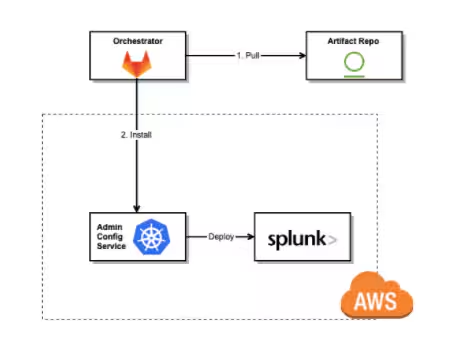
Figure 1.1 -- Simplified CD Flow
Now that you understand how ACS can bridge that last gap in your automation, let’s walk through an example leveraging AppInspect and ACS, piecing apart each step in the process.
For the purposes of this example, we will use the Postman API client to highlight the private app installation process.
First, we’ll step through the AppInspect app validation process to ensure we have an approved app package. This process entails authenticating ourselves, submitting our app package, and polling for approval.
Let’s start with authentication. AppInspect relies on a separate set of credentials that are distinct from your Splunk Cloud Platform environment. You must send a request to the Splunk API service using your Splunk.com credentials to receive a JSON Web Token (JWT) for AppInspect. This is a separate JWT from the Splunk Cloud JWT.
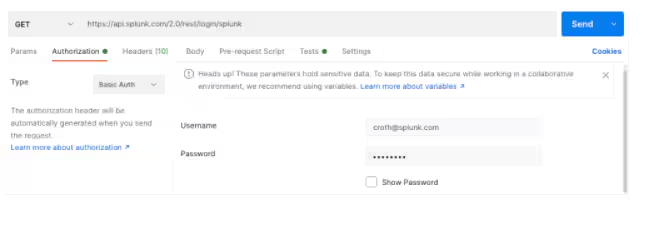
You’ll need to provide the token value returned in the API response in subsequent requests to the AppInspect API.
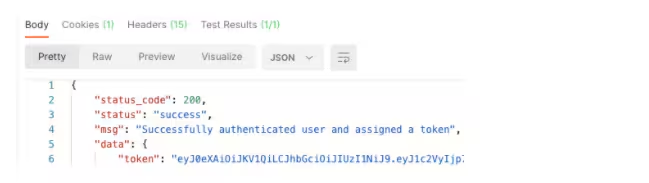
As previously mentioned, you can store the JWT in a Postman variable.
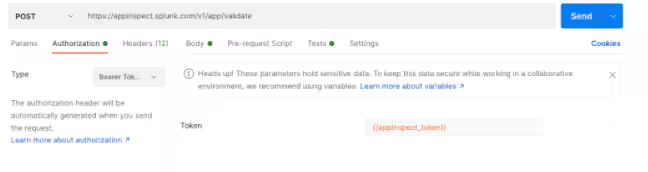
From here, we can go ahead and reference the {{appInspect_token}} variable in the Authorization section. For “Type”, select “Bearer Token”.
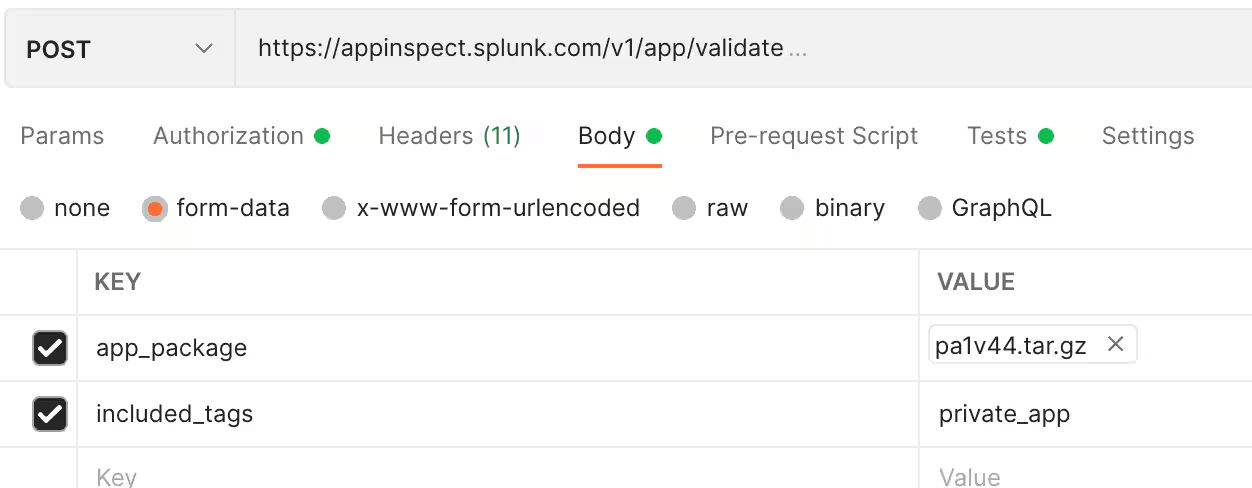
Finally, let’s validate the app package with AppInspect: Select the app package tar file and set a tag to trigger the automated private app vetting process. Make sure to provide the appropriate tags for the Splunk Cloud Platform self-service process. Please ensure the content type is multipart/form-data.
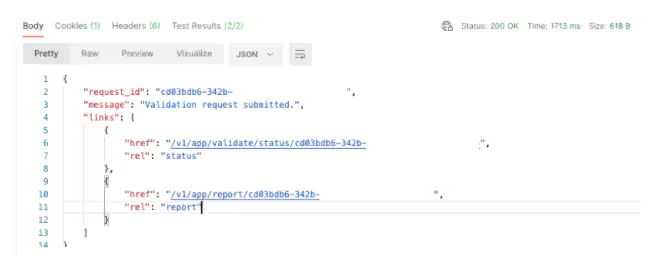
AppInspect returns a request ID that you can use for tracking the status of the submission.
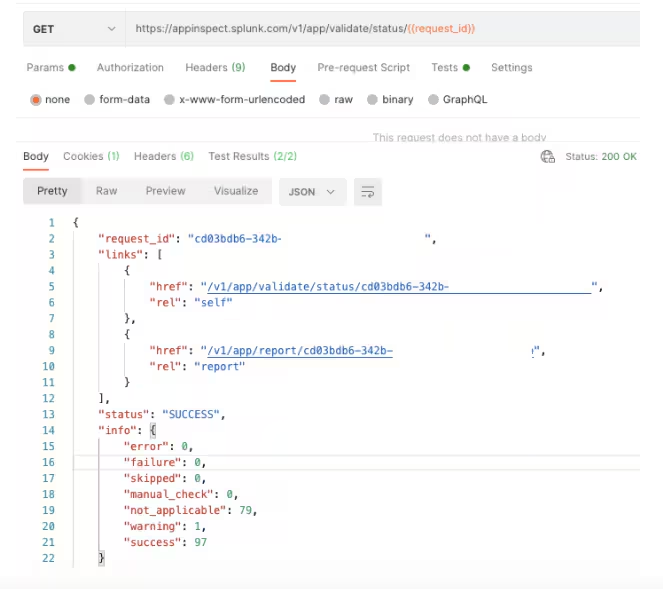
Let’s check the status of our submission. The request ID was automatically stored and recalled by Postman for these subsequent API requests.
Our app package is now officially approved by AppInspect. You can review the AppInspect request output for a validation summary. Note that to retrieve a comprehensive AppInspect report, you can use the following separate endpoint:
https://appinspect.splunk.com/v1/app/report/{{request_id}}
Let’s proceed with ACS to install the app in our environment. To begin, let’s ensure our JWT for the Splunk Cloud Platform environment is referenced. It is bound to the {{auth_token}} variable.
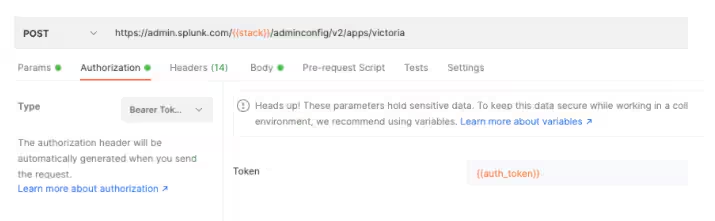
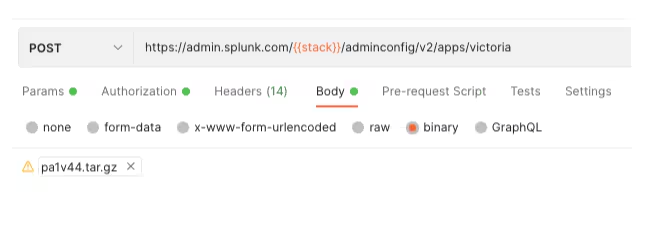
Since ACS needs to validate that the app itself is approved by AppInspect, ACS requires the AppInspect token as well. We’ll submit the {{appInspect_token}} variable as well as the app package itself.
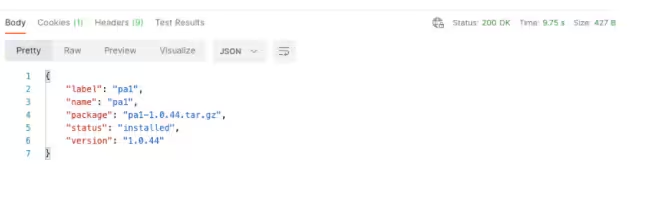
A 200 response code and accompanying output confirm that the app has been successfully deployed to your Splunk Cloud Platform search head. There may be a slight delay as changes to your environment are eventually consistent.
Congratulations! You have just vetted and installed a private app using the ACS private app management API.
As you can see, ACS can plug right into your automation to power an end-to-end CI/CD pipeline. To provide a crisp implementation example of ACS functioning within an actual deployment pipeline, we have created a reference CI/CD repository to get you up and running.
In addition to managing apps, ACS currently supports index, HEC, IP Allow list, and outbound port management via API. For more information on ACS, see the Admin Config Service (ACS) Manual.
Keep your eyes on this space for additional announcements and new capabilities geared toward Splunk Cloud admins.
Related Articles

Announcing the General Availability of Splunk POD: Unlock the Power of Your Data with Ease

Introducing the New Workload Dashboard: Enhanced Visibility, Faster Troubleshooting, and Deeper Insights

Leading the Agentic AI Era: The Splunk Platform at Cisco Live APJ

Dashboard Studio: Token Eval and Conditional Panel Visibility

Introducing Resource Metrics: Elevate Your Insights with the New Workload Dashboard

Powering AI Innovation with Splunk: Meet the Cisco Data Fabric

Remote Upgrader for Windows Is Here: Simplifying Fleet-Wide Forwarder Upgrades

Dashboard Studio: Spec-TAB-ular Updates
