Announcing the Public Beta of SPL2 in Splunk Enterprise
We’re thrilled to announce the public beta of SPL2 on Splunk Enterprise! SPL2, Splunk’s next-generation data search and processing language, introduces consistency across batch & stream data preparation, as well as SQL syntax & programming concepts, to Splunk’s ultra-powerful SPL language. With this public beta in Splunk Enterprise, app developers, including partners, in-house app developers, citizen developers and more, are empowered to build supercharged Splunk applications!
Even more exciting, we’re happy to share that we’ve partnered with CyberCX, one of our many key Splunk partners, to highlight some of the most groundbreaking capabilities in SPL2, with the development of CyberCX’s Intel Hunt for Splunk application using SPL2. SPL2 represents a massive step forward in unifying the data fabric & helping organizations enhance their digital resiliency in security & observability! Click here to read more about CyberCX’s use of SPL2.
If you’ve been following along, you know that SPL2 launched with the Splunk Edge Processor solution last year, and with the Preview of Splunk Ingest Processor earlier this year. As an evolution of SPL to extend the powers of your favorite commands to streaming data, SPL2 defines the processing pipelines in these solutions, allowing data admins to flexibly write commands & functions to filter, mask, route, & transform data in motion.
Now, with the availability of SPL2 in Splunk Enterprise in this public beta, customers can use a consistent language to manipulate data across streaming data preparation and search of data at rest. Employing a single language across the Splunk platform to unlock value from data makes Splunk even more accessible to security & IT practitioners, analysts, developers, and engineers from all backgrounds.
What is SPL2?
SPL2 takes the best of SPL (while maintaining backwards compatibility) and adds support for SQL-style syntax and developer concepts found in other languages like Java and Python. This means it’s multi-modal: you can write SPL2 with SPL-style syntax or SQL-style syntax! With the ability to integrate with multiple runtimes, including streaming runtimes like Edge & Ingest Processor and search runtimes like splunkd, SPL2 delivers a consistent language interface across the Splunk platform for batch & stream data processing. With a consistent language across the Splunk platform, customers save time and money on training users on different tools, increasing skill transferability and promoting sharing & reuse. It’s one language, designed for the database analyst using Splunk search for the first time, the data admin trying to centralize & control hundreds of data ingestion pipelines, and the developer looking to create the most powerful Splunk app without resorting to difficult-to-manage custom integrations.
Let’s focus on that last one - leveraging SPL2 as a tool to create next-generation Splunk apps, doing things that could never be done before in SPL. That’s right, in addition to your favorite SPL commands and eval functions, SPL2 adds multiple developer-friendly features with programming language concepts, to make apps even more powerful:
- SPL2 module files, like any other language file, to organize related SPL2 searches, functions, and other content that can ship in apps.
- Custom function declarations to modularize & share common data transformations while minimizing complexity.
- This includes not just commands, but also custom eval functions!
- Imports & exports to declare scope of SPL2 items, share items with others, and create explicit relationships between knowledge objects & apps
- Lambda expressions as shorthand for inline functions, with support for formidable JSON transformations using the map(), reduce(), and filter() functions.
- Data types to declare the expected schema of data, including custom data types defined in SPL2.
- …and so, so much more. (Really. A lot more.)
How Can Splunk App Developers Supercharge Their Apps With SPL2?
So, how can Splunk apps take the next step forward with SPL2? The magic lies in a new knowledge object called a module file. An SPL2 module is a text file that can contain related SPL2 functions, searches, view datasets, and other items to power your app, much like a Python script or a Java file. You can create powerful programs, function libraries, and more within these modules, export the items you create, and reuse those items in your knowledge objects. Module files are shipped within apps, in the new directory $SPLUNK_HOME/etc/apps/default/data/spl2.
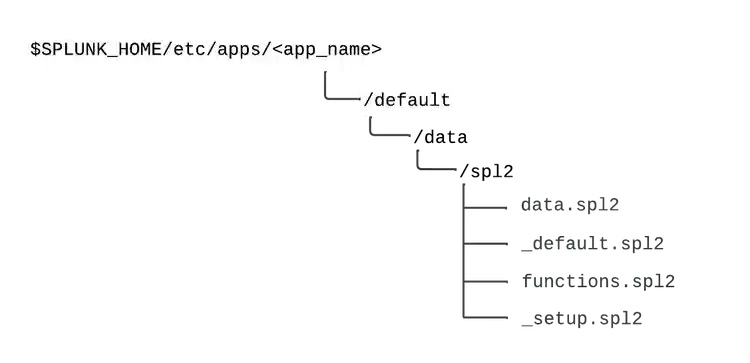
Anatomy of SPL2 in a Splunk app
Developers can author these modules using the Splunk Extension for Visual Studio Code, now enhanced to support an SPL2 module editor. These modules allow developers to write & ship SPL2 that tackles use cases that were previously extremely difficult (requiring custom development or 3rd party integrations) or impossible to achieve. For example, the following is all SPL2:
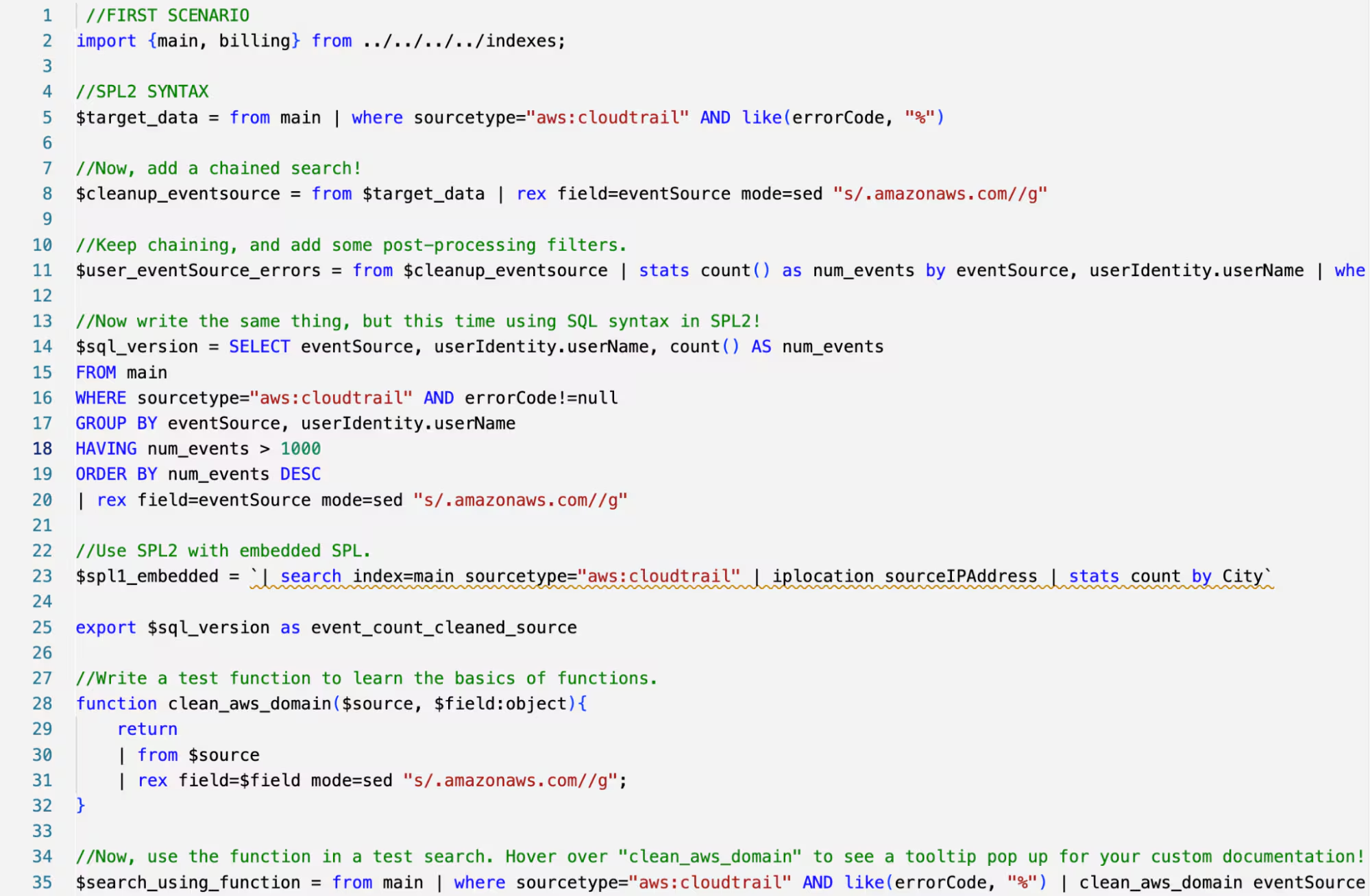
An SPL2 module in VS Code with imports, searches, exports, function declarations, and SPL & SQL syntax
But don’t worry! SPL2 can also be used where SPL is used - as single search statements to power reports, dashboards, and other knowledge objects, like the dashboard shown below. T he SPL2 that is used to power knowledge objects can leverage the items built & exported within modules, like the one shown above.
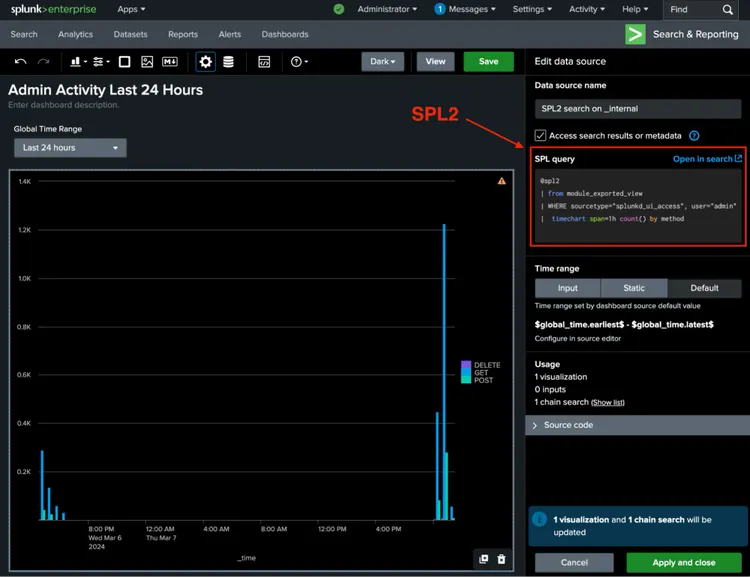
A Dashboard Studio dashboard, powered by SPL2 & reading from an SPL2 module.
The combination of SPL2 modules, and SPL2 statements leveraging those modules to power knowledge objects, allows unlimited flexibility for developers and admins. Developers can customize their apps with rich SPL2 code, without exposing that code complexity to users, by packaging the logic in the “under-the-hood” modules and only exposing relevant items via exports. Meanwhile, admins can build custom, in-house apps to provide out-of-box functions & searches to users, as well as take advantage of granular data access control as a feature of SPL2.
…and we’re just scratching the surface! SPL2 ushers in a new generation of app building in the Splunk ecosystem. But don’t just take our word for it - head on over to see how CyberCX strengthens their portfolio with a point-and-click threat hunting application, built using SPL2.
Get Started Now!
SPL2 is now available in public beta in Splunk Enterprise 9.4.0 and Splunk Cloud 9.3.2408! Learn more:
- Access SPL2 app developer documentation and admin documentation
- SPL2 language documentation can be found here
- Examine sample apps using SPL2 to understand app architecture & use cases
- Join the #spl2 channel in the Splunk Community Slack workspace for live discussion
Related Articles

Announcing the General Availability of Splunk POD: Unlock the Power of Your Data with Ease

Introducing the New Workload Dashboard: Enhanced Visibility, Faster Troubleshooting, and Deeper Insights

Leading the Agentic AI Era: The Splunk Platform at Cisco Live APJ

Dashboard Studio: Token Eval and Conditional Panel Visibility

Introducing Resource Metrics: Elevate Your Insights with the New Workload Dashboard

Powering AI Innovation with Splunk: Meet the Cisco Data Fabric

Remote Upgrader for Windows Is Here: Simplifying Fleet-Wide Forwarder Upgrades

Dashboard Studio: Spec-TAB-ular Updates
