Splunk Named Launch Partner of AWS Network Firewall
Today, AWS has announced AWS Network Firewall: a new managed service that makes it easy to deploy essential network protections for Amazon Virtual Private Clouds (VPCs). As a launch partner, Splunk has worked closely with AWS to provide customers an integration to AWS Network Firewall. In today’s blog, co-authored by my esteemed colleague Anush Jayaraman, we’ll first detail the data flow architecture and your options to ingest the AWS Network Firewall data. Next, we’ll walk through how to set up monitoring the AWS Network Firewall metrics that will be available via CloudWatch. Finally, we’ll close with an overview and links to the AWS Network Firewall Add-On for Splunk that we’ve created to help you normalize and utilize this rich dataset.
Getting Data In
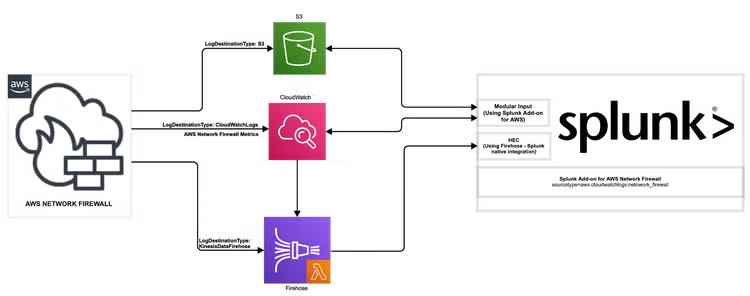
When it comes to Splunk and AWS service data, there are almost always multiple ways to architect the data flow, and AWS Network Firewall presents several options. In the diagram below, we’ve outlined the available options to ingest the AWS Network Firewall data.
-
Configure AWS Network Firewall to log directly to S3, and then configure the Splunk Add-On for AWS to gather data from the configured S3 bucket.
-
Configure AWS Network Firewall to log to CloudWatch Logs. Once the data is in CloudWatch Logs, there are two options:
- Use the Splunk Add-On for AWS and configure a CloudWatch Logs input to fetch the AWS Network Firewall data; or
- Configure Kinesis Data Firehose to pull from the CloudWatch Log group and send the data to a Splunk HTTP Event Collector (HEC) endpoint.
-
Configure AWS Network Firewall to send directly to Firehose and then send to a Splunk HEC endpoint. If choosing this method, please use the following custom lambda in your Firehose configuration:
import base64
import copy
def lambda_handler(event, context):
events=[]
event_map={}
for record in event['records']:
payload = base64.b64decode(record['data'])
json_obj = json.loads(payload)
output_json_with_line_break = json_obj['message'] + "\n"
encoded_bytes = base64.b64encode(bytearray(output_json_with_line_break, 'utf-8'))
encoded_string = str(encoded_bytes, 'utf-8')
event_map = copy.deepcopy(record)
event_map['data'] = encoded_string
event_map['result'] = 'Ok'
events.append(event_map)
return {'records': events}
AWS Network Firewall Metrics
The release of AWS Network Firewall adds a new namespace in CloudWatch metrics that allow customers to access their firewall metrics data. If you’re unfamiliar with the process of adding a new CloudWatch metrics namespace to the Splunk Add-on for AWS, I highly recommend a quick reading of the blog I wrote last year for the then newly-released API metrics that outlines the process.
The details of what you’ll need to access AWS Network Firewall metrics are as follows:
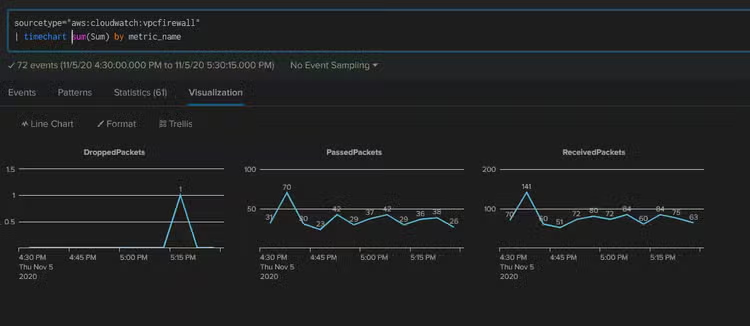
Once the metrics have been configured, you can use all of the regular Splunk goodness to craft a simple search and present your metrics:
Splunk Add-on for AWS Network Firewall
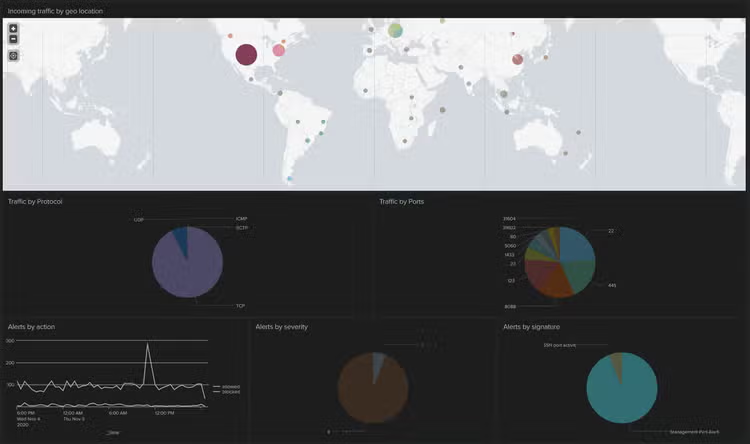
As part of our commitment to helping customers get the most value out of their data, Splunk is releasing the Splunk Add-on for AWS Network Firewall (coming soon) to coincide with the new service launch. In my opinion, the most significant feature is that we’ve pre-configured the Add-On to normalize your data across several of Splunk’s CIM models, which allows the AWS Network Firewall data to be integrated into Splunk’s industry-leading SIEM, Splunk Enterprise Security, and take advantage of the deep capabilities Splunk ES provides. In addition to the CIM modeling, we’ve also included a sample dashboard as part of the add-on to help get you started visualizing your AWS Network Firewall data.
AWS’ release of the AWS Network Firewall adds a stateful network firewall service that allows customers to filter traffic at the perimeter of their VPC to their suite of services. This release comes weeks ahead of AWS re:Invent, AWS’ largest user conference, which this year — for the first time — will be virtual. Splunk is a Platinum sponsor of the event, and sponsoring the AWS Security Jam — and you bet there will be plenty more to learn on AWS security offerings, and the strategic AWS and Splunk alliance. Attending re:Invent? We hope to (virtually) see you at the Splunk booth!
Related Articles

What’s New in the Splunk® Dataflow Template

Sustainability in a World of Data: Key Developments, Use Cases and Roundtables