How to Manage Planned Downtime the Right Way, with Synthetics
Observability Mike SimonYour synthetic browser tests should give you confidence, not confusion. If you have been following this series, you now have tests that actually matter. They reflect real user journeys, validate outcomes, and alert with purpose.
But even the best synthetic tests can create noise during planned change.
Every time you roll out a release or perform scheduled maintenance, synthetic tests start capturing every side effect that comes with change. Maybe a page loads slower while caches warm. Maybe a dependency restarts. Maybe a flow becomes inconsistent for a few minutes as infrastructure shifts under it.
Nothing is wrong. You are just making changes. The problem is the noise.
This is where planned downtime management comes in. By watermarking releases, suppressing expected failures, and marking maintenance periods with clear business context, you keep your synthetic tests clean and your signals meaningful during the moments when your environment changes the most.
This article covers the next best practice in the Getting Synthetics Right Series: Manage Planned Downtime the Right Way. If you’re new to the series, check out the introduction article to learn how these best practices come together to make your synthetic browser tests reliable and actionable.
What it is: Planned downtime management for synthetic tests
Planned downtime management is the practice of preparing your synthetic browser tests for expected change so they do not produce misleading failures or skew your performance data. It tells your observability platform, “We know things will look different right now. Interpret the results in context.”
With Splunk Observability Cloud, downtime configurations let you:
- Temporarily pause tests during known maintenance
- Or keep tests running but tag results as under maintenance
This helps preserve the clarity of synthetic signals before, during, and after deployments, upgrades, pathing changes, and other forms of controlled operational work.
Why it matters
Planned downtime matters because change often creates noise, and noise hides real issues (or minimally diminishes confidence).
During releases and maintenance, synthetic tests behave correctly by detecting slow pages, inconsistent flows, and temporary failures. The challenge is that these signals are expected during maintenance windows. If you treat them like real incidents, you end up with false alerts, polluted dashboards, and misleading performance trends.
Here are the core risks:
- Alert storms during planned work. Deployments often cause brief, expected failures. Without downtime, every fault is an opportunity to fire an alert.
- Distorted baselines. Warm-up behavior and temporary latency shifts skew performance and uptime metrics.
- No record of when change occurred. Without marking maintenance windows, you cannot tie regressions or improvements to the actual event. Remember context is critical.
Planned downtime solves these problems by marking expected change, suppressing noisy signals, and keeping your synthetic data clean. The goal? When a synthetic alert fires outside a maintenance window, you know it means something.
Putting it into practice: How to manage planned downtime
Here is how to manage planned downtime effectively in Splunk Observability Cloud so your synthetic test data stays clean, accurate, and aligned with real operational change.
1. Choose the right downtime rule
Splunk Synthetic Monitoring supports two downtime rules. Each changes how synthetic data is collected and interpreted during maintenance. Review the table below to better understand the downtime options and some example use cases.
Downtime options
under_maintenance=true. These runs are excluded from uptime, SLAs, SLOs, and averages.Pro Tip: Use under maintenance data for insight
Even though under_maintenance=true runs are excluded from SLAs and SLOs, they can still reveal valuable behavior during change.
• Warm-up impact after deployments
• Short-lived latency spikes
Learn more about Downtime Configurations.
Pro-tip: Track maintenance Visually in Dashboards
Splunk displays downtime directly on synthetic test charts so you can instantly see when maintenance occurred and how performance behaved around it.
Visual indicators include:
- Markers for downtime start and end
- Gaps in charts when tests are paused
- Runs labeled
under_maintenance=truefor augmented data
Check out these sample screencaps:
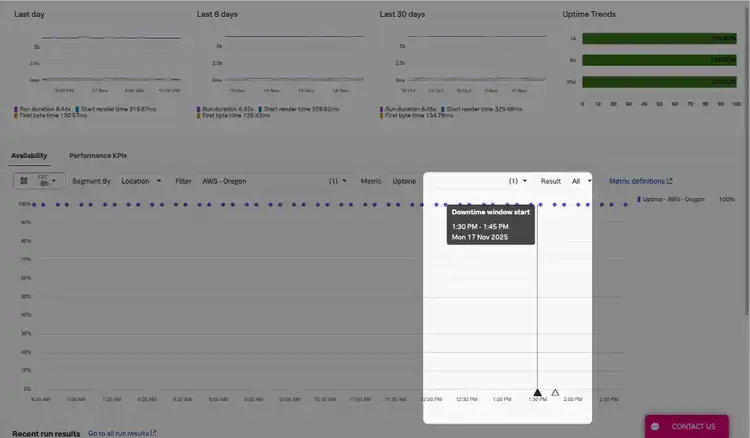
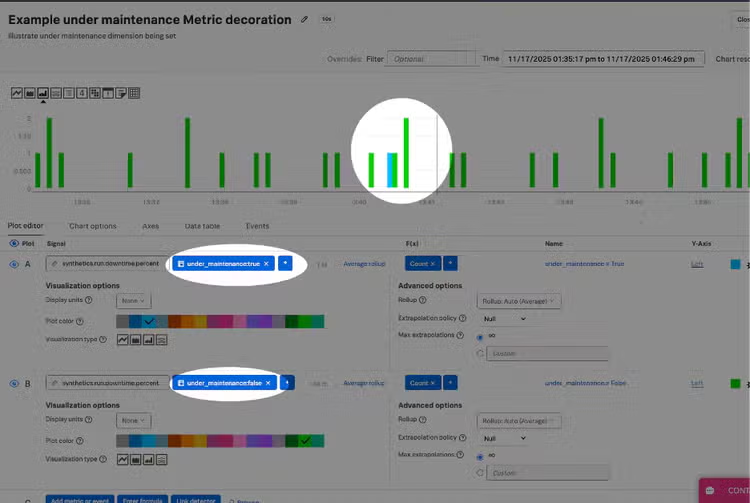
Downtime records remain available for thirteen months, preserving clean historical visibility.
2. Configure synthetics downtime
There are two ways to configure downtime for your synthetic tests in Splunk Observability Cloud. You can either:
- Set downtime windows directly in the UI.
- Automate them using the Observability Cloud API.
Both approaches help you keep your test data clean, the choice really depends on how your teams operate.
2.1 Configure downtime in the UI
The Splunk UI is ideal for operationally driven maintenance windows, scheduled releases, and situations where teams want visual clarity without automation. In a past life, part of our change management process was the association of a change task to enable downtime windows post change approval.
When the UI is the best fit:
- Predictable or scheduled maintenance
- Releases owned by operations teams
- Simple workflows without CI/CD integration
- Scenarios where visual confirmation matters
Downtime actions in the UI
UI-based management is simple, predictable, and easy to operationalize across teams.
2.2 Configure Downtime as Code Using the API
Downtime can also be created and managed programmatically through the Observability cloud API . This is the right choice for teams that automate deployment workflows or want downtime to be controlled directly by their release pipelines or change management tooling
When the API is the best fit:
- Release pipelines that need to create downtime automatically
- Blue/green or canary deployments
- Automated change management systems
- Fast or frequent deployment cycles
- Cases where downtime must adjust dynamically
Learn more: Leveraging the API to manage synthetics downtime configurations.
Example: Create a downtime window with the API
curl -X POST "https://api.us1.signalfx.com/v2/synthetics/downtime_configurations"

  -H "Content-Type: application/json"

  -H "X-SF-TOKEN: $TOKEN"

  -d '{

        "downtimeConfiguration": {

          "name": "release-maintenance",

          "rule": "augment_data",

          "testIds": [12345],

          "startTime": "2025-05-01T02:00:00Z",

          "endTime": "2025-05-01T03:00:00Z",

          "timezone": "America/New_York"

        }

      }'
API-managed downtime ensures observability stays aligned with how you deploy and operate your applications.
3. Add buffers before and after maintenance
Maintenance windows need time on both sides. Systems warm up, dependencies initialize, caches rebuild, and traffic stabilizes after deployment.
Here’s why buffers help:
- Avoid short-lived errors from appearing as incidents.
- Keep transitional warm-up behavior out of SLAs and baseline metrics.
- Align synthetic monitoring with the real lifecycle of a deployment.
Python example with API call
import requests
from datetime import datetime, timedelta

TOKEN = ""
REALM = "us1"
TEST_IDS = [12345]

start = datetime(2025, 5, 1, 2, 0)
end   = datetime(2025, 5, 1, 3, 0)
buffer = timedelta(minutes=15)

downtime_start = start - buffer
downtime_end   = end + buffer

payload = {
    "downtimeConfiguration": {
        "name": "release-maintenance",
        "rule": "augment_data",
        "testIds": TEST_IDS,
        "startTime": downtime_start.isoformat() + "Z",
        "endTime": downtime_end.isoformat() + "Z",
        "timezone": "America/New_York"
    }
}

resp = requests.post(
    url=f"https://api.{REALM}.signalfx.com/v2/synthetics/downtime_configurations",
    json=payload,
    headers={"Content-Type": "application/json", "X-SF-TOKEN": TOKEN},
)

print(resp.status_code, resp.text))
4. Trigger a validation run after maintenance
Once maintenance ends, run your most important tests immediately to confirm key workflows are functioning correctly. You can do this either:
- Through the UI
- Programmatically using
try_nowapi endpoint
This gives you immediate confirmation that your release completed successfully.
Learn more:
- How to validate your test configuration with Try Now in the UI
- API Spec related to Try Now via the API
The bottom line
Planned downtime is not just about stopping alerts. It is about keeping your synthetic data clean and your signals trustworthy during moments of controlled change. With the right downtime rules, clean buffers, API-based automation, post-maintenance validation, and thoughtful use of augmented test runs, your synthetic monitoring becomes a stable, reliable part of your observability practice.
Handled well, downtime becomes a strength. When a synthetic test fires outside a maintenance window, you know it is real. When it stays quiet during a release, you know your configuration is working. And when augmented runs reveal drift or fragility, you see early warning signs before users are affected.
Call to action
Review your current downtime configuration and ensure your most important tests have the right rules in place. Add buffers around your next release, try the downtime API to automate the process, and validate key workflows once maintenance completes.
To continue building synthetic tests your team can trust, follow the rest of this series. You can also explore Splunk Observability Cloud with a free trial and see how synthetics, RUM, and APM come together to provide complete end to end visibility.
Related Articles

From Root Cause To Pull Request: AI SRE in Splunk Observability Cloud Can Now Remediate Incidents With Claude Managed Agents

Managing IT Just Got Easier: Introducing the New Splunk App for Content Packs