Splunk AppDynamics 24.10 Accelerates Deployment And MTTR
Splunk AppDynamics, now part of the Splunk Observability portfolio, provides critical observability for traditional 3-tier/n-tier applications and helps IT Operations teams quickly discover root causes of issues before end-users even notice.
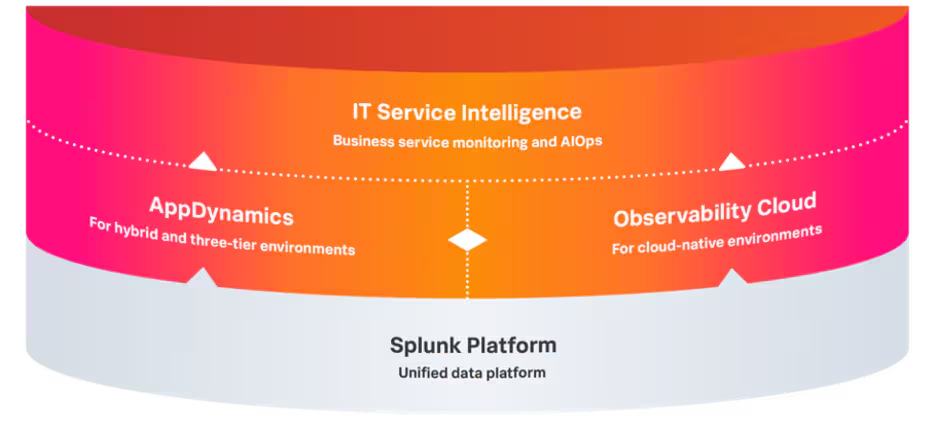
AppDynamics complements Splunk Observability Cloud, which is optimized for observing cloud-native applications by DevOps and engineering teams. By leveraging the Splunk Platform for log analysis and data management along with Splunk IT Service Intelligence for critical event correlation and business service monitoring, organizations can effectively optimize their entire application portfolio across applications, infrastructure, user experience, and security.
24.10 Release Overview
This month, we are excited to announce enhancements to Splunk AppDynamics and a powerful new integration with Splunk Enterprise. These updates speed your ability to onboard new applications at scale and help you to achieve faster mean time to resolution (MTTR) for both SaaS and self-managed applications. The result is richer data insights and seamless integrations that contribute to a more efficient observability experience.
What's New?
- Smart Agent auto-deployment
- Log Observer Connect for Splunk Enterprise
- Anomaly detection for infrastructure
- Business analytics attributes for Dash Studio
- Synthetic test management enhancements
- AppDynamics Self-Hosted cloud deployments
- AppDynamics Self-Hosted backup and restore
- Sampling for Real User Monitoring (RUM)
- File path mapping for vulnerabilities
For all the details, see AppDynamics 24.10 release notes.
Onboard apps faster with Smart Agent Auto-Deployment
Onboarding new applications into AppDynamics just got a whole lot faster and easier! Smart Agent Auto-Discovery makes it easier and faster to deploy and manage your agent fleet. The new auto-discovery feature automatically scans your host to discover all running processes, determines which specific agents are appropriate, and then installs only the agents that you need, using deployment groups to specify which applications and infrastructure to instrument. (Learn more)
Find root cause faster with Log Observer Connect for Splunk Enterprise
Released a few months ago, Log Observer Connect for AppDynamics provides deep-linking connectivity between AppDynamics SaaS and Splunk Cloud. Now, we extend that integration to include AppDynamics SaaS and Splunk Enterprise for full coverage.
Log Observer Connect for AppDynamics seamlessly combines the power of AppDynamics and the Splunk Platform to pinpoint issues faster in 3-tier/N-tier applications. With a single click, you can zoom in on relevant logs from AppDynamics within Splunk Cloud's search and reporting interface. (Learn more)
Detect issues faster with anomaly detection for infrastructure
Manual health rules can be cumbersome and become less effective if not maintained along with application changes. With AppDynamics, you save time and improve efficiency with AI/ML-powered anomaly detection so you can detect more issues, even those you didn’t anticipate, before they impact application performance.
AppDynamics now extends anomaly detection to cover infrastructure monitoring in addition to business transaction monitoring. No configuration is required beyond activating anomaly detection on servers associated with the applications you select. Tunable AI models allow you to set the appropriate sensitivity to meet your business needs. (Learn more)
Simplify business analytics in your dash studio dashboards
AppDynamics combines application performance with business health KPIs to provide business context deep within the stack. Now, it’s even easier to add analytics to your observability dashboards in a scalable and repeatable fashion. Attributes let you build a widget once and then use a drop-down menu to select which metric to display. Now you can do that with analytics metrics - making it faster and easier to build repeatable visualizations. (Learn more)
Manage synthetic monitoring tests more easily
Synthetic monitoring is a valuable tool for early detection of application performance issues so that you can address them before they impact end-users. Several enhancements help you manage your synthetic tests:
- Audit logging — Track user activities and synthetic test configuration changes to help you maintain proper test management. (Learn more)
- Credentials vault APIs — Easily test sophisticated applications with email/SMS-based multi-factor authentication (MFA) implementation. (Learn more)
- Time-based OTP (TOTP) library in PSA — Test multi-factor authentication (MFA) implementation over time.
To learn more about all the new features in the 24.10 release for AppDynamics SaaS, see 24.10 release notes.
AppDynamics self-managed enhancements
Deploy AppDynamics in private and public clouds
The AppDynamics self-managed virtual appliance can now be self-hosted in the cloud in addition to on-premises. AppDynamics Self-Managed is available as an AMI on AWS and a VHD on Azure, and it’s compatible with on-premises deployments on KVM and ESXi hypervisors. The new packages enable you to deploy on your platform of choice, with new features like AI/ML-powered anomaly detection and root cause analysis and runtime application security with faster time to value. (Learn more)
Improve resilience with virtual appliance backup and restore
New Backup and Restore features safeguard your data and ensure seamless recovery in case of cluster failures.
Save time and reduce risk with our streamlined patching process. New Vulnerability Patching capabilities address platform vulnerabilities quickly and efficiently without requiring upgrading your appliance to the latest version.
Detect issues faster with anomaly detection for infrastructure
AppDynamics AI/ML-powered anomaly detection automatically and immediately discovers issues before they impact application performance. No configuration is required beyond activating anomaly detection on servers associated with the selected application. Tunable AI models allow you to set the appropriate sensitivity to meet your business needs. (Learn more)
Optimize costs with sampling for Real-User Monitoring (RUM)
Real-user monitoring detects customer-facing issues as early as possible, but the increase in data collection and storage can increase costs.
AppDynamics’ new BRUM and MRUM session-based sampling helps you optimize license usage, so you can control costs while maintaining optimum data fidelity. (Learn more)
When problems do occur, triage faster, speed MTTR, and minimize impact on your end-users with new MRUM crash report categorization, which efficiently monitors and categorizes mobile application crashes based on application version, status, and file path. (Learn more)
Secure Application
Triage vulnerabilities faster with file path mapping
Vulnerability detection and prioritization is easy with Cisco Secure Application, but fixing each vulnerability takes time and can leave you vulnerable to attack. Now, you can quickly identify the exact tier/node faster with new File Path Mapping for Vulnerabilities to accelerate root cause analysis and reduce risk. Available on both SaaS and on-premises/self-hosted. (Learn more)
Learn more about what’s new in AppDynamics
Elevate your AppDynamics experience and get deeper insights and greater control over your observability practices. Visit AppDynamics support and customer resources to learn more about Splunk AppDynamics.
Related Articles
What the North Pole Can Teach Us About Digital Resilience

The Next Step in your Metric Data Optimization Starts Now

How to Manage Planned Downtime the Right Way, with Synthetics

Smart Alerting for Reliable Synthetics: Tune for Signal, Not Noise

How To Choose the Best Synthetic Test Locations
Advanced Network Traffic Analysis with Splunk and Isovalent

Conquer Complexity, Accelerate Resolution with the AI Troubleshooting Agent in Splunk Observability Cloud

Instrument OpenTelemetry for Non-Kubernetes Environments in One Simple Step