Kubernetes Monitoring: The Ultimate Guide
Key Takeaways
- Effective Kubernetes monitoring requires collecting and analyzing metrics, logs, and events from both the platform and the applications running on it, including nodes, pods, and control-plane components.
- Leveraging dedicated monitoring tools, industry standards, and best practices — such as Fluentd and OpenTelemetry — enhances observability, scalability, and reliability in Kubernetes environments.
- Real-time, unified monitoring solutions like Splunk Observability Cloud enable teams to detect issues early, optimize resource usage, and maintain seamless operations by providing end-to-end visibility and rapid incident response.
One of the first things you’ll learn when you start managing application performance in Kubernetes? It’s complicated. No matter how well you’ve mastered performance monitoring for conventional applications, Kubernetes monitoring is a very different technical landscape.
Since Kubernetes environments are dynamic, distributed, and ephemeral, getting the telemetry data you need to monitor successfully is much more challenging.
In this article, we’ll cover everything you need to know about Kubernetes monitoring, including:
- Key metrics to monitor
- Challenges you may face during the process
- Technical implementation
What is Kubernetes monitoring?
Many businesses rely heavily on Kubernetes (K8s) to manage and scale their containerized applications. In fact, 84% of organizations are either evaluating or already using Kubernetes in production.
However, as Kubernetes environments grow, they quickly become complex due to:
- Dynamic workloads
- Ephemeral containers and pods
- Scheduling and networking between components
- Multi-node or multi-cluster architectures
These things make it difficult to collect telemetry data from the right sources, get the context needed to diagnose the root cause of issues, and ensure that applications and infrastructure are running smoothly. To address these challenges, organizations implement Kubernetes monitoring solutions.
Implementing Kubernetes monitoring provides visibility into the performance and health of Kubernetes environments by exposing critical telemetry data like metrics, logs, and traces. With insight into key metrics, Kubernetes monitoring can help:
- Detect problems in real time and decrease Mean Time To Resolution (MTTR) to minimize downtime which costs businesses an average of $5,000 per minute.
- Monitor unusual patterns that could indicate security threats.
- Understand application behavior to scale resources effectively.
Why Kubernetes monitoring is important
Since most applications are distributed, monitoring becomes necessary for maintaining reliability by helping DevOps teams and system administrators answer questions such as:
- Are pods, nodes, and containers healthy?
- Is the infrastructure meeting SLAs?
- How is resource consumption trending over time?
When done right, monitoring provides actionable insights to preempt potential bottlenecks and reduce system disruptions, which improves the overall user experience.
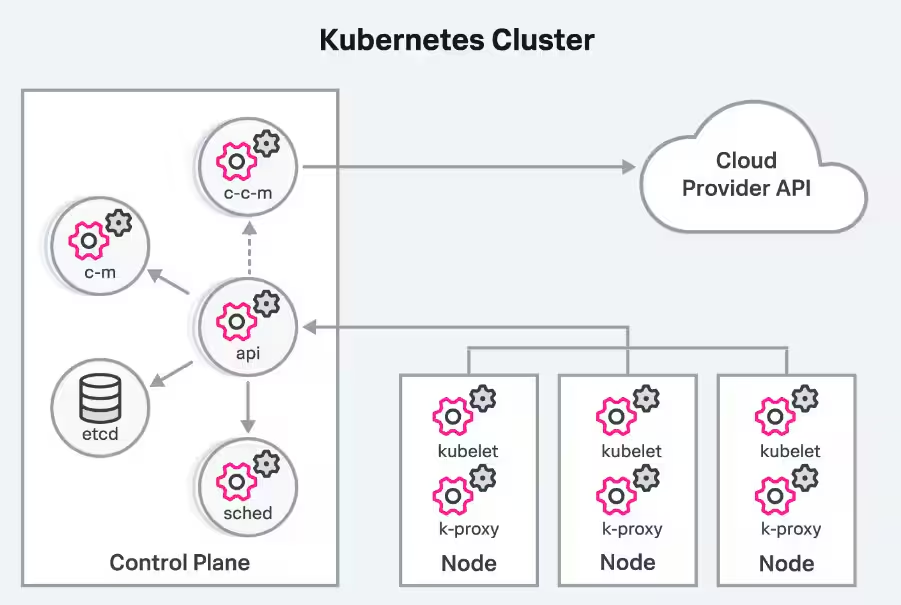
Key metrics to monitor in K8s
There are several types of Kubernetes metrics and each one provides specific insights. So, let’s see what they are:
Cluster metrics help you track the overall health of the Kubernetes cluster. They include information like:
- Resource usage across nodes (CPU, memory, and disk)
- The availability, performance, and overall health of cluster components, like the API server
Control plane metrics provide insights into the components responsible for maintaining the desired state of the cluster. For example, monitoring metrics around the scheduler, controller manager, and API server can help detect issues before they impact cluster health and workloads.
(Related reading: control plane vs. data plane.)
Node metrics focus on individual nodes within the cluster. They show how much of a node's resources — such as CPU, memory, network bandwidth, and disk space — are being used.
Pod metrics. Pods are the smallest deployable units in Kubernetes and contain one or more containers. Pod and container metrics include resource usage and pod/container statuses (running, pending, failed, waiting, terminated, etc.) and they identify whether the requested resources are being successfully scheduled.
Workload and application metrics monitor the applications running within your pods. They give insights into app-specific performance indicators, such as:
- Response times
- Error rates
- Throughput
Challenges in Kubernetes monitoring
Kubernetes has become the de facto standard for container orchestration. However, monitoring and observability are two of the biggest challenges in adopting Kubernetes, second only to a lack of training around containerized environments.
In the latest CNCF survey, 46% of those surveyed say this lack of training is a key challenge for organizations beginning their cloud-native journey. Security concerns (40%) and the complexities of monitoring and observability with container proliferation further complicate adoption. But here are the reasons behind these challenges:
- Distributed architecture: Kubernetes’ distributed nature introduces numerous components to monitor — each generates data from diverse sources. Traditional monitoring tools often fail to account for the multi-dimensional correlations between these components.
- Ephemeral containers: Kubernetes relies on ephemeral and dynamic containerized workloads that can appear and disappear unpredictably. Traditional tools struggle to track this level of dynamism and dimension.
- Siloed data sources: Kubernetes environments generate metrics, events, and logs from multiple sources. Without integration, DevOps and SRE teams frequently switch between tools which increases the mean time to resolution (MTTR).
- Manual correlation and lack of automation: High-velocity data streams from various components make manual correlation inefficient and error-prone. Traditional tools often lack AI or machine learning capabilities to analyze and correlate this data effectively.
A new approach is needed
To address these challenges, a new approach is required to monitor Kubernetes-based environments effectively. Here’s what it should look like:
- Understand the health of the Kubernetes cluster and its components' interdependencies, including nodes, containers, workloads, and Kubernetes-specific elements.
- Streamline the monitoring process with granular logging for context. This ensures that wherever you are in the Kubernetes environment, you can access relevant logs without switching contexts.
- Enable real-time analytics and insights in your environment. Use monitoring systems that provide streaming data and instantaneous alerting to stay ahead of potential issues.
- Leverage AI and ML-based automation to handle the scale and complexity of Kubernetes environments.
(Related reading: Kubernetes logging done right.)
Best practices for Kubernetes monitoring
Here are some of the best practices to follow when monitoring Kubernetes:
Choose relevant metrics
Not all data is equally useful. Focus specifically on system and application metrics because they directly impact your system's health and performance.
- System metrics like CPU and memory utilization, disk I/O, and network traffic provide a baseline view of cluster health.
- Application-specific metrics, such as node, pod, container availability, and resource usage, provide insights into performance.
So, align these metrics with your business objectives and define collection rates and retention periods for efficient data management.
(Related reading: SRE metrics to know.)
Implement comprehensive labeling
Use labels (key-value pairs) attached to Kubernetes objects like pods and nodes to organize and manage your resources.
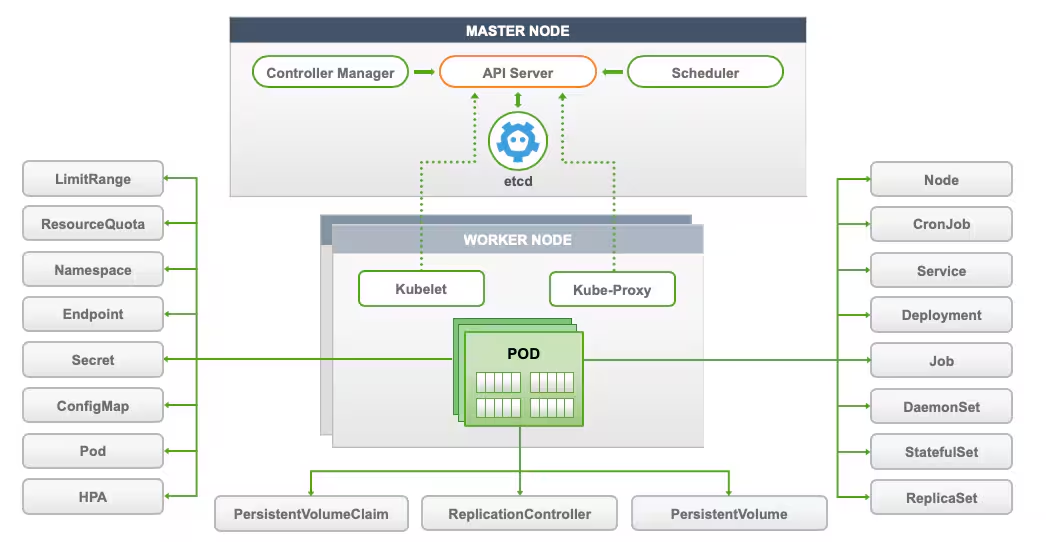
For example, you can label pods by deployment name or environment ('app=web' or 'env=production') for easy filtering and aggregation of metrics. This will simplify both monitoring and troubleshooting since you can focus on specific subsets of your infrastructure.
Use service auto-discovery
As your cluster grows, manually configuring monitoring for each new service becomes impractical. Implement service auto-discovery to detect and monitor new services as they are deployed automatically.
Set up real-time alerting
Configure alerts to notify you of critical issues, such as high resource usage or application errors. Make sure that alerts are actionable and directed to the appropriate teams for swift resolution. This will prevent minor issues from escalating into major problems.
Tools for Kubernetes monitoring
Monitoring Kubernetes can be challenging — however, the right tools make it easier by helping you track what's happening in your clusters. Let’s look at some of the most common tool options:
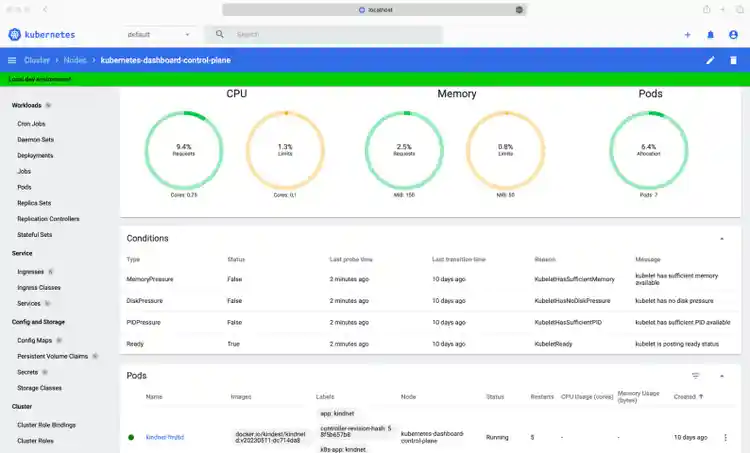
Kubernetes Dashboard
Kubernetes Dashboard provides a basic UI for getting resource utilization information, managing applications running in the cluster, and managing the cluster itself.
You can deploy it with Helm using the following commands:
# Add kubernetes-dashboard repositoryhelm repo add kubernetes-dashboard https://kubernetes.github.io/dashboard/# Deploy a Helm Release named "kubernetes-dashboard" using the kubernetes-dashboard charthelm upgrade --install kubernetes-dashboard kubernetes-dashboard/kubernetes-dashboard --create-namespace --namespace kubernetes-dashboard
You must create a secure channel for your Kubernetes cluster to access the Dashboard from your local workstation. To do so, run the following command:
$ kubectl -n kubernetes-dashboard port-forward svc/kubernetes-dashboard-kong-proxy 8443:443
``
Kubewatch
Kubewatch is a simple tool for monitoring your Kubernetes cluster. It sends alerts to platforms like Slack or Microsoft Teams whenever something changes in your cluster, such as updates to pods or services. You can set up these notifications using an easy-to-edit YAML file and get real-time updates about what's happening.
You can set up Kubewatch manually or with Helm charts. Unlike other monitoring tools, it gives fast alerts to keep you in the loop about your cluster's activity.
However, it can also overwhelm you with excessive notifications and users report that it provides no options to customize messages or filter specific event types. This makes it hard to focus on critical actions.
Lastly, and perhaps most importantly, Kubewatch is no longer under active development.
Splunk
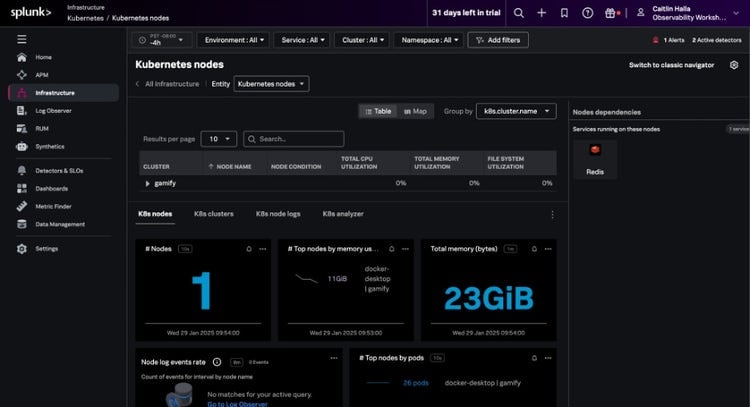
Splunk offers intuitive and comprehensive Kubernetes monitoring, no matter what your needs are. If you're using a cloud provider like AWS or Google, Splunk can connect directly to services like CloudWatch or Stackdriver to collect basic metrics — without requiring an agent.
Successful implementation of Splunk Observability offers many outcomes, including:
- Getting unified and full visibility into end-to-end application environments including Kubernetes, from beginner to expert level.
- Significantly reducing your mean time to detect (MTTD) and MTTR with root cause analysis, AI-powered anomaly detection, and in-context alerting.
- Empowering your team with seamless integrations for effective application and infrastructure monitoring.
Users of Splunk Observability can also opt into Observability Kubernetes Accelerator. This optional accelerator helps you take greater advantage of Splunk Observability and implement data onboarding using the power of OpenTelemetry, greatly improving your team’s visibility into your Kubernetes environment.
(Learn more about monitoring K8s with Splunk.)
Configuring Splunk Observability for K8s monitoring
You can easily configure Splunk Observability and set up Kubernetes monitoring by deploying the Splunk OpenTelemetry Collector for Kubernetes via Helm. With Helm (3.x) installed, simply run the following commands to send telemetry data from your Kubernetes environment to Splunk Observability Cloud:
helm repo add splunk-otel-collector-chart https://signalfx.github.io/splunk-otel-collector-charthelm install my-splunk-otel-collector --set="splunkObservability.realm=us0,splunkObservability.accessToken=xxxxxx,clusterName=my-cluster" splunk-otel-collector-chart/splunk-otel-collector- Optionally add annotations to enable automatic discovery of apps and services
Wrap up
Monitoring applications in Kubernetes may seem daunting. But ultimately it’s not so different from application monitoring in other ecosystems. The dynamic, distributed, and ephemeral nature of Kubernetes environments creates unique monitoring challenges. However, with the right monitoring tools, accessing and analyzing the telemetry data you need can help achieve a successful Kubernetes monitoring practice.
Related Articles

What Are Preload Resource Hints?

What Is a DNS Prefetch?

What Are Preconnect Resource Hints?

Synthetic Monitoring vs Real User Monitoring: What’s The Difference?

Continuous Performance Management Basics

API Testing vs Monitoring: What's The Difference?