KPI Management: A Complete Introduction
Key Takeaways
- Align KPIs directly with your organization's strategic objectives by clearly defining each metric, setting measurable targets, and assigning ownership to ensure everyone understands what's being measured and why.
- Use a formal governance framework with documented standards, regular review cadences, and cross-functional oversight to maintain data consistency, drive accountability, and keep performance on track.
- Leverage integrated analytics platforms and automation to collect and monitor KPI data in real time, enabling data-driven decisions and timely action when performance thresholds are not met.
KPI management is the strategic practice of establishing, measuring, monitoring, and analyzing Key Performance Indicators (KPIs) that are relevant to an organization for decision making and implementing strategic goals. An organization may use KPIs for IT to determine whether technology assets are operating as they are supposed to. When teams can’t meet their KPIs, it can negatively impact the business and its customers.
The KPI management process begins with establishing relevant KPIs. To maximize profits, a subscription-based video streaming company, for example, might encourage users to watch more videos and maintain their subscriptions so it can collect more ad revenue. Because performance of technology assets is critical for profitability, the company creates a number of KPIs: overall availability of its services (or uptime), responsiveness of its servers and the bandwidth availability that is delivered to end users. The business doesn’t just track these numbers in real time, it sets thresholds for KPI values representing various negative situations that might influence the user. These KPIs should also be monitored over time so IT can be made aware if certain measurements are slipping.
You can use KPIs to paint a picture of the overall health of the IT organization and the business as a whole. They are both essential for troubleshooting tactical problems within the increasingly complex IT environment as well as critical for giving management the information it needs to make informed, strategic decisions about future initiatives.
In this article, we’ll discuss what makes an IT KPI good or bad, best practices for helping you manage and track KPIs and how to get started with the practice in your enterprise.
What is a KPI?
A KPI is a key performance indicator, a term widely used across a variety of business and technical functions to measure how well a certain process, system or individual is performing. In IT, KPIs refer specifically to performance measures related to devices or services on the network (either on-premises or in the cloud). However, the most successful organizations will link technical and business-facing KPIs together. For example, a KPI related to the maximum response time of a web server can be aligned with KPIs related to online revenue and other business objectives.
KPIs are often confused with metrics, but the two have a few distinct differences. Metrics are used to measure the value of something relevant to the business such as raw performance: input/output operations per second, CPU load, or memory utilization. KPIs assign meaning to those metrics, and are ideally attached to some type of threshold. (For example, a CPU load of 80% flagged as a critically high number). KPIs can also be linked to service-level agreements (SLAs). Service availability/uptime is one of the most commonly used KPIs. If an organization has a specified SLA of 99.99% uptime, then the IT department needs to calculate and monitor that data directly as a KPI.
KPIs need to be specific, measurable, attainable, and relevant to the organization. As we’ll discuss later in this article, KPIs that fail on any of these metrics are unlikely to be useful to the organization and are likely to create problems rather than helping to solve them.
The Value of KPIs
While their value is contingent on many factors, all KPIs have key characteristics that make them useful to the business. One of the key characteristics of a good KPI is that it is specific, so it should never be presented as a merely qualitative rating (such as “good,” “bad” or “critical”). It should have a specific quantitative value (such as “85% CPU utilization”), which in turn is tied to a qualitative evaluation (“critical,” in this case).
Whatever the specific value the KPI represents, it should almost always be measured over time, and conveyed in a way that is clear to all stakeholders in an organization. By monitoring KPIs in this way, the organization is readily able to observe issues as they unfold and to take corrective action when problems emerge.
Good KPIs vs Bad KPIs
As discussed previously, KPIs need to be specific, measurable, attainable and relevant. Good KPIs are insightful, immediately intuitive and add value to business processes when measured over a longer time frame. KPIs that never change are of no real value because they don’t represent a metric in flux. The same goes for data that offers no ability to monitor it over the long term. As a KPI example, a binary data point indicating whether the network is up or down may be a useful piece of information, but it is not a KPI. Instead, “Daily network uptime” expressed as a percentage is far more useful, as it gives management the ability to monitor this information and spot trends as they are developing.
Good KPIs are either obvious in their relevancy or have some type of quality rating attached to them. “CPU utilization of 70%” is somewhat meaningless on its own, as is “CPU utilization: high.” “CPU utilization of 70%, high threshold status” ties these two pieces of information — a detailed performance metric and qualitative analysis — together. “CPU has been at 70% utilization, above high threshold, for the last 45 minutes” makes that KPI even more valuable.
One common problem with KPIs can occur when they are designed in a way that makes them easy to manipulate. On the surface, a KPI for “number of help desk requests” sounds promising, as it seemingly ensures your IT service department is not idle. However, these types of metrics can be susceptible to manipulation, especially when they are tied to compensation or job status. Examples of better KPIs would include the average time required for tickets to be resolved, average time before first response, or Net Promoter Score for service desk operations.
Five Common IT KPIs
Five of the most popular IT-centric KPIs include the following. (Note that these are fairly broad categories of KPIs; more specific sub-KPIs would be used in day-to-day operations).
- Availability: Availability is the percentage of time that a service or system is available. It can be applied to hardware, an application, a cloud-based service or the network as a whole. Because so many services are tied to availability-based SLAs, creating and monitoring KPIs in this category is critical.
- Reliability: Reliability is related to uptime, except that it calculates the portion of time a device or service is functioning according to specifications. Specifically it is a performance measure of IT for repairing or restoring a system that has failed, such as a hard drive crash or application failure.
- Throughput: Throughput is a straightforward metric referring to the bandwidth of a network pipeline or, for example, the transactions per second that a server or an application has completed. Throughput can be an important KPI, largely because it’s associated with quality of service, system efficiency, and user and customer satisfaction.
- Latency: Latency is the counterpart of throughput, tracking the lag time between an operation and its completion, or a request for data and its receipt. Latency problems can impact customer retention and other aspects of user experience while also introducing data fidelity issues.
- Security: Security metrics have become instrumental in various KPIs due to rampant cybersecurity threats such as ransomware, malware and other exploits that target digitally focused businesses. Security KPIs include measurements of intrusion attempts, policy violations and number of vulnerabilities, among others.
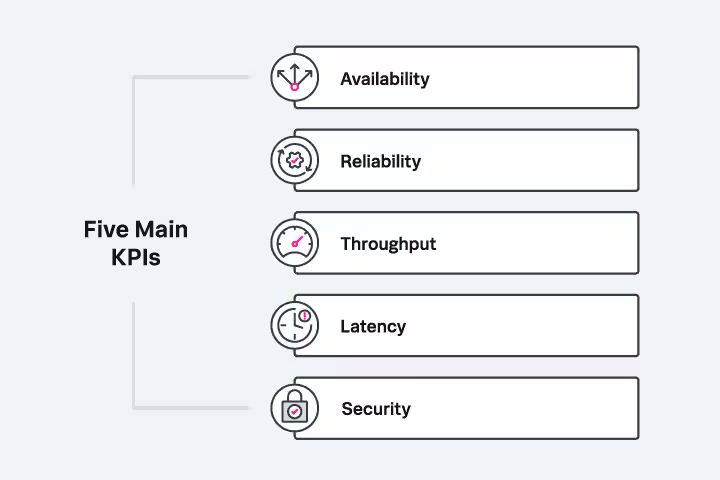
Some of the most common KPs include availability, reliability, throughput, latency and security
Benefits of KPI Management
KPI management allows the organization to understand whether its KPIs are functioning appropriately. KPI management isn’t just about monitoring KPIs over time. It helps the organization answer questions such as: Are we using the right KPIs? Are those KPIs tied to business strategy and outcomes? Are our KPI thresholds set appropriately?
A big part of KPI management is that it helps determine whether KPIs are performing as expected — and whether any problems are developing that require attention. Managing effective KPIs helps the organization understand whether the business is healthy, focusing on performance management and other quantifiable measurements, particularly when performance is slipping slowly over a long period of time. KPI management provides the tools to identify these problems and make adjustments to operations in order to return the business to a healthy state.
Common Issues with KPI Management
KPI management is not always a perfect process. Some of the most common problems and flaws include:
- Disconnecting technology KPIs from business KPIs: KPIs that are not linked to strategy or not relevant to the business can be useless at best, counterproductive at worst, especially if employees prioritize irrelevant KPIs over the right KPIs that indicate desired value for the organization.
- Tracking too many KPIs: It’s common for a business new to KPI management to attempt to track every scrap of data produced. This quickly leads to data overload as managers attempt to keep tabs on hundreds of constantly moving data points.
- Setting inappropriate KPI thresholds: Is a 90% CPU utilization too high? Or should the threshold for a critical alert be 80%? You’ll need to carefully set thresholds to appropriately manage expectations and avoid unnecessary surprises.
- Never updating KPIs: Like other enterprise functions, KPIs require constant attention and need to be updated as the business, customer demands and expectations change.
- Not acting upon KPIs: Lastly, as noted, good KPIs beget good business decisions. If KPIs are not actively used to guide strategic direction for the business, they are ultimately meaningless.
How Organizations Facilitate KPI Management
KPI management can be difficult if various stakeholders are not on the same page. Without careful attention to facilitating the process, KPI management is likely to be unsuccessful and counterproductive. Here are some tips on facilitating KPI management that maximizes return on investment (ROI).
- Involve business and technology stakeholders from the beginning: Both groups need to work together to set appropriate organizational objectives, tying financial KPIs to tactical technology measurements and relevant business goals.
- Ensure KPIs are reasonable and achievable: Management may attempt to dictate “perfection” from IT when setting KPIs, such as a mandate for 100% system uptime, which often creates resentment and conflict, and is also impossible to achieve. Setting and managing realistic expectations around KPIs is critical for meeting greater organizational goals.
- Keep KPIs as simple as possible: Smart KPIs should be readily understandable by every stakeholder in the organization. Avoid complex technical jargon, and include user-friendly dashboards, spreadsheets and guideposts such as color-coding and explanatory text to make KPIs easier to understand for strategic planning.
- Make KPI management a regular part of the planning cycle: Discuss KPI performance regularly and bring any alerts or outliers to the attention of all stakeholders. Evaluate KPIs regularly for their appropriateness and update as needed.
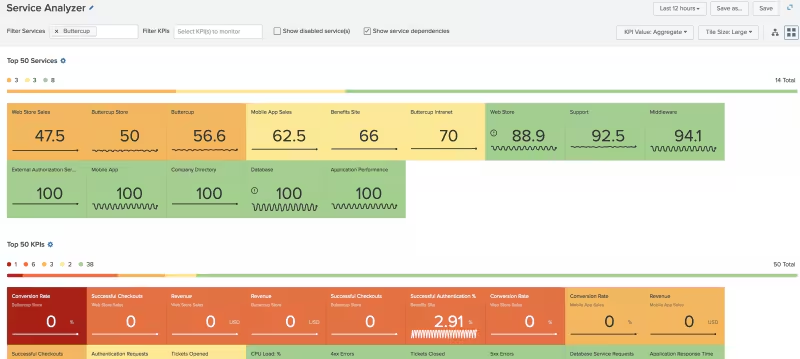
Dashboards and visualizations help make KPIs understandable by all stakeholders in the organization
Examples of KPI Management Best Practices
Here are some best practices that can help you make the most of KPI management in your organization:
- Ensure KPIs are aligned with business goals: As noted previously, smart KPIs need to be established in conjunction with the broader business objectives, including revenue growth. When business needs and strategies change, KPIs need to adapt along with them.
- Share KPIs broadly with the organization: Give stakeholders access to KPI management dashboards and frequently share related reports with the broader organization.
- Benchmark your KPIs against the competition: Many KPI management tools include industry-level benchmarks that you can use to gauge your own internal performance.
- Leverage new technologies to improve KPI performance: Tools such as machine learning and RPA (robotic process automation) can be useful in improving KPIs by identifying patterns not immediately visible to humans.
Features of a KPI Management Platform
KPI management platforms vary widely from simple performance tracking tools to complex business intelligence systems. When choosing what will work best for you, look for tools that allow you to:
- Ingest data from multiple sources: KPIs may require some data synthesis with multiple data sources being analyzed in real time.
- Customize KPI dashboards to suit your business: Every organization has a unique approach to KPI management. A good KPI management platform will allow for broad customization.
- Share platform tools easily with all types of stakeholders: The best KPI management tools will allow any stakeholder in the organization to access dashboards, create reports, and understand the information presented.
- Craft and present KPIs that are intuitive and easy to understand: KPI data should be easy to glean within a few seconds when scanning a dashboard, displayed with intuitive and/or bright visualizations. For example, green for “all clear” and red for critical KPI levels that require immediate attention.
- Scale KPIs with the business: Simpler tools may not have the scaling capabilities needed to manage the massive amount of data that larger enterprises generate. Ensure any KPI management tool you consider is built with an appropriate level of scalability in mind.
Getting Started with KPI Management
KPI management shouldn’t be a fly-by-the-seat-of-your-pants activity but rather one which requires considerable forethought and planning. Here are some tactics to help you on the right path.
- Convene key stakeholders to establish initial KPIs: This group should meet regularly to evaluate KPI management reports, whether KPIs are set appropriately and whether new ones should be created or old ones retired.
- Start with a small set of KPIs: Every organization has a unique approach to KPI management. A good KPI management platform will allow for broad customization.
- Address KPIs immediately when performance slips: The key to KPI management is management. When a KPI hits a critical threshold, it must be acted upon and corrected. If you neglect KPIs, other stakeholders will likely do the same.
- Generate regular KPI reports: KPI reports are essential to showcase successes, shine a light on where there is room for improvement, and inform the direction of business strategy..
The Bottom Line: KPI management benefits both IT and your business
Like many business activities, KPI management is a long-term, iterative process that must be fine-tuned over time. It’s important to continually revise and revamp your approach to KPI management, and to avoid getting bogged down in technical minutiae. In order to be genuinely useful, KPIs must be directly linked to business impact. Only when all groups benefit from the KPI management process can your organization maximize — and realize — its value.
FAQs about KPIs
Related Articles

What is Predictive Modeling? An Introduction

QoS Explained: Quality of Service in Networks

Top Cybersecurity Trends in 2026: 9 Trends to Watch

The Role of SCA in Software Security: The Software Composition Analysis Complete Guide

Server Monitoring Today: Why Monitoring Your Servers Matters & How to Approach It

The Software Development Lifecycle: The Most Common SDLC Models

Active vs. Passive Monitoring: What’s The Difference?

Data Encryption Standard: What Is DES and How Does It Work?