The Role of SCA in Software Security: The Software Composition Analysis Complete Guide
Software composition analysis is a type of security testing that identifies the open-source and third-party components used in modern software.
Historically, most applications were built entirely in-house. Today, however, with the widespread use of package managers, cloud-native development, and reusable code, developers rely heavily on external libraries and modules. In fact, open-source code makes up as much as 70–90% of the codebase for a single app. This reliance introduces new risks — and that’s where SCA can help.
Each year, over 20,000 CVEs are identified in open-source and third-party code. This growing risk is one reason the global SCA market, valued at $394.14 million in 2025, is projected to reach $1.68 billion by 2033.
This article explains what SCA is and how it operates. You’ll learn how to choose the right tool, where it fits among other security testing methods, the challenges it helps solve, and the trends shaping its future.
What is software composition analysis?
Software composition analysis (SCA) is a cybersecurity technique used in application security and software supply chain security to check what open-source and third-party software is used inside an application.
Most apps today include code snippets that were written by others, often in the form of libraries and modules. SCA tools scan the codebase to find these code segments and look for security risks, outdated software, or problems with licenses. SCA is often used by software development teams because it helps catch issues early in development — one way to shift security left, checking for problems as soon as possible.
SCA offers several important features that go beyond basic scanning, including:
- Generating a Software Bill of Materials (SBOM) that lists all open-source components used.
- Detecting known bugs in libraries and dependencies.
- Reporting component maintenance status, such as whether a component is still actively maintained, its last update, deprecation status, etc.
- Flagging components with license or compliance risks.
- Automating most of the scanning and reporting processes.
- Manually reviewing cases that require closer inspection.
These features can be integrated into the development process to help you build software faster without missing important warnings.
Real-world example
Among the most notorious breaches in the last decade, the Apache Log4Shell vulnerability could have been mitigated with SCA.
Here’s what happened: a critical zero-day flaw was released in Apache Log4j, a widely used open-source logging library. This flaw allowed attackers to execute arbitrary code on millions of systems globally. Organizations that lacked visibility into their software dependencies were unaware they were using Log4j, delaying mitigation efforts. An SCA tool could have identified Log4j in the software supply chain, flagged its vulnerability, and prioritized remediation — before attackers could exploit it.
(Related reading: third-party risk management.)
What cybersecurity and SCA have in common
Cybersecurity and SCA share a common goal: reducing risk across the software supply chain. As more companies rely on open-source components, attackers are targeting known vulnerabilities in software libraries and frameworks.
Governments around the world are responding by pushing new regulations that require better visibility into software internals. This includes knowing what components are being used and whether they are secure. SCA tools help fill that gap by:
- Detecting outdated or vulnerable code.
- Flagging legal risks tied to open-source licenses.
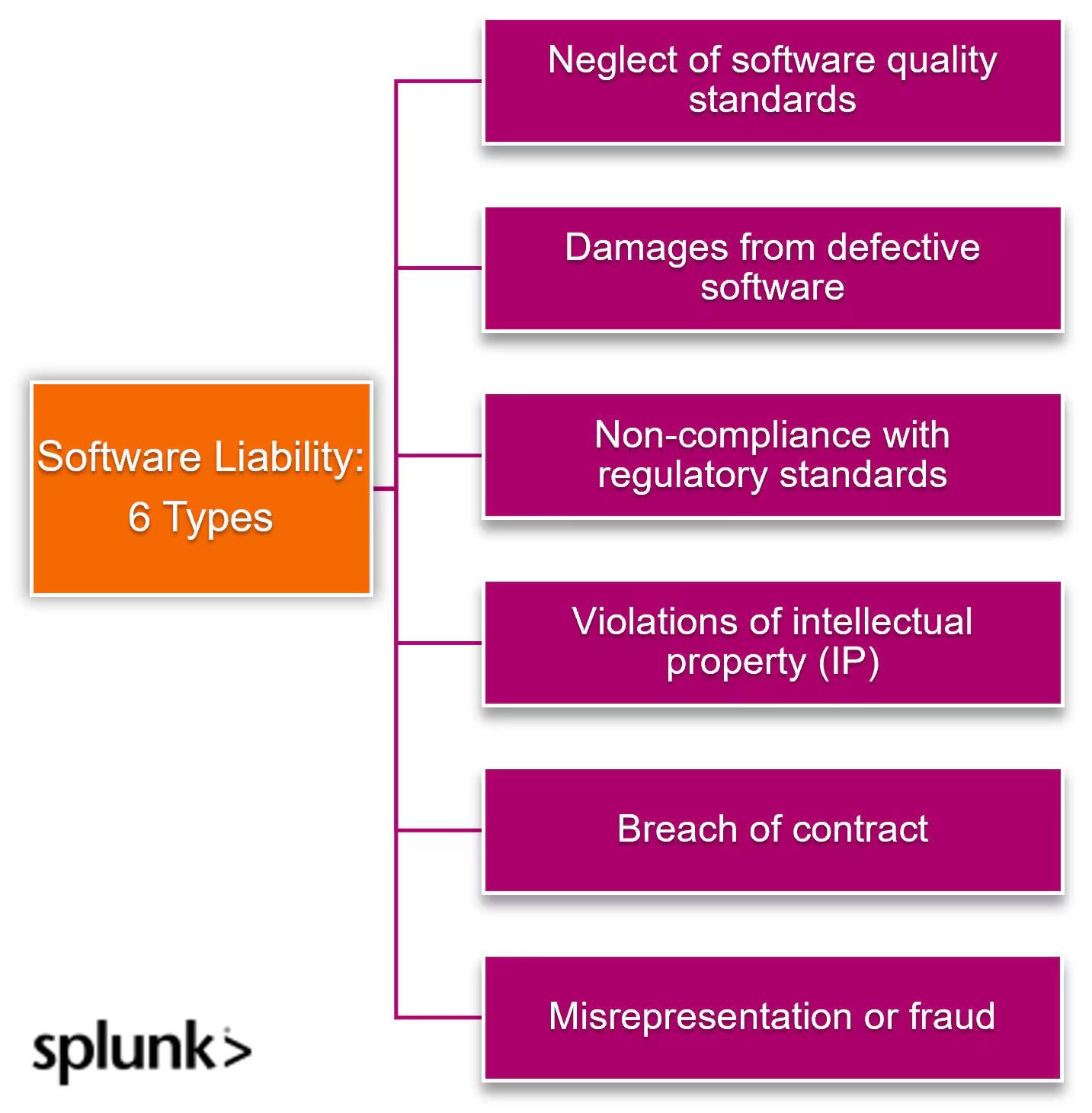
Another common issue is the lack of clear responsibility. Often, software vendors don’t claim liability for vulnerabilities, and buyers don’t have the tools to assess the risks. Cybersecurity strategies and SCA narrow this gap by providing transparency and practical ways to manage known threats.
SCA also supports one of the core practices in cybersecurity which is managing known vulnerabilities. These vulnerabilities are publicly listed and often easy for attackers to find. Detecting them early with SCA tools is one of the most effective ways to prevent breaches before they happen.
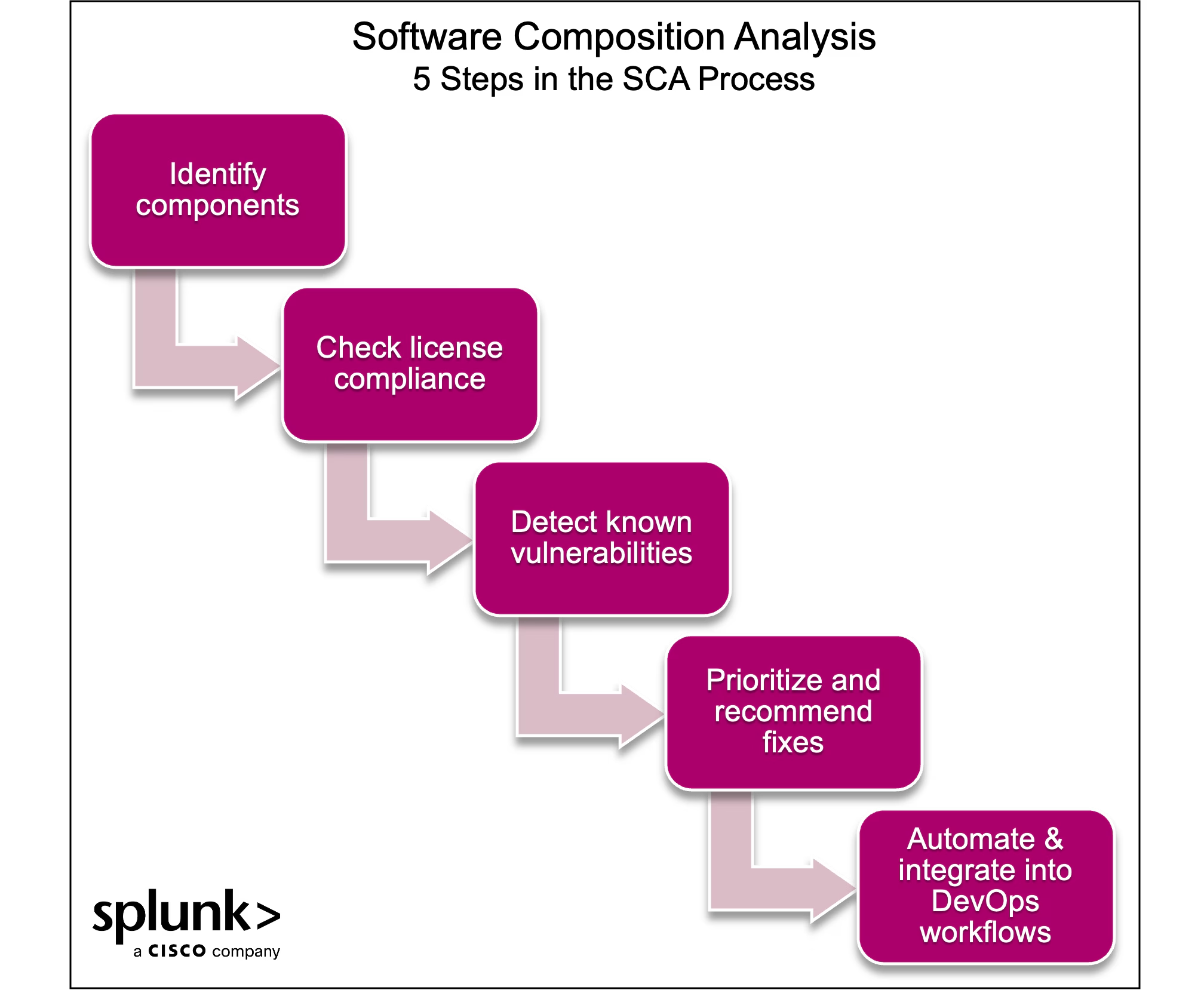
How does SCA work? A 5-step process
To understand how SCA operates, it's important to look at how external components are brought into software projects. These are often pulled through:
- Package managers
- Source code
- Binary files
- Container images
- Manifest files
Once the sources are identified, the SCA process typically follows a series of key stages.
Step 1. Identify components
At the first stage, SCA tools create a list of all software components used in a project. This includes libraries, frameworks, and modules added during development or included in container images. SCA typically uses two methods:
- Manifest scanning reads files like package.json or pom.xml to find declared dependencies.
- Binary scanning looks at compiled code to identify known packages based on unique patterns.
Some SCA solutions combine both approaches to improve accuracy.
Step 2. Check license compliance
After identifying components, SCA solutions review license information. It checks whether each library’s license meets legal and company policies. This helps avoid issues like:
- Misuse of copyleft licenses
- Missing attribution requirements
Step 3. Detect known vulnerabilities
Once all components are identified, it builds a software bill of materials (SBOM). Then, the SCA matches the list of components against vulnerability databases such as:
- National Vulnerability Database (NVD)
- Common Vulnerabilities and Exposures (CVE)
- Commercial databases like Black Duck KnowledgeBase.
If a component is known to have security flaws, the tool flags it and scores the severity of the issue (using scoring systems such as CVSS or EPSS).
Step 4. Prioritize and recommend fixes
In this step, SCA identifies vulnerabilities and prioritizes which to fix first. The tooling may assess:
- Reachability to check if the vulnerable code can actually be reached during execution.
- Exploitability to estimate how likely it is that an attacker could use the flaw.
Most SCA tools suggest fixes and integrate with issue trackers or version control systems to make remediation easier. This helps security teams to give more time to the most important risks instead of wasting time and resources on low-priority issues.
Step 5. Automate and integrate into DevOps workflows
SCA is often integrated with CI/CD pipelines to run scans during development, builds, or deployments. They also support container scanning through image registries. By automating this process, SCA gives developers a clear view of what’s in their code and helps reduce risks before release.
Static vs. Dynamic SCA: What’s the difference? Which is better?
When analyzing vulnerabilities in open-source components, there are two main ways to do it: static and dynamic SCA. Each method has its strengths and weaknesses — importantly, neither one covers everything on its own.
- Static SCA scans the source code or manifest files during the build phase to find all potential vulnerabilities before the code runs. This approach provides a full view of the application, but it often includes false positives or “noise,” especially if unused dependencies are flagged as risks.
- Dynamic SCA occurs during runtime by observing how the application behaves. It detects vulnerabilities that are actually reachable by reducing noise and helping you focus on what matters. However, it cannot see what is not exercised during runtime. This leads to blind spots and makes it less complete.
Which is better?
Both approaches have limitations. Static gives completeness but not accuracy. Dynamic gives relevance but not coverage. New methods like reachability analysis try to combine both. They help developers focus on vulnerabilities that are both present and exploitable by making SCA more effective in real-world use.
Choosing one over the other depends on your priorities. Combining both may offer the best protection.
Embedding SCA into the software development lifecycle
To be truly effective, software composition analysis should be integrated into every stage of the software development lifecycle (SDLC), from writing code to deploying it.
Below are the most common ways to embed SCA into the development process, as fully as possible.
IDE-level integration
SCA plugins inside IDEs help developers check for vulnerabilities and license issues as they add dependencies. This provides immediate feedback and helps you address issues before code reaches version control.
Pre-commit and pull request checks
Automated checks can be triggered before code is committed. SCA tools can both:
- Comment on pull requests.
- Block pull requests if they introduce known vulnerabilities or unapproved licenses.
Deployment enforcement
Policies can block software from being deployed if it contains critical vulnerabilities or license types that violate organizational rules. This avoids unsafe code reaching production environments.
Full lifecycle coverage
SCA should be extended beyond code into containers, cloud services, and infrastructure layers. This helps detect risks that may emerge later in the pipeline.
Security team visibility
Integrate centralized dashboards or reports to gain visibility into all flagged components, including their status across environments and pipelines.
Context-aware vulnerability prioritization
Not all vulnerabilities pose the same risk. Organizations should rank issues based on CVE severity and context, such as whether a component is publicly accessible or running in a private VPC.
Developer awareness and training
Developers must be educated on how dependencies affect security and compliance. Understanding the impact of vulnerable or noncompliant components helps them make correct choices from the start.
SCA vs. SAST vs. DAST: What’s the difference?
SCA, SAST, and DAST each serve a different purpose and work at a different stage of the development process.
- Static Application Security Testing scans your custom source code while it's being written. It helps find bugs early, before the code is deployed. This is useful for catching logic flaws and coding errors before they turn into real threats.
- Dynamic Application Security Testing tests running applications. It simulates real-world attacks to see how the app behaves under pressure. DAST is good at finding issues that only appear during execution, such as misconfigurations or runtime flaws.
In contrast, SCA analyzes third-party and open-source components. It identifies known vulnerabilities and license risks in libraries that developers didn’t write themselves.
Strong security strategies use SAST, DAST, and SCA
SAST protects your custom code, SCA secures the components you bring in, and DAST checks how everything behaves when deployed.
Choosing the right SCA tool for your organization
Not all SCA tools offer the same depth or features. Some provide basic manifest scanning, while others go further with reachability analysis, license governance, and CI/CD integration. Depending on your team's size, development workflow, and risk tolerance, your choice of tool can affect both security and productivity.
It's important to evaluate support for your tech stack, accuracy of vulnerability data, ease of use, and how well the tool integrates into your existing pipeline. Picking the right tool means finding one that fits your development process and helps you take action. Consider the following when comparing SCA tools:
- Supports your language stack and package managers.
- Tracks license compliance, based on your policies.
- Provides recommendations for remediation (not only alerts).
- Offers strong vendor support and clear documentation.
SCA solutions and tools
The SCA market includes a mix of commercial and open-source solutions. On the commercial side, here are some popular options:
- Snyk offers a developer-friendly tool focused on rapid CI/CD integration.
- Black Duck by Synopsys is known for comprehensive vulnerability and license management.
- Sonatype Nexus provides deep insights into dependency hygiene and governance.
Open-source options like OWASP Dependency-Check offer basic scanning capabilities but may lack the advanced features and support of commercial tools. The market is rapidly growing, however, driven by increasing reliance on open-source software and supply chain security concerns.
Challenges and solutions in Software Composition Analysis
From tracking vast numbers of dependencies to avoiding development delays, organizations must address both technical and process-level hurdles. Understanding these challenges is key to using SCA effectively and securely.
Challenge: Keeping up with constant change
Modern applications often rely on hundreds or even thousands of open-source libraries, which change frequently. Without strong indexing and update mechanisms, SCA can miss components or fall out of sync.
Solution - Choose an SCA solution that supports continuous scanning and automatically updates its vulnerability database to reflect the latest changes.
Challenge: Compliance is complicated
Open-source licenses can be complex and vary in legal implications. This makes it difficult to track and comply with every single one—but not doing so can expose organizations to lawsuits, reputation damage, or forced rework.
Solution: Use an SCA tool with comprehensive license intelligence. Involve legal or compliance teams early in the review process.
Challenge: Incomplete visibility
If the SCA solution fails to detect all components, including nested or transitive dependencies, the scan results will be incomplete. This leads to missed vulnerabilities and a false sense of security.
Solution: Use a tool that supports deep scanning and SBOM generation. Validate inventories regularly as a best practice of your DevSecOps routine.
Challenge: Poor implementation
Embedding SCA into fast-moving CI/CD environments can slow builds or frustrate developers if done poorly.
Solution: Work closely with developers to set clear policies and thresholds. Integrate SCA in a non-blocking way that detects issues early — without interrupting workflows.
Challenge: Manual work won’t scale
Without automation, old or vulnerable components can remain in code for months or years, silently introducing and expanding your risk. Manual monitoring isn’t scalable.
Solution: Automate SCA scans on a recurring basis, especially during builds, deployments, and dependency updates.
Trends and what’s next for SCA
In the past, software composition analysis was used mostly to catch known vulnerabilities during release. Now, with constant code changes and fast-paced development, that’s no longer enough. So, what trends are driving the wide adoption of SCA? And how does this change the work of development and security teams?
One major advancement is the use of artificial intelligence and machine learning. These technologies help reduce false positives, highlight risky components earlier and speed up the overall scan process — so you can take action before issues impact production.
More SCA tools are also moving to the cloud. Cloud-based SCA makes it easier to scale, update, and integrate with remote or distributed development environments. It also improves collaboration between teams in different locations.
SCA is evolving into a continuous process, rather than a one-time scan. Running scans throughout the development cycle helps catch new vulnerabilities as they emerge and supports faster, safer releases.
Another progression is deeper integration with other security tools. SCA is being combined with SAST, DAST, and container scanning to give you a single, unified view of security.
Finally, SCA tools are starting to map vulnerabilities to real business risk using techniques from risk-based vulnerability management. Instead of only showing what’s broken, they explain how a vulnerability might impact operations, helping teams prioritize what to fix first based on context and potential impact.
FAQs on SCA
Why are organizations adopting SBOMs, and how does that relate to SCA?
Organizations are adopting SBOMs to improve transparency and comply with regulations like the U.S. Executive Order on Cybersecurity, which mandates SBOMs for federal contractors. These detailed inventories of software components help assess risks, ensure compliance, and respond quickly to vulnerabilities.
SCA tools automate SBOM creation and maintenance, enabling real-time tracking of dependencies and detection of security or licensing issues.
Can SCA assist during incident response?
Yes, SCA tools can quickly generate an SBOM during incident response to identify all software components, pinpointing vulnerable libraries or dependencies. This helps to narrow the investigation scope, prioritize patching or mitigation, and cross-reference vulnerabilities with threat intelligence databases to assess exploitability, helping contain breaches efficiently.
Can SCA support regulatory compliance and vendor risk management?
SCA ensures compliance by providing visibility into open-source and third-party components, automating SBOM creation, tracking license compliance, and flagging security vulnerabilities.
This demonstrates due diligence, avoids legal penalties, and strengthens vendor risk management by evaluating third-party software security and identifying supply chain risks. Whether you must comply with certain regulations or you’re aiming for certification with ISO 27001, SCAs can help.
FAQs about Software Composition Analysis (SCA)
Related Articles

How to Use LLMs for Log File Analysis: Examples, Workflows, and Best Practices

Beyond Deepfakes: Why Digital Provenance is Critical Now

The Best IT/Tech Conferences & Events of 2026

The Best Artificial Intelligence Conferences & Events of 2026

The Best Blockchain & Crypto Conferences in 2026

Log Analytics: How To Turn Log Data into Actionable Insights

The Best Security Conferences & Events 2026

Top Ransomware Attack Types in 2026 and How to Defend