Using Splunk Stream for Hunting: Finding Islands in the Stream (of Data)
Today, we are going to look at using the Splunk Stream App to hunt for threats across your network. Sing along with us! 🎼 “Islands in the stream” of our data…
(Part of our Threat Hunting with Splunk series, this article was originally written by John Stoner. We’ve updated it recently to maximize your value.)
Splunk App for Stream: An overview
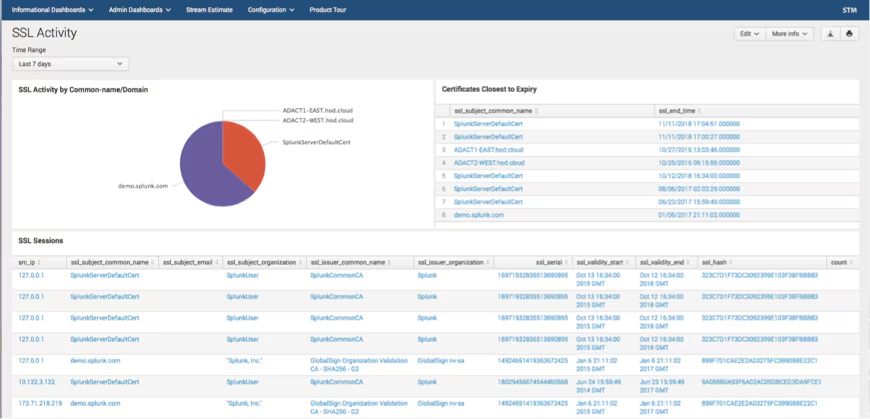
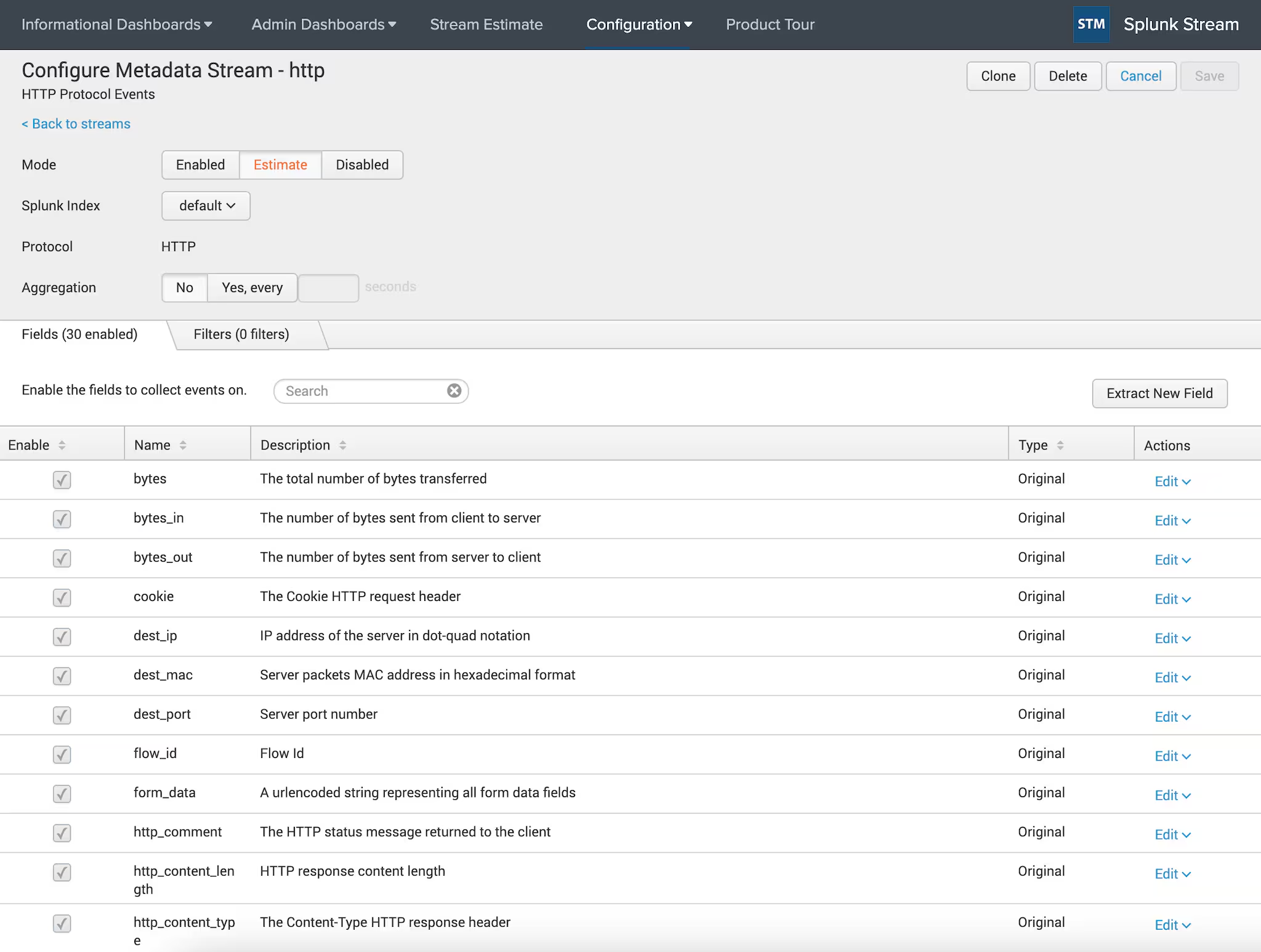
Splunk App for Stream is a free application that extends Splunk Enterprise to collect data off the wire and break down the contents based on protocol. (It’s similar to how Zeek or Suricata creates wire metadata.) Stream supports over 30 protocols across the OSI stack including TCP, UDP, DNS, HTTP, FTP and many others. (Stream also supports many, many protocols for detection only.)
Within TCP and UDP, we leverage deep packet inspection to detect protocols running at the application layer, like tor, rdp and sharepoint, just to name a few.
After Stream extracts and identifies network data, it then maps that data to the Common Information Model (CIM). For example:
- SSL certificate information extracted from TCP maps to the Certificates data model.
- HTTP data maps to the Web data model.
Many of the protocols map to various elements of the CIM and can be found in the Splunk Stream Installation and Configuration Manual. Additionally, Stream is able to:
- Parse pcap files.
- Capture full packet streams.
- Collect Netflow over 10Gbps interfaces.
Stream installs with its own listener to intercept data off the local interfaces, and it can work with taps and span ports as well before forwarding the data to a Splunk Indexer.
Optimizing Splunk Stream data ingest for hunting
When it comes to hunting, Stream complements other data sets you may already be collecting. “But wait!,” you say, "I can’t collect all the wire data in my network. I don’t want to overwhelm my analysts and I certainly don’t have the disk space, and also 10,000 other reasons..."
In this case, you’re in luck, because Stream allows for protocols to be selectively captured. This way you can redue the noise of the wire data to something that your analysts can actually work with.
For example, if you only want to gather FTP and not HTTPS, you can do that. Not only can you select the protocols to capture, you can:
- Specify individual protocol fields to capture within a specific protocol.
- Apply filters.
- Aggregate values to get certain statistics.
- Use the estimate function to preview your event count and ingest for a specific protocol before you start collecting.
Using Stream for threat hunting
Alright, now that I’ve discussed Splunk Stream’s cool features and reasons to use it, let’s get down to some practical applications: namely, threat hunting! In the paragraphs below, we are going to focus specifically on two areas — collecting DNS and HTTP data — and what they can help us see.
Collecting DNS data
First question: Do you collect DNS data today? If so, how do you collect it?
DNS can be very helpful when hunting: all the way from the A record to the Ahhhhh! record (😃). There is a wide variety of methods to ingest DNS logs from both the hosts and network, but this post assumes that you have access to DNS logs and that those logs are in Splunk.
So now that you have DNS data, you might ask: “What could I do with this DNS data?”. Suppose you had a hypothesis that you could find suspicious domains in DNS and then pivot back to the systems generating these DNS requests.
To test this hypothesis, you might end up examining the domain or sub-domain fields in your Splunk instance in an attempt to find high levels of Shannon entropy or potentially dissect the various aspects of the FQDN.
These techniques and others for monitoring DNS were presented at .conf2015 by Ryan Kovar and Steve Brant in the presentation "Hunting the Known Unknowns with DNS” (get the MP4), where they leveraged the very helpful URL Toolbox written by Cedric Le Roux.
(For more information around entropy and DNS, check out When Entropy Meets Shannon and Random Words on Entropy and DNS.)
Let’s use DNS as our first example of hunting with Stream. How do I begin my hunt to prove my “suspicious domains have a high entropy value” hypothesis? Perhaps the entropy of the domain itself isn’t a big deal, but the subdomain is. How can we calculate the entropy of the subdomain itself?
Let’s brush off the URL Toolbox and find out!
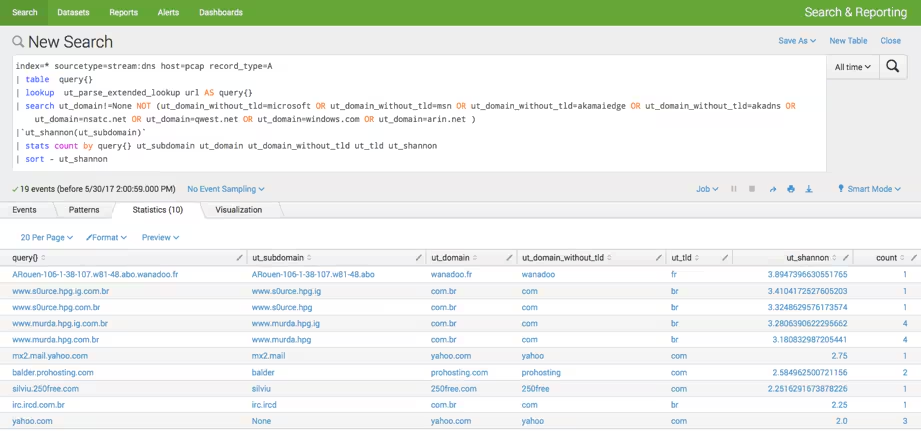
In the above search, you can see that I am looking for A records from the stream:dns sourcetype:
- After identifying the query value, I use the URL Toolbox to break the query domain name into pieces.
- Then, using the search command, I filter domains that don’t have a top-level domain (TLD) and specific domains that I know are not interesting.
- Incidentally, we could have streamlined the above search by using the lookup command and a list of common domains (like the Alexa 1 million).
However, in this example I used both fields to show how I can iteratively narrow down my results. Keep in mind you are seeing the final product — I didn’t do this all in one search. I am hunting an adversary with a systematic approach:
- I execute the macro provided by URL Toolbox, which calculates the entropy of the subdomain (though I could calculate it against any value) with a count.
- Next, I sort by the entropy score, since the higher the entropy value, the more random the subdomain. The point behind this is that highly entropic (random) strings are much more likely to be created by a machine, NOT a human.
- Now, I can pivot from my results back to the host or IP address and start doing additional investigation of the workstation in order to validate or invalidate my hypothesis.
Monitoring HTTP traffic
Now that we’ve discussed DNS, let’s talk a bit about HTTP. When you look at a number of multi-stage threats today, you’ll find that HTTP is a protocol that must be monitored. Yes, firewalls may provide some level of understanding — but monitoring HTTP on the wire provides the best visibility on your network.
There are a variety of different ways to monitor HTTP traffic:
- Use the logs from web servers like IIS and Apache to provide insight into happenings in your server’s web traffic.
- If you have a web filtering gateway, those logs can give you insight into the web traffic going across edge devices — provided you are monitoring all egress points — but the logs don’t show other HTTP traffic bouncing around the network.
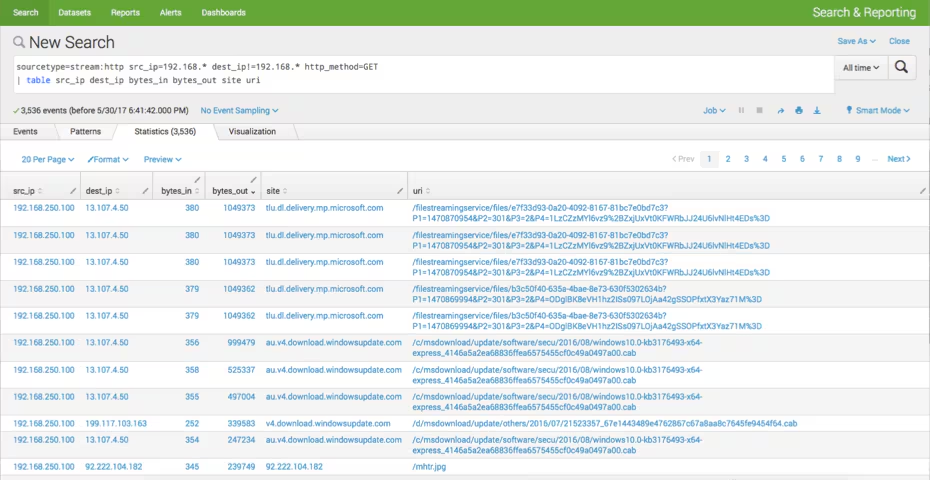
Now for an example. Let’s say I want to see web traffic that was starting within my RFC1918 address space and going somewhere else. Of this web traffic, I want to…:
- See just the HTTP GET.
- Sort by the bytes_out and see what the URI was that the GET was to.
This is what we have in the below search. From here, we could run additional stats on these values to identify outliers.
More options for hunting with Splunk Stream
What else could you use Stream with HTTP for?
Perhaps examining form_data for passwords being sent in the clear. Maybe even determining which websites users and their browsers are requesting, but are being blocked at egress. Just because the communication path was blocked to a site doesn’t mean intelligence can’t be gleaned.
Additionally, knowing a user and host attempted an outbound connection via HTTP could point to a malicious call back and provide additional opportunities for a hunter to hypothesize. They can look for systems that have been compromised; or perhaps see the requests that are coming into your enterprise via HTTP. Funny thing about that is you may see things like SQL injection and other web-based exploits this way.
As always... Happy Hunting :-)
Related Articles

Predicting Cyber Fraud Through Real-World Events: Insights from Domain Registration Trends

When Your Fraud Detection Tool Doubles as a Wellness Check: The Unexpected Intersection of Security and HR

Splunk Security Content for Threat Detection & Response: November Recap

Security Staff Picks To Read This Month, Handpicked by Splunk Experts

Behind the Walls: Techniques and Tactics in Castle RAT Client Malware

AI for Humans: A Beginner’s Field Guide

Splunk Security Content for Threat Detection & Response: November 2025 Update

Operation Defend the North: What High-Pressure Cyber Exercises Teach Us About Resilience and How OneCisco Elevates It
