Splunk Operator 1.1.0 Released: Monitoring Console Strikes Back!
The latest version of the Splunk Operator builds upon the release we made last year with a whole host of new features and fixes. We like Kubernetes for Splunk since it allows us to automate away a lot of the Splunk Administrative toil needed to set up and run distributed environments. It also brings a resiliency and ease of scale to our heavy-lifting components like Search Heads and Indexer Clusters.
Monitoring Console Custom Resource
From the outset of the Splunk Operator project, we recognized that automating the setup and updating of the Splunk instances in the Monitoring Console (MC) was something we could do in Kubernetes. Having a dedicated pod for observing the distributed Splunk deployment is a feature we like for supporting our customers. The pod allows you to troubleshoot and understand how other Splunk instances and features are operating.
In the first iteration of the project, the Monitoring Console pod appeared and began automatically monitoring all Splunk instances running in the same namespace. This was brilliant, although it required a few enhancements. We heard about potential improvements from customers who were taking the Splunk Operator for a spin. From the Splunk Operator 1.1 release on, the Monitoring Console is treated similarly to other Custom Resources. Now it can be used in the following ways:
- Requests, limitations, and Persistent Volume Claim sizing allow you to assign any system resources you choose.
- Plug the Monitoring Console pod into our App Framework for customization of content on the MC pod
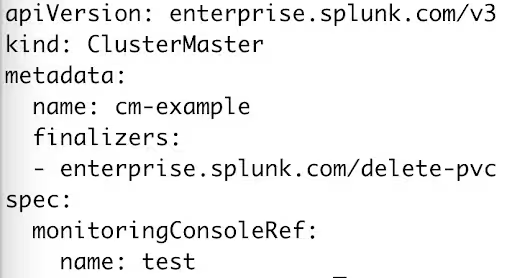
- Select which Splunk components the MC is monitoring using a new stanza in your spec, monitoringConsoleRef.
- Customers have the flexibility to create the Monitoring Console pod before or after creating other custom resources(CRs).
- There can be multiple Monitoring Console pods present in a namespace and each can monitor different CRs.
When a pod referencing the monitoringConsoleRef is created or deleted the Monitoring Console pod will automatically create or delete connections with that pod. The Monitoring Console pod can be created using a simple yaml file:
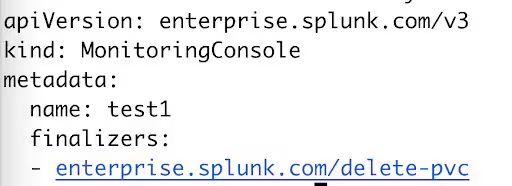
Below is how we can connect the Cluster Manager CR with the Monitoring Console Pod. The Monitoring Console pod can be created before or after creation of the CM pod. Note: We don’t need to specify monitoringConsoleRef in the Indexer Cluster CR. This is because the Indexer Cluster CR will automatically connect with the same Monitoring Console pod if/when the MC pod exists or gets created.
We’ll continue to enhance the Monitoring Console over time in the Splunk Platform to increase supportability of the overall product.
Operator SDK Upgrade
As the Operator SDK has evolved over time, we’ve evolved the Splunk Operator to keep up. In the 1.1.0 release, we’ve made a few changes that require a bit of special handling on upgrade (if you are installing the Splunk Operator for the first time on your Kubernetes cluster then carry on as usual).
Let’s say I had the 1.0.5 version of Splunk Operator installed on my Kubernetes cluster in the splunk-operator namespace:

And my Splunk pods look like this:
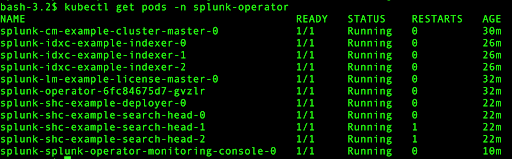
To upgrade to 1.1.0 go to the Upgrades page on GitHub and grab the upgrade script, upgrade-to-1.1.0.sh. Run the upgrade script and the 1.1.0 installer. Keep in mind that the upgrade, as with any new Splunk Operator version, will point to new versions of the Splunk Docker Container and the pods will cycle, so prepare your users.

You can verify the new Operator container is running. Notice the name change from 1.0.5 splunk-operator-xxxxxxxx to splunk-operator-controller-manager-xxxxxxxxx.

Note there are also 2 pods running for the Splunk Operator now and the auto-generated Monitoring Console pod is gone.
Wrap Up
There are several other cool items included in this release. Check out Change Log here. As always, we appreciate your interest in this project and welcome your comments and enhancements and especially your pull requests!
This article was co-authored by Kriti Ashok, Senior Software Engineer and Patrick Ogdin, Director, Product Management.
----------------------------------------------------
Thanks!
Patrick Ogdin
Related Articles

Announcing the General Availability of Splunk POD: Unlock the Power of Your Data with Ease

Introducing the New Workload Dashboard: Enhanced Visibility, Faster Troubleshooting, and Deeper Insights

Leading the Agentic AI Era: The Splunk Platform at Cisco Live APJ

Dashboard Studio: Token Eval and Conditional Panel Visibility

Introducing Resource Metrics: Elevate Your Insights with the New Workload Dashboard

Powering AI Innovation with Splunk: Meet the Cisco Data Fabric

Remote Upgrader for Windows Is Here: Simplifying Fleet-Wide Forwarder Upgrades

Dashboard Studio: Spec-TAB-ular Updates
