Show it Off with Splunk TV! More Ways to Display Your Best Dashboards
Platform SplunkSplunk TV lets you easily display your data on the big screen to visualize and monitor what’s going on in your business. Splunk TV is optimized for a hands-off experience, with slideshows and automatic scrolling so you can display the most important metrics securely and easily.
We’re happy to announce that in addition to Classic (Simple XML) dashboards, we now support Studio Dashboards and IT Service Intelligence Glass Tables. Additionally, we also support Private Spacebridge, so you can deploy Splunk TV in private networks.
If this is your first time hearing about Splunk TV, check out the following video for an introduction to what Splunk TV and TV Companion, a supporting iPad application, are all about.
Now, let’s dive into the details of the latest features in Splunk TV.
Dashboard Studio Support
Dashboard Studio lets you use advanced visualization tools and flexible layout options to easily create visually-compelling, pixel-perfect dashboards.
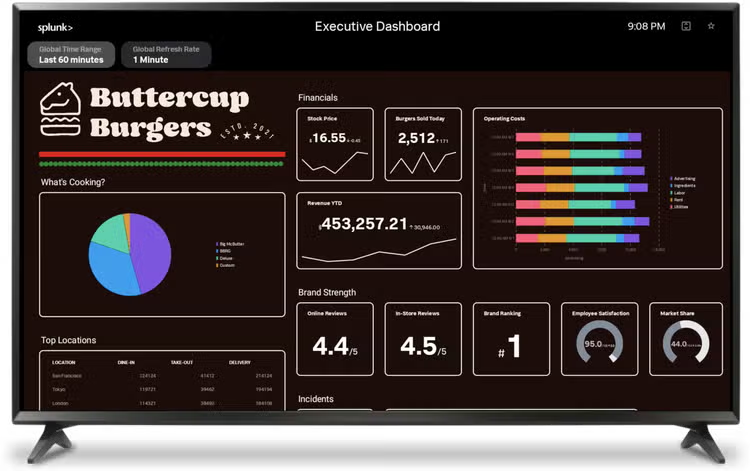
Dashboard Studio ships free with all new releases of Splunk Cloud Platform and Splunk Enterprise starting with Splunk Cloud Platform 8.1.2103 and Splunk Enterprise 8.2.
Splunk TV now supports dashboards built with this new framework! Just like simple XML dashboards, you can now favorite, create slideshows, and autoscroll Studio Dashboards.
You can pan and zoom on absolute layout dashboards, and interact with panels in a grid layout dashboard to see details.
To view Studio Dashboards on Splunk TV, you must use one of the following Splunk platforms:
- Splunk Cloud Platform 8.2.2106 with Splunk Secure Gateway 2.7.3 or higher
- Splunk Enterprise 8.2.2 with Splunk Secure Gateway 2.7.4 or higher
ITSI Glass Tables Support
IT Service Intelligence is a premium Splunk app that enables end-to-end service visibility into IT services and streamlines incident resolution.
You can create Glass Tables to visualize and monitor relationships and dependencies across your IT and business services using ITSI. Glass Tables can show real time data of KPIs and services on a background that you design.
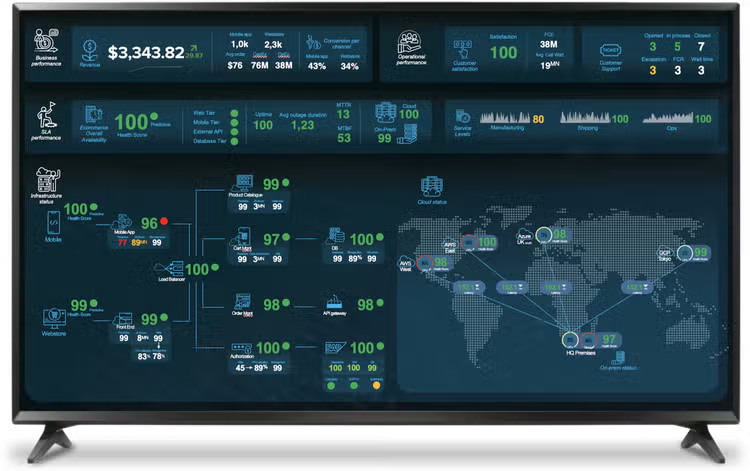
Just like Dashboard Studio, ITSI Glass Tables are now supported on Splunk TV with the same panning and zooming interactions that you can do in Studio dashboards.
To view Glass Tables on Splunk TV, you must use one of the following Splunk platforms:
- Splunk Cloud Platform 8.2.2107 with Splunk Secure Gateway 2.8.4 or higher
Private Spacebridge
Splunk Connected Experiences apps (including Splunk TV) connect to Splunk instances through Splunk Secure Gateway, a default enabled app in Splunk Enterprise and Splunk Cloud Platform, and Spacebridge, an end-to-end encrypted free cloud service.
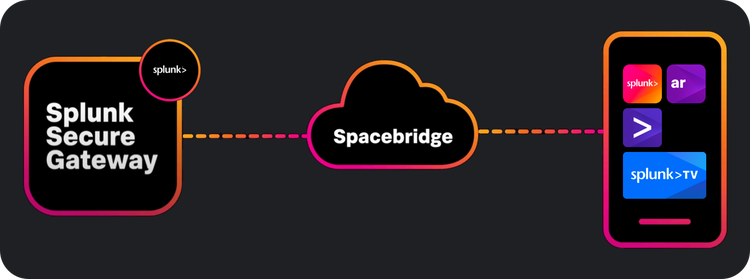
At .conf21, we announced Private Spacebridge, which lets you deploy a version of Spacebridge that runs in your own network so you can have full control over how your Splunk data is routed to connected devices.
If you have an air-gapped environment, or strict requirements on the infrastructure that can be used to transmit your data, you can set up Private Spacebridge so that you can begin using Splunk AR, iPad, Mobile, and TV. Thank you to everyone who let us know what you wanted and voted for this feature through Splunk Ideas!
Get Started Now
Splunk TV and Splunk TV Companion are available for free on their respective app stores.
Download them today at:
If you have feedback for the Splunk TV team or would like to suggest a product feature, add an idea at ideas.splunk.com. We appreciate your feedback and sincerely consider your feature requests.
This article was co-authored by Jesse Chor, VP of Engineering and Kelly Kong, Product Manager for Splunk TV.
----------------------------------------------------
Thanks!
Jesse Chor
Related Articles

Summertime ACS Updates

Deep Learning Toolkit 3.5 - Part 2: Change Point Detection, Matrix Profiles and LSTM-based Predictions