Remote Upgrader for Windows Is Here: Simplifying Fleet-Wide Forwarder Upgrades
We’re thrilled to announce the release of the Splunk Remote Upgrader (RU) for Windows Universal Forwarders (UF) — a major step forward in simplifying and accelerating forwarder upgrades across Windows environments. Following the successful rollout of the Remote Upgrader for Linux, this new release brings the same powerful capabilities to Windows, enabling Splunk Administrators to manage upgrades across their entire fleet from a single, centralized interface.
With Windows support now available, organizations can finally upgrade large fleets of agents with ease. This milestone unlocks a new level of operational efficiency and control, empowering teams to keep their environments secure and up to date, without relying on external teams or manual processes.
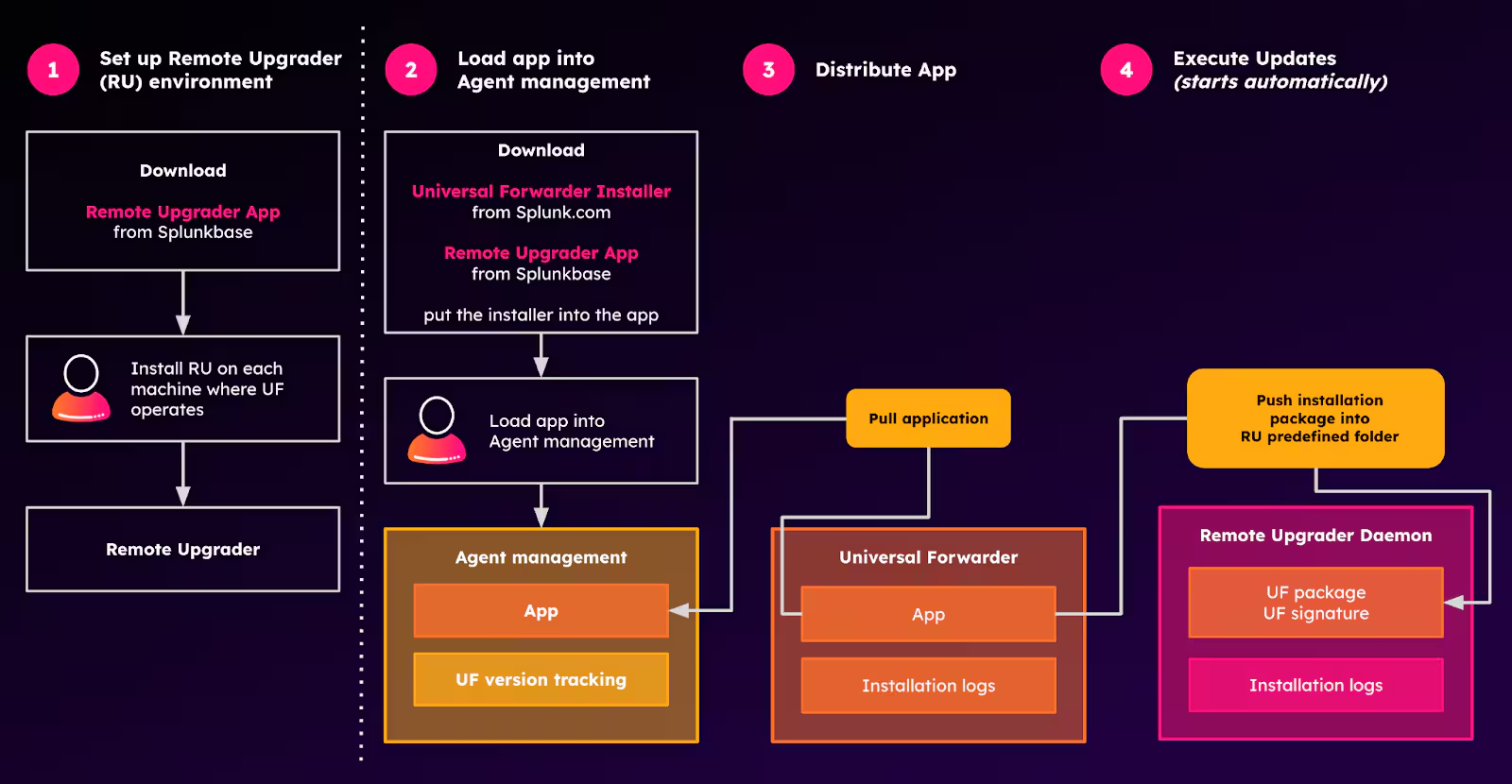
Note: Step 1 – Setting up the RU environment is performed only once to configure the remote upgrade setup; this step is omitted in subsequent executions
What Makes Remote Upgrader So Powerful?
The Remote Upgrader for Windows inherits all the benefits of its Linux counterpart, making it a robust and flexible solution for enterprise deployments. The concept, design, and usage share similarities across both platforms, with only minor differences related to operating system specifics. Here’s what you can expect:
- Centralized upgrades via agent management or deployment server
- Secure upgrade process with automatic rollback in case of failure
- Preservation of configuration files - no disruption to your existing setup
- Backup of previous UF versions for safe recovery
- Upgrade events logged and forwarded to your indexer
- Auditability for full visibility, compliance tracking, and post-upgrade health checks
- Flexible integration with 3rd party automation tools
- OS functional parity for Linux and Windows, with an exception that in the current version downgrade in the Windows version is blocked in order to follow standard Windows installation procedures
- Modular usage - use RU exclusively or as part of agent management, RUs, or UFs systems
How Does the Remote Upgrader Work?
When the installation package is placed in the predefined RU folder, the installation starts automatically.
When using Agent management for an upgrade, the installation package is delivered to the UF encapsulated within the Splunk app. The application then runs and copies the package into the RU's predefined folder, which triggers the installation process.
Automated Rollback and Configuration Safety Nets: No more ‘upgrade and pray’ scenarios. Splunk RU’s smart rollback and migration checks ensure upgrades never leave agents in a bad state.
Please review all the installation steps shown above in the figure titled ‘UF Upgrade via Agent management’, and follow them in detail using the Splunk Docs. If you'd like to explore the same concept presented from a slightly different perspective, check out the blog entry on the Splunk Remote Upgrader for Linux Universal Forwarders.
Pilot to Production: Ready for Prime Time
The release of RU for Windows marks the completion of a unified upgrade solution for both major platforms, Linux and Windows. With this dual-platform support, Splunk admins can now manage upgrades across their entire forwarder fleet from one interface. This reinforces Splunk’s commitment to building an intelligent, user-friendly ecosystem for managing Forwarding Agents.
This is the moment to move forward with production deployment. For customers whose setups align with this approach, now is the time to fine-tune the remaining details, with support from Splunk, so you're ready to go. If you have any concerns about security, don’t hesitate to request solid justification or ask for essential adjustments.
Tab. RU for Windows and Linux UFs comparison
What’s Next: Future Plans and Vision
While this release is a major milestone, it’s just the beginning. Our Engineering team is actively exploring several enhancements to make Remote Upgrader even more powerful:
- Bundling RU and UF for simplified deployment workflows
- Installing RU via agent management in certain scenarios
- Additional RU capabilities such as health reporting
- Support for signed scripts on Windows for additional security
These upcoming capabilities are designed to streamline deployment, enhance scalability, and introduce alternative upgrade methods. We're particularly excited about broadening our customer base by developing a comprehensive portfolio of solutions tailored to diverse user needs and deployment scenarios.
A Collaborative Journey
Splunk is fully committed to evolving Remote Upgrader in partnership with its users. We encourage you to explore current capabilities, test the solution in your environment, and share feedback. Together, we’ll continue to refine and expand this tool, establishing best practices for integrating it with automation frameworks and enterprise workflows.
Whether you’re managing a handful of forwarders or a massive fleet, Remote Upgrader for Windows is designed to make your life easier. Take control of your upgrade process, reduce maintenance overhead, and keep your data ecosystem secure and resilient.
For more details, check out Splunk Docs and download the app from the Splunkbase.
Related Articles

Announcing the General Availability of Splunk POD: Unlock the Power of Your Data with Ease

Introducing the New Workload Dashboard: Enhanced Visibility, Faster Troubleshooting, and Deeper Insights

Leading the Agentic AI Era: The Splunk Platform at Cisco Live APJ

Dashboard Studio: Token Eval and Conditional Panel Visibility

Introducing Resource Metrics: Elevate Your Insights with the New Workload Dashboard

Powering AI Innovation with Splunk: Meet the Cisco Data Fabric

Remote Upgrader for Windows Is Here: Simplifying Fleet-Wide Forwarder Upgrades

Dashboard Studio: Spec-TAB-ular Updates
