Introducing Inputs Data Manager on Splunk Cloud

Furthermore, Inputs Data Manager (IDM) allows Search Heads to be freed of ingestion duty for any Cloud stacks having existing modular or scripted inputs. Historically, these inputs were able to be configured on Search Heads, and customers have to forego support SLAs as a requirement. Unfortunately, this leads to search and ingestion performance contention, leading Search Heads to run search in a suboptimal performance. Taking this into consideration, IDM is introduced as a solution.
Being a new addition to the ensemble of Splunk instances on the cloud, many of our customers and Splunkers alike have been asking questions about it. This post aims to demystify those questions and to provide you with an informative overview of IDM in Splunk Cloud.
What is IDM and What Can I Do With it?
Inputs Data Manager (IDM), is a Splunk instance within a Cloud Stack that provides users an ability to set up and configure modular and scripted inputs. As a part of a stack, IDM is managed by Splunk. IDM is a unique instance, meaning that it exists independently and separately from a Search Head, and does not belong to a Search or Indexing cluster. Search capabilities are enabled, however this is reserved to app-only default reports and scheduled searches.
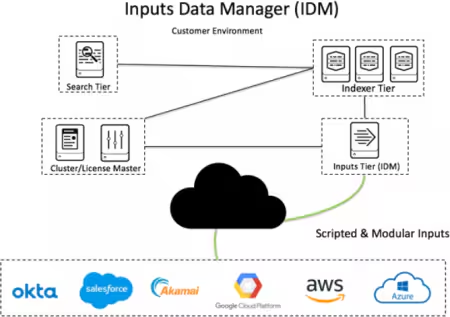
From the image above, IDM belongs to the Inputs Tier. It interacts with the indexer cluster on indexer tier for data ingestion. Furthermore, IDM shares similar features with search heads in terms of authentication and access, therefore it is possible to configure SAML and SSO authentication on it.
IDM is neither a forwarder, nor a heavy forwarder. As opposed to a forwarder/heavy forwarder, IDM are not suitable to perform these tasks:
- Parsing on inputs and anonymization,
- Network inputs such as UDP/TCP,
- Inputs via HTTP Event Collector (HEC),
- Receiving syslog input,
- Apps and Technical Add-ons directly integrated with Enterprise Security (ES), for example SecKit Common Assets Add-on.
These features would better be suited for on-prem Heavy Forwarders instead. For HEC inputs, tokens must be created on an ad-hoc search head and not IDM.
We strongly recommend no modular/scripted inputs are configured on Search Heads, as it might impact search capabilities. Should we find any cloud stack that still has ad-hoc search head inputs, we will contact admins to migrate these to an IDM.
Note: Any search and ingestion impacts due to search/inputs resource contention are not subject to Support SLAs in this matter.
What Are the Next Steps?
Would I Need IDM On My Stack?
In most cases, if you have data that comes from cloud sources, you would require an IDM. Inputs Data Manager allows you to configure and enable module and scripted inputs, mostly via installation of technical add-ons or apps. An example would be: Splunk Add-on for AWS, Splunk Add-on for Microsoft Cloud, Splunk Add-on for Salesforce, Splunk Add-on for ServiceNow, and many more. Your sales engineer/professional services consultants should be able to assist you in determining if IDM is the optimal solution on your stack.
What Would be the Process of Obtaining IDM?
If your stack is provisioned after IDM’s General Availability in August 2019, you should already have IDM on your stack. The URL for IDM would be in the format https://idm-<yourstackname>.splunkcloud.com. If you have not obtained it, please contact your Account Manager.
How Do I Log-In for the First Time?
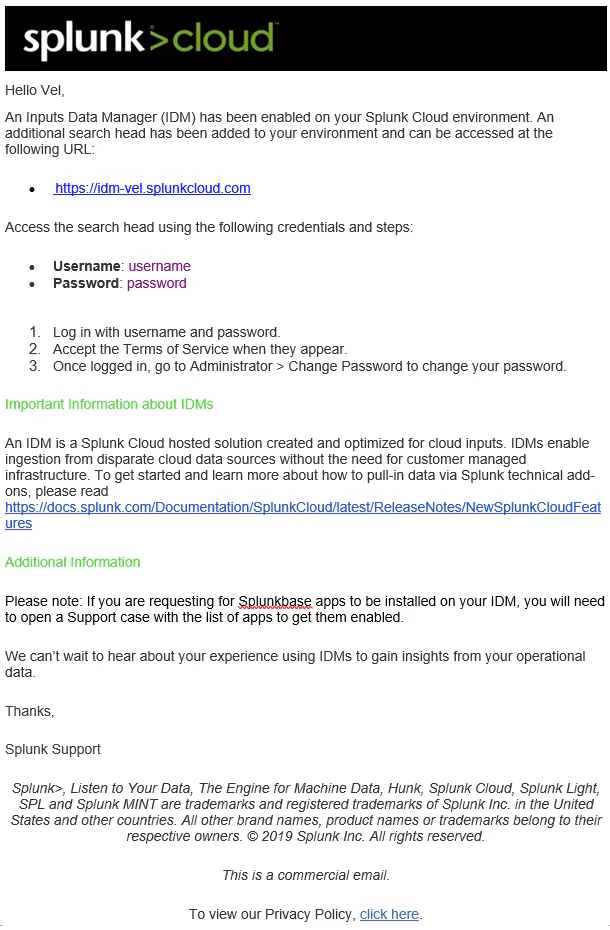
Operational Contact or Portal Admins should receive a welcome email with log-in instructions to log into IDM for the first time. If you have not received this email, please contact your Account Manager.
What About Security and Authentication? Can I Configure SAML with IDM?
IDM instances follow the same standard as other search heads on your stack. Should you specifically require an IP allow-list, you may request so with a support ticket. If your organization uses SAML to authenticate with Splunk Cloud, you may configure it in a similar manner. Please follow the official documentation on Configuring SAML single sign-on (SSO) to Splunk Cloud here.
Can I Run Searches on IDM?
Search capabilities are capped on IDM as it is not intended to be used as a search head.
How Do I Install Apps?
At the moment of writing, Apps and Technical Add-ons would require logging a support case on your support portal. We will aim to enable Self Service App Install (SSAI) on IDM in the future.
How Do I Manage External Access?
An IDM is open to the public IP when it is provisioned, except stacks with special controls (e.g. PCI/FedRAMP). Allow Lists can be configured by raising a Support ticket, citing public IP addresses and subnets with this request.
Which Ports Are Open on IDM?
Inbound access to ports 443 and 8089 are controlled by an access list. Please contact support if you need to modify the access list.
Outbound access to port 443 is open by default. Please contact support if you need to open additional outbound ports. Note that opening a specific outbound port opens the same port for all tiers in your Splunk Cloud environment.
When you contact Support, provide a list of public IP addresses and subnets with this request. For example, you might want to open port 8089 inbound, the port for the REST API.
Should you have any questions, please do not hesitate to contact your Splunk representative who can provide you with guidance with your inputs data manager. Happy Splunking!
Further Reads:
----------------------------------------------------
Thanks!
Velushomaz
Related Articles

Announcing the General Availability of Splunk POD: Unlock the Power of Your Data with Ease

Introducing the New Workload Dashboard: Enhanced Visibility, Faster Troubleshooting, and Deeper Insights

Leading the Agentic AI Era: The Splunk Platform at Cisco Live APJ

Dashboard Studio: Token Eval and Conditional Panel Visibility

Introducing Resource Metrics: Elevate Your Insights with the New Workload Dashboard

Powering AI Innovation with Splunk: Meet the Cisco Data Fabric

Remote Upgrader for Windows Is Here: Simplifying Fleet-Wide Forwarder Upgrades

Dashboard Studio: Spec-TAB-ular Updates
