Go with your Data Flow - Improve your Machine Learning Pipelines
Many of you are familiar with Splunk’s Machine Learning Toolkit (MLTK) and the Deep Learning Toolkit (DLTK) for Splunk and have started working with either one to address security, operations, DevOps or business use cases. A frequently asked question that I often hear about MLTK is how to organize the data flow in Splunk Enterprise or Splunk Cloud. In this blog post I’d like to share a few typical data pipeline patterns that will help you improve your existing or future machine learning workflows with MLTK or DLTK.
Basic Pattern: Directly Fit and Apply
The MLTK relies mostly on the classical machine learning paradigm of “fit and apply”. This implies that you often have two moving parts. Let’s say you train a model with the | fit … into model statement either in an ad-hoc search, e.g. for scoring your model, or in a scheduled search, e.g. for retraining your model in a continuous way. Then you would have another search that uses | apply model to run it either ad-hoc on new data or again in a scheduled search that generates a report or an alert based on your model results. The following chart visualizes this basic pattern of fit and apply when working on data indexed in Splunk Enterprise or Splunk Cloud.

This works perfectly fine for many simple use cases and you can create productive machine learning pipelines with MLTK in minutes. While this basic pattern is great for quick and ad-hoc tasks you are most likely going to move on to another stage when your data flows get a bit more complicated.
Intermediate Pattern: Summary Indexing
Things might get a bit trickier when your model depends on multiple data sources and involves heavier SPL lifting. This is often the situation when more preprocessing steps like data transformations for cleaning, merging, munging or in general feature engineering is needed. Summary Indexing is a standard technique that allows you to write search results simply as key=value pairs into an arbitrarily defined event index or into a metrics index for purely numerical time series data. Essentially, this helps offload ongoing calculations of features and statistics into a separate index that is often much faster to query instead of searches running heavy computation on large sets of historical data again and again. Alternatively, data models can also help to accelerate on that side.
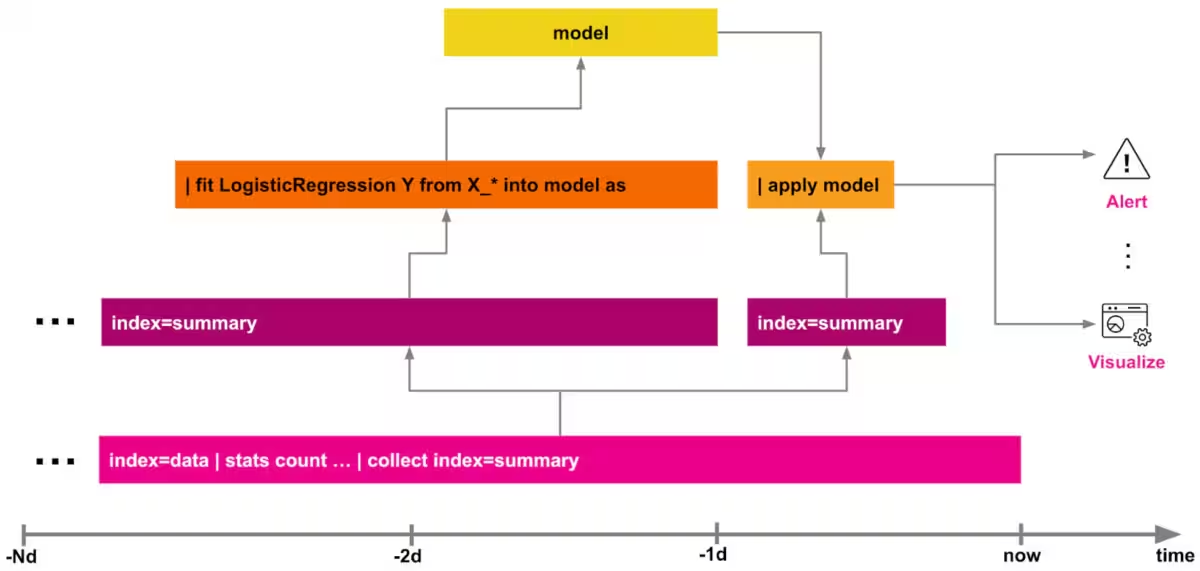
For MLTK this means you run your | fit on a summary index or a data model instead of the raw data which can significantly speed up overall processing time, especially when more heavy lifting on the SPL side is involved. As the | apply is often computationally not as demanding as the | fit, we can either apply all transformations on the new raw indexed data then or - with a certain time lag - on the summary indexed data. The first use case described in this .conf19 talk is leveraging this summary indexing pattern, if you are looking for a specific example for an anomaly detection use case in cybersecurity.
Advanced Pattern: Enrichment with Feedback
Finally, things can get even more sophisticated if you consider the human-in-the-loop type of machine learning systems that allow users to add further data into the training pipeline. This data could either be additional features in terms of synthetically generated data points or changing parameters to adjust for example the sensitivity of an anomaly detection model.
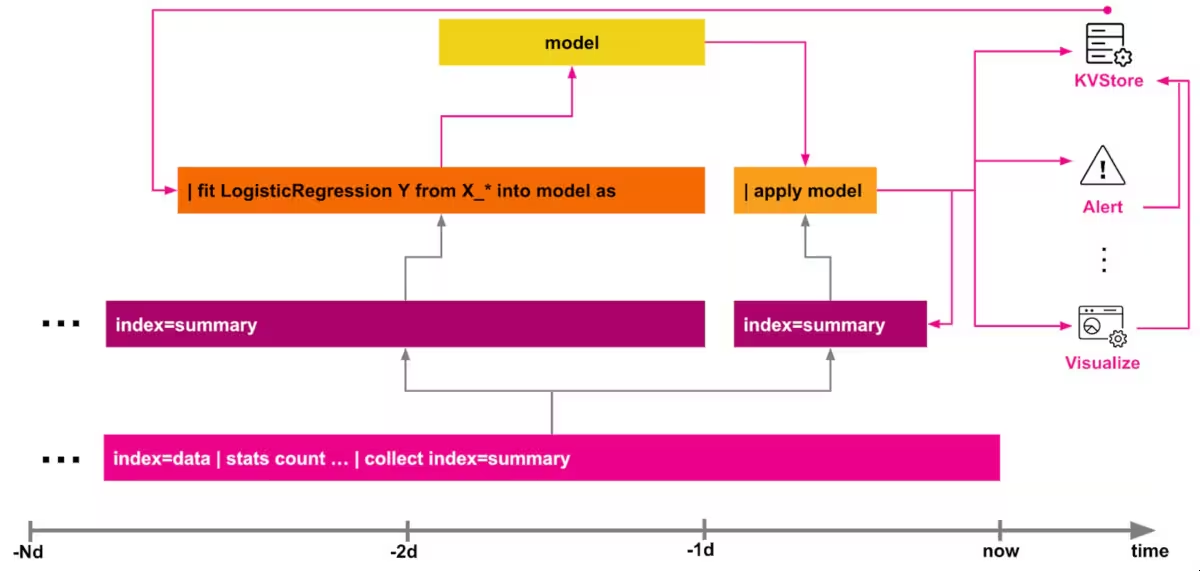
Assuming the feedback can change over time but is related to some unique identifier, then Splunk’s KVStore is a good fit for that requirement and allows for further enrichment of the training data, for example by incorporating user generated labels for a classifier model. The DGA App for Splunk provides you with an example for that pattern and will hopefully help you to get started quickly if you have similar requirements for a “human in the loop” machine learning use case. Of course you could also combine the KVStore with summary indexing to keep track of all changes over time. This method can be very useful for auditing purposes as well as to create another data layer which can be utilized for further supervised learning tasks as it contains labels generated for the given cases.
Last but not least, it’s worth mentioning that some of the same building blocks described above are also useful for improving your machine learning operations (“MLOps”). In a previous blog post I shared some examples on how various logs and metrics from MLTK based operations can be useful for those purposes.
Happy Splunking,
Philipp
Many thanks to my colleagues Josh Cowling and Greg Ainslie-Malik for your feedback, ideas and input on the best practises with MLTK.
Related Articles

Announcing the General Availability of Splunk POD: Unlock the Power of Your Data with Ease

Introducing the New Workload Dashboard: Enhanced Visibility, Faster Troubleshooting, and Deeper Insights

Leading the Agentic AI Era: The Splunk Platform at Cisco Live APJ

Dashboard Studio: Token Eval and Conditional Panel Visibility

Introducing Resource Metrics: Elevate Your Insights with the New Workload Dashboard

Powering AI Innovation with Splunk: Meet the Cisco Data Fabric

Remote Upgrader for Windows Is Here: Simplifying Fleet-Wide Forwarder Upgrades

Dashboard Studio: Spec-TAB-ular Updates
