Dynamic Data: Data Retention Options in Splunk Cloud Platform
Changing technology landscapes and accelerated enterprise digital transformation have produced enormous amounts of data that needs a good retention policy to enable business agility, growth and improved customer experience.
Splunk Cloud Platform provides customers flexibility and choice on how their data is managed offering the following storage types in 500 GB blocks to address the needs of a diverse set of use cases and retention schemes:
- Dynamic Data: Active Searchable (DDAS)
- Dynamic Data: Active Archive (DDAA)
- Dynamic Data: Self-Storage (DDSS)
DDAS provides readily searchable data storage in Splunk Cloud Platform and is the primary entry point for newly ingested data. DDSS provides a path for customers to self-manage data archival and restoration functions should the need arise to search against it. With DDAA Splunk will manage archival and restoration functions for customers.
There are two key differences between the two capabilities:
- Data Management: With DDAA, Splunk provides complete data lifecycle management of the archive on customers’ behalf and remains the custodian of customer data. Just like customers’ active searchable (DDAS) data, Splunk manages all aspects of archive availability, durability, security and privacy requirements on customers’ behalf. With DDSS, customers are responsible for data once it ages out. Customers define an Amazon S3 or Google GCS self-storage location and decide which data from which indexes lands there. Once the data lands in self-storage, the customer is in complete control.
- Data Restore: DDAA enables customers to request a slice of data to be restored back into their Splunk Cloud Platform instance. The entire workflow is fully integrated into the Splunk Web user interface so customers’ archived data is available with predictable time between retrieval and search. With DDSS, if customers want to search against data stored in a self-storage location, they must restore it to a separate Splunk Cloud Platform instance.
Dynamic Data Active Archive and Dynamic Data Self-Storage are built on the same design principles:
- Honor the data lifecycle: Splunk Cloud Platform holds one copy of data. When it reaches the end of its useful life in Splunk Cloud Platform based on your retention settings, customers can choose to move the data to their self managed storage location or move it to a Splunk managed archive. Data is only deleted from Splunk Cloud Platform after it has been successfully moved to storage.
- Secure and performant: Moving data to self-managed storage or splunk managed storage should have little to no impact on your routine search activities. Splunk has incorporated security best practices using AWS and GCP IAM roles.
Now let’s look under the hood and learn more about how DDAA works: Dynamic Data Active Archive is an optional service. Once subscribed to the service, customers will notice a few changes to their index listing page.

Storage Type now has a new value, Splunk Archive. For indexes that roll over into the archive, a new Restore option is available; more on that later.
For an index, customers can now choose Splunk Archive or Self-Storage. Note that these options are mutually exclusive, i.e. for an index you can either chose Archive or Self-Storage, NOT both.
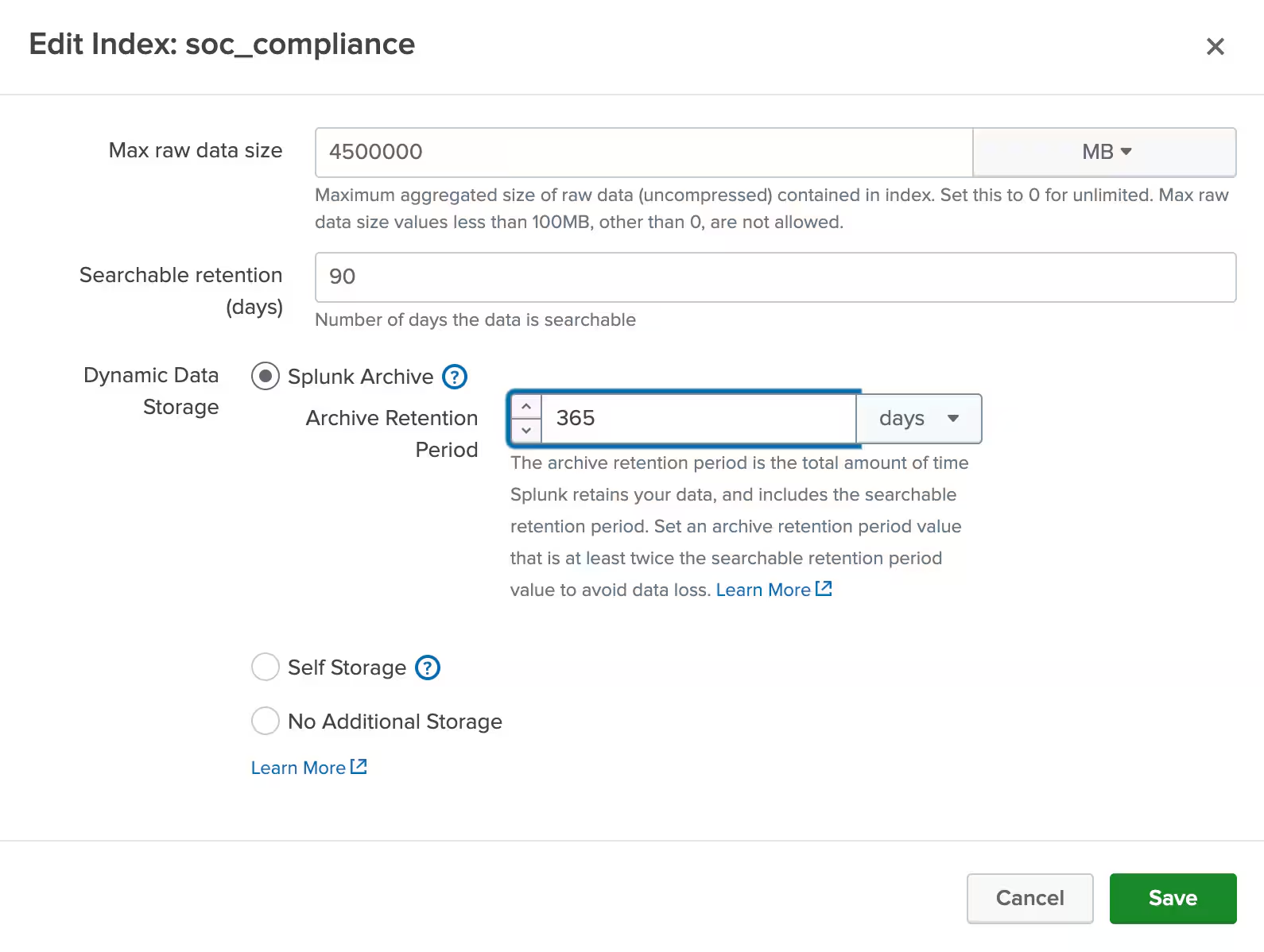
If customers select the Splunk Archive option they can specify the Retention Period for that archive. The Retention Period is based on the entitlement selected when the customer subscribed to the service.
Once the options are set, such as the Size, or the Searchable time criteria is met, the data is rolled into Splunk Archive. As mentioned earlier, only when the data is successfully moved to the archive is it then deleted from Splunk Cloud Platform. That's it!
Keep in mind that the day may arrive when a customer will be asked to restore data from the archive for an incident investigation or to meet a compliance request. With 4 simple clicks customers can easily restore the data from the archive into their Splunk Cloud Platform instance.
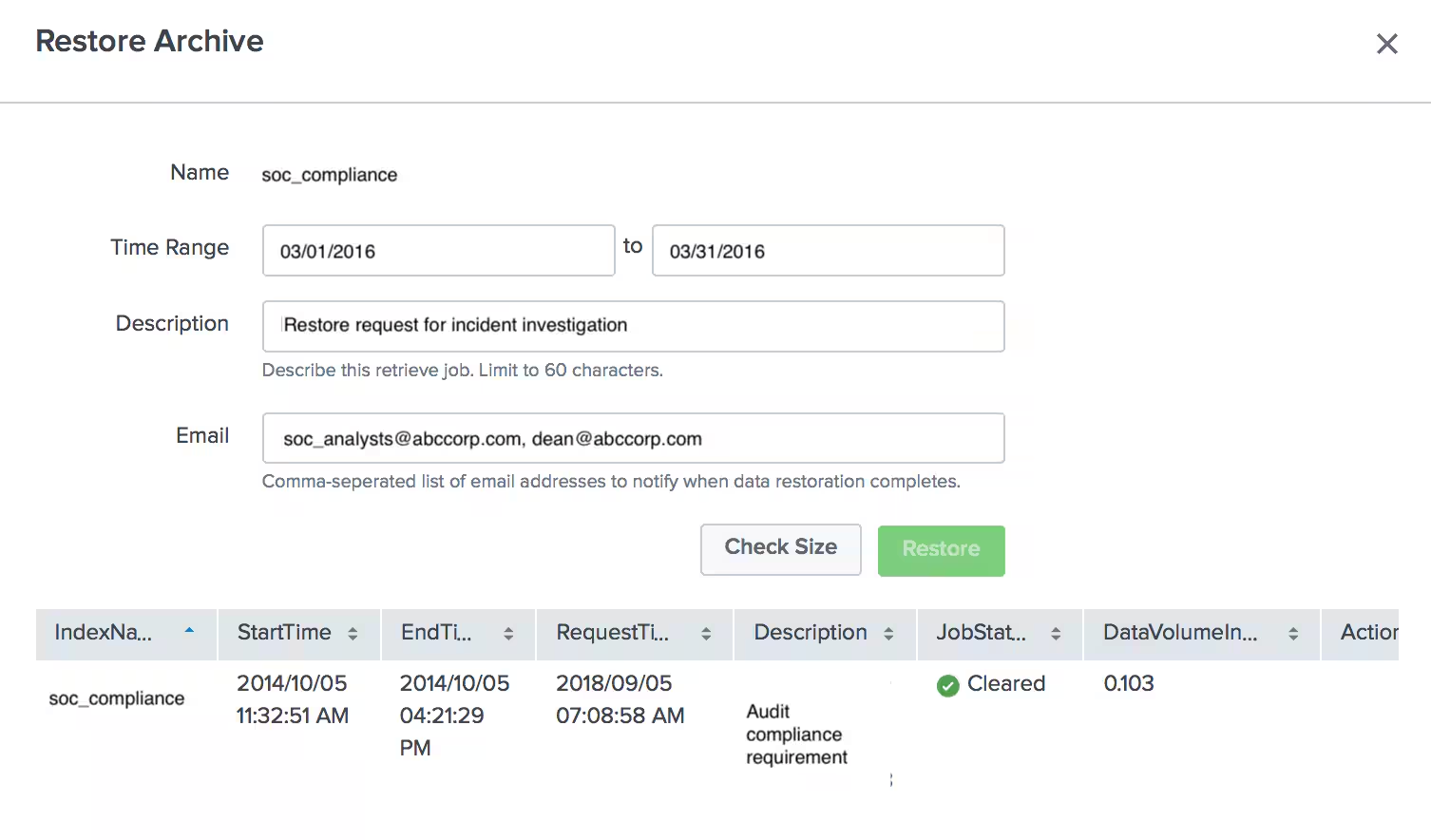
Customers need only to specify the time slice, select a description, check the size and they’re all set! If the customer wants to notify others once the data restore is complete, they can specify their email ids. The history of restore requests for that index is available to see details like status, data volume restored, etc.
A couple of key points about data restore:
- Splunk has included the ability to restore up to 10% of a customer’s Dynamic Data Active Searchable (DDAS) entitlement at any given time in the subscription price. For example, a workload-based subscription that has a 10 TB DDAS entitlement will be able to restore 1TB of data anytime.
- When data is restored using DDAA, a copy is available in the Splunk Cloud Platform instance for 30 days, after which it is deleted automatically. If there is no need to hold the data for 30 days, customers can delete it manually by clicking Clear under the Actions column in the Restore Archive window. This method of temporary data restoration helps prevent customers mistakenly deleting archived data.
Once the data is restored into a Splunk cloud instance, it can be searched like any other event data!
If you would like to learn more about DDAA and DDSS please check out our detailed documentation on Splunk Cloud Platform storage.
At Splunk we value customer feedback and continually look to deliver innovations that meet and exceed our customers’ expectations. Dynamic Data Self Storage and Dynamic Data Active Archive are examples of successful collaboration with our customers!
Note: This blog was originally published on October 11, 2018 and has been updated from its previous version.
Related Articles

Announcing the General Availability of Splunk POD: Unlock the Power of Your Data with Ease

Introducing the New Workload Dashboard: Enhanced Visibility, Faster Troubleshooting, and Deeper Insights

Leading the Agentic AI Era: The Splunk Platform at Cisco Live APJ

Dashboard Studio: Token Eval and Conditional Panel Visibility

Introducing Resource Metrics: Elevate Your Insights with the New Workload Dashboard

Powering AI Innovation with Splunk: Meet the Cisco Data Fabric

Remote Upgrader for Windows Is Here: Simplifying Fleet-Wide Forwarder Upgrades

Dashboard Studio: Spec-TAB-ular Updates
