Driving Data Innovation With MLTK v5.3

Although we always yearn for feature updates, sometimes the world of software products just needs an update or patch, and that is exactly what we have done with our latest versions of the MLTK and Python for Scientific Computing (PSC). So keep calm, update MLTK and relax in the knowledge that we have updated our bundled Python libraries to be safer and more reliable for you to use.
Please be aware that models created in MLTK version 5.2.2 and earlier are not compatible with this version of MLTK (version 5.3.0) and after. This is caused by a number of breaking changes that were introduced to MLTK when we updated the Python libraries that we bundle in PSC. Therefore, if you are upgrading to this version of MLTK, you must also re-create your existing MLTK models, which you can do by simply re-running your fit commands to generate a new version 5.3 compatible model!
But what on earth am I going to do with this wonderful updated app I hear you cry? Simply start climbing that data innovation ladder and get yourself to work finding anomalies in your data of course.
Anomaly detection is something that comes up in almost 90% of the conversations I have with customers about machine learning. It’s also something that is used extensively in our products to help customers gain insights from their data, from creating adaptive thresholds in ITSI through to sophisticated security detections in UBA.
When it comes to machine learning it can often be daunting to know where to start. There are endless amounts of information and data science articles suggesting a wide variety of approaches that can often contain pretty detailed mathematics (shudder). Even ‘gentle introduction’ type articles can seem a little frightening too!
Despite the steep learning curve, machine learning can be a really useful way of getting additional insights from your data, and that is never more true than when we talk about anomaly detection.
Some of my favourite example use cases that rely on anomaly detection can be found in our customer .conf archives, such as reducing exception logging, reducing manual effort detecting potential threats, spotting advanced persistent threats or improving cell tower performance.
So, we definitely have some great ways of finding anomalies, but which is the best for you and your data?
Choosing The Best Technique
Many of you will have read some of the cyclical statistical forecasts and anomalies blog series, or perhaps looked into our anomalies are like a gallon of Neapolitan ice cream blog series. Many of these blog posts contain detailed walkthroughs for applying specific anomaly detection techniques to your data, and here we’d like to outline some selection criteria for the best approach to choose based on your data.
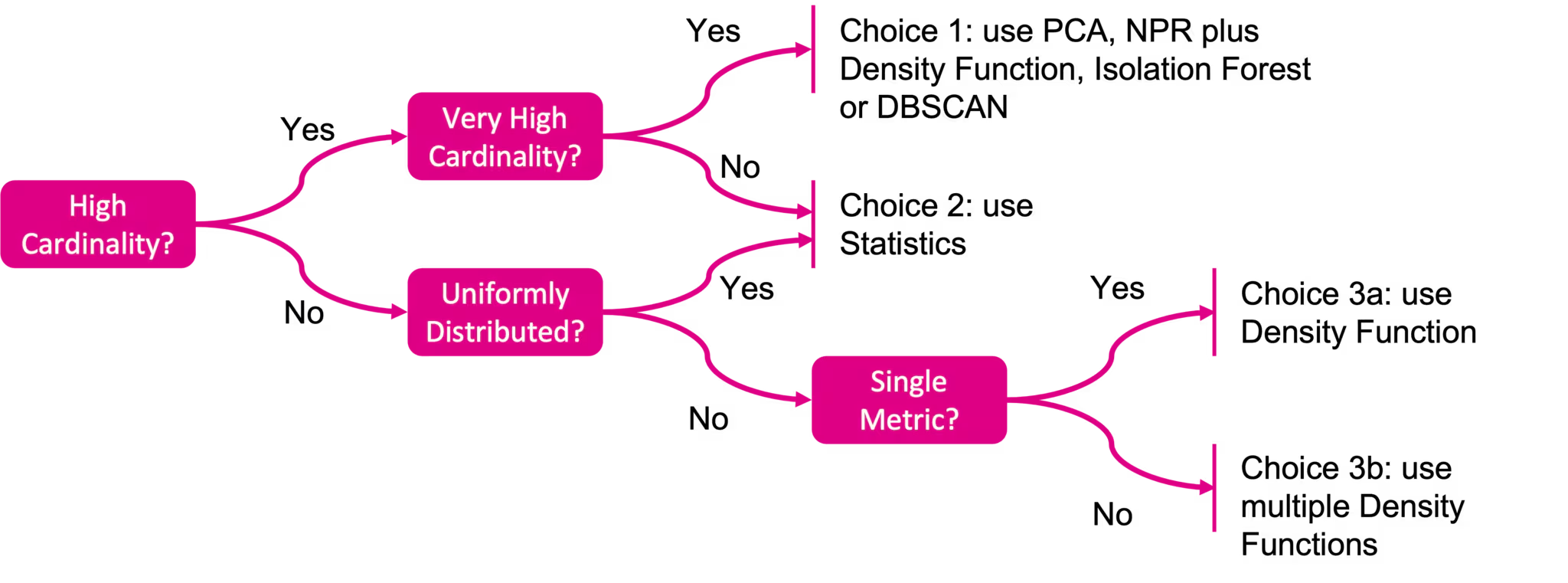
Below is a simple decision tree to help you select the right approach for your data, noting that the details for each choice can be found in the following blog posts:
- Choice 1: Look at the anomalies are like a gallon of Neapolitan ice cream blog series or Cyclical Statistical Forecasts and Anomalies – part 5
- Choice 2: Look at Cyclical Statistical Forecast and Anomalies – part 1
- Choice 3 a or b: Look at Cyclical Statistical Forecasts and Anomalies – part 4
We’ve also included some details on what the decision points in the flow chart mean below.
Cardinality
As described in the fifth part of the cyclical statistical forecasts and anomalies blog series, cardinality refers to the number of groups in your data. For high cardinality you can read over 1000 groups, and for very high cardinality you can read over 100,000 groups.
Uniform Distributions
Data that is uniformly distributed is perfectly distributed either side of it’s average. This type of distribution is often referred to as a bell curve in statistics, and more often called a normal distribution. If you’re keen to learn more about what a normal distribution is feel free to check out this short video.
If you want to know how to assess the cardinality and distribution of your data check out our blog post on exploratory data analysis for anomaly detection.
Summary
Hopefully this blog has provided you with a useful way of getting started with machine learning and figuring out the best method for detecting anomalies in your data!
For those of you who would like more information on anomaly detection there is a whole host of further reading:
- EDA for anomaly detection blog
- Cyclical statistical forecasts and anomalies blog series
- Anomalies are like a gallon of Neapolitan ice cream
- Building machine learning models with DensityFunction
- Our .conf archive
Don’t forget to check out our upcoming sessions at .conf21 as well of course, where we have a load of content related to anomaly detection.
Happy Splunking!
Follow all the conversations coming out of #splunkconf21!
Related Articles

Announcing the General Availability of Splunk POD: Unlock the Power of Your Data with Ease

Introducing the New Workload Dashboard: Enhanced Visibility, Faster Troubleshooting, and Deeper Insights

Leading the Agentic AI Era: The Splunk Platform at Cisco Live APJ

Dashboard Studio: Token Eval and Conditional Panel Visibility

Introducing Resource Metrics: Elevate Your Insights with the New Workload Dashboard

Powering AI Innovation with Splunk: Meet the Cisco Data Fabric

Remote Upgrader for Windows Is Here: Simplifying Fleet-Wide Forwarder Upgrades

Dashboard Studio: Spec-TAB-ular Updates
