Analyzing Text with Deep Learning: New Use Cases in Splunk DSDL
Text Analysis with Deep Learning
Splunk offers excellent visibility into text data, whether it's machine-generated data like log messages or human-generated texts like customer support records. Analyzing text data can prove incredibly valuable in various scenarios, such as identifying patterns by correlating similar log messages or understanding customer intents by analyzing their requests.
While exact or partial matching using regular expressions can be helpful to some extent, the natural flexibility of language, including synonym usage and expressions within specific contexts, presents significant challenges. These challenges can impact the effectiveness and accuracy of the analysis without human intervention.
These challenges can now be overcome with the power of deep learning in Splunk! In the latest release (v5.1.1) of the Splunk App for Data Science and Deep Learning (DSDL), we have introduced two new use cases for deep-learning-based text analysis. The first one is Text Similarity Scoring, which enables you to assess the similarity between two texts based on their semantic content and contextual meanings. This feature provides a nuanced understanding of text relationships that goes beyond simple keyword matching. The second use case is Zero-shot Labeling, allowing you to classify a text with customizable labels without the need for any model training. This means you can categorize text data effectively even without prior training data, providing a high degree of flexibility and adaptability to various text analysis tasks.
Now make sure you have Splunk DSDL installed together with its dependencies including Splunk MLTK and Python for Scientific Computing. To use the new use cases, you also need to have a golden-cpu-transformers or a golden-gpu-transformers container (v5.1.1) running on your Splunk DSDL. With all the preparations done, let's delve into the demonstration of these two use cases.
Text Similarity Scoring
Assessing similar texts can be valuable in multiple ways, including identifying comparable events from the past and categorizing those events based on their contents. In this blog, we will explore two distinct scenarios to illustrate the practical applications of this approach.
Scenario 1: Finding similar past log messages for troubleshooting
Encountering an error message in the logs can indeed be a headache. However, similar issues may have been faced in the past. By locating a historically similar log message, it could provide a link to the solution, facilitating a quick troubleshooting of the current problem.
In this scenario, let's consider an error message: "RuntimeError: assist binary not found". Assuming we have a list of log messages available in Splunk, we can assess the similarity of the current message with each message in the record list using just a single line of SPL, as shown in the image below.
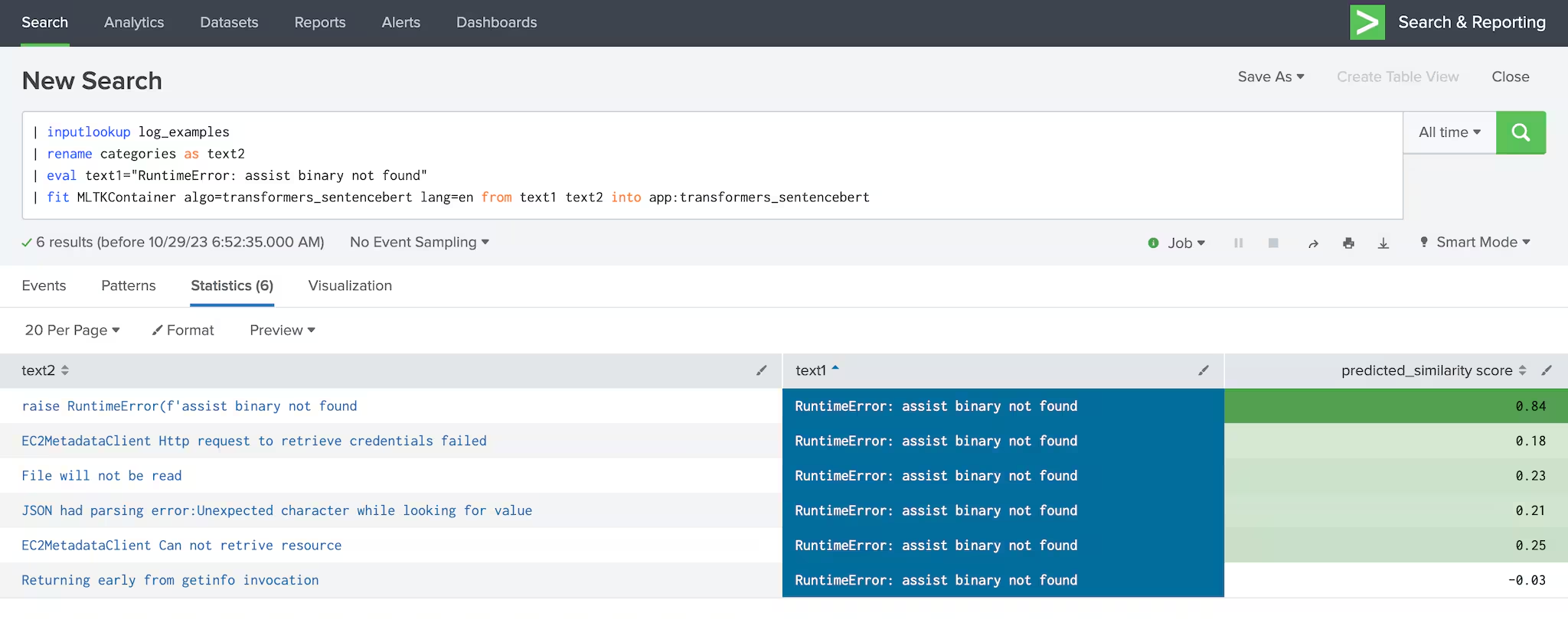
The past log messages should be listed in a field named "text2", while the recent log we wish to assess should be under the field "text1". To employ the deep learning algorithm in Splunk DSDL, execute the following command:
| fit MLTKContainer algo=transformers_sentencebert lang=en from text1 text2 into app:transformers_sentencebert
where the lang parameter specifies the input language (supporting en for English and jp for Japanese). The naming of the input fields "text1" and "text2" must be strictly followed.
The command will return a field named "predicted_similarity score", with maximal value 1.00, indicating an exact match between the sequences. In the provided example, the log message "raise RuntimeError(f'assist binary not found" achieved a high similarity score of 0.84, signifying its significant resemblance to the input log message. Conversely, unrelated log messages received lower scores, indicating their lack of similarity to the input message.
Scenario 2: Categorizing customer inquiries based on predefined intents
In customer support centers, managing numerous customer inquiries and complaints is a common challenge. Determining the intents behind these inquiries is crucial for efficient problem triaging and service analysis. In this specific situation, let's consider a customer inquiry: "Is my refund still pending?" The goal is to map this inquiry to an intent from a predefined list of intents, which is provided in the field "text2" (as shown in the image below).
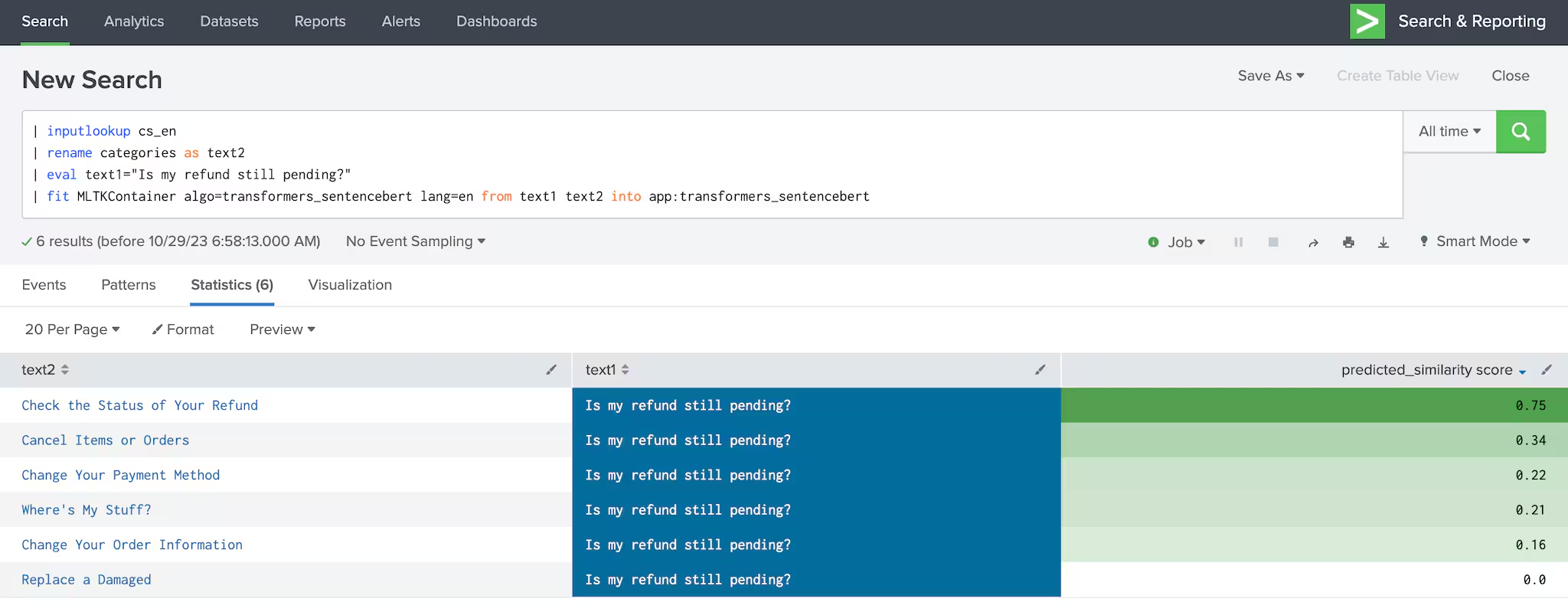
As depicted in the figure above, based on the list of target intents stored in the field "text2" and the input inquiry provided in the field "text1", the SPL command used in the previous scenario was executed. This command returned a list of similarity scores. Among these scores, the highest one has been assigned to the intent "Check the status of Your Refund.".
Zero-shot Labeling
Similar to intent discovery, text classification holds great significance in text analysis. In the release of v5.1.0, Splunk DSDL introduced Natural Language Processing (NLP) assistant features, enabling the training of text classification models based on customized datasets (as detailed in the blog). However, creating a robust classification model can be challenging when training data is limited.
In response to this challenge, the new release has incorporated the zero-shot classification feature. This addition allows users to perform text classification based on customizable labels and prompts without the need for extensive model training. To learn about the feature, let's delve into the following scenario.
In this scenario, a customer complaint has been received: "I have not received my package." The objective is to automatically classify this sentence with a label among "delivery," "refunding," and "ordering." The label determination is achieved with just one line of SPL command, as illustrated in the accompanying image.
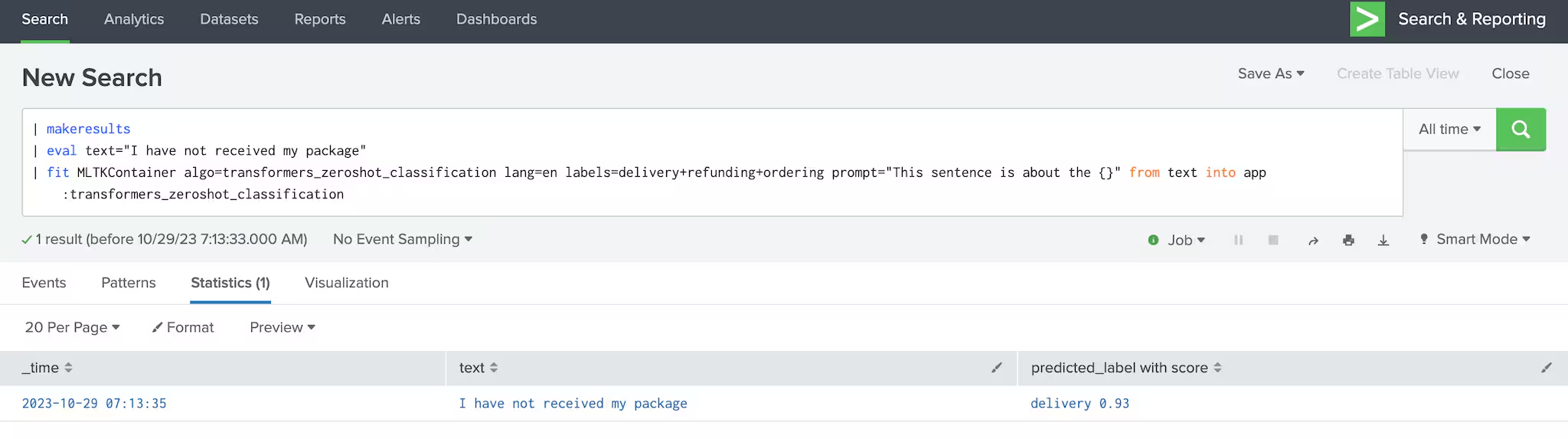
Let us break down the following SPL command that was executed:
| fit MLTKContainer algo=transformers_zeroshot_classification lang=en labels=delivery+refunding+ordering prompt="This sentence is about the {}" from text into app:transformers_zeroshot_classification
Firstly, the input text should be placed in a field named "text". The command contains three tunable parameters: "lang", "labels" and "prompt". The "lang" parameter specifies the language of the text, supporting "en" for English and "jp" for Japanese. The "labels" parameter determines the customized labels for the classification. Each label should be separated by a "+" symbol as the delimiter used in the script. Finally, the "prompt" parameter allows you to adjust the prompt used in the zero-shot classification, with curly brackets "{}" placed within a sentence, suggesting the position of the label.
In this example, the deep learning model will determine whether "This sentence is about the {delivery}" is a suitable description for the input text and by iterating through all the given labels, it finds the most suitable option "refunding" and output it together with a confidence score 0.93.
Conclusion
In this blog post, we introduced two recent features for text analysis powered by deep learning in Splunk DSDL: text similarity scoring and zero-shot text labeling. Through different use cases, we demonstrated the simplicity and effectiveness of integrating deep learning models within Splunk DSDL.
Related Articles

Announcing the General Availability of Splunk POD: Unlock the Power of Your Data with Ease

Introducing the New Workload Dashboard: Enhanced Visibility, Faster Troubleshooting, and Deeper Insights

Leading the Agentic AI Era: The Splunk Platform at Cisco Live APJ

Dashboard Studio: Token Eval and Conditional Panel Visibility

Introducing Resource Metrics: Elevate Your Insights with the New Workload Dashboard

Powering AI Innovation with Splunk: Meet the Cisco Data Fabric

Remote Upgrader for Windows Is Here: Simplifying Fleet-Wide Forwarder Upgrades

Dashboard Studio: Spec-TAB-ular Updates
