Introduction to the OpenTelemetry Sum Connector
Introduction to the Sum Connector
When you have a piece of data tucked into your logs or span tags, how do you dig for that bounty of insight today? Commonly this sort of data will be numeric, like a purchase total or number of units. Wouldn’t it be nice to easily turn that data into a metric timeseries? The Sum Connector in OpenTelemetry does just that, allowing you to create sums from attributes attached to logs, spans, span events, and even data points!
In this blog post we’ll run down how to sum attribute values inside the OpenTelemetry collector by going over the following use case:
- The final span emitted by our checkout process contains attributes for
order.total,discount.total, and marketing/coupon codes under the attributepromo.code. - We’ll use the
sumconnectorto create metrics forpurchase.order.totalandpurchase.discount.total, while passing along the marketing/coupon codes with those metrics as an attribute calledpromo.code - Using these metrics and attributes we will be able to create charts for total purchases, total discounts by promotion, total purchases undiscounted, and the percentages of purchase volume by promotion
To sum up (these puns won’t stop); in this case we’ll be using data from our trace span tag attributes to create metrics. From those metrics, we’ll be able to derive a number of useful business metrics we didn’t have access to previously. In other words, we’re uncovering buried treasure in our telemetry! Why would you re-ingest this business data into your observability system? Read on to find out!
How does the Sum Connector work?
Before we get to an example OpenTelemetry configuration, let's quickly go over what the Sum Connector does and how it should fit into your telemetry pipeline. At its most basic, this connector can be used to transform telemetry from one type to another. For example:
- Traces to metrics
- Logs to metrics
- Events to metrics
- Metric Datapoints to metrics
This is done by leveraging the attributes attached to these types of telemetry. A source_attribute designates which attribute the numerical value for a new metric would come from. In our use cases, we’ll be using source attributes called order.total and discount.total from our spans to denote the total purchase before discount and the discount applied to the purchase. Additionally, we’ll leverage the attribute from promo.code to keep track of which discount was applied for any given time series by attaching it as an attribute to our new metrics derived from the source_attribute.
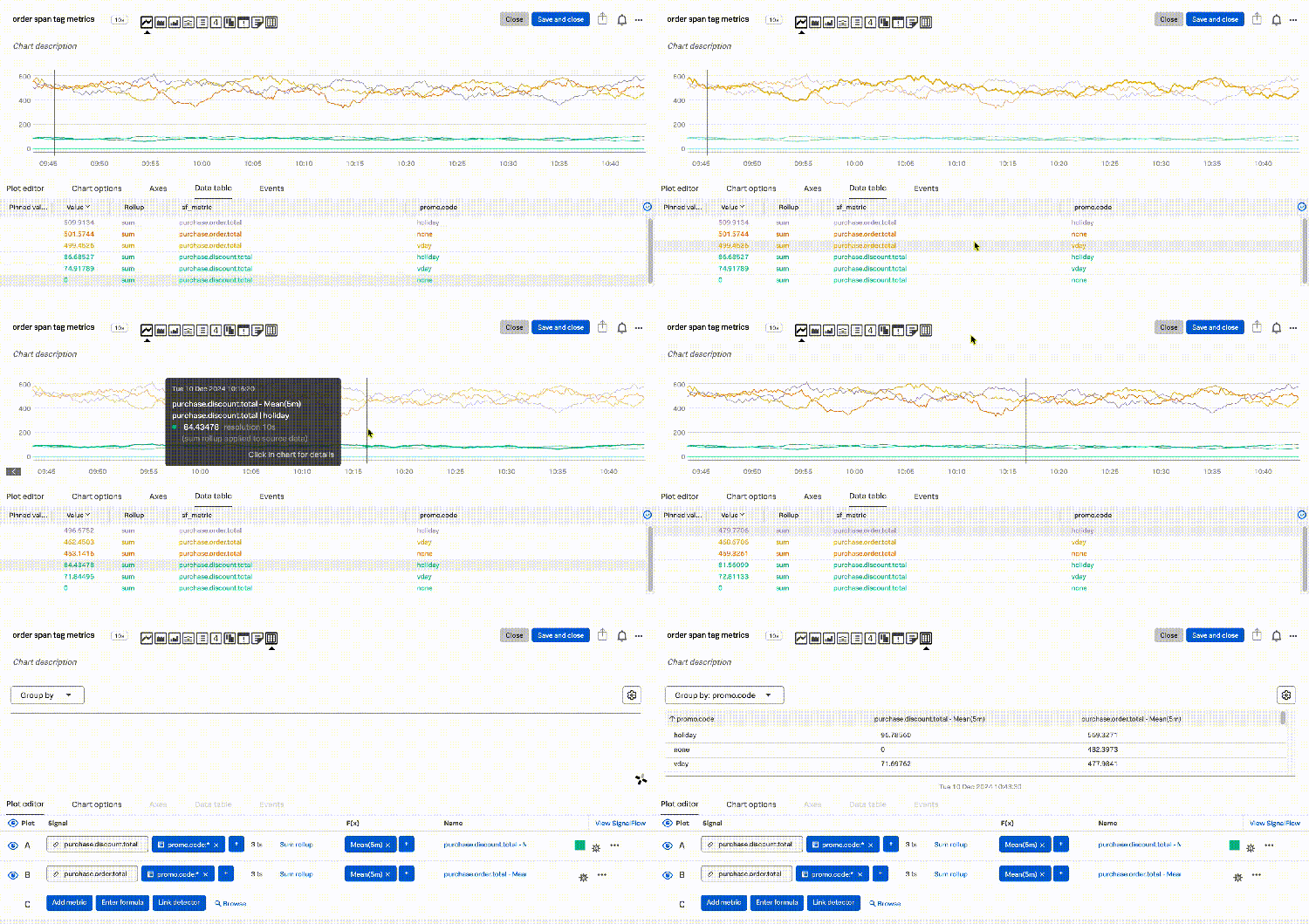
Figure 1-1. Our newly created metrics for purchase.order.total and purchase.discount.total, along with a dimension attribute for promo.code.
Connecting the pieces with an example
With that quick recap in place, let's walk through an example OpenTelemetry configuration for what was described above:
receivers:
  otlp:
    protocols:
      grpc:
        endpoint: "${SPLUNK_LISTEN_INTERFACE}:4317"
      http:
        endpoint: "${SPLUNK_LISTEN_INTERFACE}:4318"

connectors:
  sum/totals:
    spans:
      purchase.order.total:
        source_attribute: order.total
        conditions:
          - attributes["order.total"] != "NULL"
        attributes:
          - key: promo.code
            default_value: none

  sum/discounts:
    spans:
      purchase.discount.total:
        source_attribute: discount.total
        conditions:
          - attributes["discount.total"] != "NULL"
        attributes:
          - key: promo.code
            default_value: none

exporters:
  # Traces
  sapm:
    access_token: "${SPLUNK_ACCESS_TOKEN}"
    endpoint: "${SPLUNK_TRACE_URL}"
  signalfx:
    access_token: "${SPLUNK_ACCESS_TOKEN}"
    api_url: "${SPLUNK_API_URL}"
    ingest_url: "https://ingest.us1.signalfx.com"

service:
  pipelines:
    traces:
      receivers: [otlp]
      exporters: [sapm, sum/totals, sum/discounts]
    metrics:
      receivers: [otlp, sum/totals, sum/discounts]
      exporters: [signalfx]
-
Our
receiversare setup to receiveotlpdata -
We’ve created two
connectorsforsum/totalsandsum/discountswhich work very similarly so we’ll focus onsum/totalswhich looks at ourspanswith the intent of creating a metric namedpurchase.order.total.- Whenever a span contains a span tag attribute that matches
source_attributethe connector will pull the numerical value from the field (E.G.order.total) and use that as the metric value for the time series as long as the value is notNULL - The
attributessection allows us to pass along the span tag attribute forpromo.codeas an attribute of our metric time series. If there is no attribute to pull a value from it will default tonone
- Whenever a span contains a span tag attribute that matches
-
Our
tracespipeline receives theotlpdata and sends it into a couple of different exporters- The
sapmexporter sends the trace to our monitoring backend (Splunk Observability Cloud) - The
sum/totalsandsum/discountsexporters in that pipeline are actuallyconnectorsdefined earlier in the configuration and perform as noted above
- The
-
Our
metricspipeline receives data fromotlpand ourconnectors(sum/totalsandsum/discounts)- The
signalfxexporter then sends all of our metrics including our newly created ones to Splunk Observability Cloud.
- The
And with that, we’ll start to see our new metrics in the Splunk Observability and can operationalize them for trending and reporting or even business level alerting.
We can now track the total revenue against our application and infrastructure metrics and quickly correlate dips in revenue to incidents or changes in the environment. Even further, as a business level example, if our friends in marketing wanted to know what percentage of total sales is using a given promotion code in real time we can quickly chart that. We can also use this data to tie infrastructure and application performance data to critical business metrics. With that same charting method we could create an alert to let us know when promotions or non-promoted sales reach an unusually low level. In Figure 1-2 you can see what this sort of calculation might look like in practice.
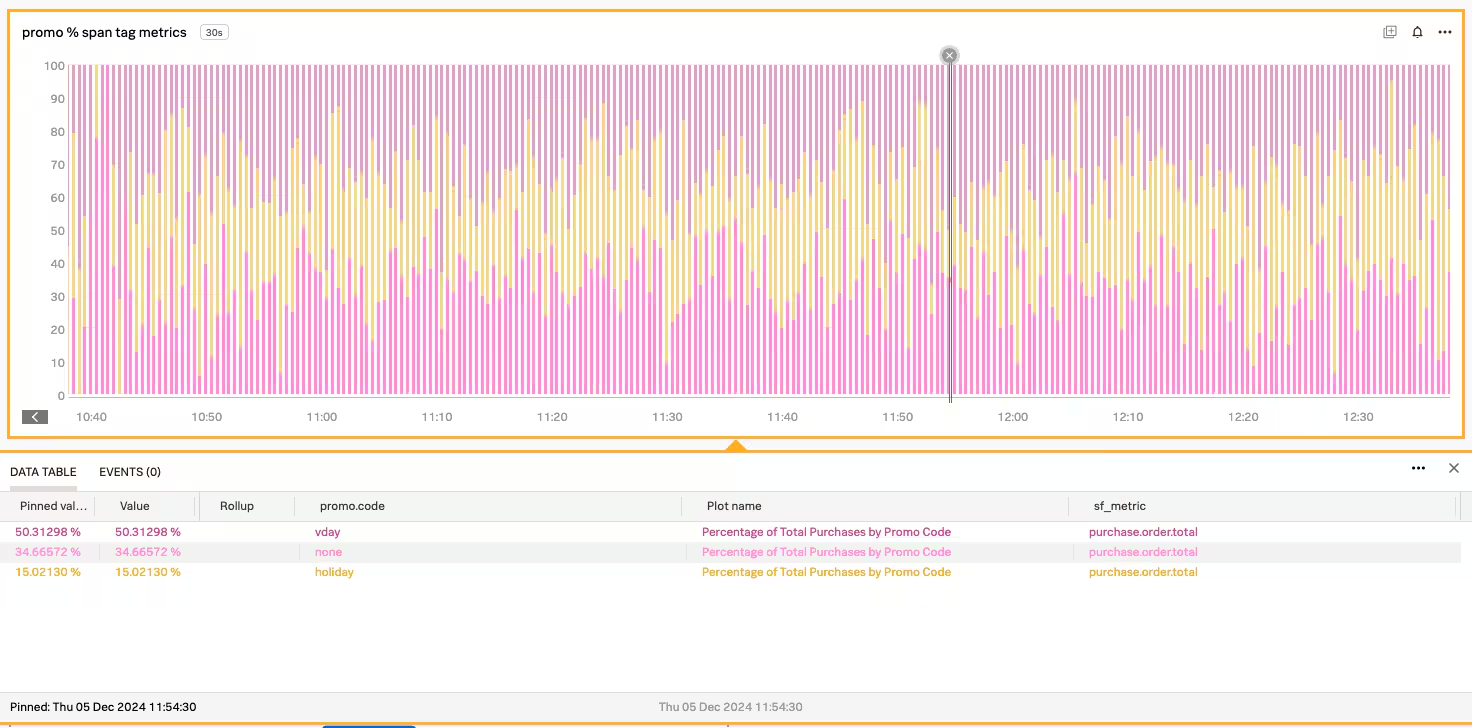
Figure 1-2. With our newly created metrics for purchase.order.total along with a dimension attribute for promo.code we can quickly see the percentage of purchases using any given promotion.
Where else is summing attributes useful?
Ultimately your uses for summing and the sum connector are specific to your business and architecture. Our example above is fairly intuitive and common, but there are countless use cases! Here are a couple of examples to get your brain going:
- Mainframe logs to metrics: Mainframe telemetry is often captured in the form of logs. Summing data such as amount totals, process/completion timings, error counts, and other numerical data into timeseries metrics before sending those logs on to a logging solution (like Splunk Cloud Platform or Splunk Enterprise) makes it easier to visualize alongside traditional application telemetry.
- Continuous Integration / Continuous Delivery (CI/CD): CI/CD data often relies on a combination of logs and metrics (with traces now becoming more common). Summing test failure and skip counts, artifact counts and artifact size, even plan create and apply times makes it easier to see at a glance how the health and usage of our pipelines is trending along with our application and business metrics.
- Business metrics: As seen in this blog post, business metrics such as total sales by promotion, promotion activity, evaluations of discount against total revenue, and even forecasting for future promotions is possible using a couple of attribute-driven metrics.
- Beyond…: Anything numerical you can jam into a span or log can be turned into a metric and enriched with other attributes! This could include anything from inventory data, to time spent waiting in a queue, even analyzing user trends like hotel room occupancy or student enrollment. The possibilities are endless!
What sort of data do you have hiding in the telemetry you’re already using for monitoring? What sort of logging or tracing data would you like to more simply chart in various ways? Using the sum connector, you can uncover and operationalize entirely new observability data from traditional sources like applications and infrastructure, but also non-traditional sources like mainframes, business processes, and generally anything else that emits logging data.
Next steps
If you’re interested in uncovering the buried treasures in your already existing observability data you can leverage the OpenTelemetry sum collector along with the vast powers of Splunk Observability to dig deeper than ever before! Sign up to start a free trial of Splunk Observability Cloud and you’ll be uncovering sum-thing incredible in no time!
For additional help turning telemetry into count metrics see the previous post on counting telemetry attributes with OpenTelemetry!
This blog post was authored by Jeremy Hicks, Staff Observability Strategist Engineer at Splunk with special thanks to: Curtis Robert and Sam Halpern
Related Articles
What the North Pole Can Teach Us About Digital Resilience

The Next Step in your Metric Data Optimization Starts Now

How to Manage Planned Downtime the Right Way, with Synthetics

Smart Alerting for Reliable Synthetics: Tune for Signal, Not Noise

How To Choose the Best Synthetic Test Locations

Advanced Network Traffic Analysis with Splunk and Isovalent

Conquer Complexity, Accelerate Resolution with the AI Troubleshooting Agent in Splunk Observability Cloud

Instrument OpenTelemetry for Non-Kubernetes Environments in One Simple Step