User Acceptance Testing (UAT): Definition, Types & Best Practices
Learn Austin ChiaKey Takeaways
- User Acceptance Testing (UAT) is the final phase of software testing, where real users validate that a system meets business requirements and works as intended in real-world scenarios before deployment.
- Effective UAT requires thorough planning, clear acceptance criteria and test cases, a dedicated test environment, and active collaboration between stakeholders and end users.
- Successful UAT helps identify issues missed in earlier testing phases, ensures the software meets user expectations, and secures stakeholder confidence before release.
With the rapid changes in software development and the competitive nature of technology products, companies must release high-quality products that meet customer expectations. One way to ensure that is through User Acceptance Testing (UAT).
In this article, we'll guide you through the critical aspects of UAT, from its significance in the software development life cycle (SDLC) to the steps in the UAT process and best practices.
What is UAT?
Short for “user acceptance testing”, UAT is the final phase of the software testing process. In the UAT phase, real users test the software to ensure it works as expected in real-world scenarios.
Unlike other testing phases that focus on finding bugs, UAT aims to validate the end-to-end business flow. This step is vital to confirming that the software meets all the agreed-upon requirements and is ready for deployment.
The essence of UAT lies in its focus on the user. It’s all about making sure that the software solution works technically — and also satisfies the needs and expectations of its users.
This is the stage where assumptions are challenged and practical usability is put to the test. If UAT is overlooked or rushed, it can lead to significant issues post-launch, affecting user satisfaction and product credibility.
Roles in UAT
UAT is typically done in collaboration with business stakeholders, end-users, and the development team. It’s essential to involve all parties in this stage to ensure that all aspects are covered, and feedback is gathered from different perspectives.
Some examples of individuals that need to be involved include:
- Business Analysts
- Product Owners/Managers
- Subject Matter Experts (SMEs)
- Customer Support Representatives
- End-users or customers
UAT benefits the software development lifecycle
A pivotal part of the SDLC, user acceptance testing bridges the development side with the production side, ensuring that the software is user-ready.
Here are the reasons that make UAT indispensable:
Quality assurance (QA). UAT acts as the final quality check before a product goes live. It's designed to catch any issues that earlier testing phases might have missed. These could range from functional defects to usability problems that could affect the user experience.
This is typically done by quality assurance (QA) engineers who:
- Are experienced in understanding user expectations.
- Closely monitor the software during testing.
User satisfaction. The primary goal of UAT is to validate the software against user requirements. This is not where you first think about the end-user; instead, UAT ensures that the final product aligns with what the users need and expect.
When users are involved in the testing phase, their feedback can lead to crucial changes that enhance the overall user experience (UX).
Risk mitigation. Early detection of issues through UAT can save time and resources by preventing more significant problems down the line. If these issues are detected and fixed before launch, companies can avoid:
- Costly post-release fixes
- Potential damage to their brand and reputation
The user acceptance test process
Next, to better understand the UAT, let's look at each step of the process in detail.
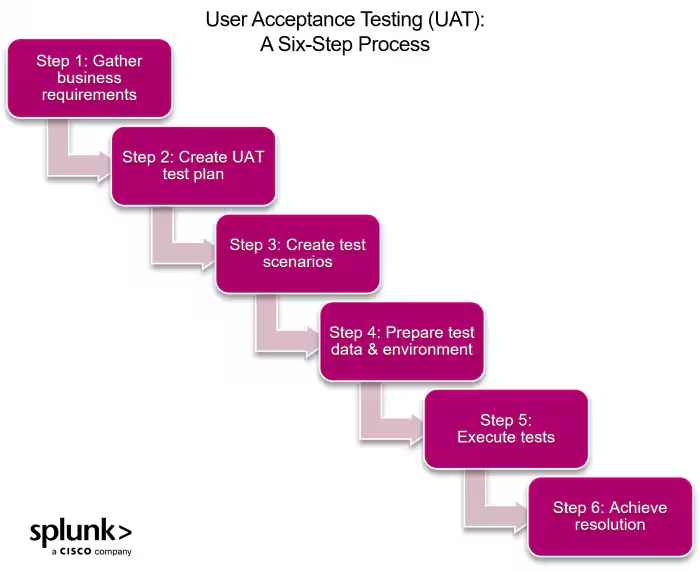
Step 1. Gather business requirements
The first step in UAT is understanding the business requirements and functional specifications of the software. These include identifying user roles, expected outcomes, and any special scenarios that need to be tested.
Having a clear understanding of the requirements is crucial as it serves as the basis for creating test scenarios. Some examples of requirements may include:
- User login and registration functionality
- Payment processing for e-commerce applications
- Data encryption for security purposes
Step 2. Create a UAT test plan
The next step is to draft out a UAT test plan. A UAT test plan outlines the objectives, scope, and strategy for testing. It should include a detailed list of:
- Business requirements
- Test scenarios
- Expected results
The test plan serves as a reference point throughout the testing process and ensures that all areas are adequately covered. For example, you can categorize test scenarios based on user roles or specific features that need to be tested.
Step 3. Create test scenarios
Test scenarios are a set of actions or steps that users can take to test specific features. These should be derived from the business requirements. Write them so they are both easy to understand and easy to execute.
For example, a test scenario for an e-commerce website could be:
- User successfully adds items to their cart.
- User navigates to the checkout page and enters the shipping information.
- User completes payment using different payment methods (Credit card, PayPal, etc.).
- The user receives an order confirmation email.
It's also good practice to have a diverse range of test scenarios that cover different user roles, edge cases, and workflows. This ensures comprehensive testing of all aspects of the software.
Step 4. Prepare test data & environment
Having a well-prepared test environment is essential for accurate UAT. This includes having realistic and relevant test data to simulate real-world usage. This can be:
- User information
- Sample orders
- Dummy accounts
- Any other data that is necessary for testing specific features
The test environment should also mimic the production environment as closely as possible to ensure accurate results.
Step 5. Execute tests and report/document findings
During the test execution phase, users execute the predetermined test scenarios and report any issues or feedback. It's critical to have a way to document and track these results, whether it be through:
- A shared spreadsheet
- A bug- or ticket-tracking tool
- Other means
During this phase, business analysts will also review the results and provide their feedback. This ensures that all requirements are met, and any necessary changes are made before launch.
The reporting process should also include identifying and prioritizing any defects found. This helps the development team address critical issues first before moving on to minor ones.
Step 6. Achieve resolution and compliance
After the test execution and reporting phase, the development team addresses any defects found. Once resolved, these changes should be retested by users to ensure that they have been successfully fixed.
During this phase, open communication between the testing team and developers is a key element in having a smooth resolution process.
Types of UAT
UAT can be categorized into several types, each serving a unique purpose and offering distinct advantages:
Alpha testing
Alpha testing is conducted in-house by the development team and a limited group of end-users. It aims to identify bugs early in the development process, providing developers with immediate feedback to make necessary adjustments.
Beta testing
Beta testing involves a broader audience outside the organization, usually real users in a live environment.
This phase is crucial for gaining insights into how the software performs in real-world conditions. Feedback from beta testers can highlight unforeseen issues and help refine the product.
Contractual acceptance testing
Contractual Acceptance Testing is performed based on specific contractual agreements between the client and the vendor. It ensures that the software meets the agreed-upon requirements and criteria outlined in the contract.
Any discrepancies found during this testing must be addressed before final acceptance.
Regulatory acceptance testing
Regulatory testing is conducted to ensure that the software complies with relevant laws, regulations, and standards. This type of UAT is essential in industries with stringent compliance requirements, such as healthcare, finance, and aviation.
Understanding these different types of UAT will help your organization choose the most appropriate method(s) based on your specific needs and goals, through proper validation of software.
UAT best practices: Planning, execution, and reporting
Implementing best practices in UAT can significantly enhance the effectiveness and efficiency of the testing process. Here’s a step-by-step guide:
Planning
Effective UAT starts with meticulous planning. Better planning requires anticipation of issues that could arise from poorly defined requirements, lack of proper test data or environment, and inadequate communication between testers and developers.
Here are some steps you can take to avoid these pitfalls:
- Identify the scope of testing, define clear objectives, and select the right participants.
- Create detailed test cases that cover all possible user scenarios and ensure that all necessary resources and tools are available.
Execution
During the execution phase, conduct tests according to the plans you’ve already laid out. You can also encourage your testers to:
- Provide detailed feedback.
- Document any issues they encounter, even if the issue seems unrelated to the item(s) they’re currently testing.
Reporting
After the tests are completed, compile a comprehensive report that includes all findings, feedback, and issues identified during UAT. Prioritize the issues based on their severity and impact on the user experience.
The report should provide actionable insights for developers to make the necessary adjustments before the final release.
UAT automation & its role in modern development
Automation has revolutionized many aspects of software development, and UAT is no exception. Here’s how UAT automation is changing through automation:
Efficiency and speed
Automating repetitive and time-consuming tasks in UAT can significantly speed up the testing process. Automated test scripts can run multiple test cases simultaneously, which offers two benefits:
- Gathering feedback quickly
- Reducing time required for more manual testing
Consistency and accuracy
Automation ensures that test cases are executed consistently and accurately every time. This reduces the risk of human error and ensures that all test cases are thoroughly validated.
Scalability
Automated UAT can easily scale to accommodate large and complex software applications. It allows organizations to run extensive test suites without the need for a proportional increase in resources.
While automation offers numerous benefits, there must be a balance between automated and manual testing. Certain aspects of UAT, such as user experience and usability, still require human judgment and cannot be fully automated.
Final thoughts
User Acceptance Testing is more than just a final checkpoint before software deployment; it's a critical component of the development process that ensures the end product aligns with user needs and expectations.
As technology continues to become more existent in our lives, UAT will play an increasingly vital role in delivering high-quality software that puts users first instead of blindly chasing the latest technology.
Related Articles

How to Use LLMs for Log File Analysis: Examples, Workflows, and Best Practices

Disaster Recovery Planning: Getting Started