What Is Cloud Infrastructure?
Learn Laiba SiddiquiWe all know that testing new ideas on physical IT infrastructure requires a massive upfront cost. That's why businesses adopt cloud infrastructure setups. These setups offer on-demand resources, which allow you to start new projects and pay for only what you use. This eliminates the need for expensive hardware and maintenance, enabling flexibility that organizations require.
In this article, we'll:
- Understand what cloud infrastructure is.
- Discuss its core components.
- Explore its three main types.
- Learn about the challenges and some best practices to overcome them.
Defining cloud infrastructure
Every business needs a cost-effective way to manage growing data and technology needs. Cloud infrastructure provides a comprehensive system of hardware and software resources that provides flexibility and operational efficiency for organizations of all sizes.
The demand for flexibility is continuously rising every year, which is why annual spending on the cloud infrastructure market is expected to hit $133 billion by 2026.

Annual spending on cloud IT infrastructure worldwide. (Source: Statista)
At its core, cloud infrastructure is made up of the following key components:
- Servers form the foundation for storing and processing data.
- Storage keeps business data safe and accessible.
- Networking tools allow communication and connectivity across systems.
- Virtualization technologies maximize resource usage.
Together, they create a unified framework that adapts to unique business requirements. This helps organizations focus on growth without being weighed down by infrastructure challenges.
(Related reading: SaaS, PaaS, IaaS cloud models, what’s the difference?)
Components of cloud infrastructure
The infrastructure you choose will support your current operations and determine how effectively your organization can adapt to future demands. So, it’s important to understand its main components. Let’s see each components helps to support your business:
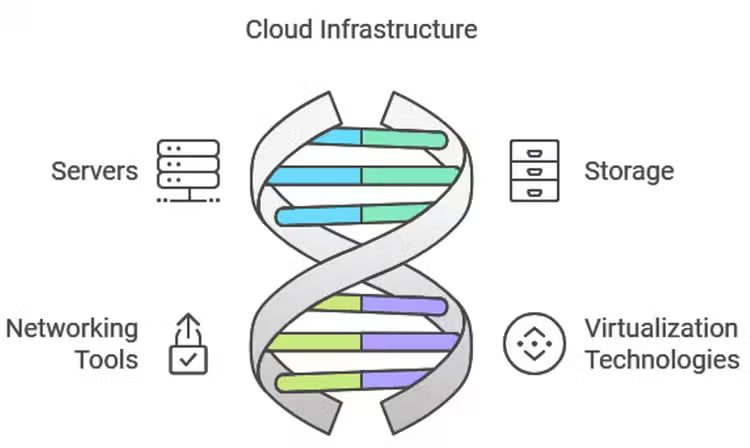
(Image source: Laiba Siddiqui)
Servers
In cloud infrastructure, servers are responsible for:
- Managing and processing data.
- Handling user requests to execute the necessary processes.
Cloud servers are virtualized, which means they exist as software-based instances running on physical hardware. So, when a business scales its operations, the cloud can quickly provision additional virtual servers to handle the increased load without any physical hardware upgrades.
Cloud providers like Amazon Web Services (AWS) host and maintain their servers remotely in data centers. They let you scale without making a heavy investment in hardware. For example, with on-premises servers, you'll need to set aside a budget for capacity, but with cloud servers, you can typically scale up or down without any upfront cost.
(Related reading: what’s CoLo? Data center colocation explained.)
Storage
Storage works like a hard drive on the internet, where users can save data and access it from anywhere in the world.
It holds data across distributed systems. Unlike traditional storage, cloud storage doesn’t rely on a single physical device but instead uses multiple servers across various locations. This is achieved through object storage, file storage, and block storage. Each storage type has its function:
- Object storage is used for large, unstructured data.
- File storage supports hierarchical files.
- Block storage handles databases and other applications that require low-latency access.
Every provider offers a different price and storage capacity. So, consider these factors when selecting an infrastructure.
Networking tools
Despite the appealing benefits, cloud infrastructure is also at risk of insider and outsider attacks. In 2024, phishing attacks were the most common security incident in the cloud.
That's why it's so important to have the right networking tools. They provide the infrastructure for secure and reliable communication between cloud infrastructure components and external devices. These tools manage traffic routing, load balancing, and firewall protection. Here’s how:
- Virtual Private Networks (VPNs) and Direct Connect allow businesses to extend their on-premise networks into the cloud securely.
- Load balancers distribute incoming traffic across multiple servers to ensure no single server becomes overwhelmed. This improves performance and redundancy.
- Content Delivery Networks (CDNs) help optimize content delivery by caching data at edge locations closer to the end users, reducing latency.
When done right, networking makes it easy for cloud infrastructures to support high volumes of users and transactions without performance degradation.
Virtualization technologies
With virtualization, users can create multiple virtual machines to run on a single physical host. Virtualization abstracts the physical hardware so cloud environments can run multiple operating systems and applications on the same server.
This reduces hardware costs and allows businesses to scale resources up or down easily. This way, unlike traditional infrastructures, the failure of one virtual machine (VM) does not affect other VMs.
At the core of virtualization are hypervisors — software that creates and manages virtual machines. Cloud providers use these to allocate resources dynamically based on demand. A great example of this is how many cloud offerings use virtualization to offer scalability, so you only pay for the resources you use.
Types of cloud infrastructure
Now that you know what makes a perfect cloud infrastructure, it's time to opt for one that helps your business in the long run. There are three main types of cloud infrastructure — private, public, and hybrid. So, let's find out which option fits your needs:
Public cloud infrastructure
Public cloud infrastructure is hosted by third-party vendors. This option is suitable if you want to:
- Save costs.
- Share resources like storage and computing power with others.
However, while this shared model reduces costs and simplifies management, it also introduces potential security risks. To address these concerns, you must invest in tools and strategies for incident identification and mitigation.
Private cloud infrastructure
With private cloud infrastructure, only a single organization — yours — has access to computing resources. That’s why private cloud is the most secure cloud option. This level of security is why industries like healthcare and finance often prefer this setup. Many government agencies require it, too.
Unlike public cloud, it doesn't work on a pay-as-you-go model. Instead, you need to invest in hardware and labor to manage the operations at your data center. While this requires more upfront costs, it offers complete control over the infrastructure which means your data will remain private and secure.
Hybrid cloud infrastructure
If you want a more resilient solution, use the hybrid cloud infrastructure. It combines the strengths of both private and public cloud models to give you the best of both.
- Store sensitive data in the private cloud, which is secure. You have complete control over critical operations.
- For tasks that don’t require as much security, like testing or scaling applications, you can take advantage of the public cloud’s cost-efficiency and scalability.
This is exactly how Lenovo deals with unexpected traffic spikes — it deploys thousands of servers during peak times and uses Splunk Observability solutions to ensure its service runs smoothly without compromising security for its main operations. The result?
100% uptime despite 300% increase of online traffic. That means no dropped transactions, no performance hiccups, no delays and real-time visibility into every transaction.
Risks with cloud infrastructure
Every organization wants to reduce costs and increase agility and yes, there's no better way than cloud infrastructure to achieve that. However, it also comes with risks. Let’s see what they are:
- Security attacks: In 2024, phishing attacks were the most common security incidents both in the cloud and on-premises. An authentication attack is another incident that targets weak areas in cloud infrastructure to gain unauthorized access. As your business scales and cloud usage grows, the frequency and sophistication of these attacks increase.
- Lack of visibility: When you manage both private and public cloud resources, it becomes difficult to track how data flows and, thus, find the leak points. This is primarily because each cloud component uses separate monitoring tools and logging mechanisms.
- Compliance issues: Public clouds pose a higher security risk because their shared model increases the likelihood of data breaches and makes meeting strict compliance standards more challenging.
- Data encryption: Symmetric encryption is the most common method in cloud environments. However, it uses a single key for encryption and decryption. If this key gets compromised, hackers can easily decrypt your data.
Best practices to address the common risks
To mitigate these risks and have more control over cloud infrastructure, here are some best practices to follow:
Adopt a shared responsibility model: To combat common security threats, adopt a shared responsibility model. In this approach, service providers manage infrastructure security, and you protect your applications and data.
For example, many cloud providers mange the infrastructure and ensure data availability and storage. Meanwhile, the client (you) handles data encryption and authentication.
Audit cloud governance: You need a proactive approach to meet compliance standards on public clouds. So, start by auditing cloud governance policies to make sure they align with industry regulations like GDPR, HIPAA, or SOC 2. You can even request detailed compliance certifications from your cloud provider and maintain clear documentation of your compliance efforts.
Implement strong encryption: To address the risks of symmetric encryption, use hardware security modules (HSMs) or key management services (KMS) provided by your cloud provider to secure and control encryption keys. Whenever possible, switch to asymmetric encryption for important data to eliminate the risk of a single key being compromised.
Optimize costs: Businesses waste 32% of their spending on unused resources only because they don't know how to optimize their costs. To avoid this, implement cost management tools that monitor and analyze resource consumption. In addition, schedule regular reviews to identify unused resources and eliminate them.
Hybrid cloud infrastructure is the solution
When it comes to balancing security and scalability, hybrid cloud infrastructure is the ideal choice. It integrates the strengths of both private and public clouds so you can protect sensitive data while leveraging the public cloud for flexibility and growth.
Related Articles

What Is Data Logging?

What is Data Masking?