APM Metrics: The Ultimate Guide
Learn Shanika WickramasingheKey Takeaways
- APM metrics provide essential insights into application health, performance, and user experience, enabling organizations to proactively identify and address bottlenecks and issues.
- Key APM metrics include response time, throughput, error rates, and resource utilization, along with the four golden signals (latency, traffic, errors, and saturation) for comprehensive monitoring and optimization.
- Leveraging APM tools like Splunk APM allows for automated metric collection, organized dashboards, integrated service-level monitoring, and proactive alerts to maintain reliability, scalability, and seamless user experiences.
How your software applications perform is an extremely important factor in determining end-user satisfaction. APM metrics are the key indicators that help business-critical applications achieve peak performance.
This article explains APM metrics, their importance, and the core APM metrics used by modern software systems to measure and optimize the performance of their applications. We also discuss:
- Some application infrastructure-specific metrics
- Additional metrics for comprehensive performance monitoring
Metrics for application (performance) monitoring
One time of IT monitoring, application performance monitoring (APM) is a critical process related to modern software applications. APM monitors and collects real-time information about the performance of applications and their underlying infrastructure.
The goal of APM is to ensure that business-critical applications work as expected and operate without disruptions or downtimes.
APM metrics are the key performance indicators (KPIs) that assess the health and performance of the application. IT teams use several key API metrics to establish a standard or baseline of application behavior.
Deviations from these metrics help teams detect application issues in advance. Additionally, APM enables teams to troubleshoot any incidents before they impact the end-user experience.
(Confusing metrics and KPIs? Get to know the differences.)
Importance of APM metrics
APM metrics provide the necessary information to understand and improve the performance and reliability of software applications. Let’s consider why APM metrics are important in modern IT and software development landscapes.
- Improve application reliability and availability. High availability is a key requirement to provide uninterrupted services to business clients. Metrics such as uptime percentage, response times, and error rates are crucial to measuring the reliability and availability of applications. Insights from such metrics help minimize application downtimes.
- Early detection of issues. High request counts, error rates, and deviations in CPU usage indicate potential issues that may impact the users. Alerts based on these metrics do help teams detect them earlier and provide solutions before they actually impact the users.
- Optimize resource utilization. Metrics related to resource consumption, such as instance count and CPU usage, help teams recognize resource usage patterns. Using such information, they can optimize the resources and reduce costs by removing unnecessary resources.
- Improve the user experience. Metrics such as Apdex score and response times directly correlate with the user experience of the system. The values of such metrics enable organizations to address performance and provide a seamless user experience.
Top APM metrics
Now that we understand what APM metrics can do for your operations, let’s move into the metrics themselves. We’ll look at three sets of APM metrics:
- Essential APM metrics
- Metrics for application infrastructure performance
- Additional metrics that support APM
(Related reading: SRE metrics & RED monitoring: rates, errors & durations.)
Essential APM metrics
APM metrics can vary according to factors, like:
- Company requirements
- The type of software application
- The deployment architecture
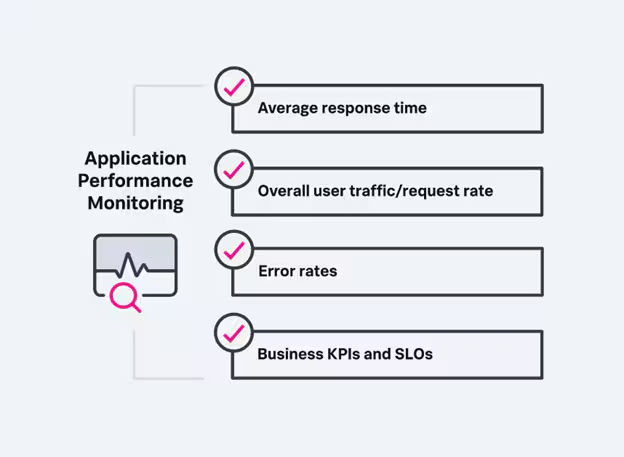
Nonetheless, most software applications use a common set of APM metrics, which we will discuss in this section.
Apdex score (Application Performance Index)
Apdex score is a standard measure of how satisfied end-users are with a particular web application and its service response time. This numerical measure is a value between 1 to 0, where:
- A value of one (1) indicates higher user satisfaction with the response times.
- Lower values indicate degradation of the application or service performance.
The Apdex threshold value must be determined based on industry standards and end-user expectations, indicating the tolerable response time value. Overall, the Apdex score simplifies assessing application performance.
Requests rates
The request rate is the number of requests the application or servers receive within a particular time period. This metric helps IT teams understand the application load. Therefore, it is crucial to identify the time frames within which the application is ready to accommodate higher loads. Usually, we can say this:
- A higher request rate indicates a higher user demand.
- A lower request rate indicates a drop in user interest.
Going one step further, you can identify any anomalies in user traffic by analyzing the request rates. For example, a higher request rate could indicate cybersecurity issues like DDOS attacks. Meanwhile, a higher number of requests from one IP address can signal an attempt to hack the account.
Response times
Response time is another important metric that measures the time taken to complete or send a response to a particular user request. For example, users expect a minimal response time when they perform a web transaction or load a page.
Response time depends on various other factors, such as:
- The amount of resources
- Network latency
- Database queries
Response time is typically measured in milliseconds or seconds, and typical threshold values can be 0-100 milliseconds for web transactions.
Error rates
The error rate is the percentage of errors observed in the application. Error rates apply to:
- APIs
- Application transactions
- Server errors
- Database queries
For example, suppose the percentage of 404 HTTP timeout server errors detected is greater than 5% for the last 50 API requests. This indicates some serious issues in the application infrastructure or codebase that require immediate attention.
Error rates help prioritize issues significantly, affecting the end-user experience and enhancing application reliability.
Metrics for application infrastructure performance
Apart from the core APM metrics, the following are additional APM metrics that allow us to understand the performance of the underlying application infrastructure.
CPU usage
CPU usage is the amount of CPU processing power in instances or computer applications. (When coupled with memory and disk usage, this metric is also called resource usage.)
CPU usage is normally measured by percentage values. For example, higher CPU usage, such as 70%, indicates heavy processing that can degrade application response times and may require more capacity.
Cloud-native applications often use this metric to automatically scale up or down the application resources to manage costs. Furthermore, fluctuations in CPU usage can indicate various conditions, issues, and behaviors within the system that may require attention.
Throughput
In APM, throughput is the amount of data or transactions the application processes within a specific time period. There are several units of measurement for throughput. For example, Transactions per second (TPS), or the number of transactions completed within a second, and Requests per second (RPS).
Throughput helps teams to:
- Understand the application behavior under varying load conditions.
- Identify bottlenecks within the application infrastructure.
Uptime percentage
Uptime is a measure of the availability of the applications and services to the end users. It is usually indicated by a percentage value in cloud environments. For example, the monthly uptime percentage for Amazon computing services is between 90% and 99%.
Uptime is important to measure the reliability of the cloud service and ensure that it meets the agreed service level agreements (SLAs).
Applications with higher uptime percentages are stable and reliable. On the other hand, lower uptime percentages can indicate potential issues with infrastructure, software, or other components that may need immediate attention to prevent service disruptions.
Node availability
This is a cloud-specific metric that indicates the number of available nodes that are operational and ready to accept requests or perform tasks within a given time period. It shows the available capacity to handle the current workload.
There are several benefits of tracking this metric. For example, node availability helps devise more effective disaster recovery plans. It is done by developing strategies to quickly restore service during an outage by identifying trends in node availability.
Instance count
Instance count is the number of application instances or servers where the application is hosted and running. This metric is specifically monitored and measured in cloud-hosted applications such as AWS or Azure-hosted applications.
If the application is configured with auto-scaling, the instance count goes up and down according to the user demand.
You can get an idea of application demand, performance, and potential bottlenecks by observing the pattern of instance count changes during a particular time. For example, a sudden increase in the instance count may indicate:
- An increase in user traffic
- A performance issue

Splunk Application Performance Monitoring
Easily troubleshoot and optimize your applications — from monoliths to microservices.
Other important APM metrics
Apart from the core APM metrics, the following are some other APM metrics that allow comprehensive application performance monitoring.
Database queries
This metric provides an overview of database queries executed within the applications and services. It indicates the total number of queries executed within a specific time period and also provides their performance. Furthermore, it can show the top queries that contribute to most of the application load.
So, we can summarize the database queries metric as one that helps developers and DevOps teams identify slower or inefficient queries that impact application performance. Analyzing top queries allows teams to first focus on optimizing the most resource-intensive queries.
Transaction tracing
Transaction tracing assesses the transactions or requests within the application as they pass through the various components of it. It includes:
- All the network calls
- External and internal API calls
- Database transactions
- How long each step takes, etc.
This metric allows DevOps and development teams to get an overview of how requests are processed from the start to the end of the application. This recording of the execution path of transactions or requests enables troubleshooting any issues, potential bottlenecks, or failures.
(Learn all about distributed tracing.)
Garbage collection (GC) metrics
Some applications built using Java, .NET, or other languages can use GC to detect heavy memory usage or leaks. It helps resolve memory management issues that could lead to performance degradation.
Measuring app performance
APMs are critical for assessing an application and its infrastructure performance. There are several APM metrics used by modern software applications and infrastructure-specific APM metrics, as discussed in the article. Furthermore, several other APM metrics software systems can be utilized for a more comprehensive monitoring experience.
APM metrics are important for identifying performance issues proactively, resource optimization, improving application reliability and availability, and providing a seamless user experience.
Video: Learn more about APM Metrics: The Ultimate Guide
Related Articles

What is Enterprise Architecture? Definition, Layers, and Business Benefits

What Is Risk Scoring? How To Score Risk