What’s ARP? Address Resolution Protocol Explained
Learn Shanika WickramasingheKey Takeaways
- ARP maps IP addresses to MAC addresses at the data-link layer, enabling devices on a local network to communicate by broadcasting requests and receiving replies with the necessary MAC addresses.
- Systems maintain an ARP cache to speed up future lookups, and features like gratuitous ARP and proxy ARP support network management and conflict detection.
- ARP lacks built-in authentication, making it vulnerable to attacks like ARP spoofing; defenses include static ARP entries, Dynamic ARP Inspection, secure DHCP, and network segmentation.
When you connect to the internet, you get a logical identifier for your device called an IP address. However, for actual communication to happen within a local area network, the MAC address of a device is needed.
The Address Resolution Protocol (ARP) is a fundamental network communication protocol used within LANs to discover the MAC address of a device using its known IP address. The ARP protocol operates at the Data Link layer of the OSI model.
Various IT roles — network administrators, cybersecurity analysts, system administrators, IT technicians, and penetration testers — need to have a good understanding of this concept.
Let’s take a look.
The purpose of ARP
In the early 1980s, Ethernet was becoming a popular local area network (LAN) technology operating at the Data Link layer, dealing with MAC addresses. Meanwhile, TCP/IP operated at the Network layer, using IP addresses.
Because of this separation, a dynamic solution was required to resolve and maintain IP-to-MAC address associations. Developed in 1982 by researchers David C. Plummer and Bill Simpson, ARP was introduced to map IP addresses to MAC addresses in local networks.
How the ARP Protocol works
Local area networks (LANs) are a very common network configuration. The following image shows a LAN where Machine A wants to communicate with Machine B.
Using this example, let's understand how ARP works.
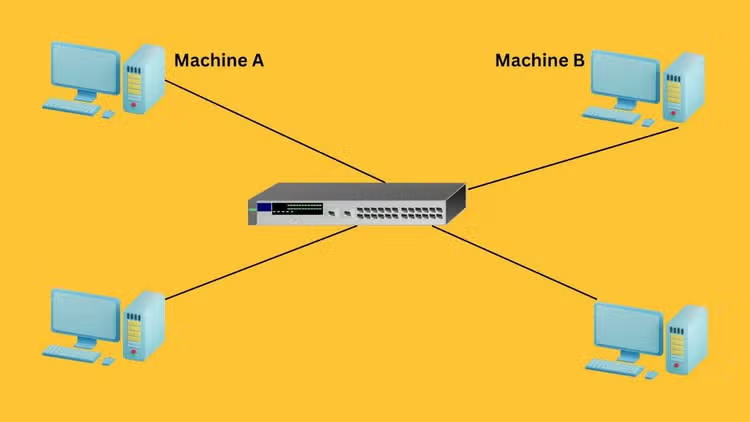
Here, Machine A wants to communicate with Machine B. Suppose Machine A already knows the IP address of Machine B. However, for this communication to take place, Machine A still needs Machine B’s MAC address.
Machine A will first look at its internal list — called the ARP cache — to see if Machine B’s IP address has a matching MAC address. If no entries are found, Machine A can use the known IP address of Machine B to locate the specific device on the network.
To do that, Machine A will send out a broadcast message to all the machines on the network, asking every device which machine has this particular IP address and requesting its associated MAC address.
The machine with the matching IP address will respond back and share its MAC address with Machine A. Once Machine A receives Machine B’s MAC address, communication can take place.
Steps in an ARP request
Based on the above example, I’ve translated how ARP works into these clear steps.
Step 1: Initial cache check. When a sender wishes to communicate with a receiver, it first checks its ARP cache to determine if it already contains the MAC address associated with the receiver’s IP address. If the MAC address is present, communication proceeds directly using that address.
Step 2: Preparing the ARP request. If the MAC address is not in the cache, the sender prepares an ARP request. This packet includes the sender’s MAC and IP addresses, with the receiver's IP address specified and the MAC address field left blank as it is unknown.
Step 3: Broadcasting the ARP request. The sender then broadcasts this ARP request across the local area network. Every device connected to the LAN receives this broadcast.
Step 4: ARP request evaluation by LAN devices. Upon receiving the ARP request, all the device compares the requested IP address by the host with its own.
- Devices with non-matching IP addresses discard the request.
- The device with the matching IP address processes it further.
Step 5: Responding to the ARP request. The device that contains the matching IP address prepares an ARP reply. This unicast message, containing both its IP and MAC addresses, is sent directly back to the sender.
Step 6: Updating the ARP cache. Once the sender receives this ARP reply, it updates its ARP cache with the new MAC address information. This update allows the sender to communicate directly with the receiver using the resolved MAC address.
Step 7: Communication. With the MAC address now known and recorded in the ARP cache, the sender can send data packets directly to the receiver.
Message format of ARP protocol
The following image shows the main components that an ARP message consists of.
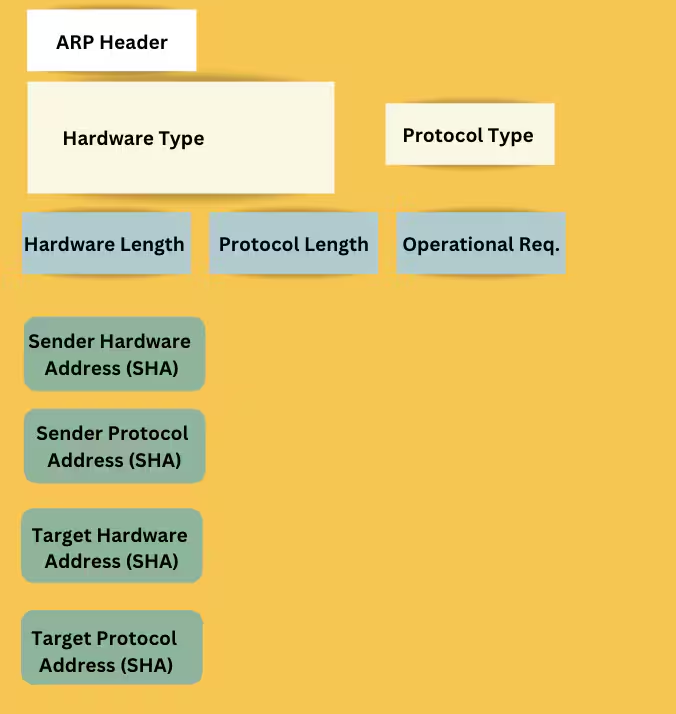
- ARP Header specifies the message type, such as 'Request' or 'Reply', and includes address length fields.
- Hardware Type is a 2-byte field indicating the hardware used for transmission, typically Ethernet (value 1).
- Protocol Type indicates the protocol used, often IPv4 (value 2048).
- Hardware Address Length shows the length of the hardware address in bytes; for Ethernet, this is 6 bytes.
- Protocol Address Length displays the size of the protocol address, with the IP address size being 4 bytes.
- OP Code specifies the operation; '1' for request and '2' for reply, dictating the message’s purpose.
- Sender hardware address contains the sender’s MAC address, identifying the sender’s network adapter.
- Sender protocol address holds the sender’s IP address, associated with the sender’s MAC address.
- Target Hardware Address. For requests, this is zero-filled since the MAC address is unknown; for replies, it contains the target device's MAC address.
- Target Protocol Address contains the IP address of the device whose MAC address is being queried.
Four types of ARP
We can recognize different types of ARP based on how they have been implemented and the use cases they have in different scenarios.
Dynamic ARP
Dynamic ARP entries are commonly used in local area networks (LANs). These entries are automatically created and managed by the ARP protocol during normal network communication.
These entries have a limited lifespan and will expire after a certain period if not used again.
Static ARP
Network administrators use Static ARP when they want to manually set fixed IP-to-MAC address mappings. These entries do not expire or get affected by the typical updating processes of dynamic ARP.
This stability increases security and is particularly useful in preventing ARP spoofing attacks.
Proxy ARP
Proxy ARP enables a Layer 3 device, such as a router, to respond to ARP requests on behalf of another device that is on a different subnet. This method involves the router mapping its own MAC address to the IP address of the target device, thereby misleading the sender into believing it has reached its intended destination directly.
Network administrators commonly use proxy ARP to:
- Connect subnets.
- Handle legacy systems.
- Increase security by hiding network topology.
Gratuitous ARP
Gratuitous ARP is a proactive broadcast by a device to update other devices on the network about its IP-to-MAC address mapping. Gratuitous ARP has two purposes:
- Updating the ARP caches of other devices to prevent outdated entries.
- Checking for duplicate IP addresses on the network.
When a device broadcasts a Gratuitous ARP request for its own IP address, if no responses are received, it confirms that no other device is using the same IP. However, if a response is received, it indicates that another device is using that IP which leads to address conflicts.
Thus, Gratuitous ARP helps maintain network integrity and prevent IP address duplication.
Advantages & challenges of ARP
(Related reading: network monitoring, the network operations center & network security.)
ARP commands & usage
There is a set of ARP commands that can be used to deal with the ARP cache. Network administrators need to know these commands as they help diagnose and resolve network connectivity issues related to ARP.
Here are some ARP commands:
User:>arp
This command displays the cache, including the IP address, physical address, and type of each entry in the cache.
User:>arp -s 172.16.1.10 00-11-55-33-66-44
Use the -s option to add an entry to the cache.
User:>arp -d 172.16.1.10
Here -d option is used to delete an entry available in the cache.
User:>arp -a
Here -a option displays the machine’s ARP cache. The output lists IP addresses, MAC addresses, and the type of each entry which can be either dynamic or static.
What is ARP spoofing?
I mentioned ARP Spoofing earlier. Common in man in the middle attacks, ARP spoofing is a technique where attackers intercept communication between network devices. In this scenario, an attacker who has access to the network will send false ARP messages. The purpose is to link their own MAC address with the IP address of a device on the network.
By using this technique, attackers can misdirect data meant for another device to their own device. Attackers could use this method to steal sensitive information like login details.
(Related reading: What is spoofing?)
ARP best practices
Despite its major role in facilitating communication between devices, ARP also brings the challenge of ARP spoofing. To avoid and mitigate such issues, all relevant parties working with ARP need to follow best practices and use ARP security appliances and software to monitor ARP traffic and ensure its security.
Related Articles

IT Benchmarking: A Tool for Measuring IT Performance

Monitoring Windows Infrastructure: Tools, Apps, Metrics & Best Practices