Monitoring Kafka Performance with Splunk
Observability SplunkSplunk is committed to using inclusive and unbiased language. This blog post might contain terminology that we no longer use. For more information on our updated terminology and our stance on biased language, please visit our blog post. We appreciate your understanding as we work towards making our community more inclusive for everyone.

Kafka is a distributed event streaming platform which nowadays typically deployed on distributed, dynamic and ephemeral infrastructure such as Kubernetes. These distributed, cloud-native systems, while boost agility and efficient scalability, also introduce operational complexities. Decoupled or loosely coupled components often pose challenges in making sense of complex interdependencies, detecting the source of performance bottlenecks, and correlated insights to understand the why behind performance anomalies.
In this blog series, we take a deep dive into Kafka architecture, the key performance characteristics that you should monitor and how to collect telemetry data to gain real-time observability into the health and performance of your Kafka cluster using Splunk.
Kafka Architecture: An Overview
Kafka leverages two key capabilities to implement event processing in real-time:
- Publish/subscribe of streaming events
- Durable storage of event data
Publish/subscribe messaging is a pattern where the sender of data messages is decoupled and agnostic of the receiver of data. Instead, the publisher characterizes the message with metadata and subscriber “picks up” messages of its interest.
Applications that publish the data message are called Producers while the applications that subscribe (receive and process messages) are called Consumers. Kafka brokers act as intermediaries between producer and consumer applications. Brokers are designed to operate as a part of a cluster. Within the cluster, one broker will also function as the cluster controller for administrative purposes such as monitoring broker failures.
Related messages are organized and stored in Topics. Producers publish messages to relevant one or more topics and consumers subscribe to those topics and read the messages. Topics themselves are divided into one or more partitions which forms a unit of parallelism. Each partition can be placed on a separate machine and assigned to the broker to allow for multiple consumers to read in parallel. Multiple consumers can also read from multiple partitions in a topic resulting in a high message processing throughput. Although a partition may be assigned to multiple brokers for redundancy and high-availability a partition is “owned” by a single broker in the cluster known as the leader of the partition.
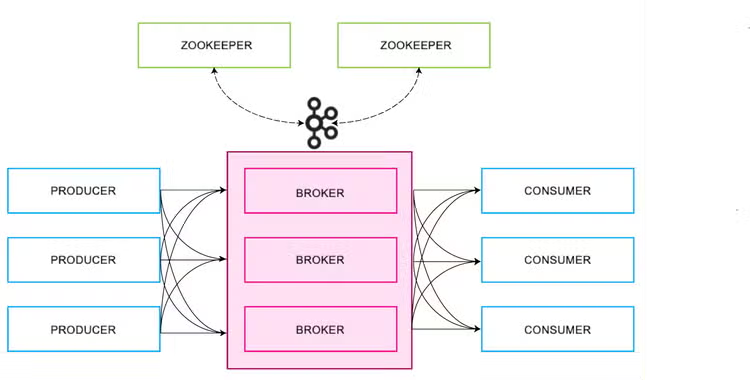
Kafka writes messages to only one replica—the partition leader. Follower replicas obtain copies of the messages from the leader. Consumers may read from either the partition leader or from a follower This architecture distributes the request load across the fleet of replicas.
There is one additional component, ZooKeeper, to keep track of the status of the Kafka cluster. To reduce the complexity, the community is moving to replace ZooKeeper with Metadata Quorum. Kafka 2.8 release introduced an early access look at Kafka without ZooKeeper, however, it is not considered feature complete and it is not yet recommended to run Kafka without ZooKeeper in production.
Kafka reads metadata from ZooKeeper and performs the following tasks:
- Controller election: In a Kafka cluster, one of the brokers serves as the controller, with the responsibility for managing the states of partitions and replicas and for performing administrative tasks like reassigning partitions.
- Configuration of topics: A list of existing topics, number of partitions for each topic, the location of all the replicas are maintained in ZooKeeper
- Cluster membership: ZooKeeper maintains a list of all the functioning brokers which are part of the cluster
- Access control and quotas: ZooKeeper also maintains ACLs for all topics as well as quotas on topics to limit the throughput of producers or consumers.
Key Performance Metrics for Monitoring Kafka
To comprehensively monitor the performance of a Kafka cluster, we need to monitor key metrics of each component that the cluster comprises:
- Kafka broker metrics
- Producer metrics
- Consumer metrics
- ZooKeeper metrics
Broker metrics
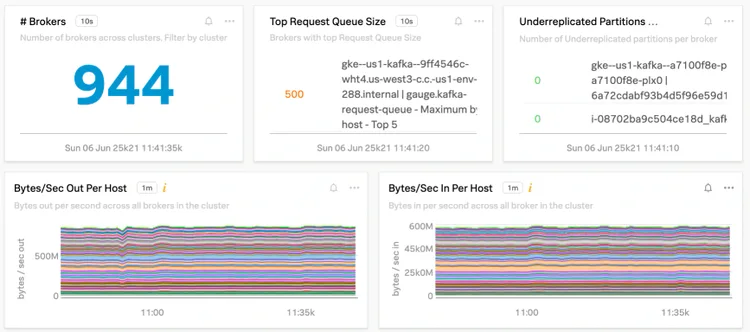
Kafka acts as a central nervous system in the enterprise data flow. Brokers play that part within Kafka. Every message pases through the broker before it is consumed. It is critical to monitor performance characteristics and get alerted to take remedial actions for performance anomalies. To get full-stack insights, we monitor:
- Kafka system metrics
- JVM metrics such as garbage collection
- Host metrics
Visuslizations of selected performance metrics across all the brokers are displayed below:
Kafka Producer Metrics
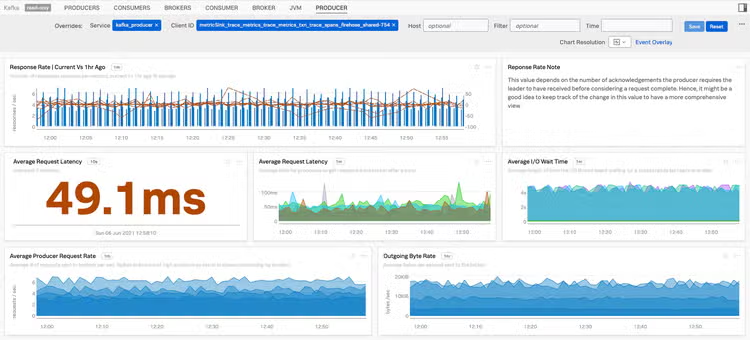
When producers can no longer push messages to brokers, consumers will not get new messages. Some of the key producer metrics are discussed below:
A visualization of selected producer metrics is shown below:
Kafka Consumer Metrics
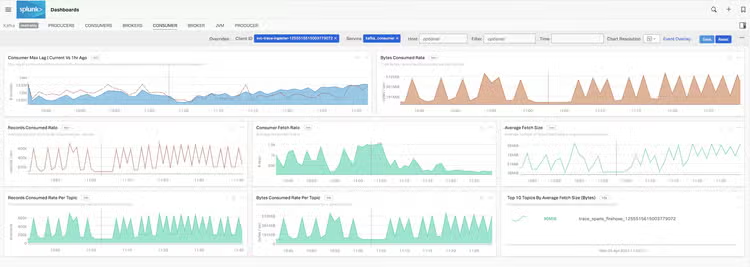
Monitoring consumer metrics may indicate systematic performance issues on how effectively the data is being fetched by consumers. High lag values could indicate overloaded consumers prompting you to add more consumers or add partitions for the topics to reduce lag and increase throughput. Similarly low trending fetch rate may indicate failures on consumers, an important metric to get alerted on.
A visualization of key consumer metrics is shown below:
ZooKeeper Metrics
ZooKeeper maintains information about Kafka’s brokers and topics and applies quotas to control the rate of traffic moving through the cluster.
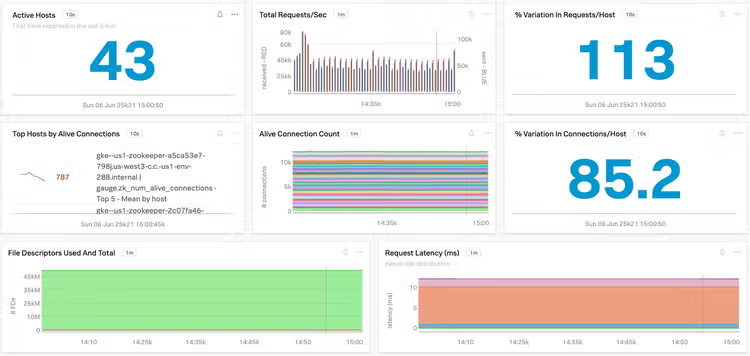
A visualization of key ZooKeeper performance metrics is shown below:
Monitor your Kafka Cluster
In this blog we looked at key performance metrics across all the components in your Kafka deployments. In the next part of the series, "Collecting Kafka Performance Metrics with OpenTelemetry," we will discuss how to use Splunk Infrastructure Monitoring for real-time visibility into the health of Kafka cluster. In the final part, we will cover how to enable distributed tracing for your Kafka clients using OpenTelemetry and Splunk APM.
You can get started by signing up for a free 14 day trial of Splunk Infrastructure Monitoring and check out our documentation for details about additional Kafka performance metrics.
----------------------------------------------------
Thanks!
Amit Sharma