Dynamic Data: Self-Storage - Compliance, Cloud and Data Lifecycle
Platform SplunkSplunk Cloud customers are aware they can tailor storage to meet their retention needs, and many customers purchase increased storage to meet those specific needs. But new regulations are being proposed at businesses for better managing cybersecurity risk and are mandating businesses retain their data for significantly longer periods of time.
Case in point is the New York State department of Financial Services regulation that went into effect last year, with many businesses still in the process of interpreting the compliance directives. Is their data subject to 3 years retention? Is it 5 years? Other compliance requirements require 7 or even 10 years of data retention! For such situations, we’ve designed a new feature in Splunk Cloud. It’s called “Dynamic Data: Self-Storage”. We’ll call it DDSS for short.
With DDSS, you send data to Splunk Cloud and control the retention of data as usual on a per-index basis. When the retention thresholds are met and data is about to be deleted, indexes configured with DDSS move the data to an Amazon S3 bucket in your organization’s AWS account to keep for as long as you see fit. The "self-storage" in the name refers to the fact that you choose where to move the data; the storage of that data once moved is in your control. It's that simple!
With DDSS we followed three design principles.
Honor the data lifecycle: There is one copy of data in Splunk Cloud. When it reaches end of its useful life in Splunk Cloud based on retention settings in your control, you now have the option to move it to a storage location in your control. When data is moved out successfully to the storage location in your control, only then is it deleted from Splunk Cloud.
Everything in your control: We’ve designed DDSS to be completely self-service and in your control. Specifically in control of the sc_admin role. You configure the Amazon S3 self-storage location and decide which indexes move data to that location.
Secure and performant: DDSS is designed to move data with negligible impact to your route search activities. We’ve incorporate best-security practices using AWS IAM roles.
Let’s take a deeper dive.
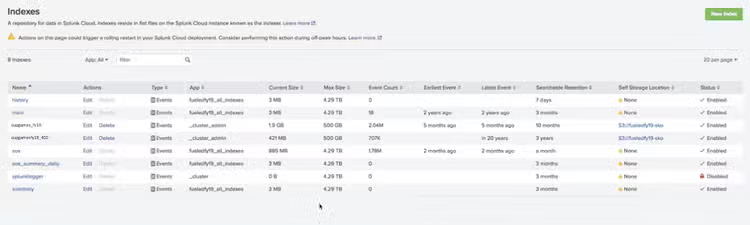
Data has a lifecycle defined by the Indexes page. Index page in Splunk Cloud has two new columns—self-service location and its status. The self-service location is assigned on a per-index basis, giving you complete flexibility to move critical data to self-storage.
Take a look at this index page of a company called fueledfy19 which uses Splunk Cloud. You’ll notice two indexes cupgames_fy19 and cupgamesfy19_400—third and fourth in the list of indexes—have a defined self-service location.
Now consider cupgames_fy19. It has a searchable retention set to 10 months, which means data will stay in Splunk Cloud for that time. When it reaches the retention threshold, data will be moved to the self-service location specified.
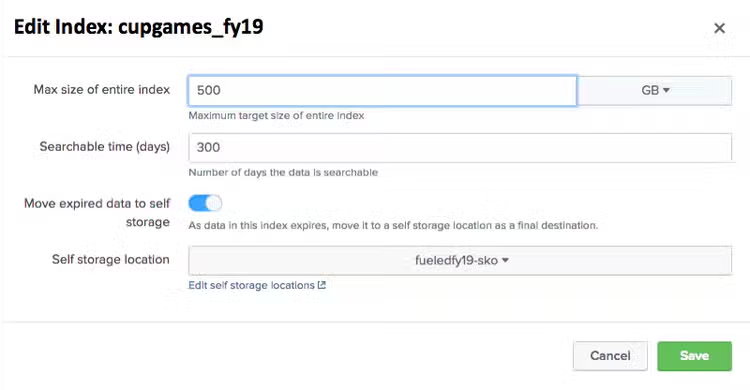
If you edit cupgames_fy19 index, you’ll notice we have an option to move data—and if selected—to a self-storage location that is already configured.
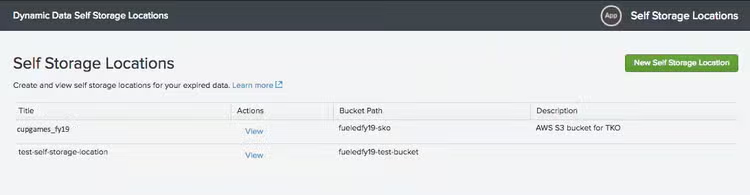
So, how do you create a self-storage location? If you click on the ‘Edit self storage locations,’ you’ll get to the Self Storage Locations page. Click on the ‘New Self Storage Location’ green button in the upper right.
You get to define the properties.
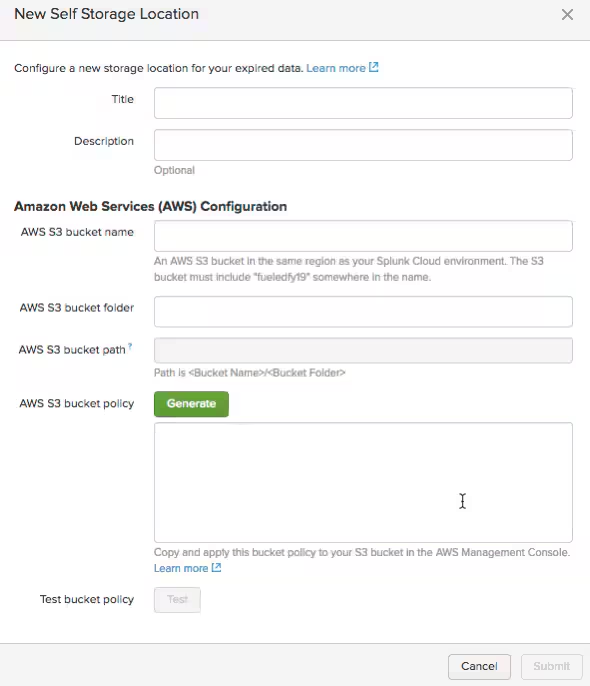
There are three key points to keep in mind.
First, the ‘Amazon S3 bucket name’ bucket folder and bucket path—you create a bucket name. TIP: Make sure you include your Splunk Cloud instance string as suggested in the bucket name. This is a security check.
Second, the bucket you create must be in the same AWS region as your Splunk Cloud instance. Why you ask? Because data moved from Splunk Cloud to an Amazon S3 bucket in the same region will not incur a data export charge.
Third and final tip is to generate the Amazon S3 bucket policy, copy the resulting JSON and apply it as an IAM policy from your AWS console to this new Amazon S3 bucket you’ve created. This policy is telling your Amazon S3 bucket to grant permission for resources in Splunk Cloud to write to your bucket. This is a security check.
Click ‘Test bucket policy’ and Splunk Cloud will attempt to write a file to the newly created bucket. Test that everything works and is writable. When successful, you're all set!
See this picture of the IAM policy being applied
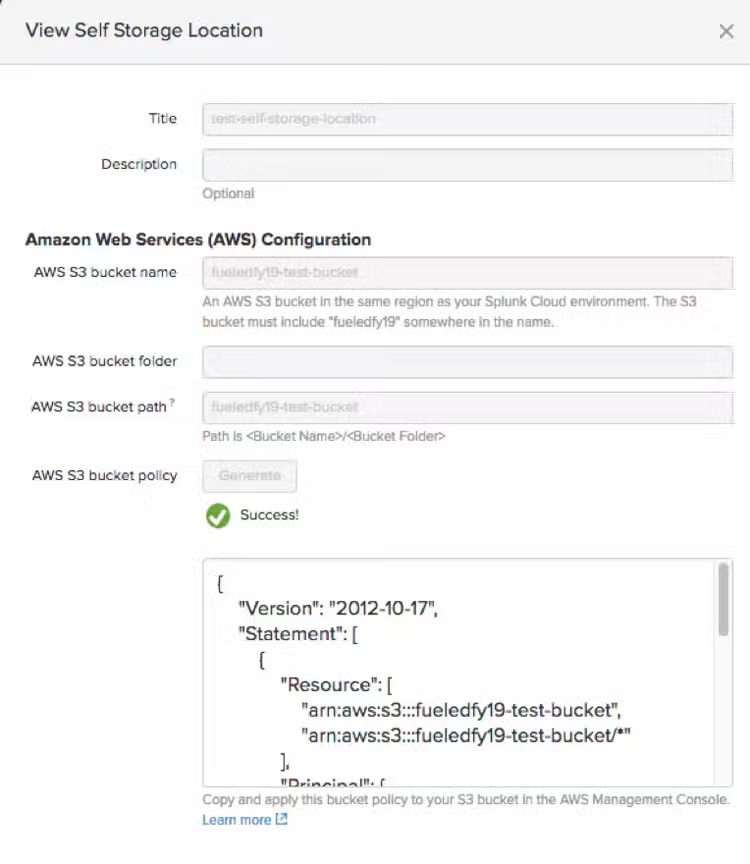
Now data will be moved from the configured index to the self-storage location you’ve defined.
What about when a compliance initiative requires you to search against this data? No problem! You can spin up an instance of Splunk Enterprise and feed it this data. Because Splunk has already indexed this data, it bypasses the licensing metering, meaning you don’t need to pay anything to index and search this data.
Yes, some of you may be thinking, can I search against this data from within Splunk Cloud? We’ve called this option Dynamic Data: Self-Storage for a reason—it is designed to move data outside of Splunk Cloud and into your own data storage; an area Splunk does not have access to.
With Dynamic Data: Self-Storage option in Splunk Cloud you now have the option to keep your data for as long as you desire. In your control. We are always working on ways to enhance the data lifecycle within Splunk Cloud. Look out for future Dynamic Data innovation in future Splunk Cloud releases.
----------------------------------------------------
Thanks!
Sundeep Gupta
Related Articles
Splunking Azure: NSG Flow Logs
Your Data, Your Choice: Expanding Log Ingestion Options with OpenTelemetry