Administer Your Splunk Cloud Stacks Easily and Efficiently with ACS Helper for Splunk
Tips & Tricks Atef KoukiA little over two years ago, Splunk announced a revolutionary feature that would simplify the life of Splunk Cloud administrators by providing APIs that enable self-management and self-administration of Splunk Cloud Stacks. No more waiting for support tickets to be written, emailed, prioritized and then executed.
The ACS API is built with a set of features to update the list of authorized IP addresses, HEC (HTTP Event Collector) tokens, authentication tokens, indexes and many other possible Splunk Cloud platform configurations.

In addition, you have to use a multitude of mandatory parameters for each API endpoint, which depends on the capability (indexes, tokens, applications, users, etc.), the experience of the Splunk Cloud instance (Classic or Victoria) and the desired action (add, delete, list, etc.)... You get the idea.
This added complexity and prevented some customers from fully benefitting from ACS capabilities.
To remedy this, I've developed a tool that adds a simple and user-friendly graphical interface to make ACS features easier to access, use and hide all that complexity: ACS Helper for Splunk.
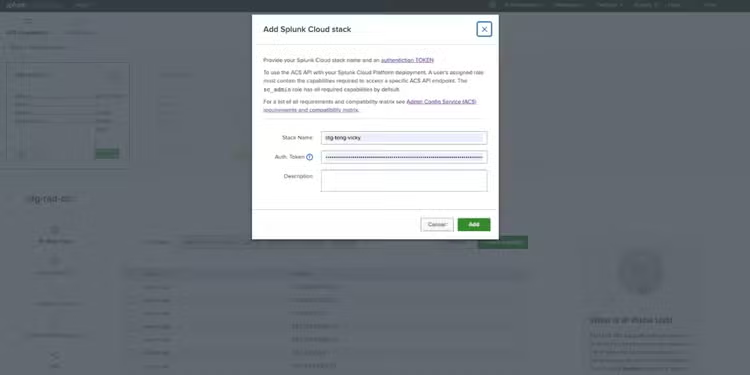
Now you don't need to consult the documentation on how to call ACS features, what parameters to use to perform a specific action and what tool to use them with. Take full advantage of all ACS capabilities within a Splunk application and see for yourself how easy it is to update your firewall rules, tweak Splunk limits, create indexes or manage your applications... with one single click!
ACS Helper for Splunk also allows you to organize, store and manage multiple Splunk Cloud instances at once, regardless of Stack experience, Classic or Victoria. This allows you to switch from administering one instance to another very quickly and without wasting any time.
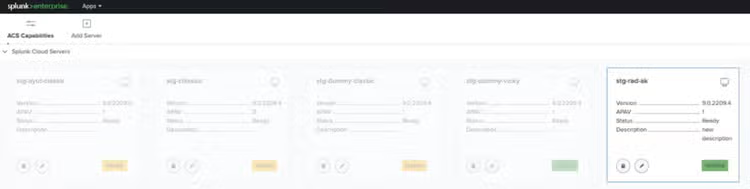
This application allows to :
- Configure IP allowlist
- Configure outbounds ports
- Manage authentication tokens
- Manage HTTP Event Collector (HEC) tokens
- Manage indexes
- Manage limits.conf configurations
- View installed applications
- Remove applications
- Show maintenance windows
- Manage restarts
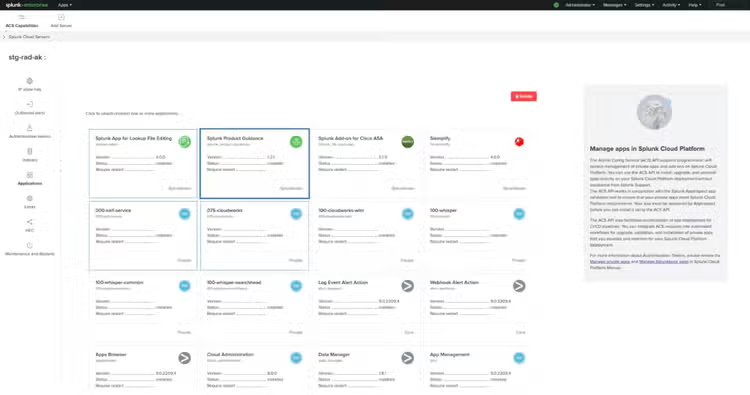
ACS Helper for Splunk has been available for download since May 10th on Splunkbase: https://splunkbase.splunk.com/app/6856

Useful links:
- https://www.splunk.com/en_us/blog/platform/splunk-cloud-self-service-announcing-the-new-admin-config-service-api.html
- https://docs.splunk.com/Documentation/SplunkCloud/9.0.2303/Config/ACSIntro
- https://docs.splunk.com/Documentation/SplunkCloud/9.0.2303/Config/ACSCLI
Thank you and happy Splunking,
Atef Kouki
Related Articles

T-Shirt Analytics at RSAC 2025: How We Used iOS Shortcuts & Splunk to Track T-Shirt Giveaways!