A Data-Driven Approach to Windows Advanced Audit Policy – What to Enable and Why
If you’ve been doing digital forensics, detection engineering, or threat hunting for some time, you already know how essential Windows event logs are for spotting malicious activities. Although Windows’ default logging has improved over the years, it still falls short of delivering the depth of visibility needed to catch sophisticated threats. That’s where Windows Advanced Audit Policies come into play. It offers additional, high-value events that are crucial for detection and hunting. Unfortunately, due to the complexity of Windows, knowing precisely which audit subcategories to enable, while factoring in information such as log volume, event criticality, and whether a particular subcategory justifies the added overhead, can be challenging.
In this blog, we’ll reduce some of that complexity by taking a data-driven look at which subcategories deliver the best coverage. We’ll explore which events are most valuable, helping you make more informed decisions about how to configure your audit policy and maximize visibility without drowning in logs.
Windows Audit Policy: A Primer
If you’ve spent some time working in Windows administration or security, you’re probably already familiar with Windows Audit Policy. Still, let’s do a quick recap to refresh some minds and bring everyone else up to speed.
Windows Audit Policy is the built-in control mechanism for logging security events on a system. It allows administrators to fine-tune what gets recorded, expanding beyond default logs to capture critical activities like user logons, file access, process creation, and handle requests. These events, among other things, help security teams detect malicious activity and investigate incidents after the fact.
In practice, the audit policy can be configured from two different locations, as shown in the image below:
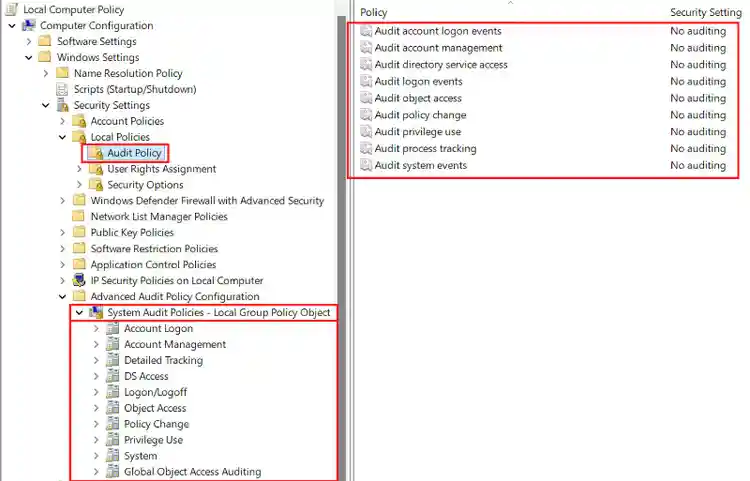
Figure 1: Windows Audit Policy Configuration Page
- Local Policies (legacy/broad approach): These policies allow you to enable or disable broad audit categories like “Logon Events” or “Account Management.”, but do not allow for a granular approach, you either log everything in a category or nothing at all.
- Advanced Audit Policies (granular approach): Advanced Audit Policies break down the original broad categories into more detailed sub-categories, giving you a lot more flexibility. For example, instead of enabling all “Logon Events,” you can selectively audit successful logons, failed logons, or other specific sub-categories that matter most to your organization.
More details are available at Microsoft documentation, our focus in this publication will be on the “Advanced Audit Policy.”
Advanced Audit Policy Categories and Sub-Categories
Windows “Advanced Audit Policy” consists of nine major categories, each containing a set of subcategories that provide more granular control over what gets logged. This Microsoft documentation provides a great breakdown of each one, that I highly suggest you check out.
Each of these subcategories generates specific events based on the configured audit policy (“Success” or “Failure”). With over 400 Event IDs spread across all categories, keeping track of which category generates which event can be tricky.
To make things easier, the Splunk Threat Research Team has compiled a comprehensive spreadsheet mapping every Event ID to its respective category and subcategory. We’ll be referencing this throughout the rest of this publication to help you navigate Windows auditing more effectively.
Now that we have an overview of Windows Advanced Audit Policy, let’s talk about the challenges that come with configuring it. While having granular control over event logging is powerful, it also introduces complexity—figuring out what to enable, managing log volume, and ensuring you capture the right events without overwhelming your system or SIEM. Let’s dive into some of the key hurdles you might face when setting up an effective audit policy.
The Challenge: Managing Log Volume, Relevance and Coverage
Why not just enable all these audit categories and sub-categories? Well, you’d end up generating an enormous volume of events, many of which might be irrelevant to your specific security goals. Large log volumes can bog down your SIEM (like Splunk Enterprise Security), overwhelm your analysts, and rack up unnecessary storage costs.
This brings up some critical questions:
- While subcategories provide more control over what gets logged, we don’t have the ability to filter specific events within them (by default). So which sub-categories strike the right balance between volume and relevance?
- Which specific events provide the best coverage in order to detect modern attacks and techniques?
To answer these questions, let us take a look at the research approach we’ve taken.
STRT Research Approach
We wanted to take a data driven approach to this research project, so we aimed to collect as much accurate information as possible. We focused on the following categories:
Audit Policy Recommendations
For overall Policy recommendations, we performed an extensive review of Microsoft’s official recommendations and various industry and trusted third party guidelines, including but not limited to:
- Microsoft Audit Policy Recommendations and Individual Sub-Category Recommendations (ex. Audit Credential Validation)
- ANSSI - Recommandations de Sécurité pour la Journalisation des Systèmes Microsoft Windows en Environnement Active Directory
- NSA - Spotting the Adversary with Windows Event Log Monitoring
- CIS Benchmarks
- ADSecurity - Securing Domain Controllers to Improve Active Directory Security
- Malware Archaeology - Logging Cheat Sheets
Our aim was to identify differences across these recommendations and gain insights into which audit settings are consistently enabled, prioritized, which ones vary, and where potential gaps might exist. This helps us build a clearer picture of what should be enabled for effective detection and security monitoring.
Event Volume Data
For event volume data, we relied on Microsoft’s official documentation along with insights from trusted third-party sources, including but not limited to:
- Microsoft Sub-Category documentation as well as individual event information when present
- The Joint SIGINT Cyber Unit (JSCU) logging essentials
- ADSecurity - Securing Domain Controllers to Improve Active Directory Security
- Australian Signals Directorate - Windows Event Logging and Forwarding
Event volume data is relatively scarce and differs depending on configured SACLs, installed roles and features, but we leveraged what was available and incorporated it into our overall analysis to better understand the impact of enabling specific audit policies.
Setup / Implementation Complexity
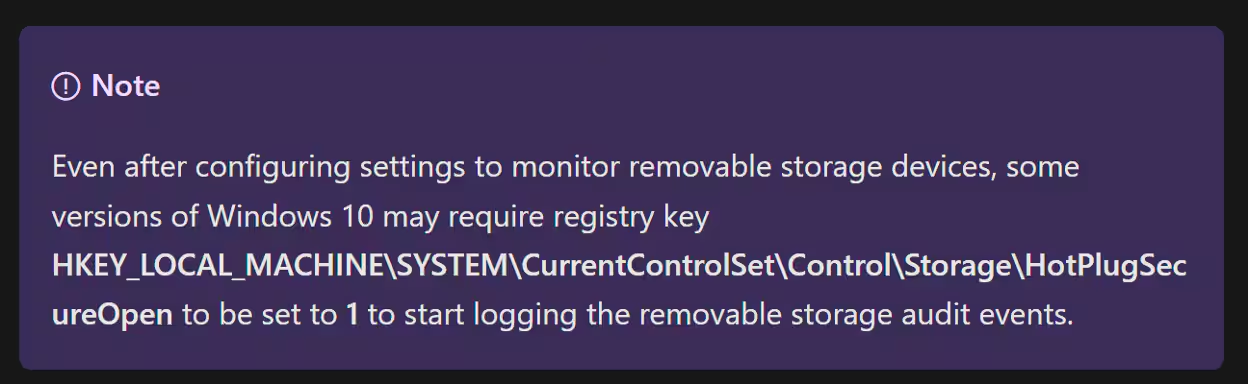
Figure 2: Monitor the use of removable storage devices - MSDN
One of the common blockers when configuring an audit policy is the additional configuration required for certain subcategories to generate meaningful events. Simply enabling a subcategory isn’t always enough—some require extra policy adjustments, registry changes, or even system reboots. Here are a few examples:
- Event ID 4688 - Requires an additional Group Policy setting or registry value to capture command-line arguments.
- Sub-Categories such as “Audit Registry” or “Audit File System” - Require System Access Control Lists (SACLs) to be configured on specific objects before they start logging relevant events.
- The Sub-Category “Removable Storage” - Needs a registry key modification followed by a system reboot to take effect.
MITRE ATT&CK Events to Techniques Mapping
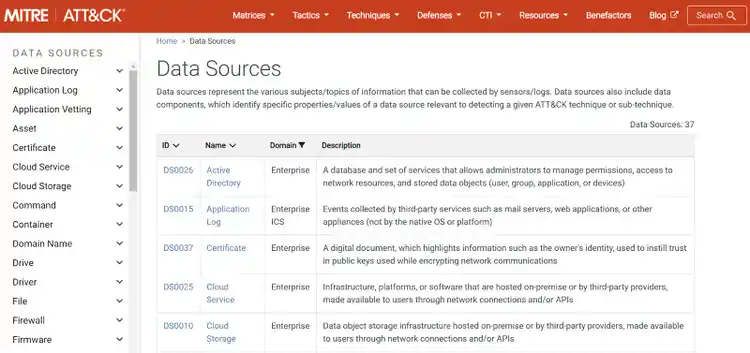
Figure 3: MITRE ATT&CK - Data Sources
One of the major goals of this research project was to factor in ATT&CK data into our audit policy recommendations. As one of the most adopted frameworks in cybersecurity and detection specifically, ATT&CK provides us with a structured way to map documented adversary TTPs with Windows event logs. By aligning Event IDs with ATT&CK techniques we can start prioritizing specific events or sub-categories depending on our needs.
To achieve this, we leveraged multiple sources of ATT&CK-aligned data, including, but not limited to:
- ATT&CK Datasources
- OSSEM Detection Model by the Open Threat Research Forge project.
- Malware Archaeology - ATT&CK Cheat Sheets
Additionally, since the ATT&CK framework is widely used in threat intelligence reports as a standard mapping mechanism, we can leverage these reports to identify which techniques are most frequently exploited by threat actors. Fortunately our colleagues at SURGe, did most of the heavy lifting with their Macro-ATT&CK research, where they compiled macro-level cyber incident data from open-source reporting (Red Canary, CISA, Mandiant’s M-Trends and The Center for Threat Informed Defense (CTID) Sightings Ecosystem project) covering a span of five years.
This combination of ATT&CK mappings and real-world frequency data gave us a more grounded way to prioritize events and subcategories.
Event Usage in Open Source Detections and Public Recommendations
Another key data point we wanted to capture was the real-world usage of Windows event logs from different audit policy subcategories in open-source detection rules. To do this, we analyzed three major open-source detection projects:
- SigmaHQ Rules – A widely used repository of community-driven detection rules.
- Elastic Detection Rules – Open-source threat detection rules built for the Elastic Security platform.
- Splunk Analytics – Our own Splunk detection content, developed and refined by the Splunk Threat Research Team.
The goal was to understand which Windows events are actively used in practice. By identifying which event IDs are referenced often in these rulesets, we could use this as an additional data point to help prioritize audit policy recommendations.
Key Takeaways
As one might expect, there’s no one-size-fits-all approach to configuring an advanced audit policy, it ultimately depends on your specific security needs, infrastructure, and priorities. However, by following the approach laid out in the previous section, we’ve identified some key takeaways that can help guide your decision-making:
The “Obvious” Winner: Event ID 4688 / Detailed Tracking
To no one’s surprise, across almost all metrics we’ve established above, Event ID 4688 from the “Detailed Tracking” sub-category is by far the best bang for your buck.
First from an audit policy configuration point of view, all the recommendations we looked at suggest that you enable auditing for the “Process Creation” category.
In terms of log volume, Event ID 4688 does generate a medium to high number of logs, depending on system activity. While that might sound like a lot, the security benefits far outweigh the storage costs. Here’s why:
-
MITRE ATT&CK Coverage: Event ID 4688 maps to around 280 MITRE ATT&CK techniques and sub-techniques, either fully or partially, making it one of the most versatile logs for threat detection.
-
Detection Engineering: If you’re leveraging open-source detection rules, most of them rely heavily on Process Creation events.
- Splunk Security Content contains 400+ analytics built around this event.
- SigmaHQ offers 1,000+ detections using the “process_creation” logsource which include Event ID 4688.
-
Public Threat Report: SURGe data also showcase that a lot of techniques and sub-techniques that were reported in the last few years, can be detected partially or fully in some cases via EventID 4688.
So if you walk away from this publication wondering what’s the single most important event to enable, the answer is simple: Event ID 4688. It provides great visibility into system activity, aligns with real-world attack techniques, and serves as the foundation for countless security detections.
Beyond Coverage: ATT&CK Coverage Is Not Enough
Leveraging ATT&CK data from the different sources mentioned in the previous section we can build a table giving us an approximative or theoretically possible coverage of certain techniques and sub-techniques per sub-category.
Keep in mind that ATT&CK is not representative of all possible attacks or attack paths, and saying an event detects X amount of technique is not completely accurate, as implementation of techniques vary and data sources provide different amounts of information. But using this would give a good initial baseline for developing a recommendation and it's an acceptable approximation.
At first glance, the table above seems to offer a straightforward solution to configuring an optimal audit policy—just enable the subcategories with the highest MITRE ATT&CK coverage, and you’re set. Unfortunately, it’s not that simple.
While ATT&CK coverage is a great starting point, it doesn’t tell the full story. A high number of mapped techniques doesn’t always translate to high detection value, and enabling everything indiscriminately can introduce unnecessary complexity, noise, and performance overhead.
Hence, additional factors need to be considered.
Complexity of Implementation
As was stated in the research approach section, not all audit subcategories are created equal. Some are straightforward to enable, while others require additional configuration (e.g., registry changes, SACL setups, role installation, or reboots) to generate the corresponding events.
Let’s take a look at a slice from the our data to illustrate this:
Some of the most powerful subcategories—like File System or Registry auditing—require additional configurations before they can provide meaningful security value. Without these tweaks, enabling them won’t actually log useful data.
Log Volume Considerations
A high event volume isn’t necessarily a bad thing, it depends on the signal-to-noise ratio, and your ability to tune, filter and scope the events. For instance,as we’ve seen with Process Creation EventID 4688, in the previous section, volume does not correlate to usefulness . On the other hand, File System auditing can flood your SIEM with logs that aren’t always useful unless carefully scoped.
Usage in Open-Source Detection Rules
When you’re building custom detections or trying to increase coverage, you will likely be leveraging open source detections. Using this vector will also help showcase how often these audit subcategories are used in open-source detection rules like SigmaHQ, Elastic detections, and Splunk Security Content. If a subcategory is rarely used in public detections, it will decrease the immediate usefulness from a detection engineering perspective, perhaps that it provides low practical value, is too noisy to be effective or simply its not meant to be enabled by a user but to be ingested by a tool like an EDR. Here’s a look at how these subcategories are used in terms of community-driven / open source detections:
Note that these do not indicate that the telemetry generated by those categories is necessarily missing or not collected by that platform. This table represents the rules that make use of specific events generated by a specific category. If at least one of these is used then the category is marked.
Introducing the Eventlog Compendium
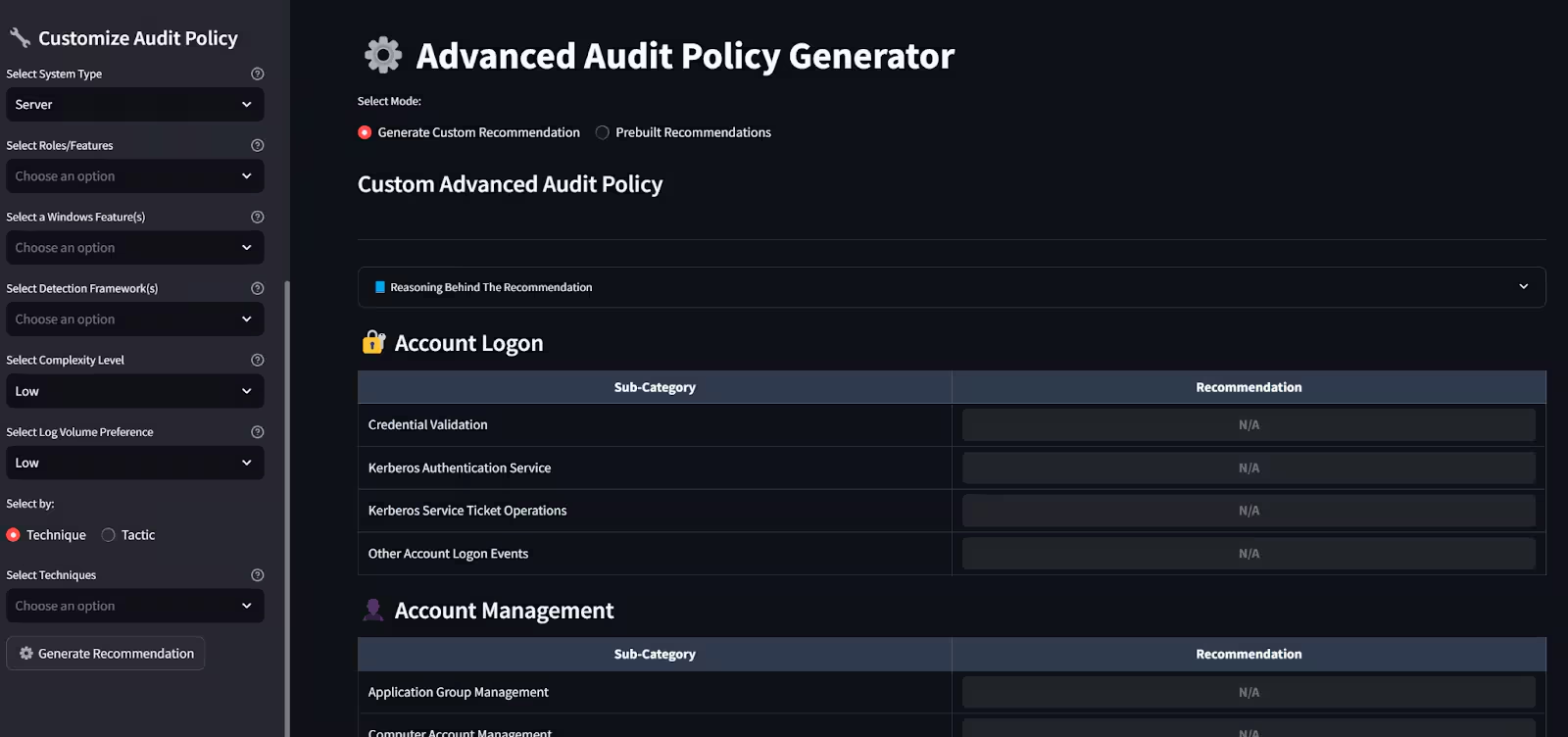
To help apply the research shared throughout this post, we built a Streamlit app called Eventlog Compendium. It's designed to assist defenders in building tailored Windows Advanced Audit Policy configurations (among many other things)—without the need to dig through spreadsheets or lengthy documentation.
The goal is to take everything we’ve talked about—MITRE coverage, volume, complexity, and detection rule usage, and make it actionable.
How Does It Work?
We take all the elements discussed in the previous sections and expose them as configurable user inputs within the app.
- System Type, Role and Feature Selection The user starts by selecting the system type—for example, "Server" or "Client". They can then choose specific Windows roles or features relevant to their environment, such as "Domain Controller", "Certificate Services", and others. This helps tailor the recommendations to what is actually deployed on the system.
- Detection Framework Alignment The user can optionally align the policy with one or more open-source detection frameworks, such as SigmaHQ, Elastic Detection Rules, or Splunk Security Content. This ensures the generated configuration supports detection rules they are likely to use.
- Complexity Level To reflect the level of technical configuration required, the user sets a complexity level. Selecting “Low” avoids recommendations that require SACLs or registry modifications. “Medium” or “High” levels include more advanced configurations for broader visibility.
- Log Volume Preference The user sets a log volume preference to control the amount of audit data generated. This allows tuning based on how much data can be handled by the logging infrastructure or SIEM—whether the goal is low-noise baselines or comprehensive visibility.
- MITRE ATT&CK Integration Finally, the user can also choose to enhance their coverage based on either MITRE techniques or tactics, allowing them to enable dedicated sub-categories.
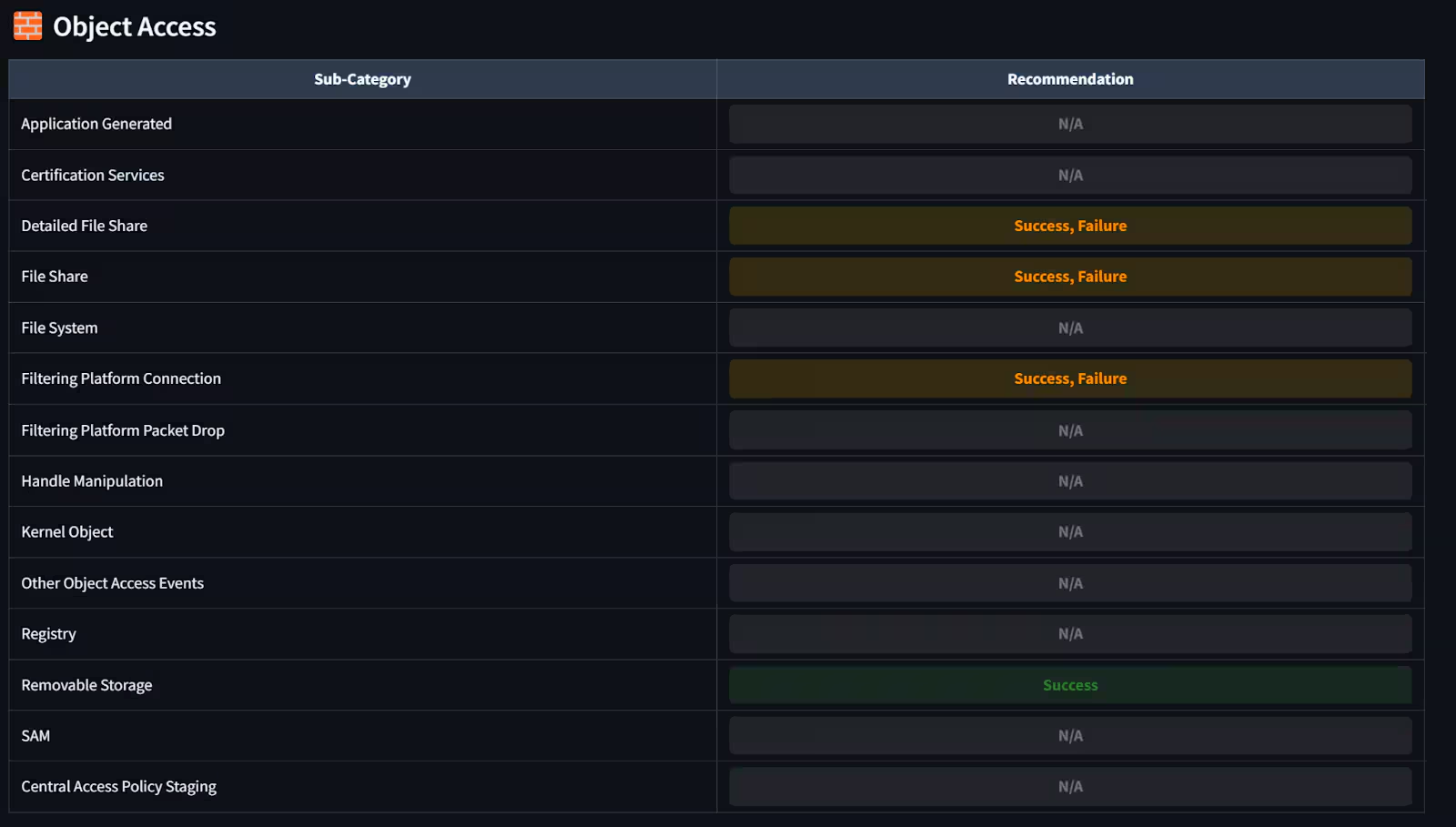
Figure 6: Audit Policy Output Example
Wait, I Already Have an EDR Solution, Should I Care About This?
The short answer is YES*, albeit the configured audit policy might slightly differ depending on the product you use or the goals you want to achieve. I’ll highlight some common scenarios:
Complementing EDR Solution
Most EDR products collect data using kernel-level drivers or ETW (Event Tracing for Windows) providers. However, they don’t always cover everything. Some solutions enable or recommend enabling certain audit policies to fill in the gaps.
For example:
-
Palo Alto Cortex XDR allows you to collect additional event logs through the XTH add-on including ones from the Security channel.
-
Cisco Secure Endpoint can enable specific Windows audit policies via configuration setting in the endpoint policy. This includes:
- Audit User Account Management Success
- Audit Logon Success
- Audit Logon Failure
- Audit Security System Extension Success
- Audit Other Object Access Events Success
Check out dedicated vendors documentation for details such as these and the EDR Telemetry Project to get a sense of which telemetry is generated and how.
Digital Forensics and Incident Response Needs
In DFIR scenarios, gaps in telemetry are common. An EDR agent might be misconfigured, disabled, or simply not deployed on the system in question. In those cases, having a properly configured Windows audit policy or a Sysmon agent logging everything locally can make a big difference.
Even if you're not using the logs day-to-day, having them available when you need them—especially for high-value systems—can save time and help recover key parts of the investigation timeline.
In short, if you're relying on your EDR as the only source of truth, you're making an assumption. Audit policy (as well as event logging in general) gives you an opportunity to validate, complement, or backstop that visibility, especially when something breaks.
Conclusion
Configuring a Windows audit policy isn’t just about checking compliance boxes, it’s about enabling the right logs, at the right level, for the right reasons. Through this research, we’ve shown that a data-driven approach, one that factors in MITRE coverage, event volume, detection usage, and implementation complexity, can go a long way in helping teams build smarter, effective and more importantly understandable policies.
Whether you're tuning for detection, preparing for incident response, or complementing an existing EDR setup, having a tailored audit policy gives you better visibility and stronger footing. The Eventlog Compendium app is our way of making that easier. Use it, tweak it, and let it guide your next steps.
Feedback
Any feedback or requests? Feel free to put in an issue on Github and we’ll follow up. Alternatively, join us on the Slack channel #security-research. Follow these instructions If you need an invitation to our Splunk user groups on Slack.
Contributors
We would like to thank Nasreddine Bencherchali for authoring this post and the entire Splunk Threat Research Team for their contributions: Michael Haag, Jose Hernandez, Lou Stella, Bhavin Patel, Rod Soto, Eric McGinnis, Patrick Bareiss, and Teoderick Contreras.
Related Articles

Predicting Cyber Fraud Through Real-World Events: Insights from Domain Registration Trends

When Your Fraud Detection Tool Doubles as a Wellness Check: The Unexpected Intersection of Security and HR

Splunk Security Content for Threat Detection & Response: November Recap

Security Staff Picks To Read This Month, Handpicked by Splunk Experts

Behind the Walls: Techniques and Tactics in Castle RAT Client Malware

AI for Humans: A Beginner’s Field Guide

Splunk Security Content for Threat Detection & Response: November 2025 Update

Operation Defend the North: What High-Pressure Cyber Exercises Teach Us About Resilience and How OneCisco Elevates It
