Visual Link Analysis with Splunk: Part 4 - How is this Pudding Connected?

I was happy with my success in using link analysis for fraud detection. Then, my colleague, James Brodsky asked, “Hey Andrew, that’s great, but how do I search for one person, or phone number, or email address and show all related links?” Which I heard as: “A trained dolphin could do a better job than you.”
To which I thought...“Yeah, but then the computers would get all wet.”
The Challenge of Following Related Links Using Link Analysis
Lucky for everyone reading – I like a challenge (and the request was a good idea), so I came up with this quick solution to search all my data for links given a single piece of information. I am not doing any data reduction, and Splunk being the awesome platform it is, delivered fast results, which reminded me of the continuum transfunctioner: “a very mysterious and powerful device and it's mystery is exceeded only by its power.”
Let’s look at a recent example I worked on regarding unemployment benefit claims with SSN as our unique identifier (FYI: all data is fictitious). I have an email address I think is suspicious, so my first search is on that email address (Yes, Virginia, There is a -Santa Claus- Way to Detect Unemployment Fraud), which returns related user information. In the example, we return just a few fields in our table. Now I want to do additional searches using the phone, IP address, street address, and SSN fields:
`uib_index`
clm_email=grunt.body@gmail.com
| table addr_street clm_email clm_phone t_src_ip clm_ssn
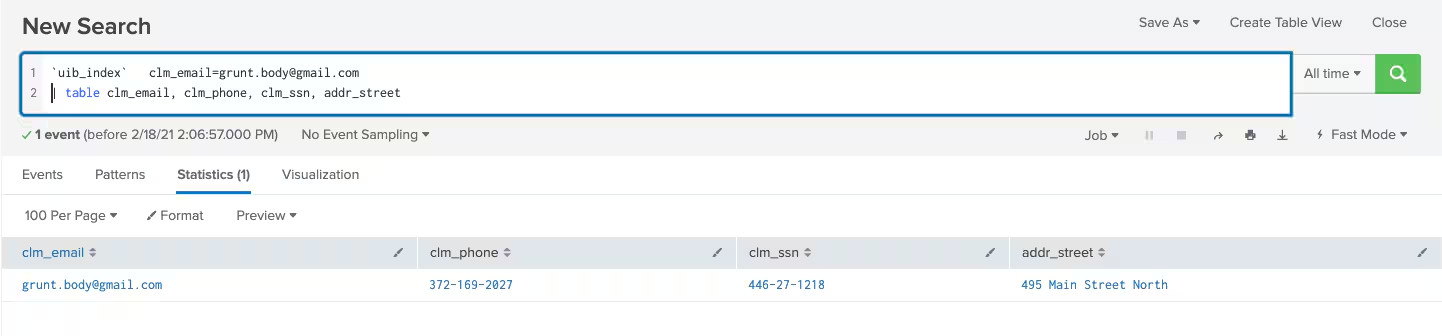
So, how do we pass these results into a new search? Initially, subsearch sounds right. Unfortunately, there is a problem with passing this data into a subsearch — the implicit AND. Here is what feeding the above into a subsearch would like:
( ( addr_street="495 Main Street North" AND clm_email="grunt.body@gmail.com"
AND clm_phone="372-169-2027" AND clm_ssn="446-27-1218" AND t_src_ip="168.253.154.20" ) )
Splunk is great at searching and when you add multiple criteria to a search, it assumes an AND, which will only return the event we already have.
No “AND”, then!

Instead, we want OR. This will give us all events that could have these field values.
Lucky for us, Splunk has the FORMAT command that lets us change the default subsearch behavior from AND to OR.
Using the FORMAT command to change our search into this:
`uib_index` clm_email=grunt.body@gmail.com
| table clm_email, clm_phone, clm_ssn, addr_street
| Format "(" "(" "OR" ")" "OR" ")"
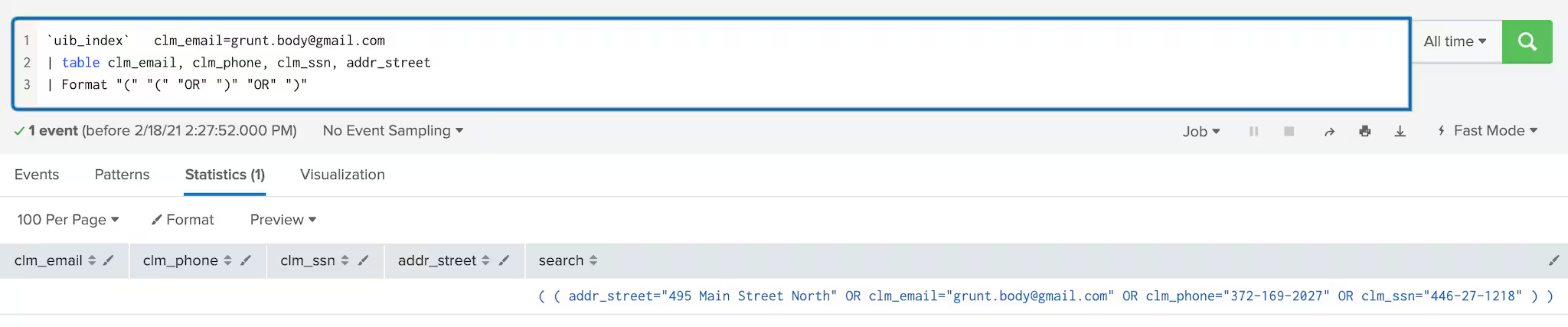
Yeah... our images are not always readable, so zooming in – this is what our output looks like above:
( ( addr_street="495 Main Street North" OR clm_email="grunt.body@gmail.com"
OR clm_phone="372-169-2027" OR clm_ssn="446-27-1218" ) )
Our search is now “OR’ing” together our terms. We then use this with a subsearch and we can return all events related to our initial email address:
`uib_index`
[search `uib_index` clm_email=grunt.body@gmail.com
| table addr_street clm_email clm_phone t_src_ip clm_ssn
| format "(" "(" "OR" ")" "OR" ")"]
| table addr_street clm_email clm_phone t_src_ip clm_ssn
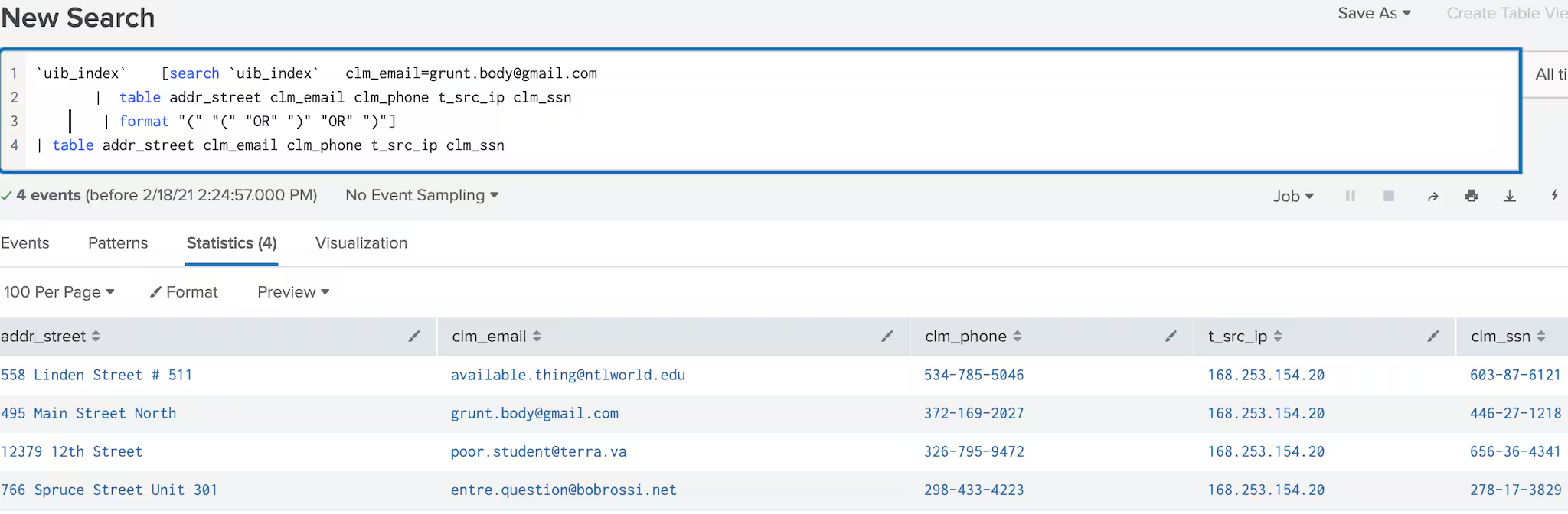
Sweet! What does mine say?
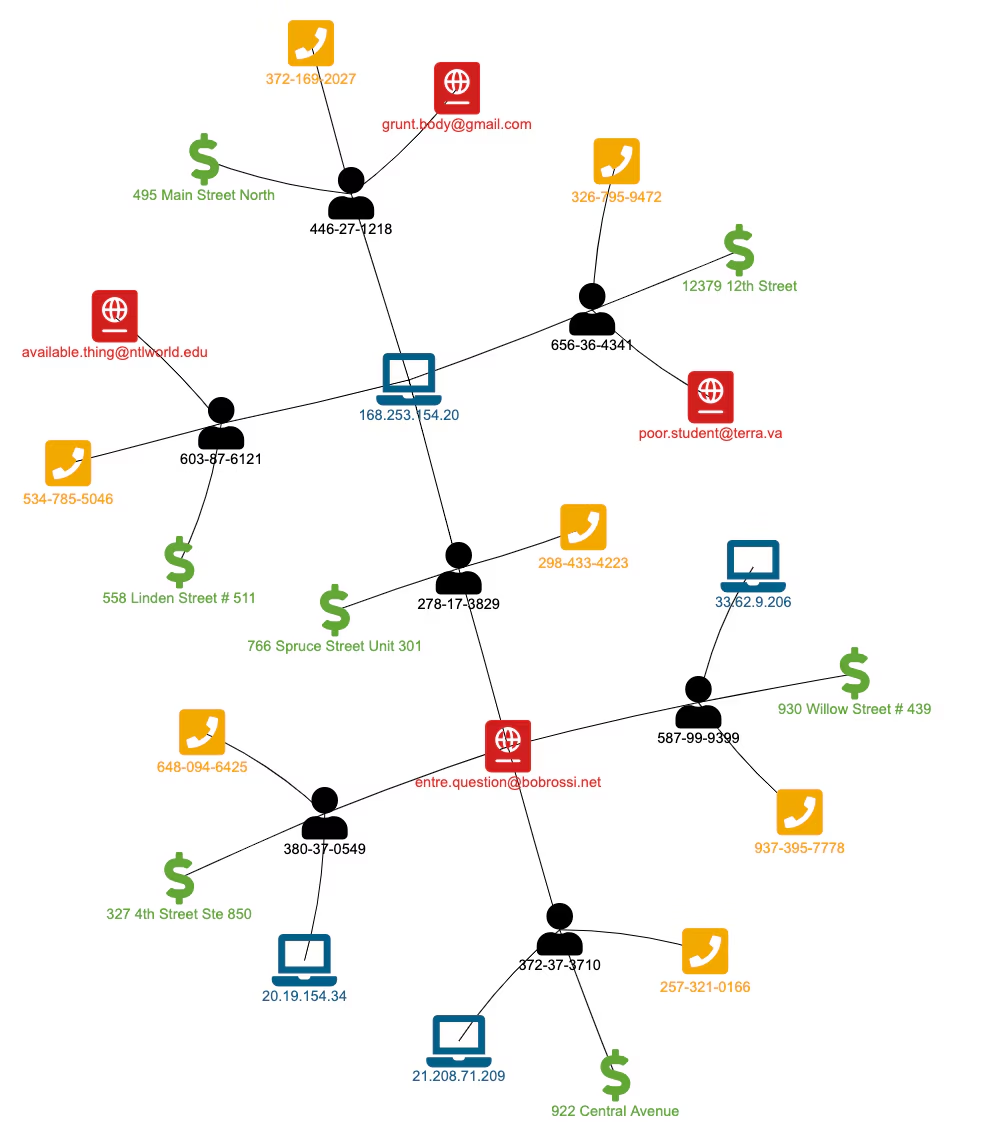
And if we use the Network Diagram Visualization App I have used in the past. Visually, it looks like this:

We can go deeper by doing the same thing again in another subsearch:
`uib_index`
[ search `uib_index` [search `uib_index` clm_email=grunt.body@gmail.com
| table addr_street clm_email clm_phone t_src_ip clm_ssn
| format "(" "(" "OR" ")" "OR" ")"]
| table ddr_street clm_email clm_phone t_src_ip clm_ssn
| format "(" "(" "OR" ")" "OR" ")"]
| table addr_street clm_email clm_phone t_src_ip clm_ssn
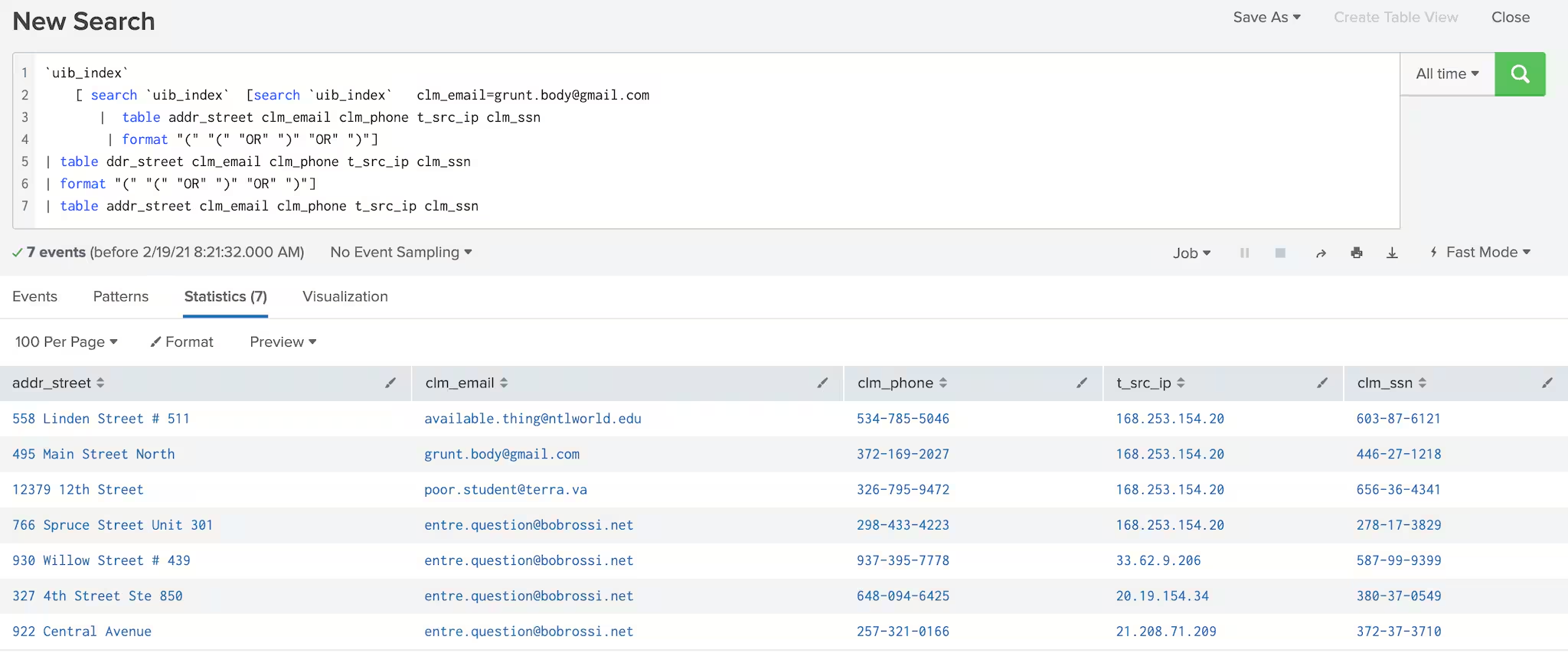
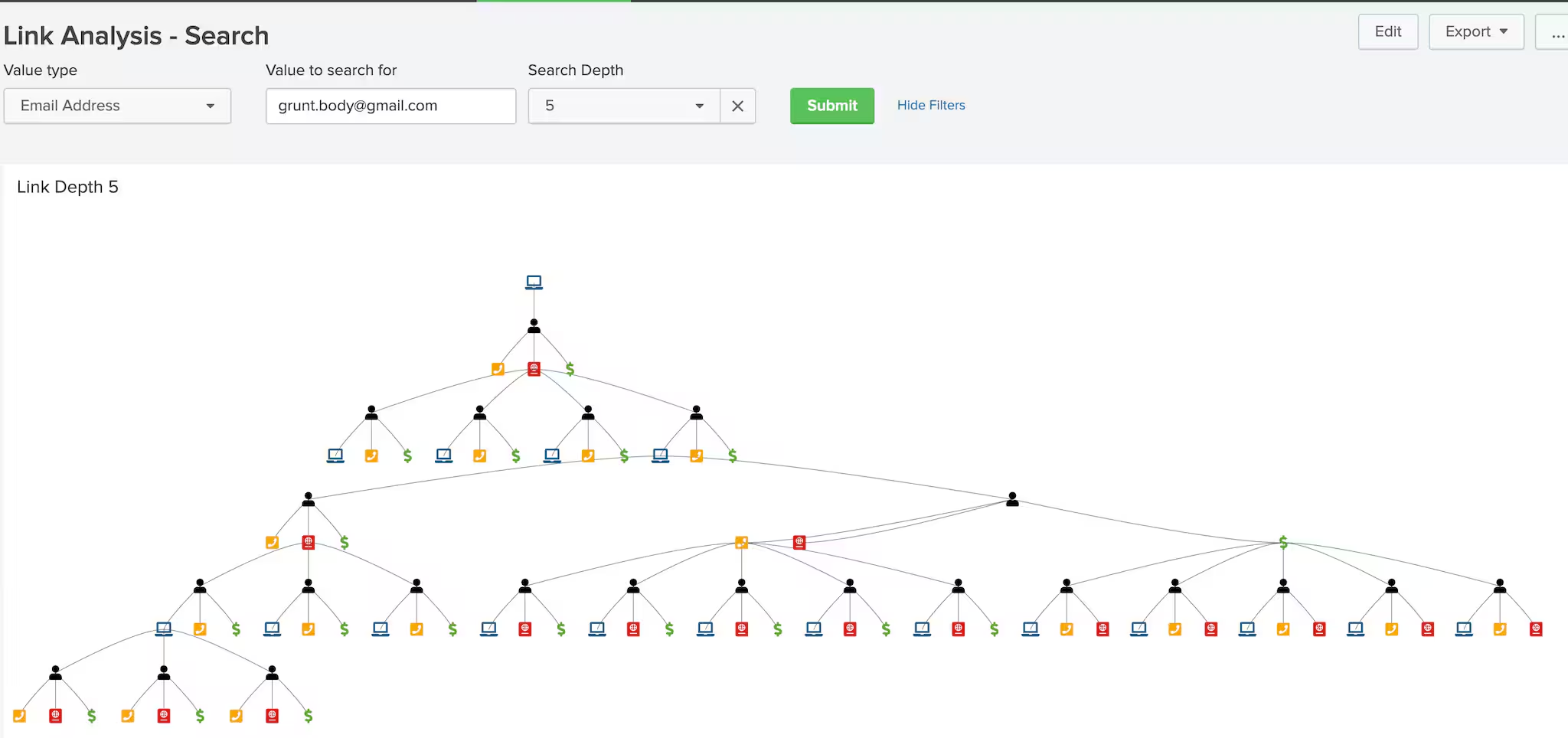
Finally, we can turn this into a dashboard with configurable parameters and go 5 levels deep:
We'll travel through space... with cool aliens who LIKE us!
`uib_index`
[ search `uib_index` [ search `uib_index` [ search `uib_index` [search `uib_index` clm_email=grunt.body@gmail.com
| fields addr_street clm_email clm_phone t_src_ip clm_ssn
| format "(" "(" "OR" ")" "OR" ")"]
| fields ddr_street clm_email clm_phone t_src_ip clm_ssn
| format "(" "(" "OR" ")" "OR" ")"]
| fields addr_street clm_email clm_phone t_src_ip clm_ssn
| format "(" "(" "OR" ")" "OR" ")"]
| fields addr_street clm_email clm_phone t_src_ip clm_ssn
| format "(" "(" "OR" ")" "OR" ")"]
| table addr_street clm_email clm_phone t_src_ip clm_ssn
Where’s Your Car, Dude?
The one negative to this approach is that we are not specifying field names. So if you have a piece of information like account number = 111559999 and it happens to have the same format and length as SSN = 111559999, but the two are not directly related, you could tie entities together with wrong information. If this data exists in the same source or index. So, I can think of two improvements to the above approach:
- Refining my search to include ”field name = value” instead of just values. This will prevent erroneous matching
- Dynamically searching until no more new events are found: “event count new= event count old”. This would avoid having to explicitly define the number of subsearches, but there is danger in building too big of a visualization if the data is too interconnected. So I would still make the solution configurable: Level =1,2,3... or All

ZOLTAN!
----------------------------------------------------
Thanks!
Andrew Morris
Related Articles

Predicting Cyber Fraud Through Real-World Events: Insights from Domain Registration Trends

When Your Fraud Detection Tool Doubles as a Wellness Check: The Unexpected Intersection of Security and HR

Splunk Security Content for Threat Detection & Response: November Recap

Security Staff Picks To Read This Month, Handpicked by Splunk Experts

Behind the Walls: Techniques and Tactics in Castle RAT Client Malware

AI for Humans: A Beginner’s Field Guide

Splunk Security Content for Threat Detection & Response: November 2025 Update

Operation Defend the North: What High-Pressure Cyber Exercises Teach Us About Resilience and How OneCisco Elevates It
