The Final Shell: Introducing ShellSweepX
Over the last year, we have continued to witness web shells breaching organizations worldwide, affecting both edge devices and on-premise web applications. Web shells consistently evade standard controls, posing a persistent threat. Today, the Splunk Threat Research Team is excited to announce the final tool in the ShellSweep collection: ShellSweepX.
ShellSweep Overview
What began as a simple Splunk scripted input with ShellSweep, providing basic anomaly detection of web shells, has evolved significantly. We expanded ShellSweep with the release of ShellSweepPlus, adding layers of web shell detection methods beyond entropy, including standard deviation, heuristic analysis, and static code analysis. Now, we take ShellSweep to another level with the release of ShellSweepX.
ShellSweepX transforms from a script running on disk to a server and client setup, offering enhanced functionality and performance. Join us as we share the improvements, special features, and notable capabilities ShellSweepX provides to incident responders and organizations of all sizes, helping them go beyond the standard.
Check out a thorough walkthrough of ShellSweepX here:
ShellSweepX Architecture
ShellSweepX is a comprehensive webshell detection and management system designed to detect malicious web shells. The architecture of ShellSweepX is built around a central server that coordinates various components and interacts with client-side agents. At its core, the system features a web interface that allows users to upload files for analysis, manage settings, and view detection results. The server utilizes machine learning models and YARA rules to scan files for potential web shells, storing the results in a SQLite database. Client-side agents, which can be deployed on Windows and Linux systems, periodically scan local directories and send suspicious files back to the server for analysis. The server processes these results, updates the database, and provides real-time feedback through the web interface. This distributed architecture allows for scalable, centralized monitoring and triaging of web shells, combining the power of centralized analysis with the reach of distributed agents.
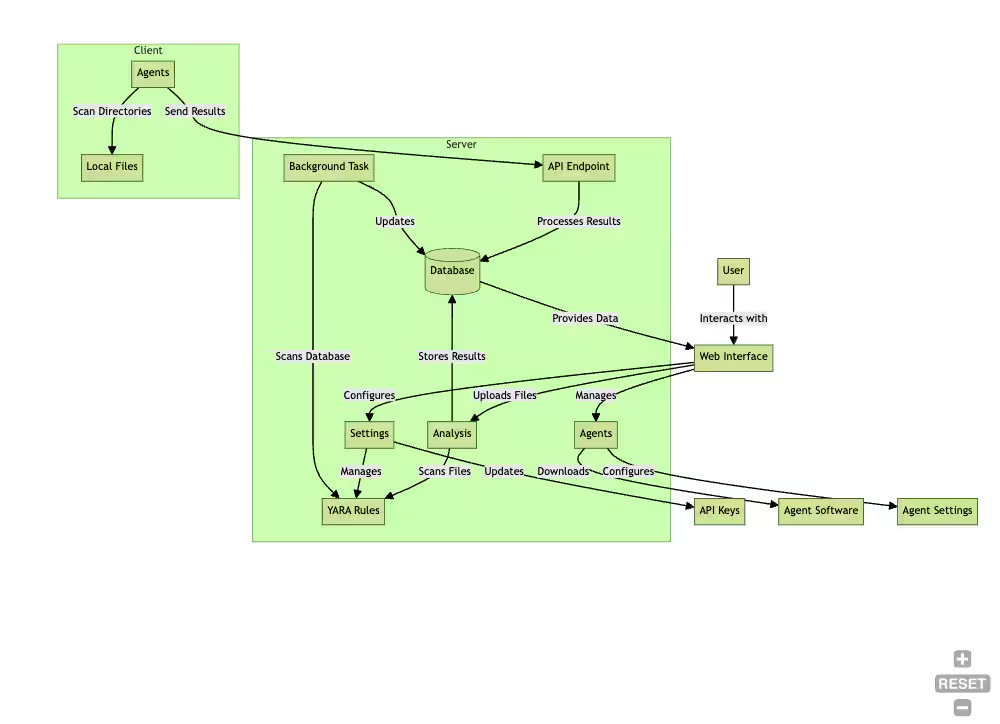
Figure 1: ShellSweepX Architecture, Splunk 2024
ShellSweepX Capabilities
ShellSweepX offers a range of powerful features to enhance efforts in detecting and removing web shells. We’ve taken all the experience from developing ShellSweep and ShellSweepPlus and combined it into a simple-to-use server and client application. Here are some of the key features:
- Machine Learning-based Detection: Utilizes advanced machine learning models to analyze and classify potential web shells.
- YARA Rule Integration: Supports custom YARA rules for flexible and precise threat detection.
- Claude and GPT Integration: Perform additional triage with an AI review.
- Distributed Agent Architecture: Deploys agents across multiple systems for network-wide monitoring.
- Real-time Dashboard: Provides an intuitive web interface for monitoring detections, trends, and system status.
- File Upload and Analysis: Allows manual file uploads for immediate analysis and threat assessment.
- Search Functionality: Enables users to search through analyzed files using various criteria.
- API Integration: Built upon FastAPI, allowing the endpoints to be accessed by any tool that can send a POST.
- Customizable Settings: Offers configurable options for API keys, YARA rules, and agent behavior.
- Entropy and Statistical Analysis: Performs advanced file analysis using entropy and standard deviation calculations.
- Secure Configuration Management: Implements encrypted storage for sensitive settings and API keys.
- Reporting and Visualization: Generates reports and visualizes detection trends for better threat understanding.
- Verbose Logging: Offers the option to log data locally that is capable of ingesting in any platform out of the box.
Feature Deep Dive
We want to spend a section on some of these features and how it will impact your ability to properly identify web shells.
Machine Learning
Although we are not experts in machine learning, we leveraged Python Scikit to generate something operational, and highly effective. Some pre-alpha ideas, which we tested thoroughly, included compiling the agent (using PyInstaller) with the model included to run the model on endpoints locally - which we knew would cause lots of overheard and was not the best approach. However, the model and vectorizer database we did generate, ended up being highly effective.
Our train_model.py script creates two components for ShellSweepX's machine learning-based web shell detection system: a Term Frequency-Inverse Document Frequency (TF-IDF) vectorizer and a logistic regression classifier model.
The vectorizer (saved as 'vectorizer.pkl') transforms the raw text content of files into numerical feature vectors. It uses the TF-IDF technique, which captures the importance of words in the context of the entire dataset. The vectorizer is configured to use a maximum of 5000 features and excludes common words that might not be indicative of web shells.
The logistic regression model (saved as 'model.pkl') is trained on these vectorized representations of web shell and benign files. It learns to distinguish between the two classes based on the patterns in the feature vectors.
In ShellSweepX, these components are used in the file analysis process, as seen in the main run.py file:
# Load the model and vectorizer
clf = joblib.load('models/model.pkl')
vectorizer = joblib.load('models/vectorizer.pkl')
The vectorizer and model are loaded here and then used in the predict_file_content function:
def predict_file_content(file_content):
    sha256_hash = hashlib.sha256(file_content.encode()).hexdigest()
    X_new = vectorizer.transform([file_content])
    prediction = clf.predict(X_new)
    if prediction[0] == 1:
        return sha256_hash, "Webshell detected"
    else:
        return sha256_hash, "File seems benign"
This function takes the content of a file, vectorizes it using the pre-trained vectorizer, and then uses the logistic regression model to predict whether the file is a web shell or benign. This prediction is then used throughout ShellSweepX for detecting potential web shells in uploaded files or files sent in by agents.
Why TF-IDF?
ShellSweepX employs TF-IDF vectorization for its web shell detection system due to its effectiveness in text representation and feature extraction. This technique is particularly suitable for analyzing web shells, which are essentially text-based scripts.
TF-IDF converts the textual content of files into numerical representations, capturing the importance of words within the context of the entire dataset. It assigns higher weights to words that are frequent in a particular file but rare across all files, helping to identify unique characteristics of web shells. The vectorization process also aids in dimensionality reduction, making the model more efficient and less prone to overfitting. This approach is computationally efficient for both training and prediction, making it ideal for real-time analysis in a production environment.
The implementation of TF-IDF vectorization in ShellSweepX can be seen in the train_model.py file:
common_top_words = [
    "width", "td", "int", "value", "file", "void", "public", "tablecell", "if", "string"
]
vectorizer = TfidfVectorizer(max_features=5000, stop_words=common_top_words)
X = vectorizer.fit_transform(webshell_files + benign_files)
This code snippet shows how the TfidfVectorizer is configured with a maximum of 5000 features and a list of common words to ignore. The vectorizer is then applied to both web shell and benign files, creating a numerical representation that can be used for training the logistic regression model.
This approach allows ShellSweepX to effectively transform the textual content of files into a format suitable for machine learning-based detection of web shells, balancing accuracy, efficiency, and interpretability. We are sharing this in detail and the source so that contributors or consumers may generate their own model against a larger web shell or benign set.
YARA Integration
YARA integration in ShellSweepX provides an additional layer of detection capability alongside the machine learning model. YARA rules are powerful pattern-matching tools that can identify specific characteristics of web shells.
The YARA integration in ShellSweepX works in two main ways: UI-based management and file-based management.
UI-based Management
With UI-based management, users can add, view, and delete YARA rules through the settings page. Simply head to the settings page in ShellSweepX and select “Enable YARA”:
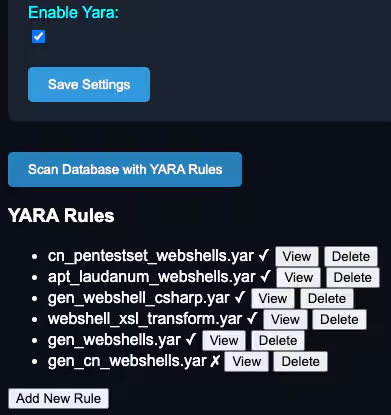
Figure 2: Yara rules in ShellSweepX, Splunk 2024
This functionality is implemented in the settings route and template:
@app.get("/settings")
async def settings_page(request: Request):
    settings = load_settings()
    yara_rules = load_yara_rules()
    return templates.TemplateResponse("settings.html", {"request": request, "settings": settings, "yara_rules": yara_rules})
@app.post("/save_yara_rule")
async def save_yara_rule_route(filename: str = Form(...), content: str = Form(...)):
    save_yara_rule(filename, content)
    return RedirectResponse(url="/settings", status_code=303)
@app.post("/delete_yara_rule")
async def delete_yara_rule_route(filename: str = Form(...)):
    delete_yara_rule(filename)
    return RedirectResponse(url="/settings", status_code=303)
File-based Management
YARA rules can also be added by dropping .yar files into a designated folder: yara_rules. The system automatically loads these rules and performs validation to ensure they will operate:
def load_yara_rules():
    rules = {}
    for file in YARA_RULES_DIR.glob("*.yar"):
        with open(file, "r") as f:
            rules[file.name] = f.read()
    return rules
YARA scanning is performed at two key points in the system: during file upload and as a background task to scan previously analyzed files.
The effectiveness of YARA rules in detecting web shells can be significant, especially for known patterns and signatures. YARA rules can catch specific web shell variants that might be missed by the machine learning model, which looks for more general patterns. The combination of YARA rules and machine learning provides a robust detection system that can identify both known and potentially unknown web shell variants. We want to thank Florian Roth for the Signature-Base repository of YARA rules.
Agents
Out of the box, Linux and Windows are supported with both PowerShell and bash scripts. The idea is simple: the consumer will need to schedule a job to run at an interval and the ShellSweepX server will handle the configuration and analysis. The agent itself will check-in, grab the configuration, and perform the requested scan. If a file is found, it will be sent back to the server for analysis. Note the main difference here is the agent is more “limited” in that it does not perform any analysis locally besides entropy and exclusions.
The diagram below shows the cyclical nature of the agent's operation, where it continuously checks for configuration updates, scans the file system based on the configuration, and reports any findings back to the server.
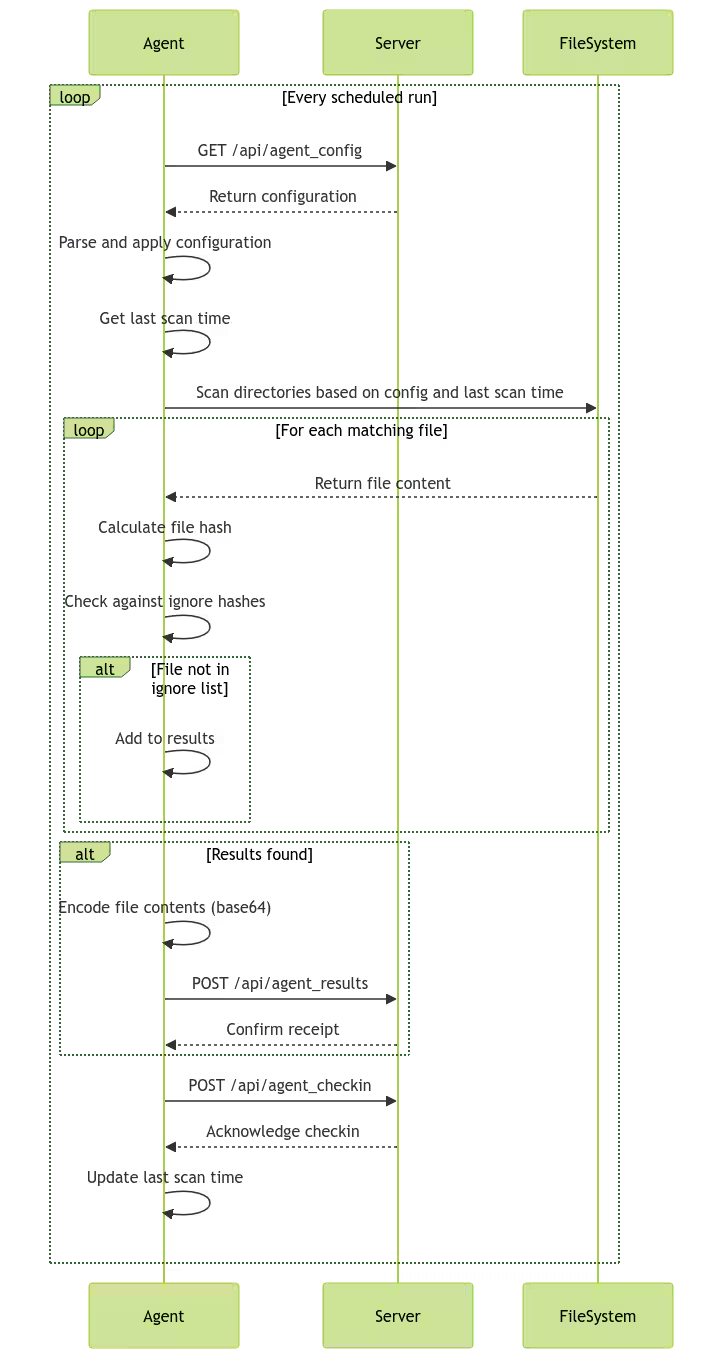
Figure 3: ShellSweepX agent diagram, Splunk 2024
Agent Configuration
All agent configurations are now handled inside the UI, whereas before it was handled in the ShellSweep script itself. Similar to before, all file extensions and types may be defined here and the range of entropy for each. We kept with entropy as the first approach mainly to assist with reducing volumes of false positives. We’ve prefilled default entropy ranges for most values based on our own shell analysis. To determine your organization’s specific ranges, utilize ShellScan to scan paths and modify the entropy values.
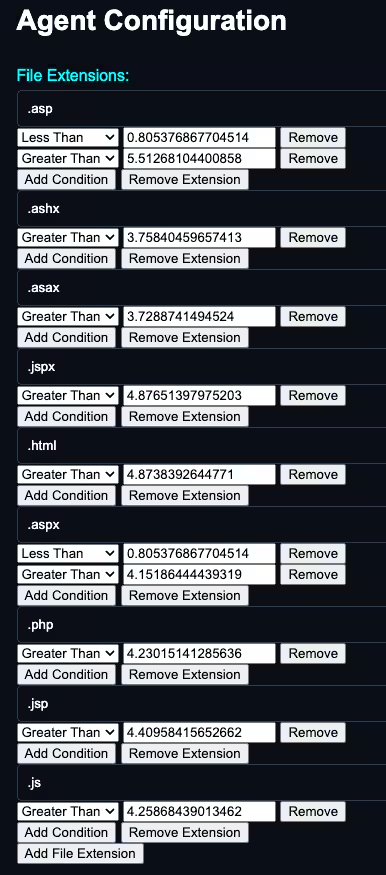
Figure 4: ShellSweepX agent extensions to scan for, Splunk 2024
In addition to the file extensions to scan, paths to scan and exclusions are now able to be made in the UI.
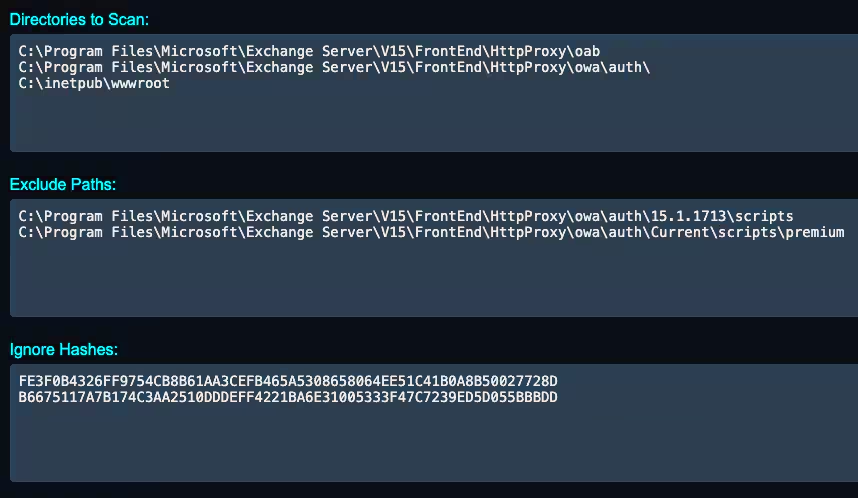
Figure 5: ShellSweepX directories and files to ignore, Splunk 2024
AI Integration
ShellSweepX now incorporates advanced AI capabilities through seamless integration with both Claude, Anthropic's powerful language model, and OpenAI's GPT-4o. These integrations enhance ShellSweepX’s ability to analyze potential web shells.
When a user initiates an AI triage, the system chunks the suspicious code and sends it to either Claude or GPT for analysis, depending on which API key is configured. The AI prompt, which can be customized in the settings, guides the AI to assess the code's potential maliciousness, capabilities, and suspicious elements. The AI's analysis is then displayed alongside the sample, providing security professionals with AI-powered insights to complement their manual analysis.
This feature leverages the latest APIs of both Claude 3.5 Sonnet and GPT-4o, ensuring up-to-date and sophisticated AI assistance in identifying and understanding potential threats.
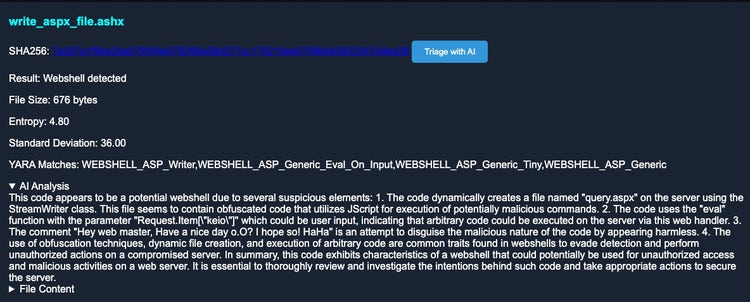
Figure 6: Triage by AI in ShellSweepX, Splunk 2024
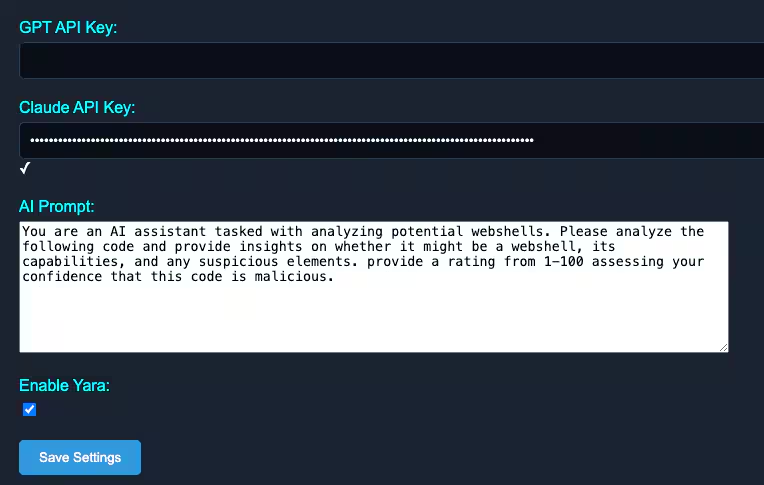
Figure 7: ShellSweepX AI prompt and API settings, Splunk 2024
Want More?
For more feature breakdown of ShellSweepX, check out the video or the project's wiki.
Closing Thoughts
As cybersecurity threats continue to evolve and become more sophisticated, it is important for organizations to adopt tools that can keep pace with these changes. ShellSweepX represents a step forward in web shell detection, offering a comprehensive and adaptable solution that can help organizations stay ahead of the curve.
We encourage readers to try ShellSweepX in their own environments and experience firsthand the benefits of its features.
Do you have ideas, suggestions, or questions? Your feedback is invaluable in helping us further refine and improve the tool to meet the ever-changing needs of the cybersecurity community.
Related Articles

Predicting Cyber Fraud Through Real-World Events: Insights from Domain Registration Trends

When Your Fraud Detection Tool Doubles as a Wellness Check: The Unexpected Intersection of Security and HR

Splunk Security Content for Threat Detection & Response: November Recap

Security Staff Picks To Read This Month, Handpicked by Splunk Experts

Behind the Walls: Techniques and Tactics in Castle RAT Client Malware

AI for Humans: A Beginner’s Field Guide

Splunk Security Content for Threat Detection & Response: November 2025 Update

Operation Defend the North: What High-Pressure Cyber Exercises Teach Us About Resilience and How OneCisco Elevates It
