Supercharge Cybersecurity Investigations with Splunk and Graphistry: A Powerful Combination for Interactive Graph Exploration
As a data scientist and Splunk user, you know the importance of leveraging the right tools to gain valuable insights from your cybersecurity data. In this blog post, we'll dive deeper into how combining Splunk and Graphistry can help you unlock new capabilities for your cybersecurity investigations and gain better resilience for your organization. We'll highlight the key features of both platforms and show you how to integrate them easily with the Splunk App for Data Science and Deep Learning (DSDL) for advanced interactive graph data science. We also share useful links and a Jupyter notebook example that is available on GitHub, so you can get started quickly and for free.
Splunk allows you to collect and index machine-generated data from various sources, providing a comprehensive view of your organization's security posture and tackling advanced threat detection. With Splunk, you can analyze and investigate security incidents, detect anomalies in real-time and get notified so you can be proactive in your responses. As mentioned in an earlier article about graph analytics, many data sources in Splunk allow us to build a graph that describes the relationship between entities. Analysis of the graph can reveal valuable information that is vital for cybersecurity analytics and investigations. Interactive graph visualization is essential for such analyzes to quickly navigate through larger datasets and find the connections of interest. You can easily view smaller graphs on a Splunk dashboard using the 3D graph network topology visualization app. However, with larger graphs, this quickly runs into limitations, especially if you want to compute a layout to actually see the topological structure of a graph properly.
This is where Graphistry shines because it allows you to work smoothly with much larger graphs. Graphistry is a platform that enables you to explore and analyze large-scale graph data in real-time using GPU-accelerated visualization, analytics, and AI. It provides a highly interactive and intuitive user interface, allowing you to visualize and investigate complex cybersecurity data sets with ease. With Graphistry, you can explore network traffic patterns, identify suspicious activity or visualize the relationships between different data points. Once you have used Splunk and Graphistry to understand the graph patterns & outliers in your data you can start experimenting with more advanced AI. Graphistry greatly simplifies applying many graph analytics and AI ideas that allow you to derive more valuable insights from your graphs quickly. Some can be applied directly in Graphistry’s user interface, others can be flexibly used in Python via PyGraphistry. This allows you to explore graphs with a set of AI algorithms and once you are happy with a certain analysis pipeline you can operationalize it and use it to automatically create incidents or contribute to your risk-based alerting in Enterprise Security.
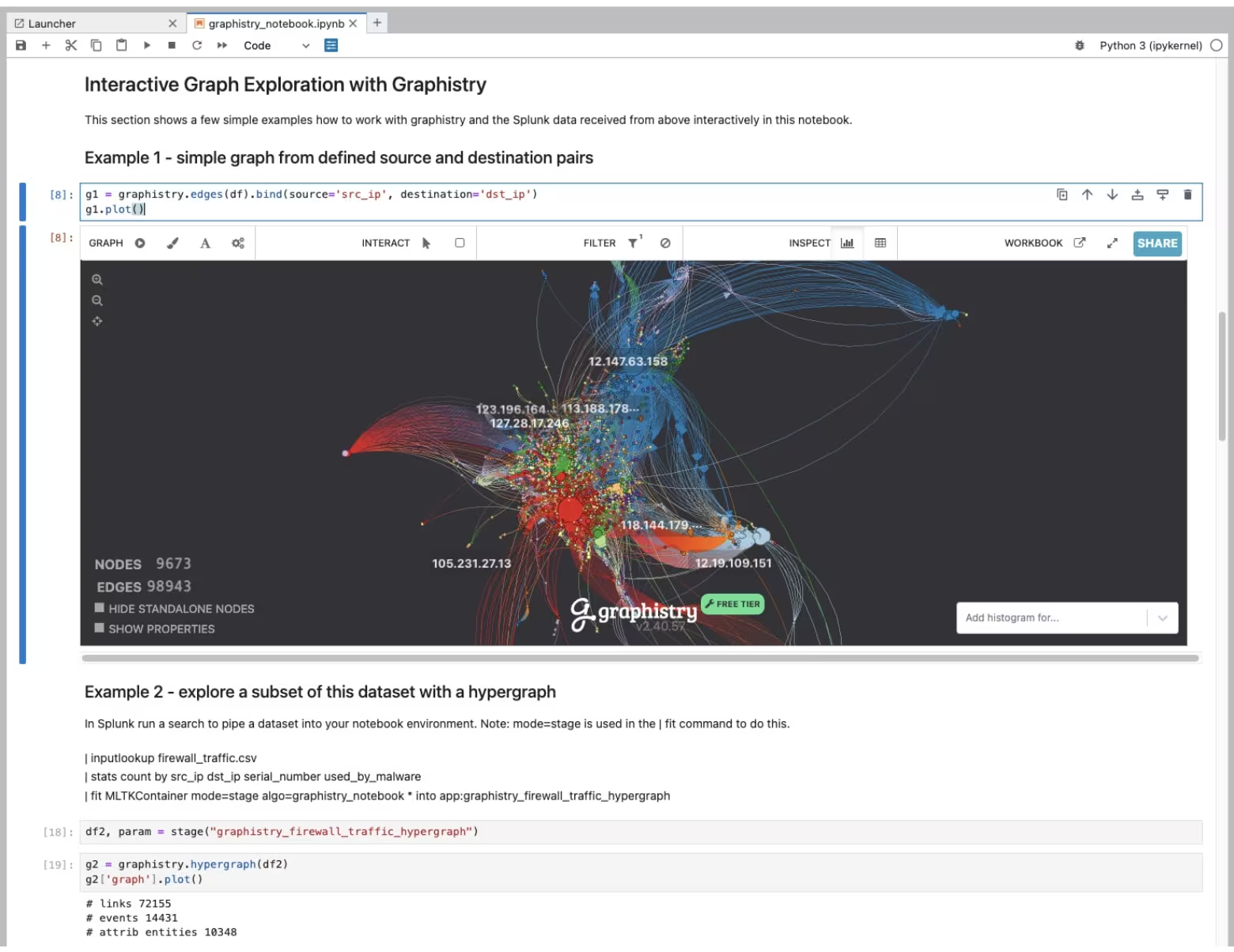
By combining Splunk and Graphistry, you can unlock new interactive graph explorations for your cybersecurity use cases and investigations. One way of getting started is by integrating the power of Graphistry into your data science workflows and using it straight from a Jupyter notebook (as shown in the screenshot above) which is available in DSDL. This comes with two main benefits:
- You can work flexibly with your datasets in Python and explore them iteratively and interactively in Graphistry.
- You can code flexibly your graph analytics pipeline in Python, leverage useful algorithms like UMAP and operationalize it with a DSDL container that can run on CPU or GPU infrastructure or uses a Graphistry server.
Here are some examples of how you can use these tools together:
- Analyze Security Incidents: Use Splunk to collect and analyze all security incident-related data, including host data like OS logs, processes and alerts as well as identity data like authentication, logins, access logs, user agent strings, IP addresses and then use Graphistry to visualize and explore the data in real-time. This allows you to enrich your investigations with relational insights that you can derive from the graphs you can flexibly define.
- Investigate Network Traffic Patterns: Use Splunk to collect and index network traffic data, such as IDS alerts, firewall logs, VPN, SSH, and weblogs, then use Graphistry to visualize and explore the data. This can help you identify suspicious activity, track the spread of malware or analyze network performance.
- Fraudulent or Non-Compliant Behavior: Use Splunk to collect behavioral data, transactions, account activities or clickstreams and use Graphistry to explore how entities are connected to each other. This can improve your fraud detection use cases and other applications where a deeper understanding of the relationship between entities is essential.
Last but not least, the latest version 5.1.1 of DSDL contains an example Jupyter notebook on GitHub that shows how you can interact with Splunk and Graphistry seamlessly and hopefully get you started quickly. On Graphistry’s GitHub you can find even more examples and security-related use case demos that you can explore further. Also, feel free to check out Graphistry’s latest generative AI system called louie.ai which allows you to work interactively with your data in natural language to retrieve Splunk data and then work further with it in Graphistry.
Watch out for the next blog post by my colleague Tanzil who will dive deeper into one use case.
Happy Splunking,
Philipp
Thanks to Leo Meyerovich and Alex Morrise from Graphistry for your guidance on your technology and for keeping me technically honest. On the Splunk side, I want to thank Tanzil Kazi for your great continued collaboration on this topic as well as Mina Wu for editing this blog post.
Related Articles

Predicting Cyber Fraud Through Real-World Events: Insights from Domain Registration Trends

When Your Fraud Detection Tool Doubles as a Wellness Check: The Unexpected Intersection of Security and HR

Splunk Security Content for Threat Detection & Response: November Recap

Security Staff Picks To Read This Month, Handpicked by Splunk Experts

Behind the Walls: Techniques and Tactics in Castle RAT Client Malware

AI for Humans: A Beginner’s Field Guide

Splunk Security Content for Threat Detection & Response: November 2025 Update

Operation Defend the North: What High-Pressure Cyber Exercises Teach Us About Resilience and How OneCisco Elevates It
