Stitching Notables Together with Event Sequencing
I’m a sickening wreck, I've got the 21st century breathing down my neck! My SOC analysts need a method to alert on advanced threats in Splunk Enterprise Security. They have a number of notable events that they believe are part of an advanced threat, but they have some specific needs around alerting when these occur. Could you point me in the right direction?
Sincerely,
Mr. Shankly

Frankly Mr. Shankly,
Your timing is impeccable. This was discussed at .conf19 during the "Enterprise Security Biology: Disecting the Incident Management Framework" talk. Event Sequencing, a feature introduced in Splunk Enterprise Security 5.2, can take multiple notable events that are created from correlation searches and present them to the analysts as a set of linked notable events that only bubble up when these chain of events occur in a specific sequence.
To better understand why this matters, let’s look at my incident review listing of notable events. These notable events have varying urgency values and some of them alone may be malicious, but others may appear to simply be policy violations when presented without additional context. However, if we can take our notables and assemble a sequence of 3 or more that occur within a period of time, then we have a Sequenced Event that encompasses these notables and also produces a higher fidelity alert.
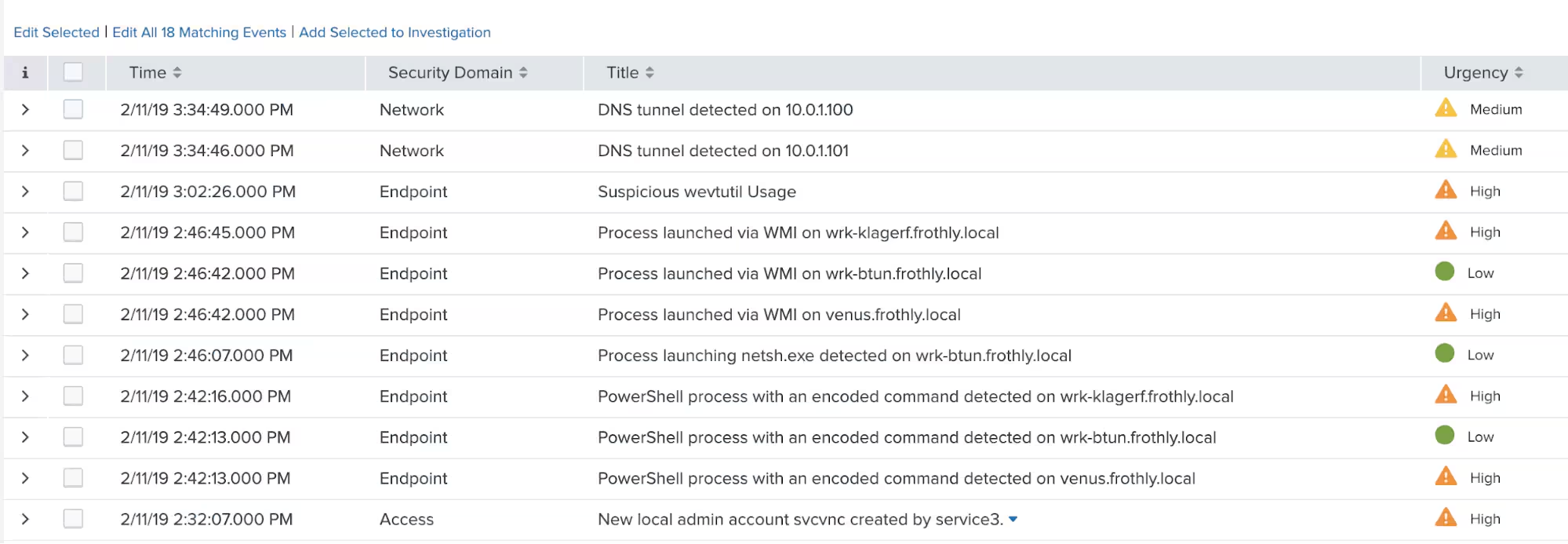
With that background in place, let’s look at an example.
We are going to take our list of existing notable and perform some analysis. This is a key step when developing any content, but it is especially important with event sequencing. Throwing a set of events together could result in false positives or event sequences not being generated for the events that are determined to be the most critical.
As part of this analysis, let’s take a quick look at a few key values in my current notable events. When building our sequence template, we need to identify common values between events to connect them together. In this case, I will just use the destination address field to connect my notable events together. More on that in a bit.
Another thing to think about is the events that trigger these sequences and what events would occur after the initial event in the sequence. Think about this from an adversary’s perspective to help develop this. In our example, we are attempting to identify an adversary deleting event logs to cover their tracks. From an attacker perspective, this is an action that will occur near the end of the attack, not at the beginning, so I would not use that as the act that initiates my sequence.
Now that we are reviewing our data and thinking about the linkages and order, let’s start getting Splunk Enterprise Security configured. Before we can alert on sequenced events, we need to enable that specific engine in Enterprise Security. You can still author your templates and test them (more on that later) without enabling the engine, but your templates will not execute. To enable it, click Configure -> All Configurations in Enterprise Security. Then click on General Settings. Scroll down the General Settings to the Event Sequencing Engine and click Enable. That’s it, the engine is ready to go!

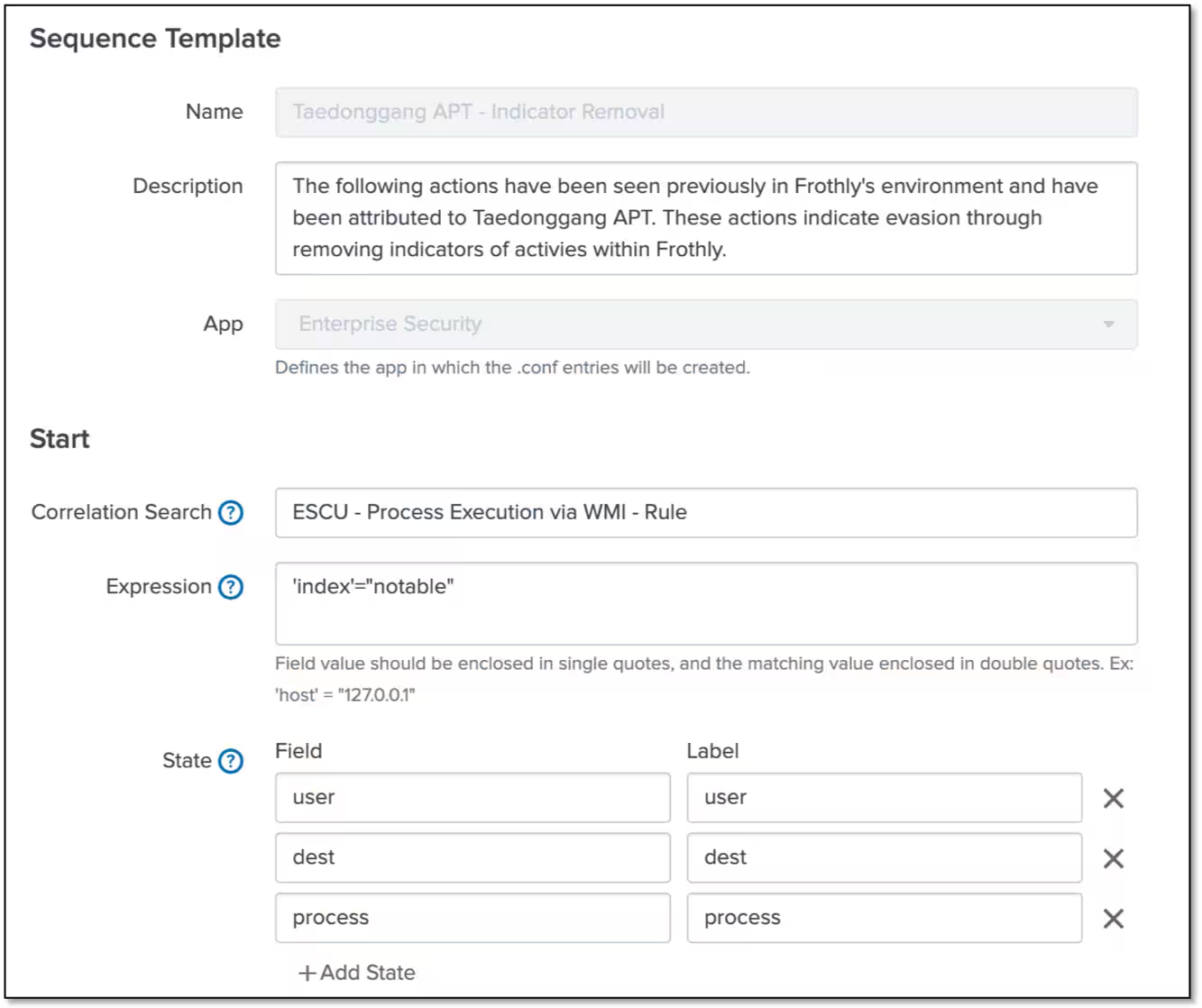
With the engine enabled, let’s start building what Splunk calls a Sequence Template. This template can be created within Enterprise Security by going Configure -> Content Management. In the top right corner of the Content Management page, click on the green Create New Content button and select Sequence Template.
In our example, our analysts have told us that Taedonggang APT has a series of steps they perform when they are covering their tracks. To ensure that these actions are quickly recognized and escalated, we are going to build our Sequence Template around that requirement.
The Name, Description and App fields are pretty self-explanatory. Under Start, we need to pick a Correlation Search that will kick off the sequence. If this correlation search doesn’t return an event, the rest of the sequence will not start. Expression must have a value in it. If you are focusing on a specific address range or something similar that is a fine way to narrow the focus of the event sequence, but that value comes from the notable event. Because every notable event has index = notable, I am going to use that so that this is kicking off anytime that ESCU - Process Execution via WMI - Rule returns a notable event. Pay close attention to the single and double quotes around fields and values and follow the guidance in the UI. This will be a constant throughout.
The last part of this first section is defining state. The tooltip will tell you that you use these fields to match against other events in the sequence, but also fields that you want to carry through the entire sequence. In my case, I grabbed the fields dest, user and process.
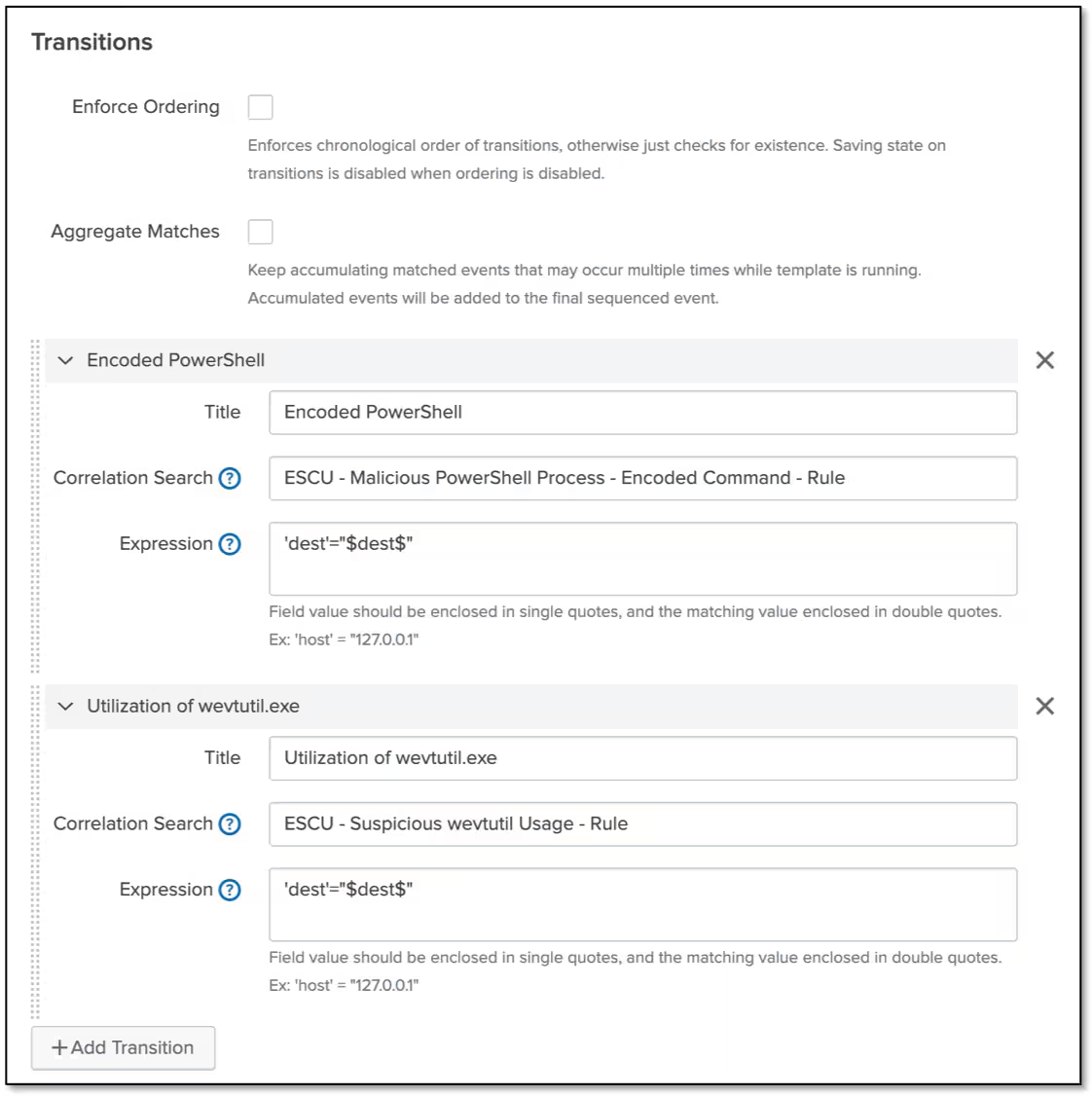
The middle section of the template is called Transitions. We have a few immediate decisions to make here. The first is around event ordering; that is, do we require events to fire in a specific order for the sequence to successfully complete? If you choose to do that, make sure you have a good feel for your correlation searches and data as well as the cron schedule your correlation searches are running on. It might be advisable initially to not worry about the order of the events as you get underway.
If we set Aggregate Matches, every time a notable fired that matched the correlation searches in Transitions that meet our criteria, it would show all of those notable events for the specific host specified. Leaving it unchecked will just show that an Encoded PowerShell event occurred and move to the next transition.
In our example, we are looking for encoded PowerShell and the execution of wevtutil.exe in no particular order and we are looking for a match on dest.
Finally, I want to end my sequence when my system identifies Windows Event Log Cleared. Notice I would like to output the original process value I defined in state at the beginning, as well as user and dest.
I also want to set a time boundary on these events. In this case I am looking for these four events to occur within a two-hour window. This time boundary can range from minutes to months.
After the sequence completes, I will want to define an Action. I can supply a title and description, just like a notable event and I can use tokens in those fields. I will need to set an Urgency and Security Domain for the sequence and define my Output Fields. These are handled like notable events with tokens as well. It is important to note that if I don’t have these set in state at the beginning I am not in a position to show them at the end, so keep that in mind.
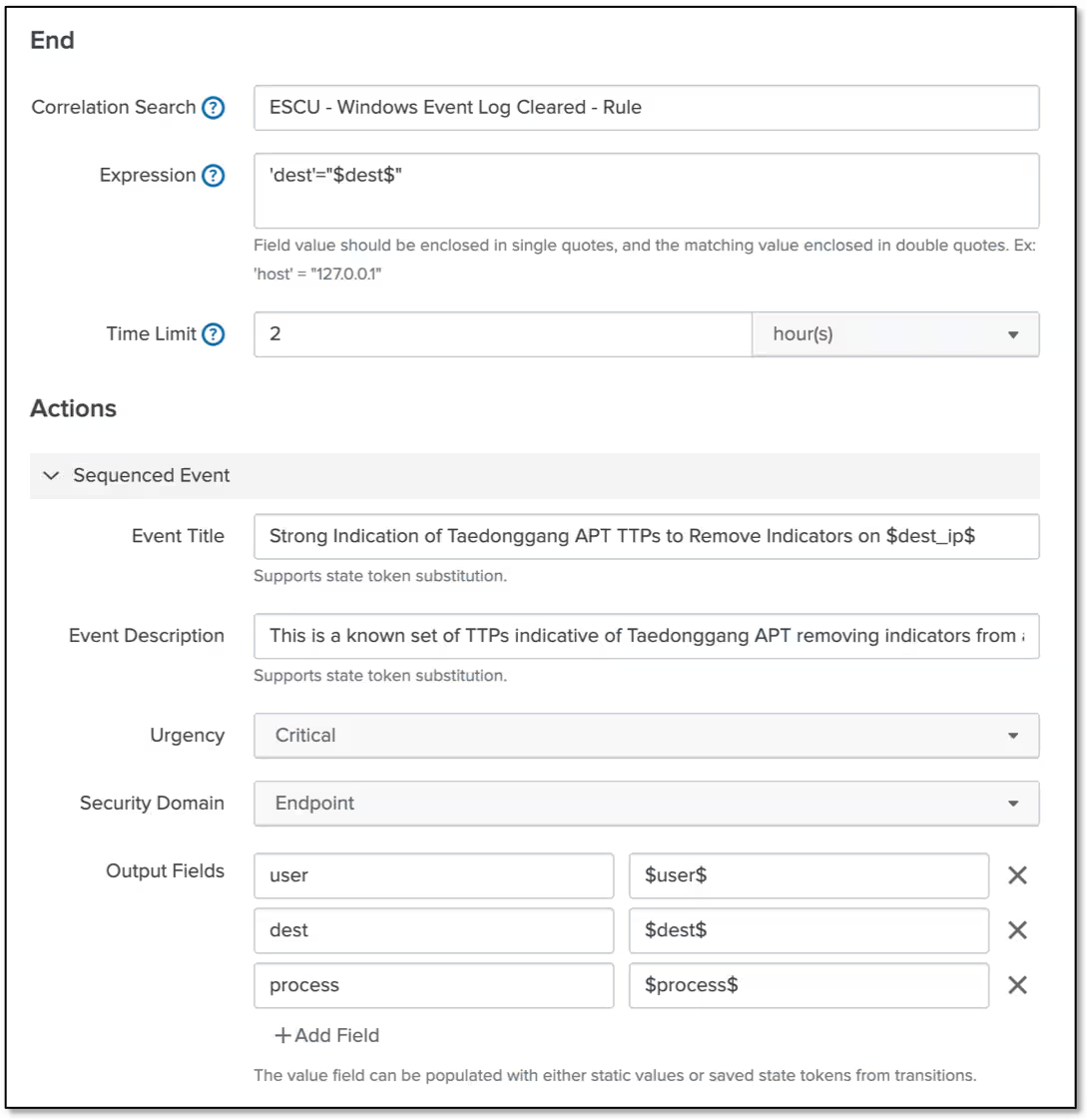
Click Save and then Enable the Sequence Template and we are set!
Now you might be thinking, great I have a sequence template, does this mean I should just wait until it fires and hope it is tuned correctly for what I am looking for? The answer is no, you don’t need to wait!
To test your sequence template, you can run this handy macro. Replace my template name (Taedonggang_APT__Indicator_Removal) with yours.
`execute_sequence_template(Taedonggang_APT__Indicator_Removal, false)`
This will look across your existing data set and timepicker and identify any matches to your template and return the output in JSON in the search screen. You can review and tweak your template as needed. If you would like to create notable events from these findings against your historical data, you can do that as well but flipping false to true!
So what does an Event Sequence look like? Here it is.
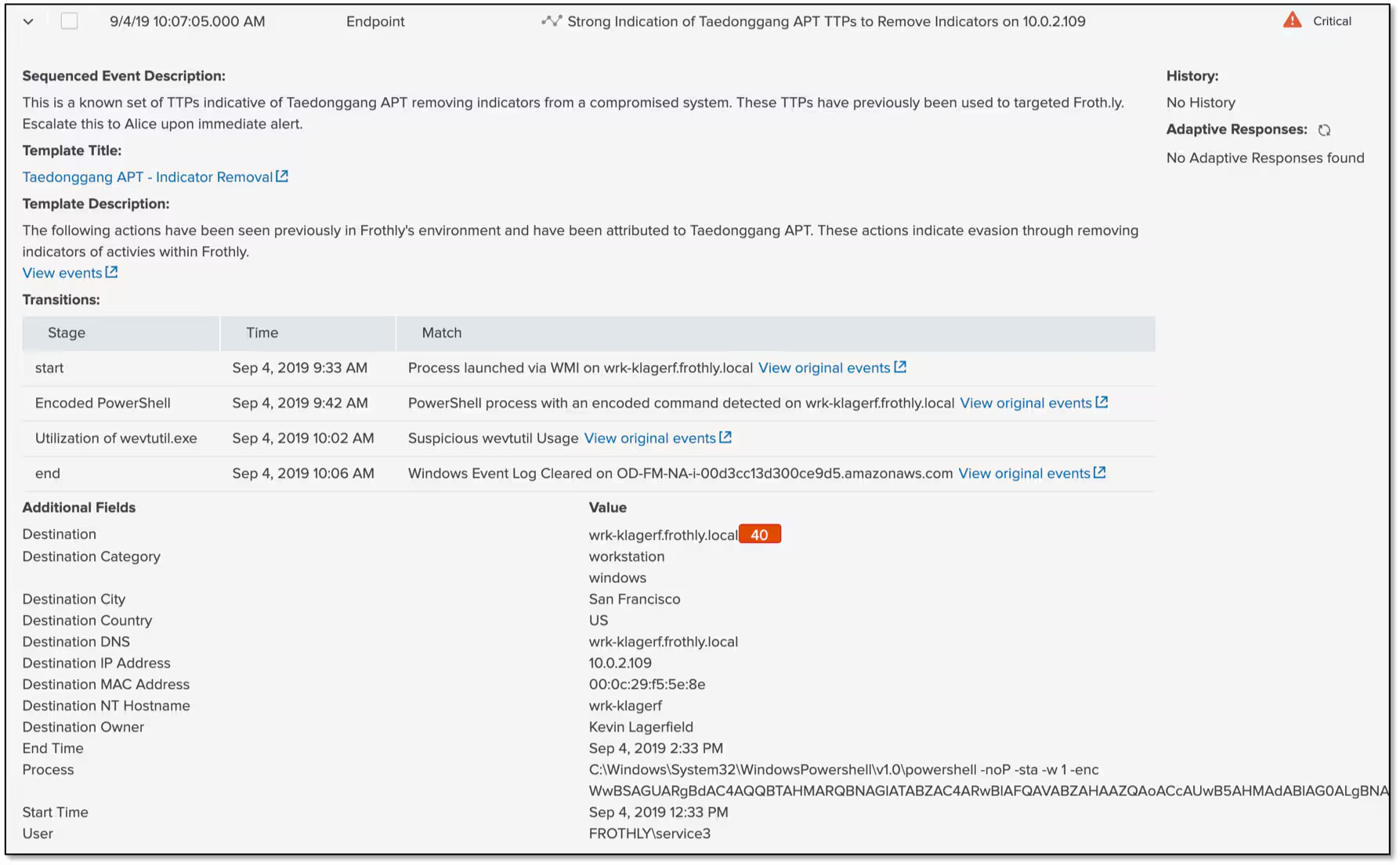
The name and description as well as tokens came across. So does my Security Domain and Urgency. In the middle of the screen are the four correlation searches that fired with links to the original events and below that are the output fields that I brought with me, including Process and User. Because Frothly was impacted by this advanced threat previously, we wanted to make sure that if we saw these behaviors occurring together, we needed to have a critical alert associated with it and that is exactly what we have done here.
There are some additional dashboards that show the state of running event sequence templates that allow you to get insights into why or why not event sequences have run. It is also important to note that while you can suppress individual notable events, the event sequence will still factor in the existence of the notable event in it’s calculation, which I think is a good thing, but it speaks to the need to have good fidelity in your notable events, particularly the ones that flow into event sequences.
I hope this provides you with a better understanding of sequenced events. This is a very powerful feature but as Spiderman says, with great power comes great responsibility! Make sure you have quality notable events to sequence and that you understand the fields that the correlation search outputs (look in the notable index). From there, you can then carry those relevant fields through the sequence.
Cordially,
Buttercup
----------------------------------------------------
Thanks!
John Stoner
Related Articles

Predicting Cyber Fraud Through Real-World Events: Insights from Domain Registration Trends

When Your Fraud Detection Tool Doubles as a Wellness Check: The Unexpected Intersection of Security and HR

Splunk Security Content for Threat Detection & Response: November Recap

Security Staff Picks To Read This Month, Handpicked by Splunk Experts

Behind the Walls: Techniques and Tactics in Castle RAT Client Malware

AI for Humans: A Beginner’s Field Guide

Splunk Security Content for Threat Detection & Response: November 2025 Update

Operation Defend the North: What High-Pressure Cyber Exercises Teach Us About Resilience and How OneCisco Elevates It
