RCE à La Follina (CVE-2022-30190)
Splunk is committed to using inclusive and unbiased language. This blog post might contain terminology that we no longer use. For more information on our updated terminology and our stance on biased language, please visit our blog post. We appreciate your understanding as we work towards making our community more inclusive for everyone.
If you want just to see how to find detections for the Follina MS Office RCE, skip down to the “detections” sections. Otherwise, read on for a quick breakdown of what happened, how to detect it, and MITRE ATT&CK mappings.
Introduction to RCE à La Follina (CVE-2022-30190)
On May 28th, 2022, the nao_sec Japanese cybersecurity research team tweeted about an unusual Microsoft Word document that appeared on VirusTotal. The researchers determined that this document was malicious and used two techniques to gain remote code execution (RCE) on the victim’s computer. The document was also able to bypass most detection methods at the time, including Microsoft Defender. The RCE was christened Follina by Kevin Beaumont due to a reference of 0438 within the sample, and 0438 being the area code of Follina in Italy. In this blog, we will provide a brief overview of this RCE exploit along with some Splunk searches to help you defend against this type of behavior in your environment.
How Was This Done?
There are multiple great write-ups on Follina that break down the technical details. We don’t want to rewrite the great work already out there, so here is a list in the order that they were released:
- Twitter thread by Jake Williams at SCYTHE
- Follina article by Kevin Beaumont
- Detailed article by John Hammond at Huntress
If you haven’t read the links above (which you really should), here is a brief overview of how Follina works.
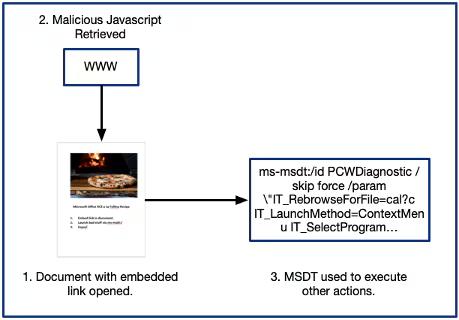
As mentioned earlier, two techniques are used to gain remote code execution. The first technique uses an embedded HTML link within the original document. When opened (or just previewed if the document is saved in rich text format), Word retrieves the content from that link, which in this case is HTML payload containing script tags. The malicious HTML payload then uses the Microsoft Support Diagnostic Tool (MSDT) protocol schema - `ms-msdt`, which allows arbitrary execution of commands including calc.exe or PowerShell scripts that disable protection tools, download a backdoor, and then open you up to things like data exfiltration, ransomware, etc.
What Does This Mean?
This may not sound novel, but so far we have not seen an example of MSDT being used as a launching pad for other processes. The closest we could find is a post by SySS GmbH titled “Abusing the MS Office protocol scheme.” This is a good read that calls out other methods of abusing similar MS protocols. While MS-MSDT is found in their blog, it isn’t specifically mentioned as an abuse vector.
This type of activity usually lives in the wonderful land of macros. But defenders are getting quite good at detecting and blocking macros, so adversaries have to find new ways to infiltrate networks. Legitimate programs called LOLBins, or living off the land binaries, are one powerful technique to bypass traditional defenses and hide malicious activity since these programs are typically needed for systems to function properly, and limiting their use can be difficult.
Should Word or other Office programs use msdt.exe? Should msdt.exe attempt to run PowerShell or other programs? I had no clue going into this, and I bet that most defenders out there are in the same boat.
What Can I Do?
First, these sorts of situations present a great learning opportunity. When a new behavior like this surfaces, it’s always a good idea to dig in a bit deeper to understand how it works. Basic searches for MSDT turn up the usual page-turners, aka Microsoft Documentation. The MSDT documentation page highlights the power of this particular tool. It has a number of capabilities that make it a perfect vector for this sort of attack.
Also, should Word, or other MS Office programs launch MSDT? Off the top of my head I can’t think of any particular reason, so maybe we should prevent it. John Hammond calls out a capability within Microsoft Defender called Attack Surface Reduction (ASR). A rule exists that will not only block MS Office programs from launching MSDT, but any other child processes. This may or may not work for your environment depending on how your business uses these applications, so tread carefully before turning this on en masse.
This leads to one of the most important learning exercises I can think of. You MUST start by understanding your own environment inside and out. This is not easy by any stretch of the imagination, but once you start putting this jigsaw puzzle together, you will be a much better defender. With this knowledge, you can start crafting detection and hunting techniques that are more behavior-driven, and less dependent on static values that can change at the drop of a hat.
Hunting with Splunk
Since we know the techniques used in this particular scenario, we are able to replicate the activity and then hunt for the behaviors within Splunk. Treat this hunting search as Splunkspiration, as you may need to adjust it to better reflect your environment.
If you ingest Microsoft Sysmon data (in our opinion you should be), this search can detect when MSDT is launched with the relevant command-line options used in this scenario. We have adopted and translated this Sigma rule created by the team at Huntress to create this search.
index=main source="xmlwineventlog:microsoft-windows-sysmon/operational" process_name=msdt.exe
| where (like(CommandLine, "%PCWDiagnostic%") AND (like(CommandLine, "%ms-msdt:/id%") OR like(CommandLine, "%ms-msdt:-id%"))) OR (like(CommandLine, "%invoke%"))
| table host CommandLine parent_process_name parent_process_id process_name process_id

This search functions as follows:
1. It searches in the main index using Microsoft Sysmon data as a source.
2. It only looks for the msdt.exe process name.
Then, it looks for one of two CommandLine executions.
3. In the first where condition, the search looks for CommandLine execution containing the string PCWDiagnostic along with ms-msdt:/id OR ms-msdt:-id strings.
or
4. In the last OR condition, it looks for any invoke strings that msdt.exe makes.
A combination of 1 + 2 and then 3 or 4 will trigger a match.
If we wanted to explore a bit further, we could pivot on the parent process ID in that time period to determine if that process communicated with any remote sites.
index=main source="xmlwineventlog:microsoft-windows-sysmon/operational" process_id=10864 EventCode=3
| table src_ip src_port dest_ip dest_port

This search functions as follows:
1. It searches in the main index using Microsoft Sysmon data as a source.
2. It uses the parent process ID from the previous search, but now as the process ID itself.
3. It searches for EventCode=3, which is the event code for Network Connections.
4. It then creates a table showing the source IP, source port, destination IP, and destination port.
The search results show us that winword.exe communicated with 143[.]244[.]214[.]139 on port 80 (HTTP).
This data would be very useful if we wanted to continue hunting in our environment to see if other hosts communicated with that destination.
Splunk Enterprise Security and ESCU
Enterprise Security Content Updates (ESCU)
For folks using ESCU, the Splunk Threat Research Team (STRT) released a new Splunk Analytic Story containing detections for this threat.
Splunk Services
Our team of Security Professionals, who are part of our Splunk Professional Services team, can help you implement what we’ve mentioned here. We also have more targeted offerings that can help you increase your security posture as well.
Splunk Services for Breach Response and Readiness
This section is all about Splunk helping you prepare for and respond to a breach using our suite of products. Let our experts help you with:
- Rapid data source identification and onboarding
- How to incorporate and use threat intelligence
- Prebuilt content with searches and dashboards to facilitate faster investigation and remediation
- Tactical response planning
- Tabletop exercises to validate your response using Splunk products
MITRE ATT&CK
After reviewing relevant blog posts from just about the whole internet, we mapped the vulnerability activity to MITRE ATT&CK. As more information becomes available, we will update this table with searches if more ATT&CK tactics, techniques, and procedures (TTPs) become known. Please note these are just searches that map to the TTP not necessarily perfect detections.
- Windows LOLBin Binary in Non Standard Path
- Detect Regsvcs Spawning a Process
- Rundll32 Control RunDLL Hunt
- Detect Regasm with Network Connection
- Windows Rasautou DLL Execution
- Rundll32 Control RunDLL World Writable Directory
- Wbemprox COM Object Execution
- Windows InstallUtil Remote Network Connection
- Suspicious Rundll32 PluginInit
- Suspicious IcedID Rundll32 Cmdline
- Detect MSHTA Url in Command Line
- Detect mshta renamed
- Verclsid CLSID Execution
- Windows Rasautou DLL Execution
- Suspicious Rundll32 no Command Line Arguments
- Detect HTML Help URL in Command Line
- Office Product Spawn CMD Process
- Rundll32 DNSQuery
- Detect Regasm Spawning a Process
- Suspicious mshta spawn
- Windows InstallUtil Credential Theft
- Mshta spawning Rundll32 OR Regsvr32 Process
- Suspicious Rundll32 StartW
- Detect Regsvcs with Network Connection
- Windows InstallUtil in Non Standard Path
- Detect Rundll32 Application Control Bypass - syssetup
- Control Loading from World Writable Directory
- Windows InstallUtil Uninstall Option
- Windows DotNet Binary in Non Standard Path
- Detect Rundll32 Application Control Bypass - advpack
- CMLUA Or CMSTPLUA UAC Bypass
- Detect Regsvcs with No Command Line Arguments
- Windows MSHTA Inline HTA Execution
- Regsvr32 Silent and Install Param Dll Loading
- Suspicious Regsvr32 Register Suspicious Path
- Windows Diskshadow Proxy Execution
- Windows Diskshadow Proxy Execution
- Windows DotNet Binary in Non Standard Path
- Rundll32 with no Command Line Arguments with Network
- Windows InstallUtil URL in Command Line
- Windows MSHTA Command-Line URL
- UAC Bypass With Colorui COM Object
- Rundll32 Process Creating Exe Dll Files
- Windows InstallUtil Uninstall Option with Network
- Detect Regasm with no Command Line Arguments
- Detect HTML Help Renamed
- Detect mshta inline hta execution
- Suspicious mshta child process
- RunDLL Loading DLL By Ordinal
- Detect HTML Help Using InfoTech Storage Handlers
- Detect Regsvr32 Application Control Bypass
- Detect Rundll32 Application Control Bypass - setupapi
- Uninstall App Using MsiExec
- Regsvr32 with Known Silent Switch Cmdline
- Suspicious Rundll32 dllregisterserver
Conclusion
This information along with the searches and ideas above should get you started to hunt for this behavior in your environment. You should also invest time to understand your risks, exposure, capabilities, and weaknesses and then plug any gaps you find. But remember, security is like a donkey, it has many layers and there are no silver bullets.
Happy Hunting!
Related Articles

Predicting Cyber Fraud Through Real-World Events: Insights from Domain Registration Trends

When Your Fraud Detection Tool Doubles as a Wellness Check: The Unexpected Intersection of Security and HR

Splunk Security Content for Threat Detection & Response: November Recap

Security Staff Picks To Read This Month, Handpicked by Splunk Experts

Behind the Walls: Techniques and Tactics in Castle RAT Client Malware

AI for Humans: A Beginner’s Field Guide

Splunk Security Content for Threat Detection & Response: November 2025 Update

Operation Defend the North: What High-Pressure Cyber Exercises Teach Us About Resilience and How OneCisco Elevates It
