Python, Re-Skinned, Keeping the Steal: Braodo’s Latest Python Loader and Obfuscation
Security Teoderick Contreras , Splunk Threat Research TeamKey takeaways
- The Braodo Stealer campaign uses varied social-engineering lures, junk-code obfuscation, and GitHub-hosted payloads to hide its loaders and avoid detection by security tools.
- The malware steals browser credentials, cookies, payment card details, and Meta advertising account data, then sends the information to attackers through Telegram.
- The Splunk Threat Research Team developed 25 detections that help organizations identify this activity by focusing on observable behaviors and indicators.
Attackers continue to find new ways to make malware harder to detect, and Python-based malware is no exception. Recently, we came across a new Braodo Stealer loader that uses a combination of loader-level obfuscation and heavily obfuscated Python code to hide its behavior and make analysis more difficult.
In this blog, the Splunk Threat Research Team (STRT) take a closer look at how the latest Braodo Stealer loader works, how its Python payload is obfuscated, and some of the techniques it uses to avoid detection. We will walk through the loader and payload, highlight the interesting artifacts and behaviors we found during analysis, and show how these techniques can be identified from a defender’s perspective.
We will also cover the Splunk detections we developed from the analysis, focusing on the behaviors and indicators that can help identify this activity in an environment. The goal is not just to understand how Braodo Stealer hides its code, but also to turn those findings into practical detections that defenders can use.
Campaign:
One interesting aspect of this Braodo Stealer campaign is the way the first-stage BAT loader is named. Rather than relying on a single filename, we observed loaders themed around travel bookings, medical records, dermatology, dental treatment, weddings, automotive products, and project updates. We observed filenames such as:
- Travel Itinerary - Booking - ShanghaiLogitics - 16Pax Jul2026.bat
- WindowSecurytm.bat
- Project_Update_April2026.bat
- Combo Cosmetics Dermatology Skin Recommended T22b7.bat
- Photo X-Ray Ultrasound Medical Records T3c7.bat
- Lab_Results_Dermatology2026.bat
- Dental_Treatment_PreConsultation_XRay.bat
- Wedding_Invitation_Specifications2026.bat
- Car Accessories Wheel Car Model Size Garage D0504.bat
This variation suggests that the campaign may be using different social-engineering themes to appeal to specific interests or situations rather than distributing the same lure to every victim. While the filenames alone are not enough to confirm a specific victimology or industry being targeted, the repeated use of medical, travel, personal-event, and consumer-related themes suggests that the attackers are adapting the initial stager to different delivery scenarios.
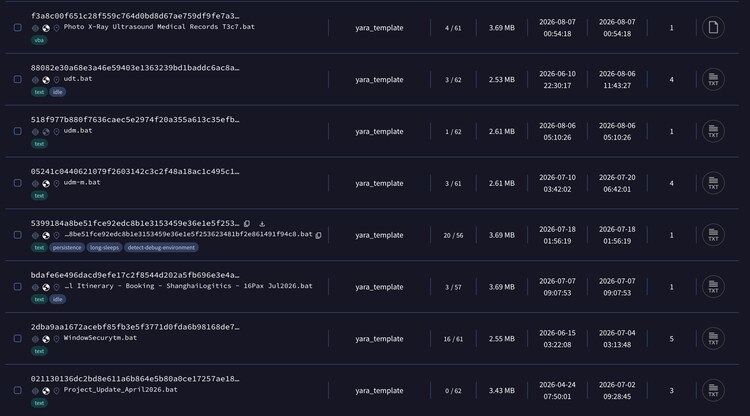
Figure 01: Braodo Stealer Batch Script Loader Campaign
Loader Analysis:
Obfuscated Files or Information: T1027
Big Junk Code Detection Evasion Variant:
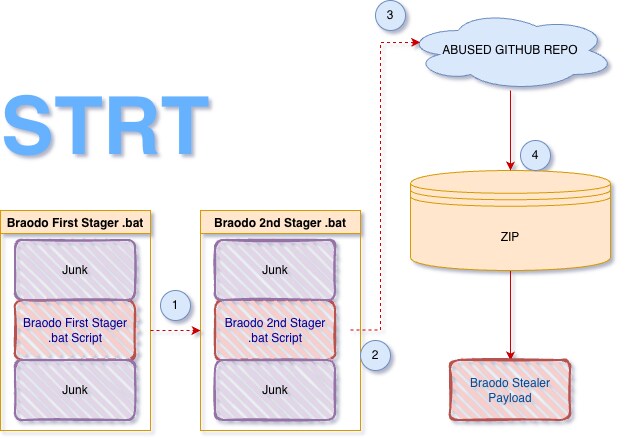
Figure 02: Braodo Stealer Infection Chain Variant A
In our previous STRT Braodo Stealer blog, we observed that the loader batch script was obfuscated using the ABOBUS obfuscator. In April 2026, we identified another Braodo batch script loader that no longer used ABOBUS obfuscation. Instead, the loader included large chunks of garbage strings in both the header and footer, likely to evade detections. As shown in Figure 03, the initial batch script loader uses the “runas” command to execute a PowerShell script with elevated privileges. The PowerShell script then downloads a .txt file from GitHub, which is saved to %TEMP% and executed as a batch script.
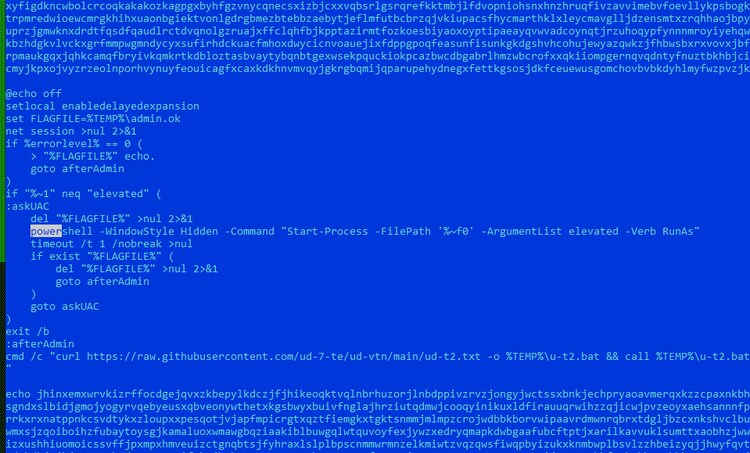
Figure 03: Braodo Stealer Batch Script First Stager Variant
The downloaded ud-t2.txt file from GitHub is another batch script that uses the same large junk-string technique to evade detection. This script is responsible for executing the actual Braodo Stealer, in this case sim.py, using python.exe. The Python executable is also included in the GitHub repository as part of an archived package created by the threat actors.
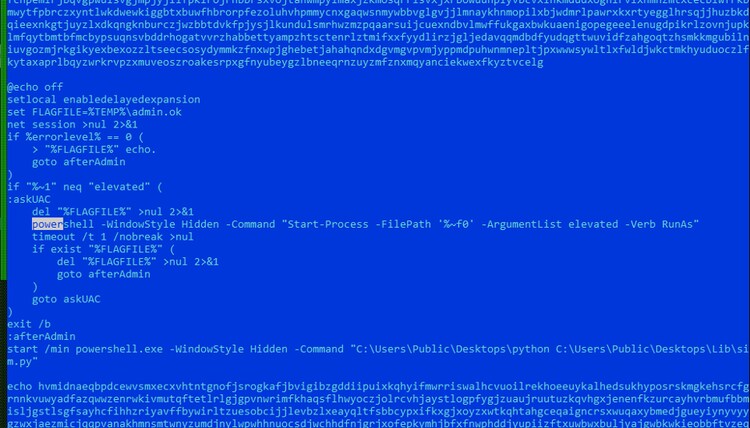
Figure 04: Braodo Stealer Batch Script Second Stager Variant
Obfuscation and Big Junk Code Technique Variant:
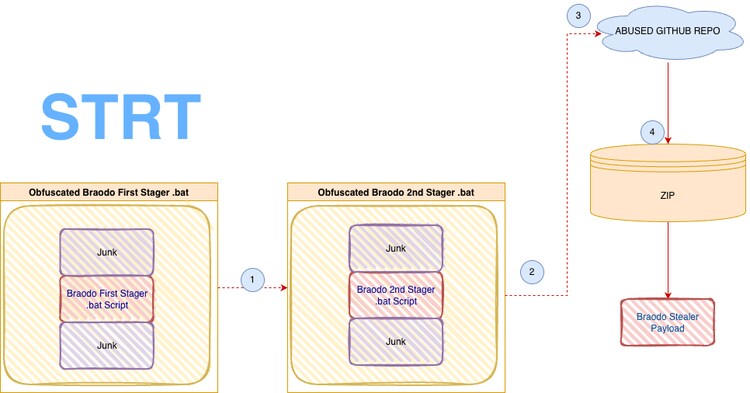
Figure 05: Braodo Stealer Infection Chain Variant B
In the latest Braodo Stealer loaders observed by STRT during August and September 2026, the threat actor continued using GitHub repositories to store its malware payloads as archived packages. The loader retrieves these archives from GitHub during execution, allowing the payload delivery to blend with legitimate GitHub traffic. This approach can make the malicious downloads less conspicuous to network-based security controls that may otherwise flag traffic to dedicated malware-hosting infrastructure.
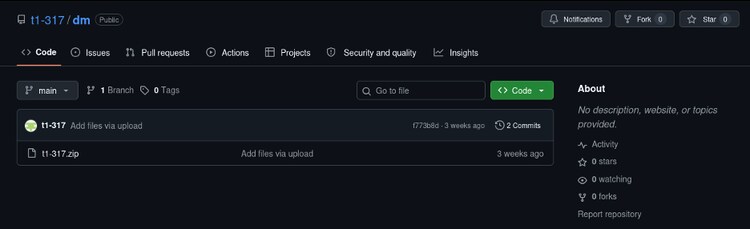
Figure 06: Braodo Stealer Archived in GitHub Repo
In this sample, STRT also observed that the batch script loader distributed through the phishing campaign was obfuscated. The loader is responsible for downloading the malicious archive from the GitHub repository. As shown in Figure 07, the obfuscated script contains the distinctive string “rouki”. However, after analyzing the script, STRT determined that the obfuscation technique is essentially a fork or modified copy of the ABOBUS obfuscator.
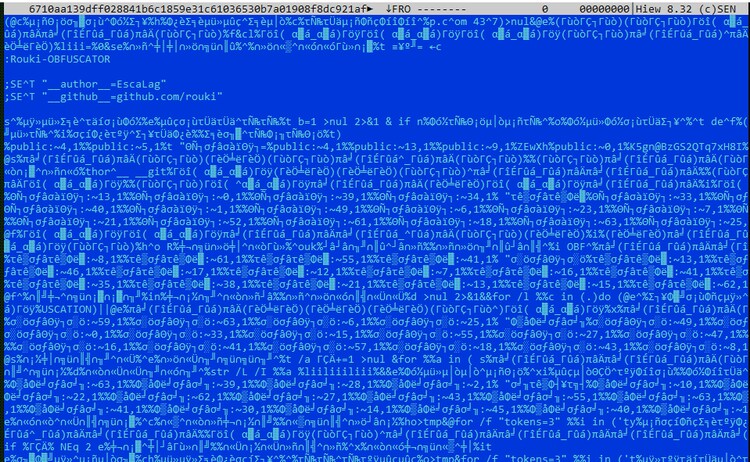
Figure 07: Braodo Stealer Obfuscated Loader Script
Using the DBOBUS tool, STRT was able to de-obfuscate and recover the script executed by the loader. As shown in Figure 08, the threat actor combined the DBOBUS-style obfuscation with large blocks of junk strings, creating multiple layers of evasion around the loader to make detection more difficult.
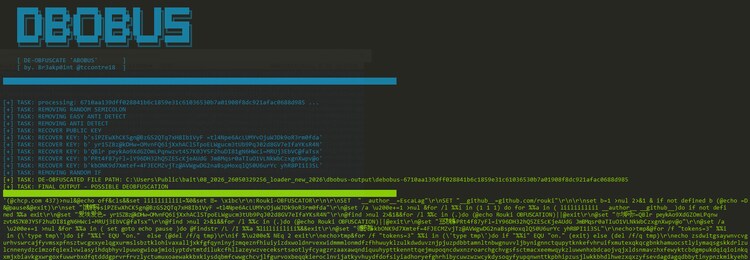
Figure 08: Braodo Stealer DBOBUS De-Obfuscation
Startup Folder: T1547.001
After de-obfuscation, the script reveals another stage in the infection chain. It uses PowerShell to download an additional batch script from a GitHub repository and saves the script to the Startup folder, establishing persistence for the malware.
The script then uses a TinyURL link to download an archive hosted through a GitHub repository. The archive contains the Braodo Stealer Python package along with its required libraries and is dropped as desktop.zip under %PUBLIC%. The loader executes sim.py using the python.exe included in the package. A specific Python version is bundled with each variant to ensure compatibility with the stealer and its required dependencies.
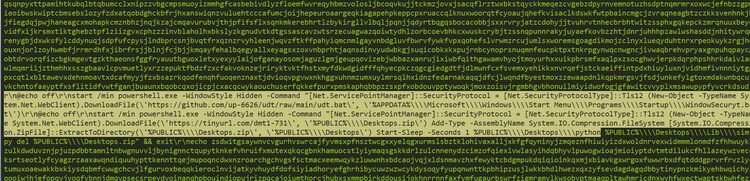
Figure 09: Braodo Stealer Second Stager
Braodo Stealer Analysis:
Python: T1059.006
The desktop.zip archive downloaded from the GitHub repository associated with this Braodo Stealer sample is more than just a container for the malware payload. It contains a complete Python runtime package, including python.exe and the libraries required by the stealer. By bundling the Python interpreter and its dependencies with the malware, the threat actor does not need to rely on a Python installation already present on the victim's system. This also provides greater control over the execution environment and helps ensure that sim.py can run with the expected Python version and required libraries.
As shown in Figure 10, sim.py is not a conventional Python source file, but Python bytecode. The bundled python.exe is used to execute this bytecode together with the dependencies included in the archive. This packaging approach reduces dependency-related execution failures and allows the threat actor to deploy the stealer as a self-contained package. It also explains why the loader downloads the entire archive rather than retrieving only the sim.py payload. The archive provides the Python runtime and supporting libraries needed to successfully execute the Braodo Stealer across the targeted systems.
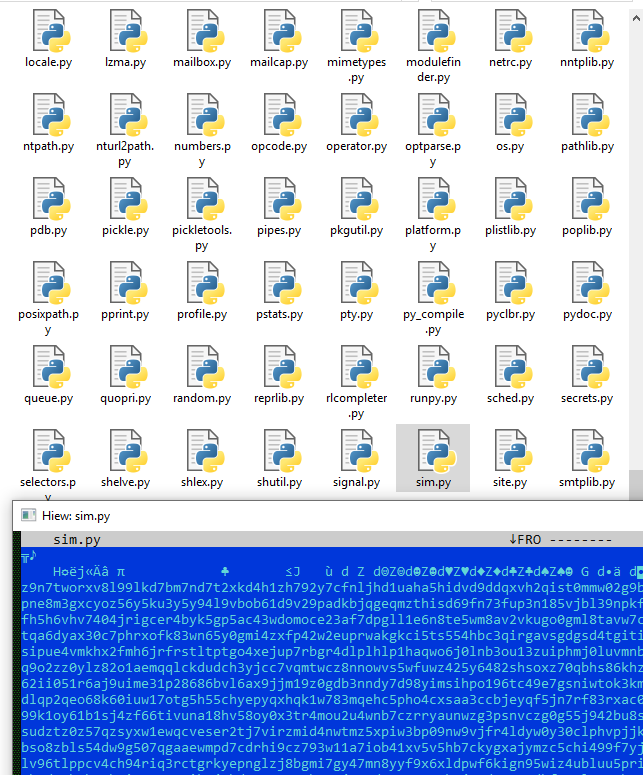
Figure 10: Braodo Stealer Sim.py payload
Using the PyLingual tool, STRT was able to decompile portions of the Python bytecode and recover part of the underlying logic. However, the decompiled code did not fully reveal the decoding and decryption routines responsible for processing the junk code and the large hexadecimal string stored in _sparkle. STRT took a dynamic analysis approach.
We hooked the execution of sim.pyc to monitor the Python runtime and capture the code after the obfuscation and decryption routines had processed it. By observing the bytecode and data generated during execution, we were able to extract the Python code in its de-obfuscated form. This approach ultimately allowed STRT to recover the underlying Braodo Stealer payload and continue the analysis of its functionality and behavior.
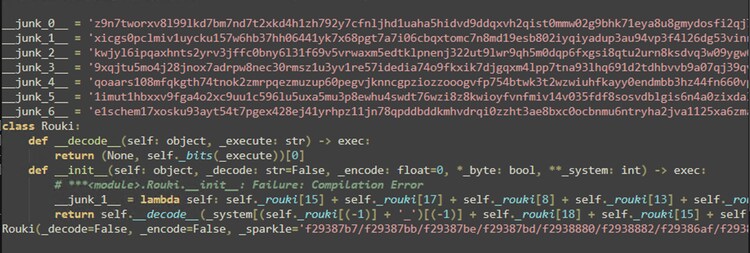
Figure 11: Braodo Stealer Sim.py Partial de-compilation
Web Service: T1102
This Trojan stealer uses Telegram as a communication channel to send stolen information from compromised systems to the threat actor. The malware contains Telegram bot-related configuration, including the bot token and chat identifier, which allows collected data to be forwarded to a designated Telegram chat. Using Telegram provides the threat actor with a readily available communication platform and avoids the need to maintain dedicated command-and-control infrastructure. This approach also allows stolen credentials and other collected information to be remotely received through the Telegram Bot API.
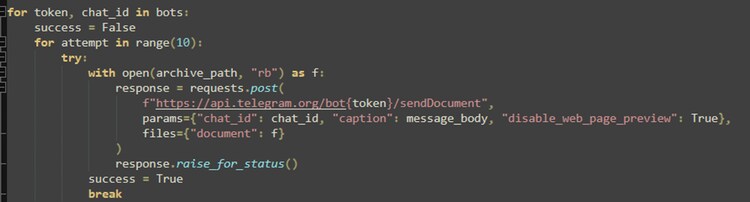
Figure 12: Braodo Stealer Telegram Bot Setting
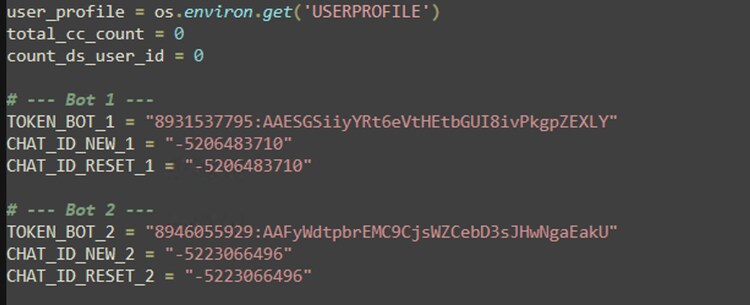
Figure 13: Braodo Stealer Telegram Bot Token and CHAT ID
Disable or Modify Tools: T1685
Before decrypting browser data, Braodo Stealer terminates processes associated with targeted browsers. By terminating these processes first, Braodo reduces the chance of encountering file-locking, process-handle, or access-denied errors during the data collection and decryption process.
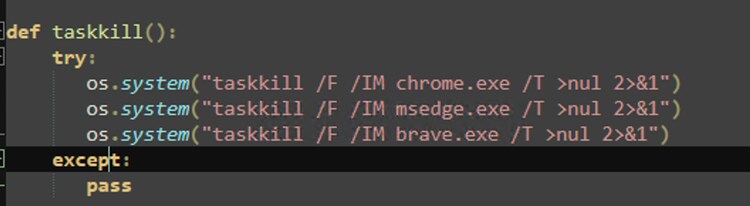
Figure 14: Terminates Browser Process
Credentials from Web Browsers: T1555.003
Like the previous variant of this Trojan stealer, the latest Braodo Stealer variant continues to target sensitive information stored by web browsers. Figures 16 and 17 show the Chromium- and Gecko-based browsers targeted by the malware. Braodo Stealer searches the compromised host for browser profiles and their associated databases, then extracts valuable data such as saved credentials, cookies, browsing history, and stored payment or credit card information. This allows the malware to collect a broad range of information from commonly used browsers.
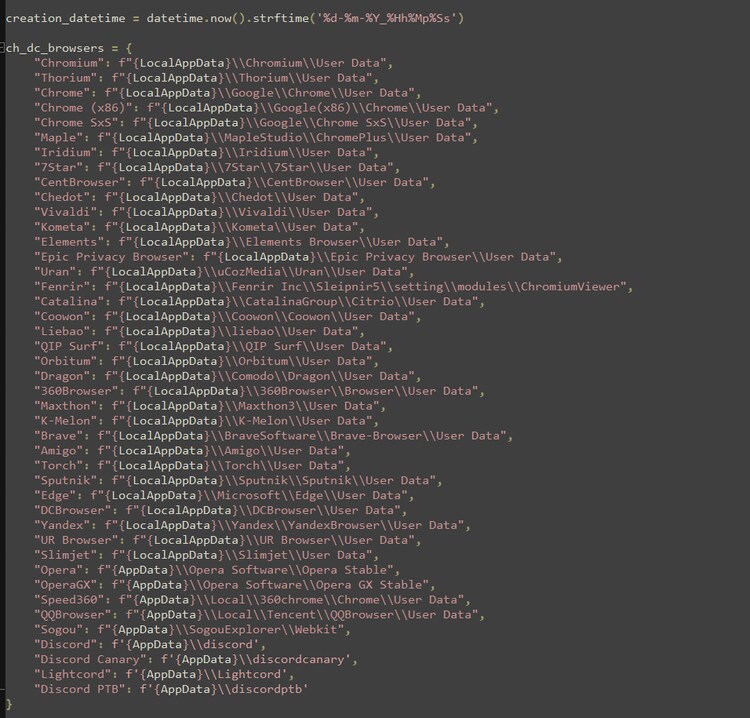
Figure 16: Braodo Stealer Targeted Chromium Browsers
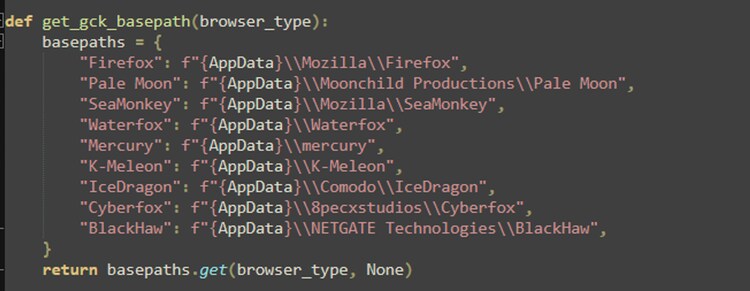
Figure 17: Braodo Stealer Targeted Gecko Browsers
The table below are the file path where Braodo stealer saved all gathered sensitive information and credentials in browsers that will be send in its telegram bot C2 server
Social Media Accounts: T1586.001
Braodo Stealer goes beyond stealing browser credentials and session data by examining the victim's Facebook and Meta advertising activity. Using an authenticated session, the malware queries the Meta Graph API to enumerate advertising accounts, Facebook Pages, and Business Manager information. It collects:
- - account IDs,
- - status,
- - currency,
- - balances,
- - spending amounts,
- - spending limits,
- - payment thresholds,
- - creation dates,
- - and information about associated credit-card payment methods.
For Business Manager accounts, it also checks advertising-account limits, providing the attacker with a detailed view of the victim's advertising infrastructure.
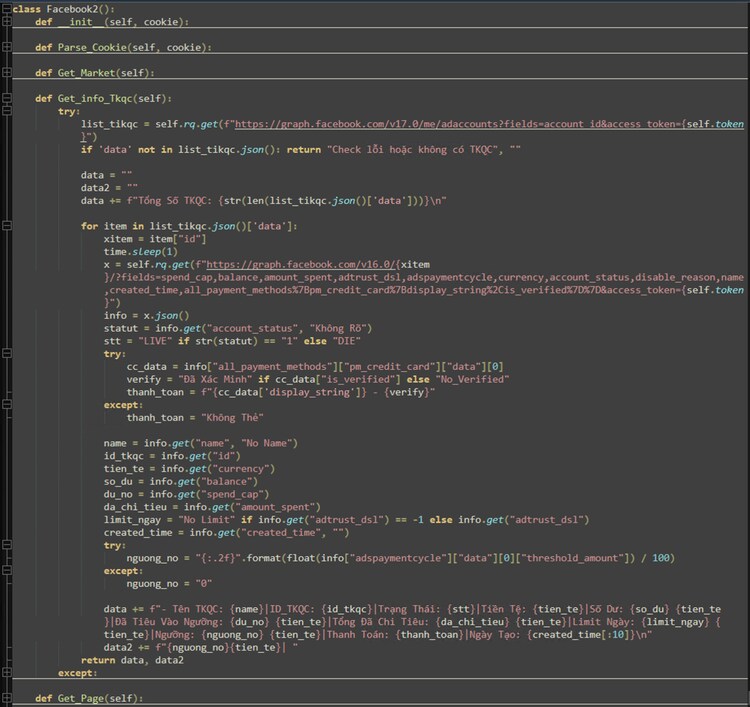
Figure 18: Braodo Stealer Function Harvest Advertising Activity
The table below lists the other Facebook Graph API endpoints abused throughout the Braodo Stealer class to harvest Meta advertising and business-account information. By leveraging the authenticated session, the malware can collect details about advertising accounts, Facebook Pages, and Business Manager resources accessible to the compromised account. The information gathered by this class is then stored locally in %TEMP%\Browser Data\ Facebook_Cookies.txt for further processing or exfiltration.
The sensitive information harvested through the Meta Graph API endpoints is then sent to the attacker using a set of distinctive HTTP headers, as shown in Figure 19. These headers provide a useful artifact for identifying the malware's communication with its command-and-control infrastructure and may also help distinguish Braodo's data-exfiltration traffic from normal web requests.
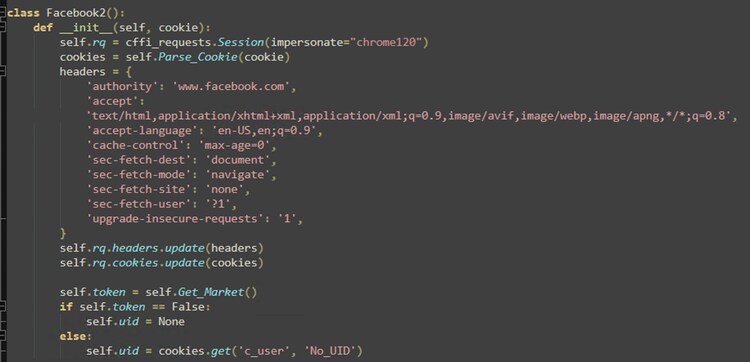
Figure 19: Braodo Stealer Headers
Inter-Process Communication: T1559
Braodo also uses a Windows named pipe to communicate with another component during the key decryption process. Instead of decrypting the key directly in this function, the stealer sends the encrypted key and its length through the pipe and waits for the resulting plaintext value to be returned. This suggests that the cryptographic operation is handled by a separate process or component. The approach separates the decryption logic from the main stealer code and adds another layer that analysts must trace during execution.

Figure 20: Braodo Stealer Named Pipe for Browser Data Decryption Key
The use of named pipes becomes more significant when examining another component embedded within Braodo. The stealer contains a Base64-encoded DLL that is decoded and loaded during execution, and this DLL also performs named-pipe operations. This suggests that the pipe acts as an IPC bridge between the main Python component and the embedded DLL. The stealer can send data such as an encrypted key through the pipe, while the DLL performs the required processing and returns the result. This design separates part of the functionality from the main stealer code.

Figure 21: Braodo Stealer Named Pipe for Browser Data Decryption Key
Dynamic-link Library Injection: T1055.001
Figure 22 shows the code responsible for injecting the Base64-decoded DLL into a newly created suspended process. Braodo selects the target process from a list of supported browsers identified on the compromised host. The browser process is created in a suspended state, allowing the malware to perform the injection before the process begins normal execution.

Figure 22: DLL Process Injection
Internet Connection Discovery: T1016.001
Braodo Stealer also queries ipinfo.io to obtain network and geolocation information from the compromised host. By querying the service, the malware can determine the public IP address and associated details such as geographic location, region, country, and network provider. This information can provide the attacker with additional context about the infected system.
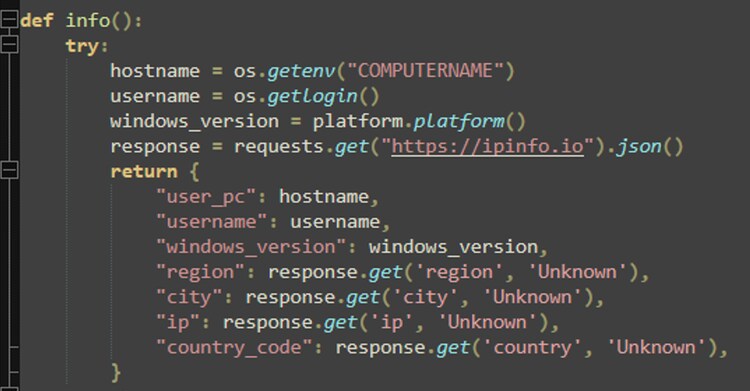
Figure 23: Internet Connection Discovery
Token Impersonation/Theft: T1134.001
Braodo Stealer impersonates lsass.exe and adjusts its token privileges to enable SeDebugPrivilege. This elevated privilege allows the malware to interact with processes that would normally be restricted, potentially enabling access to sensitive process memory and security-related information. The behavior provides Braodo with additional access needed for credential and sensitive data harvesting.

Figure 24: Lsass.exe Process Token Impersonation
Detections:
Windows Disable or Stop Browser Process
The following analytic detects the use of the taskkill command in a process command line to terminate several known browser processes, a technique commonly employed by the Braodo stealer malware to steal credentials.
| tstats `security_content_summariesonly` count min(_time) as firstTime max(_time) as lastTime FROM datamodel=Endpoint.Processes
WHERE Processes.process = "*taskkill*" Processes.process IN("*chrome.exe*","*firefox.exe*","*brave.exe*","*opera.exe*","*msedge.exe*","*chromium.exe*")
BY Processes.action Processes.dest Processes.original_file_name
Processes.parent_process Processes.parent_process_exec Processes.parent_process_guid
Processes.parent_process_id Processes.parent_process_name Processes.parent_process_path
Processes.process Processes.process_exec Processes.process_guid
Processes.process_hash Processes.process_id Processes.process_integrity_level
Processes.process_name Processes.process_path Processes.user
Processes.user_id Processes.vendor_product
| `drop_dm_object_name(Processes)`
| `security_content_ctime(firstTime)`
| `security_content_ctime(lastTime)`
| `windows_disable_or_stop_browser_process_filter`
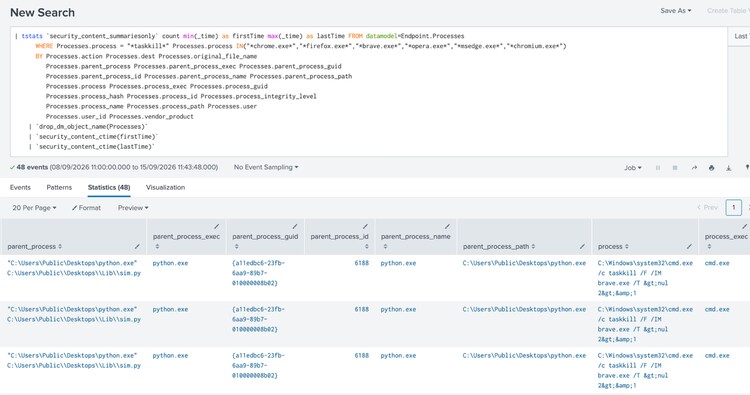
Figure 25: Windows Disable or Stop Browser Process Detection
PowerShell Download from Code Hosting Service
This analytic detects PowerShell Script Block Logging (Event ID 4104) events that use common download methods to retrieve files directly from raw-content URLs on GitHub, GitLab, or Codeberg.
`powershell` EventCode=4104 ScriptBlockText IN ("*.DownloadFile(*", "*.DownloadData(*", "*.DownloadString(*", "*Invoke-WebRequest*", "*Invoke-RestMethod*", "*Start-BitsTransfer*")
| where match(
ScriptBlockText,
"(?i)(?i)https?://(raw\.githubusercontent\.com/[^/\s]+/[^/\s]+/(main|master)|(github|gitlab)\.com/[^/\s]+/[^/\s]+/(-/)?raw/(main|master))/[^\s'\"]+\.(bat|js|vbs|vbe)"
)
| fillnull
| stats count min(_time) as firstTime max(_time) as lastTime
by dest signature signature_id user_id vendor_product EventID Guid Opcode Name Path ProcessID ScriptBlockId ScriptBlockText
| `security_content_ctime(firstTime)`
| `security_content_ctime(lastTime)`
| `powershell_download_script_from_public_free_project_repo_filter`
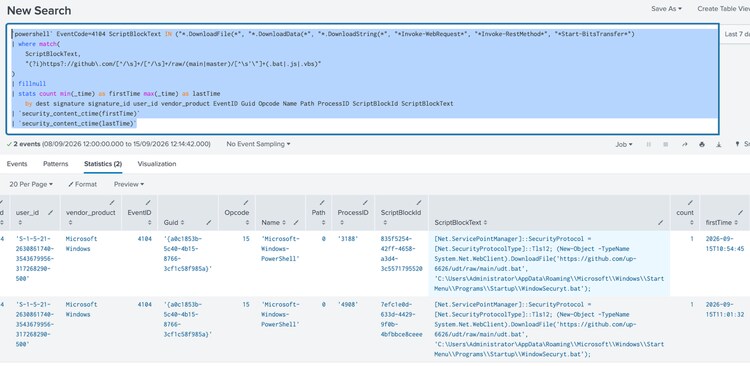
Figure 26: PowerShell Download Script in GitHub Repository Detection
Windows Process Outbound Connection To Social Media Domain
This analytic detects outbound network connections from a Python process running from suspicious or non-standard directories to Facebook and Meta-related domains.
search: |-
`sysmon`
EventCode=3
Image IN (
"C:\\Users\\Public\\*",
"*\\windows\\fonts\\*",
"*\\windows\\debug\\*",
"*\\Users\\Administrator\\Music\\*",
"*Recycle.bin*",
"*\\Windows\\Media\\*",
"\\Windows\\repair\\*",
"*\\PerfLogs\\*",
"*:\\Windows\\Prefetch\\*",
"*:\\Windows\\Cursors\\*",
"*:\\Windows\\INF\\*"
) AND
process_name IN (
python.exe,
python2*.exe,
python3*.exe,
py.exe,
pythonw.exe,
py.exe,
pypy.exe) AND
DestinationHostname IN ("*.facebook.com", "*.fb.com", "*.facebook.net", "*.facebook.org", "*.fbcd.net", "*.fbsbx.com", "*.tfbw.net", "*.fbstatic-a.akamaihd.net" ) AND
direction = outbound
| stats count min(_time) as firstTime
max(_time) as lastTime
by action app dest dest_ip dest_port direction dvc protocol protocol_version
src src_ip src_port transport user vendor_product process_name
process_exec process_guid process_id
| `security_content_ctime(firstTime)`
| `security_content_ctime(lastTime)`
| `windows_python_process_accessing_facebook_domain_filter`
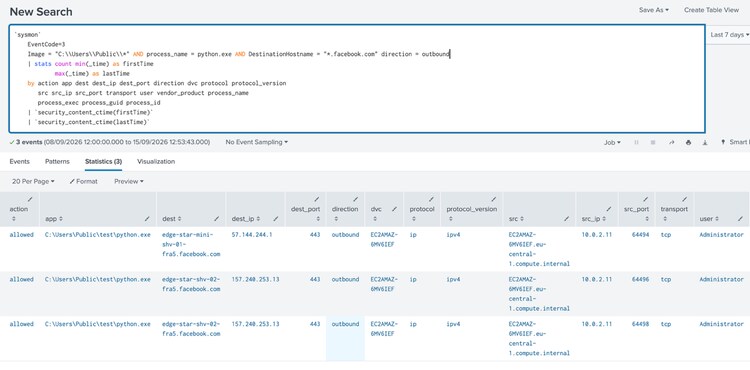
Figure 27: Windows Python Process Accessing Facebook Domain Detection
Windows Credentials from Password Stores Chrome LocalState Access
The following analytic detects non-Chrome processes accessing the Chrome "Local State" file, which contains critical settings and information.
`wineventlog_security`
EventCode=4663
object_file_path="*\\AppData\\Local\\Google\\Chrome\\User Data\\Local State"
NOT process_path IN (
"*:\\Windows\\explorer.exe",
"*\\AppData\\Local\\Google\\Chrome Beta\\Application\\chrome.exe",
"*\\AppData\\Local\\Google\\Chrome Dev\\Application\\chrome.exe",
"*\\AppData\\Local\\Google\\Chrome SxS\\Application\\chrome.exe",
"*\\AppData\\Local\\Google\\Chrome Unstable\\Application\\chrome.exe",
"*\\AppData\\Local\\Google\\Chrome\\Application\\chrome.exe",
"*\\platform_experience_helper.exe*",
"*:\\Program Files (x86)\\Microsoft\\Edge\\Application\\msedge.exe*"
)
| stats count min(_time) as firstTime
max(_time) as lastTime
by object_file_name object_file_path
process_name process_path
process_id EventCode dest
| `security_content_ctime(firstTime)`
| `security_content_ctime(lastTime)`
| `windows_credentials_from_password_stores_chrome_localstate_access_filter`
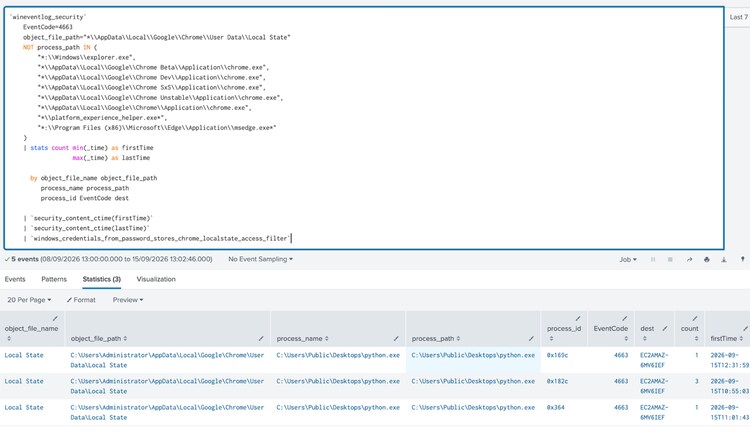
Figure 28: Windows Credentials from Password Stores Chrome LocalState Access Detection
Windows DNS Query Request To TinyUrl
The following analytic detects a process located in a potentially suspicious location making DNS queries to known URL shortening services, specifically tinyurl.
`sysmon`
EventCode=22
QueryName = "tinyurl.com"
Image IN (
"*\\AppData\\*",
"*\\Perflogs\\*",
"*\\ProgramData\\*",
"*\\Temp\\*",
"*\\Users\\Public\\*",
"*\\Windows\\Tasks\\*"
"*\\powershell.exe",
"*\\pwsh.exe",
"*\\cmd.exe",
"*\\python.exe",
)
| stats count min(_time) as firstTime max(_time) as lastTime
by answer answer_count dvc process_exec process_guid process_name query query_count
reply_code_id signature signature_id src user_id vendor_product QueryName QueryResults QueryStatus
| `security_content_ctime(firstTime)`
| `security_content_ctime(lastTime)`
| `windows_dns_query_request_to_tinyurl_filter`
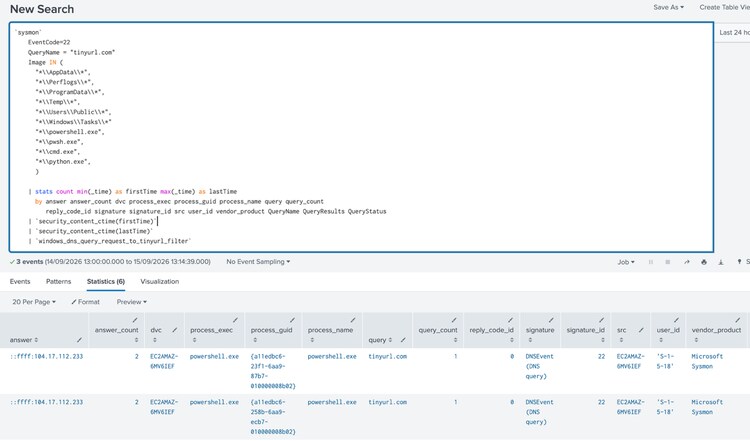
Figure 29: Windows DNS Query Request To TinyUrl Detection
Windows Boot or Logon Autostart Execution In Startup Folder
The following analytic detects the creation of files in the Windows %startup% folder, a common persistence technique.
|tstats `security_content_summariesonly` count min(_time) as firstTime max(_time) as lastTime from datamodel=Endpoint.Filesystem
where Filesystem.file_path = "*\\Microsoft\\Windows\\Start Menu\\Programs\\Startup\\*" by Filesystem.action Filesystem.dest Filesystem.file_access_time Filesystem.file_create_time Filesystem.file_hash Filesystem.file_modify_time Filesystem.file_name Filesystem.file_path Filesystem.file_acl Filesystem.file_size Filesystem.process_guid Filesystem.process_id Filesystem.user Filesystem.vendor_product
| `drop_dm_object_name(Filesystem)`
| `security_content_ctime(firstTime)`
| `security_content_ctime(lastTime)`
| `windows_boot_or_logon_autostart_execution_in_startup_folder_filter`
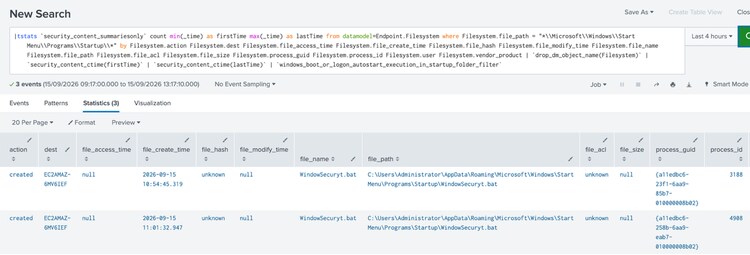
Figure 30: Windows Boot or Logon AutoStart Execution In Startup Folder Detection
Overall Braodo Stealer Analytic Story consist of 25 Splunk detections.
IOCs:
Learn More
This blog aims to help security analysts, blue teamers, and Splunk users identify New Braodo Stealer Loader and payload activity by providing insights into the tactics, techniques, and procedures (TTPs) employed by threat actors.
You can implement the detections in this blog using the Enterprise Security Content Update app or the Splunk Security Essentials app. To view the Splunk Threat Research Team's complete security content repository, visit research.splunk.com.
Feedback
Any feedback or requests? Feel free to put in an issue on GitHub and we’ll follow up. Alternatively, join us on the Slack channel #security-research. Follow these instructions If you need an invitation to our Splunk user groups on Slack.
Contributors
We would like to thank Teoderick Contreras for authoring this post and the entire Splunk Threat Research Team for their contributions.
Related Articles

Peeping Through Windows (Logs): Using Sysmon & Event Codes for Threat Hunting

What’s Cyber Security Week like for Splunk? it-sa gold!