Cloak and Firewall: Exposing Netsh’s Hidden Command Tricks
For several years now, adversaries and red teams have increasingly leveraged Living-off-the-Land Binaries (LOLBins) techniques to compromise targeted systems. By exploiting pre-installed, legitimate software, these attackers are able to evade detection tools, seamlessly blending malicious activities with normal system processes. This approach presents a significant challenge for traditional security measures, which often struggle to differentiate between legitimate use and malicious intent. As a result, organizations must adopt more advanced detection strategies to address this evolving threat landscape.
In this blog, we’ll explore how the Windows utility Netsh.exe processes command-line arguments in a way that can lead to unexpected behavior—specifically, how users can execute firewall commands without fully typing out parameters. This Netsh’s behavior can be abused to evade traditional Netsh process command-line monitoring. We'll show how this can be leveraged not just for offensive Red Team tactics, but also for sharpening Blue Team defenses—or even for Purple Team collaboration. To wrap things up, we’ll share some practical Splunk detections to help you spot and defend against this kind of evasion.
Command-line obfuscation techniques have been widely researched and shared within the cybersecurity community to enhance defenses against potential attacks and to simulate real-world threats during red team exercises.
One example of such a technique is an idiosyncrasy in how regsvr32.exe processes its arguments to execute specific features. This issue lies in regsvr32.exe only checking the first letter of the parameter after the "/" or "-", which can lead to command line obfuscation. As a result, this poor argument checking may allow attackers to evade common command line detection methods typically used to monitor regsvr32.exe processes. The quick analysis on this obfuscation was shared on X.
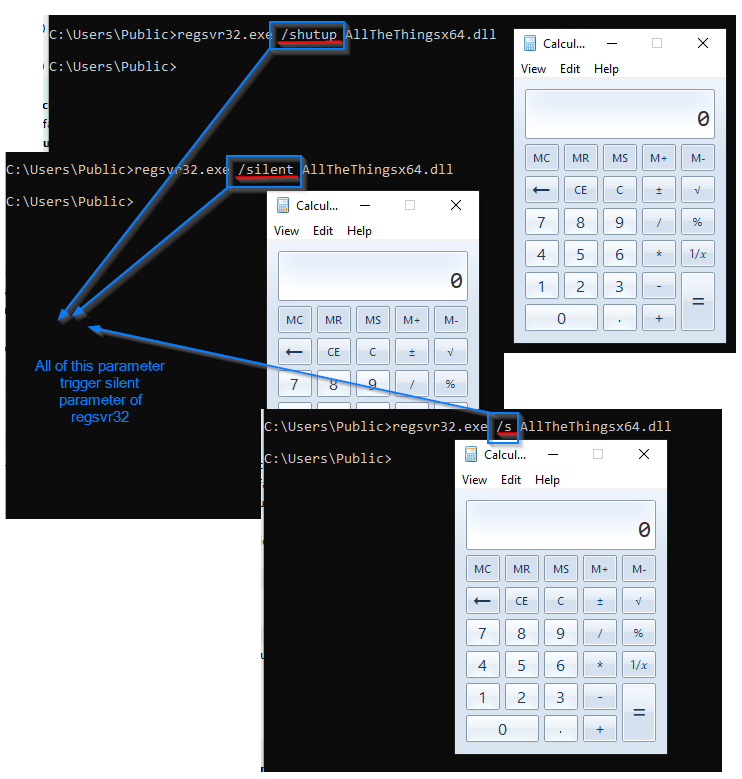
The Regsvr32 utility tool is not the only LOLBIN vulnerable to this exploitation. In the following section, the Splunk Threat Research Team explores how Netsh.exe processes and verifies its parameters, and how adversaries can abuse this weakness to obfuscate netsh.exe command lines, enabling them to evade detection.
The Netsh Utility Tool
According to Microsoft's website, "Netsh is a command-line scripting utility that allows you to display or modify the network configuration of a computer that is currently running. Netsh commands can be executed by entering them in the ‘netsh’ shell and can also be used in batch files or scripts. These commands can configure both remote and local computers."
By using `-h` and '?' parameters, we can see all possible command-line parameters and also its sub-context parameter that we can use for this tool.
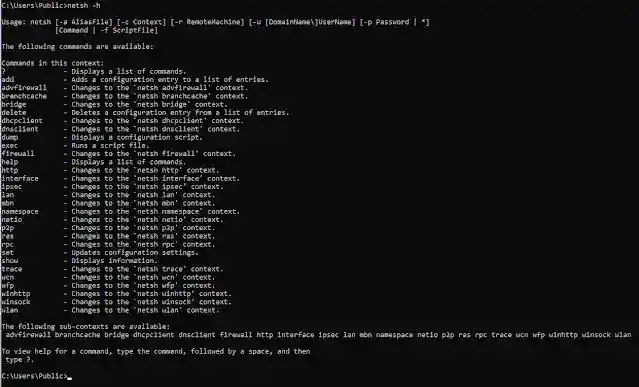
Figure 2: Netsh Parameter List
Monitoring the Netsh process and its command-line parameters can be crucial for Blue, Red, and Purple Teams to detect potential malicious activities. Attackers and several malware payloads often abuse Netsh to add, delete, or modify firewall rules, allowing them to bypass security controls or establish persistence.
For example, the Medusa Ransomware variant uses the Netsh command to add firewall rules that enable the RDP protocol on local port 3389 and a firewall rule group for Windows Management Instrumentation (WMI), as seen in the code block below.
:: ########### "enable RDP protocol in port 3389" ###########
netsh advfirewall firewall add rule name="rdp" dir=in protocol=tcp localport=3389 action=allow
:: ########### enable WMI firewall rule group ###########
netsh advfirewall firewall set rule group="windows management instrumentation (wmi)" new enable=yes
During research and several malware analyses, the Splunk Threat Research Team observed that when using Netsh, you don’t need to fully type out a parameter for it to function or trigger a specific feature. This behavior can be exploited to obfuscate Netsh command-line execution, potentially aiding in evasion techniques. In the next section, we will explore the underlying reasons behind this scenario.
The Unexpected Parameter
The netsh.exe utility consists of several key export functions that are essential for processing arguments and parameters. In analyzing the root cause of unintended parameter execution, the export function MatchToken() is identified as responsible for validating Netsh parameters.
Each parameter entered by the user is tokenized using space delimiters and then passed to the MatchToken export function. This function leverages the Windows wcsnicmp() API to compare the tokenized input against a hardcoded command-line parameter table. The comparison determines whether the input matches a valid parameter. Notably, the wcsnicmp() API requires the string length to be specified for accurate matching.
Figure 3 shows the screenshot of the MatchToken() function in verifying the Netsh parameter.
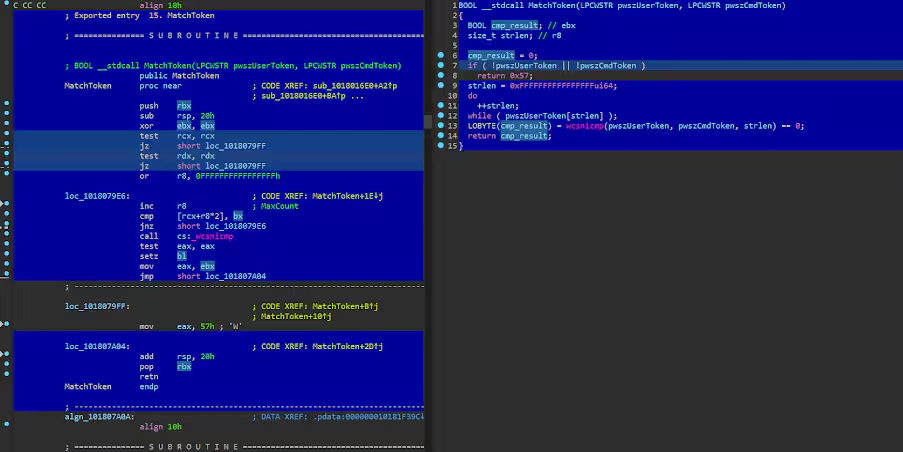
The table below highlights the key register components of the export function responsible for checking user-inputted parameters in the Netsh utility tool.
The logic of this export function is simple: it will compute the length of the string by locating the null termination bytes of the inputted string then do the comparison check.
However, there’s a bug or weakness in the logic used by the “MatchToken” function to verify whether a parameter matches any entry in its parameter string table. The length used in the wcsnicmp() API comparison is based on the inputted parameter, rather than the actual length of the parameter hardcoded in its string table. This makes the comparison checking vulnerable to this type of attack or unwanted parameter execution.
For example, let’s say a user inputted the command line below to delete the firewall user:
The following high-level steps explain how Netsh processes command-line input and why "delet" remains a valid firewall parameter.
-
Tokenization:
- Netsh splits the command into individual tokens, using spaces as delimiters.
-
Parameter Validation:
- Each token is checked against the parameter table using the MatchToken() function.
-
Issue with Incorrect Input:
- The correct parameter should be "delete", but the example used "delet".
- Normally, this should cause an error, but due to how MatchToken() works, it mistakenly accepts "delet".
-
Comparison:
- The function determines validity based on input length rather than matching the full parameter.
- R8 (the length of "delet") is set to 5, instead of 6 for "delete".
- The wcsnicmp() API function compares only the first 5 characters, based on the length of the inputted parameter "delet", making it mistakenly appear as a valid "delete" instruction.
-
Result:
- "delet" incorrectly passes the check and bypassing validation.
Below is a simple pseudo C code illustrating how `wcsnicmp()` compares the input parameter "delet" to the string "delete", using the length of the "delet" parameter.
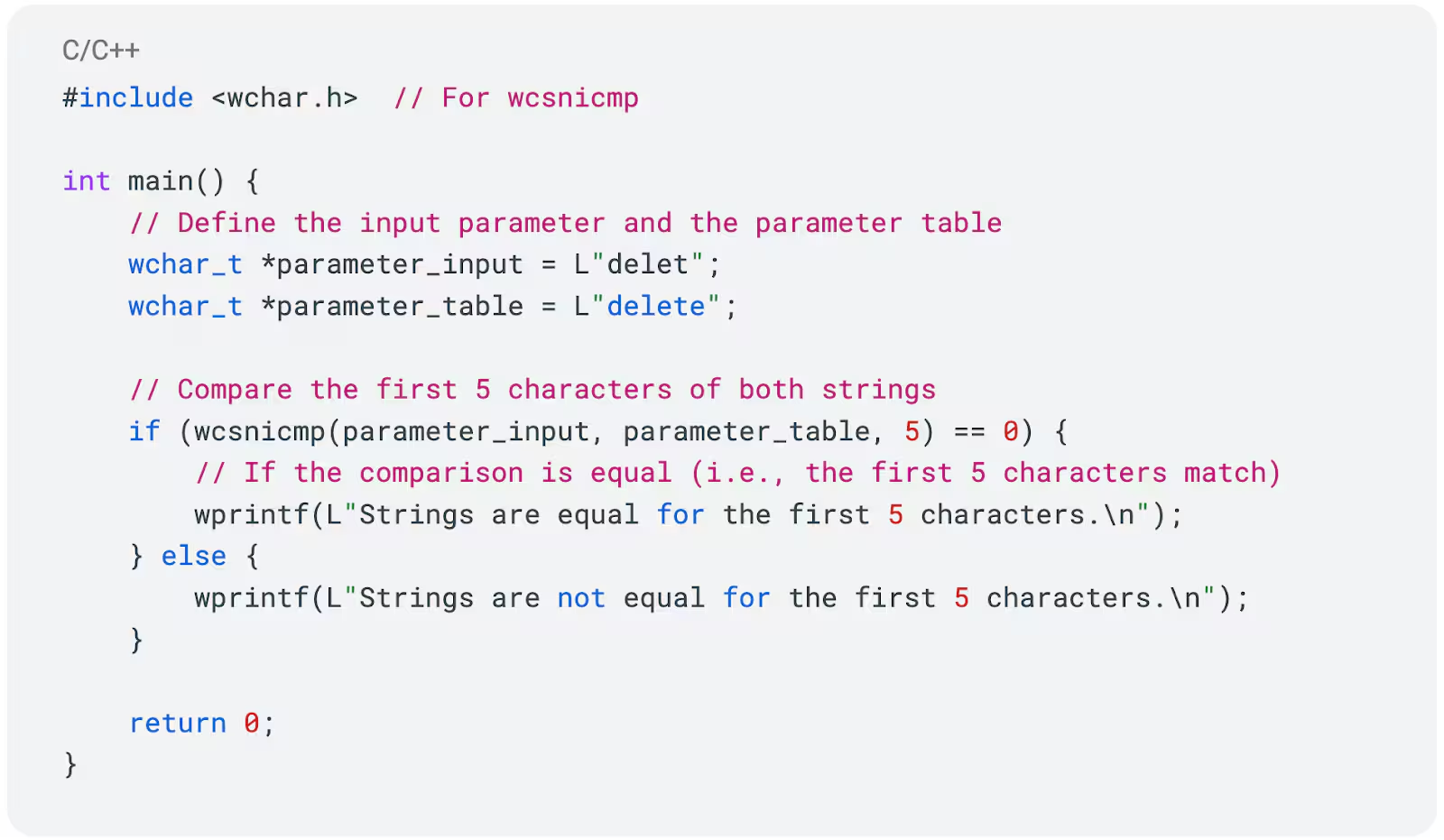
Figure 4: Pseudo Code for wcsnicmp() “delet” Parameter
Based on this analysis, we can trigger the Netsh “delete” feature in several alternative ways, as demonstrated in Figure 5.
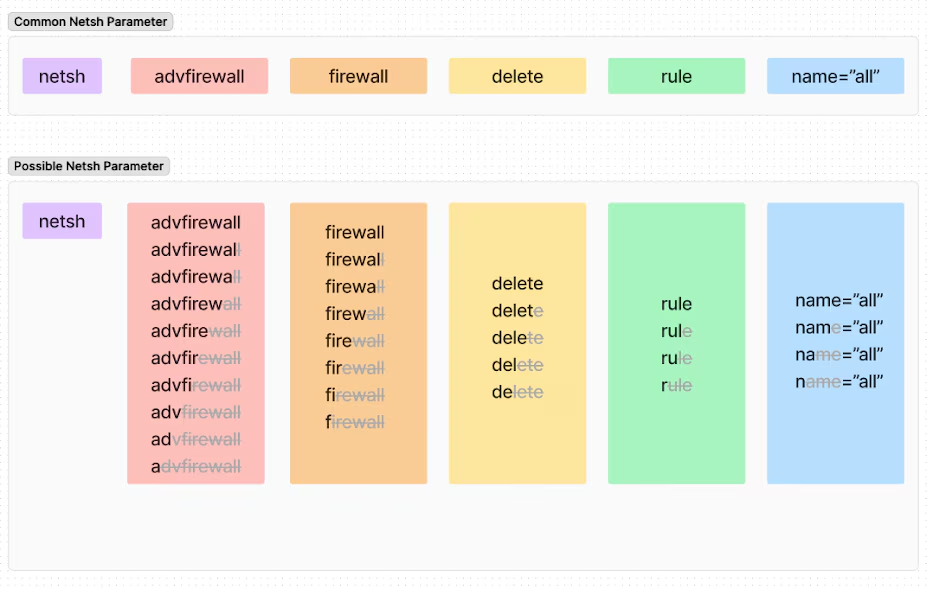
Note: Using abbreviated parameters, as shown in Figure 5, can sometimes lead to unexpected behavior if multiple parameters share the same starting letter. This occurs because Netsh may match and prioritize an earlier parameter with the same starting character, potentially causing it to incorrectly match your intended obfuscated parameter with another parameter during the token-checking process.
For instance, if you use the abbreviation "s" as an obfuscated "show" parameter, it may not work as intended if the "set" parameter is evaluated first by Netsh. The abbreviation "s" would match "set" before "show," causing the Netsh command to execute the "set" parameter instead of the desired "show" parameter like what we can see in Figure 6.
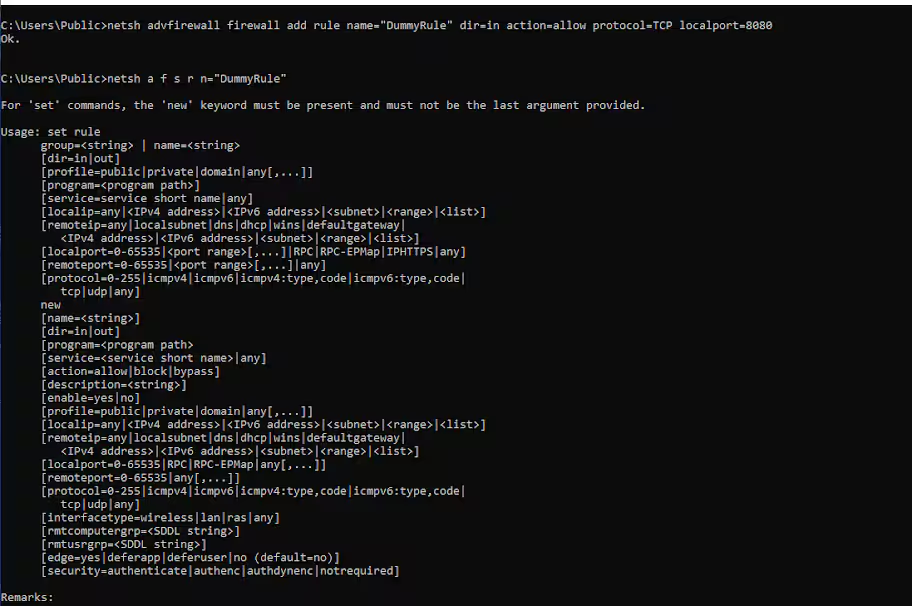
Figure 6: Obfuscated Netsh Parameter Priorities
Based on what we found, let's test some of the hidden parameters we discovered earlier. Figure 7 shows how we can add, view, and delete firewall rules using unexpected or incorrect parameter entries in the Netsh Windows utility. This shows how attackers can evade detection, which relies solely on common Netsh parameter executions, by manipulating the Netsh command-line process.
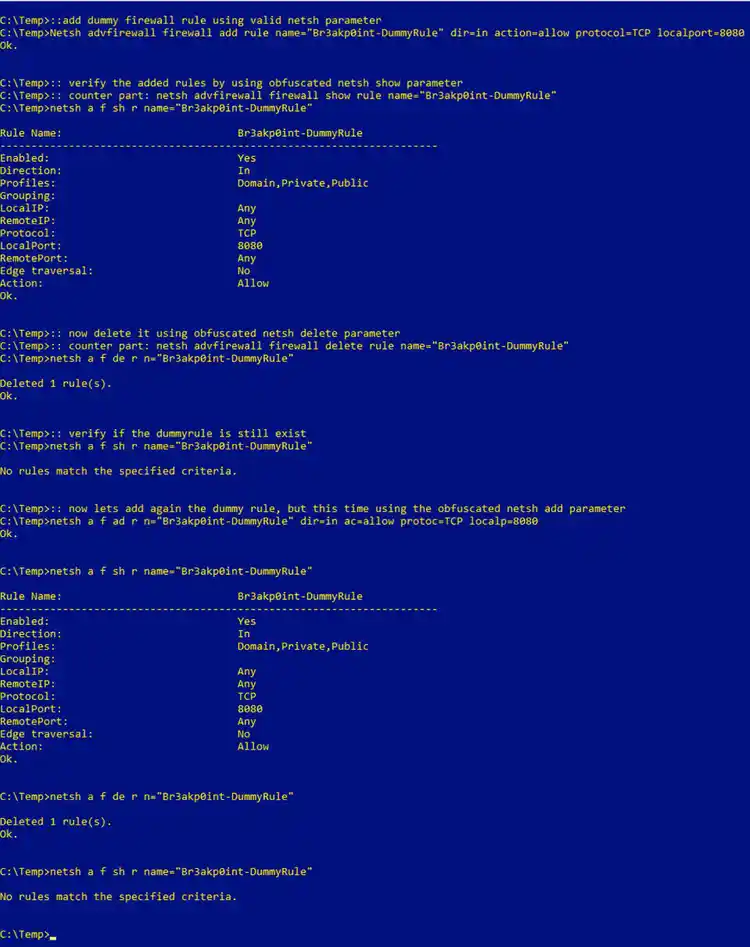
Figure 7: Obfuscated Netsh Parameter Execution
Understanding this potential obfuscation technique in Netsh command-line execution enables blue teamers to develop more effective detections for identifying firewall-related events in a monitored production environment.
Splunk Security Detections
There are several effective ways to detect the creation or deletion of firewall rules. One common method is by analyzing firewall logs, which can provide detailed information about changes made to the firewall's configuration. Additionally, we can develop detections to monitor the use of specific `netsh` command-line parameters. These parameters can be flagged when observed in the process command line during real-time monitoring, helping to identify unauthorized or unusual command execution.
Another approach is to track changes in the Windows registry. Whenever firewall rules are modified or deleted in a Windows environment, corresponding entries in the registry are updated. Monitoring these registry keys can provide early indicators of changes to firewall settings.
Windows Modify Registry to Add or Modify Firewall Rule
The following detection detects a potential addition or modification of firewall rules, signaling possible configuration changes or security policy adjustments. It tracks commands such as “netsh advfirewall” firewall add rule and set rule, which may indicate attempts to alter network access controls.
| tstats `security_content_summariesonly` count min(_time) as firstTime max(_time) as lastTime FROM datamodel=Endpoint.Registry
WHERE
Registry.registry_path="*\\System\\CurrentControlSet\\Services\\SharedAccess\\Parameters\\FirewallPolicy\\FirewallRules\\*" Registry.action = modified
by Registry.action Registry.dest Registry.process_guid Registry.process_id
Registry.registry_hive Registry.registry_path Registry.registry_key_name
Registry.registry_value_data Registry.registry_value_name Registry.registry_value_type
Registry.status Registry.user Registry.vendor_product
  | `drop_dm_object_name(Registry)`
  | `security_content_ctime(firstTime)`
  | `security_content_ctime(lastTime)`
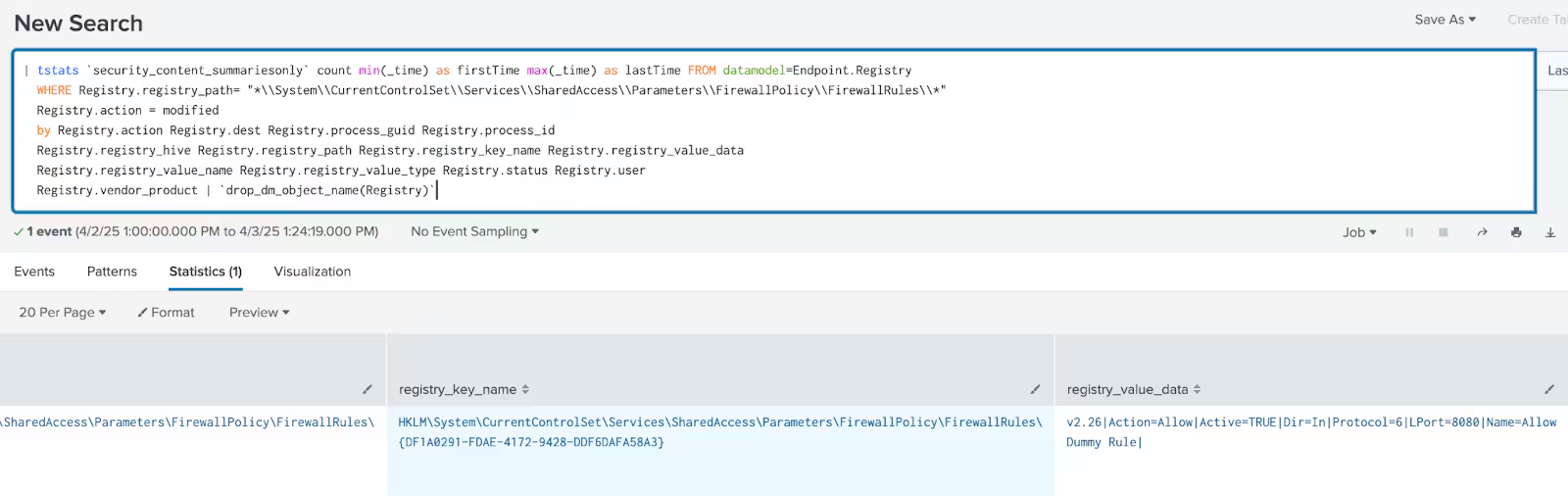
Figure 8: Windows Modify Registry to Add or Modify Firewall Rule Detection
Allow Inbound Traffic By Firewall Rule Registry
The following detection detects suspicious modifications to firewall rule registry settings that allow inbound traffic on specific ports with a public profile.
| tstats `security_content_summariesonly` count min(_time) as firstTime max(_time) as lastTime FROM datamodel=Endpoint.Registry
  WHERE (Registry.registry_path= "*\\System\\CurrentControlSet\\Services\\SharedAccess\\Parameters\\FirewallPolicy\\FirewallRules\\*"
         Registry.registry_value_data = "*|Action=Allow|*"
         Registry.registry_value_data = "*|Dir=In|*"
         Registry.registry_value_data = "*|LPort=*")
  BY Registry.registry_path Registry.registry_key_name Registry.registry_value_name
     Registry.registry_value_data Registry.process_guid  Registry.dest Registry.user
  | `drop_dm_object_name(Registry)`
  | `security_content_ctime(firstTime)`
  | `security_content_ctime(lastTime)`
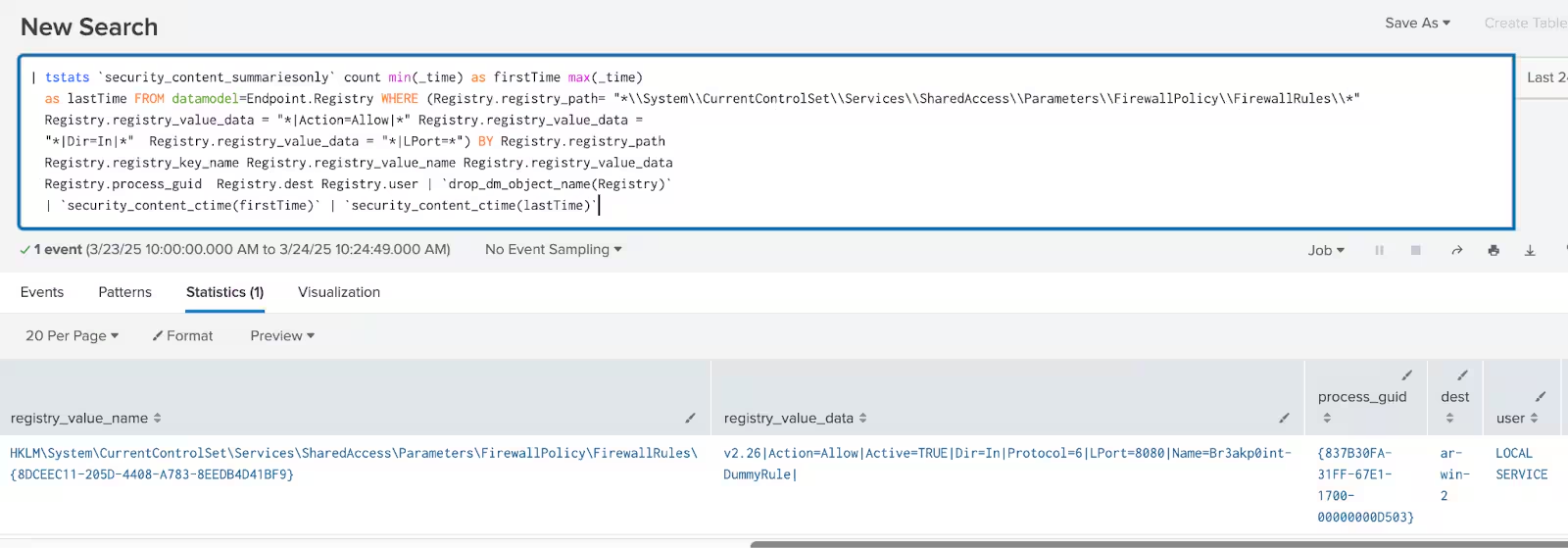
Figure 9: Allow Inbound Traffic By Firewall Rule Registry Detection
Windows Modify Registry Delete Firewall Rules
The following detection detects a potential deletion of firewall rules, indicating a possible security breach or unauthorized access attempt.
`sysmon` EventCode=12 TargetObject = "*\\System\\CurrentControlSet\\Services\\SharedAccess\\Parameters\\FirewallPolicy\\FirewallRules\\*" EventType=DeleteValue
|  rename Computer as dest
|  rename User as user
|  stats count min(_time) as firstTime max(_time) as lastTime by EventCode EventType TargetObject Image user dest
| `security_content_ctime(firstTime)`
| `security_content_ctime(lastTime)`
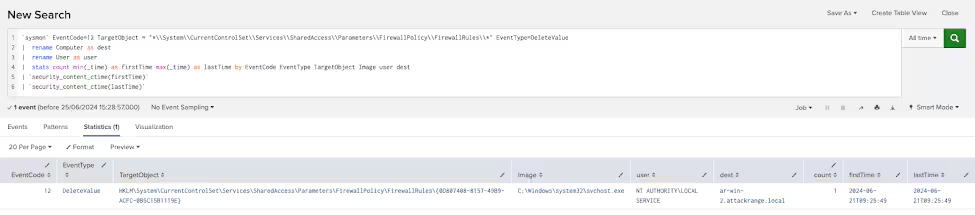
Figure 10: Windows Modify Registry Delete Firewall Rules Detection
Also by leveraging Windows MPSSVC Rule-Level Policy auditing, we can effectively track changes made to firewall rules. According to Microsoft, “Audit MPSSVC Rule-Level Policy Change determines whether the operating system generates audit events when changes are made to policy rules for the Microsoft Protection Service (MPSSVC.exe).” The Microsoft Protection Service, which powers Windows Firewall, plays a critical role in protecting the system against potential malware threats.
For firewall-based detections, enabling this policy allows security teams to monitor key firewall events, including the addition, modification, and deletion of rules. This capability is essential for maintaining visibility and integrity in a production environment, as unauthorized or suspicious firewall rule changes can indicate an active security threat or misconfiguration that could expose the system to attacks.
Multiple MPSSVC events can be used to track firewall rule changes; however, in this blog, we will focus on three key events that are critical for effective monitoring.
Windows Firewall Rule Added
This detection identifies instances where a Windows Firewall rule is added by monitoring Event ID 4946 in the Windows Security Event Log.
`wineventlog_security` EventCode=4946
  | stats count min(_time) as firstTime max(_time) as lastTime by RuleName signature subject status dest ProcessID
  | `security_content_ctime(firstTime)`  | `security_content_ctime(lastTime)`
  | `windows_firewall_rule_added_filter`
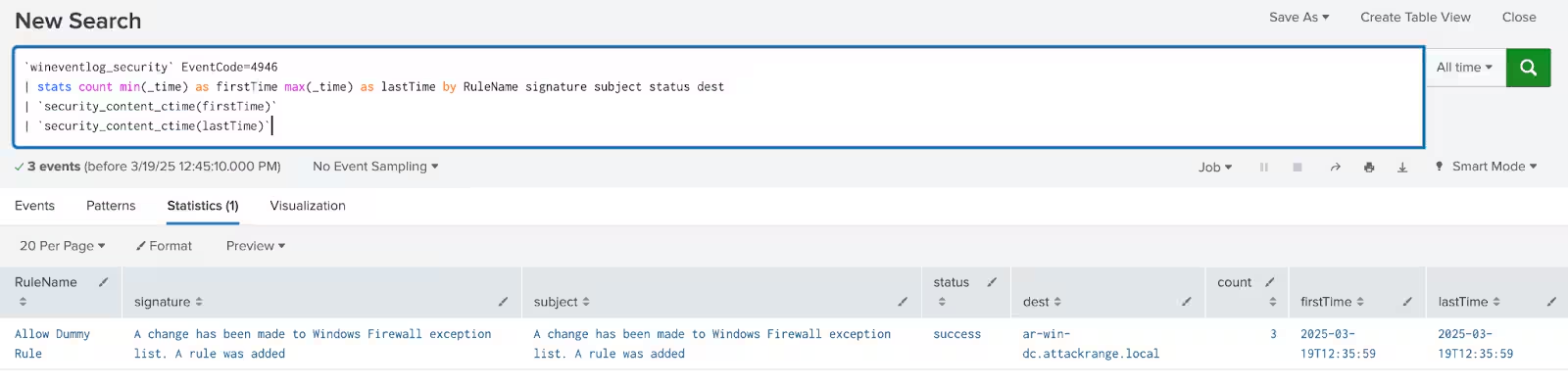
Figure 11: Windows Firewall Rule Added Detection
Windows Firewall Rule Deletion
This detection identifies instances where a Windows Firewall rule has been deleted, potentially exposing the system to security risks.
`wineventlog_security` EventCode=4948
  | stats count min(_time) as firstTime max(_time) as lastTime by RuleName signature subject status dest ProcessID
  | `security_content_ctime(firstTime)`
  | `security_content_ctime(lastTime)`
  | `windows_firewall_rule_deletion_filter`
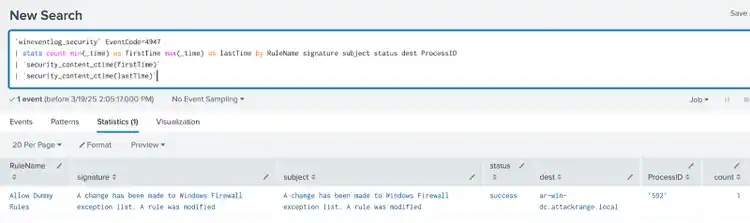
Windows Firewall Rule Modification
This detection identifies instances where a Windows Firewall rule has been modified, which may indicate an attempt to alter security policies.
`wineventlog_security` EventCode=4947
  | stats count min(_time) as firstTime max(_time) as lastTime by RuleName signature subject status dest ProcessID
  | `security_content_ctime(firstTime)`
  | `security_content_ctime(lastTime)`
  | `windows_firewall_rule_modification_filter`

Learn More
This blog is designed to assist security analysts, blue teamers, read team, purple team and Splunk customers in identifying firewall modifications that leverage netsh.exe parameter obfuscation to add, modify, or delete firewall rules as a means of evading detection. It empowers the community to uncover related Tactics, Techniques, and Procedures (TTPs) employed by threat actors and adversaries. You can implement the detections in this blog using the Enterprise Security Content Updates app or the Splunk Security Essentials app. To view the Splunk Threat Research Team's complete security content repository, visit research.splunk.com.
Feedback
Any feedback or requests? Feel free to put in an issue on Github and we’ll follow up. Alternatively, join us on the Slack channel #security-research. Follow these instructions If you need an invitation to our Splunk user groups on Slack.
Contributors
We would like to thank Teoderick Contreras for authoring this post and the entire Splunk Threat Research Team for their contributions.
Related Articles

Predicting Cyber Fraud Through Real-World Events: Insights from Domain Registration Trends

When Your Fraud Detection Tool Doubles as a Wellness Check: The Unexpected Intersection of Security and HR

Splunk Security Content for Threat Detection & Response: November Recap

Security Staff Picks To Read This Month, Handpicked by Splunk Experts

Behind the Walls: Techniques and Tactics in Castle RAT Client Malware

AI for Humans: A Beginner’s Field Guide

Splunk Security Content for Threat Detection & Response: November 2025 Update

Operation Defend the North: What High-Pressure Cyber Exercises Teach Us About Resilience and How OneCisco Elevates It
