Automated Threat Analysis: Centralize and Accelerate Phishing Investigations in Splunk Enterprise Security
Security Aditya RajKey takeaways
- Phishing attacks are more frequent and complex than they used to be. Phishing payloads, malicious links, URL and QR code redirects, and other tactics often force analysts to conduct manual, time-consuming investigations across multiple tools.
- Automated Threat Analysis in Splunk Enterprise Security (GA today) helps execute and analyze that chain inside the ES experience. It helps analysts quickly understand what happened, which indicators matter, and what the threat actor is trying to achieve — without leaving ES.
- For SOCs, this means fewer pivots; better prioritization; and faster, more confident investigations inside the platform they already use.
While this era of cybersecurity has introduced plenty of new threat vectors (hello, prompt injection), the classics haven’t disappeared. Phishing, in particular, has evolved rather than faded, becoming an even more frequent and complex headache for the SOC. In fact, according to Splunk’s report The Hidden Costs of Downtime:
Every analyst knows the pattern. A suspicious email is reported. An alert is created. Then the real work begins: pivot to one tool for message details, another for link analysis, another for artifact enrichment, and yet another for broader investigation context – all while trying to determine if you’re seeing the full picture or just one part of a complex attack chain.
Multiply that by the number of alerts analysts see in a day, and the cost becomes obvious. It’s not just the volume of phishing alerts that slows teams down; it’s the number of pivots and extensive manual effort required to resolve each one.
But no more! As announced at Cisco Live, Splunk has introduced Automated Threat Analysis in Splunk Enterprise Security (ES), incorporating many core capabilities that originated in Splunk Attack Analyzer directly into ES. With this, analysts can triage and analyze phishing threats from the same workspace they already use to orchestrate end-to-end detection, investigation, and response (TDIR) workflows.
So how does it work? Let’s dive in.
Bring Phishing Investigations into Analysts’ Existing Workflows
Phishing attacks are no longer simple messages with an obvious malicious link.
They hide behind redirect chains. They use QR codes to route users away from the original email. They place credential theft behind CAPTCHA gates to make manual analysis harder and to slow down defenders. What looks straightforward at first glance often turns into a time-consuming investigation with context spread across multiple isolated tools.
Having phishing analysis directly inside ES helps analysts make decisions faster because it keeps that context and enrichment intact. They can see the full security picture around the email itself, including the affected user, related systems, other activity tied to the entity, and the broader investigation already underway.
With this, analysts can break down the phishing attack chain from within the same environment where they’re already triaging security findings and conducting investigations that are potentially related to the phish in question.
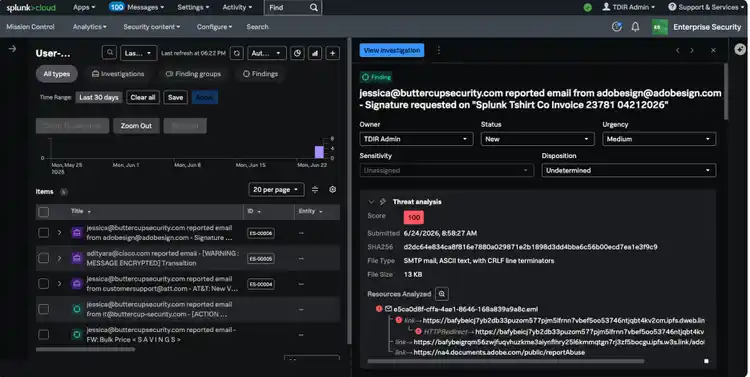
Figure 1: Automated Threat Analysis surfaces reported phishing emails directly in the Enterprise Security Analyst Queue and centralizes context to drive faster triage and investigation.
The results are:
- Less swivel-chair work for experienced analysts,
- Workflows that are easier to follow and trust for newer analysts, and
- Faster phishing investigations for the whole SOC.
Surface Sophisticated Context and Enrichment
Simply having context and enrichment in the flow of work isn’t enough though; it needs to be robust, quality context and enrichment. Legacy analysis tools often leave analysts without enough meaningful signals to act on, so they need to spend a lot of time on manual validation to answer important questions like:
- Is the message spoofing a known brand?
- Does the URL resolve somewhere suspicious?
- Is there enough evidence to escalate, or is this noise?
Automated Threat Analysis is designed to answer those questions in-line by surfacing comprehensive, sophisticated evidence and context that analysts can act on, like:
- Verdict and confidence
- System tags
- Phish kit families
- Phished brands
- Automatically extracted content (e.g., email screenshots, embedded URLs and QR codes)
- Resource chains showing how URLs and QR codes resolve
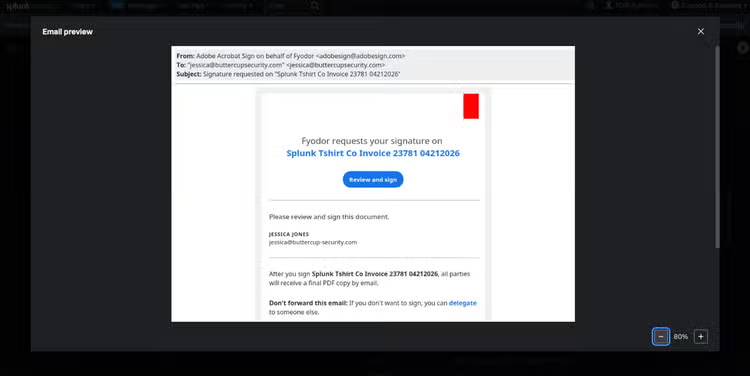
Figure 2: Automated Threat Analysis captures screenshots of suspected phishing emails, which gives analysts another fast way to validate impersonation and visual deception directly in Enterprise Security.
By automatically extracting and surfacing high-quality context and evidence to analysts, they’re able to quickly understand what they’re looking at, why it’s suspicious, and what the attacker is trying to achieve. This leads to:
- Faster triage,
- Better escalation decisions, and
- Greater confidence across the SOC.
Reduce Noise to Focus on the Phish That Matters
Security teams deal with high volumes of reported phishing emails, duplicates, and false positives. When every suspicious email demands the same amount of manual effort, the SOC’s time often gets spent in the wrong places.
Bringing Automated Threat Analysis into Enterprise Security helps teams filter low-risk items earlier, surface stronger signals sooner, and reduce unnecessary investigation effort, so teams can focus on the phishing threats that matter.
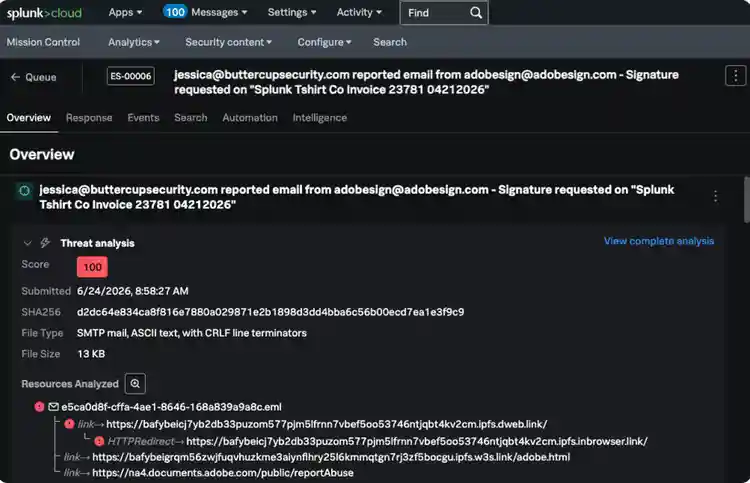
Figure 3: Automated Threat Analysis provides a risk score from 0 – 100 (the higher the score, the higher the risk) to help analysts prioritize the greatest threats. A high risk score indicates this email may be a legitimate threat for prioritization.
This doesn’t just make analysts faster; it helps the SOC use its time more effectively across the entire queue.
Available Now: Automated Threat Analysis in ES
Just as phishing continues to evolve, the way analysts approach phishing investigations must evolve as well. With Automated Threat Analysis, the analyst experience in ES becomes even more powerful, helping SOCs accelerate and scale their ability to respond to phishing threats.
Want to see it in action? Check out this interactive tour or reach out to schedule a custom demo.
Common Questions: Automated Threat Analysis in Splunk ES
Related Articles

Mockbin and the Art of Deception: Tracing Adversaries, Going Headless and Mocking APIs

Driving vSOC Detection with Machine Learning