Splunk Platform Use Cases, Written Just for You
Platform Jennifer SwallowIf you're a Splunk customer, chances are high that you use either Splunk Enterprise or Splunk Cloud Platform on a daily basis. With powerful dashboards, scalable indexes, and data streaming, these core products give you immense data analysis powers and actionable insights. And that's something everybody wants!
But you aren't everybody. You're uniquely you - a specific customer working in a specific industry with specific use cases. So when you need help with the Splunk platform, you want that help tailored to you. That's why the content on Splunk Lantern is segmented in a number of different ways, to get you to relevant content faster.
Recently, we've made a few changes to the site to help you get to the most valuable product tips and use cases even more easily.
First, for our customers who need guidance for industry-specific data analysis, we've created a new landing for key business segments. Accessible from a banner on the home page, this new page takes you to use cases written specifically for business outcomes in sectors like manufacturing, retail, healthcare, and energy.

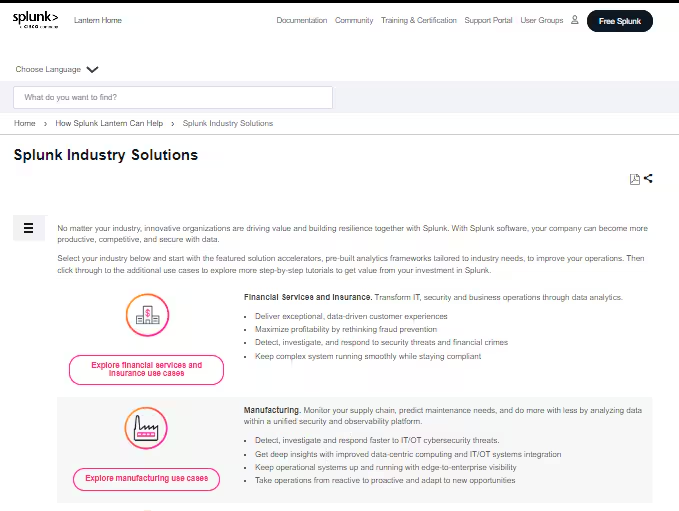
These are the classic, step-by-step use case tutorials that you've come to expect from Splunk Lantern, actionable guidance that you can follow and implement in your own deployment. But it gets better. Our group of expert contributors are adding more content types, including Getting Started Guides for key apps and Solution Accelerators that you can install on your Splunk platform instance to drive even more efficiency with advanced analytics. Some of the valuable industry-specific articles we've published in the last few months include:
- Solution Accelerator for Supply Chain Optimization
- Solution Accelerator for Operational Technology Security
- Monitoring money laundering activities with the Splunk platform
- Monitoring for account takeover with the Splunk App for Behavioral Analytics
- Getting Started Guide: Detecting and preventing fraud with the Splunk App for Fraud Analytics
Second, we know that many of you not only use the Splunk platform, but also have added on a number of premium security and observability offerings, like Splunk SOAR or Splunk IT Service Intelligence. To help you find great security and observability use cases for whatever Splunk software you might have, we've moved all Splunk platform use cases into the Security Use Case Explorer and Observability Use Case Explorer, rather than keeping them separated. So now as you browse those areas of Lantern, you'll be able to find more ways to take advantage of your investment in Splunk.
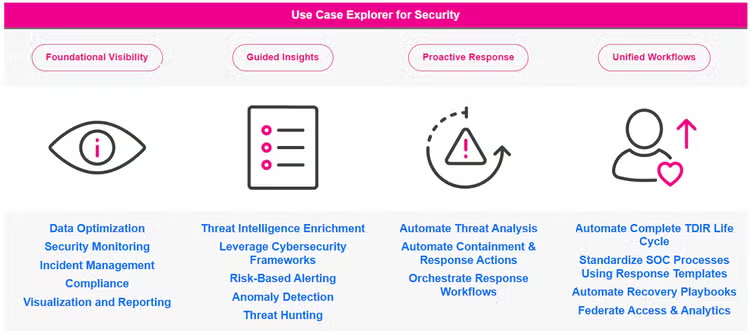
But finally, if you are one of our many happy customers who get all the productivity gains you need right from our flagship software, we've also streamlined the explorers made just for security and observability with the Splunk platform alone, so you don't have to wade through content that isn't applicable to you. Click through the paths to find:
- use cases sorted by commonly used outcomes
- deployment recommendations for training and staffing
- a maturity journey to help you assess where your company is now and where you'd like to go
- a page that highlights all the latest and greatest Splunk platform capabilities that you might not yet be aware of
We hope these additions and changes help you as you work toward continuous improvement in your business goals and your mastery of the Splunk platform. And remember, if you log into our site, you can leave feedback on the bottom of any article to let us know how we helped you or how we could help you better. We'd love to hear from you!

Related Articles

Fastest Time-to-Value Anomaly Detection in Splunk: The Splunk App for Anomaly Detection 1.1.0
Cyclical Statistical Forecasts and Anomalies – Part 5