REMA 1000’s Dashboarding Best Practices: Reducing Time to Resolution with Accessible Data and End-to-End Visibility
Platform Lizzy LiThis blog post was co-authored in partnership with André Nydegger Wermundsen and Emilie Ruud from the REMA 1000 team and with In Hye Lee from Splunk.
Key takeaways
- REMA 1000 uses Splunk to turn complex data from multiple systems into clear, real-time insights that help teams make faster, better decisions.
- Interactive dashboards make data easy to access for both technical and non-technical users, improving efficiency and reducing time to fix issues.
- By standardizing and simplifying dashboards, a small team can support the whole organization while keeping operations consistent and scalable.
REMA 1000, one of Norway’s top grocery chains, leverages Splunk to uphold its low-price promise in a competitive market. By transforming complex data into actionable insights, REMA empowers all team members to make informed decisions. This end-to-end visibility across systems significantly reduces time to resolution. The innovative use of Splunk Dashboard Studio reflects their commitment to operational efficiency and user-centric design. A key facet of their strategy is Splunk Dashboard Studio, which they have implemented in innovative ways to support their commitment to efficiency and user-centric design.
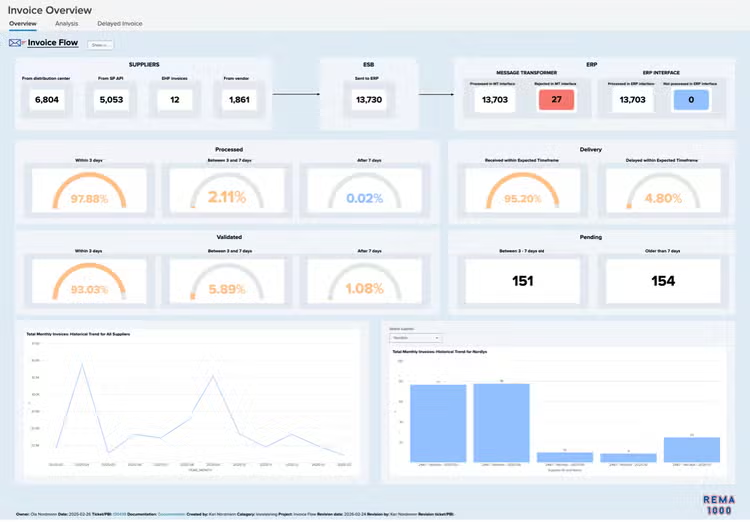
This Invoice Overview Dashboard is one of many dashboards that REMA uses to streamline their operations and democratize data access to all team members.
How REMA 1000 Leverages Key Dashboard Studio Features
REMA 1000 uses Splunk to connect to data from multiple vendors and systems, providing real-time insights. Their central FIKS (Norwegian for “fix”) dashboard provides an overview of critical services, such as payments, price distribution, ordering, and POS operations. The FIKS dashboard serves as a central hub, linking to service-specific dashboards that each provide granular data for the respective service. Learn more about the Dashboard Studio features that REMA uses in their dashboards to enhance their users’ productivity:
Interactive Tabs for Multi-Persona Dashboards
REMA 1000 streamlines operations by using a single dashboard to serve multiple user roles (IT director, developer, accounting, first-line support, etc.) by using tabs. Each dashboard has multiple tabs, each of which has information tailored to a specific role’s needs. Visualizations across tabs share base searches to ensure a single source of truth and minimize miscommunication between teams.
For example, on the invoice dashboard, the IT director can see the information they need on the overview tab, while an ERP team member can dive into delayed invoices for root cause analysis on another tab, and accounting can view cost analysis on a third tab. Separating data into tabs allows team members to focus on information relevant to their role without distraction.
Using these multi-tab dashboards, REMA 1000 reduced their total number of dashboards from 15 to 1 per use case, reducing maintenance time and effort.
Clickable Insights and Deep Drilldowns
REMA 1000’s commitment to operational efficiency extends to their own monitoring team, which is lean by design. Democratizing data access so that non-technical team members can navigate complex data flows and identify issues is essential to increasing operational efficiency.
REMA 1000 achieves this through interactive dashboards where users can click an element, such as a KPI or a region on a map, to instantly access details or logs without needing to write SPL queries. Users can access all the data they need in the Splunk dashboard without having to navigate multiple tools. This strategy empowers non-technical users by making data accessible to a broad business audience.
Dynamic Maps (Choropleths and Regular Maps)
In Norway’s highly competitive grocery industry, conditions can change quickly, requiring rapid action. REMA 1000 uses Dashboard Studio’s mapping capabilities to visualize KPIs across store locations, with markers and regions colored based on performance metrics. The colors provide an intuitive visual representation of store health and performance, empowering managers to quickly identify and act on underperforming stores.
Absolute Layout and Conditional Visibility
Presenting data in a clean, uncluttered view enables team members to focus on key information without distraction. For dashboards with flow visualizations such as the POS transaction flow, REMA 1000 uses absolute layout with hidden panels that only become visible when errors occur. Hiding panels when no errors are present reduces cognitive overload and allows users to focus on current tasks. Absolute layout provides a structured visual language that is easy for users to navigate. When errors occur and the hidden panels become visible, team members can easily use the hidden panels to help resolve the issue.
REMA 1000’s Dashboard Development Best Practices
At REMA 1000, a team of only 5 dashboard developers works to create and maintain dashboards for the rest of the company (nearly 300 end users), including searches and alerts. To support the entire company, the dashboarding team focuses on scalable patterns, reusable components, and efficient search design (considering search concurrency, job limits, and shared data sources). This approach allows them to deliver new dashboards quickly and continuously port older dashboards to new, improved templates.
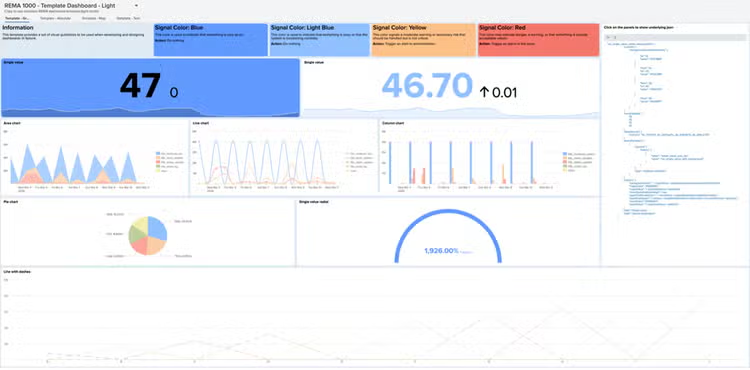
- Templates for Consistent Design: the REMA 1000 team created standard defaults and layout patterns, with templates for dark or light mode and for absolute or grid layout. This ensures that every dashboard follows a consistent structure and color scheme, regardless of who created the dashboard, making it easy for users to navigate.
The following shows the REMA 1000’s team’s template dashboard for light mode, with different tabs for grid mode, absolute mode, maps, and test content. When a new dashboard is needed, a team member can quickly set it up by cloning the template, deleting any components they don’t need, and modifying and adding components.
The team also has a template dashboard for dark mode, which also contains tabs for grid mode, absolute mode, and test content.
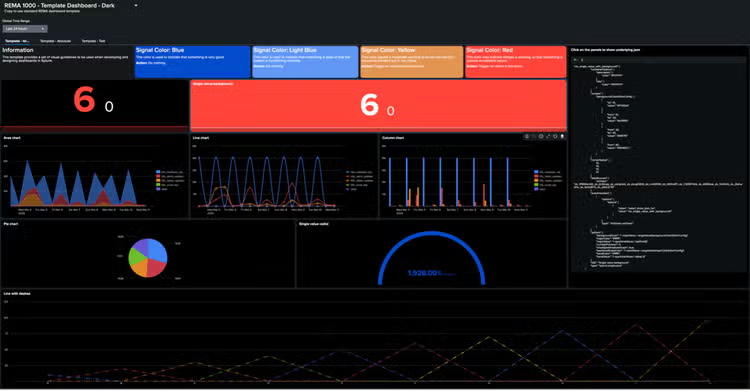
The following shows a snippet of the template dashboard definition, specifically the defaults stanza. The snippet shows how the team has configured detailed default settings for area charts, marker gauges, and single value visualizations. This ensures that when a dashboard builder creates a new visualization, these default settings are applied. While the snippet specifically shows the default settings for area charts, marker gauges, and single value visualizations as an example, the team has configured default settings for every visualization type. Leveraging the default settings ensures that each dashboard is consistent with REMA 1000’s design language while allowing the dashboard builder to focus on the dashboard content and functionality.
{
"title": "REMA 1000 - Template Dashboard - Dark Mode",
"description": "Copy to use standard REMA dashboard template",
"defaults": {
"visualizations": {
"splunk.area": {
"containerOptions": {
"description": {
"color": "#FFFFFF"
},
"title": {
"color": "#FFFFFF"
}
},
"cornerRadius": [
10,
10,
10,
10
],
"options": {
"seriesColors": [
"#4285F4",
"#C73B4A",
"#E28829",
"#6CBF2E",
"#6657D2",
"#D22F8D",
"#FFD84D"
],
"xAxisTitleVisibility": "hide"
}
},
"splunk.markergauge": {
"containerOptions": {
"description": {
"color": "#FFFFFF"
},
"title": {
"color": "#FFFFFF"
}
},
"context": {},
"cornerRadius": [
10,
10,
10,
10
],
"options": {
"gaugeRanges": [
{
"from": 90,
"to": 120,
"value": "#FF453A"
},
{
"from": 60,
"to": 90,
"value": "#e39451"
},
{
"from": 30,
"to": 60,
"value": "#4285F4"
},
{
"from": 0,
"to": 30,
"value": "#004BCC"
}
]
},
"showLastUpdated": false,
"showProgressBar": false
},
"splunk.singlevalue": {
"containerOptions": {
"description": {
"color": "#FFFFFF"
},
"title": {
"color": "#FFFFFF"
}
},
"context": {
"backgroundColorEditorConfig": [
{
"to": 10,
"value": "#FF453A"
},
{
"from": 10,
"to": 20,
"value": "#e39451"
},
{
"from": 20,
"to": 40,
"value": "#6197f5"
},
{
"from": 40,
"value": "#004BCC"
}
]
},
"cornerRadius": [
10,
10,
10,
10
],
"options": {
"backgroundColor": "> majorValue | rangeValue(backgroundColorEditorConfig)",
"majorColor": "#ffffff",
"majorValue": "> sparklineValues | lastPoint()",
"numberPrecision": 0,
"showSparklineAreaGraph": true,
"sparklineStrokeColor": "> trendValue | rangeValue(majorColorEditorConfig)",
"trendColor": "#ffffff",
"trendValue": "> sparklineValues | delta(-2)"
}
}
}
}
…
}
- Saved Base Search and Single Source of Truth: the REMA 1000 team designs saved searches to feed their dashboards and alerts. This ensures that all dashboards and alerts are based on the same data to keep teams on the same page, and makes dashboard and search design more efficient.
Outcome and Impact
REMA 1000's journey with Splunk Dashboard Studio showcases a powerful model for effective data visualization that enables end-to-end visibility across multiple systems and reduces mean time to resolution. By strategically leveraging features like interactive tabs, dynamic maps, and conditional visibility, combined with best practices like templates and data reuse, they empower their entire organization with actionable insights. Their approach demonstrates how even a small team can achieve significant impact, transforming complex data into a clear, consistent, and clickable experience for every user.
See how Splunk Dashboards can help turn your data into insights here.
The screenshots and data in this post are for illustrative purposes only.
Related Articles
AI Canvas Shines New Light on the SOC
Cyclical Statistical Forecasts and Anomalies - Part 2