Best Practices for Using Splunk Workload Management
Allocate Resources to Workload Categories Appropriately
There are three categories for workloads in Splunk — Ingest, Search and Misc. The processes that run in each category are assigned by default and cannot be changed. The core system processes and data ingestion workload run in the Ingest category. All searches run in the Search category. Scripted and modular inputs run in the Misc category.
We recommend the following resource allocation for each category. Given that Splunk core processes run in the Ingest category, set the memory limit to 100%. The resource allocation can be different for indexers and search heads if they have vastly different CPU and memory resources or if the ingestion rate is high.
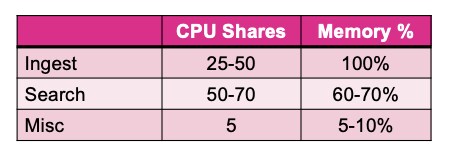
Misc category is optional to configure. You may want to use it if you have many modular or scripted inputs and want to isolate them from rest of the workloads. If you are using Splunk Cloud, each resource category is pre-allocated by default and cannot be altered.
Ensure High Priority Search Pool is Not Overused
The Search category can be further divided into various pools. If you are creating a workload pool for high priority searches, allocate 60-70% CPU resources. Memory can be shared across all search pools. Below is a typical resource allocation. You should be very selective in assigning searches to your high priority pool. We recommend adding no more than 10-20% of your total search volume assigned to your high priority pool, otherwise it will lose its ‘high priority’ nature.
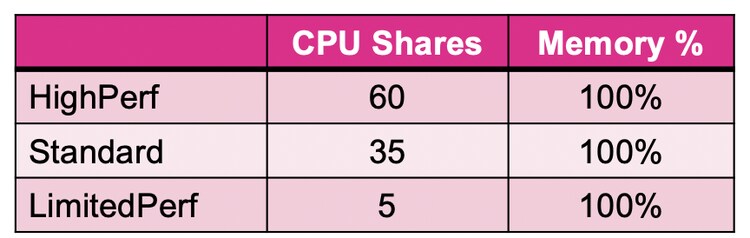
If you are using Splunk Cloud, three search pools are automatically configured for you to use and cannot be altered.
Think Through the Mixed Deployment Well
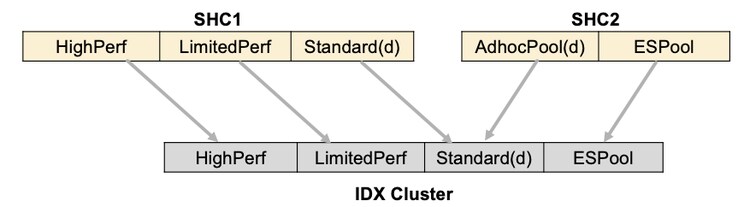
Each search head or search head cluster enforces the workload management feature independently. This means that workload pools and rules are handled independently on different search head clusters. But you need to plan well if multiple search head clusters are using the same indexer cluster.
On a search head, a search is started in the workload pool specified by the workload rules. The search looks for the same pool name on indexers as specified on the search head. If that pool does not exist on the indexers, it runs in a default search pool on indexers. The example below shows the mapping of searches placed in different workload pools on search heads to the workload pools on indexers. The default search pools are denoted by suffix (d). Because the AdhocPool does not exist on IDX cluster, any search placed in that pool on SHC2 will run in the Standard pool (default) on IDX.
Onboard One Use Case at a Time
As a best practice to get started with workload management, begin with a single use case. Generally, the first use case will lie in either of the two buckets:
- High priority search execution — searches from certain users or groups need to be placed in a high priority pool.
- Low priority search isolation — certain types of searches need to be isolated in a limited resource pool.
Program simple workload rules to achieve your first use case and then check if your expectations are met before implementing other use cases. Keep the workload rules simple to help with troubleshooting later.
Follow the best practices listed above to correctly configure workload management and extract value from your data with this feature quickly.
For getting a formal training on workload management, please join this course.
Related Articles

Cyclical Statistical Forecasts and Anomalies - Part 3

Splunking F1: Part Two