Introducing Metric Explorer: Find the Metrics That Matter, Faster
Observability Courtney GannonKey takeaways
- Metric Explorer lets teams search by entity, like a service or host, instead of guessing metric names, making it easier to find relevant data.
- The tool shows metric details like descriptions, units, and data sources, helping teams understand what each metric actually measures before using it.
- Teams can preview metrics over time and move directly from discovery into building a chart or detector, speeding up the monitoring setup process.
In large environments, teams often collect the same kind of signal under different names across services, hosts, and integrations. The people building dashboards and detectors may not know which metrics are available—or whether those metrics cover the systems they’re responsible for. That can turn metric discovery into a slow, trial-and-error process.
Metric Explorer is designed to make that work easier. It brings entity-aware discovery and metric exploration into one workflow, so teams can start with the system or service they care about, understand the data associated with it, and move from discovery to a chart or detector with more confidence.
Start With the Entity You Need To Monitor
With the legacy Metric Finder, discovery often begins with a metric name. Metric Explorer adds another starting point: the entity.
Filter entities using metadata that makes sense for your environment, such as team, workload, business unit, or entity type. Then explore the metrics associated with those entities. This helps answer practical questions: What data is available for this service? Which metrics can help measure this KPI? Are we collecting the signal across all the hosts we need to monitor?
The relationship view helps connect the dots between an entity and the telemetry around it. For example, a service may run on a container, while some custom application metrics carry the host’s identifying attributes rather than the service’s. From the service, you can explore its related host and the metrics associated with that host, helping you find useful signals that would be easy to miss if you searched only by service name.
When you select multiple entities, Metric Explorer is designed to show how broadly each metric is represented across them. That makes it easier to spot common metrics, differences in naming, and potential coverage gaps before you build a detector.
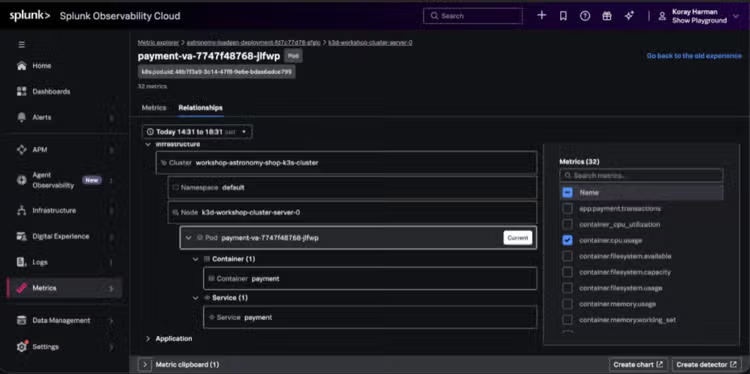
See More Than a Metric Name
A metric’s name alone may not tell you what it measures or where it came from. Metric Explorer brings relevant context into the discovery workflow, including descriptions, units, dimensions and their value counts, and collection sources or receivers.
You can also explore dimension values and use them to refine your search. As filters change, the available results and filtering options can narrow to match the scope you’ve set. A time range helps you inspect data that may have stopped arriving or came from an entity that is no longer active.
Turn Discovery Into Business Impact
When teams can identify the right metrics and confirm which entities they cover, they can spend less time searching, validating names, and rebuilding charts or detectors through trial and error. That can help monitoring teams onboard new services more efficiently and help development teams get the visibility they need to move toward production.
The relationship view adds context that can help teams understand where a signal originates and which related systems it can represent. Combined with entity coverage details, this can help teams uncover gaps earlier—before an incident exposes them. Teams can see when a signal is missing from some systems in scope, or when equivalent signals use different names, and address those issues as they build their monitoring. This supports earlier issue detection, shorter time to resolution, and a better customer experience.
Metric Explorer also helps teams respond to new business questions. When priorities shift and teams need to measure new KPIs, they can explore what data is already available across the services they own, identify where coverage is incomplete, and make informed decisions about what needs to be instrumented next.
Go From Discovery To Monitoring
As you select metrics, Metric Explorer previews them over time. You can review signals together, keep the filters that matter, and use your selections to start creating a chart or detector.
That connection between discovery and creation is important: the goal is not just to find a metric, but to have greater confidence that it represents the right data and covers the entities you intend to monitor.
Moving from Metric Finder to Metric Explorer
Metric Explorer is the next step for metric discovery in Splunk Observability Cloud. As the new experience rolls out, we will deprecate the legacy Metric Finder.
Metric Explorer is built to help teams spend less time guessing at names and navigating disconnected tools—and more time building the visibility their services and business priorities need.
Aren’t a Splunk Observability Cloud customer already? Get your Free Edition of Observability Cloud now. No timed trial. No credit card required. No gated features. Explore all the features of Observability Cloud including Agent Observability and tokenomics.
Related Articles

Nation-State Espionage Targeting COVID-19 Vaccine Development Firms - The Actions Security Teams Need To Take Now!

Use Cloud Infrastructure Data Model to Detect Container Implantation (MITRE T1525)