What is Virtualization?
Virtualization is the use of virtual hardware platforms as a replacement for physical ones. Virtual servers, desktops, storage devices and other computing resources are created using virtualization software. This software creates a virtual machine (VM), which behaves identically to a physical machine running software on its own underlying hardware. For the user, a major goal of virtualization is that it is indistinguishable from working on a physical computer. For the IT manager, the goals of virtualization are many, including simplified management, better scalability and lower operational costs.
Virtualization provides flexibility that physical hardware is unable to offer. A single computer running virtualization hardware can emulate multiple virtual machines simultaneously, each completely independent from the other. For example, a Windows server can run a dozen VMs at once — some Windows and some various distributions of open source platforms like Linux. Users interacting with one VM are oblivious to those on the other VMs. One of the key advantages of this strategy is that it allows the enterprise to host multiple types of disparate workloads on a single server instead of twelve different devices.
While virtualization is useful in a simple on-premises environment like this one, virtualization technology has become inextricably linked to the cloud, where virtual machines can be deployed on a massive scale and managed centrally. Most modern web and app platforms work on large-scale virtual environments, sometimes with thousands of VMs running at once. Operating a virtual environment at this scale requires significant attention to VM management and ample experience at working with the chosen cloud platform.
In this article, we’ll explore virtualization technology in more detail, including the various types of virtualization, key virtualization tools and platforms on the market and best practices for getting started.
How Virtualization Works
We can think of virtualization as a type of simulator. Special virtualization software is designed to create a virtual computer known as a virtual machine that mimics the operation of a real computer — operating system, applications and all. The software that creates the virtual machine is known as a hypervisor. A hypervisor can run multiple virtual machines on a single host, each with a different virtual operating system and different applications.
Because a single hypervisor is likely to run multiple VMs, performance can often be considerably slower, making management software critical. As such, virtualization is often used for applications where performance is not critical. But since virtualization offers myriad benefits in relation to costs, flexibility and security, its assets often far outweigh the drawbacks.
The Different Types of Virtualization
There are several types of virtualization in use, including (but not limited to):
- Server virtualization: When the topic of virtualization is discussed, server virtualization is generally what is intended unless otherwise specified. Virtual servers are synonymous with the use of virtual machines, representing an instance of a server operating system running virtually. Server virtualization is common in cloud services, where hosting providers rent virtual servers to customers, many of which can share the same physical server space independently.
- Desktop virtualization: Virtual desktop operating systems can also be virtualized the same way that servers can. They give users remote access to desktop services via a simpler device that lacks the power available to a full desktop PC.
- Storage virtualization: Physical storage devices can be segmented or combined to create a virtualized storage and disaster recovery space that can be more easily managed and secured via storage virtualization.
- Network virtualization: In this type of virtualization technology, a virtual network’s resources are segmented into smaller channels that can be assigned to resources and users as needed. This gives administrators more control over resource allocation on the network.
- Application virtualization: Application virtualization allows software to run on an operating system for which it was not initially intended. Known as a guest operating system, this type of software can be used by a user to, for example, run a Linux app on a Windows computer and use it by simply switching between windows.
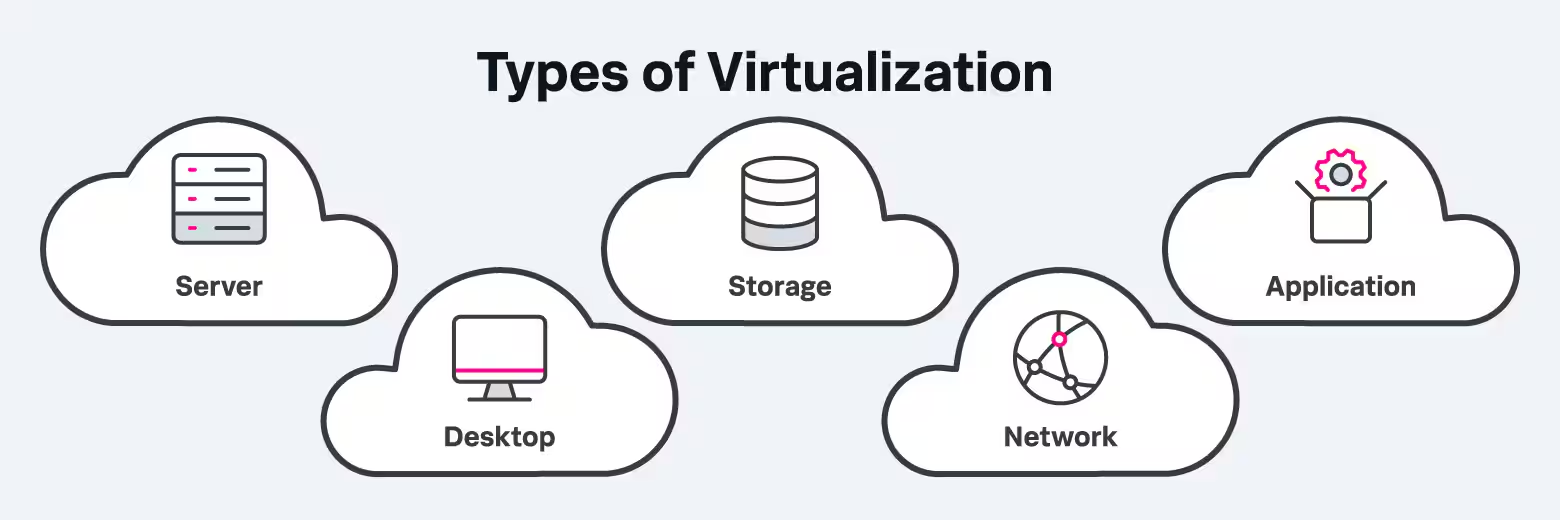
Types of virtualization include server, desktop, storage, network and application virtualization.
Virtualization in Cloud Computing
Cloud computing simply would not exist without virtualization. The two technologies are inextricably connected, and cloud computing — including hybrid cloud — relies completely on virtualization technology to function. Cloud computing providers implement virtualization in the form of a variety of “as a service” offerings. At a consumer level, millions of users interact with virtual servers directly via tools such as web-based email or online file storage systems. At the enterprise level, cloud computing also relies heavily on virtual servers. Virtual web servers power websites and virtual application servers run mobile apps, e-commerce systems and other enterprise workloads.
These cloud-based services are vital for businesses because they give them the flexibility to automate processors and meet changing demand. Virtual servers can be “spun up” on a moment’s notice and quickly shut down when that demand fades. This allows businesses to keep availability high — and customers happy — without having to keep a phalanx of physical servers and other physical resources running, which is expensive and difficult to manage.
The Benefits of Virtualization
Virtualization technology offers myriad benefits, including:
- Cost savings: Virtual servers are far less expensive to operate than physical servers and other hardware resources. In a cloud environment, operating a virtual server can be done on a pay-as-you-go basis, while operating computer hardware or physical servers require a significant outlay of upfront capital and ongoing maintenance expenses for electricity, cooling and personnel. Learn more about CapEx & OpEx for IT & Cloud.
- Better flexibility: If you need to to run a Linux app in your all-Windows shop, a virtualization app can give you quick access to an alternative operating environment without purchasing a second machine.
- Improved uptime: While virtual servers do fail, they can be recreated almost instantaneously, with no extra costs attached, resulting in less downtime. Most cloud service providers that sell access to virtual servers guarantee uptime levels that no on-premises data center can match.
- Ease of migration: Moving to different operating systems or from one physical server to another is a daunting task. In the virtual space, resources can be transferred from one user to another or migrated to another environment with just a few keystrokes — even between completely different operating environments.
- Secure sandbox operations: Virtualization lets an organization create a secure sandbox in which experimental code can be tested safely; if things go awry, the server can be instantly killed without worry of damaging the rest of the network.
Common Challenges of Virtualization
For those new to the technology, virtualization can come with its share of challenges, including:
- Greater complexity: Managing virtualization software isn’t as immediately intuitive as managing on-premises software and requires a substantial learning curve. When virtual machines proliferate into hundreds or thousands of instances, complexity can become quite intense — and costly.
- Performance issues: The performance of virtual servers is lower than that of software running on local hardware, due to the added layers of abstraction required to make virtualization possible. In certain computing environments, where real-time, high-performance is required, virtualization may not be appropriate, or may simply require additional resources.
- Monitoring difficulties: How fast your virtual server is running isn’t as easy to determine as with a physical server. Additional monitoring software is usually required to generate significant insights into performance.
- Lack of backups: A virtual device takes everything when it fails. There’s no hard drive or other storage device that carries the last known good state of the system, so careful attention needs to be paid to managing backups and other failover tools.
- Lack of local control: IT managers can fine-tune operations via local control of physical devices. A virtual environment abstracts that control away, which can be problematic for some managers.
- Security concerns: While cloud services are generally thought to be as or more secure than on-premises environments, it’s up to the organization to ensure that service providers are operating with the highest levels of security, including virtual firewalls and other security solutions, and that patches and updates are installed regularly. The more complex the virtual environment, the more daunting this process becomes. Mistakes can easily be made along the way.
Getting Started With Virtualization
Follow these steps to get started implementing virtualization.
- Begin by experimenting: By setting up local virtual machines at the desktop level to emulate another operating system within your primary environment, you can learn the ins and outs of virtual machines, the basics of resource allocation and how to move in and out of various virtual environments. Many virtualization technologies are freely available when used on a small scale like this.
- Grow your virtual environment: You can take a retired server or some other unused computing device and repurpose it as a more full-featured virtualization platform to experiment running multiple VMs on a single server. You’ll learn how to configure and manage a more complex environment, spin up new VMs and kill them and assign storage resources to various virtual machines.
- Implement a VM management tool: A VM management tool keeps all your VMs in line. This software helps coordinate the VM environment, giving administrators a dashboard that centrally monitors virtualization operations. This software makes it easier to keep track of various VM activities — and is essential when resources are limited, as when working with an on-premises server.
- Begin working with virtualization on the cloud: While you may comfortably be able to manage a dozen VMs on a single physical server, in the cloud you can quickly scale up to 1000 servers or more. You don’t need to get there in day one, but cloud platforms offer a different collection of tools that let you set up instances of VMs — and sometimes many different tools, each with various features. Start with the lowest cost, most general of these tools (Amazon, for example, recommends its t2.micro and Amazon Linux 2 AMI tools) to get your bearings.
- Tweak your configuration: Set up storage volumes for your VMs and work to understand necessary security settings. Virtual machines are still machines and any data accessible by the VM will need to be protected just as if it were an on-premises server. Learn how to terminate VMs — and delete their data — as needed.
- Begin working with remote VM access: Letting users connect to and process data using virtual machines is the ultimate goal of virtualization technology. Understand how to make secure connections to your VMs, manage workloads and share access with end users. Most importantly, understand how various settings and decisions made by users and administrators impact the price you pay for your service. Again, starting slow and small and building up to more robust processing environments is key to avoiding a shock in your billing statement.
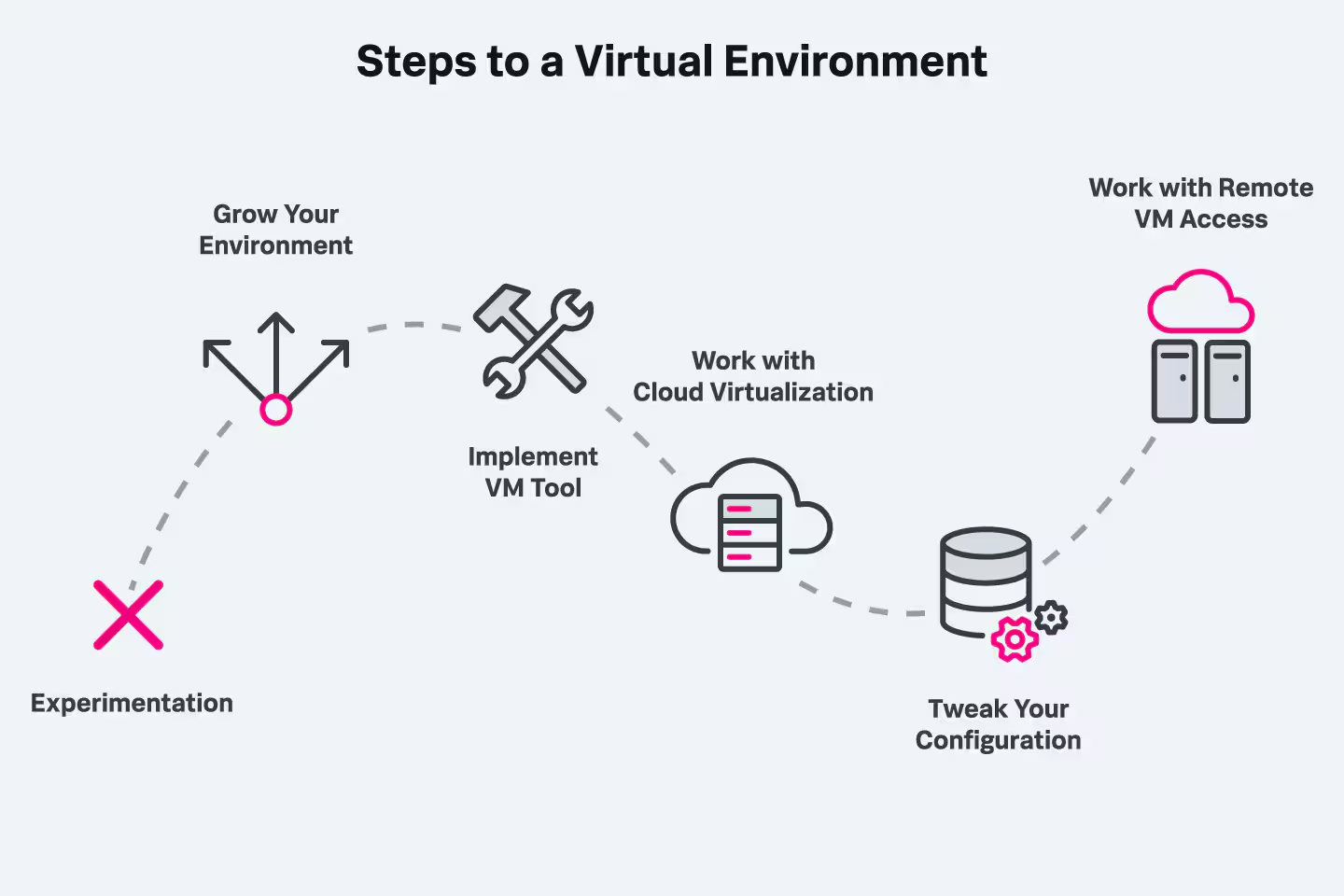
Getting started with virtualization requires a willingness to experiment as well as implementing a management tool to help you grow your environment.
Virtualization Platforms and Technologies
In addition to software-based solutions, every major cloud service provider offers a virtualization platform. Here are some of the major players in the market.
- VMware: A pioneer in the virtualization market, the company’s name is synonymous with virtualization. VMware offers multiple different virtualization solutions for different types of needs; many cloud services offer VMware solutions as a service, directly through their platforms.
- Microsoft: The company’s Hyper-V software is designed to run as a native hypervisor on the Windows platform. It’s one of the most talked-about virtualization platforms to emerge in recent years and stands as a powerful companion to the Azure service.
- Amazon: The Elastic Compute Cloud service is a core platform for launching VMs on a massive scale.
- IBM: The company’s data virtualization offerings includes Watson Query, which allows you to use a single distributed query engine across multiple data sources including clouds, databases, data lakes, warehouses and streaming data.
- Google: The Google Compute Engine is another popular option for managing large numbers of virtual machines.
- Red Hat: Red Hat markets a widely used, low-cost virtualization tool for the Linux market.
- Oracle: Oracle’s multitude of VM server tools are known for excellent support of numerous operating systems, Kubernetes and other containers.
- Citrix: Citrix is a major player in desktop virtualization services.
- Apple: Apple’s Boot Camp and Parallels systems let Mac users run Windows as a VM on Apple hardware.
Virtualization Best Practices
While virtualization offers immense amounts of value to the enterprise, it can be complex to implement and manage. Here are some best practices for getting the most out of the technology.
- Benchmark VM performance regularly: As configurations change, so can performance. Analytics should be collected and scrutinized regularly, systems should be stress-tested and experiments should be run to ensure that users are receiving the performance they require — and which you’re paying for. Examine SLAs carefully to understand your recourse if performance doesn’t meet expectations.
- Prepare for the long term: Cloud environments provide much more flexibility than on-premises environments ever have, but it’s still important to ensure your service of choice has the capacity and performance capabilities that your business will need down the line. Ensure you understand the limitations of any cloud service provider, and whether they will be able to meet your long-term needs.
- Avoid VM sprawl: VM sprawl occurs when you create so many virtual machines that you can no longer keep tabs on all of them. It can become too easy to fire up another virtual server or a dozen, leading to — sometimes massive — overprovisioning with resources that aren’t needed or aren’t being used. Terminate VMs when they are no longer needed, and track your virtual environment as carefully as your on-premises environment.
- Avoid over-provisioning VMs: It’s similarly easy to outfit virtual machines with more resources than they actually need, which can become costly, while providing no real performance benefit. Keep VMs configured with the most limited level of resources required while ensuring appropriate availability levels.
- Beware of security problems with VMs: Virtual machines must be configured with security software and settings the same way that physical machines are. If security is ignored, hackers will quickly find your VMs to be a handy way into at least part of your network — and one that may not trip standard intrusion detection software.
- VMs need backing up, too: Don’t want to recreate everything from scratch every time you fire up a virtual machine? Back up your VM configurations and settings regularly to avoid rework down the line.
The Future of Virtualization
With some 92 percent of businesses already using server virtualization, the technology isn’t going anywhere — in fact, adoption only continues to rise. One analyst pegs the market growth rate at 11.5% over the next 5 years, reaching $120 billion by 2026, and all forms of virtualization technology are seeing increased adoption. In the next few years, we’re likely to see application and network virtualization significantly take off in popularity.
Meanwhile, as the virtual market continues to grow, many vendors will offer a path to transition to containers, as evidenced by the rapid expansion and adoption of Kubernetes over the last five years. Currently, numerous vendors have growth strategies for enabling customers to take advantage of the scale and agility of containers along with VMs.
Virtualization technology will continue to become easier to use and more powerful as cloud services increasingly roll out low-code and no-code solutions that make it simpler for less technical users to create and manage virtual machines. Looking ahead, virtualization technology —– especially server virtualization —– appears to be headed toward commodity status as the differences among service providers continue to blur.
The Bottom Line: Virtualization has become a core enterprise technology
It’s difficult to imagine an operating modern enterprise that doesn’t rely on virtualization technology to some degree. By removing the need for specific hardware, virtualization has created a more even playing field that gives organizations of all sizes access to computing resources when and where they are needed — all at a much lower cost than operating a traditional data server environment.
Related Articles

What is Enterprise Architecture? Definition, Layers, and Business Benefits

Infrastructure Operations Today: Modern Trends for I&O

CI/CD & DevOps Pipelines: An Introduction

Cybersecurity Awareness Month 2026: The Complete Guide

The Ultimate Kubernetes Cheat Sheet: Essential kubectl Commands for 2026

Using AI in Security Operations: A Practical Checklist for the Modern SOC

A Guide to Bots: Good vs. Bad Bots, Common Types, and Online Safety in 2026

Splunk Community: The Beginner's Guide