CI/CD & DevOps Pipelines: An Introduction
Key Takeaways
- CI/CD pipelines automate building, testing, and delivery, helping teams release software faster and more reliably.
- DevOps pipelines foster collaboration, monitoring, and shared ownership, reducing risk and streamlining deployments.
- Choosing the right tools and addressing common challenges are essential for a scalable, efficient CI/CD and DevOps pipeline.
Many software teams still rely on manual testing and deployments, which makes every product release a risk.
Why? Because without automated checks, bugs can go unnoticed. And fixing those bugs often takes longer because rollbacks are not streamlined. The result: teams often end up scheduling releases during off-hours to avoid disruption — leading to frustration for both developers and operations.
To overcome this, use a continuous integration/continuous delivery (CI/CD) pipeline, as it automates the process of building, testing, and delivering software. When paired with a DevOps pipeline, it promotes collaboration between development and operations teams, so updates reach the production stage quickly and reliably.
In this guide, we’ll explore how CI/CD and DevOps pipelines work and share practical strategies to build one that scales with your team.
Understanding a DevOps pipeline
A DevOps pipeline is the system that connects how code is developed, tested, deployed, and maintained, with collaboration at its core. It includes automation for repetitive tasks like building, testing, and deploying code. But the cultural element is just as important as automation.
Traditional release processes used to rely on handoffs: developers finish coding, testers validate, and operations deploy. And if something fails during the whole process, blame and fixes bounce between teams.
But in a DevOps pipeline, these silos are removed. Teams share dashboards to communicate openly during incidents and take joint responsibility for both the success and failure of releases. This open collaboration is what enables high-frequency, low-risk deployments.
What is a CI/CD pipeline?
A CI/CD pipeline is a set of automated steps that moves code from development to production. It combines two practices:
- Continuous integration (CI).
- Continuous delivery (CD).
But a CI/CD pipeline is a technical part of a broader DevOps pipeline. While CI/CD handles code delivery, DevOps includes how teams work together to manage systems and respond to issues.
Continuous integration
Continuous integration (CI) is the practice of merging code changes into a shared repository multiple times per day. Each time a developer commits code, an automated system builds the application and runs tests.
Here, our goal is to detect integration issues early. Without CI, bugs often surface only after several changes are combined during a big release, making them harder to trace and fix. CI reduces that risk by testing each small change in isolation.
Primarily CI pipelines include:
- Automated unit tests.
- Static code analysis.
- Build verification.
These steps confirm that the new code doesn’t disrupt existing functionality. If a test fails, the pipeline blocks the merge and notifies the team immediately.
By catching errors early, CI maintains the stability of the main codebase. It also reduces the time developers spend on rework because they’re fixing issues while the changes are still fresh in their minds.
Continuous delivery
Continuous delivery (CD) focuses on automating what happens after code passes CI. It prepares every change for release so it can be deployed to production at any time.
In a CD pipeline, once the build is verified, it automatically moves through staging and pre-production environments. Automated integration tests and performance checks ensure the application works as expected in production-like conditions.
Unlike CI, CD doesn’t always deploy code to production automatically. Instead, it keeps the codebase “deployment-ready” so teams can release whenever they choose.
For teams practicing continuous deployment (a step further than CD), the pipeline pushes changes live automatically after passing all tests.
This helps organizations release more frequently and with lower risk. And because of this, releases become easier to roll back and far less disruptive compared to big, infrequent launches.
How DevOps and CI/CD pipelines work together
A DevOps pipeline is the broader system that surrounds a CI/CD pipeline, combining that automation with the collaboration, monitoring, and infrastructure practices that keep releases reliable.
Teams that rely only on CI/CD often automate builds and deployments but still face bottlenecks due to siloed teams or manual incident response.
Conversely, teams with DevOps practices but no CI/CD automation move slowly because releases remain manual.
To prevent both issues, you should combine CI/CD with DevOps to create a feedback-driven system. In this model, every stage of the pipeline — from code commit to deployment to production monitoring — feeds information back to the team.
Here’s how:
- Automated tests report failures immediately.
- Monitoring tools alert developers when performance dips after a release.
- User reports and production logs feed into the backlog so future iterations can address real issues faster.
(Related reading: incident management.)
How to build a scalable CI/CD and DevOps pipeline
A well-designed pipeline should do more than just automate builds and deployments. It should also make it easier for teams to collaborate, detect problems quickly, and improve with every release.
Let’s break down a five-step approach to building a scalable pipeline as your team grows.
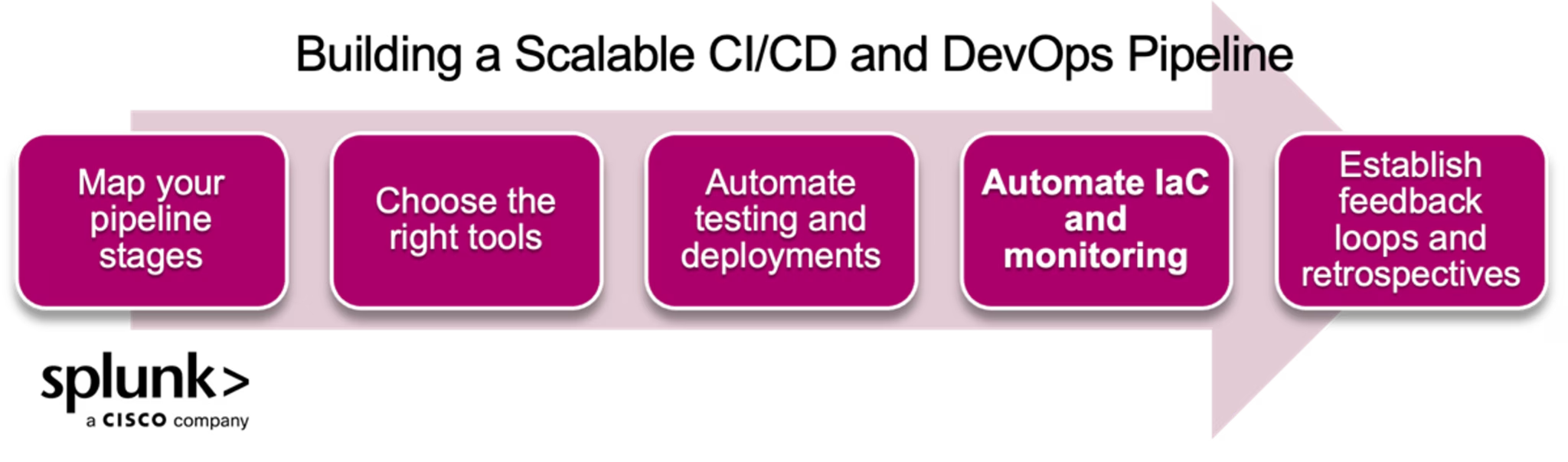
Step 1: Map your pipeline stages
Outline how code will move from development to production. Break it into clear stages, such as:
- Code commit: Developers push code to a shared repository.
- Build: The pipeline compiles the code and packages it for deployment.
- Test: Automated unit, integration, and performance tests run.
- Deploy: Code is released to staging and production environments.
- Monitor and review: Analyze performance metrics and logs after each deployment.
Involve development, QA, and operations teams when defining these stages. Decide who is responsible for monitoring, testing, and responding to incidents at each point. By mapping these roles upfront, you’ll reduce handoff issues and align DevOps practices with your CI/CD flow.
Step 2: Choose the right tools
Select tools that support each stage of your pipeline and integrate well with one another. For example:
- Version control and CI/CD: GitHub Actions, GitLab CI/CD, Jenkins, or CircleCI for automating builds and tests.
- Infrastructure automation: Terraform, Ansible, or Pulumi for managing environments with infrastructure-as-code (IaC).
- Monitoring and logging: Splunk for tracking system health and troubleshooting issues. Open-source options are available for smaller, less complex environments.
- Collaboration and visibility: Tools like Slack or Microsoft Teams for alerts and dashboards that keep all teams informed.
(Related reading: infrastructure monitoring.)
Step 3: Automate testing and deployments
Automation is what turns a release process into a CI/CD pipeline. Begin by adding automated unit and integration tests that run every time code is committed. Gradually expand to performance and security testing so problems are caught early.
For deployments, use blue-green or canary strategies to release new versions safely. These approaches allow you to shift traffic gradually and roll back quickly if something goes wrong. Automating both tests and deployments not only reduces release time but also frees teams from repetitive manual tasks.
Step 4: Implement infrastructure-as-code and monitoring
Manual server configuration and ad-hoc monitoring can’t keep up with fast-moving pipelines. Instead, use infrastructure-as-code tools like Terraform or Ansible to define your environments as code so they can be recreated or scaled automatically.
Combine this with continuous monitoring by setting up dashboards to track application performance, error rates, and resource usage in real time. With the right alerts in place, teams can respond quickly when disruptions occur — often before users notice.
Step 5: Establish feedback loops and retrospectives
A scalable pipeline is built by learning and improving over time. That’s why set up feedback loops at every stage:
- Test results feed directly to developers, so issues are fixed before merging code.
- Monitoring data informs the backlog, so performance bottlenecks or recurring errors are addressed in future releases.
- Teams hold retrospectives after incidents or major releases to identify what worked and what didn’t.
These feedback loops create a system where each release makes the next one better — ensuring the pipeline becomes more reliable and easier to maintain over time.
Popular CI/CD tools and platforms
There are many tools that can automate your CI/CD pipeline. Below is a quick overview of the most widely used options and how to choose one that fits your team:
Jenkins is a widely used open-source CI/CD tool known for its flexibility. It automates builds, tests, and deployments using hundreds of plugins, making it a strong choice for teams needing custom workflows.
GitLab CI/CD is built directly into GitLab and runs tests and deploys code automatically with every push. Its tight integration makes it ideal for teams already using GitLab for code hosting.
CircleCI is a cloud-based tool designed for speed and easy integration with GitHub and Bitbucket. Its fast builds and simple setup make it popular, especially for teams getting started.
Azure Pipelines, part of Microsoft Azure DevOps, supports multiple programming languages and platforms. It’s an excellent fit for teams working with Microsoft tools or cross-platform apps.
Travis CI is a cloud-based service favored for open-source projects. It runs automated tests and deployments on every code change with minimal configuration.
Bitbucket Pipelines allows you to build and deploy code straight from your Bitbucket repository, eliminating the need for extra setup or services.
TeamCity by JetBrains supports multi-platform builds and enables pipeline configurations as code, making it easier to track changes and maintain consistency.
Bamboo, developed by Atlassian, integrates closely with Jira and Bitbucket, making it a natural fit for teams using Atlassian’s suite.
How to choose the right tool
When selecting a CI/CD tool, consider the following:
- Match your workflow: If your team already uses GitHub, GitLab, or Bitbucket, choose a tool that integrates smoothly with those platforms.
- Check compatibility: Confirm that the tool supports your programming languages, frameworks, and operating systems.
- Balance speed and flexibility: Some tools are quick to configure and work well for simple pipelines. Others require more setup but offer greater customization.
- Evaluate costs: Look at pricing tiers for team size and usage. Make sure the tool can scale as your needs grow.
- Test before committing: Run a pilot project to ensure the tool fits your team’s needs before rolling it out fully.
Common CI/CD challenges and their solution
Even with automation, CI/CD pipelines can slow teams down if they’re not managed carefully. In fact, elite teams release updates almost a thousand times (973) more frequently than low-performing teams. And this difference often comes down to how well a pipeline is designed and maintained.
So, let’s look at five common challenges that you or your team may face with CI/CD and how to fix them.
Slow build and test times
When a pipeline takes 30 minutes or more to build and test, developers avoid pushing changes frequently.
The result? Larger code batches between releases.
However, these major releases carry a higher risk because failures are more difficult to trace, and rollbacks impact a larger number of users. This may stem from unoptimized test suites and builds.
To overcome this, you should:
- Profile the pipeline to find bottlenecks.
- Split tests into parallel jobs so they run simultaneously.
- Cache dependencies and container images to prevent unnecessary rebuilds.
- Review tests regularly and remove those that no longer provide value.
Flaky tests that block deployments
Flaky tests (ones that fail intermittently without any code changes) erode confidence in the pipeline. Developers start rerunning builds or manually verifying changes, which defeats the purpose of automation and may allow real bugs to slip into production.
At Google, internal research has found that approximately 1.5% of all test runs in its CI pipeline are flaky, and nearly 16% of over 4 million individual tests fail for reasons unrelated to code or test changes.
To avoid these:
- Tag and isolate flaky tests so they don’t block critical releases.
- Run them separately and track their failure rate.
- Stabilize testing by running tests in containerized, reproducible environments.
- Address timing issues by replacing hardcoded waits with proper synchronization.
Poor visibility into pipeline failures
When a pipeline fails but logs don’t specify where or why, debugging takes hours. You may rerun jobs repeatedly just to identify the failing stage. But this would slow down releases and increase costs.
This problem usually comes from generic logging or a lack of stage-level reporting. To overcome this, you should:
- Adopt a pipeline tool or plugins that provide stage-by-stage reporting.
- Use alerts to indicate whether the failure occurred during build, test, or deploy.
- Centralize logs so developers can quickly pinpoint root causes.
Security risks in automated deployments
CI/CD pipelines can unintentionally introduce vulnerabilities if security isn’t embedded into every stage.
How? Hardcoded credentials or unverified code can make it into production without anyone noticing, and this would scale as pipelines grow.
To prevent this, you should:
- Use static code analysis and dependency scanning tools (like Snyk or SonarQube) early in the build.
- Replace hardcoded credentials with secrets management systems like Vault or AWS Secrets Manager.
- Set up approval gates for sensitive environments so high-risk deployments require review even in automated workflows.
Lack of collaboration between teams
CI/CD pipelines depend on people. If developers, QA, and operations work in silos, issues compound.
For example, developers may push code that passes unit tests but fails integration because infrastructure changes weren’t communicated. Operations may delay deployments because they weren’t included in pipeline planning.
To avoid these issues, you should:
- Set up shared dashboards so everyone can see build, test, and deployment status in real time.
- Schedule retrospectives to review issues collaboratively.
- Adopt DevOps principles so developers and operations teams share ownership throughout the release process.
Where to go from here
If your team still relies on manual releases or disconnected workflows, start by making small changes. Automate a single part of your process, like running tests on every code push. Then expand into full CI/CD automation and layer on DevOps practices like shared dashboards, incident response, and infrastructure-as-code.
This incremental, feedback-driven approach is how top-performing teams — identified in the DORA State of DevOps Report—achieve rapid, reliable deployments with far fewer failures.
FAQs about CI/CD and DevOps Pipelines
Related Articles

How to Use LLMs for Log File Analysis: Examples, Workflows, and Best Practices

Beyond Deepfakes: Why Digital Provenance is Critical Now

The Best IT/Tech Conferences & Events of 2026

The Best Artificial Intelligence Conferences & Events of 2026

The Best Blockchain & Crypto Conferences in 2026

Log Analytics: How To Turn Log Data into Actionable Insights

The Best Security Conferences & Events 2026

Top Ransomware Attack Types in 2026 and How to Defend