What Are Preconnect Resource Hints?
In this article, let’s take a look at preconnect resource hints — what they are, why and how to use them, and best practices for auditing and scaling them.
What is a preconnect?
A preconnect is a resource hint that tells the browser to make a proactive HTTP connection to a domain the browser has not yet determined needs to be made. Creating an HTTP connection takes many steps, including:
- Making a DNS lookup.
- Connecting a TCP.
- Negotiating a secure TLS connection.
This can take tens or even hundreds of milliseconds. Preconnecting improves performance because when the browser does realize it needs to make a connection to download a resource, that connection has already happened!
Examples and real-life case studies
Let’s see an example. The screenshot below shows a request for a CSS file from Google:

This resource is discovered later in the waterfall and an existing HTTP connection does not exist. The browser knows it needs to download this CSS file, but first it must complete a DNS lookup, then create a TCP connection, and finally negotiate an encrypted TLS connection. These add roughly 100 ms of delay that occurs before the CSS file can be requested. We can optimize this by adding a preconnect resource hint in the <head> of the HTML file, as shown below:
<link rel="preconnect" href="https://fonts.googleapis.com/">
We can see the results in the waterfall screenshot below. The preconnect hint instructs the browser to proactively connect to the Google Fonts domain. When the browser later discovers the CSS file that it needs to request, a connection has already been established. This allowed the CSS file to download immediately, shifting the overall waterfall to the left:

That was great for an example, but what are some real-world examples of the benefits of preconnect?
- An online store improved their key paint metrics by 500ms to over 1 second by preconnecting to the domain with the product images catalog.
- Aaron Peters has an example where preconnects improved initial rendering performance by roughly 10% for CDN Planet.
At Splunk, we have firsthand experience. In early 2020, we worked with a major media customer which had a substantial amount of JavaScript for a variety of third-party domains. By analyzing their site and implementing resource hints such, as preconnect and preload, we improved Time-to-Interactive by 37%, from a median of 12.8 seconds down to 7.9 seconds.

Resource hints in general — and preconnects in particular — are something that all websites should consider.
How to use preconnect to improve performance
Given the impressive gains described above, I know what you must be thinking:
If preconnect resource hints improve overall performance and user experience, why don’t I preconnect to all the domains used by my website?
Unfortunately, this can hurt performance. Why? It’s simple: browsers use a lot of complex logic to decide what needs to be downloaded and when, so the page can render and be responsive for the visitor as quickly as possible. (If you want all the nerdy details, Pat Meenan has exhaustively documented and presented on it.)
A site using resource hints is essentially asking to override what operations the browser would normally perform. This can be the source of different performance issues if used carelessly.
Excessive preconnect hints
Browsers place limits on the number of HTTP connections they will maintain. Using an excessive number of preconnect resource hints will limit the browser from making connections it needs. In effect, too many preconnects can hurt performance.
A good rule of thumb is to have no more than 6-8 preconnect resource hints.
Preconnecting to an unused domain
The only thing worse than making too many preconnects, is to ask the browser to preconnect to a domain that isn’t even used! However this can be surprisingly common. Sites change where their content comes from, or they stop using a third-party provider without removing a preconnect resource hint for that domain. Preconnects to unused domains cause performance issues in two ways:
- Unused Preconnects hurt the browser since they can impede connections to other domains.
- Even if unused, open TCP and encrypted TLS connections use server resources. Akamai research found that up to 6% of encrypted HTTP connections don’t actually make any requests.
Prematurely closed preconnect
Because browsers limit the number of HTTP connects they will maintain, browsers will close an HTTP connection if no requests happen within 10 seconds. A Premature Preconnect happens when a preconnect hint tells the browser to open an HTTP connection to a domain, but no requests are sent to that domain for 10 seconds. The browser then closes this connection, only to have to make it again when it needs to request a resource from that domain. This is bad for two reasons:
- Premature Preconnects hurt the browser since it can impede connections to other domains.
- The browser has to open another connection to the domain once a request to that domain is actually encountered. So there is no net gain benefit of doing a preconnect at all!
Safari’s rel resource hint issue
Many sites have adopted the pattern of specifying both a preconnect hint as well as a dns-prefetch hint inside the same <link> tag, as shown below. (See our guide to DNS prefetches resource hints for a detailed discussion.)
<link rel="preconnect dns-prefetch" href="https://example.com/">
This practice started because browsers varied in which types of resource hints they supported. As of 2020, more browsers support preconnect than support DNS prefetch and all major browsers that support DNS prefetch also support preconnect.
There really is little benefit of specifying two different resource hints inside the same <link> tag, and in reality, there is a big negative in doing this. Safari only allows one resource hint to be specified in the rel attribute of a <link> tag. Specifying two hints inside the same rel attribute causes Safari to skip the <link> tag entirely and it will not attempt either resource hint.
In effect, specifying multiple resource hints disables the hint for Safari! Instead, you should just use <link rel="preconnect"> hints.
When to use preconnect hints
In general, preconnect hints should be made to:
- Domains that are discovered later in the waterfall
- Domains with resources that are critical to the rendering or interaction of the page
- Domains with a lot of requests, or which download a large amount of content
Good examples of these include:
- Other domains with CSS and JS bundles that are needed in the critical rendering path
- Web fonts are referenced by the CSS and will need to be downloaded
- First party domains for API endpoints that are used for the initial loading or rendering of the page
Once you have determined which domains should be preconnected, you still need to test it! Just because something should improve your site’s performance or experience, doesn’t mean it will. Make sure to always test to verify:
- Baseline your performance with synthetic tools.
- Implement your change.
- Compare the “before” and “after” performance metrics.
Best practices for preconnect resource hints
We have seen there are many benefits from using preconnect resource hints, but also many pitfalls that hurt performance if used incorrectly. This means it is important to audit how a page is using resource hints to ensure you are following all the best practices.
- First, identify all the preconnect resource hints that are currently in use for a page. You will want to look for <link rel="preconnect"> tags in the base HTML page, as well as Link: HTTP headers which can also contain resource hints. Also remember that Link headers containing resource hints can appear on other responses beyond just the base HTML page!
- Using the guidance above, determine which domains should a preconnect. Are they on the list of hints the page is already using? If not, why not?
- Are you using more than 6-8 preconnects? If so, that is too many and you should consider removing them.
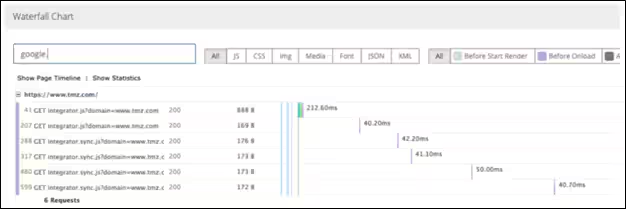
- Next, for every preconnected domain, verify that a request is sent to it, and that the request happens within 10 seconds to avoid a prematurely closed connection. Most waterfall charts will allow you to filter by the domain or parts of the URL, as shown below. This makes it much easier to see if, and when, requests occur to a domain.
- Finally, look at each resource hint and ensure there are not multiple hints in the <link rel=""> tag.
Automate with Splunk
This can all be overwhelming, we know! If you are looking for a more automated solution or want to do this validation at scale, you have options. Splunk Synthetic Monitoring automatically audits pages for different issues that can occur when using resource hints.
Related Articles

Human in the Loop (HITL) in Practice: A Guide to Core HITL Concepts, Benefits, and Effective AI Collaboration

What is Automated Incident Response? Benefits, Processes, and Challenges Explained

Infrastructure Security Explained: Threats and Protection Strategies

What Is Splunk? The Complete Overview of What Splunk Does

Advanced Persistent Threats (APTs): What They Are and How to Defend Against Them

Deep Packet Inspection (DPI) Explained: OSI Layers, Real-World Applications & Ethical Considerations

The Guide to Network Forensics: Importance, Tools, and Use Cases

Data Centers Explained: Types, Features, and Choosing the Right Model